
Models plan; code executes. Every agent therefore needs a loop: the model proposes an action, something runs it, the result goes back into context, and the cycle repeats until the job is finished. The design fork is simple on paper and messy in production: does that loop live in your service, hopping back and forth over HTTP, or inside the inference provider’s runtime, hidden behind a single API call?
Local loops are the default. You see every hop in your logs, set your own timeouts, and debug with breakpoints. Managed loops shrink your codebase but move tool execution out of sight. Pick wrong and you get agents that feel fine in dev, then stall in prod with cold-start latency, silent empty searches, or replies that never mention a failed tool call.
This article walks through both patterns in plain chat terms: what the user sees, what your app does, where inference runs, and where the goal gate decides the loop is done.
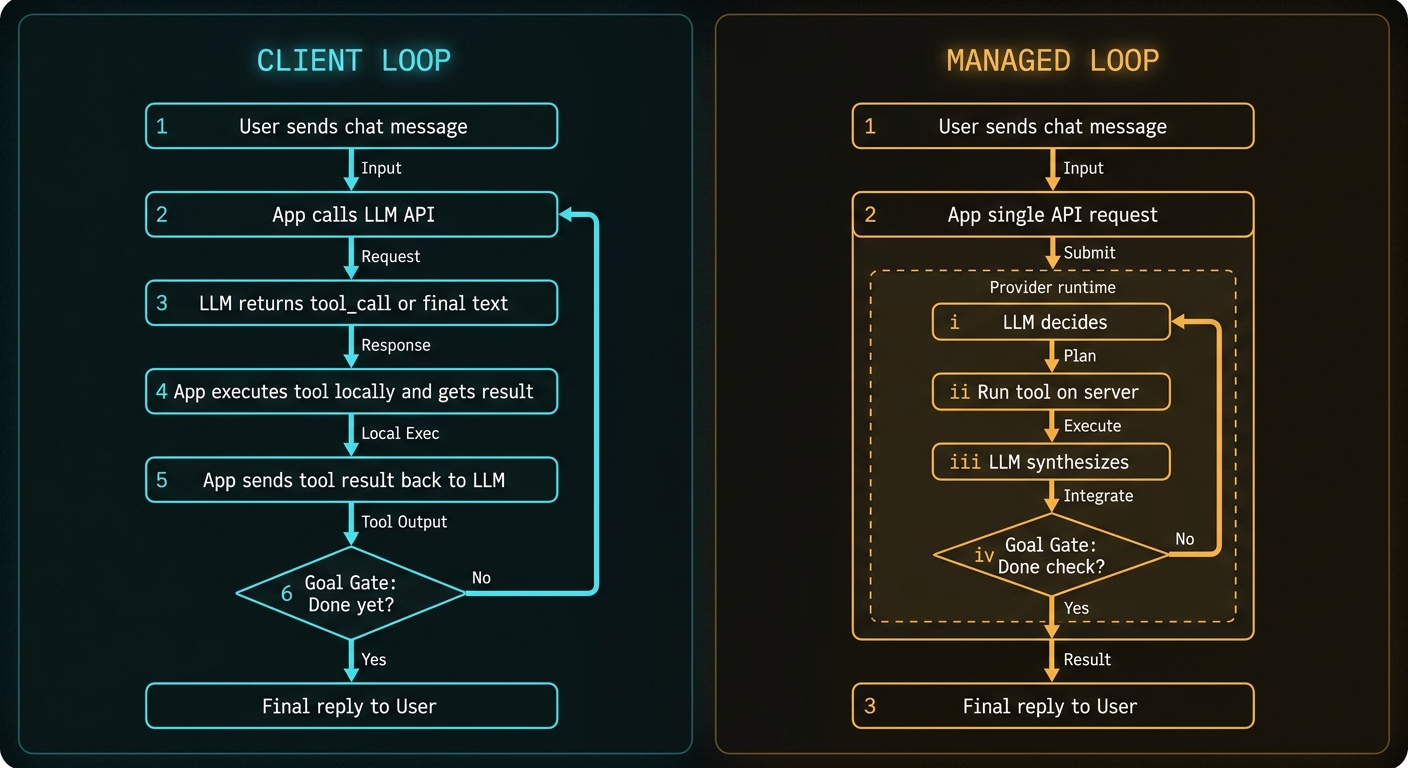
The Goal Gate: How Any Loop Actually Ends
Every agent loop needs a termination rule. In code this is usually:
- The model returns normal text and no
tool_calls→ treat as final answer. - You hit
max_steps→ stop and apologise or escalate. - A custom judge (cheap classifier, rules, or second LLM call) decides the user’s question is satisfied → stop even if the model wants another tool.
Think of this as the goal gate in the diagram: after each tool result, something must answer “are we done yet?” If no, back to inference. If yes, send the final reply to the user.
Local and managed loops differ in who runs that gate (your while loop vs the provider’s runtime), not in whether it exists.
Local Loop: A Chat Session Your App Orchestrates
Below is what a support agent looks like in chat mode when you own the loop. The user sees a normal conversation. Behind the scenes your service may call the LLM two or three times before the user gets one visible assistant message.
Example: “What’s the status of order 8842?”
What the user types:
User: What's the status of order 8842?
Hop 1 — your app → LLM (no tool result yet):
// messages sent to API:
[
  { "role": "system", "content": "You help with orders. Use lookup_order when needed." },
  { "role": "user", "content": "What's the status of order 8842?" }
]

// LLM response:
{
  "content": null,
  "tool_calls": [{
    "name": "lookup_order",
    "arguments": { "order_id": "8842" }
  }]
}
Hop 2 — your app runs the tool locally:
// Your code, not the LLM:
const result = await db.query(
  "SELECT status FROM orders WHERE id = $1", ["8842"]
);
// result: { status: "shipped", carrier: "DHL", eta: "2026-06-26" }
Hop 3 — your app → LLM again with tool output:
// messages now include:
{ "role": "tool", "tool_call_id": "...", "content": "{\"status\":\"shipped\",...}" }

// LLM response:
{
  "content": "Order 8842 shipped via DHL and should arrive on 26 June.",
  "tool_calls": []
}
Goal gate: no tool calls, non-empty content → loop exits. Your app sends one assistant message to the chat UI.
What the user finally sees:
Assistant: Order 8842 shipped via DHL and should arrive on 26 June.
One user turn, two LLM round-trips, one database query. Your metrics should capture all three latencies separately.
Example: Multi-tool research (three hops before reply)
User: Compare our refund policy with what competitor X published last month.

Assistant: [after internal loop]
  We allow 30-day refunds on unused licences. Competitor X moved to
  14 days for monthly plans in May 2026 (source: their pricing page).
Chat transcript the user sees: two messages. Internal loop the user does not see:
- LLM →
fetch_url(competitor pricing page)→ your scraper returns markdown. - LLM →
search_knowledge_base("refund policy")→ your vector DB returns an chunk. - LLM → final prose, no tools → goal gate passes.
Each hop adds wall-clock time. In local mode you log them as llm_ms, tool_fetch_url_ms, tool_search_kb_ms, llm_ms.
The local loop in code
async function runAgent(messages, tools, maxSteps = 8) {
  for (let step = 0; step < maxSteps; step++) {
    const res = await llm.chat({ messages, tools });

    // Goal gate: final answer
    if (!res.tool_calls?.length) {
      return res.content;
    }

    // Execute each tool locally
    for (const call of res.tool_calls) {
      const out = await executeLocally(call);
      messages.push(toolResult(call.id, out));
    }
  }
  throw new Error("Max steps reached — goal gate never opened");
}
Managed Loop: One User Message, Hidden Inner Turns
Same user question, but tool execution runs inside the provider's runtime. The chat UI still shows one user bubble and one assistant bubble. The difference is what happens between your app's single POST and the response.
Example: "What's the status of order 8842?" (managed)
What the user types:
User: What's the status of order 8842?
Your app sends one request:
const res = await llm.chat({
  messages: [
    { role: "system", content: "You help with orders." },
    { role: "user", content: "What's the status of order 8842?" }
  ],
  tools: [{
    type: "mcp",
    server_url: "https://tools.example.com/mcp",
    allowed_tools: ["lookup_order"]
  }]
});
Inside the provider runtime (you do not see this unless tracing is on):
// Provider internal trace (conceptual):
[1] LLM decides → tool_call lookup_order(8842)
[2] Provider connects to your MCP server → runs tool → gets JSON
[3] LLM synthesises → "Order 8842 shipped via DHL..."
[4] Goal gate: no further tools → return to client
What the user sees (same as local, but slower TTFT):
Assistant: Order 8842 shipped via DHL and should arrive on 26 June.
Same chat surface. Different ownership: MCP server must be warm and reachable from the provider's network; empty tool results need system-prompt guardrails because your code never intercepts them.
Example: Web search agent (managed, serial tools)
User: Summarise Kubernetes networking changes in the last six months.

// Single API call with:
tools: [{ type: "web_search", max_uses: 4 }]

// User sees one assistant message after ~3–8 seconds.
// Trace might show: search → search → fetch → synthesise.
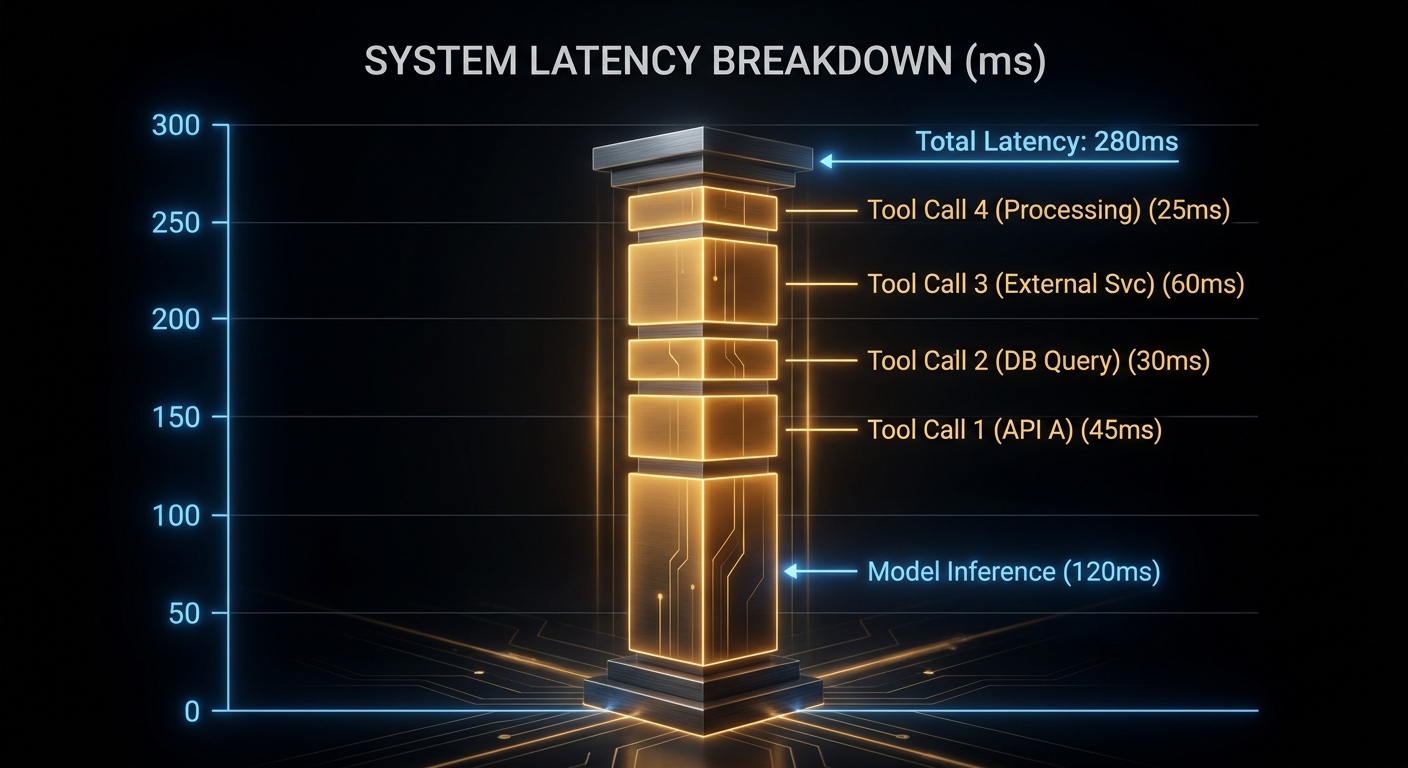
In chat mode this feels like a slow but normal reply. Without tracing you cannot tell whether latency was inference, search #2, or a cold MCP connector.
Side-by-Side: Same Chat, Different Plumbing
| Question | Local loop | Managed loop |
|---|---|---|
| Who calls the LLM? | Your app, each hop | Provider, inside one request |
| Who runs tools? | Your process / your MCP client | Provider runtime / remote MCP |
| Who implements the goal gate? | Your while loop + max_steps |
Provider runtime limits |
| What the user sees in chat | One assistant reply (usually) | One assistant reply (usually) |
| Best debugging surface | Your logs + breakpoints | Provider trace API |
Capability Buckets (Vendor Names Differ)
- Managed search/fetch — model-triggered web retrieval.
- Private corpus lookup — RAG in the same request.
- Remote MCP — your HTTPS tool server; provider connects and runs allowlisted tools.
- Deferred tool schemas — load tool definitions on demand when you have dozens of tools (past ~25, input token savings matter).
"MCP (Model Context Protocol) is an open-source standard for connecting AI applications to external systems." — Model Context Protocol, Introduction
Latency: Count Every Hidden Hop
Case 1: Local tools can be nearly free
- In-process validation: sub-millisecond
- Local MCP over stdio: ~1 ms when warm
- Remote HTTP APIs: 50–300+ ms
- Cold MCP boot: seconds
Case 2: Managed loops hide serial stack time
// Voice/chat budget — measure, do not guess:
const budgetMs = 800;
const modelMs = 350;      // per inner LLM call
const innerCalls = 2;     // typical for one tool
const toolMs = 280;       // per tool
if (modelMs * innerCalls + toolMs > budgetMs) {
  // keep local, parallelise, or reduce max_uses
}
Case 3: Silent partial failures in chat
Local: search throws → your code shows "I couldn't reach the catalogue." Managed: model may answer confidently from partial context. System prompt guardrail:
"If any tool returns no useful data, say so in the reply.
 Do not invent facts. Ask the user to rephrase."
Failures You Still Own in Managed Mode
Write idempotency. Reads retry cleanly. Writes need dedupe keys.
Network path. Managed MCP must be reachable from provider egress (usually public HTTPS).
Alert granularity. Split provider outage vs your MCP cold vs model quality issues.
When to Stay Local
- Development: you need payload logs and breakpoints.
- Sub-second chat or voice UX.
- Tools on private networks or needing local session state.
- Custom goal gates (compliance judge, human-in-the-loop approval).
When Managed Makes Sense
- Standard search/retrieval without running your own search stack.
- Many agents sharing one MCP surface.
- Credentials should not live in app repos.
- You accept tracing APIs in exchange for less loop code.
Practical Migration
- Build local first; log tool name, args size, latency, result size per hop.
- Tag read vs write, local vs remote, latency-sensitive vs batch.
- Move read-heavy tolerant tools managed; keep writes local until idempotent.
- Enable provider tracing before cutover; compare inner-hop counts to local logs.
What to Check Right Now
- Draw your loop on paper with numbered hops and the goal gate. If you cannot, your production agent is opaque.
- Split metrics: model ms vs tool ms per user-visible reply.
- MCP cold-start from a fresh process.
- Write tools: idempotency keys present?
- Tool count: past 25, evaluate deferred schema loading.
Swarms to Keep an Eye On
This article stops at the single-agent loop: local versus managed, one context window, serial or traced tool hops. That is the right default for most production chat agents. When tasks decompose into parallel research lanes, orchestrator-worker topologies, or peer handoffs between specialists, you are in multi-agent territory with different costs and failure modes.
For the full evolution map (single-shot LLM → ReAct loop → agent stack → orchestrator swarm), topology comparisons, and a 2026 watchlist including Claude Research, OpenAI Agents SDK, LangGraph, and CrewAI, read the companion piece:
From Chat Completion to Agent Swarms: How Loop Architecture Evolved
Managed execution shrinks code; it does not shrink accountability. The chat looks the same either way. What changes is whether you can see the loops between the user's question and the assistant's answer.
nJoy 😉