
Enable grub menu:
edit the /etc/default/grub file and change the
GRUB_HIDDEN_TIMEOUT=0
GRUB_HIDDEN_TIMEOUT_QUIET=true
to
GRUB_HIDDEN_TIMEOUT=10
GRUB_HIDDEN_TIMEOUT_QUIET=false
Save and call:
sudo update-grub
from a terminal, and reboot.
Enable grub menu:
edit the /etc/default/grub file and change the
GRUB_HIDDEN_TIMEOUT=0
GRUB_HIDDEN_TIMEOUT_QUIET=true
to
GRUB_HIDDEN_TIMEOUT=10
GRUB_HIDDEN_TIMEOUT_QUIET=false
Save and call:
sudo update-grub
from a terminal, and reboot.
On Debian based systems like Ubuntu:
# dpkg --list | grep linux-image
Type the following command:

# uname -r

# uname -mrs
With rpm based OSes
# rpm -qa kernel
This will list the available kernels.
Type the following command:
# uname -r

# uname -mrs
If an instance gets stuck in an intermediate state (e.g., “deleting”), you can manually reset the state of an instance using the nova reset-state command. This will reset it to an error state, which you can then delete. For example:
$ nova reset-state c6bbbf26-b40a-47e7-8d5c-eb17bf65c485
$ nova delete c6bbbf26-b40a-47e7-8d5c-eb17bf65c485
You can also use the --active to force the instance back into an active state instead of an error state, for example:
$ nova reset-state –active c6bbbf26-b40a-47e7-8d5c-eb17bf65c485
![[Note]](https://docs.openstack.org/trunk/openstack-object-storage/admin/common/images/admon/note.png) |
Note |
|---|---|
The version of the nova client that ships with Essex on most distributions does not support the reset-statecommand. You can download a more recent version of the nova client from PyPI. The package name ispython-novaclient, which can be installed using a Python package tool such as pip. |
LTS is an abbreviation for “Long Term Support”.
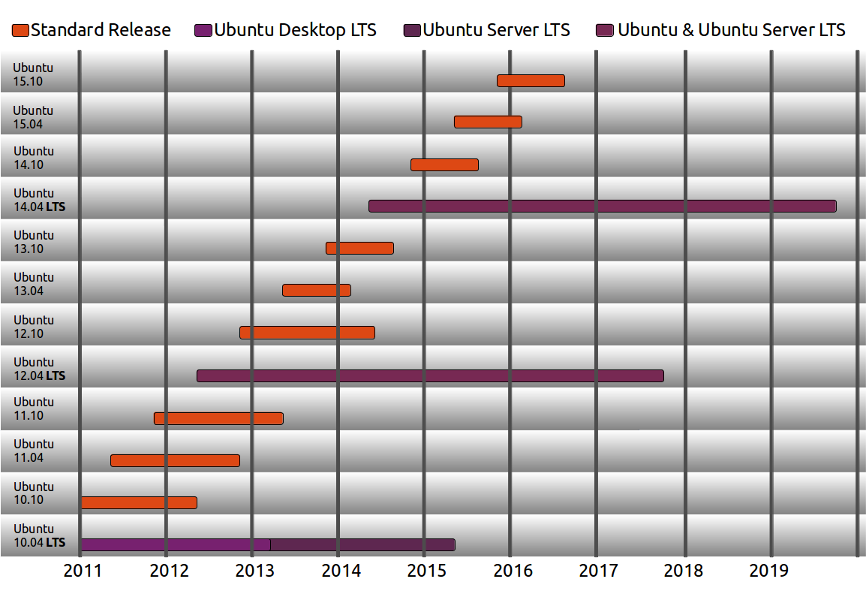
We produce a new Ubuntu Desktop and Ubuntu Server release every six months [diagram below]. That means you’ll always have the latest and greatest applications that the open source world has to offer. Ubuntu is designed with security in mind. You get free security updates for at least 18 months on the desktop and server.
A new LTS version is released every 2 years. In previous releases, a Long Term Support (LTS) version had 3 years support on Ubuntu (Desktop) and 5 years on Ubuntu Server. Starting with Ubuntu 12.04 LTS, both versions will receive 5 years support. There is no extra fee for the LTS version; we make our very best work available to everyone on the same free terms. Upgrades to new versions of Ubuntu are and always will be free of charge.
The LTS designation applies only to specific subsets of the Ubuntu archive. The LTS may not apply to all flavors and remixes of Ubuntu. For example, for 8.04 LTS, Kubuntu chose to move to KDE 4.0 and didn’t issue an LTS release. In 10.04, the Netbook Edition was not an LTS. The project will decide which flavors will be LTS and the support duration for each, early in the LTS development cycle.
Some of the latest support windows are illustrated below:
Furthermore, we define the LTS to be:
and clearly state that it is not:
To support our goal of ensuring stability, we plan to make a small number of changes to the release schedule:
Quoted from here.
The magic spell is :
$sudo apt-get update; sudo apt-get upgrade
kickstart postinstall, you can read how to do this on the internet.
wget http://foo/tools.tar.gz
tar xzvf *.tar.gz
cd directory-where-you-untarred
vmware-tools-install.pl -d
BINGO !
Giggidi Giggidi
Installing SNMP daemon and tools:
As root
yum -y install net-snmp.i686
yum -y install net-snmp-utils
Once these are installed start the snmp daemon:
/etc/init.d/snmpd start
chkconfig snmpd on
This is just the basic install but testing it :
snmpwalk -v 1 -c public -O e 127.0.0.1
For production servers it is advisable to at least change the community name.
All configs are in
/etc/snmp/snmpd.conf
and traps are setup here:
/etc/snmp/snmptrapd.conf
No traps are set by default.
Enjoy !!
It is sometimes useful not only to know your repo list covers you for all the stack of software you want but also where does a package actually reside.
The repoquery command comes to the rescue.
EPEL stands for Extra Packages for Enterprise Linux. This is a massive collection of packages that are very useful for the building of many modern stacks and include many tools for the running and maintenance of systems.
The homepage of EPEL is here: http://fedoraproject.org/wiki/EPEL.
You can browse the package set using repoview:
Installing on Centos 5.x & 6.x:
For EL5:
su -c 'rpm -Uvh http://mirror.switch.ch/ftp/mirror/epel/5/i386/epel-release-5-4.noarch.rpm'
...
su -c 'yum install puppet'
For EL6:
su -c 'rpm -Uvh http://download.fedoraproject.org/pub/epel/6/i386/epel-release-6-8.noarch.rpm'
...
su -c 'yum install puppet'
For EL7
sudo yum install epel-release