Under the Hood: JSON-RPC 2.0, Lifecycle, and Capability Negotiation in MCP

Protocols are not magic. Under every elegant abstraction is a set of bytes moving between processes, governed by rules that someone wrote down. MCP is no different. The moment you understand exactly what happens on the wire when a client connects to an MCP server – the handshake, the capability negotiation, the request-response cycle, the message format – the whole protocol becomes transparent. And transparent systems are debuggable systems.

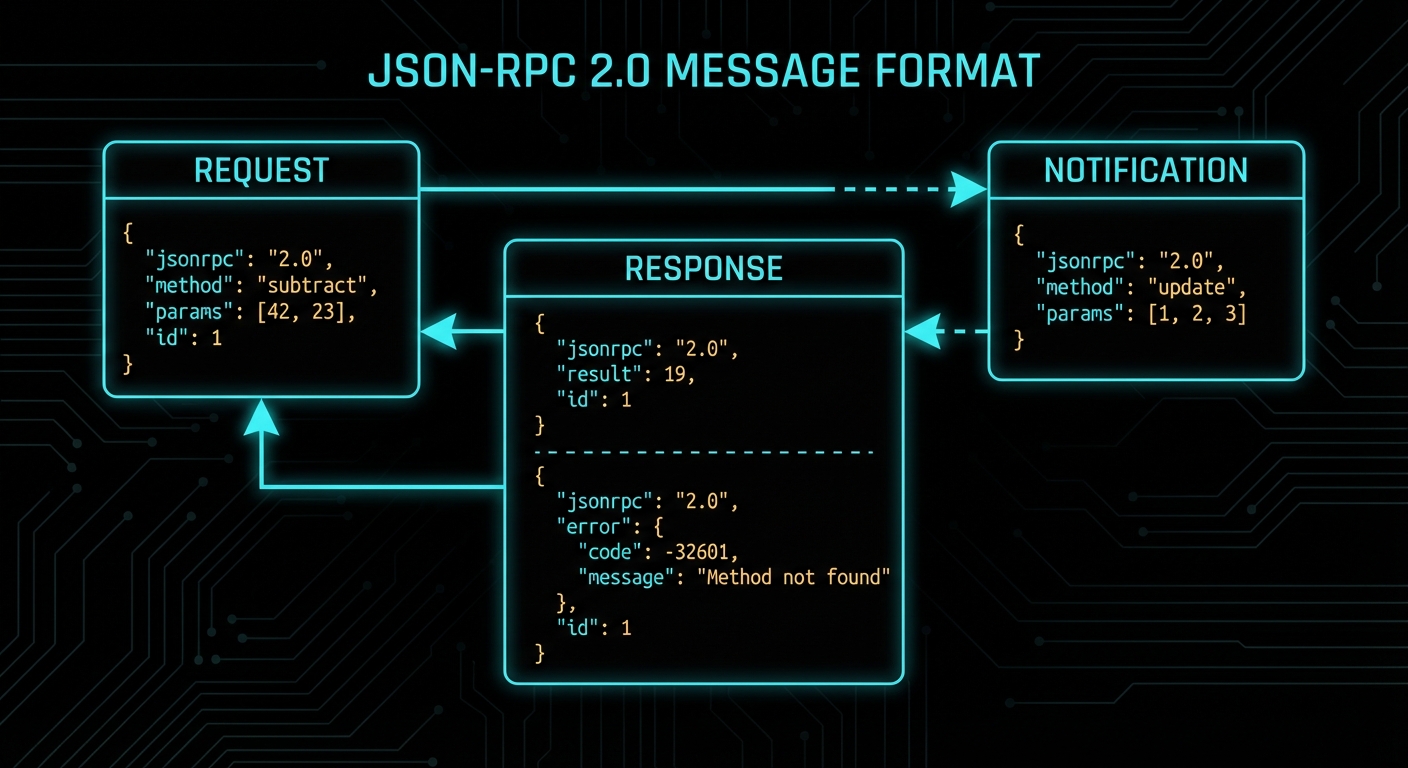
JSON-RPC 2.0 message flow diagram showing initialize request response and tool calls on dark background
The MCP wire protocol: JSON-RPC 2.0 messages flowing through a stateful connection lifecycle.

JSON-RPC 2.0: The Wire Format

MCP uses JSON-RPC 2.0 as its message format. JSON-RPC is a simple remote procedure call protocol encoded as JSON. Every MCP message is one of four types: a Request, a Response, an Error Response, or a Notification (a one-way message with no response expected).

A JSON-RPC request looks like this:

{
  "jsonrpc": "2.0",
  "id": 1,
  "method": "tools/call",
  "params": {
    "name": "greet",
    "arguments": { "name": "Alice" }
  }
}

A successful response:

{
  "jsonrpc": "2.0",
  "id": 1,
  "result": {
    "content": [
      { "type": "text", "text": "Hello, Alice! Welcome to MCP." }
    ]
  }
}

An error response:

{
  "jsonrpc": "2.0",
  "id": 1,
  "error": {
    "code": -32602,
    "message": "Invalid params",
    "data": { "detail": "Missing required argument: name" }
  }
}

A notification (no id, no response expected):

{
  "jsonrpc": "2.0",
  "method": "notifications/tools/list_changed"
}

The id field is how you match responses to requests in an async system. If you send ten requests and get ten responses back in any order, the id tells you which response belongs to which request. Notifications don’t have IDs because they are fire-and-forget.

“The base protocol uses JSON-RPC 2.0 messages exchanged over a transport layer. Server and client capabilities are negotiated during an initialization phase.” – MCP Specification, Base Protocol

The Connection Lifecycle

Every MCP connection goes through a well-defined lifecycle. Understanding this lifecycle is essential for debugging connection problems and for building robust hosts and servers.

The lifecycle has three phases: initialisation, operation, and shutdown.

Phase 1: Initialisation

When a client connects to a server, the very first thing that happens is the initialisation handshake. This is not optional and not configurable – it is the protocol’s way of ensuring both sides agree on what they can do together before anything else happens.

The sequence:

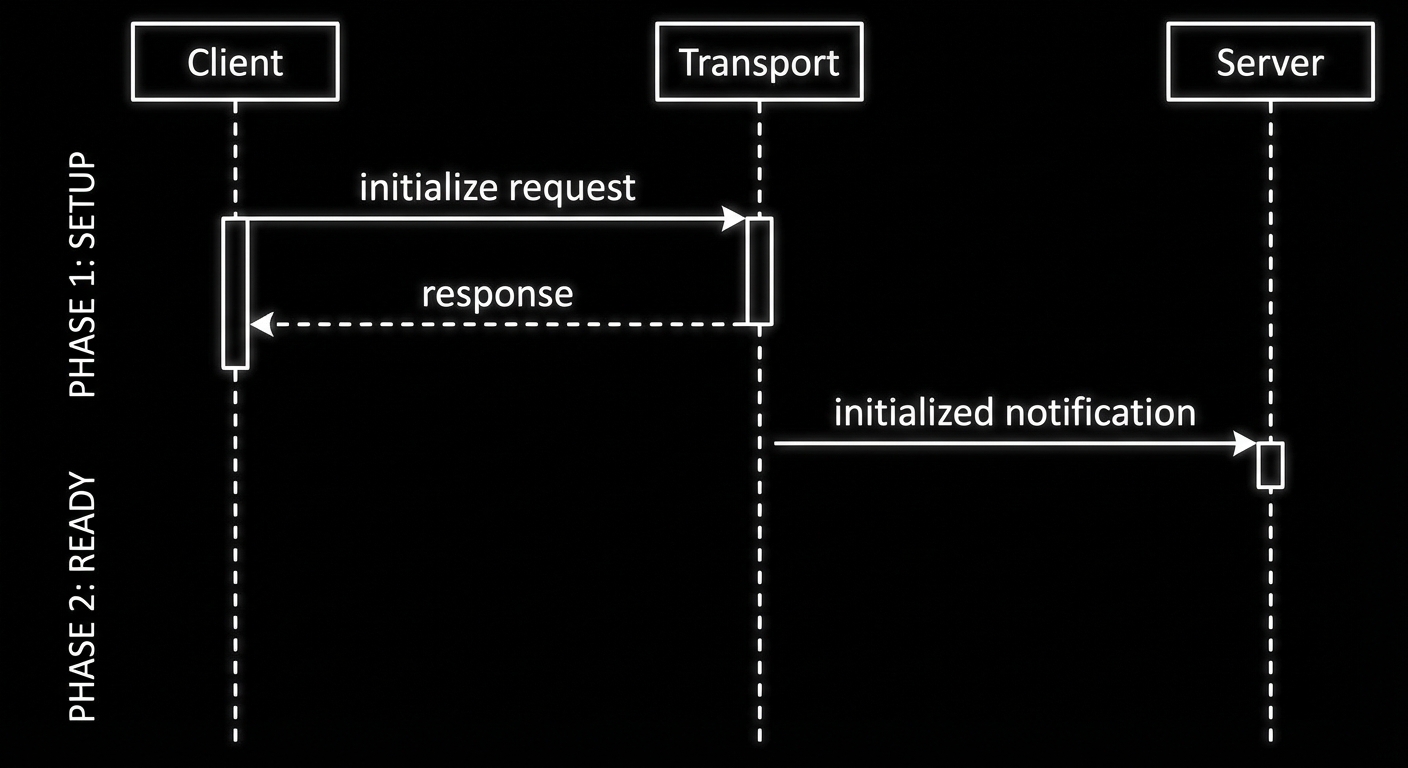
  1. Client sends an initialize request, declaring its protocol version and capabilities.
  2. Server responds with its protocol version and capabilities.
  3. Client sends an initialized notification to confirm it received the response.
  4. Both sides are now in the operating phase and can exchange any supported messages.
// Step 1: Client sends initialize request
{
  "jsonrpc": "2.0",
  "id": 1,
  "method": "initialize",
  "params": {
    "protocolVersion": "2024-11-05",
    "clientInfo": { "name": "my-host", "version": "1.0.0" },
    "capabilities": {
      "sampling": {}
    }
  }
}

// Step 2: Server responds
{
  "jsonrpc": "2.0",
  "id": 1,
  "result": {
    "protocolVersion": "2024-11-05",
    "serverInfo": { "name": "my-server", "version": "1.0.0" },
    "capabilities": {
      "tools": {},
      "resources": { "subscribe": true },
      "logging": {}
    }
  }
}

// Step 3: Client confirms with a notification
{
  "jsonrpc": "2.0",
  "method": "notifications/initialized"
}
MCP connection lifecycle sequence diagram - initialize operate shutdown phases on dark background
The three-phase connection lifecycle: initialise, operate, shutdown. Everything else happens in the middle phase.

Phase 2: Operation

After the handshake, the connection is fully operational. Either side can send requests, responses, or notifications, subject to the capabilities they negotiated. The client can call tools/list, tools/call, resources/list, resources/read, prompts/list, prompts/get. The server can send sampling/createMessage requests (if the client declared sampling capability) or notifications about state changes.

Phase 3: Shutdown

Either side can close the connection. With stdio transport, this happens when the process exits. With HTTP/SSE transport, it happens when the connection is closed. The MCP SDK handles shutdown gracefully when you call server.close() or client.close().

Capability Negotiation in Detail

Capability negotiation determines what each side is allowed to do in the operation phase. If the client does not declare sampling capability, the server cannot send sampling/createMessage requests – the client simply will not handle them. If the server does not declare resources capability, the client calling resources/list will receive a method-not-found error.

This is a safety mechanism. It prevents servers from sending requests that clients cannot handle, and prevents clients from calling methods the server has not implemented. You can inspect negotiated capabilities after connecting:

import { Client } from '@modelcontextprotocol/sdk/client/index.js';
import { StdioClientTransport } from '@modelcontextprotocol/sdk/client/stdio.js';

const client = new Client(
  { name: 'inspector', version: '1.0.0' },
  { capabilities: { sampling: {} } }
);

const transport = new StdioClientTransport({
  command: 'node',
  args: ['./my-server.js'],
});

await client.connect(transport);

// Read back what the server declared it supports
const serverCaps = client.getServerCapabilities();
console.log('Server capabilities:', JSON.stringify(serverCaps, null, 2));

// Read back what the server reported about itself
const serverInfo = client.getServerVersion();
console.log('Server info:', serverInfo);

Common Protocol Failures

Case 1: Sending Requests Before Initialisation Completes

If you attempt to call a tool or list resources before the initialized notification has been exchanged, the server will reject the request with a protocol error. The MCP SDK handles this transparently when you use client.connect(transport) – the connect method waits for the full handshake before resolving. But if you implement a custom transport or bypass the SDK, this is the first thing that will bite you.

// WRONG: Calling tools before connect resolves
const transport = new StdioClientTransport({ command: 'node', args: ['server.js'] });
client.connect(transport); // Don't await this
const tools = await client.listTools(); // Races with initialisation - will fail

// CORRECT: Always await connect
await client.connect(transport);
const tools = await client.listTools(); // Safe: handshake is complete

Case 2: Mismatched Protocol Versions

MCP has versioned specifications. If client and server declare different protocol versions and neither can support the other, the connection fails at initialisation. The current stable version is 2024-11-05; the draft spec has incremental additions. When upgrading SDK versions, check the protocol version the new SDK defaults to and ensure your deployed servers are compatible.

// Always pin to a specific protocol version in production:
const client = new Client(
  { name: 'my-host', version: '1.0.0' },
  {
    capabilities: {},
    // The SDK picks the protocol version based on what server supports
    // Check SDK changelog when upgrading
  }
);

Case 3: Treating Notifications Like Requests

Notifications do not have an id field and do not receive a response. If you send a notification and wait for a response, you will wait forever (or until a timeout). The SDK’s notification methods do not return promises for this reason – they are fire-and-forget by design.

// WRONG: Awaiting a notification
await client.sendNotification({ method: 'notifications/initialized' }); // This does not wait for a response

// CORRECT: Notifications are void
client.sendNotification({ method: 'notifications/initialized' }); // Correct - no await

“Servers MUST NOT send requests to clients before receiving the initialized notification from the client. Clients MUST NOT send requests other than pings before receiving the initialize response from the server.” – MCP Specification, Lifecycle

What to Check Right Now

  • Inspect live traffic with the MCP Inspector – run npx @modelcontextprotocol/inspector node your-server.js. The inspector shows every JSON-RPC message, making the protocol visible in real time.
  • Enable SDK logging – set DEBUG=mcp:* in your environment when developing. The SDK logs all protocol messages, which is invaluable for debugging lifecycle issues.
  • Validate your capability declarations – if a server feature is not working, check that the server declared the capability and the client did not need to declare a matching client capability first.
  • Use JSON-RPC error codes correctly – MCP defines standard error codes (-32700 parse error, -32600 invalid request, -32601 method not found, -32602 invalid params, -32603 internal error). Application-level errors use codes in the range -32000 to -32099.

nJoy 😉

Hosts, Clients, and Servers: The MCP Three-Role Model

Three roles. One protocol. If you can hold this architecture in your head clearly – host, client, server, what each does, who owns each one, how they talk – then 80% of MCP suddenly makes sense. Most of the confusion beginners have about MCP traces back to fuzzy thinking about these three roles. This lesson is about making that mental model concrete and then keeping it concrete under stress.

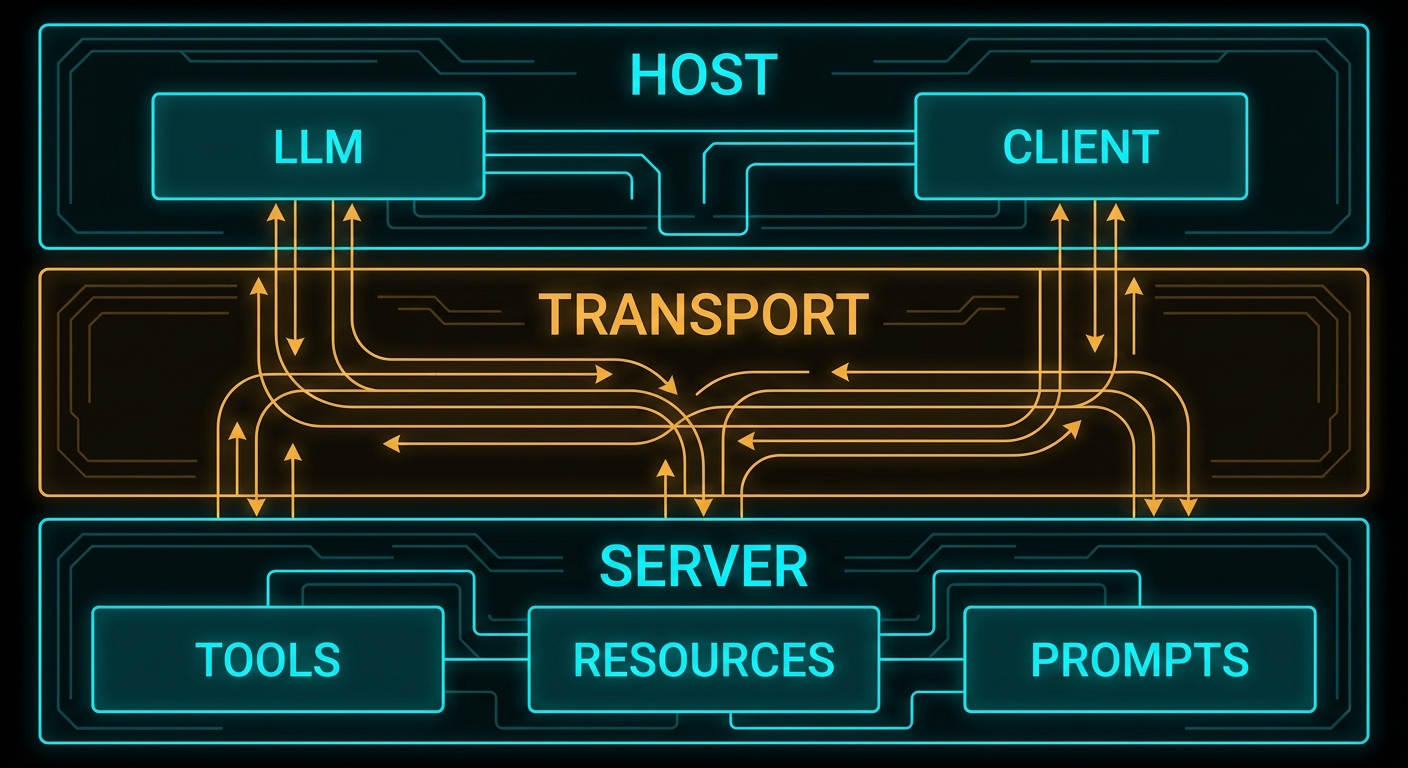
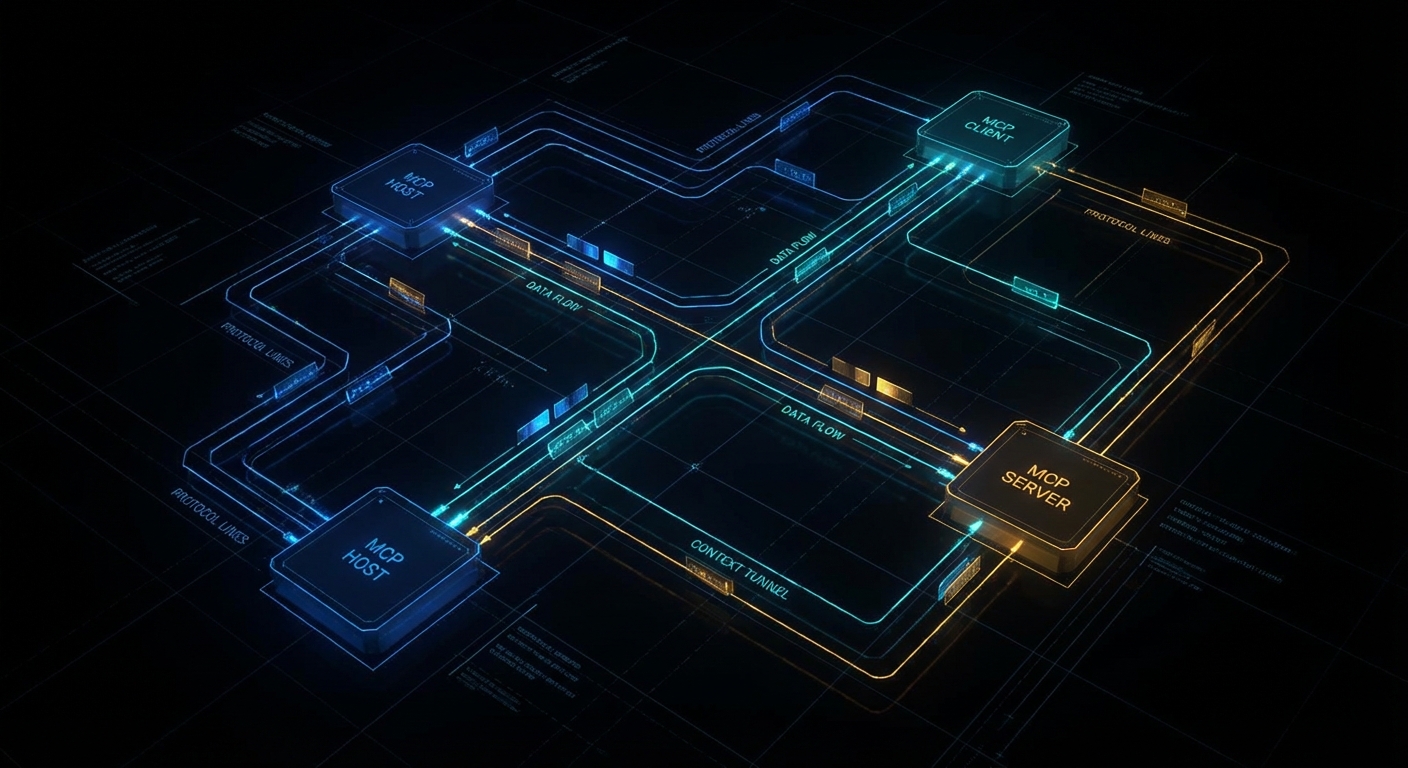
MCP three-role architecture diagram - host client server layered diagram on dark background
The three-role model: Host (the AI application), Client (the protocol connector), Server (the capability provider).

The Host: What the User Runs

The host is the AI application that the end user interacts with. Claude Desktop is a host. VS Code with a Copilot extension is a host. Cursor is a host. Your custom Node.js chat application is a host. The host is the entry point: users direct it, it decides what to do with their input, and it is responsible for controlling the entire MCP lifecycle.

The host has several specific responsibilities in the MCP model:

  • Creating and managing clients – the host decides which MCP servers to connect to, creates client instances for each one, and manages their lifecycle (connect, reconnect, disconnect).
  • Security and consent – the host is the security boundary. It must obtain user consent before allowing servers to access data or invoke tools. It decides what each server is allowed to do.
  • LLM integration – the host is what calls the LLM (OpenAI API, Anthropic API, Gemini API). The model does not participate in the MCP protocol directly. The host takes model output, decides when tool calls need to happen, routes those calls through its clients to the appropriate servers, and feeds the results back to the model.
  • Aggregating context – if the host connects to multiple servers, it aggregates the available tools, resources, and prompts from all of them before presenting them to the model.

“Hosts are LLM applications that initiate connections to servers in order to access tools, resources, and prompts. The host application is responsible for managing client lifecycles and enforcing security policies.” – Model Context Protocol Specification

A host can maintain connections to multiple servers simultaneously. A typical production host might connect to a database server, a file system server, a calendar server, and a code execution server – all at the same time, each via its own client instance.

The Client: The Protocol Connector

The client is the component inside the host that manages the connection to exactly one MCP server. Each server connection has its own client. Clients are not user-facing – users never interact with clients directly. They are the internal plumbing that translates between what the host needs and what the MCP protocol defines.

The client’s job is well-defined and narrow:

  • Establish and maintain the transport connection to the server (stdio pipe, HTTP stream, etc.)
  • Perform the protocol handshake (capability negotiation) when connecting
  • Send JSON-RPC requests to the server on behalf of the host
  • Receive and parse JSON-RPC responses and notifications from the server
  • Handle protocol-level errors (timeouts, disconnects, malformed messages)
  • Optionally: expose client-side capabilities back to the server (sampling, elicitation, roots)

In Node.js, you rarely write a client from scratch. The @modelcontextprotocol/sdk provides a Client class that handles all of this. You instantiate it, point it at a transport, connect it, and then call methods like client.listTools(), client.callTool(), client.listResources().

import { Client } from '@modelcontextprotocol/sdk/client/index.js';
import { StdioClientTransport } from '@modelcontextprotocol/sdk/client/stdio.js';

// One client per server connection
const client = new Client(
  { name: 'my-host-app', version: '1.0.0' },
  { capabilities: {} }
);

const transport = new StdioClientTransport({
  command: 'node',
  args: ['./my-mcp-server.js'],
});

await client.connect(transport);

// Now you can call into the server
const tools = await client.listTools();
console.log('Available tools:', tools.tools.map(t => t.name));
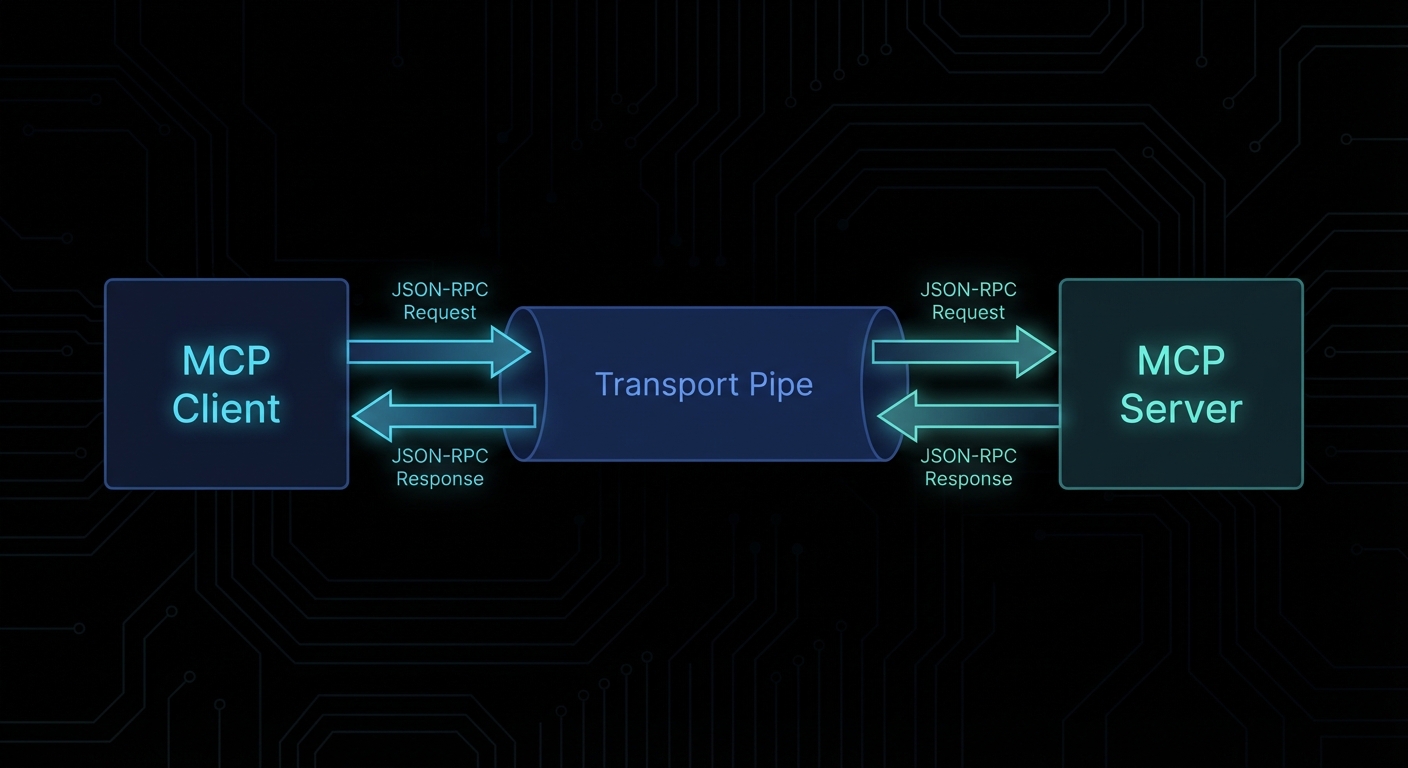
MCP client-server connection diagram showing transport layer and JSON-RPC messages
Client to server: a transport layer carries JSON-RPC 2.0 messages in both directions.

The Server: The Capability Provider

The server is what exposes capabilities to the AI ecosystem. A server can be anything that implements the MCP protocol and exposes tools, resources, or prompts. It might be:

  • A local process launched by the host (stdio server – the most common pattern for developer tools)
  • A remote HTTP service your team runs (a company’s internal knowledge base, a proprietary database)
  • A third-party cloud service that publishes an MCP endpoint

The server is the thing you will build most often in this course. When someone says “I wrote an MCP integration for Jira” or “I built an MCP server for my Postgres database”, they mean they built an MCP server that exposes tools for interacting with those systems.

A minimal MCP server in Node.js looks like this:

import { McpServer } from '@modelcontextprotocol/sdk/server/mcp.js';
import { StdioServerTransport } from '@modelcontextprotocol/sdk/server/stdio.js';
import { z } from 'zod';

const server = new McpServer({
  name: 'my-first-server',
  version: '1.0.0',
});

// Register a tool
server.tool(
  'greet',
  'Returns a personalised greeting',
  { name: z.string().describe('The name to greet') },
  async ({ name }) => ({
    content: [{ type: 'text', text: `Hello, ${name}! Welcome to MCP.` }],
  })
);

// Connect and serve
const transport = new StdioServerTransport();
await server.connect(transport);

That is a complete, working MCP server. It has one tool called greet. Any MCP client can connect to it, discover the tool, and invoke it. We will build far more complex servers throughout this course, but every one of them is fundamentally this structure with more tools, resources, and prompts added.

Failure Modes in the Three-Role Model

Case 1: Building the Model Call Inside the Server

A common architectural mistake is putting the LLM API call inside the MCP server – reasoning that “the server needs to be smart, so the server should call the LLM”. This inverts the architecture and breaks the separation of concerns.

// WRONG: Server calling OpenAI directly
server.tool('analyse', 'Analyse a text', { text: z.string() }, async ({ text }) => {
  // This is wrong. The server should not call the LLM.
  // The server is a capability provider; the host is the LLM orchestrator.
  const openai = new OpenAI();
  const result = await openai.chat.completions.create({
    model: 'gpt-4o',
    messages: [{ role: 'user', content: `Analyse: ${text}` }],
  });
  return { content: [{ type: 'text', text: result.choices[0].message.content }] };
});

The correct pattern is to either return the raw data and let the host’s LLM do the analysis, or use the sampling capability to request a model call through the client (covered in Lesson 9). Putting LLM calls inside the server creates tight coupling between your capability provider and a specific LLM provider – exactly what MCP is designed to prevent.

// CORRECT: Server returns data; host's LLM does the analysis
server.tool('get_text', 'Fetch text for analysis', { doc_id: z.string() }, async ({ doc_id }) => {
  const text = await fetchDocumentText(doc_id);
  return { content: [{ type: 'text', text }] };
  // The host will pass this to the LLM for analysis.
  // The server just provides the data.
});

Case 2: One Client Connecting to Multiple Servers

The spec is explicit: each client maintains a connection to exactly one server. Attempting to use a single client instance to talk to multiple servers is not supported by the protocol.

// WRONG: Trying to use one client for two servers
const client = new Client({ name: 'host', version: '1.0.0' }, { capabilities: {} });
await client.connect(transport1);
await client.connect(transport2); // This will error or overwrite the first connection
// CORRECT: One client per server
const dbClient = new Client({ name: 'host-db', version: '1.0.0' }, { capabilities: {} });
const fsClient = new Client({ name: 'host-fs', version: '1.0.0' }, { capabilities: {} });

await dbClient.connect(dbTransport);
await fsClient.connect(fsTransport);

// Each client independently manages its own server connection
const dbTools = await dbClient.listTools();
const fsTools = await fsClient.listTools();

Case 3: Confusing Server Capabilities with Client Capabilities

The MCP spec defines capabilities for both sides of the connection. Server capabilities (tools, resources, prompts, logging, completions) are advertised by the server during the handshake. Client capabilities (sampling, elicitation, roots) are advertised by the client. These are negotiated in both directions. A common mistake is expecting the client to have tools, or the server to do sampling.

// During connection, both sides declare what they support:
const client = new Client(
  { name: 'my-host', version: '1.0.0' },
  {
    capabilities: {
      sampling: {},     // Client tells server: "I can handle sampling requests from you"
      roots: { listChanged: true }, // Client can provide root boundaries
    },
  }
);

// The server then declares its own capabilities:
const server = new McpServer({
  name: 'my-server',
  version: '1.0.0',
  // capabilities are inferred from what you register (tools, resources, prompts)
});

Multi-Server Host Architecture

In production, a host typically manages several server connections. Here is the pattern for a host that aggregates tools from multiple servers:

import { Client } from '@modelcontextprotocol/sdk/client/index.js';
import { StdioClientTransport } from '@modelcontextprotocol/sdk/client/stdio.js';

async function createHostClient(name, command, args) {
  const client = new Client(
    { name: `host-${name}`, version: '1.0.0' },
    { capabilities: {} }
  );
  const transport = new StdioClientTransport({ command, args });
  await client.connect(transport);
  return client;
}

// Create one client per server
const clients = {
  database: await createHostClient('database', 'node', ['servers/db-server.js']),
  filesystem: await createHostClient('filesystem', 'node', ['servers/fs-server.js']),
  calendar: await createHostClient('calendar', 'node', ['servers/calendar-server.js']),
};

// Aggregate all tools for the LLM
const allTools = [];
for (const [name, client] of Object.entries(clients)) {
  const { tools } = await client.listTools();
  allTools.push(...tools.map(t => ({ ...t, _server: name })));
}

console.log(`Total tools available: ${allTools.length}`);
// When the LLM decides to call a tool, you route it to the correct client
// based on the _server tag (or by name convention).

“Clients maintain 1:1 connections with servers, while hosts may run multiple client instances simultaneously.” – MCP Specification, Architecture Overview

What to Check Right Now

  • Map your existing AI integrations to the three roles – for any LLM feature you currently maintain, ask: what is the host, what are the servers, where are the clients? This makes the MCP fit (or gap) immediately visible.
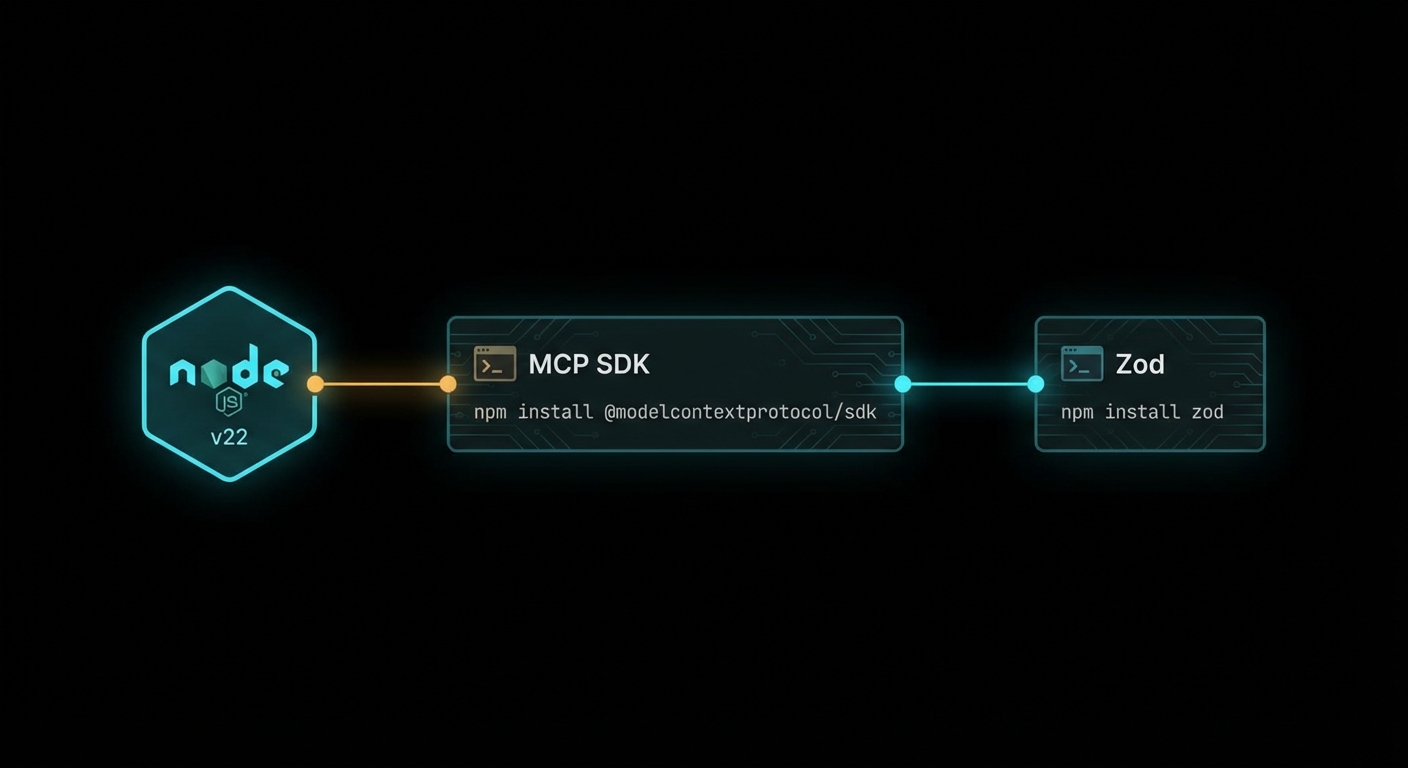
  • Install the MCP SDK – run npm install @modelcontextprotocol/sdk zod in a scratch project. The SDK is the only dependency you need to build your first server (next lesson).
  • Read the architecture pagemodelcontextprotocol.io/docs/concepts/architecture has the official diagrams. Having the spec’s own diagrams alongside this lesson’s code is useful.
  • Note the security boundary – in any architecture where you have a host managing multiple clients, think carefully about what each server is allowed to do. The host is the security boundary; it should not grant servers more access than they need.

nJoy 😉

What is MCP? The Protocol that Unified AI Tool Integration

In 2023, every LLM integration was bespoke. You wrote a plugin for Claude, rewrote it for GPT-4, rewrote it again for the next model, and maintained three diverging codebases that did the same thing. This was fine when AI was a toy. It becomes genuinely untenable when AI is infrastructure. The Model Context Protocol is the answer to that problem – and it arrived at exactly the right time.

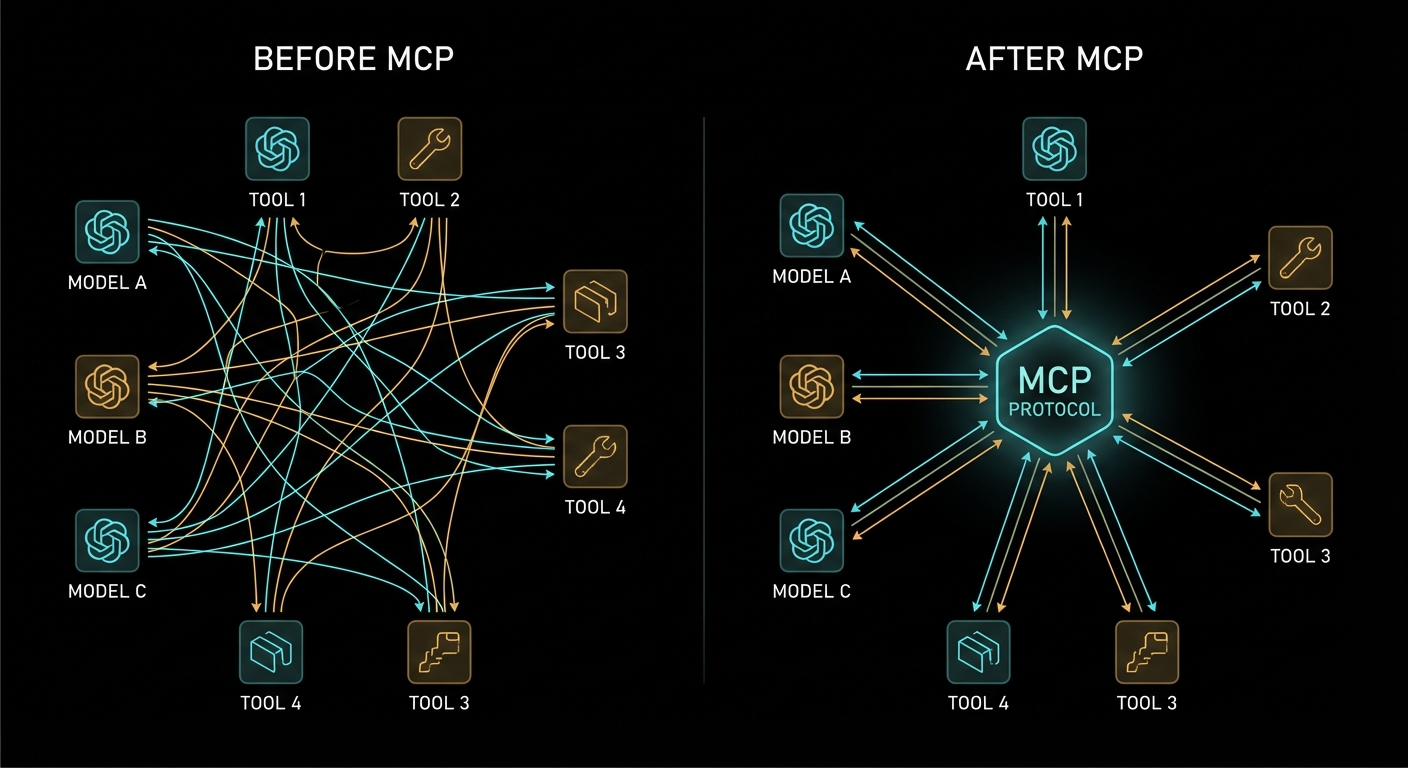
MCP Protocol architecture - before and after standardisation, dark diagram
Before MCP: N models × M tools = N×M custom integrations. After MCP: N models + M tools = N+M standard implementations.

The Problem MCP Solves

To understand why MCP matters, you need to feel the pain it eliminates. Before MCP, connecting an LLM to an external capability – a database, an API, a file system, a calendar – required you to build a full custom integration for every model-tool combination. If you had three AI models and ten tools, you had thirty integrations to build and maintain. Each one spoke a slightly different language. Each one had different error handling. Each one had different security assumptions.

This is the classic N×M problem. Every new model you add multiplies the integration work by the number of tools you have. Every new tool you add multiplies the work by the number of models. The growth is combinatorial, and combinatorial problems kill engineering teams.

MCP collapses this to N+M. Each model speaks MCP once. Each tool speaks MCP once. They all interoperate. This is exactly what HTTP did for the web, what USB did for peripherals, what LSP (Language Server Protocol) did for programming language tooling. It is a standardisation play, and standardisation plays that work become infrastructure.

“MCP takes some inspiration from the Language Server Protocol, which standardizes how to add support for programming languages across a whole ecosystem of development tools. In a similar way, MCP standardizes how to integrate additional context and tools into the ecosystem of AI applications.” – Model Context Protocol Specification

The LSP analogy is the right one. Before LSP, every code editor had to implement autocomplete, go-to-definition, and rename-symbol for every programming language. After LSP, language implementors write one language server, and every LSP-compatible editor gets the features for free. MCP does the same for AI context. You write one MCP server for your Postgres database, and every MCP-compatible LLM client can use it.

What MCP Actually Is

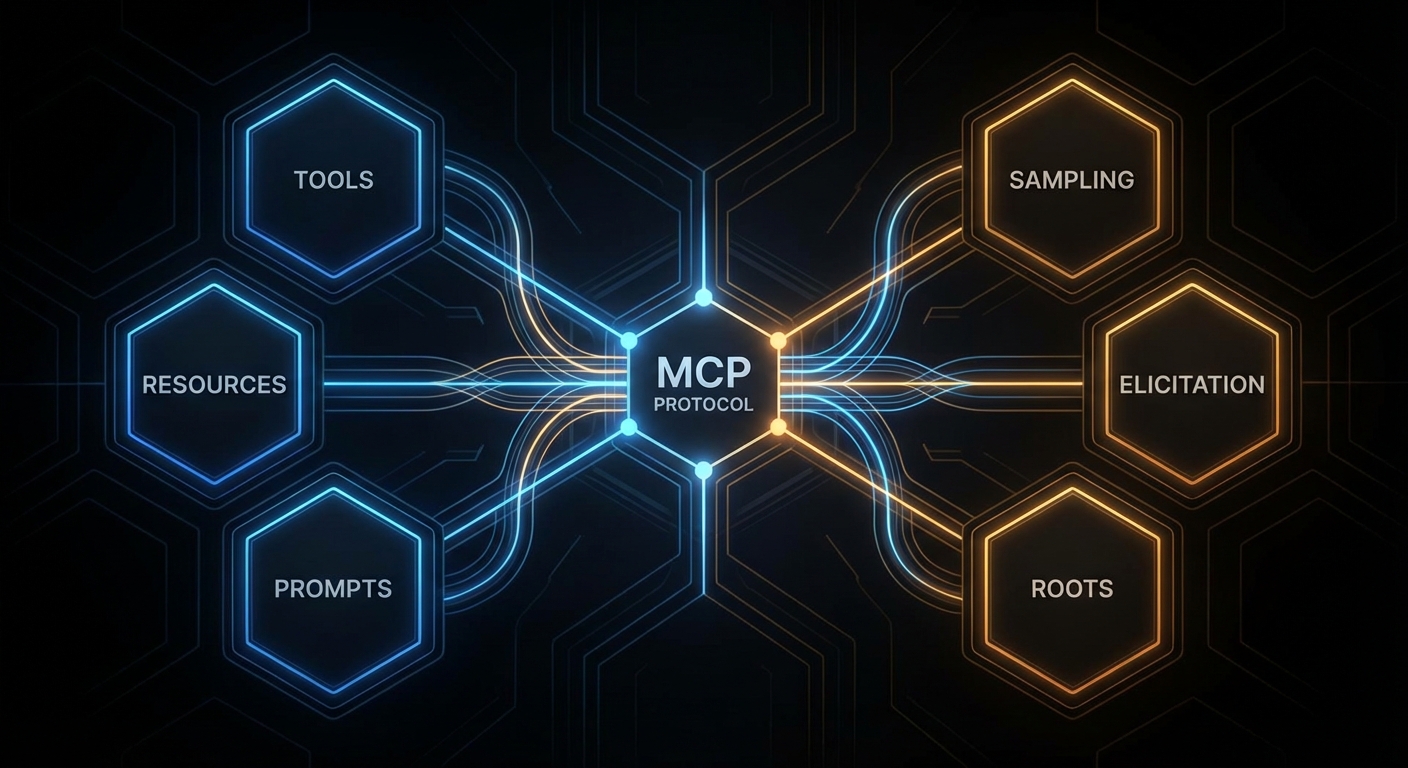
MCP is an open protocol published by Anthropic in late 2024 and now maintained as a community standard. It defines a structured way for AI applications to request context and capabilities from external servers, using JSON-RPC 2.0 as the wire format. The protocol specifies three kinds of things that servers can expose:

  • Tools – functions the AI model can call, with a defined input schema and a return value. Think of these as the actions the AI can take: “search the database”, “send an email”, “read a file”.
  • Resources – data the AI (or the user) can read, addressed by URI. Think of these as the documents and data the AI has access to: “the current user’s profile”, “the contents of this file”, “the current weather”.
  • Prompts – reusable prompt templates that applications can surface to users. Think of these as saved queries or workflows: “summarise this document”, “review this code for security issues”.

Beyond what servers expose, the protocol also defines what clients can offer back to servers:

  • Sampling – the ability for a server to request an LLM inference from the client, enabling recursive agent loops where the server needs to “think” about something before responding.
  • Elicitation – the ability for a server to ask the user a structured question through the client, collecting input it needs to complete a task.
  • Roots – the ability for a server to query what filesystem or URI boundaries it is allowed to operate within.
MCP protocol primitives - tools resources prompts sampling elicitation roots
The six primitives of MCP: three server-side (tools, resources, prompts) and three client-side (sampling, elicitation, roots).

The Three-Role Architecture

MCP defines three distinct roles in every interaction. Understanding these clearly is essential – confusing them is the most common mistake beginners make when reading the spec.

The Host is the AI application the user is running – Claude Desktop, a VS Code extension, your custom chat interface, Cursor. The host is the entry point for users. It creates and manages one or more MCP clients. It controls what the user sees and decides which servers to connect to.

The Client lives inside the host. Each client maintains exactly one connection to one MCP server. It is the connector, the protocol layer, the thing that speaks JSON-RPC to the server on behalf of the host. When you build an AI chat application, you typically build a client (or use the SDK’s built-in client) that connects to whatever servers your application needs.

The Server is the external capability provider. It could be a local process (a stdio server running on the same machine), a remote HTTP service (a company’s internal API wrapped in MCP), or anything in between. The server exposes tools, resources, and prompts, and it responds to requests from clients.

The key insight: the model itself is not a named role in MCP. The model lives inside the host, and the host decides when to invoke tools based on model output. MCP is not a protocol between the user and the model; it is a protocol between the AI application (host) and capability providers (servers). The model benefits from MCP, but the model does not participate in the protocol directly.

Case 1: Confusing the Client and the Server

A very common confusion when starting with MCP is thinking that the “client” is the end-user’s chat application and the “server” is the LLM API. This is wrong. In MCP terminology:

// WRONG mental model:
// User -> [MCP Client = chat app] -> [MCP Server = OpenAI/Claude API]

// CORRECT mental model:
// User -> [Host = chat app]
//   Host manages -> [MCP Client]
//     MCP Client connects to -> [MCP Server = your tool/data provider]
// Host also calls -> [LLM API = OpenAI/Claude/Gemini, separate from MCP]

The LLM API (OpenAI, Anthropic, Gemini) is not an MCP server. It is what the host uses to process messages. MCP servers are the external capability providers – your database wrapper, your file system access layer, your Slack integration. Keep these two separate and the architecture becomes clear immediately.

Case 2: Thinking MCP Is Only for Claude

Because Anthropic published MCP and Claude Desktop was the first host to support it, many people assume MCP is an Anthropic-specific protocol. It is not. The spec is open. The TypeScript and Python SDKs are MIT-licensed. OpenAI’s Agents SDK supports MCP servers. Google’s Gemini models can be used in MCP hosts. The whole point is interoperability across the ecosystem.

// MCP works with all three major providers:
import OpenAI from 'openai';
import Anthropic from '@anthropic-ai/sdk';
import { GoogleGenerativeAI } from '@google/generative-ai';

// All three can be used as the LLM inside an MCP host.
// The MCP server does not know or care which LLM is calling it.
// It just responds to JSON-RPC requests.

This provider-agnosticism is a feature, not an accident. A well-designed MCP server should work with any compliant host, regardless of which LLM that host uses internally.

Why Now: The Timing of MCP

MCP arrived at exactly the right moment for several reasons that compound:

LLMs are becoming infrastructure. In 2022, LLMs were demos. In 2025-2026, they are production systems at scale. When something becomes infrastructure, the lack of standards becomes genuinely painful. Nobody would tolerate every web server speaking its own custom HTTP dialect. The AI ecosystem was approaching that point of pain when MCP appeared.

Tool calling matured. OpenAI added function calling in 2023. Anthropic added tool use. Google added function declarations. By 2024, every major model supported some form of structured tool invocation. The machinery was there. MCP provided the standard format on top of it.

Agentic AI needed an architecture. Simple chatbots don’t need MCP. A model answering questions from a fixed system prompt doesn’t need MCP. But agentic AI – systems where the model takes actions, uses tools, reads documents, and operates over extended sessions – absolutely needs a structured way to manage capabilities. MCP is that structure.

“MCP provides a standardized way for applications to: build composable integrations and workflows, expose tools and capabilities to AI systems, share contextual information with language models.” – MCP Specification, Overview

MCP vs. Direct Tool Calling: When Each Applies

MCP is not a replacement for all tool calling patterns. It is an architecture for systems of tools, not a required wrapper for every single function call. Understanding when to use MCP and when plain tool calling is enough will save you from over-engineering.

Use direct tool calling (without MCP) when you have a single LLM application with a small, fixed set of tools that never change, never get shared across multiple applications, and have no external deployment concerns. A simple chatbot with three custom tools is not a candidate for MCP.

Use MCP when any of the following apply:

  • Multiple LLM applications (or multiple LLM providers) need access to the same tools or data
  • Tools are developed and maintained by different teams from the host application
  • You want to compose capabilities from third-party MCP servers without writing custom integrations
  • You need to deploy tool servers independently of the host application (different release cycles, different teams, different scaling requirements)
  • Security isolation is required between the AI application and the tool execution environment
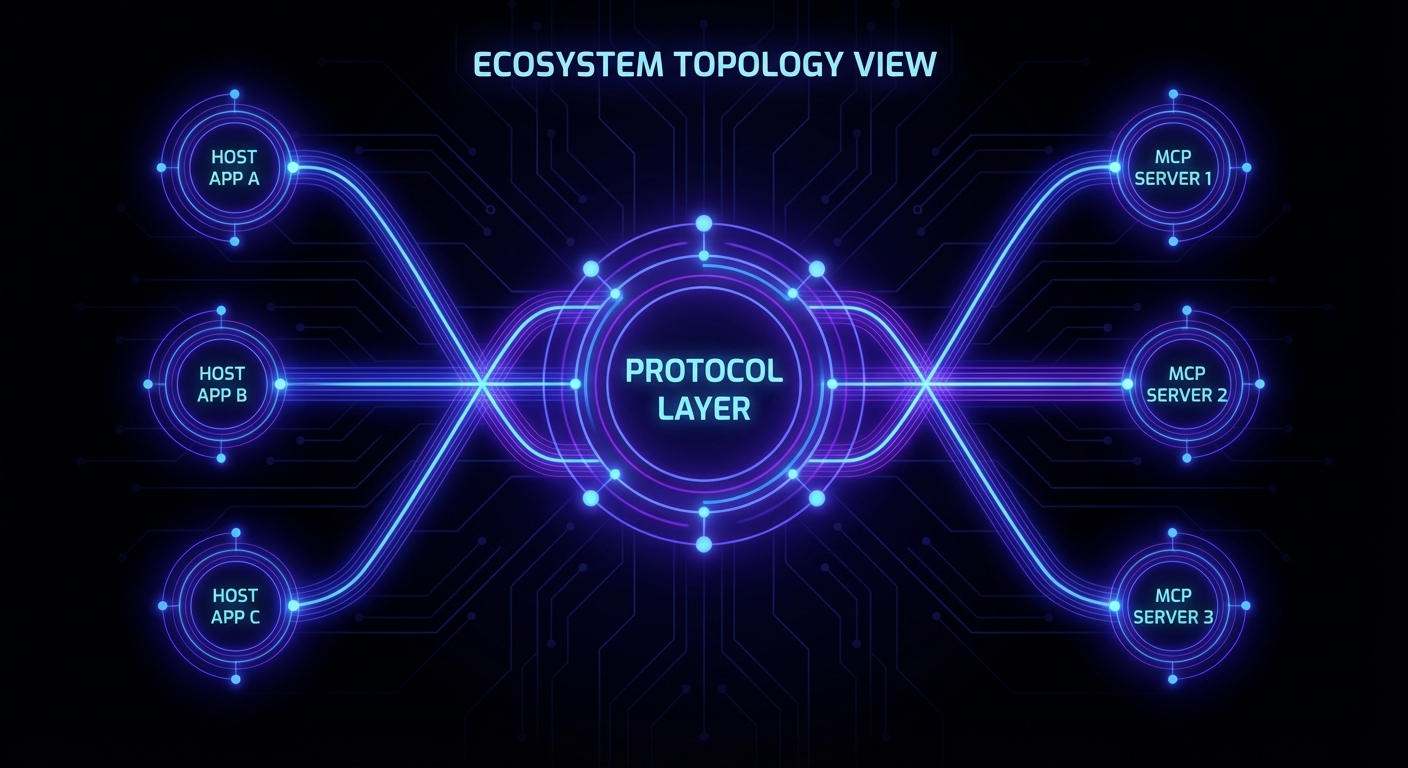
MCP ecosystem showing multiple hosts connecting to multiple servers - dark network diagram
The MCP ecosystem: multiple hosts (Claude Desktop, VS Code, custom apps) connecting freely to multiple servers (databases, APIs, file systems).

What to Check Right Now

  • Verify your Node.js version – run node --version. This course requires 22+. Upgrade via nvm install 22 && nvm use 22 if needed.
  • Read the spec overview – spend 10 minutes on modelcontextprotocol.io/specification. The Overview and Security sections are the most important ones at this stage.
  • Install the MCP Inspector – run npx @modelcontextprotocol/inspector to get the official GUI for testing MCP servers. You’ll use it constantly from Lesson 5 onwards.
  • Get your LLM API keys ready – you won’t need them until Part IV, but creating the accounts now avoids waiting when you get there: OpenAI, Anthropic, Google AI Studio.
  • Bookmark the TypeScript SDKgithub.com/modelcontextprotocol/typescript-sdk. Every code example in this course uses it.

nJoy 😉

MCP Protocol – From Zero to Enterprise: The Complete Course

Every few years, something happens in computing that quietly reshapes everything around it. The UNIX pipe. HTTP. REST. The transformer architecture. And now, in 2026, the Model Context Protocol. If you build software and you haven’t internalised MCP yet, this is your moment. This course will fix that – thoroughly.

MCP Protocol course - dark architectural diagram of hosts, clients and servers
The MCP ecosystem: hosts, clients, and servers unified under a single open protocol.

What This Course Is

This is a full university-grade course on the Model Context Protocol – the open standard, published by Anthropic and now maintained by a broad coalition, that lets AI models talk to tools, data sources, and services in a structured, secure, and interoperable way. Think of it as HTTP for AI context: before HTTP, every web server spoke its own dialect; after HTTP, the whole web could talk to each other. MCP does the same thing for the agentic AI layer.

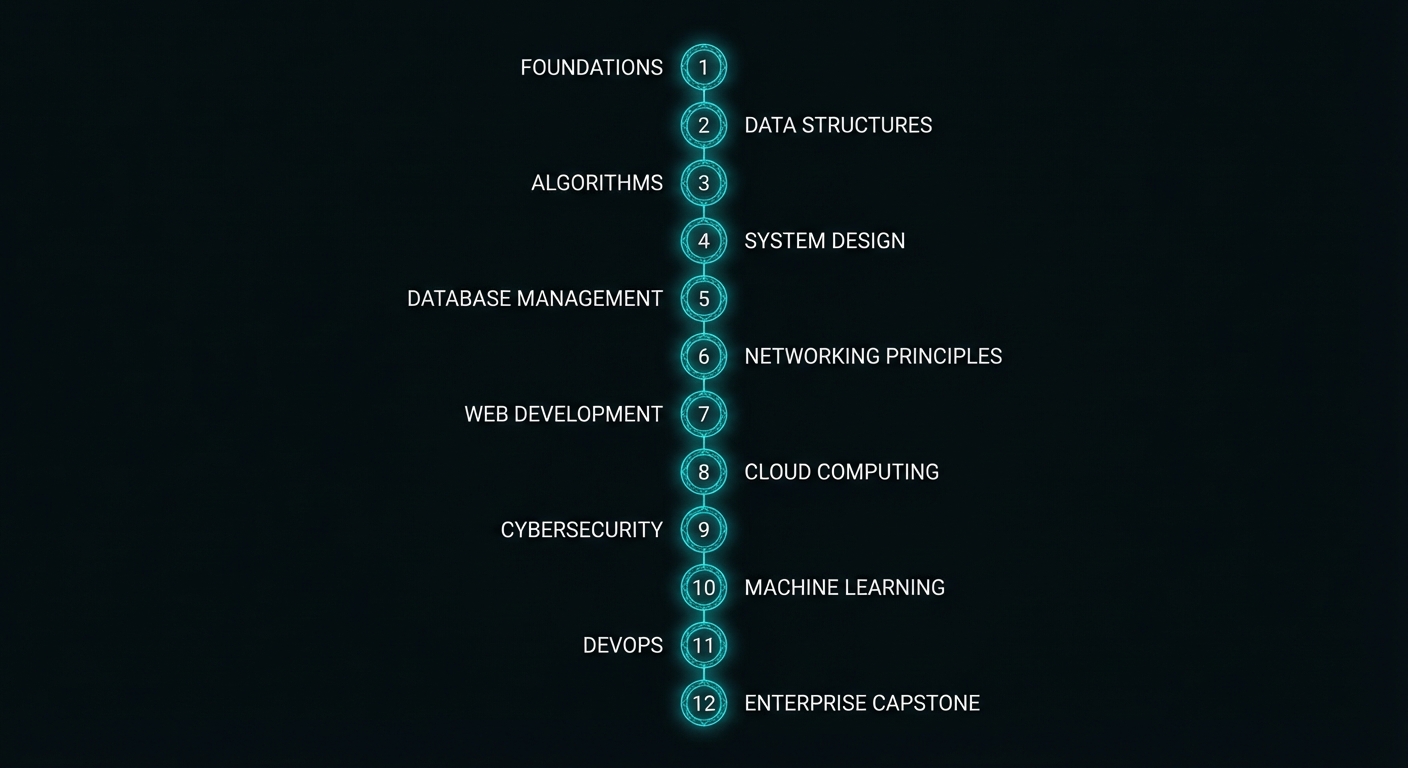
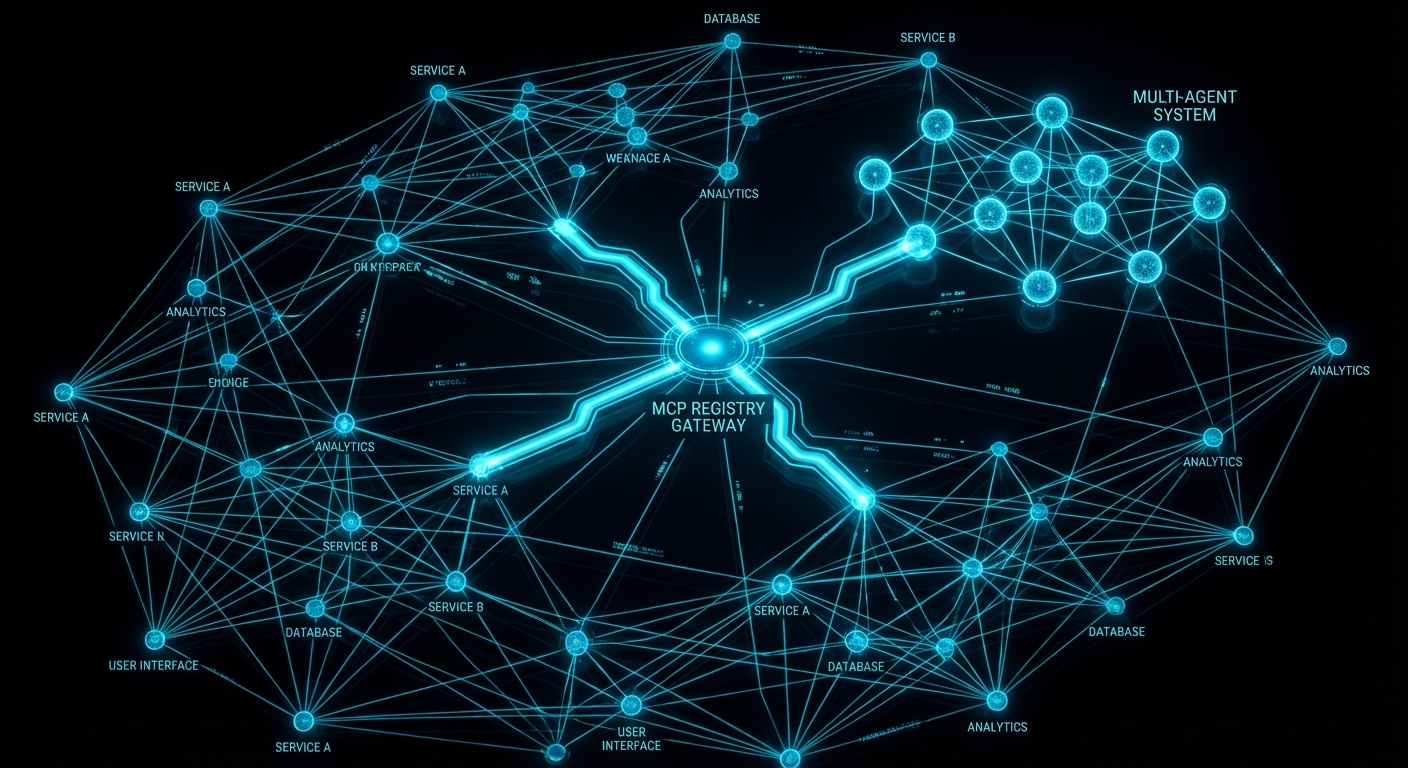
The course runs 53 lessons across 12 Parts, from zero to enterprise. Part I gives you the mental model and the first working server in under an hour. Part XII has you building a full production MCP platform with a registry, an API gateway, and multi-agent orchestration. Everything in between is ordered by dependency – no lesson assumes knowledge that hasn’t been covered yet.

“MCP provides a standardized way for applications to: build composable integrations and workflows, expose tools and capabilities to AI systems, share contextual information with language models.” – Model Context Protocol Specification, Anthropic

All code is in plain Node.js 22 ESM – no TypeScript, no compilation step, no tsconfig to wrestle with. You run node server.js and it works. The point is to teach MCP, not the type system. Where types genuinely help (complex tool schema shapes), JSDoc hints appear inline. Everywhere else, the code is clean signal.

Who This Is For

The course was designed for two audiences who need the same rigour but come at it differently:

  • University students – third or fourth year CS, AI, or software engineering. You know how to write async JavaScript. You’ve used an LLM API. You want to understand the architecture that makes production agentic systems work, not just the vibes.
  • Professional engineers and architects – you’re building AI-powered products or evaluating MCP for your organisation. You need the protocol internals, the security model, the enterprise deployment patterns, and a clear comparison of how OpenAI, Anthropic Claude, and Google Gemini each implement the standard differently.

If you’re a beginner to programming, start with the Node.js fundamentals first. If you’re already shipping LLM features to production, you can start from Part IV (provider integrations) and backfill the protocol theory as needed.

MCP course structure - 12 parts from foundations to capstone projects
Twelve parts. Fifty-three lessons. Ordered strictly by dependency.

The Technology Stack

Every lesson uses the same stack throughout, so you never lose time context-switching:

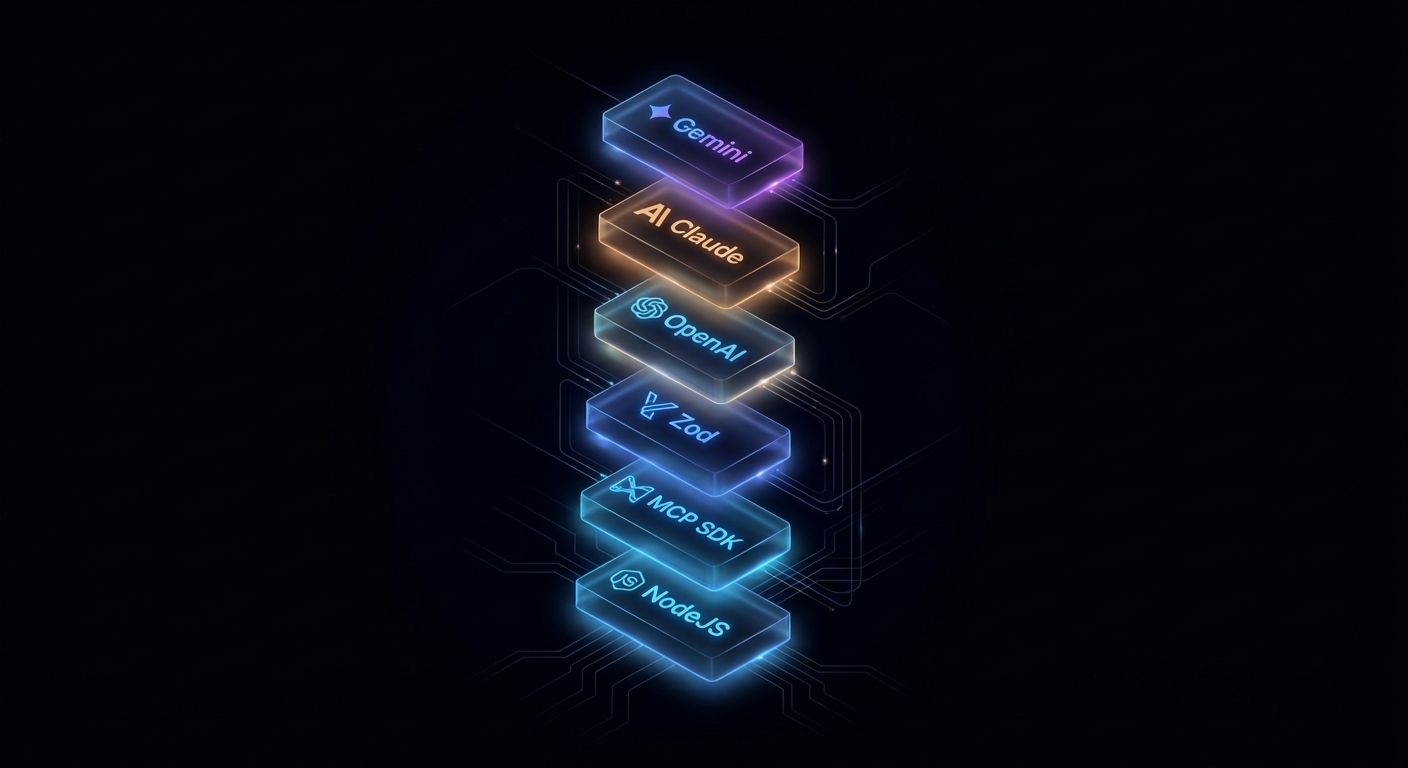
  • Runtime: Node.js 22+ with native ESM ("type": "module")
  • MCP SDK: @modelcontextprotocol/sdk v1 stable (v2 features noted as they ship)
  • Schema validation: zod v4 for tool input schemas
  • HTTP transport: @modelcontextprotocol/express or Hono adapter
  • OpenAI: openai latest – tool calling with GPT-4o and o3
  • Anthropic: @anthropic-ai/sdk latest – Claude 3.5/3.7 Sonnet
  • Gemini: @google/generative-ai latest – Gemini 2.0 Flash and 2.5 Pro
  • Native Node.js extras: --env-file for secrets, node:test for tests

No framework lock-in beyond the MCP SDK itself. All HTTP adapter code works with plain Node.js http if you prefer – the adapter packages are convenience wrappers, not requirements.

Course Curriculum

Fifty-three lessons across twelve parts. Links will go live as each lesson publishes.

Part I: Foundations

  1. What is MCP? The Protocol that Unified AI Tool Integration
  2. Hosts, Clients, and Servers: The Three-Role Model
  3. Under the Hood: JSON-RPC 2.0, Lifecycle, and Capability Negotiation
  4. Node.js Dev Environment: SDK, Zod, ESM, and Tooling
  5. Your First MCP Server and Client in Node.js

Part II: Core Server Primitives

  1. Tools: Defining, Validating, and Executing LLM-Callable Functions
  2. Resources: Exposing Static and Dynamic Data to AI Models
  3. Prompts: Reusable Templates and Workflow Fragments
  4. Sampling: Server-Initiated LLM Calls and Recursive AI
  5. Elicitation: Asking the User for Input from Inside a Server
  6. Roots: Filesystem and URI Boundaries

Part III: Transports

  1. stdio Transport: The Local Standard and When to Use It
  2. Streamable HTTP and SSE: Building Remote MCP Servers
  3. HTTP Adapters: Express, Hono, and the Node Middleware
  4. Transport Security: TLS, CORS, and Host Header Validation

Part IV: OpenAI Integration

  1. OpenAI + MCP: Tool Calling with GPT-4o and o3
  2. Streaming Completions and Structured Outputs with MCP Tools
  3. Responses API and the Agents SDK + MCP
  4. Building a Production OpenAI-Powered MCP Client

Part V: Anthropic Claude Integration

  1. Claude 3.5/3.7 + MCP: Native Tool Calling
  2. Extended Thinking Mode with MCP Tools
  3. Claude Code and Agent Skills: MCP in the Era of Autonomous Coding
  4. Patterns and Anti-Patterns: Claude + MCP in Production

Part VI: Google Gemini Integration

  1. Gemini 2.0/2.5 Pro + MCP: Function Calling at Scale
  2. Multi-modal MCP: Images, PDFs, and Audio with Gemini
  3. Google AI Studio, Vertex AI, and MCP Servers
  4. Building a Production Gemini-Powered MCP Client

Part VII: Cross-Provider Patterns

  1. OpenAI vs Claude vs Gemini: The Definitive MCP Tool Calling Comparison
  2. Provider Abstraction: A Node.js Library for Multi-Provider MCP Clients
  3. Choosing the Right Model: A Decision Framework for MCP Applications

Part VIII: Security and Trust

  1. OAuth 2.0 with MCP: Authentication for Remote Servers
  2. Authorization, Scope Consent, and Incremental Permissions
  3. Tool Safety: Input Validation, Sandboxing, and Execution Limits
  4. Secrets Management: Vault, Environment Variables, and Rotation
  5. Audit Logging, Compliance, and Data Privacy

Part IX: Multi-Agent Systems

  1. Agent-to-Agent (A2A) Protocol: MCP in Multi-Agent Architectures
  2. MCP + LangChain and LangGraph: Orchestration Patterns in Node.js
  3. Reliable Agent Pipelines: State, Memory, and Checkpoints
  4. Failure Modes: Loops, Hallucinations, and Cascades in MCP Agents

Part X: Enterprise Patterns

  1. Production Deployment: Docker, Health Checks, and Graceful Shutdown
  2. Scaling MCP: Load Balancing, Rate Limiting, and Caching
  3. Observability: Logging, Metrics, and Distributed Tracing
  4. CI/CD for MCP Servers: Testing, Versioning, and Zero-Downtime Deploy
  5. MCP Registry, Discovery, and Service Mesh Patterns

Part XI: Advanced Protocol Features

  1. Tasks API: Long-Running Async Operations
  2. Cancellation, Progress, and Backpressure in MCP Streams
  3. Protocol Versioning, Backwards Compatibility, and Migration
  4. Writing Custom Transports and Protocol Extensions

Part XII: Capstone Projects

  1. Project 1: PostgreSQL Query Agent with OpenAI + MCP
  2. Project 2: File System Agent with Claude + MCP
  3. Project 3: A Multi-Provider API Integration Hub
  4. Project 4: Enterprise AI Assistant with Auth, RBAC, and Audit Logging
  5. Capstone: Building a Full MCP Platform – Registry, Gateway, and Agents
Node.js MCP stack - SDK, Zod, OpenAI, Claude, Gemini on dark background
The complete stack: Node.js 22 ESM, the MCP SDK, Zod schemas, and all three major LLM providers.

How the Lessons Are Written

Each lesson is designed to be self-contained and longer than comfortable. The goal is that a reader who sits down with the article and a terminal open will finish knowing how to do the thing, not just knowing that the thing exists. That means:

  • Named failure cases – every lesson covers what goes wrong, specifically, with the exact code that triggers it and the exact fix. Learning from bad examples sticks better than learning from good ones.
  • Official source quotes – every lesson cites the MCP specification, SDK documentation, or relevant RFC directly. The wording is exact, not paraphrased. The link goes to the actual source document.
  • Working code – every code block runs. It is tested against the actual SDK version noted at the top of the lesson. Nothing is pseudo-code unless explicitly labelled.
  • Balance – where a technique has valid alternatives, the lesson says so. A reader should leave knowing when to use the thing taught, and when not to.

“The key words MUST, MUST NOT, REQUIRED, SHALL, SHALL NOT, SHOULD, SHOULD NOT, RECOMMENDED, NOT RECOMMENDED, MAY, and OPTIONAL in this document are to be interpreted as described in BCP 14 when, and only when, they appear in all capitals.” – MCP Specification, Protocol Conventions

The course is sourced from over 77 videos across six major MCP playlists from channels including theailanguage, Microsoft Developer, and CampusX – then substantially expanded with code, official spec references, and architectural analysis that the videos don’t cover. The videos are the floor, not the ceiling.

What to Check Right Now

  • Verify Node.js 22+ – run node --version. If you’re below 22, install via nodejs.org or nvm install 22.
  • Install yt-dlp (optional, for running the research tooling) – brew install yt-dlp or pip install yt-dlp.
  • Get API keys before Part IV – OpenAI, Anthropic, and Google AI Studio keys. Store them in .env files, never in code.
  • Bookmark the MCP specmodelcontextprotocol.io/specification. You’ll refer to it constantly.
  • Start with Lesson 1 – even if you’ve used LLM tool calling before, the framing in the first three lessons will change how you think about it.
Enterprise MCP platform architecture - registry, gateway, agents, dark minimal
Where you’ll be by Part XII: a production MCP platform with registry, gateway, and full multi-agent orchestration.

nJoy 😉