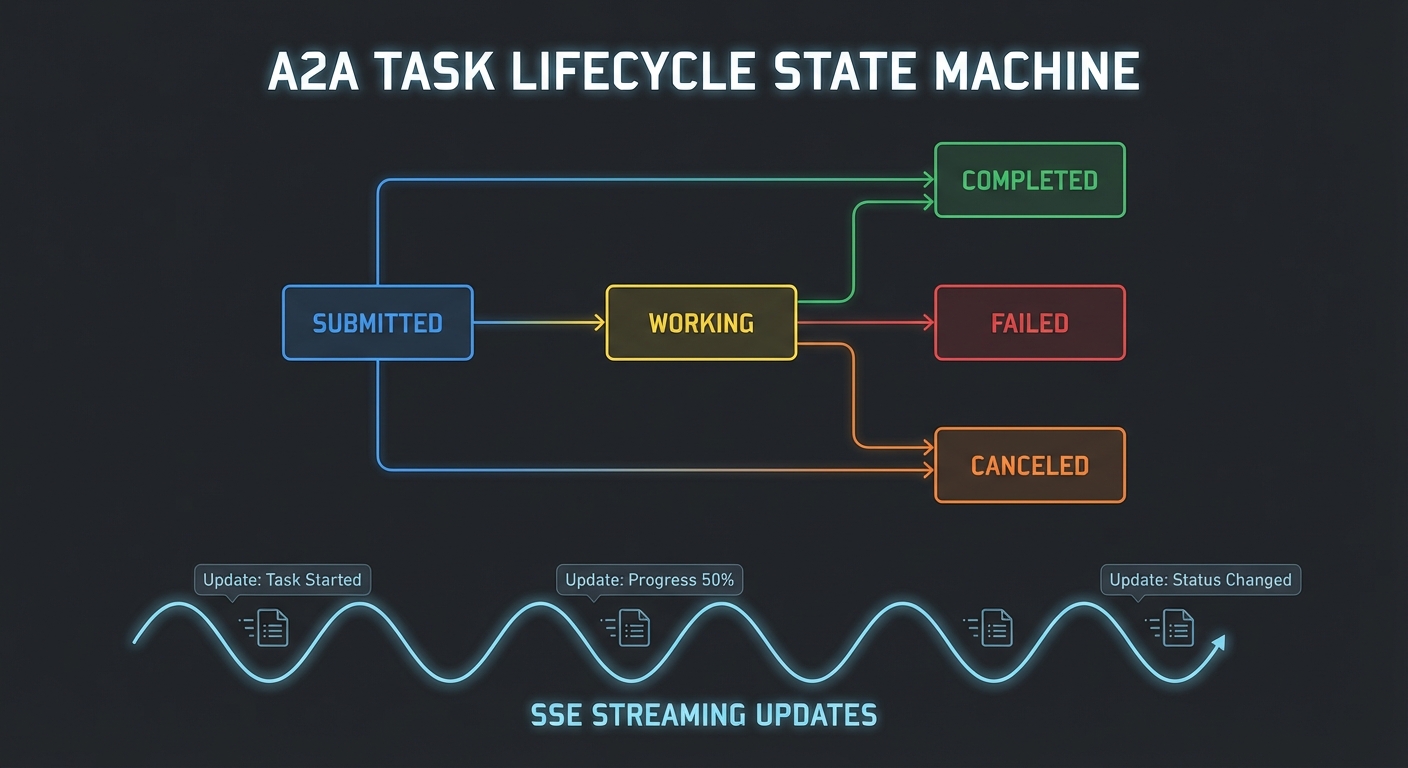
New in 2025-11-25 (experimental) – The Tasks API replaced older DIY polling patterns with a protocol-level state machine. The entire feature is experimental and may evolve in future spec versions.
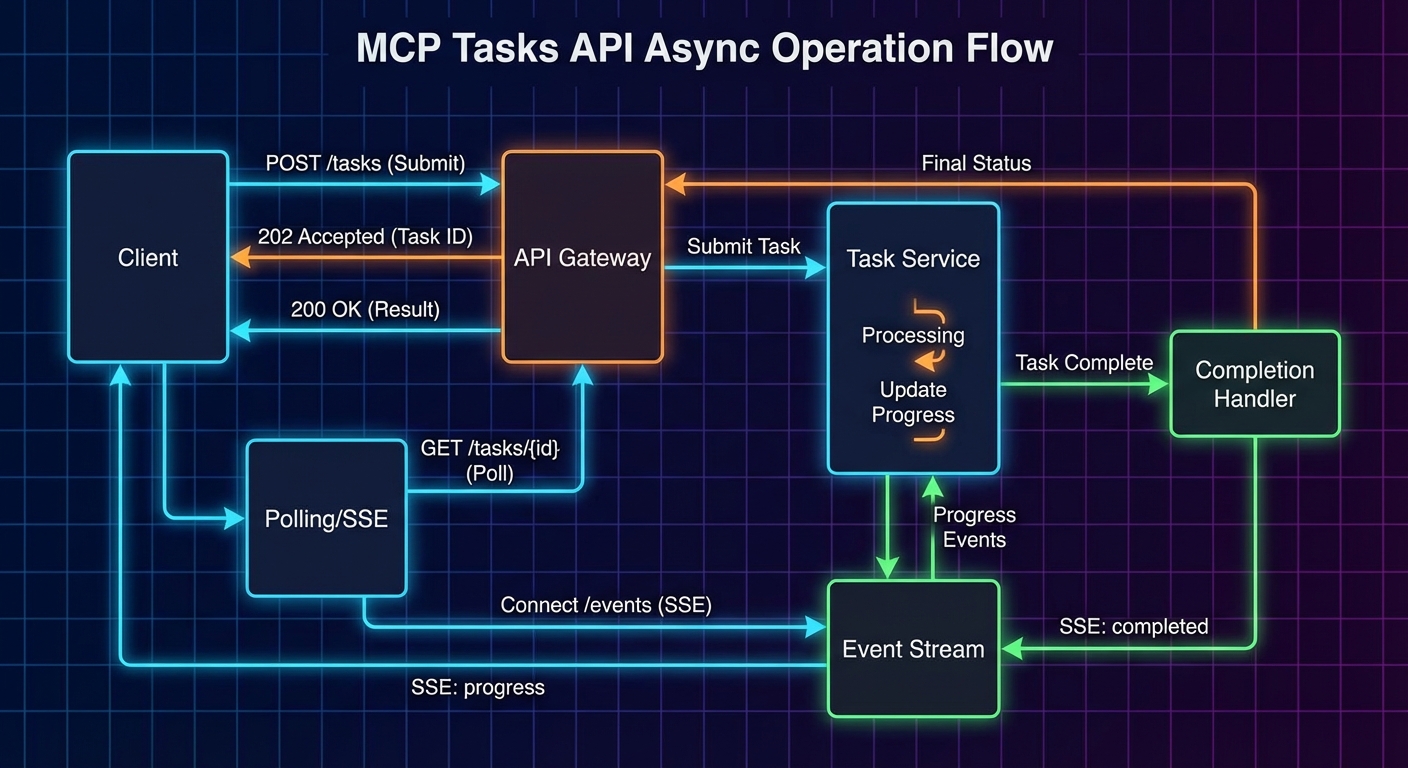
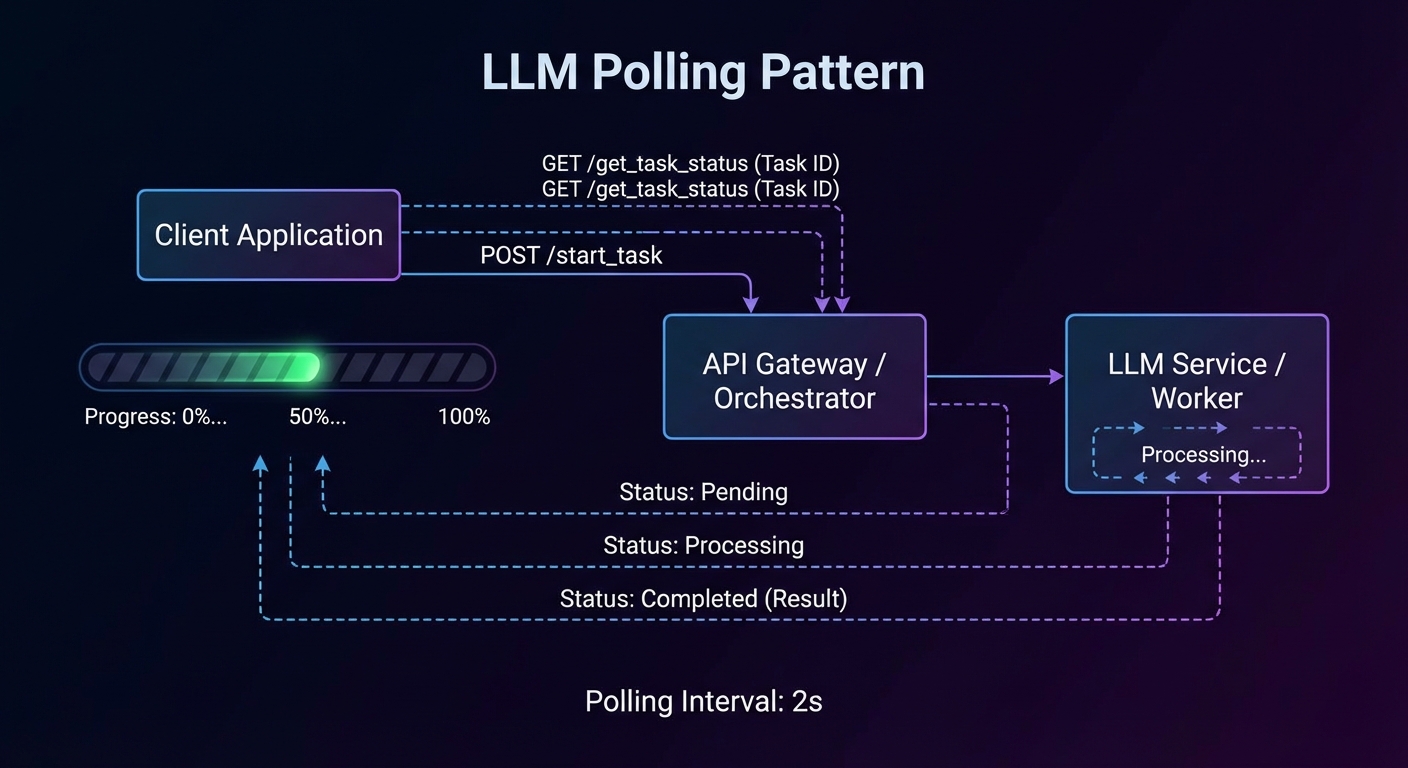
Most MCP tool calls complete in under a second: query a database, call an API, read a file. But some operations take minutes or hours: training a model, processing a large dataset, running a batch export, triggering a CI/CD pipeline. For these, a synchronous request-response model breaks down. The 2025-11-25 specification introduced the Tasks API – a protocol-level mechanism for durable, async request tracking. Instead of inventing your own “start_task + poll get_task_status” pattern (which every server implemented differently), the Tasks API provides a standard state machine, standard polling endpoints (tasks/get, tasks/list, tasks/cancel, tasks/result), and per-tool opt-in via execution.taskSupport.
When to Use Tasks vs Regular Tools
- Use regular tools for operations that complete in under 30 seconds. Keep them synchronous – the LLM waits for the result before proceeding.
- Use task-augmented tools for operations that take longer than 30 seconds, produce intermediate results the user or LLM can act on, or may fail partway through and need resumability.
Before the Tasks API, every server had to invent its own polling scheme (two tools, custom status fields, ad-hoc cancellation). The protocol-level approach standardises the state machine and the polling endpoints, so every client handles async the same way regardless of which server it talks to.
Task State Machine
Every task starts in the working state and follows a strict lifecycle. The three terminal states (completed, failed, cancelled) are irreversible – once a task reaches one of them, it cannot transition to any other state.
//  Task Status State Machine
//
//  [created] --> working --+--> completed (terminal)
//                 |    ^   +--> failed    (terminal)
//                 |    |   +--> cancelled (terminal)
//                 v    |
//           input_required
//
//  working --> input_required: server needs client input to proceed
//  input_required --> working: client provided the requested input
//  Any non-terminal --> cancelled: via tasks/cancel
The input_required state is for cases where the task cannot proceed without additional input from the client – for example, the server needs an MFA code or the user must approve an intermediate step. When the client sees input_required, it should call tasks/result to receive the pending request (an elicitation or sampling request), handle it, and allow the task to transition back to working.
Capability Negotiation
Both servers and clients declare task support during initialisation. The capabilities structure is organised by request type – a server declares which of its incoming request types (like tools/call) support task augmentation, and a client declares which of its incoming request types (like sampling/createMessage and elicitation/create) support it.
// Server capabilities: tasks supported for tools/call
{
  capabilities: {
    tasks: {
      list: {},                      // supports tasks/list
      cancel: {},                    // supports tasks/cancel
      requests: {
        tools: { call: {} },         // tools/call can be task-augmented
      },
    },
  },
}

// Client capabilities: tasks supported for sampling and elicitation
{
  capabilities: {
    tasks: {
      list: {},
      cancel: {},
      requests: {
        sampling: { createMessage: {} },    // sampling can be task-augmented
        elicitation: { create: {} },        // elicitation can be task-augmented
      },
    },
  },
}
If a server does not include tasks.requests.tools.call, clients MUST NOT attempt task augmentation on that server’s tools, regardless of per-tool settings.
Tool-Level Task Support
Individual tools declare their task support via execution.taskSupport in the tools/list response. This is a fine-grained layer on top of the server-level capability.
// In the tools/list response, each tool can declare task support
{
  name: 'generate_report',
  title: 'Generate Report',
  description: 'Generates a PDF report from analytics data. May take several minutes.',
  inputSchema: { /* ... */ },
  execution: {
    taskSupport: 'optional',   // 'forbidden' (default) | 'optional' | 'required'
  },
}
"forbidden"(default): the tool cannot be invoked as a task. If a client tries, the server returns error-32601."optional": the client may invoke the tool normally (synchronous) or as a task (async). Both work."required": the client MUST invoke the tool as a task. Synchronous invocation returns error-32601.
Creating a Task-Augmented Request
To invoke a tool as a task, the client includes a task field in the tools/call params. The server accepts the request immediately and returns a CreateTaskResult containing the task metadata – not the actual tool result.
// Client: send a task-augmented tools/call
const response = await client.request({
  method: 'tools/call',
  params: {
    name: 'generate_report',
    arguments: { reportType: 'quarterly', period: '2025-Q3' },
    task: {
      ttl: 300000,   // requested lifetime: 5 minutes
    },
  },
});

// Response is a CreateTaskResult, not the tool result
// {
//   task: {
//     taskId: '786512e2-9e0d-44bd-8f29-789f320fe840',
//     status: 'working',
//     statusMessage: 'Report generation started.',
//     createdAt: '2025-11-25T10:30:00Z',
//     lastUpdatedAt: '2025-11-25T10:30:00Z',
//     ttl: 300000,
//     pollInterval: 5000,
//   }
// }

const { taskId, pollInterval } = response.task;
The ttl (time-to-live in milliseconds) tells the server how long the client wants the task and its results to be retained. The server may override the requested TTL. After the TTL expires, the server may delete the task and its results regardless of status.
Polling With tasks/get
Clients poll for task status using tasks/get. The server returns the current task state including status, statusMessage, and a pollInterval suggestion. Clients SHOULD respect the pollInterval to avoid overwhelming the server.
// Client: poll until terminal status
async function pollTask(client, taskId, initialInterval = 5000) {
  let interval = initialInterval;

  while (true) {
    await new Promise(r => setTimeout(r, interval));

    const status = await client.request({
      method: 'tasks/get',
      params: { taskId },
    });

    console.log(`Task ${taskId}: ${status.status} - ${status.statusMessage ?? ''}`);

    if (['completed', 'failed', 'cancelled'].includes(status.status)) {
      return status;
    }

    if (status.status === 'input_required') {
      // The server needs input - call tasks/result to get the pending request
      return status;
    }

    // Respect the server's suggested poll interval
    if (status.pollInterval) {
      interval = status.pollInterval;
    }
  }
}
Retrieving Task Results
Once a task reaches a terminal status, the actual tool result is retrieved via tasks/result. This is distinct from tasks/get (which returns task metadata). The result has the same shape as a normal CallToolResult.
// Client: retrieve the actual tool result
const taskStatus = await pollTask(client, taskId);

if (taskStatus.status === 'completed') {
  const result = await client.request({
    method: 'tasks/result',
    params: { taskId },
  });

  // result is a CallToolResult: { content: [...], isError: false }
  console.log('Report ready:', result.content[0].text);
}

if (taskStatus.status === 'failed') {
  const result = await client.request({
    method: 'tasks/result',
    params: { taskId },
  });
  // result may contain an error description
  console.error('Task failed:', result.content?.[0]?.text);
}
If tasks/result is called while the task is still working, the server MUST block until the task reaches a terminal status and then return the result. This makes tasks/result a long-poll alternative to repeated tasks/get calls. However, clients SHOULD still poll with tasks/get in parallel if they want to display progress updates.
Listing and Cancelling Tasks
// List all tasks (paginated)
const listing = await client.request({
  method: 'tasks/list',
  params: { cursor: undefined },  // or a cursor from a previous response
});
// listing.tasks: array of Task objects
// listing.nextCursor: pagination token (if more tasks exist)

// Cancel a running task
try {
  const cancelled = await client.request({
    method: 'tasks/cancel',
    params: { taskId },
  });
  console.log(`Cancelled: ${cancelled.status}`);  // 'cancelled'
} catch (err) {
  // Error -32602 if the task is already in a terminal state
  console.error('Cannot cancel:', err.message);
}
Cancellation transitions the task to the cancelled terminal state. The server SHOULD attempt to stop the underlying work, but the task MUST be marked cancelled even if the underlying computation continues to run (best-effort cancellation). Clients SHOULD NOT rely on cancelled tasks being retained – retrieve any needed data before cancelling.
Status Notifications
Servers MAY send notifications/tasks/status when a task’s status changes. These are a convenience – clients MUST NOT rely on them for correctness, because notifications are optional and may be dropped. Always poll with tasks/get as the source of truth.
// Server: optionally notify the client of status changes
server.notification({
  method: 'notifications/tasks/status',
  params: {
    taskId: '786512e2-...',
    status: 'completed',
    statusMessage: 'Report generation finished.',
    createdAt: '2025-11-25T10:30:00Z',
    lastUpdatedAt: '2025-11-25T10:35:00Z',
    ttl: 300000,
    pollInterval: 5000,
  },
});
Client-Side Tasks: Sampling and Elicitation
Tasks are not server-only. Servers can also send task-augmented requests to the client for sampling/createMessage and elicitation/create. This is useful when a server initiates a sampling request that might take a long time (the client is calling an LLM), or an elicitation that requires the user to complete an out-of-band flow.
The pattern mirrors the server side: the server sends the request with a task field, the client accepts immediately with a CreateTaskResult, and the server polls the client’s tasks/get and tasks/result endpoints. The client declares which request types support this in its capabilities under tasks.requests.sampling.createMessage and tasks.requests.elicitation.create.
Task Metadata: Related Tasks
All requests, notifications, and responses related to a task MUST include io.modelcontextprotocol/related-task in their _meta field. This links sub-operations (like an elicitation triggered during a task-augmented tool call) back to the parent task.
// Elicitation triggered during a task-augmented tool call
// The _meta links it to the parent task
{
  method: 'elicitation/create',
  params: {
    message: 'Enter the MFA code to continue the deployment.',
    requestedSchema: { /* ... */ },
    _meta: {
      'io.modelcontextprotocol/related-task': {
        taskId: '786512e2-9e0d-44bd-8f29-789f320fe840',
      },
    },
  },
}
Server-Side Implementation Pattern
The SDK does not yet have high-level helpers for the Tasks API (it is experimental). In practice, you implement it by managing a task store, intercepting tool calls that include a task field, and exposing the tasks/* methods. Production systems should use Redis or a database so task state survives server restarts.
import crypto from 'node:crypto';

const taskStore = new Map();

// When a tools/call includes params.task, create a task entry and return immediately
function createTask(ttl = 60000) {
  const task = {
    taskId: crypto.randomUUID(),
    status: 'working',
    statusMessage: null,
    createdAt: new Date().toISOString(),
    lastUpdatedAt: new Date().toISOString(),
    ttl,
    pollInterval: 5000,
    _result: null,    // stored when complete
    _error: null,     // stored on failure
  };
  taskStore.set(task.taskId, task);
  return task;
}

function updateTask(taskId, updates) {
  const task = taskStore.get(taskId);
  if (!task) return;
  Object.assign(task, updates, { lastUpdatedAt: new Date().toISOString() });
}

// Clean up expired tasks
setInterval(() => {
  const now = Date.now();
  for (const [id, task] of taskStore) {
    const created = new Date(task.createdAt).getTime();
    if (task.ttl !== null && now - created > task.ttl) {
      taskStore.delete(id);
    }
  }
}, 60_000);
What to Check Right Now
- Audit your slow tools – any tool that regularly takes over 30 seconds is a candidate for
execution.taskSupport: 'optional'. - Check server capabilities – if you add task support, declare
tasks.requests.tools.callin your server capabilities. - Respect pollInterval – never hard-code a polling frequency. Always use the server’s suggested
pollIntervalfrom thetasks/getresponse. - Handle all terminal states –
completed,failed, andcancelledall need distinct handling in your polling loop. - Remember this is experimental – the Tasks API was introduced in 2025-11-25 and may change. Pin your implementation to the spec version and watch for updates.
nJoy 😉