Introduction: The Power of LSTMs
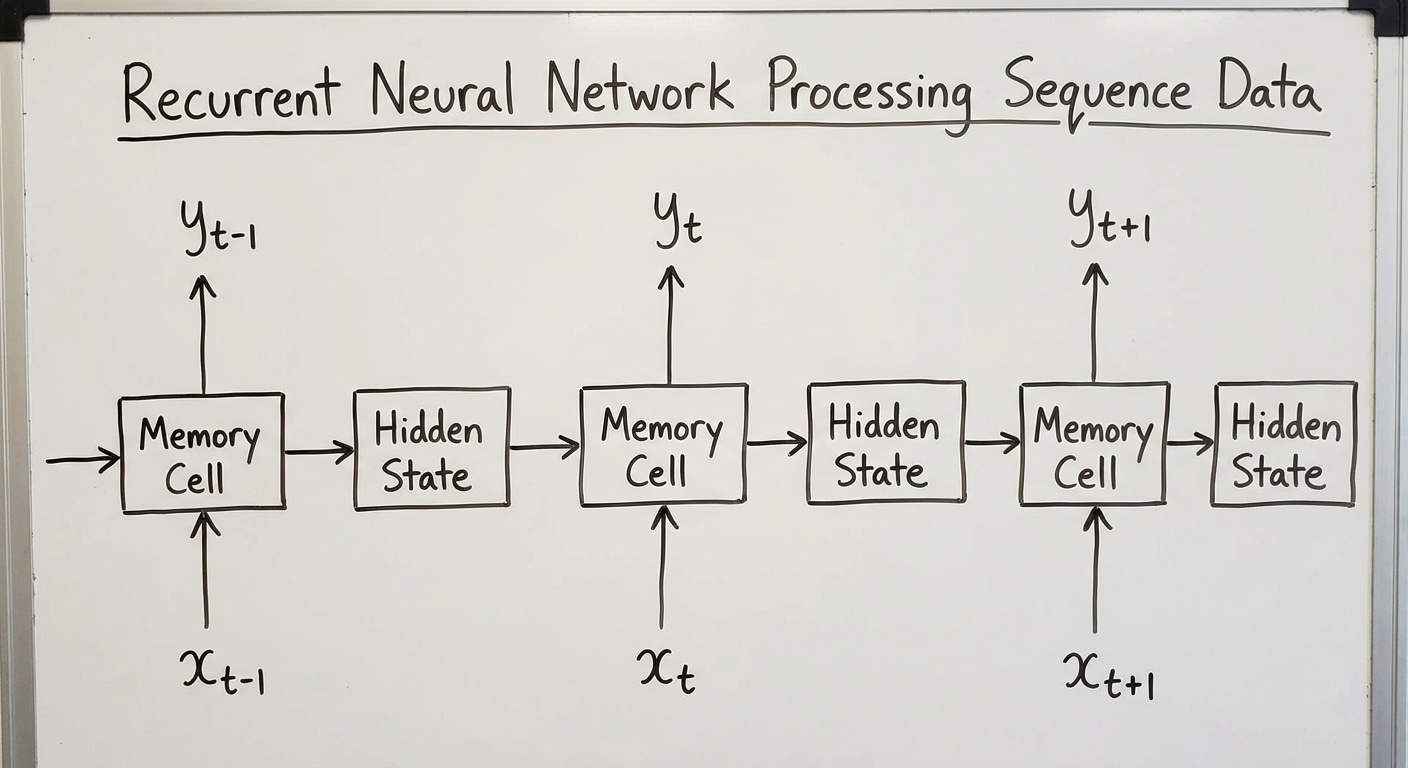
The Long Short-Term Memory (LSTM) network is a specialised kind of Recurrent Neural Network (RNN) architecture, designed specifically to solve the problem of vanishing gradients that plagues traditional RNNs when dealing with long sequences of data.
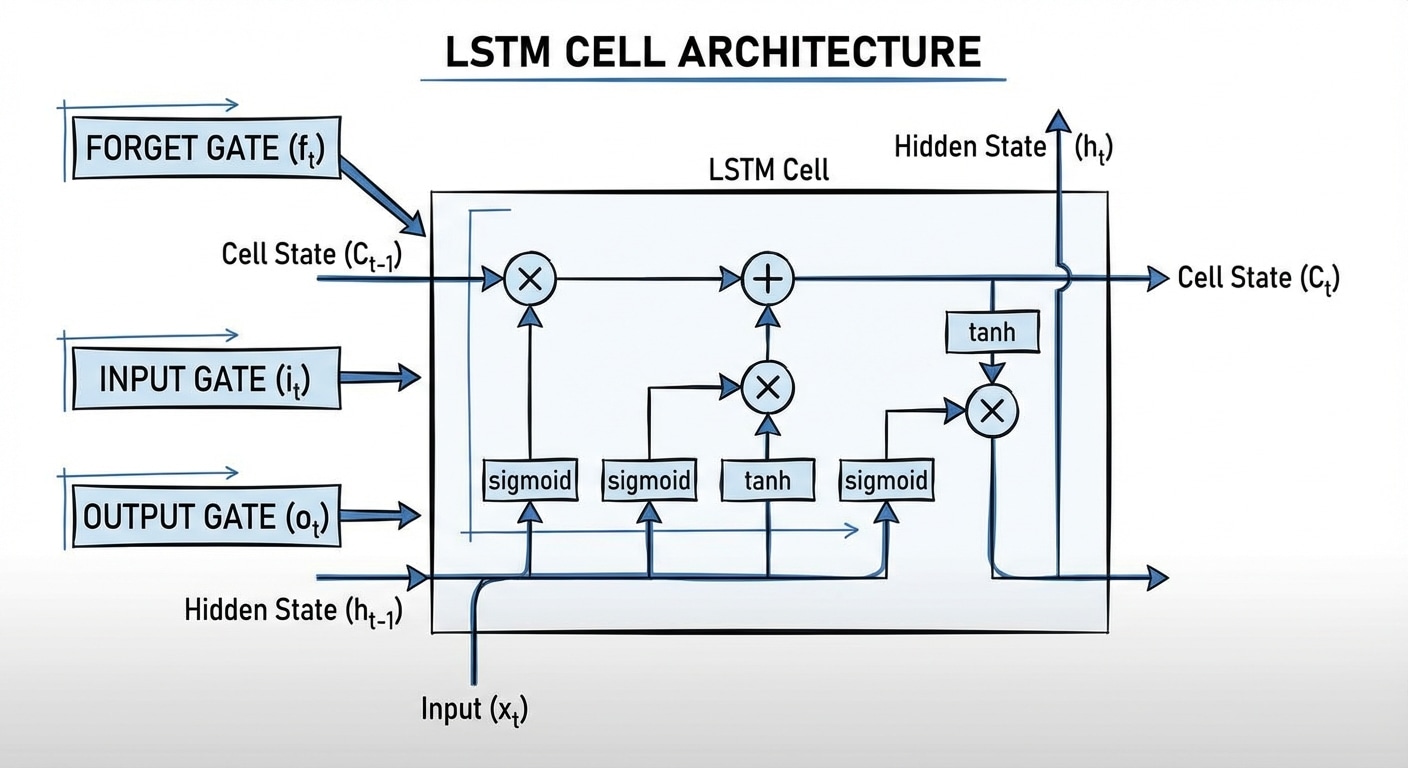
While standard RNNs struggle to retain information from many steps ago, LSTMs are engineered with a dedicated Cell State (Ct)—often called the “conveyor belt”—that runs straight through the network. This Cell State is regulated by three distinct, multiplicative gates (Forget, Input, and Output) that learn to selectively remember or forget information, allowing the network to capture and utilise long-term dependencies in sequential data like text, speech, and time series. The mathematical equations below illustrate how these gates precisely control the flow of both long-term memory (Ct) and short-term output (ht).
LSTM Cell Architecture Equations
This breakdown translates the LSTM diagram into its corresponding mathematical equations, showing exactly how the inputs (xt, ht-1, Ct-1) are processed to generate the outputs (ht, Ct).
The σ symbol represents the Sigmoid function, and W and b represent the weight matrices and bias vectors learned during training.
1. The Gates (Control)
The first step is calculating the three gates, each using the current input (xt) and the previous hidden state (ht-1) and applying a sigmoid function (σ):
A. Forget Gate (ft):
ft = σ(Wf · [ht-1, xt] + bf)
Purpose: Decides which information to forget from the old cell state (Ct-1).
B. Input Gate (it):
it = σ(Wi · [ht-1, xt] + bi)
Purpose: Decides which values to update in the cell state.
C. Candidate Cell State (ᶜt):
ᶜt = tanh(WC · [ht-1, xt] + bC)
Purpose: Creates a vector of potential new values that could be added to the cell state.
2. Cell State Update (The Memory)
The Cell State (Ct) is the core memory of the LSTM, updated by combining the old memory and the new candidate memory:
Ct = ft ∗ Ct-1 + it ∗ ᶜt
- The term
ft * Ct-1 implements the forgetting mechanism: the old memory Ct-1 is scaled down by the Forget Gate ft.
- The term
it * ᶜt implements the input mechanism: the new candidate information ᶜt is scaled by the Input Gate it.
- These two parts are then added to create the new long-term memory, Ct.
3. Hidden State Output (The Prediction)
The Hidden State (ht) is the final output of the cell at this time step. It is based on the new Cell State, filtered by the Output Gate:
A. Output Gate (ot):
ot = σ(Wo · [ht-1, xt] + bo)
Purpose: Decides which parts of the (squashed) Cell State will be exposed as the Hidden State.
B. Final Hidden State (ht):
ht = ot ∗ tanh(Ct)
- The new Cell State Ct is passed through
tanh to bound the values between -1 and 1.
- The result is then element-wise multiplied by the Output Gate ot to produce the final short-term memory and output vector, ht.
Conclusion: The Importance of Selective Memory
The LSTM architecture, as described by these equations, fundamentally improved the capability of recurrent neural networks to model complex dependencies over long sequences. By using three learned, multiplicative gates to regulate the flow into and out of the Cell State, the LSTM is able to maintain a stable, uncorrupted memory path, overcoming the practical limitations of standard RNNs.
This innovation has made LSTMs essential tools in areas requiring deep contextual understanding, leading to breakthroughs in speech recognition, machine translation, and text generation, before the wider adoption of the Transformer architecture.
Next Steps
Interested in a simpler alternative? Check out the GRU (Gated Recurrent Unit), which combines the forget and input gates into a single update gate—achieving similar performance with fewer parameters. For cutting-edge sequence modeling, explore how Transformers use attention mechanisms to process entire sequences in parallel, bypassing recurrence altogether.