Continuous Batching: Why Your AI API Is Faster Than You Think

Traditional batch inference works like a bus: you wait until every passenger (request) is ready, then you run one big forward pass. When requests have different lengths or finish at different times, the bus still waits for the slowest. That wastes GPU time and inflates latency. Continuous batching fixes that by treating the batch as fluid: new requests join as soon as there’s room, and requests leave as soon as they’ve produced their next token. So at each step you’re decoding for a set of “active” sequences, not a fixed batch. Throughput goes up and tail latency goes down.

Under the hood, the server maintains a batch of in-flight sequences. Each step: run one decode for every sequence in the batch, append the new token to each, check for EOS or stop conditions, remove finished sequences, and add new ones from the queue. The batch shape changes every step. That requires dynamic shapes and careful memory handling, which is where PagedAttention and similar schemes help. vLLM and TGI both use continuous batching; it’s a big reason they can serve many users at once without turning into a queue.

For you as a user of an API, it means the server isn’t waiting for other people’s long answers before starting yours. For you as an operator, it means the GPU stays busy and you can set tighter latency targets.

The only downside is implementation complexity and the need for kernels that support variable-length batches. Once that’s in place, continuous batching is the default for any serious serving setup.

Expect continuous batching to become the norm everywhere; the next improvements will be around prioritisation, fairness, and better memory reuse.

nJoy πŸ˜‰

The Inference Framework Showdown: vLLM vs TGI vs Ollama vs llama.cpp

There are four main ways to run LLM inference today, each aimed at a different use case. vLLM is the performance king for multi-user APIs: PagedAttention, continuous batching, and an OpenAI-compatible server. You run it on a GPU server, point clients at it, and scale by adding more replicas. Hugging Face Text Generation Inference (TGI) is in the same league, also batching and an API, with strong support for Hugging Face models and built-in tooling. Choose vLLM when you want maximum throughput and flexibility; choose TGI when you’re already in the HF ecosystem and want a one-command deploy.

Ollama is the “just run it” option on a Mac or PC. You install one binary, run ollama run llama3, and get a local chat and an API. It handles model download, quantization, and a simple server. No batching to speak of, it’s one request at a time, but for dev and personal use that’s fine. llama.cpp is the library underneath many local runners: C++, CPU and GPU, minimal dependencies, and the reference for quantization (GGUF, Q4_K_M, etc.). You use llama.cpp when you’re embedding inference in an app or need maximum control and portability.

Rough rule of thumb: API product or multi-user service β†’ vLLM or TGI. Local tinkering and demos β†’ Ollama. Custom app, embedded, or research β†’ llama.cpp.

The landscape is still moving: new entrants, mergers of ideas (e.g. speculative decoding everywhere), and more focus on latency and cost. Picking one stack now doesn’t lock you in forever, but understanding the tradeoffs helps you ship without over-engineering or under-provisioning.

nJoy πŸ˜‰

vLLM and PagedAttention β€” The Architecture That Scaled AI APIs

Early LLM APIs hit a wall: GPUs had plenty of compute, but memory for the “KV cache”, the key and value tensors that attention uses for long contexts, fragmented and wasted space. Different requests had different sequence lengths, so pre-allocating a block per request either ran out of memory or left big holes. vLLM’s insight was to borrow an idea from operating systems: paging. Treat the KV cache as a heap of fixed-size blocks and allocate only what each request actually needs. That one change drove huge gains in throughput and made long-context serving practical.

PagedAttention works like virtual memory. The logical KV cache for a sequence is split into blocks. A request allocates blocks as it generates; when the request ends, blocks go back to a pool. No more worst-case allocation per request, and no fragmentation in the same way. The attention kernel then has to gather from these non-contiguous blocks, which vLLM does efficiently. The result is that you can pack many more concurrent requests onto one GPU, and latency stays predictable.

The rest of vLLM is built around this: continuous batching (add new requests and decode steps as they’re ready), CUDA graphs and custom kernels to reduce overhead, and an OpenAI-compatible API so existing clients and apps work. It’s open source and has become the default choice for many teams serving Llama, Mistral, and similar models in production.

You do pay a small cost: the gather step and block management add some complexity and a bit of overhead compared to a single-request path. For short, single-user use cases, a simpler engine might be fine. For multi-tenant APIs and high utilisation, PagedAttention is what makes the numbers work.

Expect more variants: different block sizes, eviction policies for “infinite” context, and tighter integration with quantized and speculative decoding.

nJoy πŸ˜‰

How LLMs Actually Run: From Model Weights to Tokens

When you type a prompt and hit enter, you’re not “asking a brain”, you’re running a gigantic math function. That function is defined by hundreds of millions or billions of parameters (the “weights”) stored in a model file. Understanding that one idea clears up a lot of confusion about why LLMs need so much memory, why they’re deterministic at a fixed temperature, and why “thinking” is just more matrix multiplications.

Think of the weights as a fixed recipe. The recipe never changes during one run. The only thing that changes is the input you feed in: the sequence of token IDs representing your text. Each token is a small integer (e.g. 0 to 50,257 in GPT-2). The model looks up an “embedding” vector for each token, runs those vectors through dozens of transformer layers (attention and feed-forward steps), and at the end it has a vector of scores, one per possible next token. Sampling from those scores gives the next token; that token gets appended and the process repeats. So “generation” is a loop: embed β†’ transform β†’ score β†’ sample β†’ append β†’ repeat.

Under the hood, each layer is doing the same kind of linear algebra: matrix multiplies, softmax for attention, layer norms. The weights are just big matrices. Inference is a single forward pass per new token, with no gradient computation. That’s why it’s cheaper than training, but still compute-heavy: you’re still doing billions of multiply-adds per token for a 7B model.

The practical implications are everywhere. Bigger models need more VRAM because the weight matrices must fit in memory. Quantization helps by storing weights in lower precision (e.g. 4-bit instead of 16-bit), which trades a bit of quality for a lot less memory and faster math. Serving at scale is mostly about batching these forward passes and keeping the GPU busy.

We’re still in the early phase of making this pipeline efficient: better kernels, smarter batching, and distillation will keep pushing what’s possible on a single machine or a small cluster.

nJoy πŸ˜‰

Ichimoku Cloud Trading Strategy – Complete Course

Ichimoku Trading Course
A complete 10-part Python trading course

Ichimoku Cloud + EMA Trading Strategy

A comprehensive 10-part course teaching you to build, backtest, and optimise an algorithmic trading strategy combining Ichimoku Cloud with EMA trend filtering.

Course Highlights

  • Timeframe: 4-Hour Charts
  • Expected Returns: 28-43% annually (backtested)
  • Win Rate: 53-69%
  • Language: Python

Course Contents

Part Title Topics
1 Introduction Strategy overview, expected results, why it works
2 The Five Components Tenkan, Kijun, Senkou Spans, Chikou explained
3 The Kumo Cloud Bullish/bearish clouds, avoiding look-ahead bias
4 EMA Trend Filter 100-period filter rules, code implementation
5 Entry Signals Cloud pierce conditions, combining filters
6 Trade Management ATR-based SL/TP, risk-reward optimisation
7 Backtesting Setup Python environment, data fetching
8 Strategy Class backtesting.py implementation
9 Optimisation Grid search, heat maps, multi-asset testing
10 Results & Next Steps Final analysis, deployment options

Prerequisites

  • Basic Python knowledge
  • Understanding of candlestick charts
  • Familiarity with trading concepts (SL, TP, R:R)

What You Will Learn

  • Build a complete algorithmic trading strategy
  • Avoid common backtesting pitfalls (look-ahead bias)
  • Optimise parameters systematically
  • Deploy strategies as signal generators

Source Materials

Start the Course →

Results Analysis and Next Steps

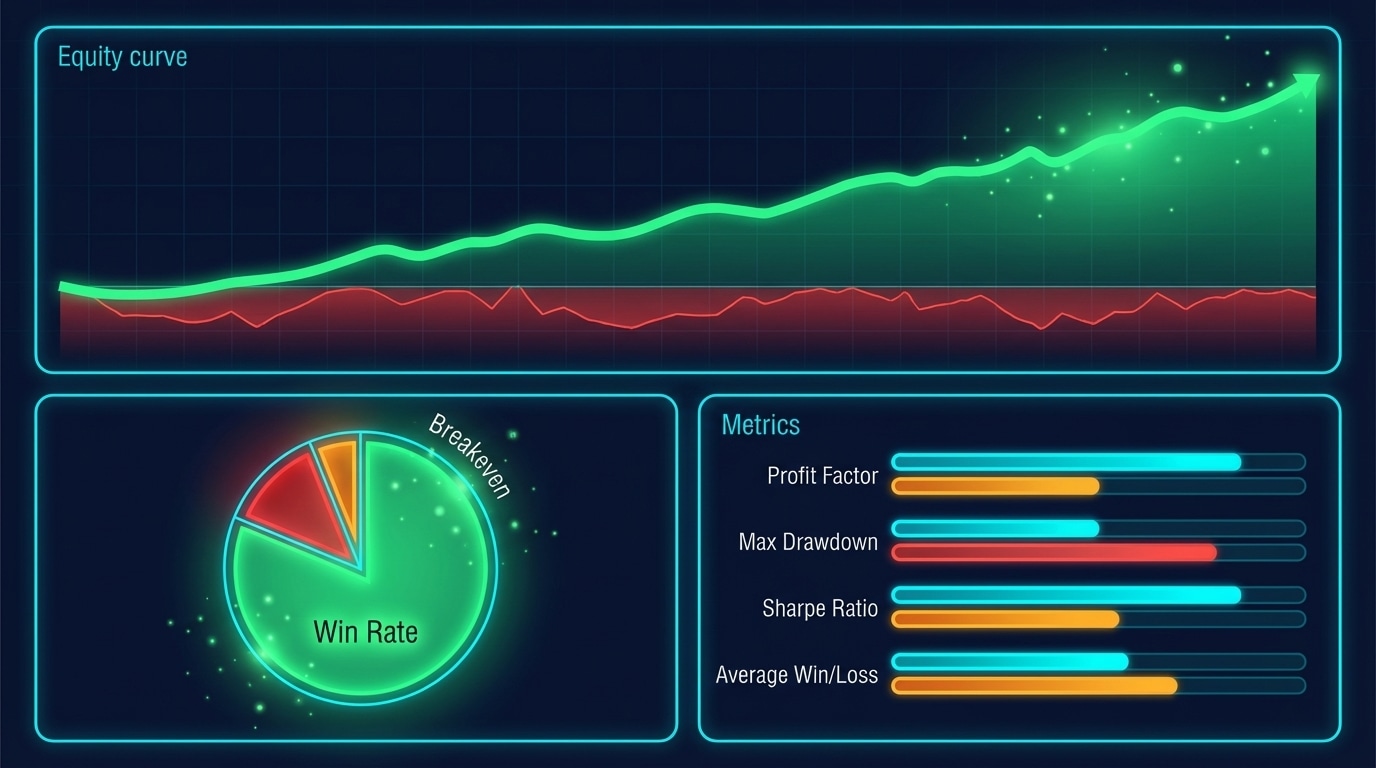
Trading Results Dashboard
Final backtest results showing consistent profitability across multiple metrics

Ichimoku Trading Series: Part 10 of 10 (Final) | ← Previous | View Full Series

Final Backtest Results

Single Asset (USDCHF) – Optimised Parameters

Metric Value
Annual Return 43%
Buy & Hold -5.7%
Win Rate 69%
Max Drawdown -21% (with leverage)
Sharpe Ratio 1.38
Trades 13

Without Leverage

Metric Value
Annual Return ~4%
Max Drawdown -2%
Sharpe Ratio Higher

Multi-Asset Summary

Symbol Return [%] MaxDD [%] Win Rate [%] Trades
EURUSD=X 28.5 -6.3 53.8 15
USDJPY=X 35.2 -8.1 61.5 13
GBPUSD=X 22.1 -7.2 50.0 14
USDCHF=X 43.0 -6.0 69.2 13
AVERAGE 32.2 -6.9 58.6 14

Key Insights

1. The Strategy is SELECTIVE

“Only one issue is that we have only 13 trades in here and that is the main weak point of this strategy. It is very selective.”

This is actually a feature:

  • Fewer trades = lower commission costs
  • Each trade has high conviction
  • Manageable for manual oversight

2. Better for Trending Markets

“I do not think Forex is the best place to test this strategy… It works better on stocks, especially winning stocks.”

The strategy excels when:

  • Markets have clear trends
  • Retracements to cloud are clean
  • Less choppy price action

3. Best as a Signal Generator

“Ideally, we would deploy this strategy online live, but it will not trade on its own. It will actually send you signals… emails or notifications whenever the pattern is there and then you can jump in.”

The 4-hour timeframe means:

  • No rush to enter
  • Time to verify setup manually
  • Filter out borderline signals

Recommended Deployment

Option 1: Alert System

Strategy runs on server → Detects signal → Sends email/Telegram alert → You verify and enter manually

Option 2: Semi-Automated

Strategy generates signal → Places order with your manual approval → Manages SL/TP automatically

Ideas for Improvement

1. Filter Long Candles

“It would be good to add one additional filter where if candles are way too long, we are going to discard the signal because we want to squeeze the best risk-reward ratio.”

# Reject signals where entry candle is too large
max_candle_atr = 1.5
candle_range = abs(df["Close"] - df["Open"])
valid_entry = candle_range < (df["ATR"] * max_candle_atr)

2. Add Volume Confirmation

Higher volume on the bounce confirms institutional interest.

3. Multiple Timeframe Analysis

Use daily chart for trend, 4H for entry.

4. Asset-Specific Optimisation

Each instrument has different optimal parameters.

Final Thoughts

This Ichimoku + EMA strategy provides:

  • ✔ Clear, mechanical rules
  • ✔ Trend-following with retracement entries
  • ✔ Proper risk management
  • ✔ Realistic backtesting (no look-ahead bias)

The 28-43% returns with controlled drawdowns make this a solid addition to any trader toolkit.

Download & Experiment

Full Code: GitHub – Ichimoku_Trend

“You can download the code, tweak the parameters, and test the strategy on different assets.”

🎉 Congratulations! You have completed the Ichimoku Cloud Trading Strategy course. Return to Series Index

Parameter Optimization

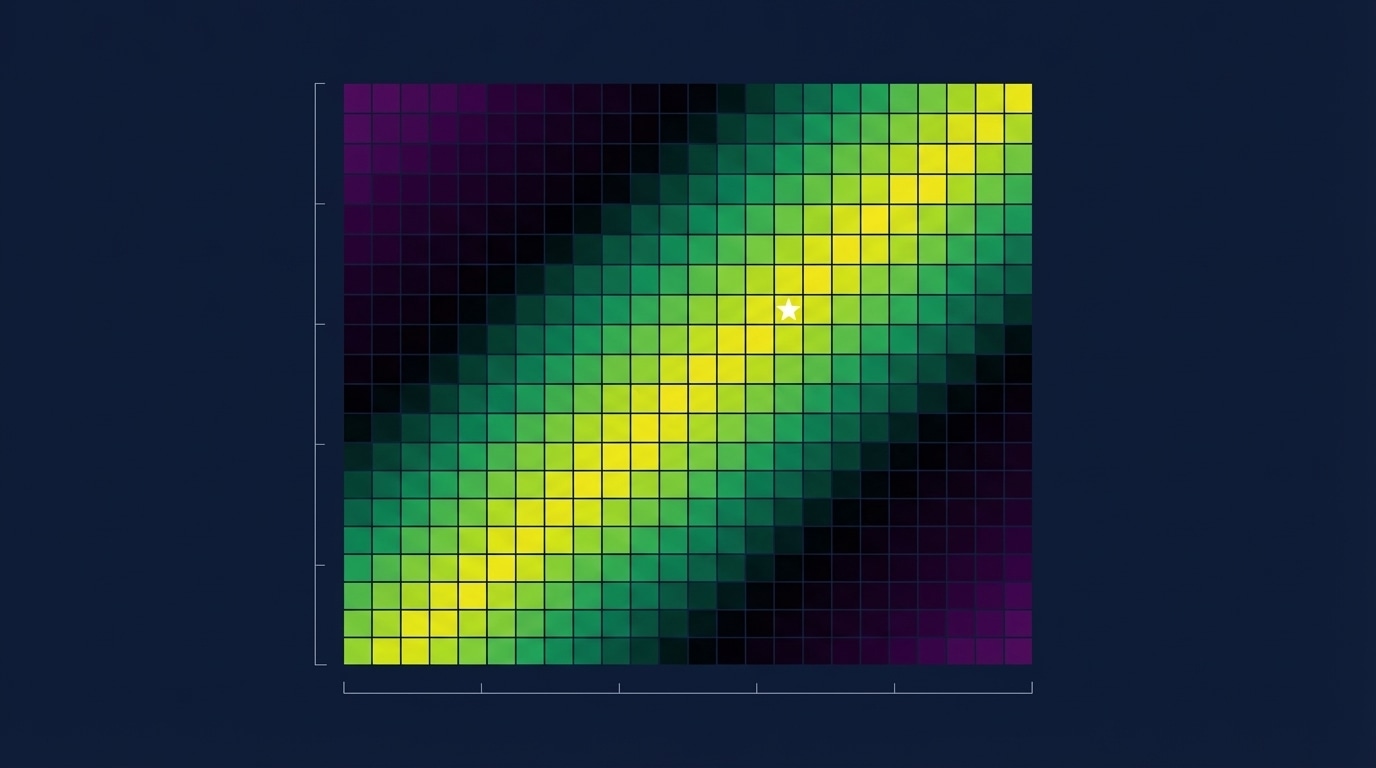
Parameter Optimisation Heat Map
Heat map visualisation showing optimal parameter combinations

Ichimoku Trading Series: Part 9 of 10 | ← Previous | View Full Series

The Optimisation Challenge

We have two key parameters to tune:

  1. ATR Multiplier (stop-loss distance)
  2. Risk-Reward Multiplier (take-profit distance)

Grid Search Approach

# Parameter ranges
atr_range = np.arange(1.0, 2.5, 0.1)  # 1.0 to 2.4
rr_range  = np.arange(1.0, 3.0, 0.1)  # 1.0 to 2.9

# Run optimization
stats, heatmap = bt.optimize(
    atr_mult_sl=atr_range,
    rr_mult_tp=rr_range,
    maximize="Return [%]",
    constraint=lambda param: param.rr_mult_tp >= 1,
    return_heatmap=True
)

Multi-Asset Testing

Test across multiple instruments to ensure robustness:

SYMBOLS = [
    "EURUSD=X", "USDJPY=X", "GBPUSD=X", 
    "AUDUSD=X", "USDCHF=X", "USDCAD=X", "NZDUSD=X"
]

def run_all_assets(symbols, start, end, interval, cash, commission):
    rows = []
    for sym in symbols:
        try:
            stats, _, _ = run_backtest(
                symbol=sym, start=start, end=end, 
                interval=interval, cash=cash, commission=commission,
                show_plot=False
            )
            rows.append({
                "Symbol": sym,
                "Return [%]": stats.get("Return [%]"),
                "MaxDD [%]": stats.get("Max. Drawdown [%]"),
                "Win Rate [%]": stats.get("Win Rate [%]"),
                "Trades": stats.get("# Trades"),
            })
        except Exception as e:
            print(f"Warning {sym}: {e}")
    
    return pd.DataFrame(rows)

summary = run_all_assets(SYMBOLS, START, END, INTERVAL, CASH, COMMISSION)
print(summary)

Understanding the Heat Map

The optimisation produces a heat map showing returns for each parameter combination.

Key Pattern: The Diagonal

“Notice those ridges, those clusters of returns… It is showing this decreasing slope. And this is totally normal.”

Why the diagonal?

  • High ATR multiplier = wider stop-loss → needs lower R:R
  • Low ATR multiplier = tighter stop-loss → can use higher R:R

“Either you have a high stop-loss distance and a low risk-reward ratio, OR you have a low ATR multiplier and a high risk-reward ratio — which actually is working the best for this strategy.”

Optimal Zone

ATR Mult RR Mult Expected Return
1.0-1.3 2.5-2.9 35-43%
1.4-1.7 1.8-2.2 25-35%
1.8-2.4 1.0-1.5 15-25%

Heat Map Visualisation Code

import plotly.express as px

def plot_heatmap(heat, metric_name="Return [%]", min_return=10):
    """Plot optimization heatmap with threshold filtering."""
    
    # Pivot to matrix form
    zdf = heat.pivot(index="atr_mult_sl", columns="rr_mult_tp", values=metric_name)
    
    # Create heatmap
    fig = px.imshow(
        zdf.values,
        x=zdf.columns,
        y=zdf.index,
        color_continuous_scale="Viridis",
        labels=dict(x="RR Multiplier", y="ATR Multiplier", color=metric_name),
        title=f"Optimization Heatmap - {metric_name}"
    )
    
    return fig

Avoiding Overfitting

  • Test on multiple assets, not just one
  • Use walk-forward analysis
  • Look for robust parameter zones, not single optimal points
  • Consider the diagonal pattern — many combinations work

Coming Up Next: Optimisation complete — let us analyse what we found and draw conclusions in our final part. Continue to Part 10 →

Building the Strategy Class

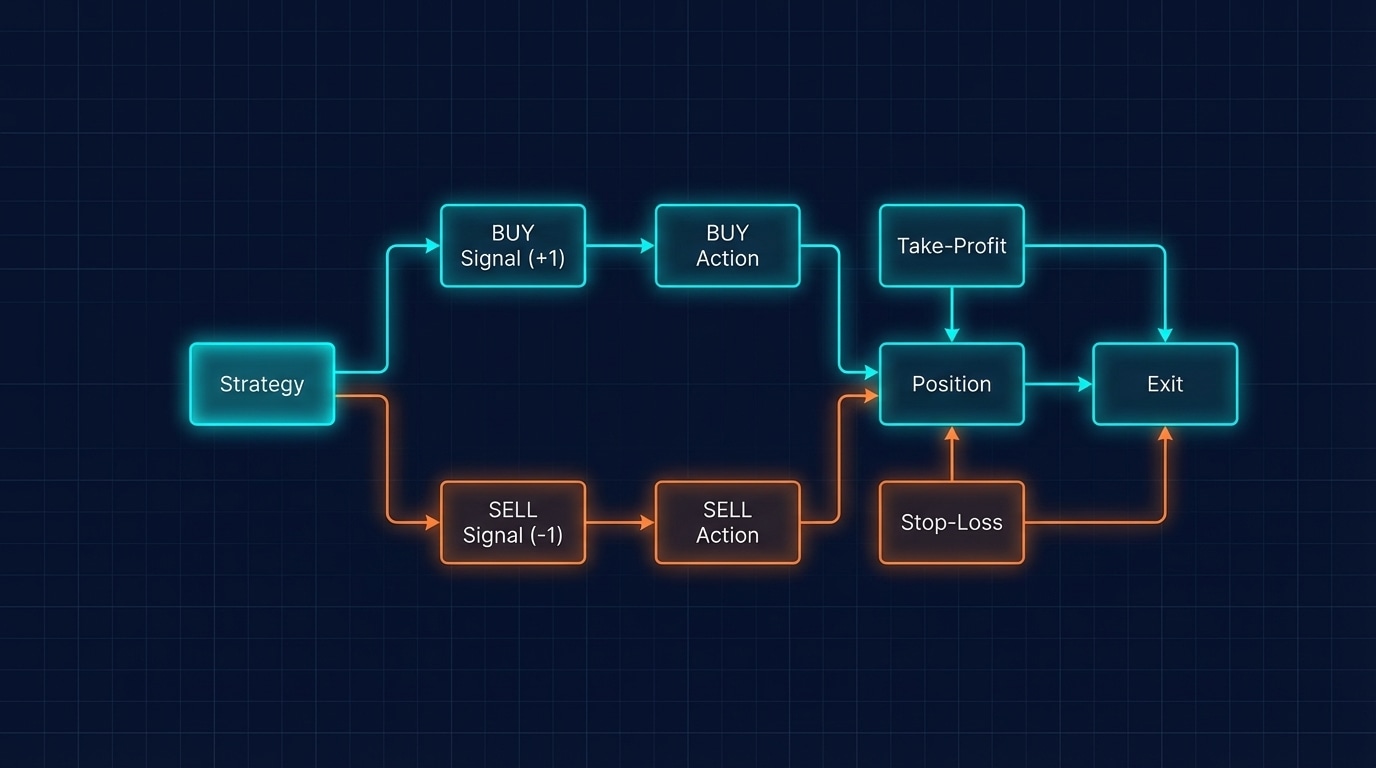
Strategy Class Architecture
The Strategy class handles signal processing and position management

Ichimoku Trading Series: Part 8 of 10 | ← Previous | View Full Series

The backtesting.py Framework

The backtesting library uses a class-based approach where:

  • init() runs once at the start
  • next() runs on every candle

Complete Strategy Class

from backtesting import Strategy

class SignalStrategy(Strategy):
    """
    Ichimoku + EMA trend-following strategy.
    
    Entry: Pre-computed signal column (+1 long, -1 short)
    Exit: ATR-based SL and RR-based TP
    """
    
    # Class-level parameters (can be optimized)
    atr_mult_sl: float = 1.5   # SL distance = ATR x this
    rr_mult_tp:  float = 2.0   # TP distance = SL x this
    
    def init(self):
        """Initialize indicators (we pre-compute, so nothing needed here)."""
        pass
    
    def next(self):
        """Called on every bar. Check for signals and manage positions."""
        i = -1  # Current bar
        signal = int(self.data.signal[i])   # +1 long, -1 short, 0 none
        close  = float(self.data.Close[i])
        atr    = float(self.data.ATR[i])
        
        # Safety check
        if not (atr > 0):
            return
        
        # --- Manage open trades ---
        if self.position:
            # Let SL/TP handle exits automatically
            return
        
        # --- New entry logic ---
        sl_dist = atr * self.atr_mult_sl
        tp_dist = sl_dist * self.rr_mult_tp
        
        if signal == 1:  # LONG entry
            sl = close - sl_dist
            tp = close + tp_dist
            self.buy(size=0.99, sl=sl, tp=tp)
        
        elif signal == -1:  # SHORT entry
            sl = close + sl_dist
            tp = close - tp_dist
            self.sell(size=0.99, sl=sl, tp=tp)

Key Design Decisions

1. Pre-Computed Signals

We calculate signals BEFORE backtesting (in pandas), then the strategy just reads them. This is cleaner and faster.

2. Position Check

if self.position:
    return

We do not stack trades — one position at a time.

3. Size = 0.99

self.buy(size=0.99, sl=sl, tp=tp)

Using 99% of available equity leaves room for rounding.

Running the Backtest

def run_backtest(symbol, start, end, interval, cash, commission, show_plot=True):
    # Prepare data
    df = fetch_data(symbol, start, end, interval)
    df = add_ichimoku(df)
    df["EMA"] = ta.ema(df.Close, length=100)
    df = MovingAverageSignal(df, back_candles=7)
    df = createSignals(df, lookback_window=10, min_confirm=7)
    df = df.dropna()
    
    # Create backtest
    bt = Backtest(
        df,
        SignalStrategy,
        cash=cash,
        commission=commission,
        trade_on_close=True,
        exclusive_orders=True,
        margin=1/10,  # 10x leverage
    )
    
    # Run and display results
    stats = bt.run()
    print(f"n=== {symbol} Signal Strategy ===")
    print(stats)
    
    if show_plot:
        bt.plot(open_browser=False)
    
    return stats, df, bt

# Execute
stats, df, bt = run_backtest(
    symbol="USDCHF=X",
    start="2023-10-01",
    end="2024-10-01", 
    interval="4h",
    cash=1_000_000,
    commission=0.0002
)

Example Output

=== USDCHF=X Signal Strategy ===
Return [%]                     28.5
Sharpe Ratio                    1.02
Max. Drawdown [%]              -6.3
Avg. Drawdown [%]              -3.7
Win Rate [%]                   53.8
# Trades                         13
Exposure Time [%]              42.1

Coming Up Next: Our strategy is coded — now let us optimise parameters using grid search and visualise results with heat maps. Continue to Part 9 →

Python Backtesting Setup

Python Backtesting Setup
Setting up the Python environment for algorithmic trading backtests

Ichimoku Trading Series: Part 7 of 10 | ← Previous | View Full Series

Required Libraries

from __future__ import annotations
import warnings
warnings.filterwarnings("ignore", category=FutureWarning)

import numpy as np
import pandas as pd
import pandas_ta as ta        # Technical analysis
import yfinance as yf         # Free market data
from backtesting import Backtest, Strategy

Installation

pip install numpy pandas pandas-ta yfinance backtesting plotly

Fetching Market Data

def fetch_data(symbol: str, start: str, end: str, interval: str) -> pd.DataFrame:
    """
    Fetch OHLCV data from Yahoo Finance.
    
    Parameters:
    - symbol: "EURUSD=X", "AAPL", "BTC-USD", etc.
    - start/end: "2023-01-01" format
    - interval: "1h", "4h", "1d"
    """
    df = yf.download(symbol, start=start, end=end, interval=interval,
                     auto_adjust=True, progress=False, threads=False)
    
    if df.empty:
        raise ValueError(f"No data returned for {symbol}")
    
    # Handle MultiIndex columns (newer yfinance versions)
    if isinstance(df.columns, pd.MultiIndex):
        df = df.xs(symbol, axis=1, level=1)
    
    # Standardize column names
    df.columns = [c.title() for c in df.columns]
    return df.dropna()

Adding Ichimoku Indicators

def add_ichimoku(df: pd.DataFrame,
                 tenkan: int = 9,
                 kijun: int = 26,
                 senkou_b: int = 52) -> pd.DataFrame:
    """
    Build bias-safe Ichimoku columns for SIGNAL logic.
    - Raw spans (no forward shift) to avoid look-ahead bias
    """
    out = df.copy()
    h, l, c = out["High"], out["Low"], out["Close"]
    
    # Compute lines manually (bias-free)
    tenkan_series = (h.rolling(tenkan).max() + l.rolling(tenkan).min()) / 2.0
    kijun_series  = (h.rolling(kijun).max() + l.rolling(kijun).min()) / 2.0
    
    # Raw spans (NO forward shift!)
    span_a_raw = (tenkan_series + kijun_series) / 2.0
    span_b_raw = (h.rolling(senkou_b).max() + l.rolling(senkou_b).min()) / 2.0
    
    out["ich_tenkan"] = tenkan_series
    out["ich_kijun"]  = kijun_series
    out["ich_spanA"]  = span_a_raw
    out["ich_spanB"]  = span_b_raw
    
    # Add ATR for trade management
    out["ATR"] = ta.atr(out["High"], out["Low"], out["Close"], length=14)
    
    # Add EMA for trend filter
    out["EMA"] = ta.ema(out["Close"], length=100)
    
    # Drop warmup NaNs
    return out.dropna()

Putting It Together

# Configuration
SYMBOL   = "EURUSD=X"
START    = "2023-10-01"
END      = "2024-10-01"
INTERVAL = "4h"
CASH     = 100_000
COMMISSION = 0.0002  # 0.02%

# Fetch and prepare data
df = fetch_data(SYMBOL, START, END, INTERVAL)
df = add_ichimoku(df)
df = MovingAverageSignal(df, back_candles=7)
df = createSignals(df, lookback_window=10, min_confirm=7)
df = df.dropna()

print(f"Data shape: {df.shape}")
print(df.tail())

Data Verification

Your DataFrame should now have these columns:

Open, High, Low, Close, Volume,
ich_tenkan, ich_kijun, ich_spanA, ich_spanB,
ATR, EMA, EMA_signal, signal

Coming Up Next: With data flowing, let us build our Strategy class that the backtester will execute. Continue to Part 8 →

Trade Management with ATR

ATR-Based Trade Management
ATR-based stop-loss and take-profit levels adapt to market volatility

Ichimoku Trading Series: Part 6 of 10 | ← Previous | View Full Series

ATR-Based Risk Management

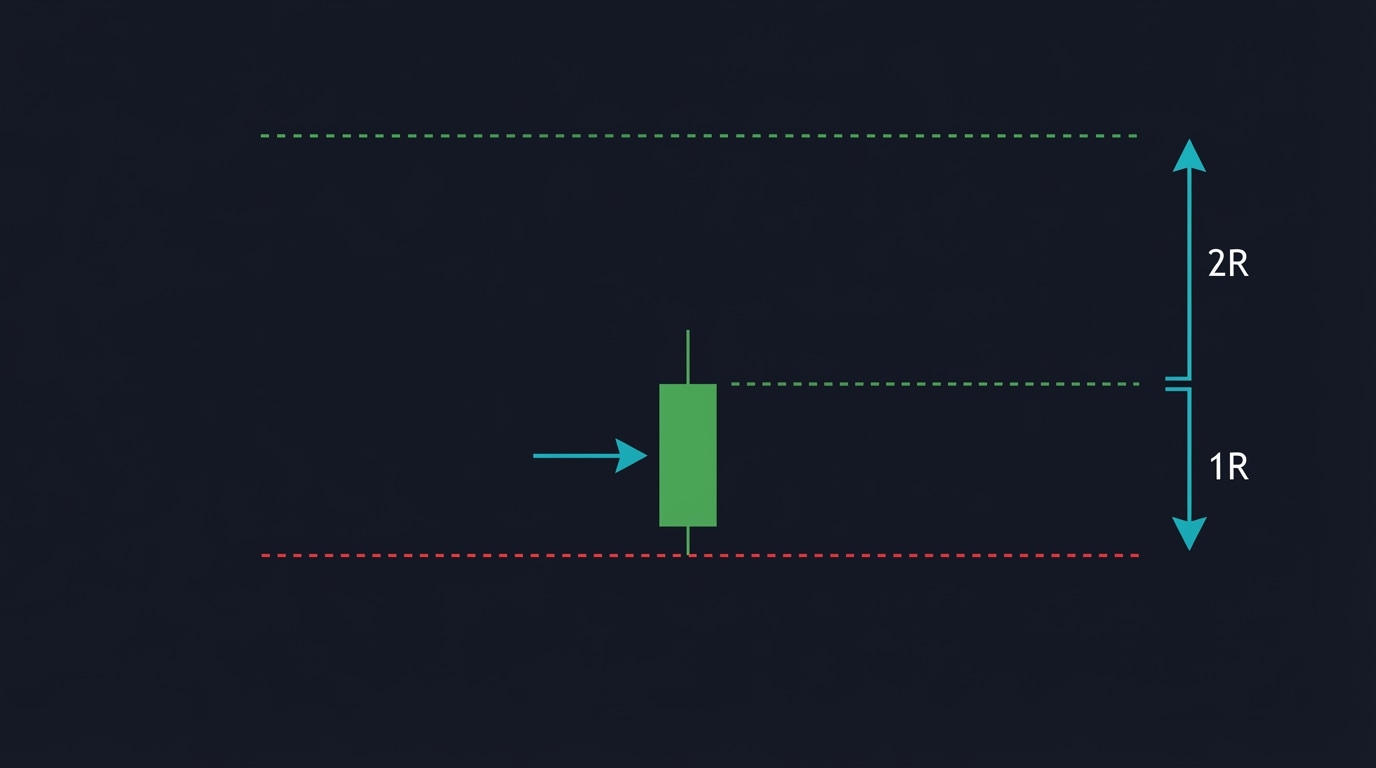
Instead of fixed pip distances, we use the Average True Range (ATR) to adapt our stops to current market volatility.

Why ATR?

  • In volatile markets → wider stops (avoid noise)
  • In calm markets → tighter stops (maximise R:R)
  • Automatically adapts to the instrument

The Formulas

Stop-Loss Distance

SL_distance = ATR × ATR_MULT_SL

# For long: SL = entry - SL_distance
# For short: SL = entry + SL_distance

Take-Profit Distance

TP_distance = SL_distance × RR_MULT_TP

# For long: TP = entry + TP_distance
# For short: TP = entry - TP_distance

Default Parameters

ATR_LEN      = 14      # ATR lookback period
ATR_MULT_SL  = 2.0     # SL = ATR × 2
ATR_MULT_TP  = 4.0     # TP = ATR × 4  (gives 2R)

With these defaults:

  • Risk-Reward Ratio = 4 / 2 = 2R
  • Win only 33% of the time to break even
  • Our 53-69% win rate means consistent profits

Optimisation Insights

From backtesting results:

ATR Multiplier Best RR Ratio Returns
1.0 (tight) 2.5-2.9 Highest
1.5 (medium) 1.5-2.0 Good
2.0 (wide) 1.0-1.5 Moderate

Key Finding: Tight stops with high R:R work best!

“The best set of parameters is decreasing like this. Either you have a high stop-loss distance and a low risk-reward ratio, or you have a low ATR multiplier or stop-loss distance and a high risk-reward ratio — which actually is working the best for this strategy.”

Why Tight Stops Work Here

Because we are entering at cloud bounces (retracements):

“We are squeezing our entry position to the retracement to the minimum of the retracement when we are dipping within inside of the cloud and just getting out of it. So this is why you do not need a very wide stop-loss distance.”

Code Implementation

# Risk settings
ATR_LEN      = 14
ATR_MULT_SL  = 1.5     # Tight stop-loss
ATR_MULT_TP  = 3.0     # Higher R:R (2R)

# In strategy:
sl_dist = atr * self.atr_mult_sl
tp_dist = sl_dist * self.rr_mult_tp

if signal == 1:  # Long entry
    sl = close - sl_dist
    tp = close + tp_dist
    self.buy(size=0.99, sl=sl, tp=tp)

elif signal == -1:  # Short entry
    sl = close + sl_dist
    tp = close - tp_dist
    self.sell(size=0.99, sl=sl, tp=tp)

Coming Up Next: Our rules are defined — let us build the Python backtesting infrastructure to test them. Continue to Part 7 →