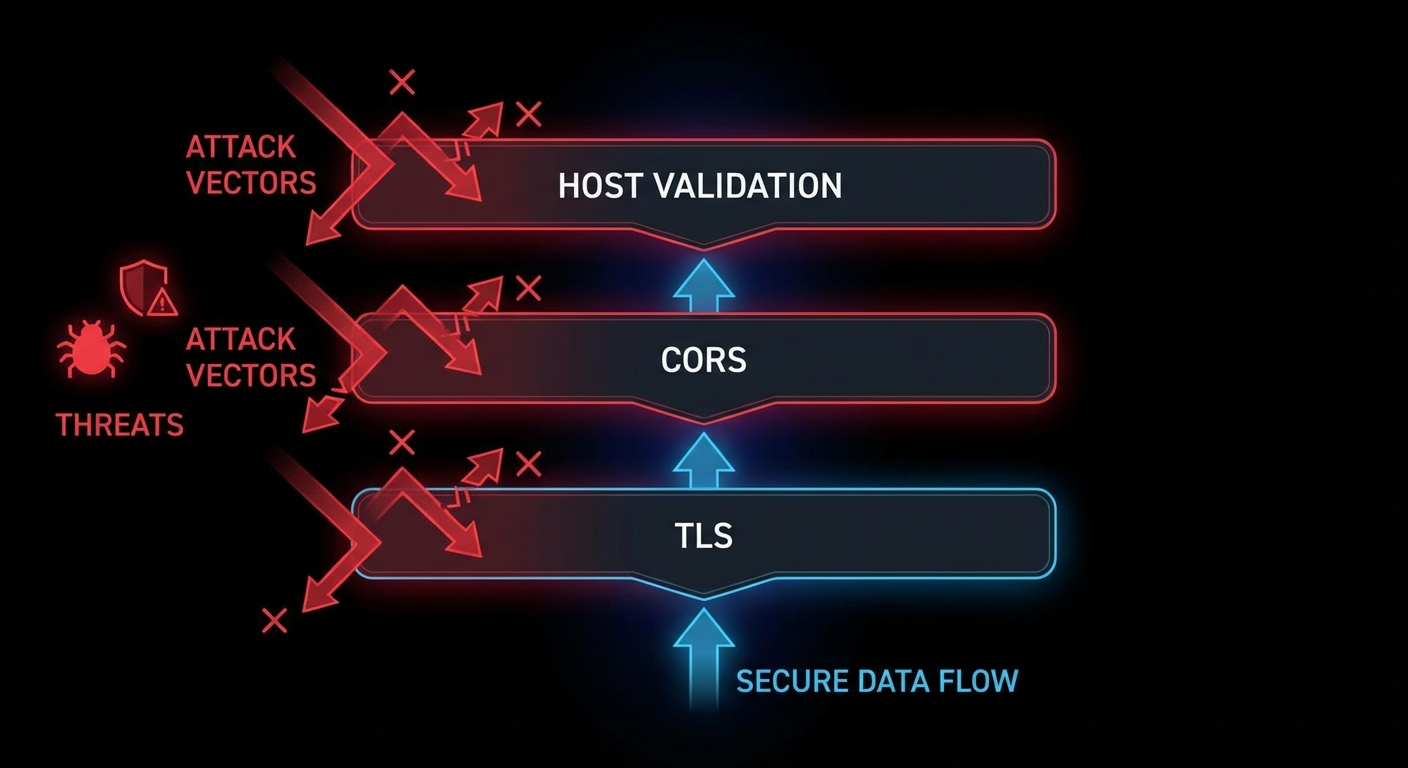
Security is not a feature you add after the transport works. It is the transport design. An MCP server exposed over HTTP without TLS, without CORS validation, and without Host header checking is not a development shortcut – it is a vulnerability waiting to be exploited. This lesson covers the three most important transport-level security controls for MCP HTTP servers: TLS termination, CORS policy, and Host header validation. Get these right before your server ever sees production traffic.
Three layers of transport security: TLS (encryption), CORS (browser origin control), Host header validation (DNS rebinding protection).
TLS: Why Plaintext MCP Is Unacceptable
Any MCP server that carries sensitive data (API keys, user data, database queries, file contents) must use TLS. Over plaintext HTTP, anyone between the client and server can read and modify the JSON-RPC stream. Tool arguments, resource contents, and sampling responses are all exposed. For local development, this is tolerable. For any remote server – even internal company servers – TLS is mandatory.
The simplest production approach: terminate TLS at nginx or a load balancer, and run your Node.js MCP server on HTTP internally. This keeps TLS certificate management at the infrastructure layer.
# nginx.conf for TLS-terminated MCP server
server {
    listen 443 ssl;
    server_name mcp.mycompany.com;

    ssl_certificate /etc/ssl/certs/mycompany.crt;
    ssl_certificate_key /etc/ssl/private/mycompany.key;
    ssl_protocols TLSv1.2 TLSv1.3;
    ssl_ciphers ECDHE-ECDSA-AES128-GCM-SHA256:ECDHE-RSA-AES128-GCM-SHA256;

    location /mcp {
        proxy_pass http://localhost:3000;
        proxy_http_version 1.1;
        proxy_set_header Upgrade $http_upgrade;
        proxy_set_header Connection 'upgrade';
        proxy_set_header Host $host;
        proxy_set_header X-Real-IP $remote_addr;
        proxy_buffering off;        # Critical for SSE
        proxy_read_timeout 3600s;   # Long timeout for SSE connections
        proxy_cache off;
    }
}
“For remote MCP servers, all communication MUST use TLS to protect against eavesdropping and tampering. Servers MUST validate client authentication before processing any requests.” – MCP Specification, Transport Security
CORS: Controlling Browser Access
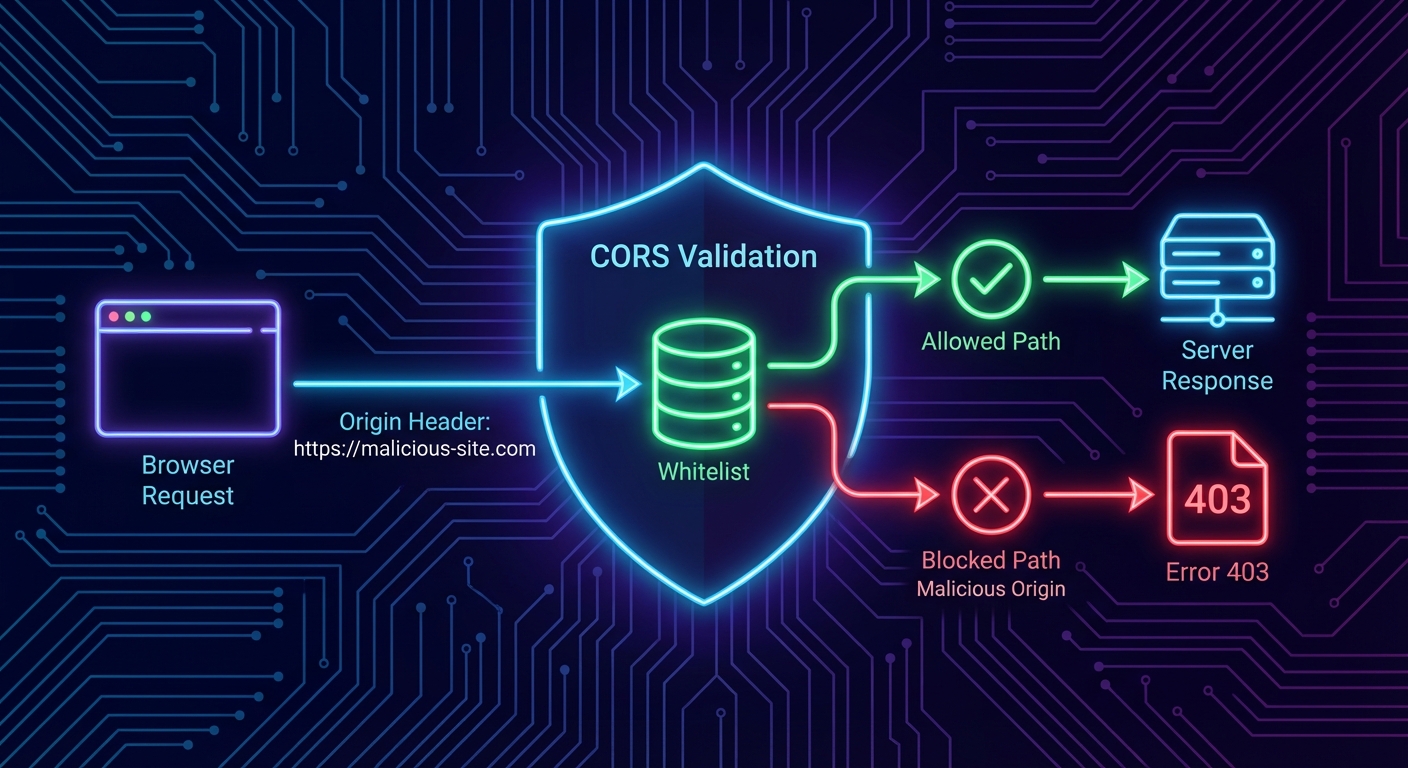
If your MCP server will be accessed from browser-based hosts (web applications that call the MCP endpoint directly from JavaScript), you must configure CORS. Without CORS headers, the browser will block cross-origin requests. With overly permissive CORS (Access-Control-Allow-Origin: *), any website can make requests to your server on behalf of your users.
// Correct CORS configuration for MCP HTTP servers
import cors from 'cors';

const ALLOWED_ORIGINS = [
  'https://myapp.example.com',
  'https://staging.myapp.example.com',
  // For development only:
  'http://localhost:5173',
];

app.use('/mcp', cors({
  origin: (origin, callback) => {
    // Allow requests with no origin (server-to-server, curl)
    if (!origin) return callback(null, true);
    if (ALLOWED_ORIGINS.includes(origin)) return callback(null, true);
    callback(new Error(`CORS: Origin ${origin} not allowed`));
  },
  methods: ['GET', 'POST', 'DELETE', 'OPTIONS'],
  allowedHeaders: ['Content-Type', 'mcp-session-id', 'Authorization'],
  credentials: true,  // If you use cookie-based auth
}));
CORS origin allowlist: only listed origins can make browser-side requests to your MCP server.
Host Header Validation: DNS Rebinding Protection
DNS rebinding attacks allow malicious websites to make requests to your localhost MCP server even through browser CORS restrictions. The attack works by pointing a DNS entry to 127.0.0.1 and then making requests with a spoofed Host header. Validating the Host header prevents this class of attack for local servers.
// Host header validation middleware
function validateHost(allowedHosts) {
  return (req, res, next) => {
    const host = req.headers.host;
    if (!host) return res.status(400).send('Missing Host header');

    const hostname = host.split(':')[0]; // Strip port
    if (!allowedHosts.includes(hostname)) {
      console.error(`[security] Rejected request with Host: ${host}`);
      return res.status(403).send('Forbidden: Invalid Host header');
    }

    next();
  };
}

// For a local development server, allow only localhost
app.use('/mcp', validateHost(['localhost', '127.0.0.1']));

// For a production server, allow your actual domain
// app.use('/mcp', validateHost(['mcp.mycompany.com']));
Putting It All Together: Security Middleware Stack
// Complete security middleware stack for production MCP server
import helmet from 'helmet';
import rateLimit from 'express-rate-limit';

app.use(helmet({
  contentSecurityPolicy: {
    directives: {
      defaultSrc: ["'self'"],
    },
  },
}));

// Host validation
app.use('/mcp', validateHost([process.env.MCP_ALLOWED_HOST || 'localhost']));

// CORS
app.use('/mcp', cors({ origin: ALLOWED_ORIGINS, methods: ['GET', 'POST', 'DELETE'] }));

// Rate limiting
app.use('/mcp', rateLimit({
  windowMs: 60 * 1000,
  max: 100,
  standardHeaders: true,
  legacyHeaders: false,
}));

// Request size limit
app.use('/mcp', express.json({ limit: '2mb' }));

// Then your MCP handler
app.post('/mcp', handleMcpRequest);
app.get('/mcp', handleMcpRequest);
Failure Modes in Transport Security
Case 1: Using Wildcard CORS in Production
// NEVER in production - allows any origin to call your MCP server
app.use(cors({ origin: '*' }));

// ALWAYS use an explicit allowlist in production
app.use(cors({ origin: ALLOWED_ORIGINS }));
Case 2: Running an HTTP MCP Server on a Public Port Without Auth
// WRONG: Public port, no auth, no TLS
app.listen(3000);  // Accessible to the internet on port 3000 - anyone can call your tools

// CORRECT: Bind to localhost and terminate TLS at nginx
app.listen(3000, '127.0.0.1'); // Only accessible locally; nginx handles TLS externally
What to Check Right Now
Scan your server with nmap – nmap -sV localhost -p 3000. Verify it binds only to 127.0.0.1 in production builds.
Test CORS with curl -H “Origin:” – curl -X OPTIONS http://localhost:3000/mcp -H "Origin: https://evil.com". The server should return a 403 or no CORS headers.
Check Host header handling – curl http://localhost:3000/mcp -H "Host: evil.com". Your server should reject requests with non-allowlisted Host headers.
Enable TLS on every non-local deployment – use Let’s Encrypt with certbot --nginx for automatic certificate management. There is no excuse for plaintext in 2026.
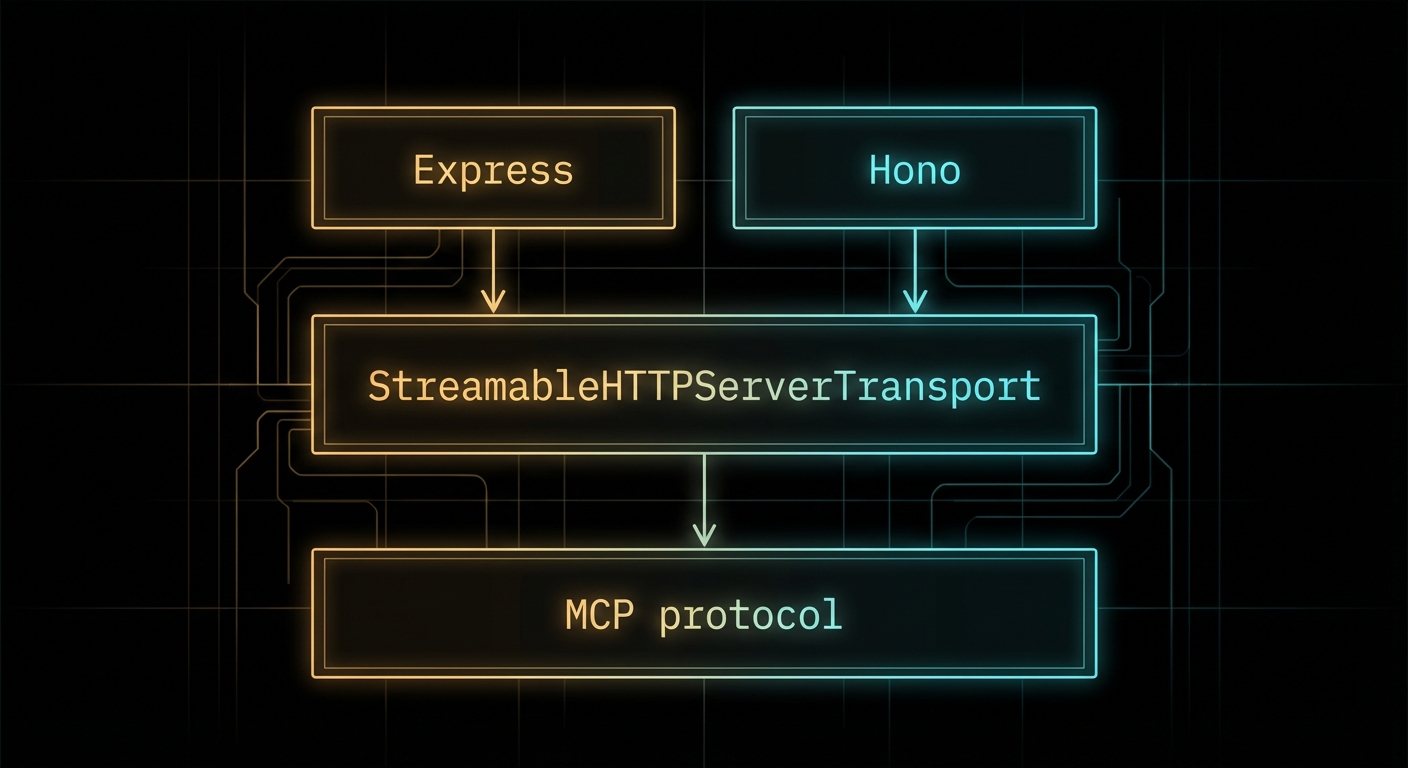
The MCP SDK’s StreamableHTTPServerTransport is framework-agnostic at the core, but wiring it up to Express, Hono, or any other HTTP framework requires adapters. Good adapters are thin – they translate between the framework’s request/response model and the transport’s expectations without adding logic of their own. This lesson shows you how to build those adapters correctly for Express and Hono, covers the common configuration patterns, and explains why each choice matters for production deployment.
HTTP adapters: thin wrappers that plug the MCP transport into your HTTP framework of choice.
Express Adapter Pattern
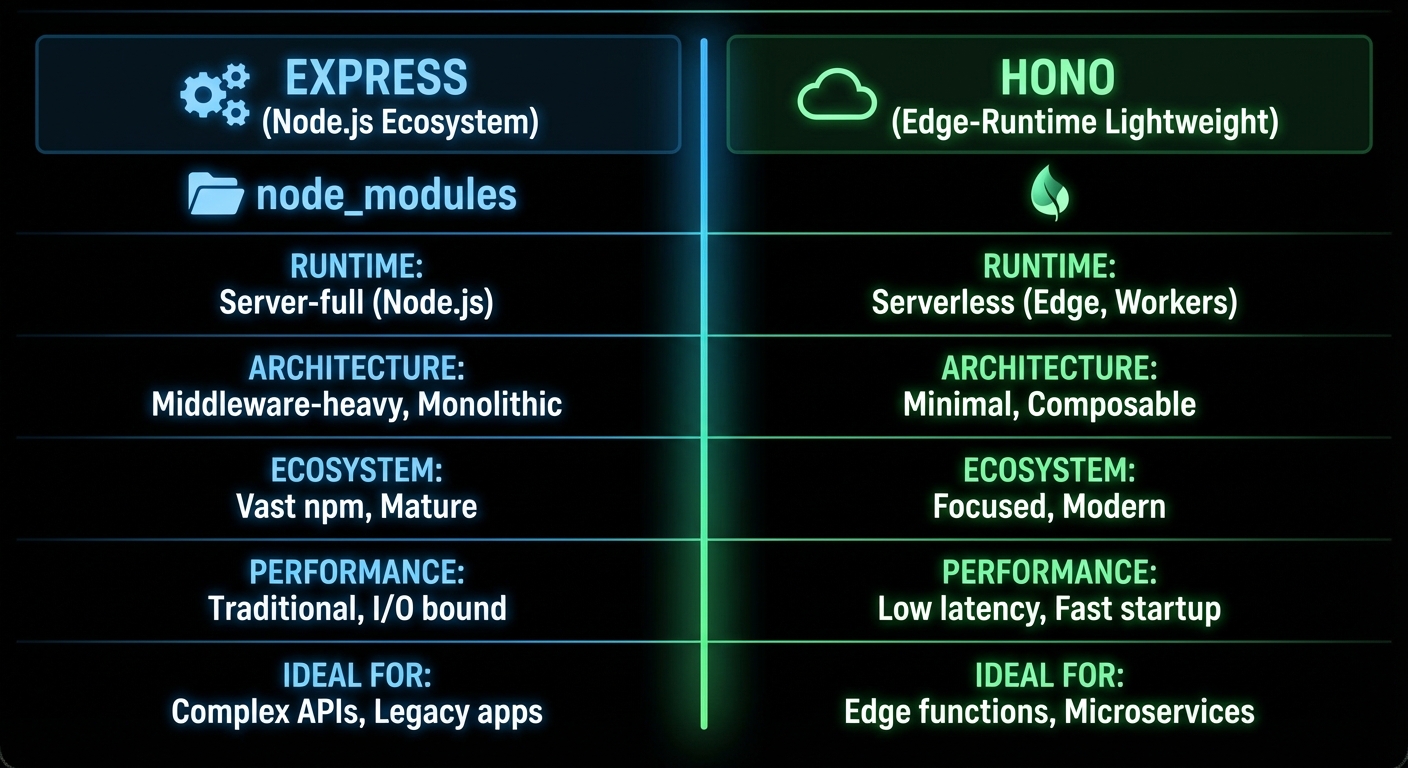
Express is the most widely used Node.js HTTP framework and the safest choice for teams that want maximum ecosystem compatibility. Here is the production-ready Express adapter pattern:
// mcp-server-express.js
import express from 'express';
import { McpServer } from '@modelcontextprotocol/sdk/server/mcp.js';
import { StreamableHTTPServerTransport } from '@modelcontextprotocol/sdk/server/streamableHttp.js';
import { z } from 'zod';
import { randomUUID } from 'node:crypto';

const app = express();
app.use(express.json({ limit: '4mb' })); // Increase limit for large tool inputs

// Session registry
const sessions = new Map();

function createMcpServer() {
  const server = new McpServer({ name: 'api-server', version: '1.0.0' });
  server.tool('ping', 'Check server health', {}, async () => ({
    content: [{ type: 'text', text: 'pong' }],
  }));
  return server;
}

// Shared handler for POST and GET
async function handleMcpRequest(req, res) {
  const sessionId = req.headers['mcp-session-id'];
  let transport;

  if (sessionId && sessions.has(sessionId)) {
    transport = sessions.get(sessionId);
  } else if (!sessionId && req.method === 'POST') {
    // New session on first POST
    transport = new StreamableHTTPServerTransport({
      sessionIdGenerator: () => randomUUID(),
      onsessioninitialized: (id) => {
        sessions.set(id, transport);
        // Clean up session when transport closes
        transport.onclose = () => sessions.delete(id);
      },
    });
    const mcpServer = createMcpServer();
    await mcpServer.connect(transport);
  } else {
    res.status(400).json({ error: 'Invalid or missing session' });
    return;
  }

  await transport.handleRequest(req, res, req.body);
}

app.post('/mcp', handleMcpRequest);
app.get('/mcp', handleMcpRequest);
app.delete('/mcp', (req, res) => {
  const sessionId = req.headers['mcp-session-id'];
  sessions.delete(sessionId);
  res.sendStatus(200);
});

// Health check
app.get('/health', (req, res) => res.json({ status: 'ok', sessions: sessions.size }));

const PORT = process.env.PORT || 3000;
app.listen(PORT, () => console.error(`MCP server on :${PORT}`));
“The Streamable HTTP transport can be integrated with any HTTP server framework. The key requirement is that the server must handle POST requests for client-to-server messages and GET requests for server-to-client SSE streams.” – MCP Documentation, Transports
Hono Adapter Pattern
Hono is a lightweight, ultra-fast web framework designed for edge runtimes (Cloudflare Workers, Deno Deploy, Bun) as well as Node.js. Its smaller footprint and native Web API compatibility make it attractive for MCP servers that need to run at the edge.
// mcp-server-hono.js
import { Hono } from 'hono';
import { serve } from '@hono/node-server';
import { McpServer } from '@modelcontextprotocol/sdk/server/mcp.js';
import { StreamableHTTPServerTransport } from '@modelcontextprotocol/sdk/server/streamableHttp.js';
import { randomUUID } from 'node:crypto';

const app = new Hono();
const sessions = new Map();

app.post('/mcp', async (c) => {
  const sessionId = c.req.header('mcp-session-id');
  const body = await c.req.json();

  let transport;
  if (sessionId && sessions.has(sessionId)) {
    transport = sessions.get(sessionId);
  } else {
    transport = new StreamableHTTPServerTransport({
      sessionIdGenerator: () => randomUUID(),
      onsessioninitialized: (id) => sessions.set(id, transport),
    });
    const mcpServer = createMcpServer();
    await mcpServer.connect(transport);
  }

  // Hono uses Web API Request/Response - convert for the transport
  // The SDK transport.handleRequest accepts both Node.js and Web API style
  return new Response(await transport.handlePostRequest(body, sessionId));
});

app.get('/mcp', async (c) => {
  const sessionId = c.req.header('mcp-session-id');
  const transport = sessions.get(sessionId);
  if (!transport) return c.json({ error: 'Session not found' }, 404);

  // Return SSE stream
  const stream = await transport.createSSEStream();
  return new Response(stream, {
    headers: {
      'Content-Type': 'text/event-stream',
      'Cache-Control': 'no-cache',
    },
  });
});

serve({ fetch: app.fetch, port: 3000 });
Express: maximum ecosystem compatibility. Hono: edge runtimes, minimal footprint. Both work with the MCP SDK.
Middleware for MCP Endpoints
MCP endpoints benefit from the same middleware patterns as any HTTP API – request logging, rate limiting, correlation IDs, and error handling. Here is a middleware stack for a production MCP endpoint:
// Express middleware stack for MCP
import rateLimit from 'express-rate-limit';

// Rate limiting - protect against DoS
const mcpLimiter = rateLimit({
  windowMs: 60 * 1000,  // 1 minute
  max: 100,             // 100 requests per minute per IP
  message: { error: 'Too many requests' },
  skip: (req) => req.headers['mcp-session-id'] && sessions.has(req.headers['mcp-session-id']),
});

// Request logging
app.use('/mcp', (req, res, next) => {
  const start = Date.now();
  res.on('finish', () => {
    console.error(`[mcp] ${req.method} ${req.url} ${res.statusCode} ${Date.now() - start}ms`);
  });
  next();
});

// Apply rate limit before handler
app.post('/mcp', mcpLimiter, handleMcpRequest);
app.get('/mcp', handleMcpRequest);
Failure Modes with HTTP Adapters
Case 1: Forgetting express.json() Middleware
Without express.json(), Express will not parse the POST body. The transport will receive undefined as the body and produce confusing parse errors.
// WRONG: No body parser
const app = express();
app.post('/mcp', handleMcpRequest); // req.body is undefined

// CORRECT: Parse JSON bodies
const app = express();
app.use(express.json());
app.post('/mcp', handleMcpRequest); // req.body is the parsed JSON object
Case 2: Sharing a Single McpServer Instance Across All Sessions
If tool handlers have per-session state (user context, authentication tokens, active database transactions), sharing one McpServer instance across all sessions will mix state between users. Create a new McpServer per session, or design tools to be stateless.
// RISKY: Shared server instance if tools have per-session state
const sharedServer = createMcpServer(); // Fine only if all tools are stateless

// SAFE: New server per session (slightly more overhead but guarantees isolation)
onsessioninitialized: (id) => {
  const sessionServer = createMcpServer(); // Fresh instance per session
  sessionServer.connect(transport);
}
What to Check Right Now
Choose Express for Node.js, Hono for edge – if you are deploying to a standard VPS or Docker container, Express is the safer choice. If you need Cloudflare Workers or Deno Deploy, use Hono.
Add a health endpoint – every MCP HTTP server should have a GET /health endpoint that returns session count and server status. This is essential for load balancer health checks.
Apply rate limiting before your MCP handler – without rate limiting, a single client can exhaust your server with rapid requests. Use express-rate-limit or equivalent.
Monitor session count – sessions that are never cleaned up will consume memory. Log the session count on the health endpoint and alert if it grows unboundedly.
stdio works beautifully for local tools, but the moment you want to share an MCP server across a network – serving multiple clients, deploying to a container, integrating with a third-party host over the internet – you need HTTP transport. The MCP specification defines Streamable HTTP as the canonical remote transport: HTTP POST for client-to-server requests, Server-Sent Events (SSE) for server-to-client streaming. This lesson covers the protocol mechanics, the implementation pattern, and the hard-won lessons about making streaming work reliably in production.
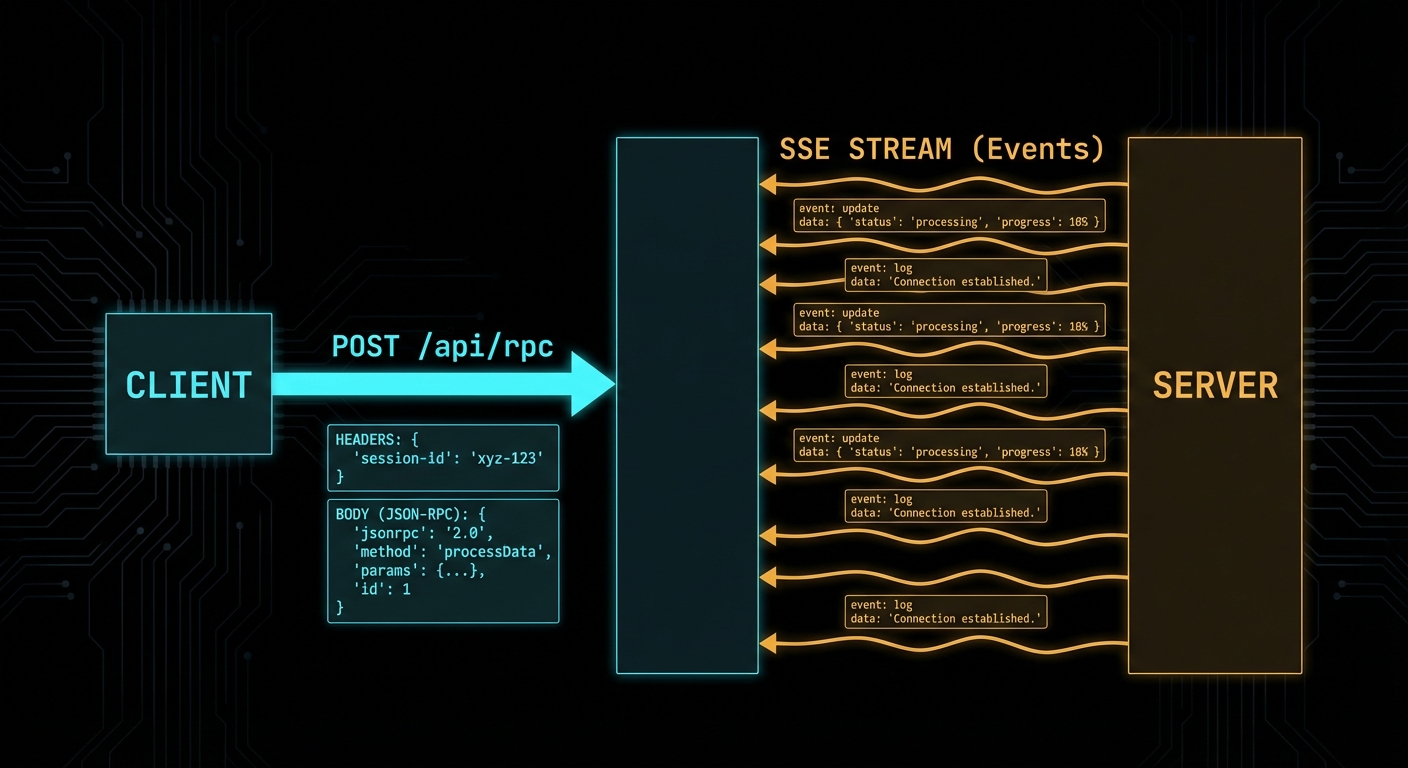
Streamable HTTP: POST for requests, SSE for streaming responses – the MCP remote transport standard.
The Streamable HTTP Protocol
The Streamable HTTP transport uses a single HTTP endpoint (typically /mcp) and the following request flow:
Client to server: HTTP POST with Content-Type: application/json containing the JSON-RPC message(s). The client must include a session ID header (mcp-session-id) after the connection is established.
Server to client (immediate response): HTTP 200 with Content-Type: application/json containing the JSON-RPC response. For a single request-response pair with no streaming.
Server to client (streaming): HTTP 200 with Content-Type: text/event-stream (SSE). The server keeps the connection open and pushes events as they arrive. This is used for long-running tools, progress notifications, and sampling requests.
Server to client (async): HTTP GET to the MCP endpoint opens an SSE stream for the server to push unsolicited notifications (resource updates, tool list changes, etc.).
// Client side: use the Streamable HTTP transport
import { Client } from '@modelcontextprotocol/sdk/client/index.js';
import { StreamableHTTPClientTransport } from '@modelcontextprotocol/sdk/client/streamableHttp.js';

const client = new Client(
  { name: 'my-http-host', version: '1.0.0' },
  { capabilities: {} }
);

const transport = new StreamableHTTPClientTransport(
  new URL('https://my-mcp-server.example.com/mcp')
);

await client.connect(transport);

const tools = await client.listTools();
console.log('Available tools:', tools.tools.map(t => t.name));
Unlike stdio, this transport lets your MCP server exist independently of any single host process. The server can be deployed as a standalone service, shared across a team, or exposed to third-party clients over the internet. That independence is what makes HTTP the right choice for any non-local use case.
“The HTTP with SSE transport uses Server-Sent Events for server-to-client streaming while using HTTP POST for client-to-server communication. This allows servers to stream results and send notifications to clients.” – MCP Documentation, Transports
Building a Streamable HTTP Server
The MCP SDK provides a StreamableHTTPServerTransport that handles all the protocol mechanics. You attach it to any HTTP server framework – Express, Hono, Fastify, or Node’s built-in http module.
import { McpServer } from '@modelcontextprotocol/sdk/server/mcp.js';
import { StreamableHTTPServerTransport } from '@modelcontextprotocol/sdk/server/streamableHttp.js';
import { z } from 'zod';
import express from 'express';

const app = express();
app.use(express.json());

const server = new McpServer({ name: 'remote-server', version: '1.0.0' });

server.tool(
  'get_weather',
  'Gets current weather for a city',
  { city: z.string().describe('City name') },
  async ({ city }) => {
    const data = await fetchWeather(city);
    return {
      content: [{ type: 'text', text: `${city}: ${data.temp}°C, ${data.condition}` }],
    };
  }
);

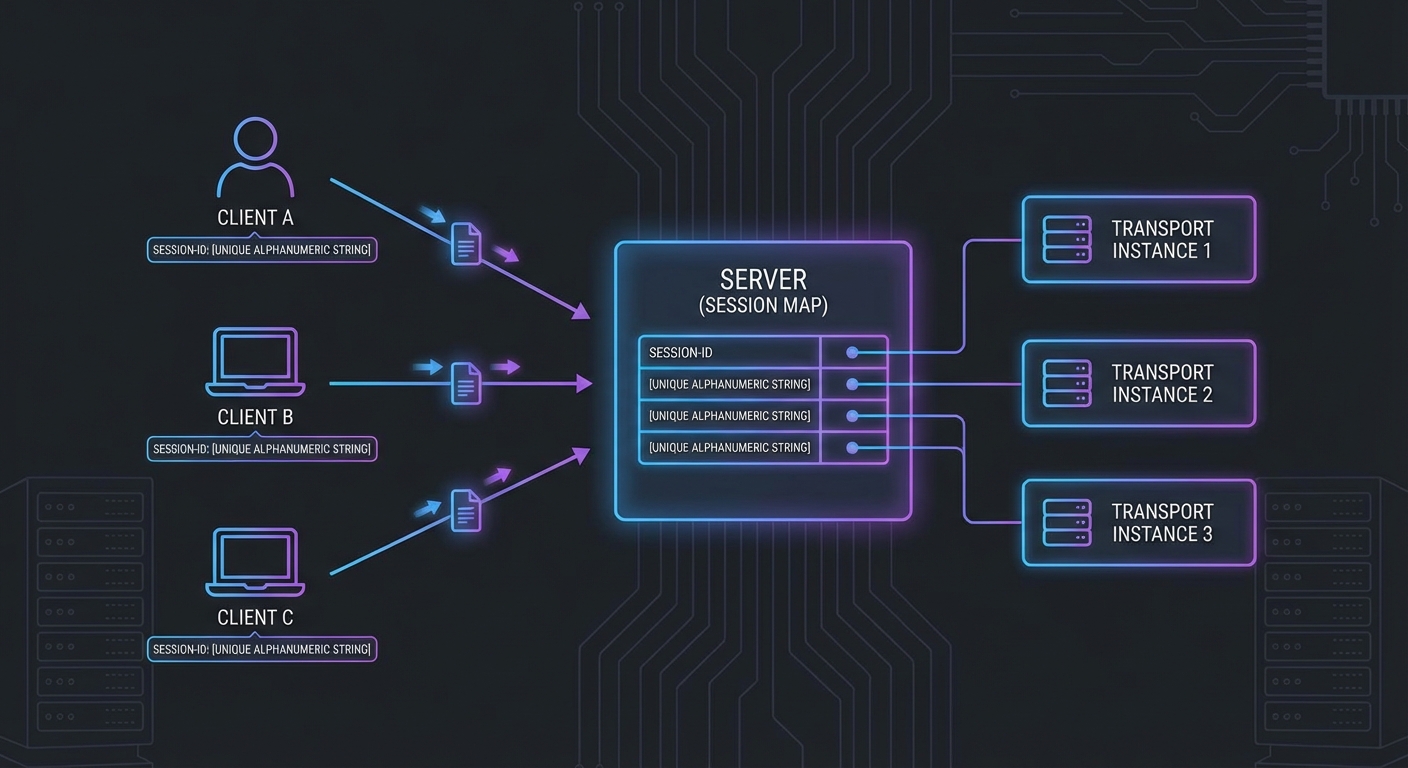
// Session management: one transport per client session
const sessions = new Map();

app.post('/mcp', async (req, res) => {
  const sessionId = req.headers['mcp-session-id'];

  let transport;
  if (sessionId && sessions.has(sessionId)) {
    transport = sessions.get(sessionId);
  } else {
    // New session
    transport = new StreamableHTTPServerTransport({
      sessionIdGenerator: () => crypto.randomUUID(),
      onsessioninitialized: (id) => sessions.set(id, transport),
    });
    await server.connect(transport);
  }

  await transport.handleRequest(req, res);
});

app.get('/mcp', async (req, res) => {
  const sessionId = req.headers['mcp-session-id'];
  const transport = sessions.get(sessionId);
  if (!transport) return res.status(404).send('Session not found');
  await transport.handleRequest(req, res);
});

app.delete('/mcp', async (req, res) => {
  const sessionId = req.headers['mcp-session-id'];
  sessions.delete(sessionId);
  res.status(200).send('Session terminated');
});

app.listen(3000, () => console.error('MCP HTTP server running on :3000'));
HTTP session management: each client gets a session ID, mapped to its own transport instance.
The server setup above handles basic request-response patterns. But the real power of HTTP transport is streaming: the ability to push progress updates, intermediate results, and server-initiated notifications to the client while a long-running operation is still in flight.
SSE Streaming in Practice
When a tool produces results progressively (e.g. a long-running data processing job), the server can stream intermediate progress via SSE notifications before sending the final result:
server.tool(
  'process_large_dataset',
  'Processes a large dataset with progress streaming',
  { dataset_id: z.string(), chunk_size: z.number().default(1000) },
  async ({ dataset_id, chunk_size }, { server: serverInstance }) => {
    const dataset = await loadDataset(dataset_id);
    const totalRows = dataset.length;
    let processed = 0;

    for (let i = 0; i < dataset.length; i += chunk_size) {
      const chunk = dataset.slice(i, i + chunk_size);
      await processChunk(chunk);
      processed += chunk.length;

      // Stream progress via SSE notification
      serverInstance.server.notification({
        method: 'notifications/progress',
        params: {
          progressToken: dataset_id,
          progress: processed,
          total: totalRows,
        },
      });
    }

    return {
      content: [{
        type: 'text',
        text: `Processed ${processed} rows from dataset ${dataset_id}`,
      }],
    };
  }
);
In a production system, you would combine progress streaming with timeout handling and cancellation support. If a client disconnects mid-stream, the server should detect the closed connection and abort the in-progress work to avoid wasting resources on results nobody will receive.
Failure Modes with Streamable HTTP
Case 1: No Session Management - One Transport for All Clients
Creating a single global transport instance and sharing it across all HTTP requests corrupts all sessions. Each client connection needs its own transport instance.
// WRONG: Single global transport - all sessions corrupt each other
const globalTransport = new StreamableHTTPServerTransport({ ... });
await server.connect(globalTransport);

app.post('/mcp', async (req, res) => {
  await globalTransport.handleRequest(req, res); // All clients share state - WRONG
});

// CORRECT: Per-session transport instances (as shown above)
This is one of the most common bugs when building HTTP-based MCP servers. The corruption is subtle: two clients may receive each other's responses, or a notification intended for one session leaks into another. It often only surfaces under concurrent load, making it hard to reproduce locally.
Case 2: SSE Connection Not Kept Alive
SSE connections must be kept open by the server for the duration of the session. Intermediate proxies (nginx, load balancers, CDNs) may buffer responses or close idle connections. Set appropriate headers and configure proxy timeouts.
// When using Express with SSE, set headers to prevent buffering
res.setHeader('Cache-Control', 'no-cache');
res.setHeader('X-Accel-Buffering', 'no'); // Nginx: disable buffering
res.setHeader('Connection', 'keep-alive');

// For nginx: proxy_read_timeout 3600s; proxy_buffering off;
Together, these two failure modes highlight the fundamental challenge of HTTP transport: you are responsible for connection lifecycle management that stdio handles automatically. Session isolation and keep-alive behavior are things you must actively get right, not things that work by default.
SSE Polling and Server-Initiated Disconnection
New in 2025-11-25
Earlier versions of Streamable HTTP assumed the server would keep SSE connections open indefinitely. The 2025-11-25 spec clarifies that servers may disconnect SSE streams at will, enabling a polling model for environments where long-lived connections are impractical (load balancers with short timeouts, serverless functions, horizontally scaled clusters).
The key change: clients can always resume a stream by sending a GET request to the MCP endpoint, regardless of whether the original stream was created by a POST or a GET. The server includes event IDs that encode stream identity, allowing the client to reconnect and pick up where it left off.
// Client: reconnect after server disconnects the SSE stream
async function connectWithReconnect(mcpUrl, lastEventId = null) {
  const headers = { Accept: 'text/event-stream' };
  if (lastEventId) {
    headers['Last-Event-ID'] = lastEventId;  // Resume from where we left off
  }

  const response = await fetch(mcpUrl, { method: 'GET', headers });
  const reader = response.body.getReader();
  const decoder = new TextDecoder();

  let currentEventId = lastEventId;

  while (true) {
    const { done, value } = await reader.read();
    if (done) {
      // Server closed the stream - reconnect after a brief delay
      console.log('Stream ended, reconnecting...');
      await new Promise(r => setTimeout(r, 1000));
      return connectWithReconnect(mcpUrl, currentEventId);
    }

    const text = decoder.decode(value);
    // Parse SSE events, track event IDs for resumption
    for (const line of text.split('\n')) {
      if (line.startsWith('id:')) currentEventId = line.slice(3).trim();
      if (line.startsWith('data:')) handleMessage(JSON.parse(line.slice(5)));
    }
  }
}
Event IDs should encode stream identity so that the server can distinguish reconnection attempts from new connections. The spec does not prescribe a format, but a common pattern is to include both a session identifier and a sequence number in the event ID.
Origin Validation
Clarified in 2025-11-25
Servers MUST respond with HTTP 403 Forbidden for requests with invalid Origin headers in the Streamable HTTP transport. This prevents cross-origin attacks where a malicious web page attempts to connect to a local MCP server running on localhost. Always validate the Origin header against an allowlist before processing any request.
What to Check Right Now
Test with curl - send a raw HTTP POST to your server: curl -X POST http://localhost:3000/mcp -H 'Content-Type: application/json' -d '{"jsonrpc":"2.0","id":1,"method":"initialize",...}'
Verify SSE with the browser - open your /mcp GET endpoint in a browser with DevTools open. The Network tab should show the SSE stream with events appearing in real time.
Configure nginx for SSE - in any production deployment, add proxy_buffering off and proxy_read_timeout 3600s to your nginx location block for the MCP endpoint.
Implement session cleanup - sessions that are never explicitly terminated will accumulate. Add a TTL or a periodic cleanup job to the sessions Map.
The transport layer is what carries JSON-RPC messages between client and server. MCP defines multiple transports, and choosing the right one for your use case is the first architectural decision you make when building a server. The stdio transport – using standard input and standard output – is the right choice for local, on-machine server processes, and it is the most widely deployed transport in the MCP ecosystem today. This lesson covers what it is, how it works, when to use it, and when not to.
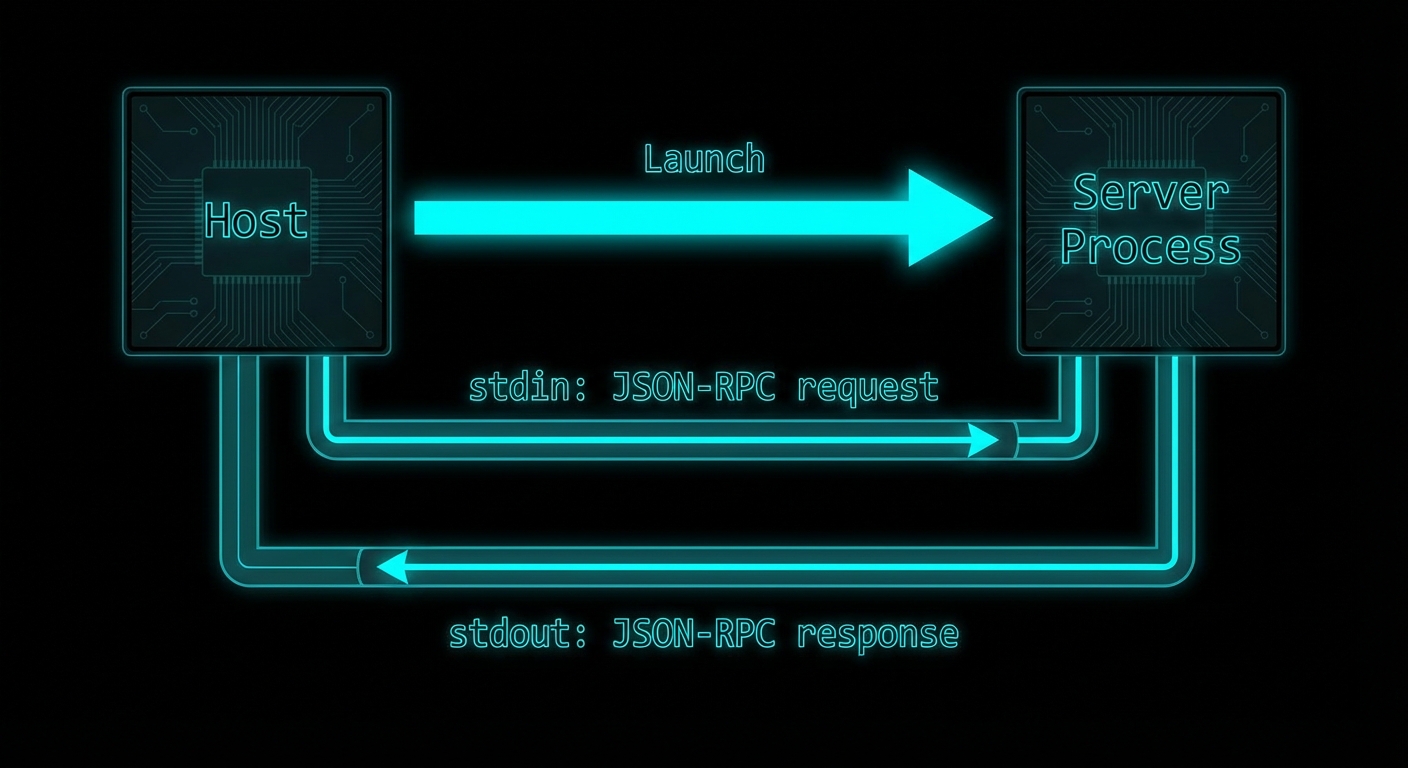
stdio transport: the host launches the server as a subprocess and communicates over stdin/stdout pipes.
How stdio Transport Works
With stdio transport, the host launches the MCP server as a child process. JSON-RPC messages are sent to the server via its stdin and received from the server via its stdout. Each message is delimited by a newline character. The server’s stderr is typically forwarded to the host’s logs for debugging. The server process lives for as long as the client needs it and is terminated when the client disconnects or the host exits.
This is a well-understood pattern in Unix tooling – it is how shells pipe data between commands (cat file | grep pattern | wc -l). MCP adopts it for the same reason: simplicity, no network setup required, OS-managed process isolation, and easy integration with any host that can launch subprocesses.
// Server side: connect to stdio transport
import { McpServer } from '@modelcontextprotocol/sdk/server/mcp.js';
import { StdioServerTransport } from '@modelcontextprotocol/sdk/server/stdio.js';

const server = new McpServer({ name: 'my-server', version: '1.0.0' });
// ... register tools, resources, prompts ...

const transport = new StdioServerTransport();
await server.connect(transport);
// Server is now listening on stdin, writing to stdout
// Client side: launch server as subprocess
import { Client } from '@modelcontextprotocol/sdk/client/index.js';
import { StdioClientTransport } from '@modelcontextprotocol/sdk/client/stdio.js';

const client = new Client({ name: 'my-host', version: '1.0.0' }, { capabilities: {} });

const transport = new StdioClientTransport({
  command: 'node',                    // The command to launch the server
  args: ['./server.js'],              // Arguments
  env: {                              // Environment variables for the subprocess
    ...process.env,
    DATABASE_URL: process.env.DATABASE_URL,
  },
  cwd: '/path/to/project',           // Working directory (optional)
});

await client.connect(transport);
// The transport has launched server.js as a subprocess
// and established stdin/stdout communication
“The stdio transport is ideal for local integrations and command-line tools. It allows processes to communicate through standard input and output streams, making it simple to implement and easy to debug.” – MCP Documentation, Transports
stdio in Configuration Files
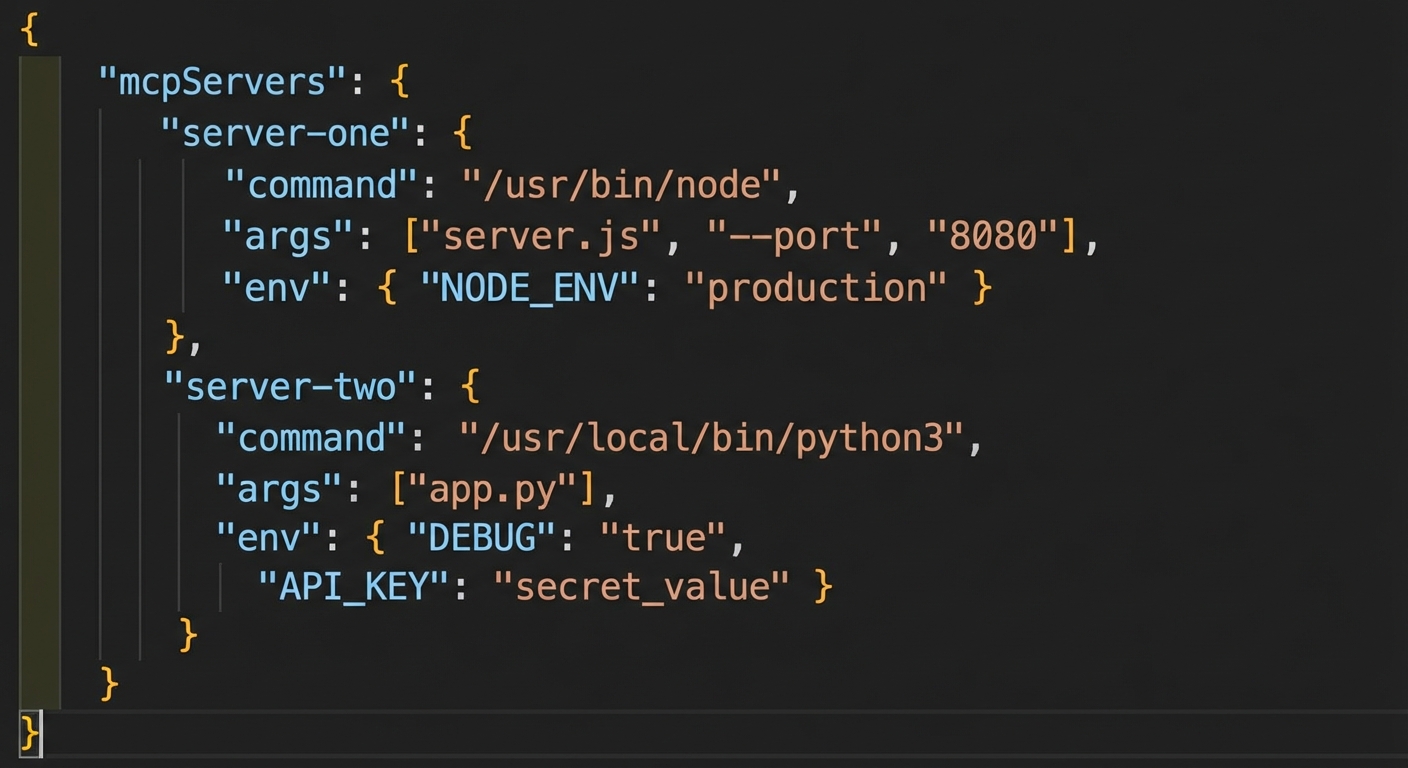
Most MCP hosts (Claude Desktop, VS Code extensions, Cursor) use a configuration file that lists servers with their launch commands. The host reads this file and launches each server as a stdio subprocess when needed. Understanding this format is essential for distributing your MCP server.
The standard MCP server configuration format used by Claude Desktop, VS Code, and other hosts.
stdio vs HTTP Transport: When to Use Each
Factor
stdio
HTTP/SSE
Deployment
Local machine only
Local or remote
Multiple clients
One client per process
Many concurrent clients
Network setup
None required
Ports, TLS, CORS
Security isolation
OS process isolation
Network + auth required
Sharing
Not shareable
Shareable across team/internet
State persistence
Lives with host process
Independent lifetime
Failure Modes with stdio
Case 1: Writing to stdout from Server Code
The most common stdio failure. Anything written to stdout by the server process becomes part of the JSON-RPC stream and corrupts the protocol. Use stderr for all logging.
// WRONG: console.log goes to stdout and corrupts the JSON-RPC stream
console.log('Server started');
console.log('Processing request...');

// CORRECT: Use stderr for all server-side output
console.error('Server started');
process.stderr.write('Processing request...\n');

// OR: Use the MCP logging notification capability
server.server.sendLoggingMessage({ level: 'info', data: 'Server started' });
Case 2: Blocking the Event Loop in stdio Server
stdio servers run in a single Node.js process. If a tool handler blocks the event loop (synchronous file read, a tight computation loop), all other requests to the server will queue up and timeout. Always use async I/O in tool handlers.
Run your server through cat – a quick sanity check: echo '{"jsonrpc":"2.0","id":1,"method":"initialize","params":{"protocolVersion":"2024-11-05","clientInfo":{"name":"test","version":"1.0"},"capabilities":{}}}' | node server.js. You should see a JSON-RPC response on stdout and any logs on stderr.
Check for stdout pollution – search your server code for console.log and replace with console.error. Any package that logs to stdout will also cause issues.
Use the Inspector as a stdio test harness – npx @modelcontextprotocol/inspector node server.js gives you a complete GUI client for your stdio server.
Handle SIGTERM gracefully – when the host terminates your server, it sends SIGTERM. Handle it to close database connections and flush logs: process.on('SIGTERM', cleanup).
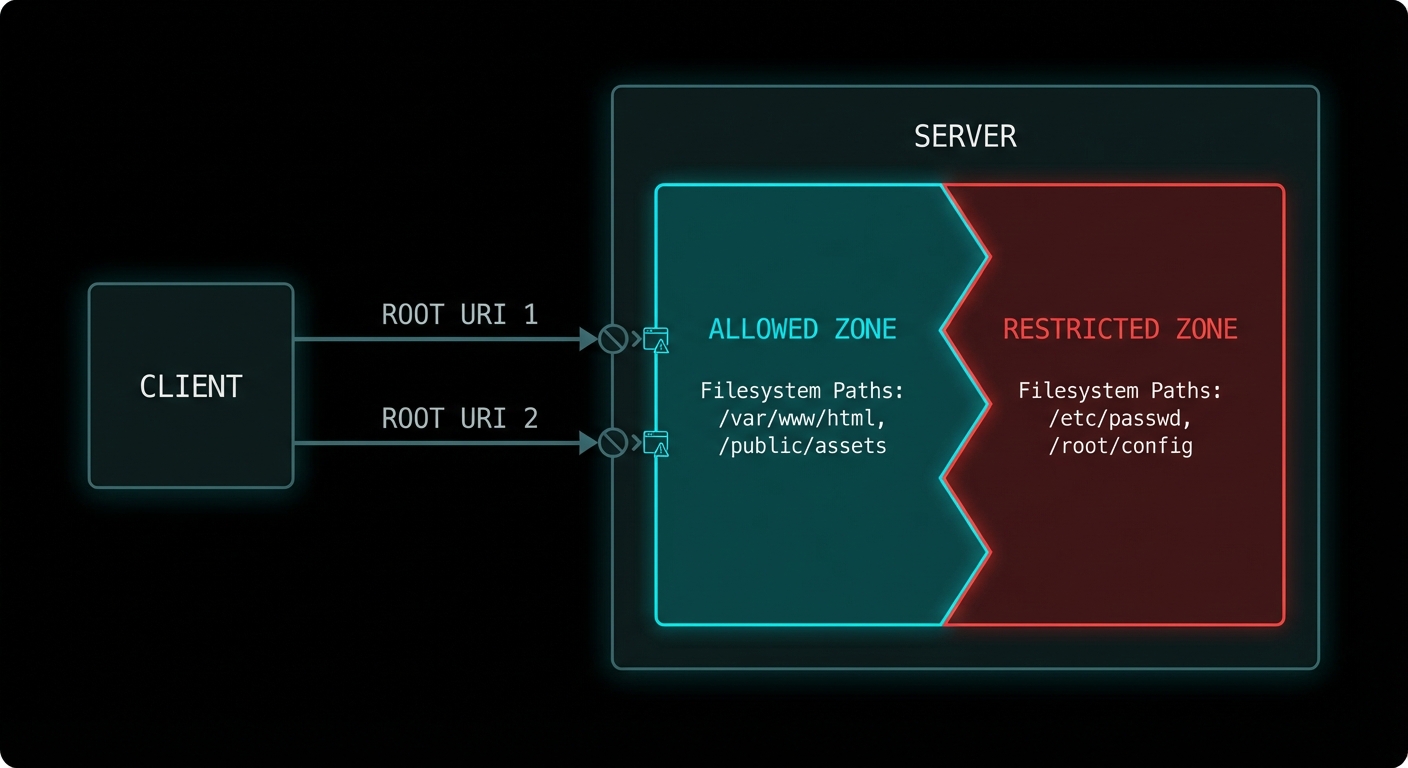
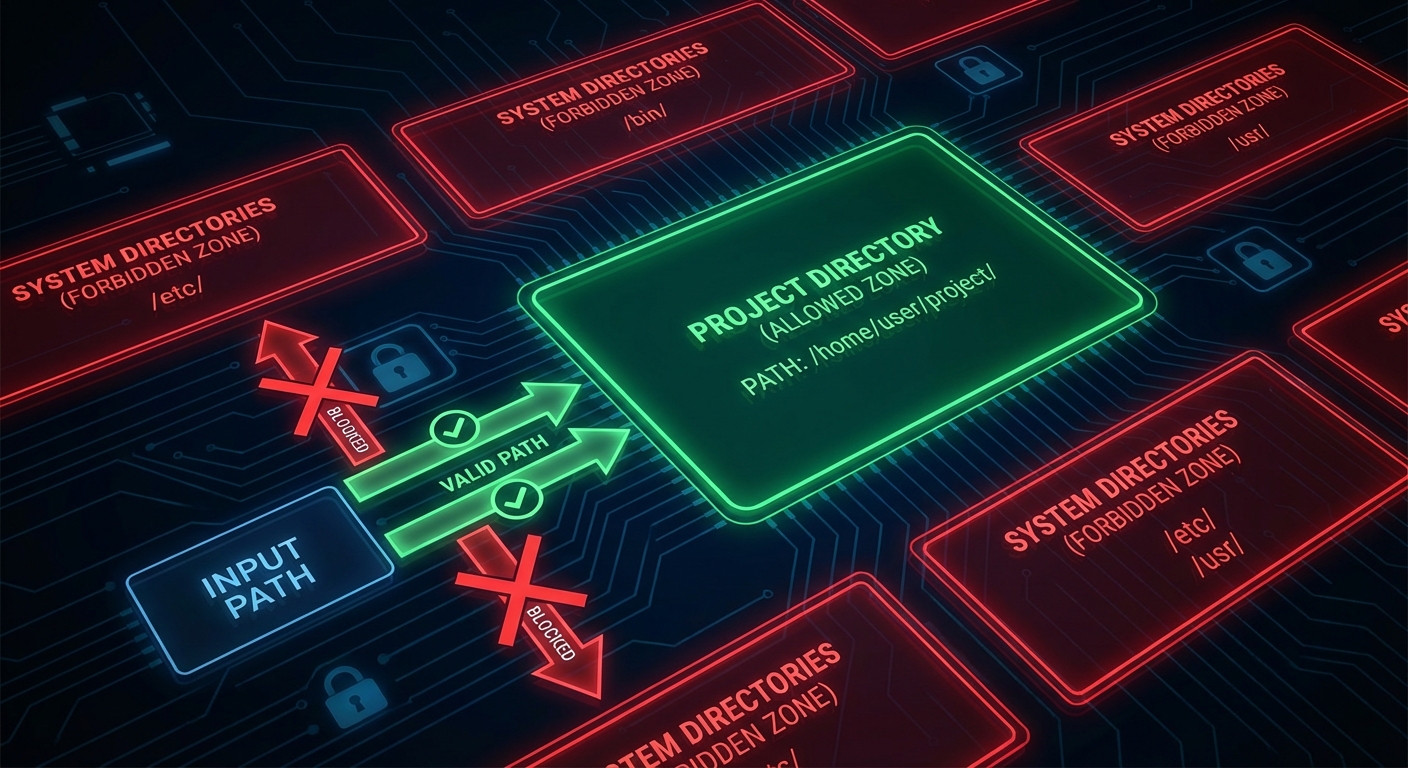
A server that can read any file anywhere on the filesystem is a security disaster waiting to happen. Roots are MCP’s answer to the containment problem: a mechanism for clients to tell servers exactly which filesystem paths and URIs they are permitted to access. It is not just a security feature – it is also a scoping feature. Roots let the host say “this AI assistant is allowed to work with the files in this project directory”, giving the server a clear operational boundary without restricting it to a fixed list of resources.
Roots: the host tells the server which paths it is allowed to work with, enforcing operational boundaries.
What Roots Are
A root is a URI that defines a boundary of the client’s environment that the server may access. A root most commonly represents a directory on the filesystem (file:///Users/alice/my-project), but it can also be any URI scheme meaningful to the server (https://api.mycompany.com/v1, git://my-org/my-repo). The server should limit its operations to within the URIs provided as roots.
Roots flow from client to server: the client announces its roots when the server requests them via the roots/list method. The client can also notify the server when roots change via the roots/list_changed notification.
// Client: declare roots capability
const client = new Client(
  { name: 'my-ide', version: '1.0.0' },
  {
    capabilities: {
      roots: {
        listChanged: true,  // Client will notify when roots change
      },
    },
  }
);

// Client: respond to roots/list requests from the server
import { ListRootsRequestSchema } from '@modelcontextprotocol/sdk/types.js';

client.setRequestHandler(ListRootsRequestSchema, async () => ({
  roots: [
    {
      uri: 'file:///Users/alice/my-project',
      name: 'My Project',
    },
    {
      uri: 'file:///Users/alice/shared-libs',
      name: 'Shared Libraries',
    },
  ],
}));

// Notify server when workspace changes (e.g. user opens a different project)
await client.sendNotification({
  method: 'notifications/roots/list_changed',
});
Roots create operational zones: the server is guided to stay within declared URIs and avoid everything else.
Server-Side Roots Usage
On the server side, you request the current roots at startup or whenever you need to know the operational scope. Use roots to validate that requested resource URIs fall within allowed boundaries before accessing them.
import { McpServer } from '@modelcontextprotocol/sdk/server/mcp.js';
import { z } from 'zod';
import path from 'node:path';
import fs from 'node:fs/promises';
import { fileURLToPath } from 'node:url';

const server = new McpServer({ name: 'fs-server', version: '1.0.0' });

// Helper: check if a path is within any declared root
async function isWithinRoots(targetPath, serverInstance) {
  const { roots } = await serverInstance.listRoots();
  const fileRoots = roots
    .filter(r => r.uri.startsWith('file://'))
    .map(r => fileURLToPath(r.uri));

  const normalised = path.resolve(targetPath);
  return fileRoots.some(root => normalised.startsWith(path.resolve(root)));
}

server.tool(
  'read_file',
  'Reads a file from within the allowed workspace roots',
  { file_path: z.string().describe('Path to the file to read') },
  async ({ file_path }, { server: serverInstance }) => {
    // Check the path is within declared roots before reading
    const allowed = await isWithinRoots(file_path, serverInstance);
    if (!allowed) {
      return {
        isError: true,
        content: [{
          type: 'text',
          text: `Access denied: ${file_path} is outside the allowed workspace roots.`,
        }],
      };
    }

    const content = await fs.readFile(file_path, 'utf8');
    return { content: [{ type: 'text', text: content }] };
  }
);
“Roots represent URI boundaries that define the scope of client access. Servers SHOULD use roots as guidance for what resources and operations to offer, respecting the boundaries set by the client.” – MCP Specification, Roots
Roots for Non-Filesystem URIs
Roots are not limited to file paths. Any URI scheme can be a root, which allows hosts to scope server access to particular API endpoints, repository namespaces, or any other URI-addressed resource space.
// API roots example
client.setRequestHandler(ListRootsRequestSchema, async () => ({
  roots: [
    { uri: 'https://api.mycompany.com/v1/projects/42', name: 'Project 42 API' },
    { uri: 'https://api.mycompany.com/v1/users/me', name: 'My User API' },
  ],
}));

// The server checks that any API call it makes is within these URIs:
async function isApiAllowed(endpoint, serverInstance) {
  const { roots } = await serverInstance.listRoots();
  return roots.some(r => endpoint.startsWith(r.uri));
}
Failure Modes with Roots
Case 1: Server Ignoring Roots Entirely
Roots are advisory in the current spec – the protocol does not force enforcement on the server. This means a badly implemented server can simply ignore the roots and access anything it wants. In a security-conscious deployment, the host should use OS-level sandboxing (chroot, Docker volumes, seccomp filters) to enforce the boundaries that roots only hint at.
// RISKY: Server trusts roots only, no OS enforcement
// A malicious or buggy server can bypass this
const allowed = await isWithinRoots(userProvidedPath, serverInstance);
if (allowed) await fs.readFile(userProvidedPath); // Only guarded by protocol hint

// SAFER: Add OS-level enforcement too
// Run the server process in a Docker container with volume mounts limited to the root dirs:
// docker run --volume /Users/alice/my-project:/workspace:ro my-mcp-server
Case 2: Not Handling roots/list_changed
If the user changes the active workspace (opens a different project, switches repositories), the client sends roots/list_changed. If the server caches the roots from startup and ignores this notification, it will use stale root information for all subsequent operations.
Declare roots capability on your clients – if you build a host that has a concept of a workspace or project, declare roots and implement the handler. This is what makes your server integration “workspace-aware”.
Validate paths against roots in every file-touching tool – add the isWithinRoots check to every tool that reads or writes files. Do this before any fs.readFile or fs.writeFile call.
Test path traversal attempts – try passing ../../../etc/passwd to a file-reading tool and verify the roots check catches it.
Combine roots with OS isolation – in production, run server processes in containers with volume mounts restricted to the declared roots. Advisory protocol constraints are not a substitute for OS-level isolation.
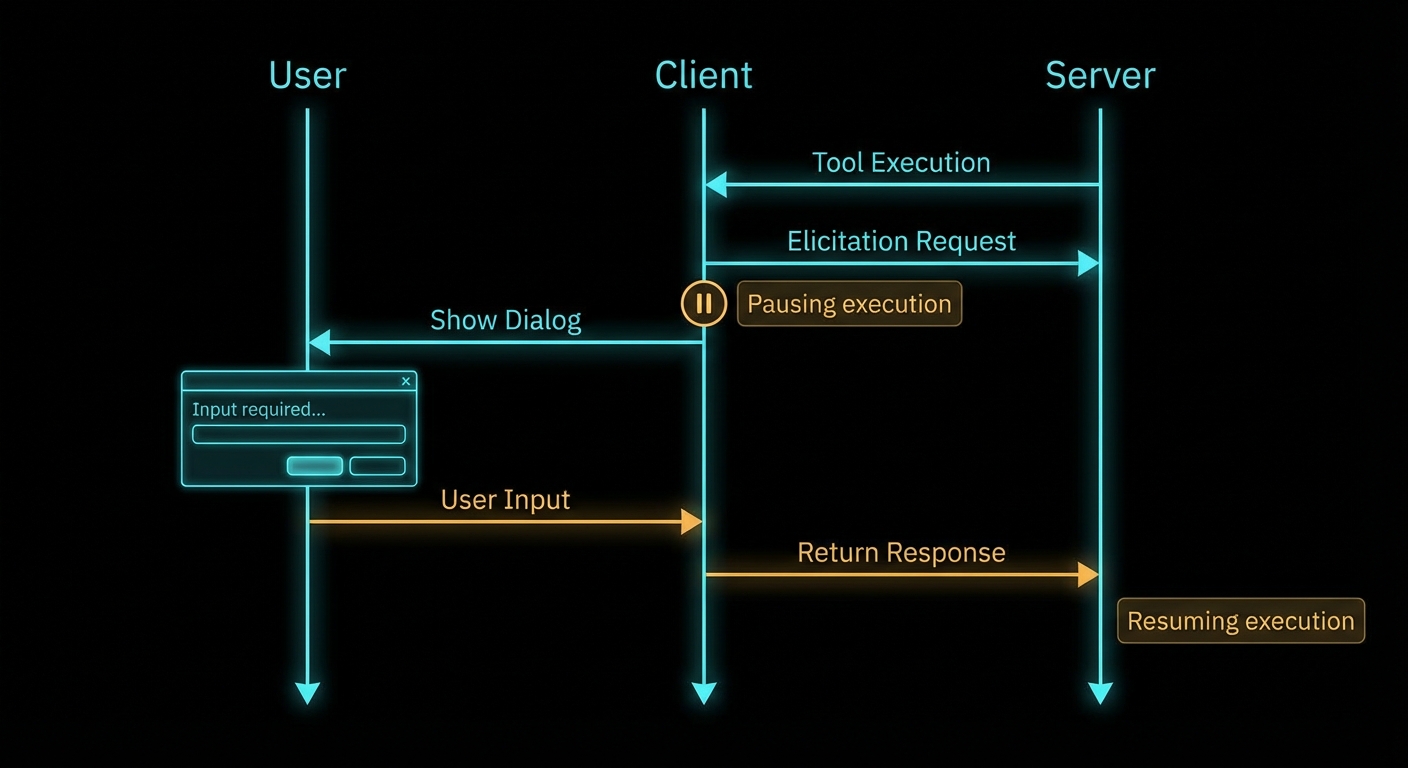
Some tools cannot complete without asking the user a question. “Which account should I debit?” “What is the date range for this report?” “Are you sure you want to delete all 200 records?” These are not questions an LLM should guess at. They require explicit, structured input from the human in the loop. Elicitation is MCP’s mechanism for this – it lets a server, while handling a request, ask the user for information through the client’s UI, wait for the answer, and then continue. It is a synchronous human-in-the-loop pattern baked into the protocol.
Elicitation: the server pauses tool execution, asks the user a structured question, and resumes with the answer.
How Elicitation Works
When a server needs user input, it sends an elicitation/create request to the client. The request includes a message (explaining what information is needed) and a JSON schema describing the expected response format. The client presents this to the user in whatever UI is appropriate – a dialog box, a prompt, a form – and returns the user’s structured response. The server receives the answer and continues processing.
Elicitation is a client capability – the server can only use it if the client declared elicitation support during initialisation. If the client does not support elicitation, the server must handle the lack of user input gracefully (skip the step, use defaults, or return an error with a clear explanation).
// Client: declare elicitation support
const client = new Client(
  { name: 'my-host', version: '1.0.0' },
  {
    capabilities: {
      elicitation: {
        form: {},   // In-band structured data collection
        url: {},    // Out-of-band URL navigation (New in 2025-11-25)
      },
    },
  }
);

// Client: implement the elicitation handler
import { ElicitRequestSchema } from '@modelcontextprotocol/sdk/types.js';

client.setRequestHandler(ElicitRequestSchema, async (request) => {
  const { message, requestedSchema } = request.params;

  // Show UI to user - implementation is host-specific
  const userResponse = await showElicitationDialog(message, requestedSchema);

  if (userResponse === null) {
    // User dismissed/cancelled
    return { action: 'cancel' };
  }

  return {
    action: 'accept',
    content: userResponse,  // Must match requestedSchema
  };
});
Why this matters: the handler is the trust boundary between protocol messages and your UI. In a real project you would validate userResponse against requestedSchema before returning accept, and you would time out slow users so the server does not hang forever.
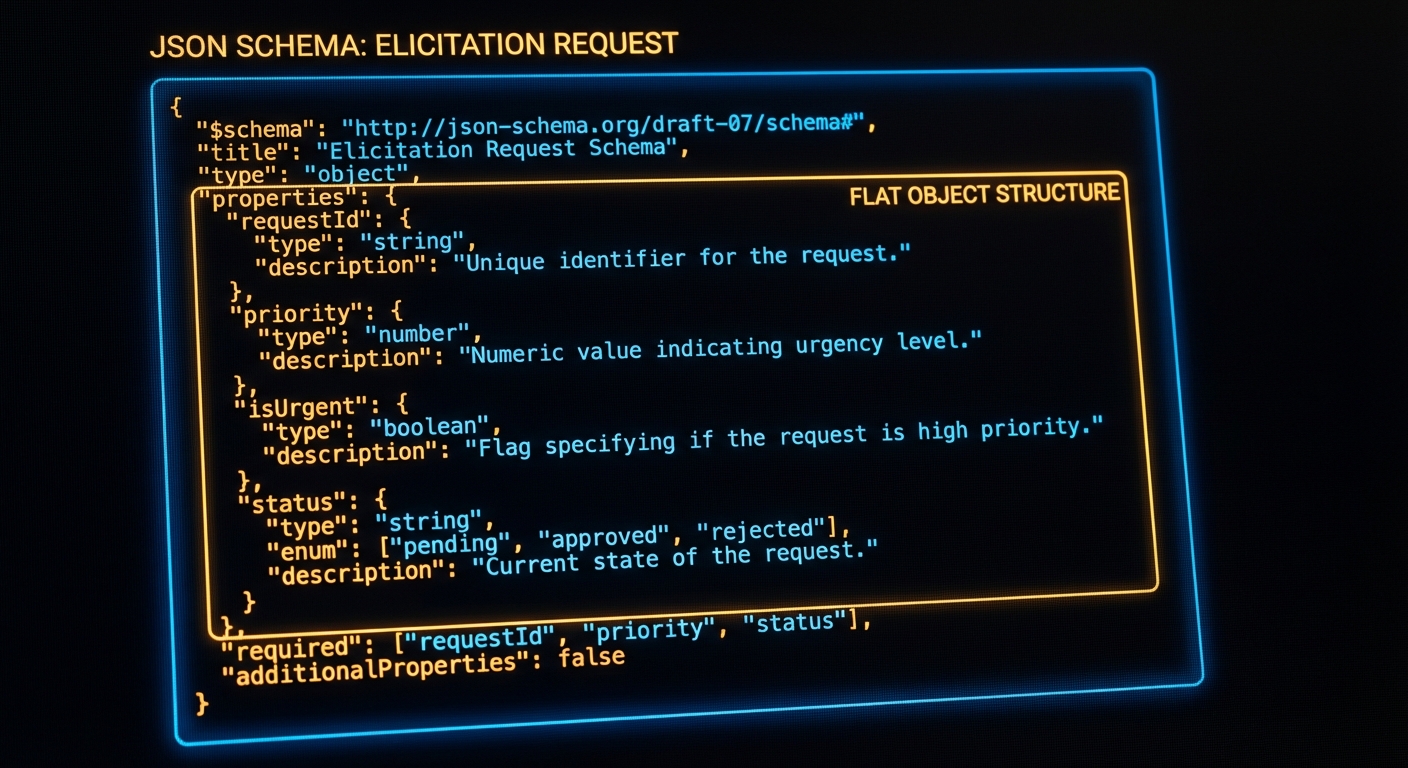
Elicitation schemas: flat JSON schemas that define the exact structure of the user’s expected answer.
The client pieces only declare and route elicitation; the server still decides when to pause a tool and what shape of answer it needs. The next example shows a full tool handler that elicits structured confirmation before a side effect.
Server-Side Elicitation Usage
import { McpServer } from '@modelcontextprotocol/sdk/server/mcp.js';
import { z } from 'zod';

const server = new McpServer({ name: 'payment-server', version: '1.0.0' });

server.tool(
  'process_payment',
  'Processes a payment transaction with user confirmation',
  {
    amount: z.number().positive().describe('Amount in USD'),
    recipient: z.string().describe('Recipient name or email'),
  },
  async ({ amount, recipient }, { server: serverInstance }) => {
    // Elicit confirmation before processing
    const confirmation = await serverInstance.elicitInput({
      message: `You are about to send $${amount.toFixed(2)} to ${recipient}. Please confirm the payment account:`,
      requestedSchema: {
        type: 'object',
        properties: {
          account_id: {
            type: 'string',
            description: 'Your account ID to debit (format: ACC-XXXXXXXX)',
          },
          confirmed: {
            type: 'boolean',
            description: 'Confirm you want to proceed with this payment',
          },
        },
        required: ['account_id', 'confirmed'],
      },
    });

    if (confirmation.action === 'cancel') {
      return { content: [{ type: 'text', text: 'Payment cancelled by user.' }] };
    }

    if (!confirmation.content.confirmed) {
      return { content: [{ type: 'text', text: 'Payment declined - user did not confirm.' }] };
    }

    const result = await processPayment({
      amount,
      recipient,
      accountId: confirmation.content.account_id,
    });

    return { content: [{ type: 'text', text: `Payment ${result.transactionId} processed successfully.` }] };
  }
);
Why this pattern matters: money-moving and irreversible actions are where silent model guesses hurt the most. In a real project you would keep the elicitation copy short, show the same numbers the server will use, and log the outcome for audit without storing secrets in the model context.
“Elicitation allows servers to request additional information from users during tool execution. This enables interactive workflows where user input is needed to complete tasks, while maintaining a clear separation between the AI model and the human oversight layer.” – MCP Specification, Elicitation
Elicitation Schema Constraints
The schema for an elicitation request is deliberately restricted compared to full JSON Schema. This is intentional – the schema must be renderable by any client UI, which means it cannot be arbitrarily complex. The spec defines a “flat” schema: a single object with primitive properties (string, number, boolean, or enum). No nested objects, no arrays, no $ref references.
// VALID elicitation schema - flat, primitive properties only
{
  type: 'object',
  properties: {
    name: { type: 'string', description: 'Your full name' },
    age: { type: 'number', description: 'Your age in years' },
    agree_to_terms: { type: 'boolean', description: 'Do you agree to the terms?' },
    plan: { type: 'string', enum: ['basic', 'pro', 'enterprise'], description: 'Choose a plan' },
  },
  required: ['name', 'agree_to_terms'],
}

// INVALID: Nested objects not allowed in elicitation schemas
{
  type: 'object',
  properties: {
    address: {
      type: 'object',  // This will fail - nested objects not permitted
      properties: { street: { type: 'string' } },
    },
  },
}
If you need a richer form, split it into sequential elicitations or collect details before the tool runs. The flat schema trade-off keeps portable clients implementable; planning your UX around that limit avoids spec violations at runtime.
Failure Modes with Elicitation
Case 1: Not Handling cancel Action
Users can always cancel an elicitation. If your tool handler does not check for the cancel action, it will try to proceed with undefined data and crash or produce garbage output.
// BAD: No cancel check
const response = await serverInstance.elicitInput({ ... });
await processData(response.content.value); // Will throw if action was 'cancel'

// GOOD: Always check the action
const response = await serverInstance.elicitInput({ ... });
if (response.action !== 'accept') {
  return { content: [{ type: 'text', text: 'Action cancelled.' }] };
}
await processData(response.content.value);
Case 2: Using Elicitation When a Tool Parameter Would Suffice
Elicitation is for input the server cannot know at design time – confirmation of a specific action, a password, runtime context. If the information can be a tool argument, make it a tool argument. Elicitation adds a round-trip to the user and breaks the automated flow.
// WRONG: Using elicitation for something that should be an arg
server.tool('delete_record', '...', { id: z.string() }, async ({ id }, ctx) => {
  const confirm = await ctx.server.elicitInput({ message: 'Confirm deletion?', ... });
  // Should this really need an interactive prompt? Or is --confirm a better pattern?
});

// BETTER: Use tool annotations + let the host handle confirmation
server.tool(
  'delete_record',
  'Permanently deletes a record',
  { id: z.string(), confirm: z.boolean().describe('Set true to confirm permanent deletion') },
  { annotations: { destructiveHint: true } },
  async ({ id, confirm }) => {
    if (!confirm) return { isError: true, content: [{ type: 'text', text: 'Set confirm=true to proceed.' }] };
    await db.delete(id);
    return { content: [{ type: 'text', text: `Deleted ${id}` }] };
  }
);
URL Mode Elicitation
New in 2025-11-25
Form mode elicitation passes user data through the MCP client – the client renders the form, collects the response, and relays it back to the server. This is fine for non-sensitive data like preferences, date ranges, or confirmation flags. But some workflows need the user to enter credentials, sign a document, or complete an OAuth flow in a secure context where the MCP client should never see the raw data. URL mode solves this by directing the user to an external URL for the sensitive interaction.
When a server sends a URL mode elicitation, the client opens the target URL (in a browser or embedded webview), and the user interacts directly with the server’s web page. The sensitive data (password, API key, payment info) stays between the user and the server’s web endpoint. The MCP client only learns whether the user completed or cancelled the flow.
// Server: elicit via URL mode for credential entry
const result = await serverInstance.elicitInput({
  mode: 'url',
  message: 'Please sign in to your GitHub account to grant repository access.',
  url: 'https://auth.example.com/github/connect?session=abc123',
});

if (result.action === 'cancel') {
  return { content: [{ type: 'text', text: 'GitHub authentication cancelled.' }] };
}

// result.action === 'accept' means the user completed the flow
// The server's web endpoint already has the credential from the callback
const repos = await fetchGitHubRepos(sessionId);
return { content: [{ type: 'text', text: `Connected. Found ${repos.length} repositories.` }] };
The specification requires that servers MUST NOT use form mode for sensitive information. If your tool needs a password, API key, or payment detail, use URL mode. The client MUST display the target domain and get user consent before navigating. This is a trust boundary: the user decides whether to visit the URL, and the MCP client never touches the sensitive data.
Clients declare URL mode support in their capabilities: { elicitation: { form: {}, url: {} } }. A client that only supports form mode omits the url key. For backwards compatibility, an empty elicitation: {} object is treated as form-only. Servers MUST check the client’s declared capabilities before sending a URL mode request.
Titled and Multi-Select Enums
New in 2025-11-25
Earlier versions of elicitation only supported bare enums: enum: ['basic', 'pro', 'enterprise']. The 2025-11-25 spec adds titled enums (human-readable labels for each option) and multi-select enums (the user can pick more than one value). These make elicitation forms more usable without adding nested schema complexity.
// Titled enum: each option has a display label
const response = await serverInstance.elicitInput({
  message: 'Select your deployment region:',
  requestedSchema: {
    type: 'object',
    properties: {
      region: {
        type: 'string',
        enum: ['us-east-1', 'eu-west-1', 'ap-southeast-1'],
        enumNames: ['US East (Virginia)', 'EU West (Ireland)', 'Asia Pacific (Singapore)'],
        description: 'AWS region for deployment',
      },
    },
    required: ['region'],
  },
});

// Multi-select enum: user picks one or more values
const tagsResponse = await serverInstance.elicitInput({
  message: 'Tag this record (select all that apply):',
  requestedSchema: {
    type: 'object',
    properties: {
      tags: {
        type: 'array',
        items: {
          type: 'string',
          enum: ['urgent', 'billing', 'technical', 'feature-request'],
          enumNames: ['Urgent', 'Billing Issue', 'Technical Support', 'Feature Request'],
        },
        description: 'One or more tags for this support ticket',
      },
    },
    required: ['tags'],
  },
});
Titled enums prevent the user from seeing raw enum values like us-east-1 when the client renders the form – instead they see “US East (Virginia)”. Multi-select enums use an array wrapper around the enum type. Both features keep the schema flat and portable across client UIs.
Default Values in Elicitation Schemas
New in 2025-11-25
All primitive types in elicitation schemas now support a default value. The client pre-fills the form field with the default, reducing friction for the common case while still letting the user override when needed.
Defaults reduce the number of fields the user has to actively fill in. For high-frequency workflows (daily exports, recurring queries), a well-chosen default turns a multi-field form into a single-click confirmation.
What to Check Right Now
Map your interactive flows – identify any workflow in your application that requires user input mid-execution. These are elicitation candidates.
Keep schemas flat – validate your elicitation schemas against the spec constraints: flat object, primitive values only, no nested objects or arrays.
Always handle cancel and decline – every elicitation can result in cancel (user dismissed) or decline (user responded negatively). Handle all three outcomes.
Check client support first – before calling elicitInput, check client.getClientCapabilities()?.elicitation. If the client does not support it, fall back to tool-argument-based confirmation.
Use URL mode for sensitive data – passwords, API keys, and payment details MUST go through URL mode, never form mode. Check that the client declares url in its elicitation capabilities before sending a URL mode request.
Add defaults to common fields – pre-fill format, limit, and toggle fields so the user can confirm with one click in routine workflows.
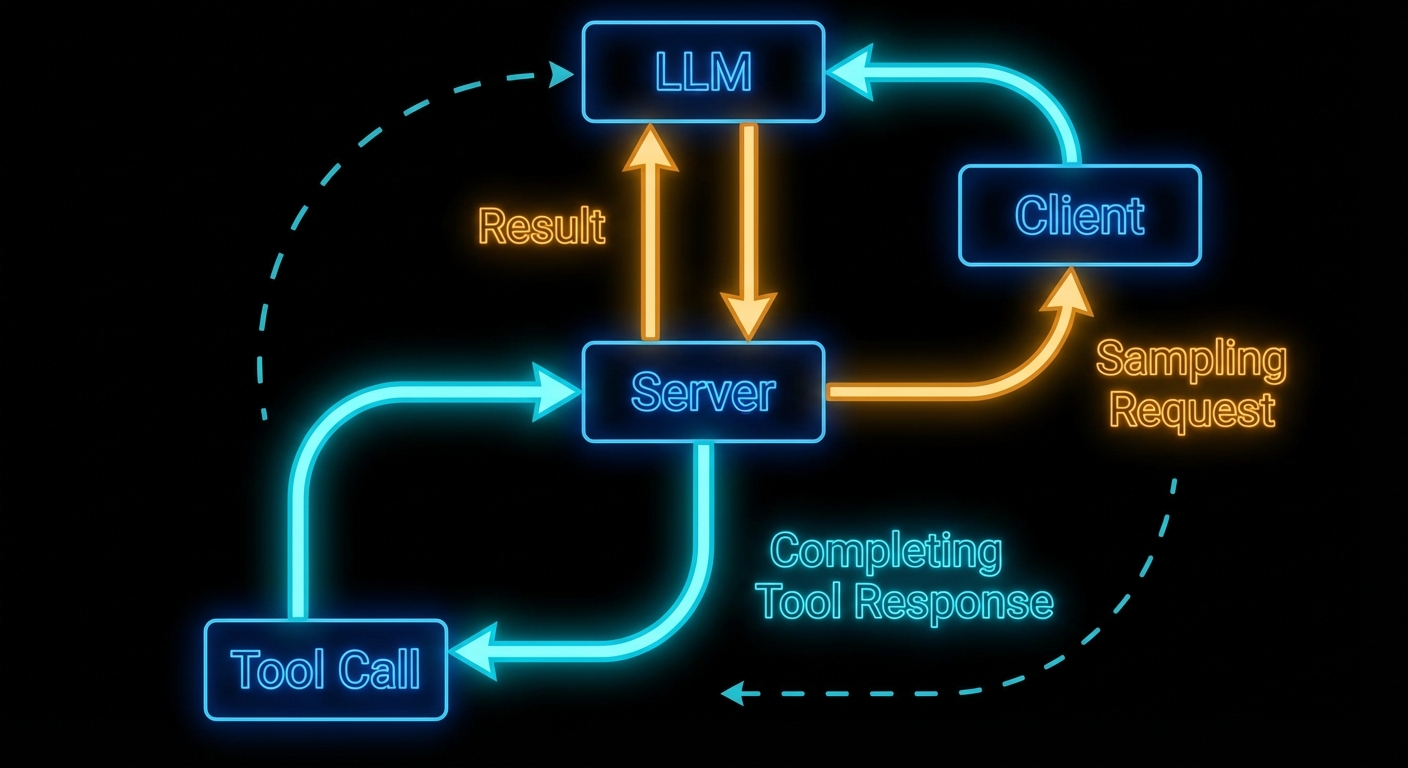
Here is the mind-bending part of MCP: servers can ask the LLM for help. In the standard model, the flow is one-way – host calls LLM, LLM calls tool, tool runs on server, result goes back. Sampling reverses one arrow. It lets a server, while handling a request, ask the host’s LLM to generate text – and then use that generated text in its response. This is recursive AI, and it is what enables genuinely intelligent MCP servers that reason about their own actions.
Sampling: the server requests an LLM inference from the client, enabling server-side reasoning loops.
The Sampling Flow
Sampling works as follows: a server handling a tool call decides it needs to “think” before it can respond. It sends a sampling/createMessage request to the client. The client receives this, shows the pending sampling request to the user (or approves it automatically based on policy), then calls the actual LLM API, and returns the result to the server. The server uses the result to complete its work and returns the final tool response to the original caller.
The critical point: the server does not know which LLM the client is using. It just asks for “a language model response” and gets back generated text. This maintains provider-agnosticism even for server-side reasoning.
// Client configuration to enable sampling
const client = new Client(
  { name: 'my-host', version: '1.0.0' },
  {
    capabilities: {
      sampling: {},  // Must declare this to receive sampling requests from servers
    },
  }
);

// Client must handle incoming sampling requests
client.setRequestHandler(CreateMessageRequestSchema, async (request) => {
  const { messages, maxTokens, temperature } = request.params;

  // Here the host calls its actual LLM
  const openai = new OpenAI();
  const response = await openai.chat.completions.create({
    model: 'gpt-4o',
    messages: messages.map(m => ({
      role: m.role,
      content: typeof m.content === 'string' ? m.content : m.content.text,
    })),
    max_tokens: maxTokens || 1000,
    temperature: temperature || 0.7,
  });

  return {
    role: 'assistant',
    content: { type: 'text', text: response.choices[0].message.content },
    model: 'gpt-4o',
    stopReason: 'endTurn',
  };
});
Why this matters: without capabilities.sampling the server cannot request completions at all, and without a handler every sampling call fails the tool mid-flight. In a real project you would centralise LLM calls here so quotas, logging, and redaction policies stay in one place on the host.
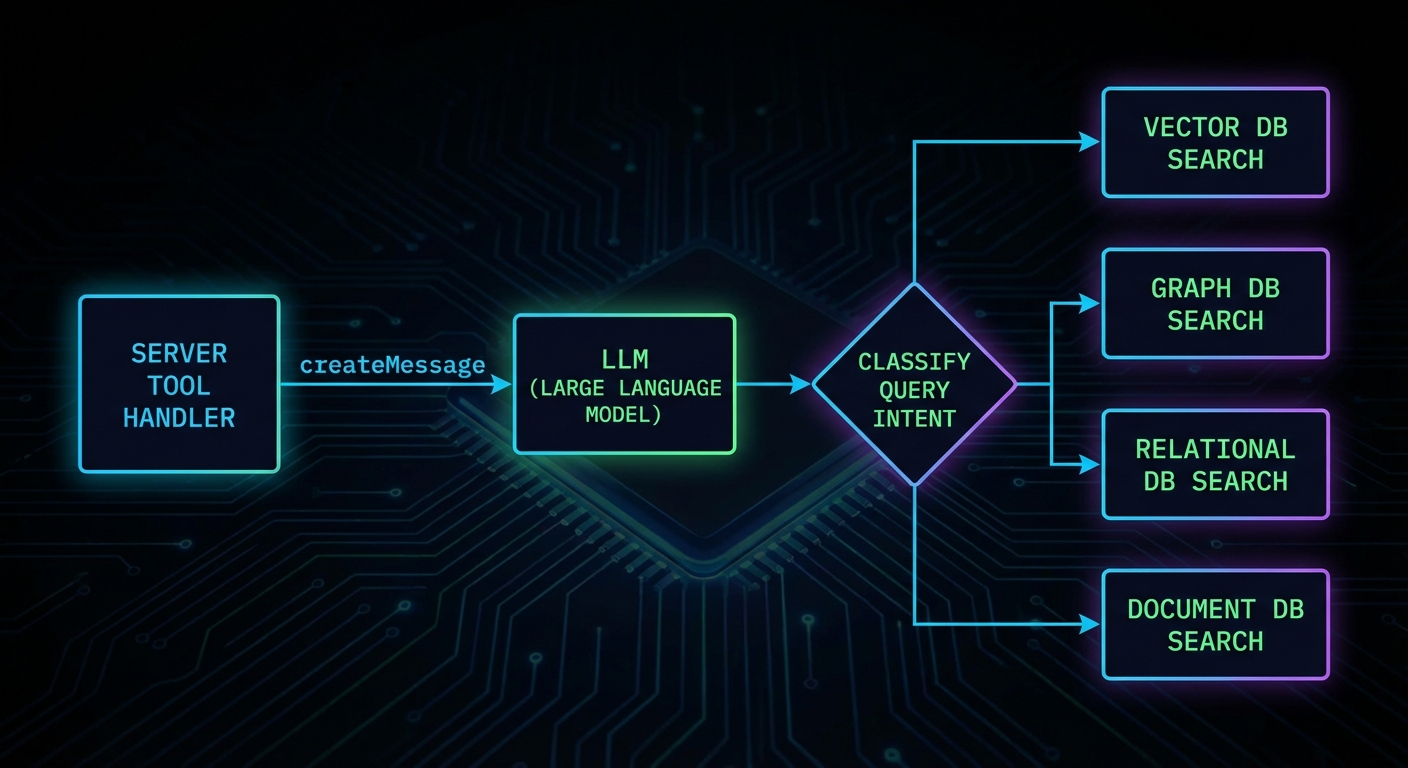
A server using sampling to analyse data before returning a structured response.
Server-Side Sampling Usage
On the server side, you request sampling through the server’s sampling capability. Here is a server that uses sampling to classify user intent before deciding which database to query:
import { McpServer } from '@modelcontextprotocol/sdk/server/mcp.js';
import { z } from 'zod';

const server = new McpServer({ name: 'smart-search', version: '1.0.0' });

server.tool(
  'intelligent_search',
  'Searches across databases, routing the query based on intent',
  { query: z.string().describe('The search query') },
  async ({ query }, { server: serverInstance }) => {
    // Use sampling to classify the query intent
    const classification = await serverInstance.createMessage({
      messages: [{
        role: 'user',
        content: {
          type: 'text',
          text: `Classify this search query into one of: products, users, orders, docs.\nQuery: "${query}"\nRespond with only the category name.`,
        },
      }],
      maxTokens: 10,
    });

    const category = classification.content.text.trim().toLowerCase();

    // Route to the appropriate search function
    let results;
    switch (category) {
      case 'products': results = await searchProducts(query); break;
      case 'users': results = await searchUsers(query); break;
      case 'orders': results = await searchOrders(query); break;
      default: results = await searchDocs(query);
    }

    return { content: [{ type: 'text', text: JSON.stringify(results) }] };
  }
);
In a real project you would treat the classification step as a bounded, cheap call (low maxTokens, strict prompt) and keep routing logic easy to unit test. If the model returns an unexpected label, fall back to a safe default path instead of failing the whole tool.
“Sampling allows servers to request LLM completions through the client, enabling sophisticated agentic behaviors while maintaining security through human oversight. The client retains control over which model is used and what requests are permitted.” – MCP Documentation, Sampling
Sampling Parameters
The sampling/createMessage request supports model preferences and sampling parameters. These are preferences, not requirements – the client may choose to ignore them if they conflict with its policy or available models.
Those preferences are negotiation, not a guarantee: the host may pin a single approved model or ignore cost and speed hints for compliance. Use them to express intent, then document what your client actually honours so server authors know what to expect.
Failure Modes with Sampling
Case 1: Using Sampling for Every Decision
Sampling adds latency and cost. Using it for decisions that can be made with deterministic code (string matching, regex, a simple lookup) is waste. Reserve sampling for genuinely ambiguous situations where LLM understanding adds real value.
// WASTEFUL: Sampling for something a regex handles
const isEmail = await serverInstance.createMessage({
  messages: [{ role: 'user', content: { type: 'text', text: `Is "${input}" an email address? Yes or No.` } }],
  maxTokens: 5,
});

// BETTER: Just use a regex
const isEmail = /^[^@]+@[^@]+\.[^@]+$/.test(input);
Why this matters: every sampling round trip adds latency and billed tokens. In a real project you would profile hot tools and replace LLM branches with deterministic code wherever the spec is stable.
Case 2: Infinite Sampling Loops
If a server uses sampling and the LLM response triggers another tool call that uses sampling again, you can create infinite loops. Always set a maximum recursion depth and terminate if exceeded.
Starting with spec version 2025-11-25, servers can include tools and toolChoice parameters in a sampling/createMessage request. This lets the server constrain which tools the LLM may call during the sampling turn. Without this, the LLM during sampling would either have no tools at all or the full tool set – there was no way for the server to scope the tools available during a recursive inference.
// Server: sampling request with constrained tool set
const response = await serverInstance.createMessage({
  messages: [{
    role: 'user',
    content: {
      type: 'text',
      text: 'Look up the current status of order ORD-12345 and summarise it.',
    },
  }],
  maxTokens: 500,
  tools: [
    {
      name: 'get_order_status',
      description: 'Look up the current status of an order by ID',
      inputSchema: {
        type: 'object',
        properties: {
          orderId: { type: 'string', description: 'The order ID' },
        },
        required: ['orderId'],
      },
    },
  ],
  toolChoice: { type: 'auto' },  // 'auto' | 'none' | { type: 'tool', name: '...' }
});
The tools array defines the tool definitions available during this specific sampling turn. The toolChoice parameter controls how the LLM selects tools: "auto" lets the model decide, "none" disables tool use entirely, and { type: 'tool', name: 'get_order_status' } forces a specific tool. This is useful when a server needs the LLM to do a lookup-then-reason task: you provide only the lookup tool, the LLM calls it, gets the data, and writes a summary.
The client is responsible for actually executing the tool calls the LLM makes during sampling. The client returns the final assistant message to the server, including any tool results in the conversation. This keeps the server out of the tool execution loop during its own sampling request – the client manages the entire multi-turn tool-use conversation internally.
What to Check Right Now
Declare sampling on your client – if you want servers to be able to use sampling, your client must declare capabilities: { sampling: {} }. Without this, sampling requests from servers will be rejected.
Implement a sampling handler – if you build a host application, implement the CreateMessageRequestSchema handler. An unimplemented handler will cause all sampling requests to fail silently.
Show sampling requests to users – the spec emphasises human oversight. Production hosts should surface pending sampling requests to users and allow approval/rejection.
Cap sampling depth – any server that uses sampling recursively must have a maximum depth limit. Without it, one malformed query can run up unbounded costs.
Most MCP developers learn about tools and resources and stop there, treating prompts as a nice-to-have. This is a mistake. Prompts are the mechanism that turns a raw capability server into a polished, user-facing product. They let you bake your best workflows into the server itself, expose them through any MCP-compatible host, and guarantee that users get the same high-quality prompt structure regardless of which host they use. Think of prompts as the “saved queries” of the AI world.
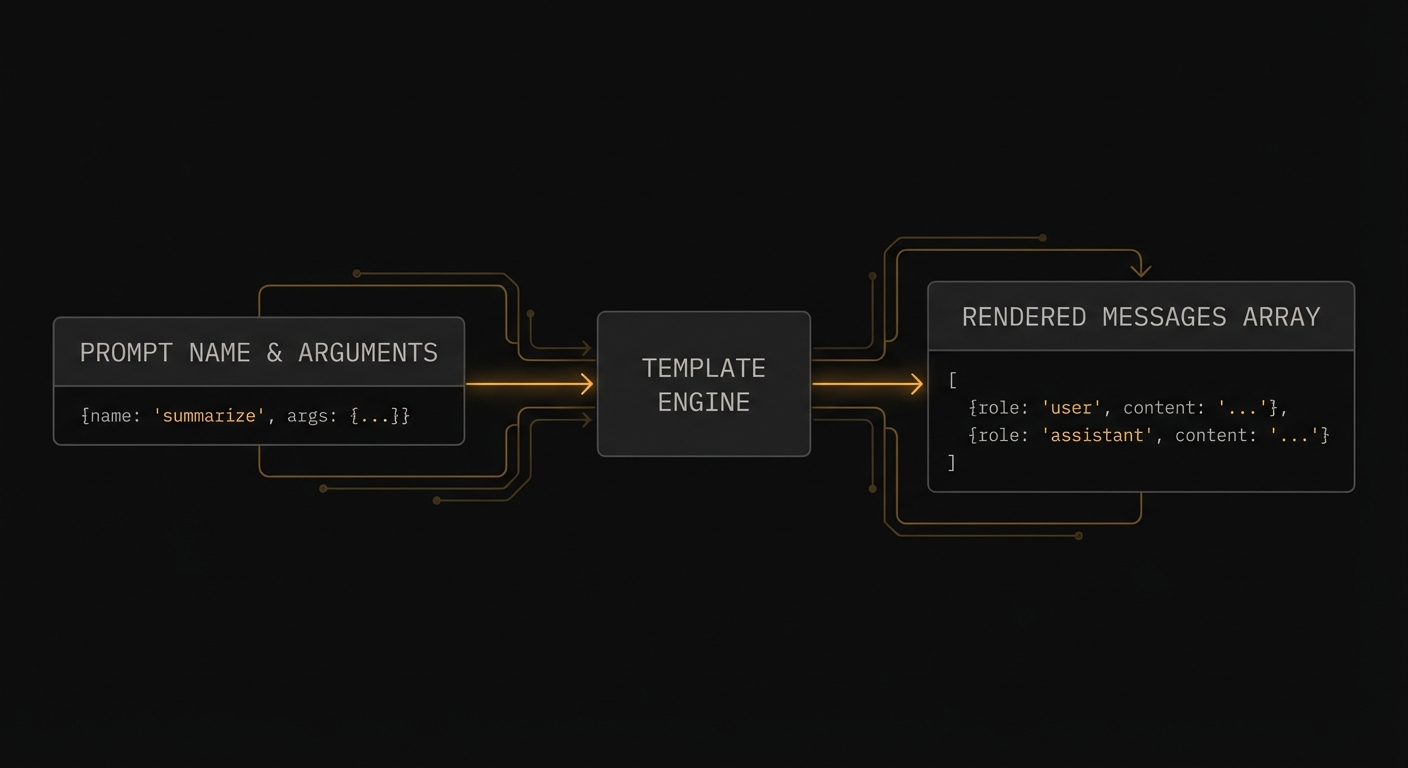
Prompts: named, parameterised message templates that clients surface to users.
What Prompts Are and Why They Matter
An MCP prompt is a named, reusable prompt template that the server exposes for clients to use. When a client calls prompts/get with a prompt name and arguments, the server returns a list of messages ready to be sent to an LLM. The messages can reference resources (to inject dynamic content), contain multi-turn conversation history, and include both user and assistant roles.
The key difference from tools: prompts are human-initiated workflows. A user explicitly selects a prompt from the host UI (“Code Review”, “Summarise Document”, “Translate to French”). Tools are model-initiated – the LLM decides to call them based on context. Prompts are the programmatic equivalent of slash commands.
import { McpServer } from '@modelcontextprotocol/sdk/server/mcp.js';
import { z } from 'zod';

const server = new McpServer({ name: 'dev-assistant', version: '1.0.0' });

// Simple prompt with arguments
server.prompt(
  'code_review',
  'Review code for quality, security, and best practices',
  {
    code: z.string().describe('The code to review'),
    language: z.string().describe('Programming language (e.g. javascript, python, rust)'),
    focus: z.enum(['security', 'performance', 'style', 'all']).default('all')
      .describe('What aspect to focus the review on'),
  },
  async ({ code, language, focus }) => ({
    messages: [
      {
        role: 'user',
        content: {
          type: 'text',
          text: `Please review the following ${language} code with a focus on ${focus}:\n\n\`\`\`${language}\n${code}\n\`\`\`\n\nProvide specific, actionable feedback with examples.`,
        },
      },
    ],
  })
);
This matters because without prompts, every user has to manually craft the same instructions over and over. A well-designed prompt bakes in your team’s best practices – the right system instructions, the correct output format, the domain-specific framing – so that every user gets consistent, high-quality results regardless of how they phrase their request.
“Prompts enable servers to define reusable prompt templates and workflows that clients can easily surface to users and LLMs. They provide a way to standardize and share common LLM interactions.” – MCP Documentation, Prompts
Prompts with Resource Embedding
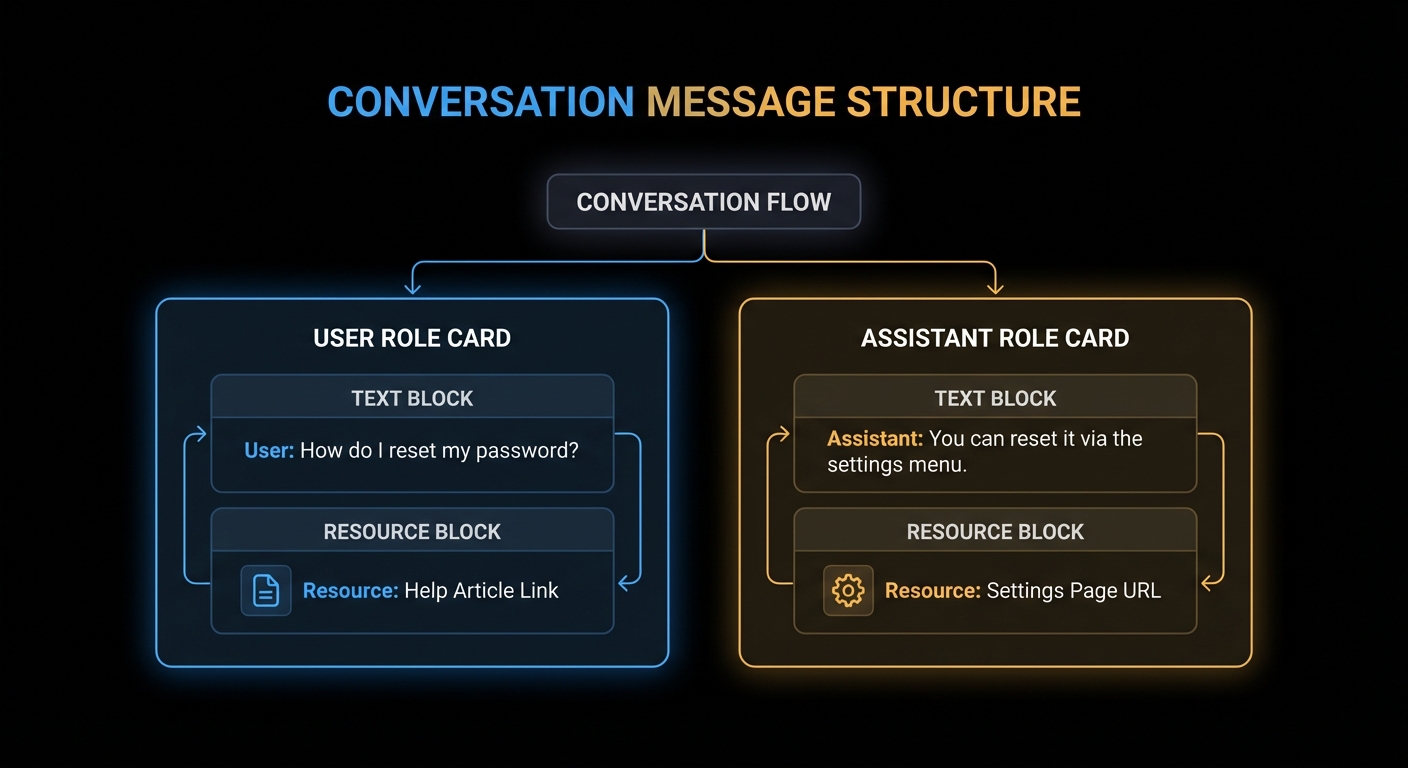
Prompts can embed resources directly into messages. When the server returns a message with a resource content block, the client reads the resource and injects its content into the conversation context before sending it to the LLM.
server.prompt(
  'analyse_file',
  'Analyse the contents of a file',
  { file_uri: z.string().describe('The URI of the file to analyse') },
  async ({ file_uri }) => ({
    messages: [
      {
        role: 'user',
        content: [
          {
            type: 'text',
            text: 'Please analyse the following file and provide a summary of its contents, structure, and any notable patterns:',
          },
          {
            type: 'resource',
            resource: { uri: file_uri }, // Client resolves this URI and injects content
          },
        ],
      },
    ],
  })
);

// Multi-turn prompt with context
server.prompt(
  'debug_error',
  'Debug an error with context',
  {
    error_message: z.string(),
    stack_trace: z.string().optional(),
    context: z.string().optional().describe('Additional context about what you were doing'),
  },
  async ({ error_message, stack_trace, context }) => ({
    messages: [
      {
        role: 'user',
        content: { type: 'text', text: 'I am getting the following error:' },
      },
      {
        role: 'user',
        content: {
          type: 'text',
          text: `Error: ${error_message}${stack_trace ? `\n\nStack trace:\n${stack_trace}` : ''}${context ? `\n\nContext: ${context}` : ''}`,
        },
      },
      {
        role: 'assistant',
        content: { type: 'text', text: 'I can help debug this. Let me analyse the error...' },
      },
      {
        role: 'user',
        content: { type: 'text', text: 'What is causing this error and how do I fix it?' },
      },
    ],
  })
);
In a production deployment, the multi-turn pattern shown above is especially useful for support workflows. Pre-filling an assistant message like “I can help debug this” primes the model’s tone and focus, reducing the chance of generic or off-topic responses. Think of it as setting the stage for the conversation, not just the first question.
Prompt messages: multi-turn conversations with user/assistant roles and embedded resource content.
Resource embedding and multi-turn prompts give you a powerful composition model. But with that power comes a few common traps that are easy to fall into, especially when coming from a background of building direct LLM integrations. The failure modes below cover the most frequent mistakes.
Failure Modes with Prompts
Case 1: Putting LLM Logic Inside the Prompt Handler
A prompt handler should assemble and return messages. It should not call an LLM. Calling an LLM inside a prompt handler breaks the separation between prompt construction (server’s job) and prompt execution (host’s job). It also makes your server non-deterministic and slow.
// WRONG: Calling an LLM inside the prompt handler
server.prompt('summarise', '...', { text: z.string() }, async ({ text }) => {
  const openai = new OpenAI();
  const summary = await openai.chat.completions.create({ ... }); // WRONG
  return { messages: [{ role: 'user', content: { type: 'text', text: summary } }] };
});

// CORRECT: Return the prompt; let the host's LLM execute it
server.prompt('summarise', '...', { text: z.string() }, async ({ text }) => ({
  messages: [{
    role: 'user',
    content: { type: 'text', text: `Please summarise the following text in 3 bullet points:\n\n${text}` },
  }],
}));
The first case is about respecting the boundary between prompt assembly and prompt execution. The next case deals with a subtler problem: data freshness. If you inline content directly into a prompt, it becomes a frozen snapshot that will silently go stale.
Case 2: Hardcoding Content That Should Be a Resource Reference
If your prompt inlines large amounts of data (a whole document, a database dump), the data will not be updated when the underlying source changes and the prompt will grow stale. Reference a resource URI instead, letting the client fetch fresh content at prompt execution time.
title: New in 2025-06-18 | icons: New in 2025-11-25
Like tools and resources, prompts now support a title field for human-readable display names and an icons array for visual identification in host UIs. The title is what users see in a prompt picker or slash-command menu. The name remains the stable programmatic identifier.
// In the prompts/list response
{
  name: 'code_review',
  title: 'Code Review',                  // User-facing label
  description: 'Review code for quality, security, and best practices',
  icons: [
    { src: 'https://cdn.example.com/icons/review.svg', mimeType: 'image/svg+xml' },
  ],
  arguments: [
    { name: 'code', description: 'The code to review', required: true },
    { name: 'language', description: 'Programming language', required: true },
  ],
}
Icons help users quickly scan a list of available prompts in a host that renders a visual picker. Multiple sizes are supported via the sizes property. SVG icons are a good default since they scale to any resolution.
What to Check Right Now
Identify your power workflows – what are the 3-5 most common things your users ask the AI to do? Each one is a prompt candidate.
Test prompts in the Inspector – the Inspector shows prompts in a dedicated tab. Fill in arguments and render the messages to verify the output before integrating with an LLM.
Use resource references for dynamic content – never inline large or frequently-changing data in prompt text. Reference it by URI.
Notify on changes – if your prompts change (updated templates, new prompts added), send notifications/prompts/list_changed so clients can refresh their prompt catalogues.
Tools do things. Resources provide things. This distinction matters more than it sounds. A tool executes code with side effects – it searches, writes, sends, deletes. A resource is a read-only window into data – it gives the model (or the user) access to content without triggering any action. The resources primitive is MCP’s answer to the question: “how do I give the AI access to my data without writing a bespoke data-access tool every time?”
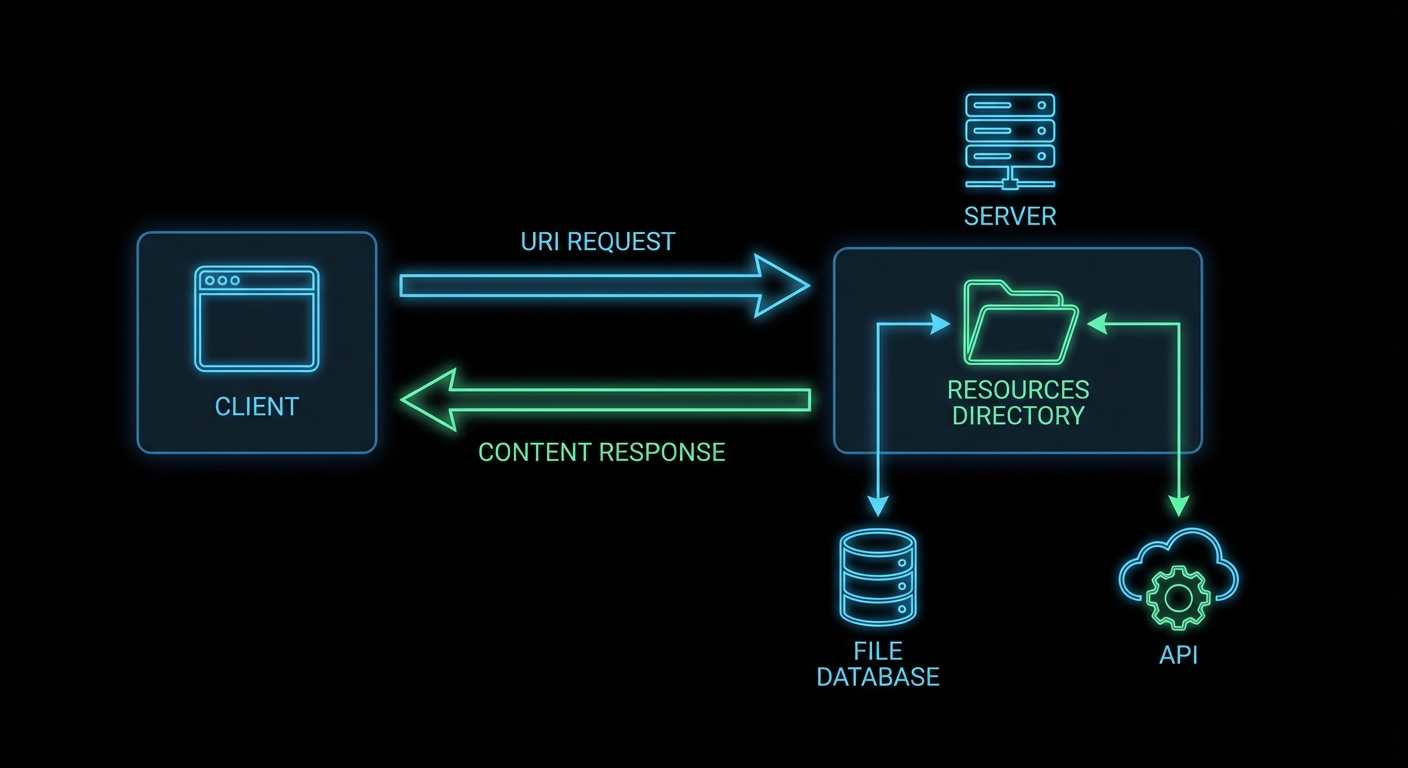
Resources: URI-addressed content that servers expose for reading by clients and AI models.
What Resources Are and How They Work
Every MCP resource has a URI – a unique identifier that the client uses to request it. The URI can follow any scheme: file://, db://, https://, custom-scheme://. The server defines what URIs exist and what they return. The client requests a URI and gets back content blocks (text or binary).
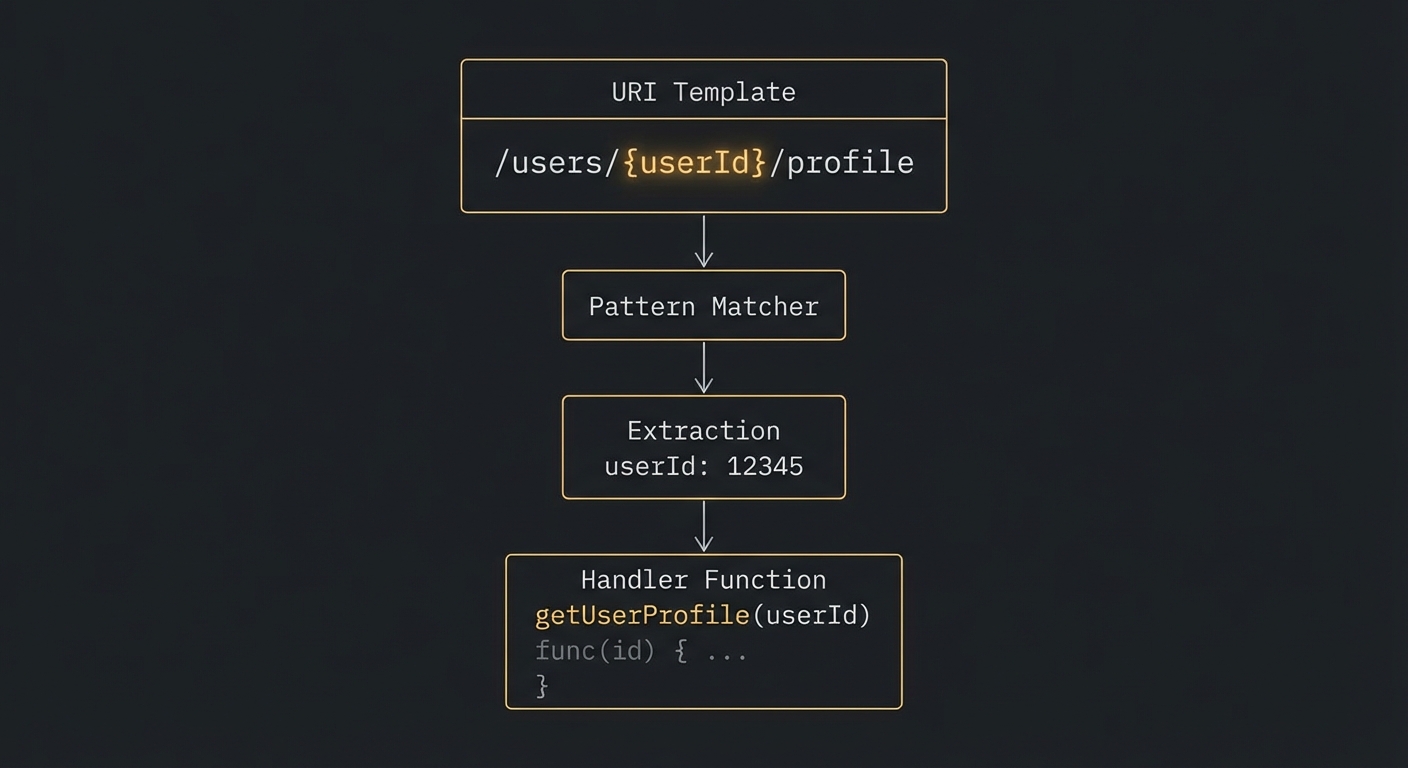
Resources come in two forms: direct resources (static items with known URIs that the server lists upfront) and resource templates (URI patterns with parameters, for dynamic resources where the set of possible URIs is not fixed).
import { McpServer } from '@modelcontextprotocol/sdk/server/mcp.js';
import { ResourceTemplate } from '@modelcontextprotocol/sdk/server/mcp.js';
import { z } from 'zod';
import fs from 'node:fs/promises';

const server = new McpServer({ name: 'file-server', version: '1.0.0' });

// Direct resource - static, known URI
// title and icons are optional metadata (title: New in 2025-06-18, icons: New in 2025-11-25)
server.resource(
  'config',
  'config://app/settings',
  {
    description: 'The application configuration',
    mimeType: 'application/json',
    title: 'App Settings',
    icons: [{ src: 'https://cdn.example.com/icons/settings.svg', mimeType: 'image/svg+xml' }],
  },
  async (uri) => {
    const config = await fs.readFile('./config.json', 'utf8');
    return { contents: [{ uri: uri.href, mimeType: 'application/json', text: config }] };
  }
);

// Resource template - dynamic, parameterised URI
server.resource(
  'user-profile',
  new ResourceTemplate('users://{userId}/profile', { list: undefined }),
  { description: 'User profile by ID' },
  async (uri, { userId }) => {
    const user = await db.getUser(userId);
    if (!user) throw new Error(`User ${userId} not found`);
    return {
      contents: [{
        uri: uri.href,
        mimeType: 'application/json',
        text: JSON.stringify(user, null, 2),
      }],
    };
  }
);
This pattern matters because it eliminates the need to write a separate tool for every piece of data your AI needs to read. Instead of creating get_config, get_user, and get_product tools, you expose each as a resource with a clean URI. The client can then browse and select what it needs without the model having to decide which tool to call.
“Resources represent any kind of data that an MCP server wants to make available to clients. This can include file contents, database records, API responses, live system data, screenshots, images, log files, and more.” – MCP Documentation, Resources
Resource Content Types
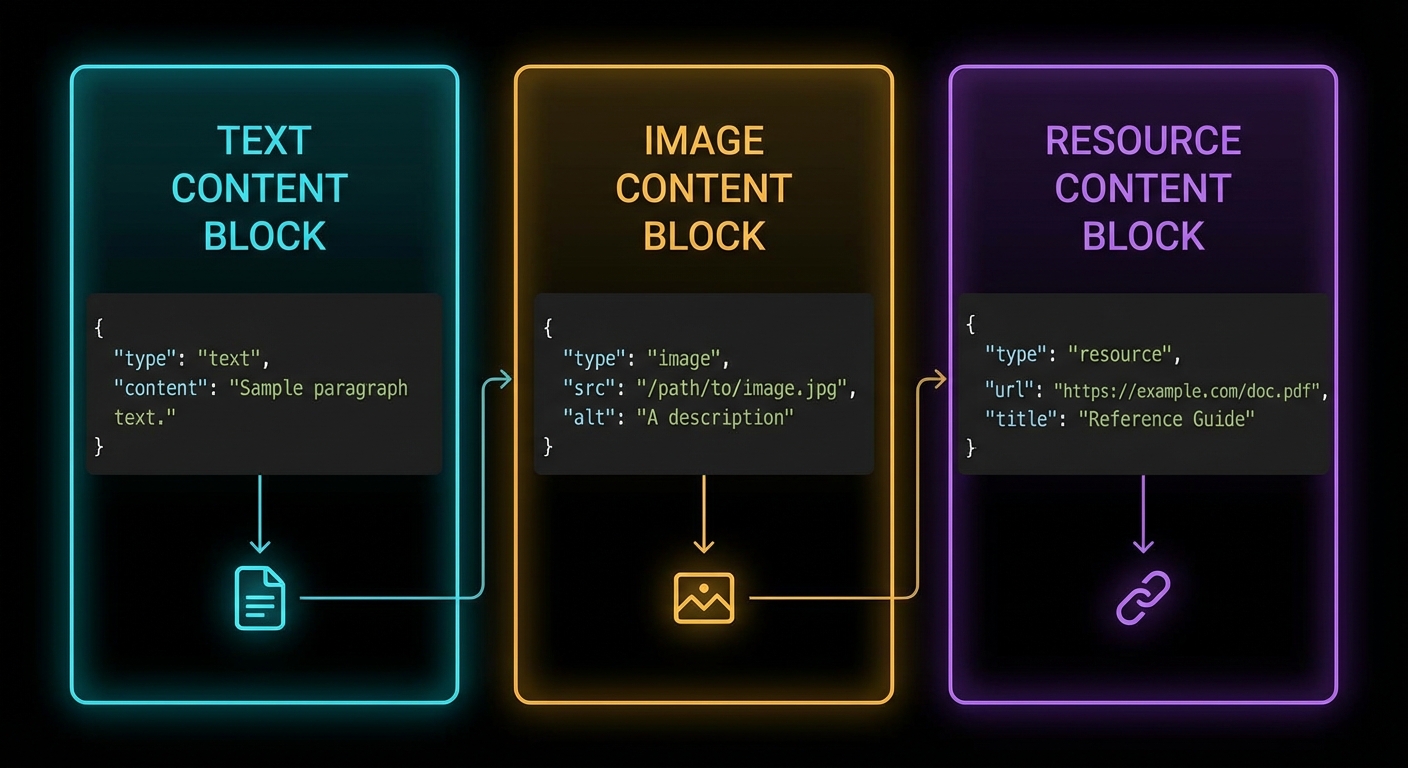
Resources return content blocks with either text or blob (binary) content. Text resources are the most common – JSON, Markdown, plain text, CSV, code. Binary resources use base64-encoded data.
Resource templates: URI patterns like users://{userId}/profile resolve to dynamic content.
So far, resources are fetched on demand – the client requests a URI and gets a snapshot. But what about data that changes continuously? The next section covers subscriptions, which let clients receive push notifications when a resource’s content updates.
Resource Subscriptions
If a resource changes over time, the server can support subscriptions. Clients subscribe to a URI and receive notifications when its content changes. This is useful for live data: a log file that grows, a database record that updates, a sensor reading that changes.
// Server with subscription support
const server = new McpServer({
  name: 'live-data-server',
  version: '1.0.0',
  capabilities: { resources: { subscribe: true } },
});

server.resource(
  'live-metrics',
  'metrics://system/cpu',
  { description: 'Live CPU usage percentage' },
  async (uri) => {
    const usage = await getCpuUsage();
    return {
      contents: [{ uri: uri.href, mimeType: 'text/plain', text: `${usage}%` }],
    };
  }
);

// When the data changes, notify subscribers:
setInterval(async () => {
  server.server.notification({
    method: 'notifications/resources/updated',
    params: { uri: 'metrics://system/cpu' },
  });
}, 5000); // every 5 seconds
In a production system, you would gate the notification interval based on actual data changes rather than a fixed timer. Broadcasting updates every 5 seconds when nothing has changed wastes bandwidth and triggers unnecessary re-fetches on the client side. Use event-driven notifications – emit only when the underlying data actually changes.
Now that we have covered how resources work when everything goes right, let’s look at what happens when they are misused. The following failure modes are the most common mistakes developers make when first implementing resources.
Failure Modes with Resources
Case 1: Returning Mutable Data from Resources
Resources are semantically read-only. If your resource handler has side effects (incrementing a counter, logging access, triggering a build), you are violating the contract. Clients may cache resource responses and re-use them without re-fetching. Side effects in resource handlers lead to missed triggers and hard-to-reproduce bugs.
// BAD: Side effect in a resource handler
server.resource('report', 'reports://quarterly', {}, async (uri) => {
  await markReportAsViewed(userId); // Side effect - will not fire on cached reads
  return { contents: [{ uri: uri.href, text: reportContent }] };
});

// GOOD: Side effects belong in tools
server.tool('mark_report_viewed', '...', { report_id: z.string() }, async ({ report_id }) => {
  await markReportAsViewed(report_id);
  return { content: [{ type: 'text', text: 'Marked as viewed.' }] };
});
The distinction between resources and tools is one of the most important design decisions in MCP server architecture. The next case covers the opposite mistake: using a resource where a tool would be more appropriate.
Case 2: Using Resources When Tools Are the Right Primitive
Resources are for pre-existing data the AI reads passively. If the data requires parameters that affect what is returned, the access has query semantics, or you need to aggregate data from multiple sources on the fly – that is a tool, not a resource.
// Ambiguous: is this a resource or a tool?
// If it takes user query parameters and runs a search algorithm -> Tool
// If it returns a fixed, addressable document -> Resource

// RESOURCE: Fixed, URI-addressable content
server.resource('user-manual', 'docs://user-manual', {}, handler);

// TOOL: Dynamic query with parameters
server.tool('search_docs', '...', { query: z.string() }, handler);
Resource Metadata: title and icons
title: New in 2025-06-18 | icons: New in 2025-11-25
Resources (and resource templates) now support a title field for human-readable display names and an icons array for visual identification in host UIs. The title is distinct from the programmatic name – use name as a stable identifier and title for user-facing labels that can contain spaces and special characters.
// In the resources/list response, each resource can include title and icons
{
  uri: 'config://app/settings',
  name: 'config',
  title: 'Application Settings',        // Human-readable label
  description: 'The current application configuration',
  mimeType: 'application/json',
  icons: [
    { src: 'https://cdn.example.com/icons/config.svg', mimeType: 'image/svg+xml' },
  ],
}
Content Annotations
New in 2025-06-18
All content types (text, image, audio, embedded resources, resource links) now support optional annotations that provide metadata about the intended audience, priority, and modification time. Hosts use these annotations to route content to the right place – for example, showing high-priority user-facing content in the chat while keeping low-priority assistant-only content in the model context without displaying it.
return {
  contents: [{
    uri: uri.href,
    mimeType: 'application/json',
    text: JSON.stringify(data),
    annotations: {
      audience: ['user', 'assistant'],   // who should see this
      priority: 0.8,                     // 0 (low) to 1 (high)
      lastModified: '2025-12-01T14:30:00Z',
    },
  }],
};

// assistant-only content (debug info the user does not need to see)
return {
  contents: [{
    uri: uri.href,
    mimeType: 'text/plain',
    text: debugTrace,
    annotations: {
      audience: ['assistant'],
      priority: 0.1,
    },
  }],
};
The audience array can contain "user", "assistant", or both. priority is a float from 0 to 1. lastModified is an ISO 8601 timestamp. All three are optional. These annotations apply to resource content, tool result content, and prompt message content – any content block in MCP can carry them.
What to Check Right Now
Identify your read-only data sources – any data your AI needs to read but not modify is a resource candidate: config files, user profiles, product catalogues, documentation.
Use resource templates for parameterised access – if you have N users with profiles, use users://{userId}/profile rather than registering N individual resources.
Enable subscriptions for live data – if any of your resources update frequently, implement subscription support so clients can receive push notifications rather than polling.
Test resource listing – call resources/list from the Inspector and verify all your direct resources appear with correct URIs and descriptions.
Tools are the heart of MCP. When people say “the AI can use tools”, they mean it can call functions exposed through this primitive. Tools are what let an AI model search your database, send an email, read a file, call an API, or run a command. Everything else in MCP is scaffolding around this core capability. This lesson covers the full tool API: defining schemas, validation, error handling, streaming, annotations, and the failure modes that will destroy a production system if you do not anticipate them.
The anatomy of an MCP tool: name, description, input schema, and async handler returning content blocks.
The Tool Definition API
A tool in MCP has four required components: a name (unique identifier, snake_case by convention), a description (what the tool does – this is what the LLM reads to decide when to use it), an input schema (a Zod object shape describing what arguments the tool takes), and a handler (an async function that receives validated arguments and returns a result).
Why this surface matters: the host turns your Zod shape into JSON Schema the model sees at call time. When validation fails, the error is precise instead of your handler receiving garbage. In a real project you would treat name, description, schema, and handler as one versioned contract with integrators, the same way you would document a public REST endpoint.
The description is the most important field for LLM usability. It is what the model reads when deciding whether to use this tool. Write it as if explaining to a smart colleague what the function does, when to use it, and what it returns. Vague descriptions cause the model to either misuse the tool or avoid it entirely.
“Tools are exposed to the client with a JSON schema for their inputs. Clients SHOULD present tools to the LLM with appropriate context about what the tool does and when to use it.” – MCP Documentation, Tools
With the definition shape clear, the next question is what a handler is allowed to return. The protocol is not limited to a single string: you can combine blocks so the model and the user get summaries, images, and pointers to large artifacts in one response.
Content Types and Rich Responses
Tool handlers return an object with a content array. Each item in the array is a content block. MCP defines five content types: text, image, audio, resource (embedded), and resource_link.
// Text content (most common)
return {
  content: [{ type: 'text', text: 'The result as a string' }],
};

// Multiple text blocks (e.g. separate sections)
return {
  content: [
    { type: 'text', text: '## Summary\nHere is what I found...' },
    { type: 'text', text: '## Details\nFull results below...' },
  ],
};

// Image content (base64-encoded)
const imageData = fs.readFileSync('./chart.png').toString('base64');
return {
  content: [{
    type: 'image',
    data: imageData,
    mimeType: 'image/png',
  }],
};

// Audio content (base64-encoded)                  [New in 2025-03-26]
const audioData = fs.readFileSync('./recording.wav').toString('base64');
return {
  content: [{
    type: 'audio',
    data: audioData,
    mimeType: 'audio/wav',
  }],
};

// Resource link (pointer the client can fetch or subscribe to)  [New in 2025-06-18]
return {
  content: [{
    type: 'resource_link',
    uri: 'file:///project/src/main.js',
    name: 'main.js',
    description: 'Application entry point',
    mimeType: 'text/javascript',
  }],
};

// Embedded resource (inline content with URI)
return {
  content: [{
    type: 'resource',
    resource: { uri: 'file:///data/report.pdf', mimeType: 'application/pdf' },
  }],
};

// Content annotations on any block               [New in 2025-06-18]
return {
  content: [{
    type: 'text',
    text: 'Internal debug trace - not for the user',
    annotations: {
      audience: ['assistant'],       // only the model sees this
      priority: 0.2,                 // low importance
    },
  }, {
    type: 'text',
    text: 'Your export is ready at /downloads/report.csv',
    annotations: {
      audience: ['user'],            // shown directly to the user
      priority: 1.0,
    },
  }],
};

// Mixed content (text + image)
return {
  content: [
    { type: 'text', text: 'Here is the sales chart for Q1:' },
    { type: 'image', data: chartBase64, mimeType: 'image/png' },
  ],
};
In a real project you would return images for charts or screenshots, audio for voice recordings or transcriptions, resource links when the payload is huge or already lives in storage the client can fetch, and embedded resources when you want inline content with a URI. Text blocks stay ideal for short, model-friendly summaries; mixing types keeps token use down while still giving rich UI hooks on the host. The resource_link type is distinct from resource: a resource link is a pointer the client may fetch or subscribe to, while an embedded resource carries the actual content inline.
Content annotations (audience, priority, lastModified) let you control which blocks the user sees versus which blocks only the model receives. A low-priority assistant-only block is perfect for debug traces; a high-priority user-only block is for the final answer. The host uses these hints to route content to the right place in its UI.
Tool content types: text, image, audio, embedded resource, and resource_link.
Beyond what you return, hosts also need a coarse sense of risk and side effects before they invoke a tool. The next section covers optional annotations that carry that signal; they complement content blocks but do not replace real authorization on the server.
Tool Annotations
MCP supports optional annotations on tools that hint to clients about the tool’s behaviour. These help hosts make better security and UX decisions before invoking a tool. Annotations are hints, not enforceable constraints – a well-behaved host should respect them, but the protocol does not validate them at runtime. Clients should never make trust decisions based solely on annotations from untrusted servers.
The annotation properties use the *Hint suffix (not bare names) to reinforce that they are advisory. The MCP specification defines these properties:
destructiveHint (boolean) – the tool may perform irreversible changes (deletes, overwrites). When true, compliant hosts may prompt for confirmation.
readOnlyHint (boolean) – the tool does not modify its environment. Useful for hosts that want to auto-approve read operations.
idempotentHint (boolean) – calling the tool multiple times with the same arguments produces the same effect as calling it once. Relevant for retry logic.
openWorldHint (boolean) – the tool interacts with entities outside the local system (network calls, third-party APIs).
title (string) – a human-readable display name for the tool, distinct from the programmatic name.
server.tool(
  'delete_file',
  'Permanently deletes a file from the filesystem',
  { path: z.string().describe('Absolute path to the file') },
  {
    annotations: {
      destructiveHint: true,    // Irreversible action - host may ask for confirmation
      readOnlyHint: false,      // This tool modifies the filesystem
      idempotentHint: true,     // Deleting twice has the same effect as deleting once
      openWorldHint: false,     // Local filesystem only, no network
      title: 'Delete File',
    },
  },
  async ({ path }) => {
    await fs.promises.unlink(path);
    return { content: [{ type: 'text', text: `Deleted: ${path}` }] };
  }
);

// Read-only tool: the host can safely auto-approve this without user confirmation
server.tool(
  'read_file',
  'Reads a file from the filesystem and returns its contents',
  { path: z.string().describe('Absolute or relative path to the file') },
  {
    annotations: {
      readOnlyHint: true,       // No side effects - safe to call without confirmation
      destructiveHint: false,   // Does not modify anything
      openWorldHint: false,     // Local only
      title: 'Read File',
    },
  },
  async ({ path }) => {
    const content = await fs.promises.readFile(path, 'utf8');
    return { content: [{ type: 'text', text: content }] };
  }
);

// A tool that calls an external API - note the openWorldHint
server.tool(
  'fetch_weather',
  'Fetches current weather for a city from the OpenWeather API',
  { city: z.string().describe('City name, e.g. "London"') },
  {
    annotations: {
      readOnlyHint: true,       // Does not modify anything
      destructiveHint: false,
      openWorldHint: true,      // Makes a network call to a third-party API
      idempotentHint: true,     // Same city always returns the latest weather
      title: 'Fetch Weather',
    },
  },
  async ({ city }) => {
    const res = await fetch(
      `https://api.openweathermap.org/data/2.5/weather?q=${city}&appid=${process.env.OWM_KEY}`
    );
    const data = await res.json();
    return { content: [{ type: 'text', text: JSON.stringify(data) }] };
  }
);
Annotations do not replace auth or policy on the server, but they give honest hosts a standard vocabulary for confirmations, auto-approve reads, and retry-friendly tools. In a real project you would align these hints with your product rules so support and security teams can reason about tool risk without reading every handler.
Common mistake: using bare property names. Writing destructive: true or readOnly: true or requiresConfirmation: true will silently produce a tool with no recognised annotations – the SDK does not validate unknown keys. Always use the *Hint suffix: destructiveHint, readOnlyHint, idempotentHint, openWorldHint. There is no requiresConfirmation property in the specification – the decision to confirm is delegated to the host based on the hints.
The following cases are the ones that show up in logs after launch: vague copy, wrong error channel, weak schema guidance, and dynamic lists that never refresh on the client. Treat them as a checklist while you review a server before production.
Failure Modes in Tool Design
Case 1: Vague Tool Descriptions Causing Misuse
When the description is too vague, the LLM will either call the wrong tool, pass wrong arguments, or skip the tool when it should use it. This causes subtle, hard-to-debug failures in production.
// BAD: Vague description - what does "process" mean?
server.tool('process', 'Process some data', { data: z.string() }, handler);

// GOOD: Specific description with context and return value
server.tool(
  'summarise_text',
  'Summarises a long text to under 100 words. Use when the user asks for a summary or when text exceeds 2000 characters and needs to be condensed. Returns: a concise summary string.',
  { text: z.string().min(1).describe('The text to summarise') },
  handler
);
Why this matters: the model cannot repair a tool name it never understood. Telemetry often shows repeated failed calls with drifting arguments until you tighten the description and examples. In a real project you would A/B descriptions against real transcripts the same way you tune prompt copy.
Case 2: Throwing Errors Instead of Returning isError
Throwing an uncaught error from a tool handler causes the server to return a JSON-RPC error (protocol-level failure). The LLM sees this as a system failure, not a domain error. For domain errors – “user not found”, “quota exceeded”, “invalid file type” – return isError: true so the LLM can reason about the failure.
// BAD: Protocol error - LLM cannot reason about this
async ({ user_id }) => {
  const user = await db.findUser(user_id);
  if (!user) throw new Error('User not found'); // JSON-RPC error - not helpful to LLM
}

// GOOD: Domain error - LLM can adjust response
async ({ user_id }) => {
  const user = await db.findUser(user_id);
  if (!user) return {
    isError: true,
    content: [{ type: 'text', text: `No user found with ID ${user_id}. Check if the ID is correct.` }],
  };
  return { content: [{ type: 'text', text: JSON.stringify(user) }] };
}
Why this matters: isError keeps the turn inside the tool contract so the model can apologise, ask for a corrected ID, or try another path. A thrown error looks like infrastructure failure and often stops the whole chain. In a real project you would reserve throws for true bugs and programmer errors, not user or domain mistakes.
Case 3: Missing Zod .describe() on Input Fields
Every Zod field in a tool’s input schema should have a .describe() call. The description appears in the JSON Schema that gets sent to the LLM. Without it, the model has to guess what the field means from its name alone – which leads to wrong values being passed.
// BAD: No descriptions - LLM must guess what max_items means
{ query: z.string(), max_items: z.number(), include_archived: z.boolean() }

// GOOD: Descriptions guide the LLM to pass correct values
{
  query: z.string().describe('Search query - supports AND, OR, NOT operators'),
  max_items: z.number().int().min(1).max(100).describe('Maximum results to return (1-100)'),
  include_archived: z.boolean().default(false).describe('Set to true to include archived items in results'),
}
Why this matters: field names alone rarely encode units, formats, or business rules. Descriptions are cheap to add and expensive to omit once users rely on agents in the wild. In a real project you would lint for missing .describe() in CI for every tool schema you ship.
Dynamic Tool Registration
Tools do not have to be registered at server startup. You can register tools dynamically and notify connected clients:
That pattern matters when capabilities depend on tenancy, feature flags, or plugins loaded after connect. Without a list-changed notification, long-lived sessions keep a stale catalog and the model calls tools that no longer exist or misses new ones.
// Register a tool at startup
const toolRegistry = new Map();

function registerTool(name, description, schema, handler) {
  server.tool(name, description, schema, handler);
  toolRegistry.set(name, { name, description });
  // Notify connected clients that the tool list changed
  server.server.notification({ method: 'notifications/tools/list_changed' });
}

// Call this at any point after the server is connected
registerTool(
  'new_dynamic_tool',
  'A tool added at runtime',
  { input: z.string() },
  async ({ input }) => ({ content: [{ type: 'text', text: `Got: ${input}` }] })
);
In a real project you would debounce or coalesce notifications if many tools register at once, and you would log which clients refetched so you can debug desync issues. Pair dynamic registration with integration tests that connect, mutate the registry, and assert the host sees the updated list.
“Servers MAY notify clients when the list of available tools changes. Clients that support the tools.listChanged capability SHOULD re-fetch the tool list when they receive this notification.” – MCP Documentation, Tools
Structured Tool Output
New in 2025-06-18
By default, tools return unstructured content: an array of text, image, or resource blocks that the LLM interprets as it sees fit. Starting with spec version 2025-06-18, tools can also declare an outputSchema – a JSON Schema that defines the precise shape of a structured result. When a tool declares an output schema, its result includes a structuredContent object that clients and downstream code can parse, validate, and route without relying on text extraction or regex.
This matters for any tool whose callers are other programs, not just an LLM. A weather tool called by a dashboard widget needs { temperature: 22.5, humidity: 65 }, not a prose sentence the widget has to parse. Structured output also makes schema validation possible on the client side, so you catch malformed results before they reach the user.
// Tool with outputSchema - declares the shape of its structured result
server.tool(
  'get_weather_data',
  'Returns current weather for a location as structured data',
  {
    location: z.string().describe('City name or zip code'),
  },
  {
    outputSchema: {
      type: 'object',
      properties: {
        temperature: { type: 'number', description: 'Temperature in celsius' },
        conditions: { type: 'string', description: 'Weather description' },
        humidity: { type: 'number', description: 'Humidity percentage' },
      },
      required: ['temperature', 'conditions', 'humidity'],
    },
  },
  async ({ location }) => {
    const weather = await fetchWeather(location);

    return {
      // Structured result - must conform to outputSchema
      structuredContent: {
        temperature: weather.temp_c,
        conditions: weather.description,
        humidity: weather.humidity,
      },
      // Backwards-compat: also provide a text block for older clients
      content: [{
        type: 'text',
        text: JSON.stringify({
          temperature: weather.temp_c,
          conditions: weather.description,
          humidity: weather.humidity,
        }),
      }],
    };
  }
);
When an outputSchema is declared, the server MUST return a structuredContent object that validates against it. For backwards compatibility, the server SHOULD also return the serialised JSON in a text content block so older clients that do not understand structuredContent still receive the data. Clients SHOULD validate structuredContent against the declared schema before trusting it.
Tool Naming Rules
New in 2025-11-25
The specification now provides explicit guidance on tool names. Following these rules ensures your tools work consistently across all clients and avoids silent failures when a host rejects or truncates an invalid name.
Names are case-sensitive: getUser and GetUser are different tools.
No spaces, commas, or other special characters.
Names SHOULD be unique within a server.
// Valid tool names
'getUser'              // camelCase
'DATA_EXPORT_v2'       // UPPER_SNAKE with version
'admin.tools.list'     // dot-separated namespace

// Invalid names (will cause problems)
'get user'             // space not allowed
'delete,record'        // comma not allowed
'résumé_tool'          // non-ASCII characters
''                     // empty string
Dots are useful for namespacing tools by domain (billing.create_invoice, billing.get_status). This is especially important when a server exposes dozens of tools – clear namespacing helps both the LLM and human operators identify which subsystem a tool belongs to.
Tool Icons
New in 2025-11-25
Tools can now include an icons array for display in host UIs. Icons help users quickly identify tool categories in tool pickers or approval dialogs. Each icon specifies a src URL, a mimeType, and an optional sizes array.
server.tool(
  'send_email',
  'Sends an email through the company mail service',
  { to: z.string().email(), subject: z.string(), body: z.string() },
  {
    annotations: { destructiveHint: true, openWorldHint: true, title: 'Send Email' },
    icons: [
      { src: 'https://cdn.example.com/icons/email-48.png', mimeType: 'image/png', sizes: ['48x48'] },
      { src: 'https://cdn.example.com/icons/email.svg', mimeType: 'image/svg+xml' },
    ],
  },
  async ({ to, subject, body }) => {
    await mailer.send({ to, subject, body });
    return { content: [{ type: 'text', text: `Email sent to ${to}` }] };
  }
);
Icons are optional metadata – they do not affect tool execution. Include multiple sizes so hosts can pick the resolution that fits their UI. SVG icons scale to any size and are a good default choice.
JSON Schema Dialect
New in 2025-11-25
MCP now uses JSON Schema 2020-12 as the default dialect for both inputSchema and outputSchema. If your schema does not include a $schema field, clients and servers MUST treat it as 2020-12. You can still use older drafts (like draft-07) by specifying "$schema": "http://json-schema.org/draft-07/schema#" explicitly, but 2020-12 is the recommended default.
Task-Augmented Execution
New in 2025-11-25 (experimental)
Individual tools can declare whether they support the experimental Tasks API via the execution.taskSupport property. This tells clients whether a tools/call request for this tool can be augmented with a task for deferred result retrieval.
// This tool supports optional task-augmented execution
server.tool(
  'generate_report',
  'Generates a complex report that may take several minutes',
  { reportType: z.string(), dateRange: z.object({ from: z.string(), to: z.string() }) },
  {
    execution: {
      taskSupport: 'optional',   // 'forbidden' (default) | 'optional' | 'required'
    },
  },
  async ({ reportType, dateRange }) => {
    const report = await buildReport(reportType, dateRange);
    return { content: [{ type: 'text', text: report.summary }] };
  }
);
When taskSupport is "optional", the client may include a task ID in the request to get async polling; if it does not, the tool behaves synchronously as usual. When "required", the client MUST provide a task. When "forbidden" (the default), the tool does not participate in the Tasks API at all. See Lesson 47: Tasks API for the full protocol.
Input Validation and Error Categories
Clarified in 2025-11-25
The specification now explicitly states that input validation errors should be returned as tool execution errors (with isError: true), not as JSON-RPC protocol errors. This distinction matters because the LLM can read and react to tool execution errors – for example, it can fix a wrong date format and retry. Protocol errors, by contrast, are treated as infrastructure failures and typically stop the chain.
async ({ date_from, date_to }) => {
  if (new Date(date_from) > new Date(date_to)) {
    // Tool execution error - the LLM can read this and self-correct
    return {
      isError: true,
      content: [{
        type: 'text',
        text: 'Invalid date range: date_from must be before date_to. '
            + `Got from=${date_from}, to=${date_to}.`,
      }],
    };
  }
  // ... proceed with valid input
}
Reserve JSON-RPC protocol errors (thrown exceptions) for true programmer bugs: an unknown tool name, a malformed JSON-RPC envelope, or an internal server crash. Anything the model could plausibly fix by adjusting its arguments belongs in isError: true.
What to Check Right Now
Audit your tool descriptions – for each tool you build, ask: if an LLM read only the name and description, would it know exactly when to use this tool and what it returns? If not, rewrite the description.
Add .describe() to every Zod field – do this as a rule, not an afterthought. The descriptions are part of the tool API surface.
Test isError handling – build a tool that deliberately returns isError: true with an informative message. Test it with the Inspector to see what the LLM would receive.
Check your annotation hints – mark every destructive tool (delete, update, send) with destructiveHint: true and every safe read with readOnlyHint: true. Use the *Hint suffix for all annotation properties.
Consider outputSchema – if any of your tools return data that downstream code (not just the LLM) needs to parse, add an outputSchema and return structuredContent.
Validate your tool names – check that every name uses only A-Za-z0-9_-., is 1-128 characters, and contains no spaces or special characters.