Common Errors and Fixes for OpenStack Compute

The Launchpad Answers site offers a place to ask and answer questions, and you can also mark questions as frequently asked questions.

Credential errors, 401, 403 forbidden errors

A 403 forbidden error is caused by missing credentials. Through current installation methods, there are basically two ways to get the novarc file. The manual method requires getting it from within a project zipfile, and the scripted method just generates novarc out of the project zip file and sources it for you. If you do the manual method through a zip file, then the following novarc alone, you end up losing the creds that are tied to the user you created with nova-manage in the steps before.

When you run nova-api the first time, it generates the certificate authority information, including openssl.cnf. If it gets started out of order, you may not be able to create your zip file. Once your CA information is available, you should be able to go back to nova-manage to create your zipfile.

You may also need to check your proxy settings to see if they are causing problems with the novarc creation.

Instance errors

Sometimes a particular instance shows “pending” or you cannot SSH to it. Sometimes the image itself is the problem. For example, when using flat manager networking, you do not have a dhcp server, and an ami-tiny image doesn’t support interface injection so you cannot connect to it. The fix for this type of problem is to use an Ubuntu image, which should obtain an IP address correctly with FlatManager network settings. To troubleshoot other possible problems with an instance, such as one that stays in a spawning state, first check your instances directory for i-ze0bnh1q dir to make sure it has the following files:

  • libvirt.xml
  • disk
  • disk-raw
  • kernel
  • ramdisk
  • console.log (Once the instance actually starts you should see a console.log.)

Check the file sizes to see if they are reasonable. If any are missing/zero/very small then nova-compute has somehow not completed download of the images from objectstore.

Also check nova-compute.log for exceptions. Sometimes they don’t show up in the console output.

Next, check the /var/log/libvirt/qemu/i-ze0bnh1q.log file to see if it exists and has any useful error messages in it.

Finally, from the instances/i-ze0bnh1q directory, try virsh create libvirt.xml and see if you get an error there.
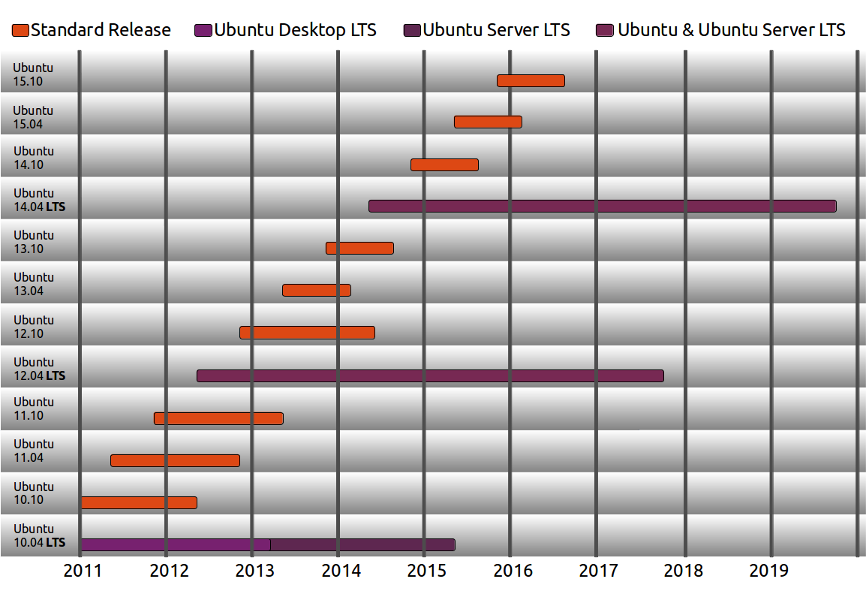
LTS and Release Cycle for Ubuntu

LTS is an abbreviation for “Long Term Support”.

We produce a new Ubuntu Desktop and Ubuntu Server release every six months [diagram below]. That means you’ll always have the latest and greatest applications that the open source world has to offer. Ubuntu is designed with security in mind. You get free security updates for at least 18 months on the desktop and server.

A new LTS version is released every 2 years. In previous releases, a Long Term Support (LTS) version had 3 years support on Ubuntu (Desktop) and 5 years on Ubuntu Server. Starting with Ubuntu 12.04 LTS, both versions will receive 5 years support. There is no extra fee for the LTS version; we make our very best work available to everyone on the same free terms. Upgrades to new versions of Ubuntu are and always will be free of charge.

The LTS designation applies only to specific subsets of the Ubuntu archive. The LTS may not apply to all flavors and remixes of Ubuntu. For example, for 8.04 LTS, Kubuntu chose to move to KDE 4.0 and didn’t issue an LTS release. In 10.04, the Netbook Edition was not an LTS. The project will decide which flavors will be LTS and the support duration for each, early in the LTS development cycle.

Some of the latest support windows are illustrated below:

ubuntu-release-cycle-2.png

Release Plan Details

  1. We are more conservative in our package merge with Debian, auto-synching with Debian testing, instead of Debian unstable.
  2. We start stabilizing the release early by significantly limiting the number of new features. We will choose which features we package into the LTS release, versus which ones we leave out and allow for users to optionally download and use from a separate archive.
  3. Avoid structural changes as far as possible, such as changing the default set of applications, lots of library transitions, or system layer changes (example: introducing KMS or hal → DeviceKit would not have been appropriate changes in a LTS).

Furthermore, we define the LTS to be:

  • Enterprise Focused: We are targeting server and multiple desktop installations, where the average user is moderately risk averse.
  • Compatible with New Hardware: We will make point releases throughout the development cycle to provide functional support for new server and desktop hardware.
  • More Tested: We will shorten the development window and extend the Beta cycle to allow for more testing and bug fixing

and clearly state that it is not:

  • A Feature-Based Release: We will focus on hardening functionality of existing features, versus introducing new ones1, except for in the areas of Online Services and Desktop Experience2.
    • 1. Exceptions for priority projects will be documented.~
      ~-2. Because these two areas of development are relatively new, they still require new features to satisfy the original reasons for their creation
  • Cutting Edge: Instead of doing an automatic full package import from Debian unstable, we will do it from Debian testing1. The benefit we gain from not introducing new bugs and/or regressions outweighs the new features and/or fixes we often get from unstable.
    • 1. We reserve the right to selectively pull in updates from unstable, if we believe the stability of the package in Debian is better than what is in the current Ubuntu archive.


LTS Schedule

To support our goal of ensuring stability, we plan to make a small number of changes to the release schedule:

  1. Reduced Alpha Stage: Because we will have substantially less new code, we can reduce the number of Alpha releases, and extend the Beta stage to allow for more system testing.
  2. Two Beta Releases: We generally get more bugs filed in the Beta stage because of the increase in user base. In order to address more of these issues, we will provide an additional Beta release.

Quoted from here.

Openstack Compute logs location

The log files are located here :

/var/logs/nova

Logfiles are :

nova-api.log
nova-cert.log
nova-compute.log
nova-dhcpbridge.log
nova-manage.log
nova-network.log
nova-objectstore.log
nova-scheduler.log
nova-volume.log
nova-xvpvncproxy.log


Vmware tools autoinstall after kickstart

kickstart postinstall, you can read how to do this on the internet.

wget http://foo/tools.tar.gz

tar xzvf *.tar.gz

cd directory-where-you-untarred

vmware-tools-install.pl -d

BINGO !
Giggidi Giggidi

Windows command line power control

While this is a Linux forum this came in REALLY handy so what the heck 🙂

Frustratingly hidden away, windows command for putting the machine into Hibernate and / or standby are hidden away in the api under the powrprof.dll library.


Shutdown %windir%\System32\shutdown.exe -s

Reboot %windir%\System32\shutdown.exe -r

Logoff %windir%\System32\shutdown.exe -l

Standby %windir%\System32\rundll32.exe powrprof.dll,SetSuspendState Standby

Hibernate %windir%\System32\shutdown.exe -h     OR

%windir%\System32\rundll32.exe powrprof.dll,SetSuspendState Hibernate


Also if you Windows 7 wakes up and you don’t know why check:

powercfg lastwake

Hope this helps.

Linux check all ips in a subnet with ping

Let’s say you have a subnet 192.168.1.0 / 24 and you want to scan all ip’s to see if any hosts are up:

Type the following command, enter:


$ for ip in $(seq 1 254); do ping -c 1 192.168.1.$ip>/dev/null; [ $? -eq 0 ] && echo “192.168.1.$ip UP” || : ; done

Output:

192.168.1.65 UP
192.168.1.66 UP
192.168.1.70 UP
192.168.1.76 UP
192.168.1.253 UP
192.168.1.254 UP

Permanently set hostname in Ubuntu

Debian based systems use the file /etc/hostname to read the hostname of the computer at boot time and set it up using the init script /etc/init.d/hostname.sh

One can edit the file /etc/hostname and change the hostname and then run:

/etc/init.d/hostname.sh start

Update /etc/hosts ip 127.0.0.1 respectively ( leave the localhost entry untouched)

Steps:

  1. sudo vi  /etc/hostname
  2. Save the file with the hostname you like to set
  3. sudo /etc/init.d/hostname.sh start
  4. sudo vi /etc/hostname
  5. Save file with 127.0.0.1 entry updated
  6. Test using hostname -f
  7. Log off using exit

Ref: http://sysblogd.com/50/change-hostname-permanently-on-debian-or-ubuntu.htm

Installing SNMP on Centos 6.x

Installing SNMP daemon and tools:

As root

yum -y install net-snmp.i686

yum -y install net-snmp-utils

Once these are installed start the snmp daemon:

/etc/init.d/snmpd start

chkconfig snmpd on


This is just the basic install but testing it :

snmpwalk -v 1 -c public -O e 127.0.0.1

For production servers it is advisable to at least change the community name.

All configs are in

/etc/snmp/snmpd.conf

and traps are setup here:

/etc/snmp/snmptrapd.conf

No traps are set by default.

Enjoy !!

Missing Perl module with phptop how to fix.

While trying to run phptop after unzipping it I get the following error:

[root@torino phptop-0.5.3]# ./phptop 
Can't locate Term/Size.pm in @INC (@INC contains: /usr/local/lib/perl5 /usr/local/share/perl5 /usr/lib/perl5/vendor_perl /usr/share/perl5/vendor_perl /usr/lib/perl5 /usr/share/perl5 .) at ./phptop line 24.
BEGIN failed--compilation aborted at ./phptop line 24.
[root@torino phptop-0.5.3]#


To fix it I had to follow the coming steps:

[root@torino phptop-0.5.3]# yum install cpan
Loaded plugins: fastestmirror, refresh-packagekit, security
Loading mirror speeds from cached hostfile
 * base: it.centos.contactlab.it
 * epel: mirror.karneval.cz
 * extras: it.centos.contactlab.it
 * updates: mirror.bofh.so
Setting up Install Process
Resolving Dependencies
--> Running transaction check
---> Package perl-CPAN.i686 0:1.9402-127.el6 will be installed
--> Finished Dependency Resolution
Dependencies Resolved
================================================================================
 Package Arch Version Repository Size
================================================================================
Installing:
 perl-CPAN i686 1.9402-127.el6 base 244 k
Transaction Summary
================================================================================
Install 1 Package(s)
Total download size: 244 k
Installed size: 663 k
Is this ok [y/N]: y
Downloading Packages:
perl-CPAN-1.9402-127.el6.i686.rpm | 244 kB 00:00 
Running rpm_check_debug
Running Transaction Test
Transaction Test Succeeded
Running Transaction
 Installing : perl-CPAN-1.9402-127.el6.i686 1/1 
 Verifying : perl-CPAN-1.9402-127.el6.i686 1/1
Installed:
 perl-CPAN.i686 0:1.9402-127.el6
Complete!
[root@torino phptop-0.5.3]#

Then run cpan

[root@torino phptop-0.5.3]#cpan

And you will be asked  whether to accept default answers just press <ENTER>/

Lots of test later you are presented with the cpan prompt tyoe install Term::Size as follows:

  • ommit: wrote '/usr/share/perl5/CPAN/Config.pm'
    Terminal does not support AddHistory.
    cpan shell -- CPAN exploration and modules installation (v1.9402)
    Enter 'h' for help.
    cpan[1]> install Term::Size

After a long verbose build process assuming all went well ( you need internet connectivity to perform this step) type quit at the prompt as so:

cpan[2]> quit

This returns you to the shell prompt:

[root@torino phptop-0.5.3]# ./phptop 
No phptop records found.
[root@torino phptop-0.5.3]#

Voila !!! the program is working.The error is due to the lack of page reads as yet but the program compiled (JIT) and ran.