
In 2023, every LLM integration was bespoke. You wrote a plugin for Claude, rewrote it for GPT-4, rewrote it again for the next model, and maintained three diverging codebases that did the same thing. This was fine when AI was a toy. It becomes genuinely untenable when AI is infrastructure. The Model Context Protocol is the answer to that problem – and it arrived at exactly the right time.
The Problem MCP Solves
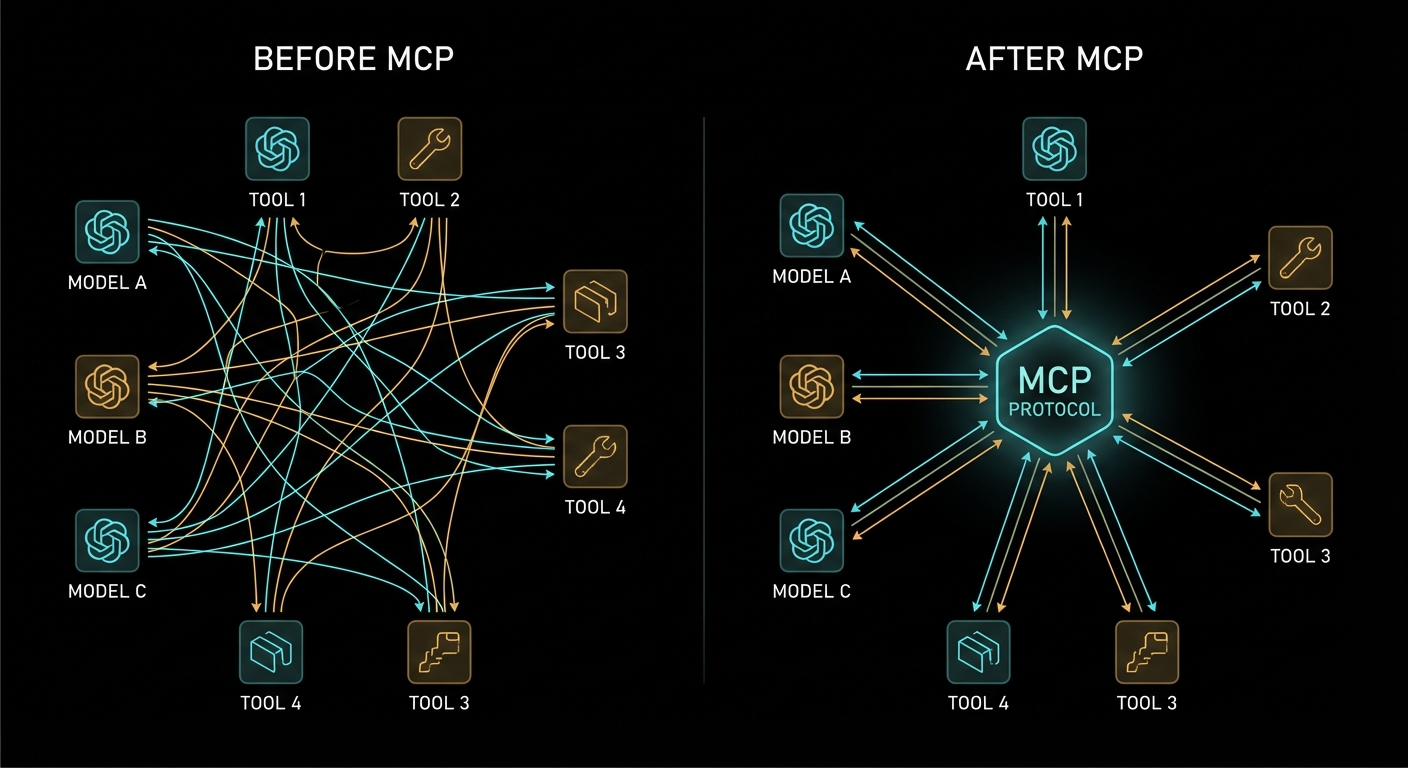
To understand why MCP matters, you need to feel the pain it eliminates. Before MCP, connecting an LLM to an external capability – a database, an API, a file system, a calendar – required you to build a full custom integration for every model-tool combination. If you had three AI models and ten tools, you had thirty integrations to build and maintain. Each one spoke a slightly different language. Each one had different error handling. Each one had different security assumptions.
This is the classic N×M problem. Every new model you add multiplies the integration work by the number of tools you have. Every new tool you add multiplies the work by the number of models. The growth is combinatorial, and combinatorial problems kill engineering teams.
MCP collapses this to N+M. Each model speaks MCP once. Each tool speaks MCP once. They all interoperate. This is exactly what HTTP did for the web, what USB did for peripherals, what LSP (Language Server Protocol) did for programming language tooling. It is a standardisation play, and standardisation plays that work become infrastructure.
“MCP takes some inspiration from the Language Server Protocol, which standardizes how to add support for programming languages across a whole ecosystem of development tools. In a similar way, MCP standardizes how to integrate additional context and tools into the ecosystem of AI applications.” – Model Context Protocol Specification
The LSP analogy is the right one. Before LSP, every code editor had to implement autocomplete, go-to-definition, and rename-symbol for every programming language. After LSP, language implementors write one language server, and every LSP-compatible editor gets the features for free. MCP does the same for AI context. You write one MCP server for your Postgres database, and every MCP-compatible LLM client can use it.
What MCP Actually Is
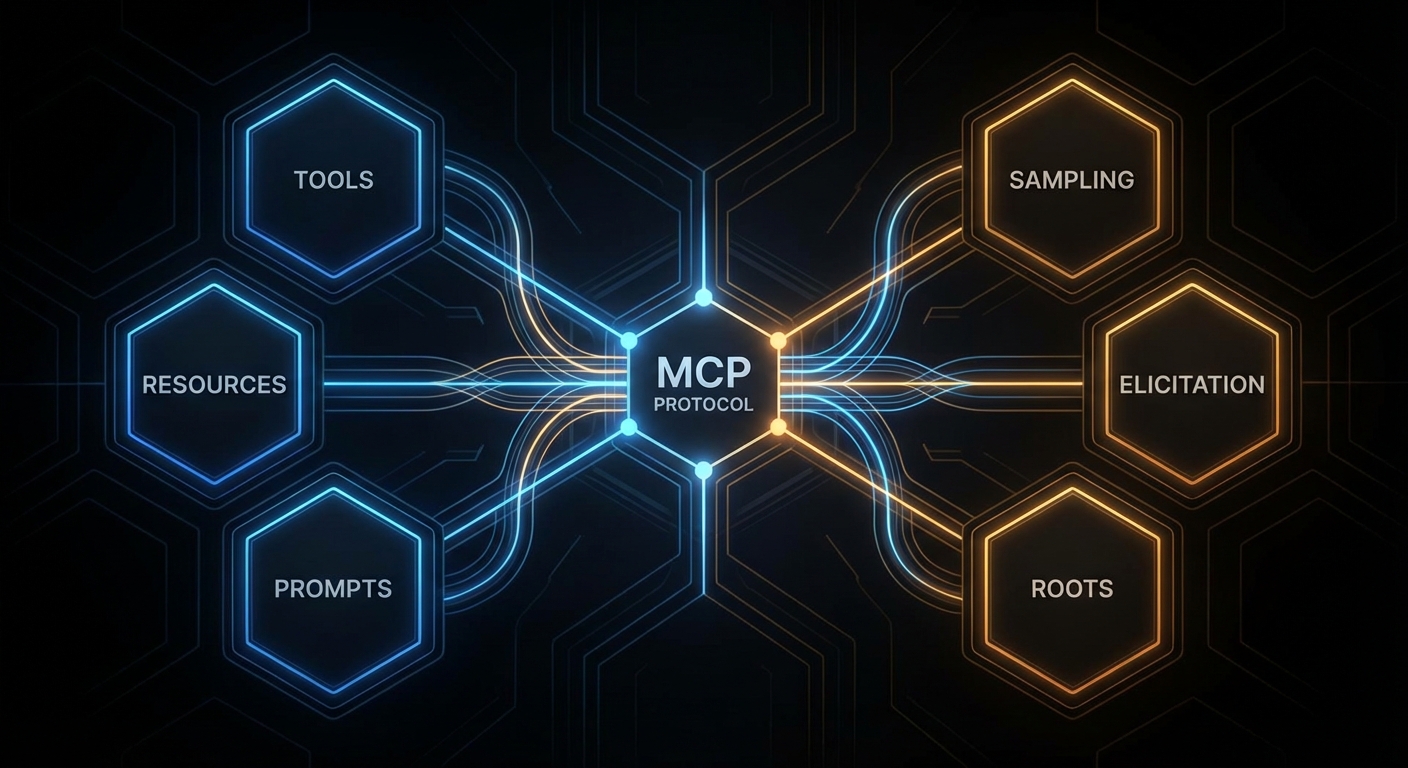
MCP is an open protocol published by Anthropic in late 2024 and now maintained as a community standard. It defines a structured way for AI applications to request context and capabilities from external servers, using JSON-RPC 2.0 as the wire format. The protocol specifies three kinds of things that servers can expose:
- Tools – functions the AI model can call, with a defined input schema and a return value. Think of these as the actions the AI can take: “search the database”, “send an email”, “read a file”.
- Resources – data the AI (or the user) can read, addressed by URI. Think of these as the documents and data the AI has access to: “the current user’s profile”, “the contents of this file”, “the current weather”.
- Prompts – reusable prompt templates that applications can surface to users. Think of these as saved queries or workflows: “summarise this document”, “review this code for security issues”.
Beyond what servers expose, the protocol also defines what clients can offer back to servers:
- Sampling – the ability for a server to request an LLM inference from the client, enabling recursive agent loops where the server needs to “think” about something before responding.
- Elicitation – the ability for a server to ask the user a structured question through the client, collecting input it needs to complete a task.
- Roots – the ability for a server to query what filesystem or URI boundaries it is allowed to operate within.
The Three-Role Architecture
MCP defines three distinct roles in every interaction. Understanding these clearly is essential – confusing them is the most common mistake beginners make when reading the spec.
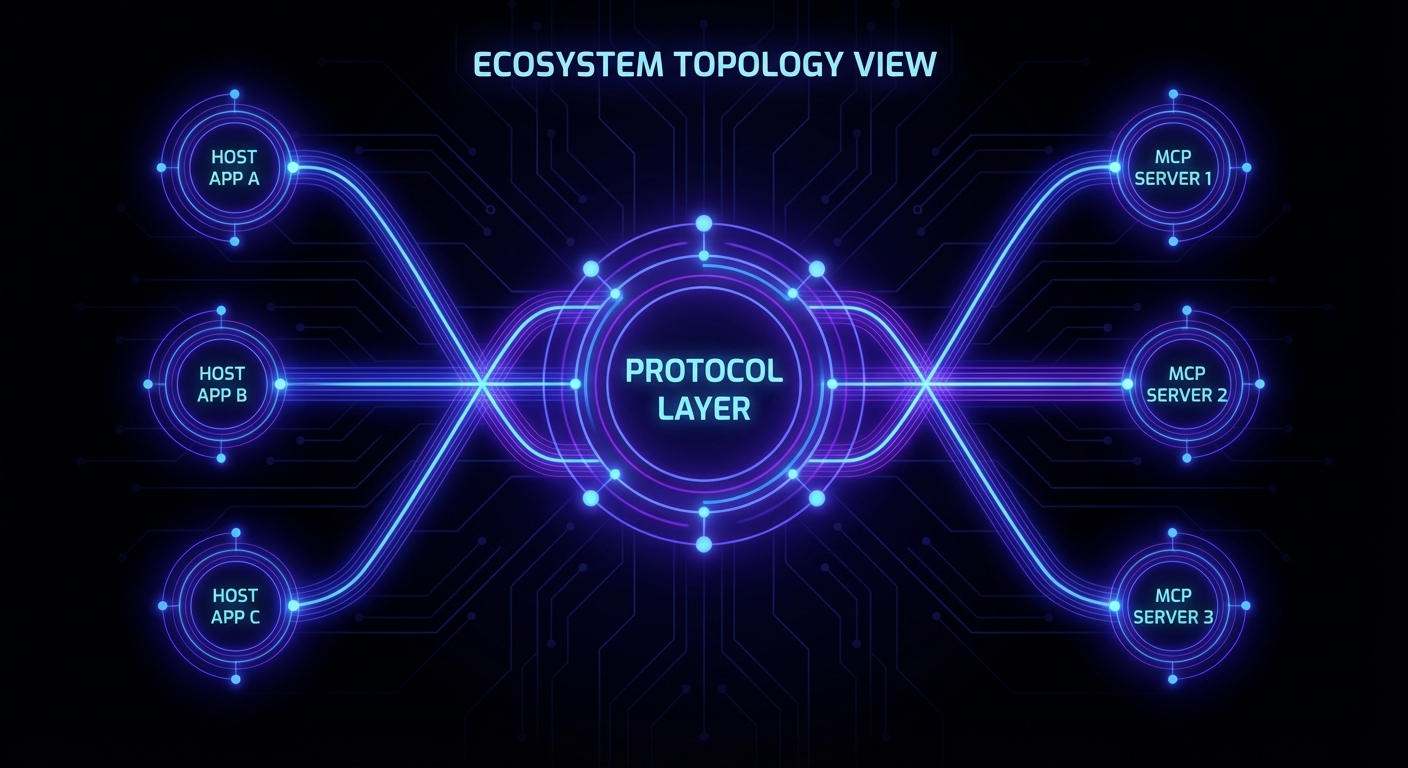
The Host is the AI application the user is running – Claude Desktop, a VS Code extension, your custom chat interface, Cursor. The host is the entry point for users. It creates and manages one or more MCP clients. It controls what the user sees and decides which servers to connect to.
The Client lives inside the host. Each client maintains exactly one connection to one MCP server. It is the connector, the protocol layer, the thing that speaks JSON-RPC to the server on behalf of the host. When you build an AI chat application, you typically build a client (or use the SDK’s built-in client) that connects to whatever servers your application needs.
The Server is the external capability provider. It could be a local process (a stdio server running on the same machine), a remote HTTP service (a company’s internal API wrapped in MCP), or anything in between. The server exposes tools, resources, and prompts, and it responds to requests from clients.
The key insight: the model itself is not a named role in MCP. The model lives inside the host, and the host decides when to invoke tools based on model output. MCP is not a protocol between the user and the model; it is a protocol between the AI application (host) and capability providers (servers). The model benefits from MCP, but the model does not participate in the protocol directly.
Case 1: Confusing the Client and the Server
A very common confusion when starting with MCP is thinking that the “client” is the end-user’s chat application and the “server” is the LLM API. This is wrong. In MCP terminology:
// WRONG mental model:
// User -> [MCP Client = chat app] -> [MCP Server = OpenAI/Claude API]

// CORRECT mental model:
// User -> [Host = chat app]
//   Host manages -> [MCP Client]
//     MCP Client connects to -> [MCP Server = your tool/data provider]
// Host also calls -> [LLM API = OpenAI/Claude/Gemini, separate from MCP]
The LLM API (OpenAI, Anthropic, Gemini) is not an MCP server. It is what the host uses to process messages. MCP servers are the external capability providers – your database wrapper, your file system access layer, your Slack integration. Keep these two separate and the architecture becomes clear immediately.
Case 2: Thinking MCP Is Only for Claude
Because Anthropic published MCP and Claude Desktop was the first host to support it, many people assume MCP is an Anthropic-specific protocol. It is not. The spec is open. The TypeScript and Python SDKs are MIT-licensed. OpenAI’s Agents SDK supports MCP servers. Google’s Gemini models can be used in MCP hosts. The whole point is interoperability across the ecosystem.
// MCP works with all three major providers:
import OpenAI from 'openai';
import Anthropic from '@anthropic-ai/sdk';
import { GoogleGenerativeAI } from '@google/generative-ai';

// All three can be used as the LLM inside an MCP host.
// The MCP server does not know or care which LLM is calling it.
// It just responds to JSON-RPC requests.
This provider-agnosticism is a feature, not an accident. A well-designed MCP server should work with any compliant host, regardless of which LLM that host uses internally.
Why Now: The Timing of MCP
MCP arrived at exactly the right moment for several reasons that compound:
LLMs are becoming infrastructure. In 2022, LLMs were demos. In 2025-2026, they are production systems at scale. When something becomes infrastructure, the lack of standards becomes genuinely painful. Nobody would tolerate every web server speaking its own custom HTTP dialect. The AI ecosystem was approaching that point of pain when MCP appeared.
Tool calling matured. OpenAI added function calling in 2023. Anthropic added tool use. Google added function declarations. By 2024, every major model supported some form of structured tool invocation. The machinery was there. MCP provided the standard format on top of it.
Agentic AI needed an architecture. Simple chatbots don’t need MCP. A model answering questions from a fixed system prompt doesn’t need MCP. But agentic AI – systems where the model takes actions, uses tools, reads documents, and operates over extended sessions – absolutely needs a structured way to manage capabilities. MCP is that structure.
“MCP provides a standardized way for applications to: build composable integrations and workflows, expose tools and capabilities to AI systems, share contextual information with language models.” – MCP Specification, Overview
MCP vs. Direct Tool Calling: When Each Applies
MCP is not a replacement for all tool calling patterns. It is an architecture for systems of tools, not a required wrapper for every single function call. Understanding when to use MCP and when plain tool calling is enough will save you from over-engineering.
Use direct tool calling (without MCP) when you have a single LLM application with a small, fixed set of tools that never change, never get shared across multiple applications, and have no external deployment concerns. A simple chatbot with three custom tools is not a candidate for MCP.
Use MCP when any of the following apply:
- Multiple LLM applications (or multiple LLM providers) need access to the same tools or data
- Tools are developed and maintained by different teams from the host application
- You want to compose capabilities from third-party MCP servers without writing custom integrations
- You need to deploy tool servers independently of the host application (different release cycles, different teams, different scaling requirements)
- Security isolation is required between the AI application and the tool execution environment
What to Check Right Now
- Verify your Node.js version – run
node --version. This course requires 22+. Upgrade vianvm install 22 && nvm use 22if needed. - Read the spec overview – spend 10 minutes on modelcontextprotocol.io/specification. The Overview and Security sections are the most important ones at this stage.
- Install the MCP Inspector – run
npx @modelcontextprotocol/inspectorto get the official GUI for testing MCP servers. You’ll use it constantly from Lesson 5 onwards. - Get your LLM API keys ready – you won’t need them until Part IV, but creating the accounts now avoids waiting when you get there: OpenAI, Anthropic, Google AI Studio.
- Bookmark the TypeScript SDK – github.com/modelcontextprotocol/typescript-sdk. Every code example in this course uses it.
nJoy 😉