
Security is not a feature you add after the transport works. It is the transport design. An MCP server exposed over HTTP without TLS, without CORS validation, and without Host header checking is not a development shortcut – it is a vulnerability waiting to be exploited. This lesson covers the three most important transport-level security controls for MCP HTTP servers: TLS termination, CORS policy, and Host header validation. Get these right before your server ever sees production traffic.
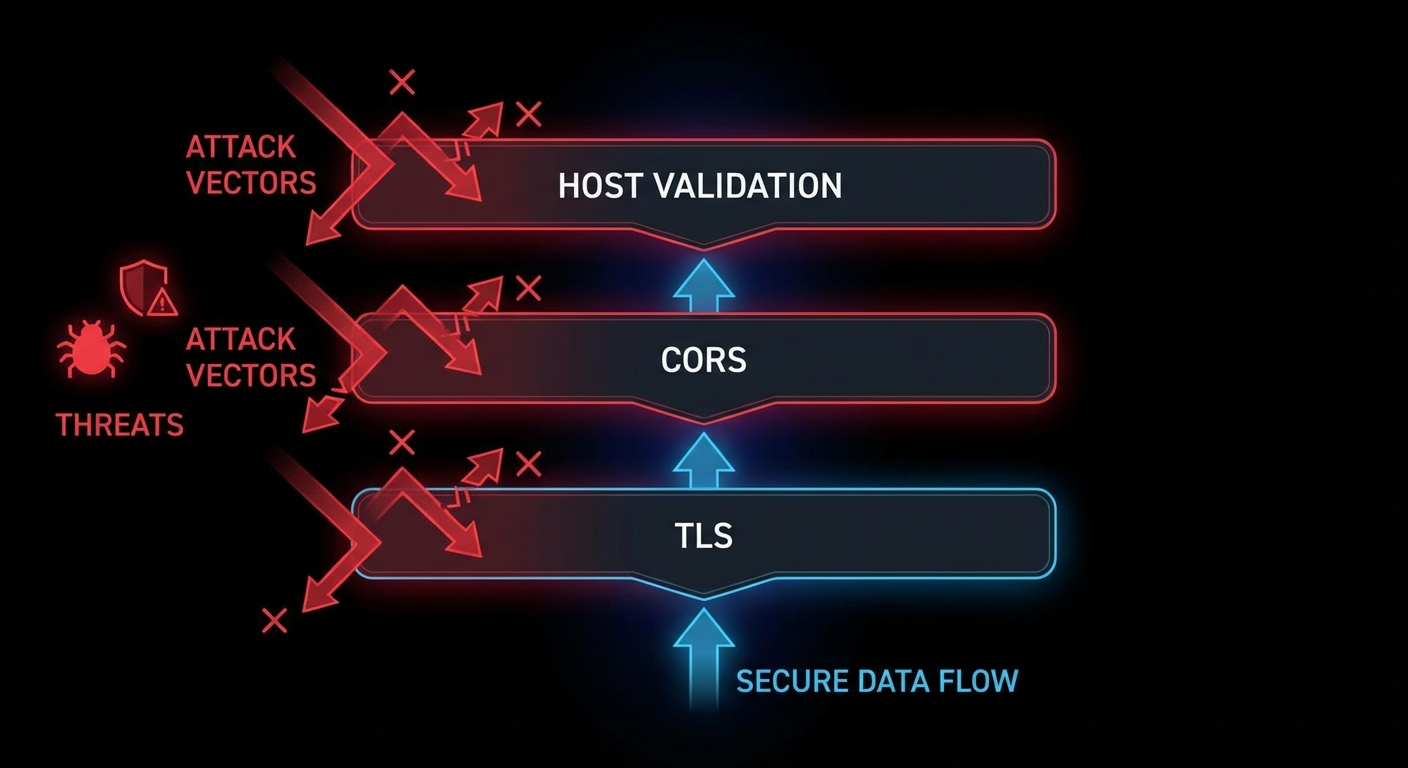
TLS: Why Plaintext MCP Is Unacceptable
Any MCP server that carries sensitive data (API keys, user data, database queries, file contents) must use TLS. Over plaintext HTTP, anyone between the client and server can read and modify the JSON-RPC stream. Tool arguments, resource contents, and sampling responses are all exposed. For local development, this is tolerable. For any remote server – even internal company servers – TLS is mandatory.
The simplest production approach: terminate TLS at nginx or a load balancer, and run your Node.js MCP server on HTTP internally. This keeps TLS certificate management at the infrastructure layer.
# nginx.conf for TLS-terminated MCP server
server {
    listen 443 ssl;
    server_name mcp.mycompany.com;

    ssl_certificate /etc/ssl/certs/mycompany.crt;
    ssl_certificate_key /etc/ssl/private/mycompany.key;
    ssl_protocols TLSv1.2 TLSv1.3;
    ssl_ciphers ECDHE-ECDSA-AES128-GCM-SHA256:ECDHE-RSA-AES128-GCM-SHA256;

    location /mcp {
        proxy_pass http://localhost:3000;
        proxy_http_version 1.1;
        proxy_set_header Upgrade $http_upgrade;
        proxy_set_header Connection 'upgrade';
        proxy_set_header Host $host;
        proxy_set_header X-Real-IP $remote_addr;
        proxy_buffering off;        # Critical for SSE
        proxy_read_timeout 3600s;   # Long timeout for SSE connections
        proxy_cache off;
    }
}
“For remote MCP servers, all communication MUST use TLS to protect against eavesdropping and tampering. Servers MUST validate client authentication before processing any requests.” – MCP Specification, Transport Security
CORS: Controlling Browser Access
If your MCP server will be accessed from browser-based hosts (web applications that call the MCP endpoint directly from JavaScript), you must configure CORS. Without CORS headers, the browser will block cross-origin requests. With overly permissive CORS (Access-Control-Allow-Origin: *), any website can make requests to your server on behalf of your users.
// Correct CORS configuration for MCP HTTP servers
import cors from 'cors';

const ALLOWED_ORIGINS = [
  'https://myapp.example.com',
  'https://staging.myapp.example.com',
  // For development only:
  'http://localhost:5173',
];

app.use('/mcp', cors({
  origin: (origin, callback) => {
    // Allow requests with no origin (server-to-server, curl)
    if (!origin) return callback(null, true);
    if (ALLOWED_ORIGINS.includes(origin)) return callback(null, true);
    callback(new Error(`CORS: Origin ${origin} not allowed`));
  },
  methods: ['GET', 'POST', 'DELETE', 'OPTIONS'],
  allowedHeaders: ['Content-Type', 'mcp-session-id', 'Authorization'],
  credentials: true,  // If you use cookie-based auth
}));
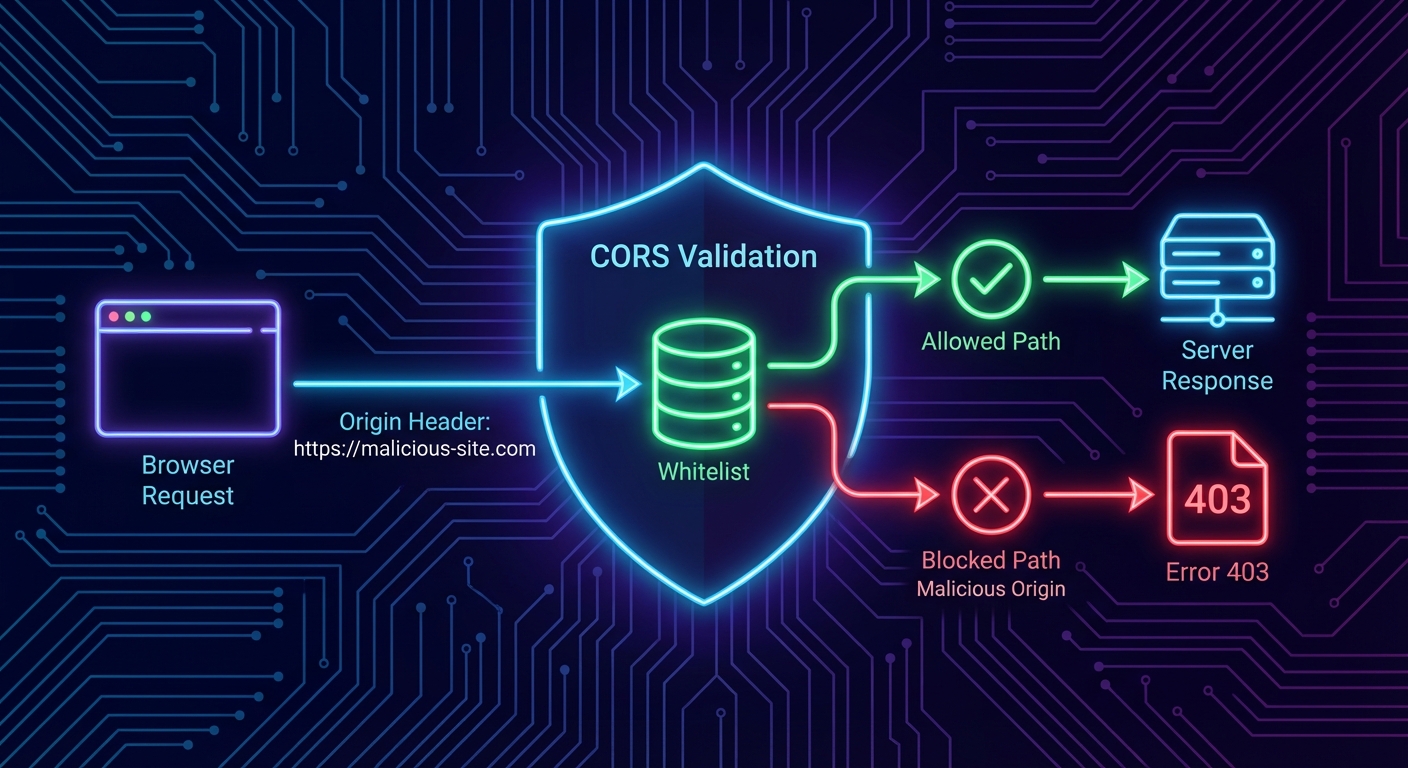
Host Header Validation: DNS Rebinding Protection
DNS rebinding attacks allow malicious websites to make requests to your localhost MCP server even through browser CORS restrictions. The attack works by pointing a DNS entry to 127.0.0.1 and then making requests with a spoofed Host header. Validating the Host header prevents this class of attack for local servers.
// Host header validation middleware
function validateHost(allowedHosts) {
  return (req, res, next) => {
    const host = req.headers.host;
    if (!host) return res.status(400).send('Missing Host header');

    const hostname = host.split(':')[0]; // Strip port
    if (!allowedHosts.includes(hostname)) {
      console.error(`[security] Rejected request with Host: ${host}`);
      return res.status(403).send('Forbidden: Invalid Host header');
    }

    next();
  };
}

// For a local development server, allow only localhost
app.use('/mcp', validateHost(['localhost', '127.0.0.1']));

// For a production server, allow your actual domain
// app.use('/mcp', validateHost(['mcp.mycompany.com']));
Putting It All Together: Security Middleware Stack
// Complete security middleware stack for production MCP server
import helmet from 'helmet';
import rateLimit from 'express-rate-limit';

app.use(helmet({
  contentSecurityPolicy: {
    directives: {
      defaultSrc: ["'self'"],
    },
  },
}));

// Host validation
app.use('/mcp', validateHost([process.env.MCP_ALLOWED_HOST || 'localhost']));

// CORS
app.use('/mcp', cors({ origin: ALLOWED_ORIGINS, methods: ['GET', 'POST', 'DELETE'] }));

// Rate limiting
app.use('/mcp', rateLimit({
  windowMs: 60 * 1000,
  max: 100,
  standardHeaders: true,
  legacyHeaders: false,
}));

// Request size limit
app.use('/mcp', express.json({ limit: '2mb' }));

// Then your MCP handler
app.post('/mcp', handleMcpRequest);
app.get('/mcp', handleMcpRequest);
Failure Modes in Transport Security
Case 1: Using Wildcard CORS in Production
// NEVER in production - allows any origin to call your MCP server
app.use(cors({ origin: '*' }));

// ALWAYS use an explicit allowlist in production
app.use(cors({ origin: ALLOWED_ORIGINS }));
Case 2: Running an HTTP MCP Server on a Public Port Without Auth
// WRONG: Public port, no auth, no TLS
app.listen(3000);  // Accessible to the internet on port 3000 - anyone can call your tools

// CORRECT: Bind to localhost and terminate TLS at nginx
app.listen(3000, '127.0.0.1'); // Only accessible locally; nginx handles TLS externally
What to Check Right Now
- Scan your server with nmap –
nmap -sV localhost -p 3000. Verify it binds only to 127.0.0.1 in production builds. - Test CORS with curl -H “Origin:” –
curl -X OPTIONS http://localhost:3000/mcp -H "Origin: https://evil.com". The server should return a 403 or no CORS headers. - Check Host header handling –
curl http://localhost:3000/mcp -H "Host: evil.com". Your server should reject requests with non-allowlisted Host headers. - Enable TLS on every non-local deployment – use Let’s Encrypt with
certbot --nginxfor automatic certificate management. There is no excuse for plaintext in 2026.
nJoy 😉