
Tools are the heart of MCP. When people say “the AI can use tools”, they mean it can call functions exposed through this primitive. Tools are what let an AI model search your database, send an email, read a file, call an API, or run a command. Everything else in MCP is scaffolding around this core capability. This lesson covers the full tool API: defining schemas, validation, error handling, streaming, annotations, and the failure modes that will destroy a production system if you do not anticipate them.
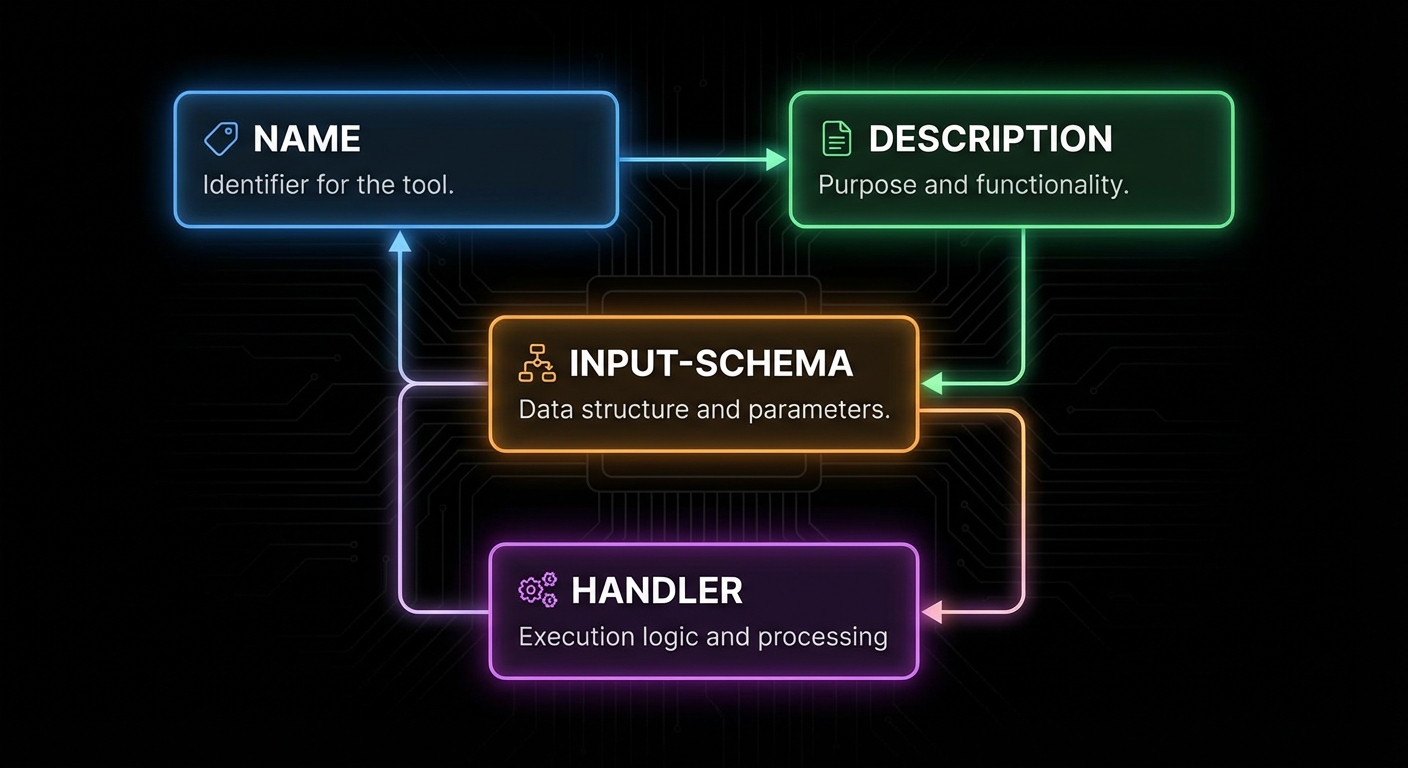
The Tool Definition API
A tool in MCP has four required components: a name (unique identifier, snake_case by convention), a description (what the tool does – this is what the LLM reads to decide when to use it), an input schema (a Zod object shape describing what arguments the tool takes), and a handler (an async function that receives validated arguments and returns a result).
import { McpServer } from '@modelcontextprotocol/sdk/server/mcp.js';
import { z } from 'zod';

const server = new McpServer({ name: 'my-server', version: '1.0.0' });

server.tool(
  'search_products',                    // name
  'Search the product catalogue',       // description
  {                                     // input schema (Zod object shape)
    query: z.string().min(1).max(200).describe('Search terms'),
    category: z.enum(['electronics', 'clothing', 'books']).optional()
      .describe('Optional category filter'),
    max_price: z.number().positive().optional()
      .describe('Maximum price in USD'),
    limit: z.number().int().min(1).max(50).default(10)
      .describe('Number of results to return'),
  },
  async ({ query, category, max_price, limit }) => {  // handler
    const results = await db.searchProducts({ query, category, max_price, limit });
    return {
      content: results.map(p => ({
        type: 'text',
        text: `${p.name} - $${p.price} (${p.category})\n${p.description}`,
      })),
    };
  }
);
Why this surface matters: the host turns your Zod shape into JSON Schema the model sees at call time. When validation fails, the error is precise instead of your handler receiving garbage. In a real project you would treat name, description, schema, and handler as one versioned contract with integrators, the same way you would document a public REST endpoint.
The description is the most important field for LLM usability. It is what the model reads when deciding whether to use this tool. Write it as if explaining to a smart colleague what the function does, when to use it, and what it returns. Vague descriptions cause the model to either misuse the tool or avoid it entirely.
“Tools are exposed to the client with a JSON schema for their inputs. Clients SHOULD present tools to the LLM with appropriate context about what the tool does and when to use it.” – MCP Documentation, Tools
With the definition shape clear, the next question is what a handler is allowed to return. The protocol is not limited to a single string: you can combine blocks so the model and the user get summaries, images, and pointers to large artifacts in one response.
Content Types and Rich Responses
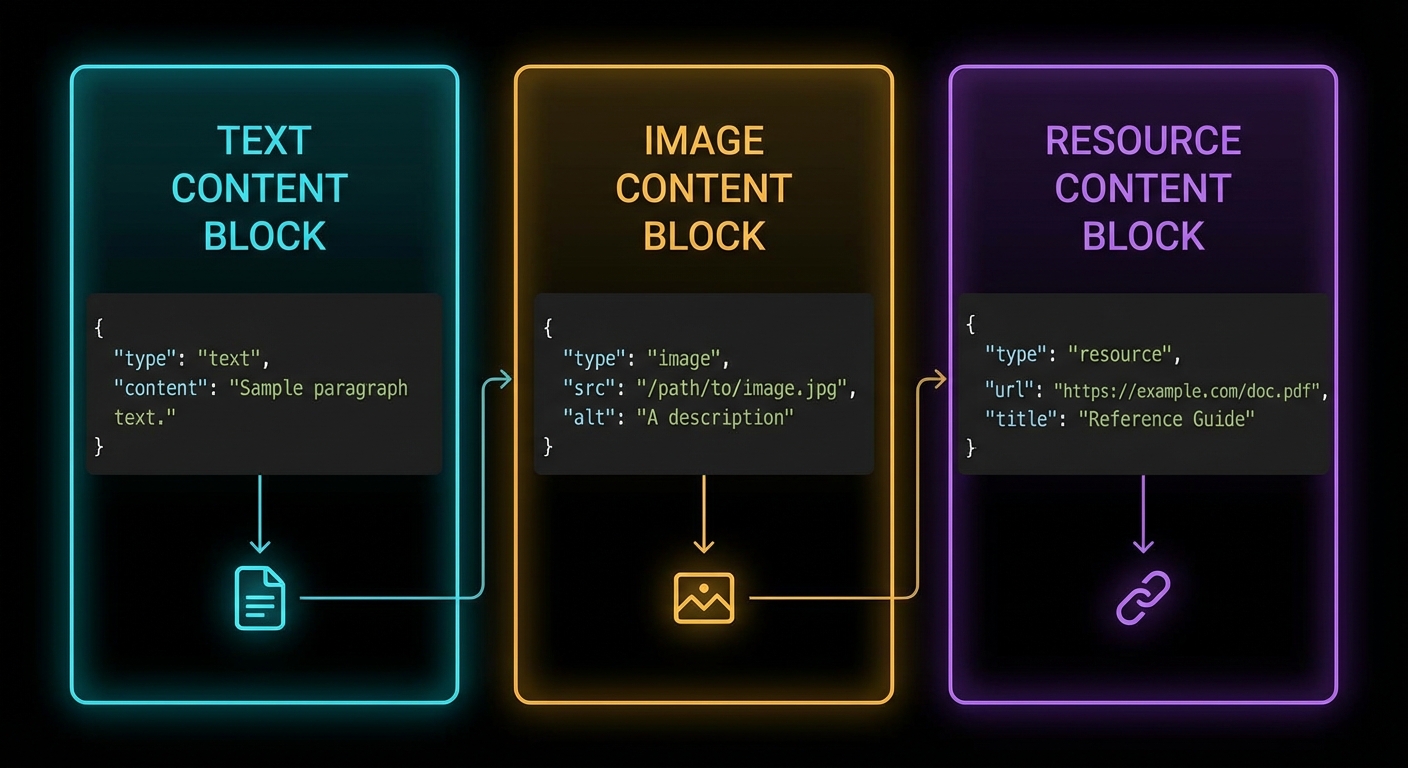
Tool handlers return an object with a content array. Each item in the array is a content block. MCP defines five content types: text, image, audio, resource (embedded), and resource_link.
// Text content (most common)
return {
  content: [{ type: 'text', text: 'The result as a string' }],
};

// Multiple text blocks (e.g. separate sections)
return {
  content: [
    { type: 'text', text: '## Summary\nHere is what I found...' },
    { type: 'text', text: '## Details\nFull results below...' },
  ],
};

// Image content (base64-encoded)
const imageData = fs.readFileSync('./chart.png').toString('base64');
return {
  content: [{
    type: 'image',
    data: imageData,
    mimeType: 'image/png',
  }],
};

// Audio content (base64-encoded)                  [New in 2025-03-26]
const audioData = fs.readFileSync('./recording.wav').toString('base64');
return {
  content: [{
    type: 'audio',
    data: audioData,
    mimeType: 'audio/wav',
  }],
};

// Resource link (pointer the client can fetch or subscribe to)  [New in 2025-06-18]
return {
  content: [{
    type: 'resource_link',
    uri: 'file:///project/src/main.js',
    name: 'main.js',
    description: 'Application entry point',
    mimeType: 'text/javascript',
  }],
};

// Embedded resource (inline content with URI)
return {
  content: [{
    type: 'resource',
    resource: { uri: 'file:///data/report.pdf', mimeType: 'application/pdf' },
  }],
};

// Content annotations on any block               [New in 2025-06-18]
return {
  content: [{
    type: 'text',
    text: 'Internal debug trace - not for the user',
    annotations: {
      audience: ['assistant'],       // only the model sees this
      priority: 0.2,                 // low importance
    },
  }, {
    type: 'text',
    text: 'Your export is ready at /downloads/report.csv',
    annotations: {
      audience: ['user'],            // shown directly to the user
      priority: 1.0,
    },
  }],
};

// Mixed content (text + image)
return {
  content: [
    { type: 'text', text: 'Here is the sales chart for Q1:' },
    { type: 'image', data: chartBase64, mimeType: 'image/png' },
  ],
};
In a real project you would return images for charts or screenshots, audio for voice recordings or transcriptions, resource links when the payload is huge or already lives in storage the client can fetch, and embedded resources when you want inline content with a URI. Text blocks stay ideal for short, model-friendly summaries; mixing types keeps token use down while still giving rich UI hooks on the host. The resource_link type is distinct from resource: a resource link is a pointer the client may fetch or subscribe to, while an embedded resource carries the actual content inline.
Content annotations (audience, priority, lastModified) let you control which blocks the user sees versus which blocks only the model receives. A low-priority assistant-only block is perfect for debug traces; a high-priority user-only block is for the final answer. The host uses these hints to route content to the right place in its UI.
Beyond what you return, hosts also need a coarse sense of risk and side effects before they invoke a tool. The next section covers optional annotations that carry that signal; they complement content blocks but do not replace real authorization on the server.
Tool Annotations
MCP supports optional annotations on tools that hint to clients about the tool’s behaviour. These help hosts make better security and UX decisions before invoking a tool. Annotations are hints, not enforceable constraints – a well-behaved host should respect them, but the protocol does not validate them at runtime. Clients should never make trust decisions based solely on annotations from untrusted servers.
The annotation properties use the *Hint suffix (not bare names) to reinforce that they are advisory. The MCP specification defines these properties:
destructiveHint(boolean) – the tool may perform irreversible changes (deletes, overwrites). Whentrue, compliant hosts may prompt for confirmation.readOnlyHint(boolean) – the tool does not modify its environment. Useful for hosts that want to auto-approve read operations.idempotentHint(boolean) – calling the tool multiple times with the same arguments produces the same effect as calling it once. Relevant for retry logic.openWorldHint(boolean) – the tool interacts with entities outside the local system (network calls, third-party APIs).title(string) – a human-readable display name for the tool, distinct from the programmaticname.
server.tool(
  'delete_file',
  'Permanently deletes a file from the filesystem',
  { path: z.string().describe('Absolute path to the file') },
  {
    annotations: {
      destructiveHint: true,    // Irreversible action - host may ask for confirmation
      readOnlyHint: false,      // This tool modifies the filesystem
      idempotentHint: true,     // Deleting twice has the same effect as deleting once
      openWorldHint: false,     // Local filesystem only, no network
      title: 'Delete File',
    },
  },
  async ({ path }) => {
    await fs.promises.unlink(path);
    return { content: [{ type: 'text', text: `Deleted: ${path}` }] };
  }
);

// Read-only tool: the host can safely auto-approve this without user confirmation
server.tool(
  'read_file',
  'Reads a file from the filesystem and returns its contents',
  { path: z.string().describe('Absolute or relative path to the file') },
  {
    annotations: {
      readOnlyHint: true,       // No side effects - safe to call without confirmation
      destructiveHint: false,   // Does not modify anything
      openWorldHint: false,     // Local only
      title: 'Read File',
    },
  },
  async ({ path }) => {
    const content = await fs.promises.readFile(path, 'utf8');
    return { content: [{ type: 'text', text: content }] };
  }
);

// A tool that calls an external API - note the openWorldHint
server.tool(
  'fetch_weather',
  'Fetches current weather for a city from the OpenWeather API',
  { city: z.string().describe('City name, e.g. "London"') },
  {
    annotations: {
      readOnlyHint: true,       // Does not modify anything
      destructiveHint: false,
      openWorldHint: true,      // Makes a network call to a third-party API
      idempotentHint: true,     // Same city always returns the latest weather
      title: 'Fetch Weather',
    },
  },
  async ({ city }) => {
    const res = await fetch(
      `https://api.openweathermap.org/data/2.5/weather?q=${city}&appid=${process.env.OWM_KEY}`
    );
    const data = await res.json();
    return { content: [{ type: 'text', text: JSON.stringify(data) }] };
  }
);
Annotations do not replace auth or policy on the server, but they give honest hosts a standard vocabulary for confirmations, auto-approve reads, and retry-friendly tools. In a real project you would align these hints with your product rules so support and security teams can reason about tool risk without reading every handler.
Common mistake: using bare property names. Writing destructive: true or readOnly: true or requiresConfirmation: true will silently produce a tool with no recognised annotations – the SDK does not validate unknown keys. Always use the *Hint suffix: destructiveHint, readOnlyHint, idempotentHint, openWorldHint. There is no requiresConfirmation property in the specification – the decision to confirm is delegated to the host based on the hints.
The following cases are the ones that show up in logs after launch: vague copy, wrong error channel, weak schema guidance, and dynamic lists that never refresh on the client. Treat them as a checklist while you review a server before production.
Failure Modes in Tool Design
Case 1: Vague Tool Descriptions Causing Misuse
When the description is too vague, the LLM will either call the wrong tool, pass wrong arguments, or skip the tool when it should use it. This causes subtle, hard-to-debug failures in production.
// BAD: Vague description - what does "process" mean?
server.tool('process', 'Process some data', { data: z.string() }, handler);

// GOOD: Specific description with context and return value
server.tool(
  'summarise_text',
  'Summarises a long text to under 100 words. Use when the user asks for a summary or when text exceeds 2000 characters and needs to be condensed. Returns: a concise summary string.',
  { text: z.string().min(1).describe('The text to summarise') },
  handler
);
Why this matters: the model cannot repair a tool name it never understood. Telemetry often shows repeated failed calls with drifting arguments until you tighten the description and examples. In a real project you would A/B descriptions against real transcripts the same way you tune prompt copy.
Case 2: Throwing Errors Instead of Returning isError
Throwing an uncaught error from a tool handler causes the server to return a JSON-RPC error (protocol-level failure). The LLM sees this as a system failure, not a domain error. For domain errors – “user not found”, “quota exceeded”, “invalid file type” – return isError: true so the LLM can reason about the failure.
// BAD: Protocol error - LLM cannot reason about this
async ({ user_id }) => {
  const user = await db.findUser(user_id);
  if (!user) throw new Error('User not found'); // JSON-RPC error - not helpful to LLM
}

// GOOD: Domain error - LLM can adjust response
async ({ user_id }) => {
  const user = await db.findUser(user_id);
  if (!user) return {
    isError: true,
    content: [{ type: 'text', text: `No user found with ID ${user_id}. Check if the ID is correct.` }],
  };
  return { content: [{ type: 'text', text: JSON.stringify(user) }] };
}
Why this matters: isError keeps the turn inside the tool contract so the model can apologise, ask for a corrected ID, or try another path. A thrown error looks like infrastructure failure and often stops the whole chain. In a real project you would reserve throws for true bugs and programmer errors, not user or domain mistakes.
Case 3: Missing Zod .describe() on Input Fields
Every Zod field in a tool’s input schema should have a .describe() call. The description appears in the JSON Schema that gets sent to the LLM. Without it, the model has to guess what the field means from its name alone – which leads to wrong values being passed.
// BAD: No descriptions - LLM must guess what max_items means
{ query: z.string(), max_items: z.number(), include_archived: z.boolean() }

// GOOD: Descriptions guide the LLM to pass correct values
{
  query: z.string().describe('Search query - supports AND, OR, NOT operators'),
  max_items: z.number().int().min(1).max(100).describe('Maximum results to return (1-100)'),
  include_archived: z.boolean().default(false).describe('Set to true to include archived items in results'),
}
Why this matters: field names alone rarely encode units, formats, or business rules. Descriptions are cheap to add and expensive to omit once users rely on agents in the wild. In a real project you would lint for missing .describe() in CI for every tool schema you ship.
Dynamic Tool Registration
Tools do not have to be registered at server startup. You can register tools dynamically and notify connected clients:
That pattern matters when capabilities depend on tenancy, feature flags, or plugins loaded after connect. Without a list-changed notification, long-lived sessions keep a stale catalog and the model calls tools that no longer exist or misses new ones.
// Register a tool at startup
const toolRegistry = new Map();

function registerTool(name, description, schema, handler) {
  server.tool(name, description, schema, handler);
  toolRegistry.set(name, { name, description });
  // Notify connected clients that the tool list changed
  server.server.notification({ method: 'notifications/tools/list_changed' });
}

// Call this at any point after the server is connected
registerTool(
  'new_dynamic_tool',
  'A tool added at runtime',
  { input: z.string() },
  async ({ input }) => ({ content: [{ type: 'text', text: `Got: ${input}` }] })
);
In a real project you would debounce or coalesce notifications if many tools register at once, and you would log which clients refetched so you can debug desync issues. Pair dynamic registration with integration tests that connect, mutate the registry, and assert the host sees the updated list.
“Servers MAY notify clients when the list of available tools changes. Clients that support the tools.listChanged capability SHOULD re-fetch the tool list when they receive this notification.” – MCP Documentation, Tools
Structured Tool Output
New in 2025-06-18
By default, tools return unstructured content: an array of text, image, or resource blocks that the LLM interprets as it sees fit. Starting with spec version 2025-06-18, tools can also declare an outputSchema – a JSON Schema that defines the precise shape of a structured result. When a tool declares an output schema, its result includes a structuredContent object that clients and downstream code can parse, validate, and route without relying on text extraction or regex.
This matters for any tool whose callers are other programs, not just an LLM. A weather tool called by a dashboard widget needs { temperature: 22.5, humidity: 65 }, not a prose sentence the widget has to parse. Structured output also makes schema validation possible on the client side, so you catch malformed results before they reach the user.
// Tool with outputSchema - declares the shape of its structured result
server.tool(
  'get_weather_data',
  'Returns current weather for a location as structured data',
  {
    location: z.string().describe('City name or zip code'),
  },
  {
    outputSchema: {
      type: 'object',
      properties: {
        temperature: { type: 'number', description: 'Temperature in celsius' },
        conditions: { type: 'string', description: 'Weather description' },
        humidity: { type: 'number', description: 'Humidity percentage' },
      },
      required: ['temperature', 'conditions', 'humidity'],
    },
  },
  async ({ location }) => {
    const weather = await fetchWeather(location);

    return {
      // Structured result - must conform to outputSchema
      structuredContent: {
        temperature: weather.temp_c,
        conditions: weather.description,
        humidity: weather.humidity,
      },
      // Backwards-compat: also provide a text block for older clients
      content: [{
        type: 'text',
        text: JSON.stringify({
          temperature: weather.temp_c,
          conditions: weather.description,
          humidity: weather.humidity,
        }),
      }],
    };
  }
);
When an outputSchema is declared, the server MUST return a structuredContent object that validates against it. For backwards compatibility, the server SHOULD also return the serialised JSON in a text content block so older clients that do not understand structuredContent still receive the data. Clients SHOULD validate structuredContent against the declared schema before trusting it.
Tool Naming Rules
New in 2025-11-25
The specification now provides explicit guidance on tool names. Following these rules ensures your tools work consistently across all clients and avoids silent failures when a host rejects or truncates an invalid name.
- Names SHOULD be 1 to 128 characters in length.
- Allowed characters:
A-Z,a-z,0-9, underscore (_), hyphen (-), and dot (.). - Names are case-sensitive:
getUserandGetUserare different tools. - No spaces, commas, or other special characters.
- Names SHOULD be unique within a server.
// Valid tool names
'getUser'              // camelCase
'DATA_EXPORT_v2'       // UPPER_SNAKE with version
'admin.tools.list'     // dot-separated namespace

// Invalid names (will cause problems)
'get user'             // space not allowed
'delete,record'        // comma not allowed
'résumé_tool'          // non-ASCII characters
''                     // empty string
Dots are useful for namespacing tools by domain (billing.create_invoice, billing.get_status). This is especially important when a server exposes dozens of tools – clear namespacing helps both the LLM and human operators identify which subsystem a tool belongs to.
Tool Icons
New in 2025-11-25
Tools can now include an icons array for display in host UIs. Icons help users quickly identify tool categories in tool pickers or approval dialogs. Each icon specifies a src URL, a mimeType, and an optional sizes array.
server.tool(
  'send_email',
  'Sends an email through the company mail service',
  { to: z.string().email(), subject: z.string(), body: z.string() },
  {
    annotations: { destructiveHint: true, openWorldHint: true, title: 'Send Email' },
    icons: [
      { src: 'https://cdn.example.com/icons/email-48.png', mimeType: 'image/png', sizes: ['48x48'] },
      { src: 'https://cdn.example.com/icons/email.svg', mimeType: 'image/svg+xml' },
    ],
  },
  async ({ to, subject, body }) => {
    await mailer.send({ to, subject, body });
    return { content: [{ type: 'text', text: `Email sent to ${to}` }] };
  }
);
Icons are optional metadata – they do not affect tool execution. Include multiple sizes so hosts can pick the resolution that fits their UI. SVG icons scale to any size and are a good default choice.
JSON Schema Dialect
New in 2025-11-25
MCP now uses JSON Schema 2020-12 as the default dialect for both inputSchema and outputSchema. If your schema does not include a $schema field, clients and servers MUST treat it as 2020-12. You can still use older drafts (like draft-07) by specifying "$schema": "http://json-schema.org/draft-07/schema#" explicitly, but 2020-12 is the recommended default.
Task-Augmented Execution
New in 2025-11-25 (experimental)
Individual tools can declare whether they support the experimental Tasks API via the execution.taskSupport property. This tells clients whether a tools/call request for this tool can be augmented with a task for deferred result retrieval.
// This tool supports optional task-augmented execution
server.tool(
  'generate_report',
  'Generates a complex report that may take several minutes',
  { reportType: z.string(), dateRange: z.object({ from: z.string(), to: z.string() }) },
  {
    execution: {
      taskSupport: 'optional',   // 'forbidden' (default) | 'optional' | 'required'
    },
  },
  async ({ reportType, dateRange }) => {
    const report = await buildReport(reportType, dateRange);
    return { content: [{ type: 'text', text: report.summary }] };
  }
);
When taskSupport is "optional", the client may include a task ID in the request to get async polling; if it does not, the tool behaves synchronously as usual. When "required", the client MUST provide a task. When "forbidden" (the default), the tool does not participate in the Tasks API at all. See Lesson 47: Tasks API for the full protocol.
Input Validation and Error Categories
Clarified in 2025-11-25
The specification now explicitly states that input validation errors should be returned as tool execution errors (with isError: true), not as JSON-RPC protocol errors. This distinction matters because the LLM can read and react to tool execution errors – for example, it can fix a wrong date format and retry. Protocol errors, by contrast, are treated as infrastructure failures and typically stop the chain.
async ({ date_from, date_to }) => {
  if (new Date(date_from) > new Date(date_to)) {
    // Tool execution error - the LLM can read this and self-correct
    return {
      isError: true,
      content: [{
        type: 'text',
        text: 'Invalid date range: date_from must be before date_to. '
            + `Got from=${date_from}, to=${date_to}.`,
      }],
    };
  }
  // ... proceed with valid input
}
Reserve JSON-RPC protocol errors (thrown exceptions) for true programmer bugs: an unknown tool name, a malformed JSON-RPC envelope, or an internal server crash. Anything the model could plausibly fix by adjusting its arguments belongs in isError: true.
What to Check Right Now
- Audit your tool descriptions – for each tool you build, ask: if an LLM read only the name and description, would it know exactly when to use this tool and what it returns? If not, rewrite the description.
- Add .describe() to every Zod field – do this as a rule, not an afterthought. The descriptions are part of the tool API surface.
- Test isError handling – build a tool that deliberately returns
isError: truewith an informative message. Test it with the Inspector to see what the LLM would receive. - Check your annotation hints – mark every destructive tool (delete, update, send) with
destructiveHint: trueand every safe read withreadOnlyHint: true. Use the*Hintsuffix for all annotation properties. - Consider outputSchema – if any of your tools return data that downstream code (not just the LLM) needs to parse, add an
outputSchemaand returnstructuredContent. - Validate your tool names – check that every name uses only
A-Za-z0-9_-., is 1-128 characters, and contains no spaces or special characters.
nJoy 😉