
stdio works beautifully for local tools, but the moment you want to share an MCP server across a network – serving multiple clients, deploying to a container, integrating with a third-party host over the internet – you need HTTP transport. The MCP specification defines Streamable HTTP as the canonical remote transport: HTTP POST for client-to-server requests, Server-Sent Events (SSE) for server-to-client streaming. This lesson covers the protocol mechanics, the implementation pattern, and the hard-won lessons about making streaming work reliably in production.
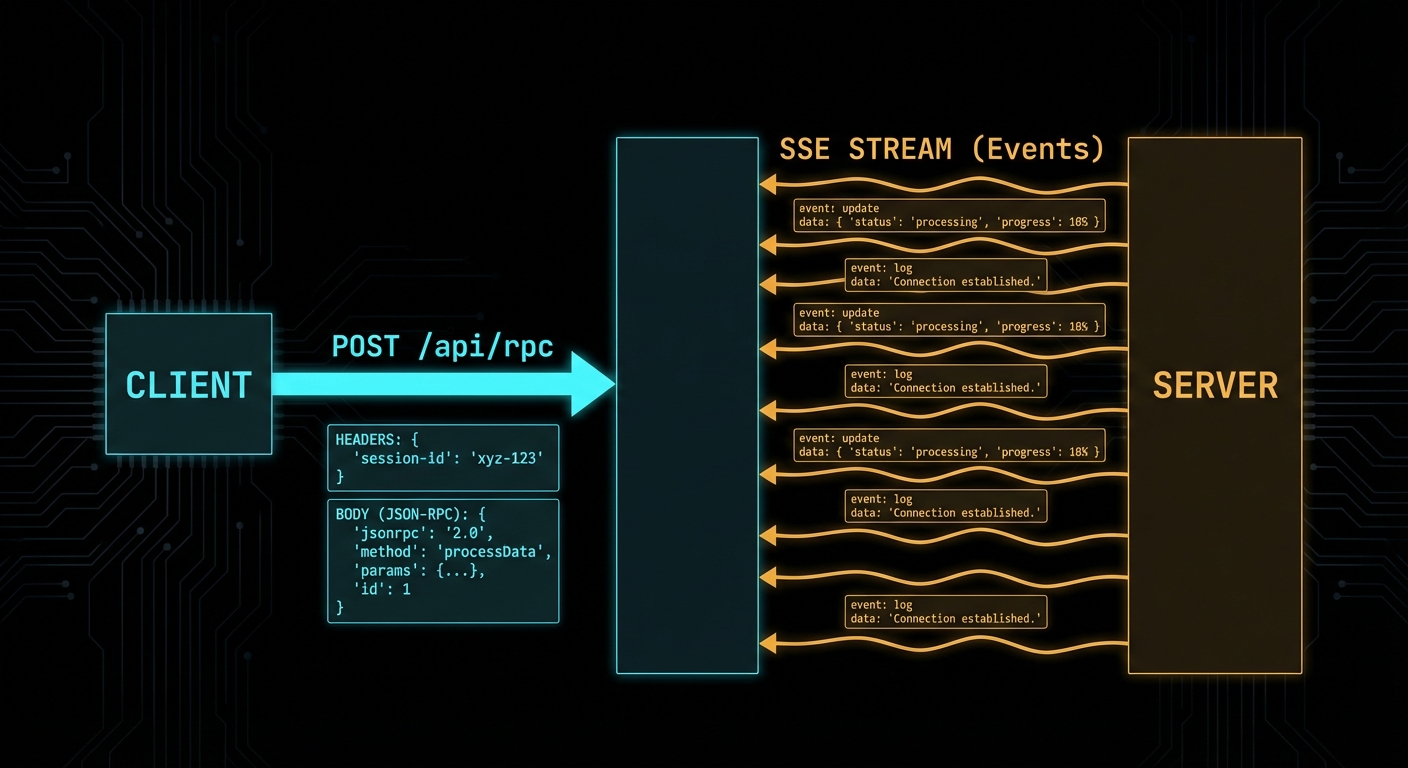
The Streamable HTTP Protocol
The Streamable HTTP transport uses a single HTTP endpoint (typically /mcp) and the following request flow:
- Client to server: HTTP POST with
Content-Type: application/jsoncontaining the JSON-RPC message(s). The client must include a session ID header (mcp-session-id) after the connection is established. - Server to client (immediate response): HTTP 200 with
Content-Type: application/jsoncontaining the JSON-RPC response. For a single request-response pair with no streaming. - Server to client (streaming): HTTP 200 with
Content-Type: text/event-stream(SSE). The server keeps the connection open and pushes events as they arrive. This is used for long-running tools, progress notifications, and sampling requests. - Server to client (async): HTTP GET to the MCP endpoint opens an SSE stream for the server to push unsolicited notifications (resource updates, tool list changes, etc.).
// Client side: use the Streamable HTTP transport
import { Client } from '@modelcontextprotocol/sdk/client/index.js';
import { StreamableHTTPClientTransport } from '@modelcontextprotocol/sdk/client/streamableHttp.js';

const client = new Client(
  { name: 'my-http-host', version: '1.0.0' },
  { capabilities: {} }
);

const transport = new StreamableHTTPClientTransport(
  new URL('https://my-mcp-server.example.com/mcp')
);

await client.connect(transport);

const tools = await client.listTools();
console.log('Available tools:', tools.tools.map(t => t.name));
Unlike stdio, this transport lets your MCP server exist independently of any single host process. The server can be deployed as a standalone service, shared across a team, or exposed to third-party clients over the internet. That independence is what makes HTTP the right choice for any non-local use case.
“The HTTP with SSE transport uses Server-Sent Events for server-to-client streaming while using HTTP POST for client-to-server communication. This allows servers to stream results and send notifications to clients.” – MCP Documentation, Transports
Building a Streamable HTTP Server
The MCP SDK provides a StreamableHTTPServerTransport that handles all the protocol mechanics. You attach it to any HTTP server framework – Express, Hono, Fastify, or Node’s built-in http module.
import { McpServer } from '@modelcontextprotocol/sdk/server/mcp.js';
import { StreamableHTTPServerTransport } from '@modelcontextprotocol/sdk/server/streamableHttp.js';
import { z } from 'zod';
import express from 'express';

const app = express();
app.use(express.json());

const server = new McpServer({ name: 'remote-server', version: '1.0.0' });

server.tool(
  'get_weather',
  'Gets current weather for a city',
  { city: z.string().describe('City name') },
  async ({ city }) => {
    const data = await fetchWeather(city);
    return {
      content: [{ type: 'text', text: `${city}: ${data.temp}°C, ${data.condition}` }],
    };
  }
);

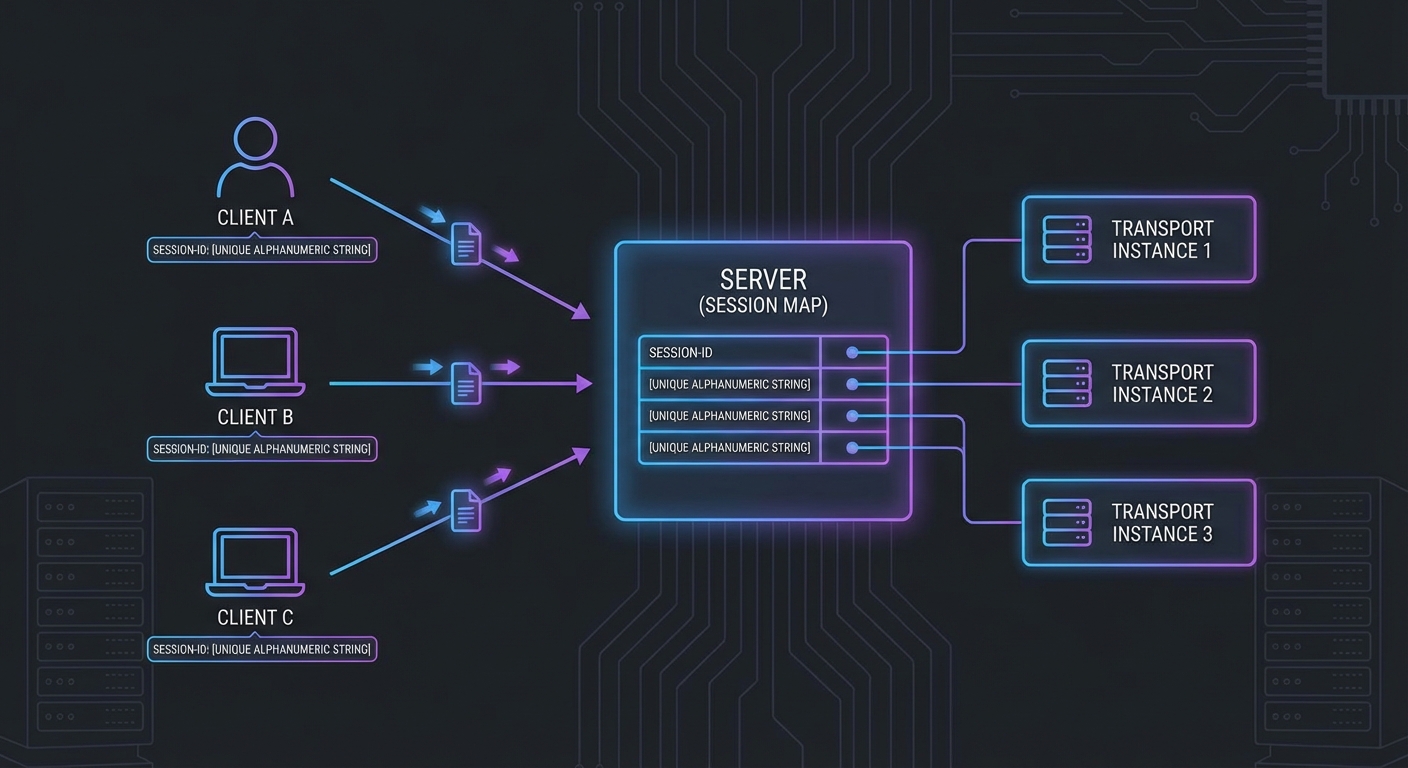
// Session management: one transport per client session
const sessions = new Map();

app.post('/mcp', async (req, res) => {
  const sessionId = req.headers['mcp-session-id'];

  let transport;
  if (sessionId && sessions.has(sessionId)) {
    transport = sessions.get(sessionId);
  } else {
    // New session
    transport = new StreamableHTTPServerTransport({
      sessionIdGenerator: () => crypto.randomUUID(),
      onsessioninitialized: (id) => sessions.set(id, transport),
    });
    await server.connect(transport);
  }

  await transport.handleRequest(req, res);
});

app.get('/mcp', async (req, res) => {
  const sessionId = req.headers['mcp-session-id'];
  const transport = sessions.get(sessionId);
  if (!transport) return res.status(404).send('Session not found');
  await transport.handleRequest(req, res);
});

app.delete('/mcp', async (req, res) => {
  const sessionId = req.headers['mcp-session-id'];
  sessions.delete(sessionId);
  res.status(200).send('Session terminated');
});

app.listen(3000, () => console.error('MCP HTTP server running on :3000'));
The server setup above handles basic request-response patterns. But the real power of HTTP transport is streaming: the ability to push progress updates, intermediate results, and server-initiated notifications to the client while a long-running operation is still in flight.
SSE Streaming in Practice
When a tool produces results progressively (e.g. a long-running data processing job), the server can stream intermediate progress via SSE notifications before sending the final result:
server.tool(
  'process_large_dataset',
  'Processes a large dataset with progress streaming',
  { dataset_id: z.string(), chunk_size: z.number().default(1000) },
  async ({ dataset_id, chunk_size }, { server: serverInstance }) => {
    const dataset = await loadDataset(dataset_id);
    const totalRows = dataset.length;
    let processed = 0;

    for (let i = 0; i < dataset.length; i += chunk_size) {
      const chunk = dataset.slice(i, i + chunk_size);
      await processChunk(chunk);
      processed += chunk.length;

      // Stream progress via SSE notification
      serverInstance.server.notification({
        method: 'notifications/progress',
        params: {
          progressToken: dataset_id,
          progress: processed,
          total: totalRows,
        },
      });
    }

    return {
      content: [{
        type: 'text',
        text: `Processed ${processed} rows from dataset ${dataset_id}`,
      }],
    };
  }
);
In a production system, you would combine progress streaming with timeout handling and cancellation support. If a client disconnects mid-stream, the server should detect the closed connection and abort the in-progress work to avoid wasting resources on results nobody will receive.
Failure Modes with Streamable HTTP
Case 1: No Session Management - One Transport for All Clients
Creating a single global transport instance and sharing it across all HTTP requests corrupts all sessions. Each client connection needs its own transport instance.
// WRONG: Single global transport - all sessions corrupt each other
const globalTransport = new StreamableHTTPServerTransport({ ... });
await server.connect(globalTransport);

app.post('/mcp', async (req, res) => {
  await globalTransport.handleRequest(req, res); // All clients share state - WRONG
});

// CORRECT: Per-session transport instances (as shown above)
This is one of the most common bugs when building HTTP-based MCP servers. The corruption is subtle: two clients may receive each other's responses, or a notification intended for one session leaks into another. It often only surfaces under concurrent load, making it hard to reproduce locally.
Case 2: SSE Connection Not Kept Alive
SSE connections must be kept open by the server for the duration of the session. Intermediate proxies (nginx, load balancers, CDNs) may buffer responses or close idle connections. Set appropriate headers and configure proxy timeouts.
// When using Express with SSE, set headers to prevent buffering
res.setHeader('Cache-Control', 'no-cache');
res.setHeader('X-Accel-Buffering', 'no'); // Nginx: disable buffering
res.setHeader('Connection', 'keep-alive');

// For nginx: proxy_read_timeout 3600s; proxy_buffering off;
Together, these two failure modes highlight the fundamental challenge of HTTP transport: you are responsible for connection lifecycle management that stdio handles automatically. Session isolation and keep-alive behavior are things you must actively get right, not things that work by default.
SSE Polling and Server-Initiated Disconnection
New in 2025-11-25
Earlier versions of Streamable HTTP assumed the server would keep SSE connections open indefinitely. The 2025-11-25 spec clarifies that servers may disconnect SSE streams at will, enabling a polling model for environments where long-lived connections are impractical (load balancers with short timeouts, serverless functions, horizontally scaled clusters).
The key change: clients can always resume a stream by sending a GET request to the MCP endpoint, regardless of whether the original stream was created by a POST or a GET. The server includes event IDs that encode stream identity, allowing the client to reconnect and pick up where it left off.
// Client: reconnect after server disconnects the SSE stream
async function connectWithReconnect(mcpUrl, lastEventId = null) {
  const headers = { Accept: 'text/event-stream' };
  if (lastEventId) {
    headers['Last-Event-ID'] = lastEventId;  // Resume from where we left off
  }

  const response = await fetch(mcpUrl, { method: 'GET', headers });
  const reader = response.body.getReader();
  const decoder = new TextDecoder();

  let currentEventId = lastEventId;

  while (true) {
    const { done, value } = await reader.read();
    if (done) {
      // Server closed the stream - reconnect after a brief delay
      console.log('Stream ended, reconnecting...');
      await new Promise(r => setTimeout(r, 1000));
      return connectWithReconnect(mcpUrl, currentEventId);
    }

    const text = decoder.decode(value);
    // Parse SSE events, track event IDs for resumption
    for (const line of text.split('\n')) {
      if (line.startsWith('id:')) currentEventId = line.slice(3).trim();
      if (line.startsWith('data:')) handleMessage(JSON.parse(line.slice(5)));
    }
  }
}
Event IDs should encode stream identity so that the server can distinguish reconnection attempts from new connections. The spec does not prescribe a format, but a common pattern is to include both a session identifier and a sequence number in the event ID.
Origin Validation
Clarified in 2025-11-25
Servers MUST respond with HTTP 403 Forbidden for requests with invalid Origin headers in the Streamable HTTP transport. This prevents cross-origin attacks where a malicious web page attempts to connect to a local MCP server running on localhost. Always validate the Origin header against an allowlist before processing any request.
What to Check Right Now
- Test with curl - send a raw HTTP POST to your server:
curl -X POST http://localhost:3000/mcp -H 'Content-Type: application/json' -d '{"jsonrpc":"2.0","id":1,"method":"initialize",...}' - Verify SSE with the browser - open your
/mcpGET endpoint in a browser with DevTools open. The Network tab should show the SSE stream with events appearing in real time. - Configure nginx for SSE - in any production deployment, add
proxy_buffering offandproxy_read_timeout 3600sto your nginx location block for the MCP endpoint. - Implement session cleanup - sessions that are never explicitly terminated will accumulate. Add a TTL or a periodic cleanup job to the sessions Map.
nJoy 😉