
You have already learned the six core primitives a server can expose: tools, resources, prompts, sampling, elicitation, and roots. But there is a seventh mechanism that sits above all of them, delivered once during the initialisation handshake, that most MCP developers never implement – and that omission measurably degrades how well an LLM uses their server. That mechanism is server instructions.
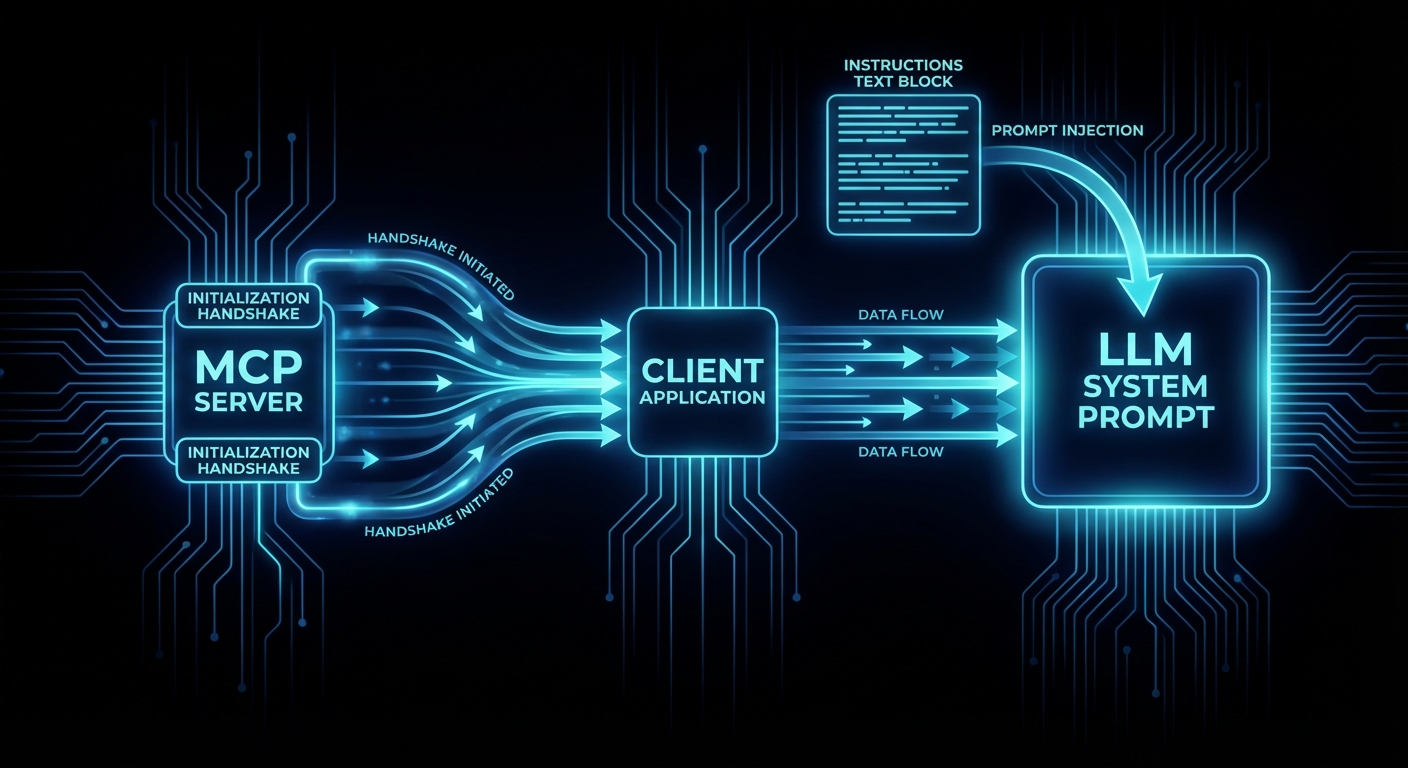
The instructions field in the MCP InitializeResult is a plain string that the server returns to the client during the handshake. The client injects it (typically into the system prompt) so the LLM reads it before it sees any tool schemas, resource lists, or user messages. It is the server’s chance to say: “here is the user manual for my tools – which ones to call first, how they relate to each other, what the constraints are, and what you should never do.”
Why Individual Tool Descriptions Are Not Enough
Each tool has a description field that explains what it does. But when an LLM gets tools from multiple MCP servers – a GitHub server, a Slack server, a database server, a monitoring server – it needs cross-cutting knowledge that no single tool description can carry. Which tools depend on each other? What order should they be called in? What are the rate limits across the whole server? Which tool should the agent call first to orient itself?
Without instructions, the LLM has to guess these relationships from tool names and descriptions alone. For strong models like Claude Sonnet 4, the guess is often right. For weaker models, the success rate drops dramatically. Instructions close that gap.
“Because server instructions may be injected into the system prompt, they should be written with caution and diligence. No instructions are better than poorly written instructions.” – Ola Servo, MCP Core Maintainer, “Using Server Instructions”
The InitializeResult Schema
The instructions field is part of the InitializeResult that the server returns in step 2 of the handshake. It is optional, and most servers do not set it. Here is the relevant schema from the MCP 2025-11-25 specification:
// From the MCP specification (2025-11-25)
// InitializeResult is the server's response to the client's initialize request
{
  "protocolVersion": "2025-11-25",
  "serverInfo": {
    "name": "my-server",
    "version": "1.0.0",
    "title": "My Server",             // Human-readable display name (new in 2025-06-18)
    "description": "Short description" // Optional (new in 2025-11-25)
  },
  "capabilities": {
    "tools": { "listChanged": true },
    "resources": { "subscribe": true }
  },
  "instructions": "Call authenticate first. Then use search_* tools for queries (prefer over list_* to avoid context overflow). Batch operations: max 10 items per call."
}
Setting Instructions in the MCP SDK
In the @modelcontextprotocol/sdk, the instructions field is set in the McpServer constructor. It is part of ServerOptions and gets passed through to the InitializeResult automatically.
import { McpServer } from '@modelcontextprotocol/sdk/server/mcp.js';
import { z } from 'zod';

const server = new McpServer({
  name: 'product-catalog',
  version: '1.0.0',
  instructions: [
    'Product Catalog MCP Server.',
    '',
    'Start with search_products for any product query (prefer over list_products to avoid context overflow).',
    'For bulk operations, use batch_update (max 50 items per call).',
    'All prices are in USD cents. Divide by 100 for display.',
    'Rate limit: 100 requests/minute per session.',
  ].join('\n'),
});

// The instructions string is now part of every InitializeResult this server sends
Using .join('\n') on an array of strings keeps long instructions readable in your source code while producing a clean multi-line string for the LLM.
What Good Instructions Cover
The MCP blog and community have converged on five categories that instructions should address:
- Cross-tool relationships – “Always call
authenticatebefore anyfetch_*tools.” This is the single most valuable thing instructions can do: tell the LLM about dependencies between tools that are invisible from their individual descriptions. - Operational patterns – “Use
batch_fetchfor multiple items. Checkrate_limit_statusbefore bulk operations. Results are cached for 5 minutes.” These are the patterns a human would learn after a week of using the API. - Constraints and limitations – “File operations limited to workspace directory. Rate limit: 100 requests/minute. Maximum payload: 1MB.” Hard limits the model needs to know to avoid errors.
- Performance guidance – “Prefer
search_*overlist_*tools when possible. Process large datasets in batches of 5-10 items.” This prevents the model from making expensive calls that blow up the context window. - Entry point – “Start with
get_statusto understand the current state before making changes.” Tells the model which tool to call first.
What Instructions Should NOT Contain
- Tool descriptions – those belong in
tool.description. Duplicating them in instructions wastes tokens. - Marketing or superiority claims – “This is the best server for…” is noise the LLM cannot use.
- General behavioral instructions – “Be helpful and concise” is not the server’s job. That belongs in the host’s system prompt.
- A manual – instructions should be concise and actionable, not a wall of text. Every token in instructions is a token the LLM reads on every turn.
Real-World Example: GitHub MCP Server
The most well-documented real-world implementation of server instructions is GitHub’s official MCP server (PR #1091, merged September 2025). It uses a pattern worth studying: toolset-based dynamic instructions.
Instead of a single static string, the server generates instructions dynamically based on which toolsets are enabled for the current session:
// Pseudocode of GitHub MCP Server's approach (originally in Go)
// Adapted to JavaScript to match this course

function generateInstructions(enabledToolsets) {
  const sections = [];

  // Base instruction: always present regardless of which toolsets are active
  sections.push(
    'GitHub API responses can overflow context windows. Strategy: ' +
    '1) Always prefer search_* tools over list_* tools when possible, ' +
    '2) Process large datasets in batches of 5-10 items, ' +
    '3) For summarization tasks, fetch minimal data first, then drill down.'
  );

  if (enabledToolsets.includes('pull_requests')) {
    sections.push(
      'PR review workflow: Always use create_pending_pull_request_review, ' +
      'then add_comment_to_pending_review for line-specific comments, ' +
      'then submit_pending_pull_request_review. Never use single-step create_and_submit.'
    );
  }

  if (enabledToolsets.includes('issues')) {
    sections.push(
      'When updating issues, always fetch the current state first with get_issue ' +
      'to avoid overwriting recent changes by other contributors.'
    );
  }

  return sections.join(' ');
}
This pattern has three design decisions worth copying:
- Always-present base instruction – context management guidance applies regardless of which tools are active.
- Conditional sections – only relevant guidance is included. If the PR toolset is disabled, the PR workflow instruction is not sent. This keeps the token cost proportional to the active feature set.
- Environment variable escape hatch – setting
GITHUB_MCP_DISABLE_INSTRUCTIONS=1suppresses all instructions for testing.
Measured Impact: +25% Workflow Adherence
The GitHub team ran a controlled evaluation of 40 sessions in VSCode comparing model behavior with and without the PR review workflow instruction. The task: correctly follow the three-step pending review workflow instead of using a single-step shortcut.
| Model | With Instructions | Without Instructions | Delta |
|---|---|---|---|
| GPT-5-Mini | 80% | 20% | +60pp |
| Claude Sonnet 4 | 90% | 100% | -10pp |
| Overall | 85% | 60% | +25pp |
The data tells a clear story: strong models (Claude Sonnet 4) naturally gravitate toward the correct workflow even without instructions. Weaker models (GPT-5-Mini) need explicit guidance. Since you cannot control which model your MCP client’s host is running, instructions are insurance that your server works well regardless of model capability.
Client Support and Injection Mechanism
The MCP specification does not mandate how clients use the instructions string. It says the field exists; what the client does with it is implementation-defined. In practice, most clients inject it into the LLM’s system prompt. As of late 2025, these clients support server instructions:
- Claude Code – injects instructions into system prompt. Respects them consistently.
- VSCode (Copilot Chat) – injects instructions. Used in the GitHub evaluation above.
- Goose – injects instructions into system prompt.
- Cursor – MCP support shipped in v1.6 (September 2025). Instructions handling may vary.
Because injection is not guaranteed, instructions should enhance, not replace good tool descriptions. If a client ignores instructions, each tool should still be usable from its own description and schema alone. Instructions add the cross-cutting context that individual descriptions cannot carry.
Instructions as the Endorsed Grouping Mechanism
A common request from MCP server developers is tool grouping or namespacing – a way to tell the LLM “these five tools belong together.” The MCP specification does not have a formal grouping primitive. Instead, the endorsed mechanism is the instructions field.
“Lots of people want tool bundling / grouping / namespaces to guide servers how to use tools together. We should make instructions more obvious and have examples for how to use it.” – Felix Weinberger, MCP contributor, Python SDK Issue #1464
This means if you want to group your tools into logical sets, you do it in instructions:
const server = new McpServer({
  name: 'analytics-server',
  version: '2.0.0',
  instructions: [
    'Analytics MCP Server - two tool groups:',
    '',
    'QUERYING: Use run_query for SQL, get_dashboard for pre-built views,',
    'export_csv for bulk data. Always run_query before export_csv.',
    '',
    'ADMIN: Use create_dashboard to build new views, set_alert for thresholds.',
    'Admin tools require prior authentication via the OAuth flow.',
  ].join('\n'),
});
A Complete Server With Instructions
import { McpServer } from '@modelcontextprotocol/sdk/server/mcp.js';
import { StdioServerTransport } from '@modelcontextprotocol/sdk/server/stdio.js';
import { z } from 'zod';

const server = new McpServer({
  name: 'customer-support',
  version: '1.0.0',
  instructions: [
    'Customer Support MCP Server.',
    '',
    'Workflow: 1) lookup_customer by email or ID, 2) get_tickets for that customer,',
    '3) respond_to_ticket or escalate_ticket based on severity.',
    '',
    'Never call respond_to_ticket without first reading the ticket via get_tickets.',
    'Escalation threshold: severity >= 3 or customer tier = "enterprise".',
    'Rate limit: 60 requests/minute. Batch lookups with lookup_customers (max 20).',
  ].join('\n'),
});

server.tool(
  'lookup_customer',
  'Find a customer by email address or customer ID. Returns customer profile with tier and contact info.',
  {
    email: z.string().email().optional().describe('Customer email address'),
    customer_id: z.string().optional().describe('Customer ID (format: CUS-XXXX)'),
  },
  async ({ email, customer_id }) => {
    if (!email && !customer_id) {
      return { isError: true, content: [{ type: 'text', text: 'Provide email or customer_id.' }] };
    }
    const customer = await db.findCustomer({ email, customer_id });
    if (!customer) {
      return { isError: true, content: [{ type: 'text', text: 'Customer not found.' }] };
    }
    return { content: [{ type: 'text', text: JSON.stringify(customer) }] };
  }
);

server.tool(
  'get_tickets',
  'List support tickets for a customer. Returns ticket ID, subject, severity (1-5), status, and last update.',
  {
    customer_id: z.string().describe('Customer ID (format: CUS-XXXX)'),
    status: z.enum(['open', 'pending', 'closed']).optional().default('open')
      .describe('Filter by ticket status'),
  },
  {
    annotations: { readOnlyHint: true, openWorldHint: false },
  },
  async ({ customer_id, status }) => {
    const tickets = await db.getTickets(customer_id, status);
    return { content: [{ type: 'text', text: JSON.stringify(tickets) }] };
  }
);

server.tool(
  'respond_to_ticket',
  'Send a response to a support ticket. The response is visible to the customer.',
  {
    ticket_id: z.string().describe('Ticket ID (format: TKT-XXXX)'),
    message: z.string().min(1).max(5000).describe('Response message to send to the customer'),
  },
  {
    annotations: { destructiveHint: false, readOnlyHint: false, openWorldHint: true },
  },
  async ({ ticket_id, message }) => {
    await db.addTicketResponse(ticket_id, message);
    return { content: [{ type: 'text', text: `Response sent to ${ticket_id}.` }] };
  }
);

server.tool(
  'escalate_ticket',
  'Escalate a ticket to a human agent. Use when severity >= 3 or customer tier is enterprise.',
  {
    ticket_id: z.string().describe('Ticket ID (format: TKT-XXXX)'),
    reason: z.string().describe('Why this ticket needs human attention'),
  },
  {
    annotations: { destructiveHint: false, readOnlyHint: false, openWorldHint: true },
  },
  async ({ ticket_id, reason }) => {
    await db.escalateTicket(ticket_id, reason);
    return { content: [{ type: 'text', text: `Ticket ${ticket_id} escalated. Reason: ${reason}` }] };
  }
);

const transport = new StdioServerTransport();
await server.connect(transport);
Notice how the instructions string tells the LLM the workflow order (lookup, then get tickets, then respond or escalate), the escalation rule (severity >= 3 or enterprise tier), and the rate limit. None of these facts belong in any single tool’s description – they are cross-cutting concerns that only instructions can carry.
Instructions and Tool Search
As MCP servers grow to dozens of tools, clients like Claude Code adopt tool search mechanisms (covered in detail in a later lesson). When tool search is active, the LLM does not see all tool schemas upfront – it sees only the instructions and a search interface. The instructions become the primary signal the model uses to decide which tools to search for.
This makes instructions even more critical for large servers: if your instructions do not mention a capability, the model may never discover the tools that implement it.
What to Check Right Now
- Add instructions to your server – even a two-sentence string describing the workflow order and the main constraint is better than no instructions at all.
- Keep it under 200 words – instructions are read on every LLM turn. Every word costs tokens across every interaction.
- Test with a weaker model – your instructions matter most for models that cannot infer tool relationships from names alone. Test with GPT-4o-mini or a smaller model to verify the instructions actually help.
- Do not duplicate tool descriptions – instructions describe relationships and constraints. Individual tool capabilities belong in
tool.description. - Use the MCP Inspector – run
npx @modelcontextprotocol/inspector node your-server.jsand verify that the instructions appear in the InitializeResult.
nJoy 😉