
A single MCP server instance handling one user works fine. The same server handling 500 concurrent users during peak hours is a different problem entirely. This lesson covers the four levers for scaling MCP infrastructure: horizontal scaling with session affinity, rate limiting that protects both your server and upstream LLM APIs, response caching for expensive tool calls, and load balancing configurations that handle MCP’s stateful session requirements correctly.
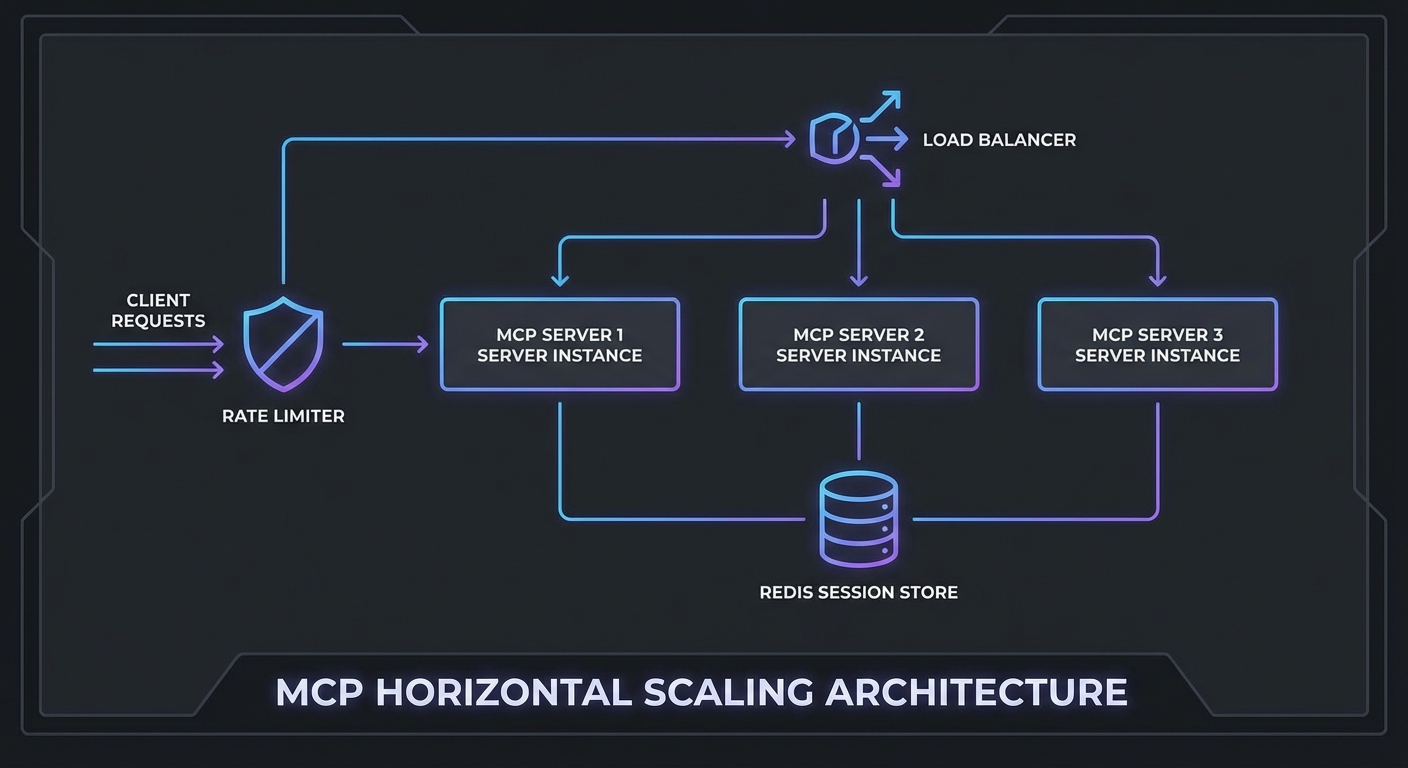
Horizontal Scaling with Shared Session State
MCP Streamable HTTP sessions are stateful. If a client’s POST goes to server A but the next SSE connection goes to server B, the session state is lost. Two solutions:
Option 1: Sticky sessions (simpler) – Configure your load balancer to route all requests from the same client to the same server instance. Works but creates uneven load distribution.
Option 2: Shared session store (recommended) – Store session state in Redis and allow any server instance to handle any request.
import { createClient } from 'redis';
import { McpServer } from '@modelcontextprotocol/sdk/server/mcp.js';
import { StreamableHTTPServerTransport } from '@modelcontextprotocol/sdk/server/streamable-http.js';

const redis = createClient({ url: process.env.REDIS_URL });
await redis.connect();

// In-memory session store backed by Redis
const sessions = new Map();  // Local cache for active requests

app.post('/mcp', async (req, res) => {
  const sessionId = req.headers['mcp-session-id'];

  // Try local cache first, then Redis
  let transport = sessions.get(sessionId);
  if (!transport && sessionId) {
    const stored = await redis.get(`mcp:session:${sessionId}`);
    if (stored) {
      // Restore session - in practice, transport state is complex to serialize
      // For true multi-instance support, use sticky sessions at the LB level
      console.error(`Session ${sessionId} not found locally - sticky sessions recommended`);
    }
  }

  if (!transport) {
    transport = new StreamableHTTPServerTransport({
      sessionIdGenerator: () => crypto.randomUUID(),
      onsessioninitialized: async (sid) => {
        sessions.set(sid, transport);
        // Mark session as active in Redis (for health tracking)
        await redis.setEx(`mcp:session:${sid}:active`, 3600, '1');
      },
    });
    const server = buildMcpServer();
    await server.connect(transport);
  }

  await transport.handleRequest(req, res, req.body);
});
In practice, shared session state is the difference between a prototype and a production system. Without it, a load balancer restart or a single instance crash silently kills every session pinned to that node, and your users see cryptic “session not found” errors with no recovery path.
Rate Limiting at the Gateway
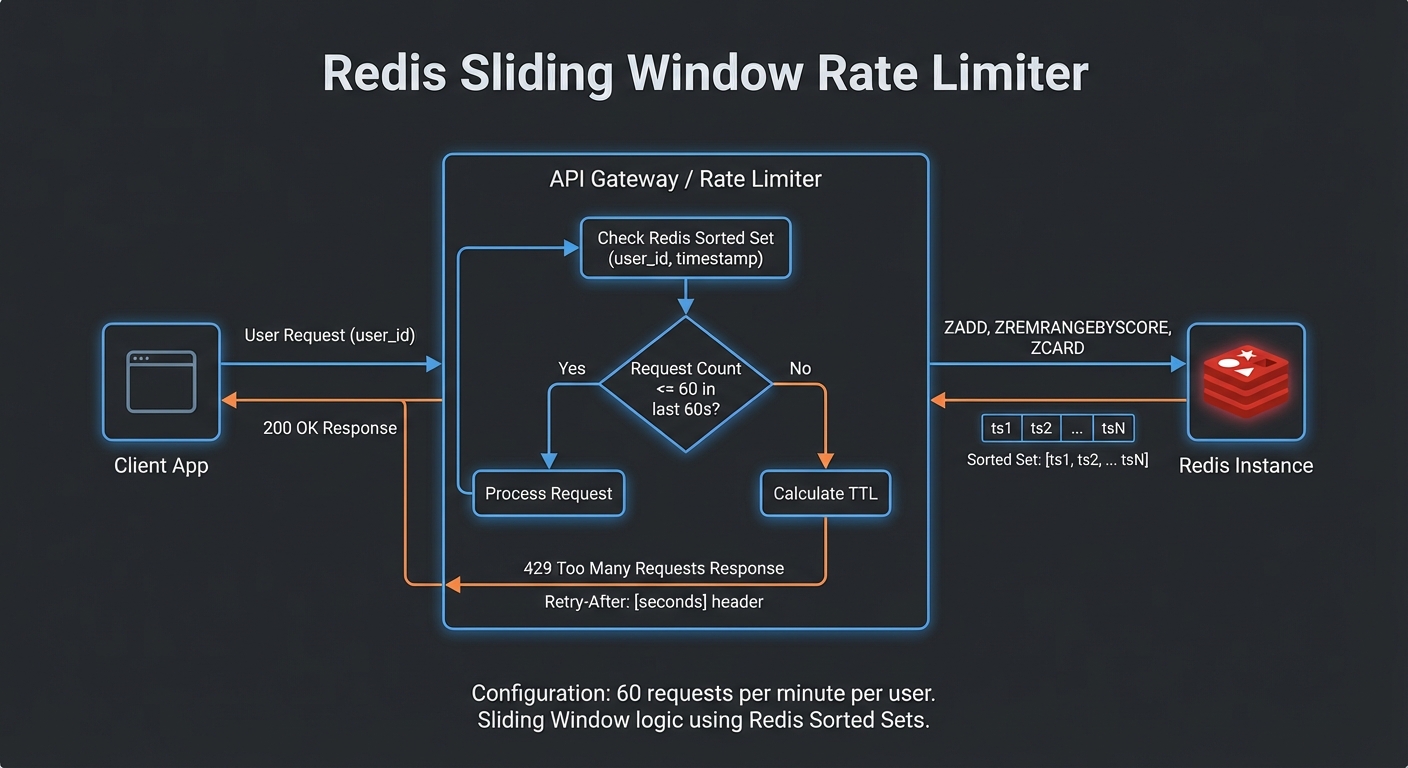
Scaling the server only to leave it unprotected is a recipe for outages. Rate limiting sits at the gateway layer and prevents a single misbehaving client, or a sudden LLM retry loop, from consuming all available capacity. The following setup uses Redis so the limits are enforced consistently across all server instances.
import { RateLimiterRedis } from 'rate-limiter-flexible';

// Per-user rate limit: 60 requests per minute
const rateLimiter = new RateLimiterRedis({
  storeClient: redis,
  keyPrefix: 'mcp-rl',
  points: 60,        // Number of requests
  duration: 60,      // Per 60 seconds
  blockDuration: 60, // Block for 60 seconds after limit hit
});

// Per-IP rate limit for unauthenticated paths
const ipRateLimiter = new RateLimiterRedis({
  storeClient: redis,
  keyPrefix: 'mcp-ip-rl',
  points: 100,
  duration: 60,
});

async function rateLimit(req, res, next) {
  const key = req.auth?.sub ?? req.ip;
  try {
    await rateLimiter.consume(key);
    next();
  } catch (rl) {
    res.setHeader('Retry-After', Math.ceil(rl.msBeforeNext / 1000));
    res.setHeader('X-RateLimit-Limit', 60);
    res.setHeader('X-RateLimit-Remaining', 0);
    res.status(429).json({ error: 'too_many_requests', retryAfter: Math.ceil(rl.msBeforeNext / 1000) });
  }
}

app.use('/mcp', rateLimit);
Tool Result Caching
Many MCP tool calls hit the same data repeatedly. An LLM agent researching a product might call get_product three times in one conversation with identical arguments. Caching those results in Redis avoids redundant database queries and cuts latency for the most common patterns. The key decision is choosing TTLs that match how frequently the underlying data actually changes.
// Cache expensive or read-heavy tool call results in Redis
class ToolResultCache {
  #redis;
  #ttls;

  constructor(redis, ttls = {}) {
    this.#redis = redis;
    this.#ttls = {
      // Default TTLs per tool (seconds)
      get_product: 300,      // 5 min - product data changes rarely
      search_products: 60,   // 1 min - search results change more
      get_inventory: 10,     // 10 sec - inventory changes frequently
      get_user: 600,         // 10 min - user profile rarely changes
      ...ttls,
    };
  }

  key(toolName, args) {
    return `mcp:tool:${toolName}:${JSON.stringify(args)}`;
  }

  async get(toolName, args) {
    const cached = await this.#redis.get(this.key(toolName, args));
    return cached ? JSON.parse(cached) : null;
  }

  async set(toolName, args, result) {
    const ttl = this.#ttls[toolName];
    if (!ttl) return;  // Don't cache if no TTL defined
    await this.#redis.setEx(this.key(toolName, args), ttl, JSON.stringify(result));
  }

  async invalidate(pattern) {
    const keys = await this.#redis.keys(`mcp:tool:${pattern}:*`);
    if (keys.length) await this.#redis.del(keys);
  }
}

const toolCache = new ToolResultCache(redis);

// Wrap MCP callTool with caching
async function callToolWithCache(mcp, name, args) {
  const cached = await toolCache.get(name, args);
  if (cached) {
    return cached;
  }
  const result = await mcp.callTool({ name, arguments: args });
  await toolCache.set(name, args, result);
  return result;
}
Nginx Load Balancer Config with Sticky Sessions
With application-level concerns handled, the last piece is the load balancer itself. MCP’s SSE streaming requires long-lived connections, which means default Nginx timeouts and buffering settings will break things immediately. Watch out for proxy_buffering in particular: if left on, Nginx will hold SSE events in memory instead of forwarding them, and the client will appear to hang.
upstream mcp_servers {
    ip_hash;  # Sticky sessions by client IP
    server mcp-server-1:3000;
    server mcp-server-2:3000;
    server mcp-server-3:3000;
    keepalive 64;
}

server {
    listen 443 ssl;
    server_name mcp.yourcompany.com;

    # SSE requires long-lived connections - increase timeouts
    proxy_read_timeout 3600s;
    proxy_send_timeout 3600s;
    proxy_connect_timeout 10s;

    # Required for SSE streaming
    proxy_buffering off;
    proxy_cache off;
    proxy_set_header Connection '';
    proxy_http_version 1.1;
    chunked_transfer_encoding on;

    location /mcp {
        proxy_pass http://mcp_servers;
        proxy_set_header Host $host;
        proxy_set_header X-Real-IP $remote_addr;
        proxy_set_header X-Forwarded-For $proxy_add_x_forwarded_for;
    }

    location /health {
        proxy_pass http://mcp_servers;
        access_log off;
    }
}
A common real-world failure is caching a tool result that was specific to one user’s permissions and then serving it to another user. Always include the user or session identity in your cache key when the tool’s output depends on who is calling it. The key() method above uses only tool name and arguments, which is correct for public data but dangerous for anything access-controlled.
Scaling Decision Guide
- Under 10 concurrent users: Single instance, no load balancer needed
- 10-100 concurrent users: 2-3 instances with sticky sessions, Redis for rate limiting
- 100-1000 concurrent users: 5-10 instances, Redis session store, tool result caching, dedicated rate limiting layer
- 1000+ concurrent users: Kubernetes with horizontal pod autoscaling, Redis Cluster, API Gateway (Kong, APISIX) for rate limiting and auth
nJoy 😉