
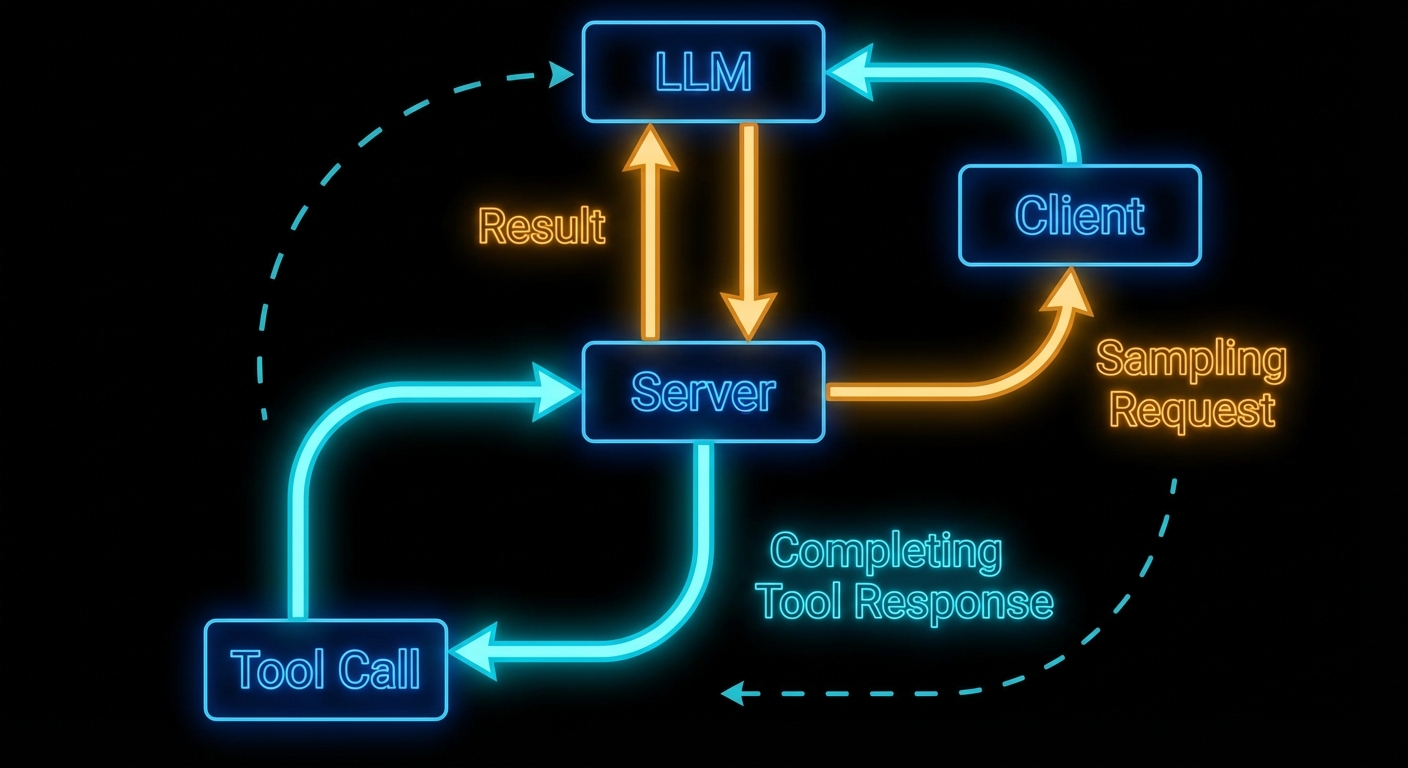
Here is the mind-bending part of MCP: servers can ask the LLM for help. In the standard model, the flow is one-way – host calls LLM, LLM calls tool, tool runs on server, result goes back. Sampling reverses one arrow. It lets a server, while handling a request, ask the host’s LLM to generate text – and then use that generated text in its response. This is recursive AI, and it is what enables genuinely intelligent MCP servers that reason about their own actions.
The Sampling Flow
Sampling works as follows: a server handling a tool call decides it needs to “think” before it can respond. It sends a sampling/createMessage request to the client. The client receives this, shows the pending sampling request to the user (or approves it automatically based on policy), then calls the actual LLM API, and returns the result to the server. The server uses the result to complete its work and returns the final tool response to the original caller.
The critical point: the server does not know which LLM the client is using. It just asks for “a language model response” and gets back generated text. This maintains provider-agnosticism even for server-side reasoning.
// Client configuration to enable sampling
const client = new Client(
  { name: 'my-host', version: '1.0.0' },
  {
    capabilities: {
      sampling: {},  // Must declare this to receive sampling requests from servers
    },
  }
);

// Client must handle incoming sampling requests
client.setRequestHandler(CreateMessageRequestSchema, async (request) => {
  const { messages, maxTokens, temperature } = request.params;

  // Here the host calls its actual LLM
  const openai = new OpenAI();
  const response = await openai.chat.completions.create({
    model: 'gpt-4o',
    messages: messages.map(m => ({
      role: m.role,
      content: typeof m.content === 'string' ? m.content : m.content.text,
    })),
    max_tokens: maxTokens || 1000,
    temperature: temperature || 0.7,
  });

  return {
    role: 'assistant',
    content: { type: 'text', text: response.choices[0].message.content },
    model: 'gpt-4o',
    stopReason: 'endTurn',
  };
});
Why this matters: without capabilities.sampling the server cannot request completions at all, and without a handler every sampling call fails the tool mid-flight. In a real project you would centralise LLM calls here so quotas, logging, and redaction policies stay in one place on the host.
Server-Side Sampling Usage
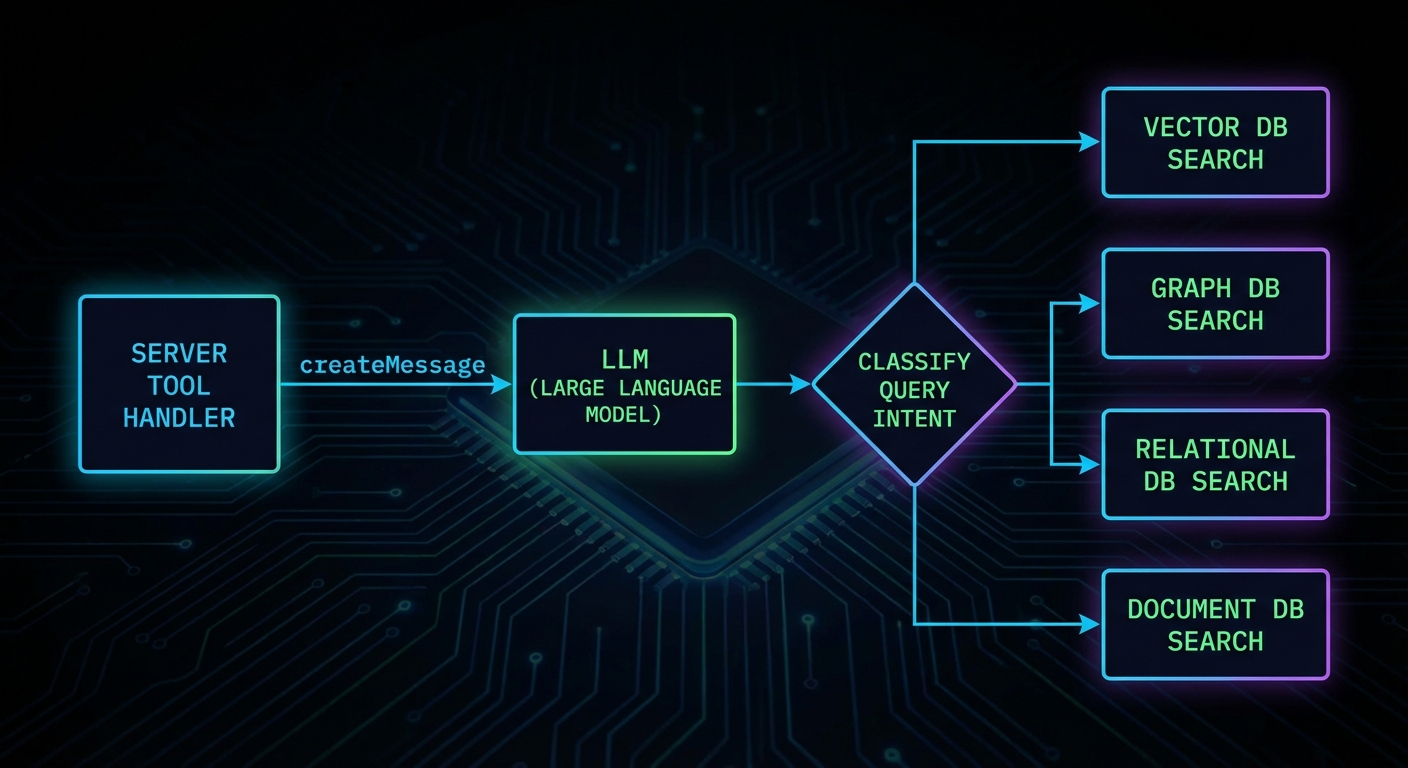
On the server side, you request sampling through the server’s sampling capability. Here is a server that uses sampling to classify user intent before deciding which database to query:
import { McpServer } from '@modelcontextprotocol/sdk/server/mcp.js';
import { z } from 'zod';

const server = new McpServer({ name: 'smart-search', version: '1.0.0' });

server.tool(
  'intelligent_search',
  'Searches across databases, routing the query based on intent',
  { query: z.string().describe('The search query') },
  async ({ query }, { server: serverInstance }) => {
    // Use sampling to classify the query intent
    const classification = await serverInstance.createMessage({
      messages: [{
        role: 'user',
        content: {
          type: 'text',
          text: `Classify this search query into one of: products, users, orders, docs.\nQuery: "${query}"\nRespond with only the category name.`,
        },
      }],
      maxTokens: 10,
    });

    const category = classification.content.text.trim().toLowerCase();

    // Route to the appropriate search function
    let results;
    switch (category) {
      case 'products': results = await searchProducts(query); break;
      case 'users': results = await searchUsers(query); break;
      case 'orders': results = await searchOrders(query); break;
      default: results = await searchDocs(query);
    }

    return { content: [{ type: 'text', text: JSON.stringify(results) }] };
  }
);
In a real project you would treat the classification step as a bounded, cheap call (low maxTokens, strict prompt) and keep routing logic easy to unit test. If the model returns an unexpected label, fall back to a safe default path instead of failing the whole tool.
“Sampling allows servers to request LLM completions through the client, enabling sophisticated agentic behaviors while maintaining security through human oversight. The client retains control over which model is used and what requests are permitted.” – MCP Documentation, Sampling
Sampling Parameters
The sampling/createMessage request supports model preferences and sampling parameters. These are preferences, not requirements – the client may choose to ignore them if they conflict with its policy or available models.
const response = await serverInstance.createMessage({
  messages: [{ role: 'user', content: { type: 'text', text: 'Summarise in one sentence.' } }],
  maxTokens: 100,
  temperature: 0.3,           // Lower = more deterministic
  modelPreferences: {
    hints: [{ name: 'claude-3-5-haiku' }], // Preferred model - client may ignore
    costPriority: 0.8,         // 0-1: prefer cheaper models
    speedPriority: 0.9,        // 0-1: prefer faster models
    intelligencePriority: 0.2, // 0-1: prefer smarter models
  },
  systemPrompt: 'You are a concise summariser.',
});
Those preferences are negotiation, not a guarantee: the host may pin a single approved model or ignore cost and speed hints for compliance. Use them to express intent, then document what your client actually honours so server authors know what to expect.
Failure Modes with Sampling
Case 1: Using Sampling for Every Decision
Sampling adds latency and cost. Using it for decisions that can be made with deterministic code (string matching, regex, a simple lookup) is waste. Reserve sampling for genuinely ambiguous situations where LLM understanding adds real value.
// WASTEFUL: Sampling for something a regex handles
const isEmail = await serverInstance.createMessage({
  messages: [{ role: 'user', content: { type: 'text', text: `Is "${input}" an email address? Yes or No.` } }],
  maxTokens: 5,
});

// BETTER: Just use a regex
const isEmail = /^[^@]+@[^@]+\.[^@]+$/.test(input);
Why this matters: every sampling round trip adds latency and billed tokens. In a real project you would profile hot tools and replace LLM branches with deterministic code wherever the spec is stable.
Case 2: Infinite Sampling Loops
If a server uses sampling and the LLM response triggers another tool call that uses sampling again, you can create infinite loops. Always set a maximum recursion depth and terminate if exceeded.
// Guard against recursion depth
async function toolHandler({ query }, context, depth = 0) {
  if (depth > 3) {
    return { isError: true, content: [{ type: 'text', text: 'Max reasoning depth exceeded.' }] };
  }
  const classification = await serverInstance.createMessage({ ... });
  if (needsMoreInfo(classification)) {
    return toolHandler({ query: refineQuery(query) }, context, depth + 1);
  }
  return finalResponse(classification);
}
Tool Calling in Sampling Requests
New in 2025-11-25
Starting with spec version 2025-11-25, servers can include tools and toolChoice parameters in a sampling/createMessage request. This lets the server constrain which tools the LLM may call during the sampling turn. Without this, the LLM during sampling would either have no tools at all or the full tool set – there was no way for the server to scope the tools available during a recursive inference.
// Server: sampling request with constrained tool set
const response = await serverInstance.createMessage({
  messages: [{
    role: 'user',
    content: {
      type: 'text',
      text: 'Look up the current status of order ORD-12345 and summarise it.',
    },
  }],
  maxTokens: 500,
  tools: [
    {
      name: 'get_order_status',
      description: 'Look up the current status of an order by ID',
      inputSchema: {
        type: 'object',
        properties: {
          orderId: { type: 'string', description: 'The order ID' },
        },
        required: ['orderId'],
      },
    },
  ],
  toolChoice: { type: 'auto' },  // 'auto' | 'none' | { type: 'tool', name: '...' }
});
The tools array defines the tool definitions available during this specific sampling turn. The toolChoice parameter controls how the LLM selects tools: "auto" lets the model decide, "none" disables tool use entirely, and { type: 'tool', name: 'get_order_status' } forces a specific tool. This is useful when a server needs the LLM to do a lookup-then-reason task: you provide only the lookup tool, the LLM calls it, gets the data, and writes a summary.
The client is responsible for actually executing the tool calls the LLM makes during sampling. The client returns the final assistant message to the server, including any tool results in the conversation. This keeps the server out of the tool execution loop during its own sampling request – the client manages the entire multi-turn tool-use conversation internally.
What to Check Right Now
- Declare sampling on your client – if you want servers to be able to use sampling, your client must declare
capabilities: { sampling: {} }. Without this, sampling requests from servers will be rejected. - Implement a sampling handler – if you build a host application, implement the
CreateMessageRequestSchemahandler. An unimplemented handler will cause all sampling requests to fail silently. - Show sampling requests to users – the spec emphasises human oversight. Production hosts should surface pending sampling requests to users and allow approval/rejection.
- Cap sampling depth – any server that uses sampling recursively must have a maximum depth limit. Without it, one malformed query can run up unbounded costs.
nJoy 😉