
Tools do things. Resources provide things. This distinction matters more than it sounds. A tool executes code with side effects – it searches, writes, sends, deletes. A resource is a read-only window into data – it gives the model (or the user) access to content without triggering any action. The resources primitive is MCP’s answer to the question: “how do I give the AI access to my data without writing a bespoke data-access tool every time?”
What Resources Are and How They Work
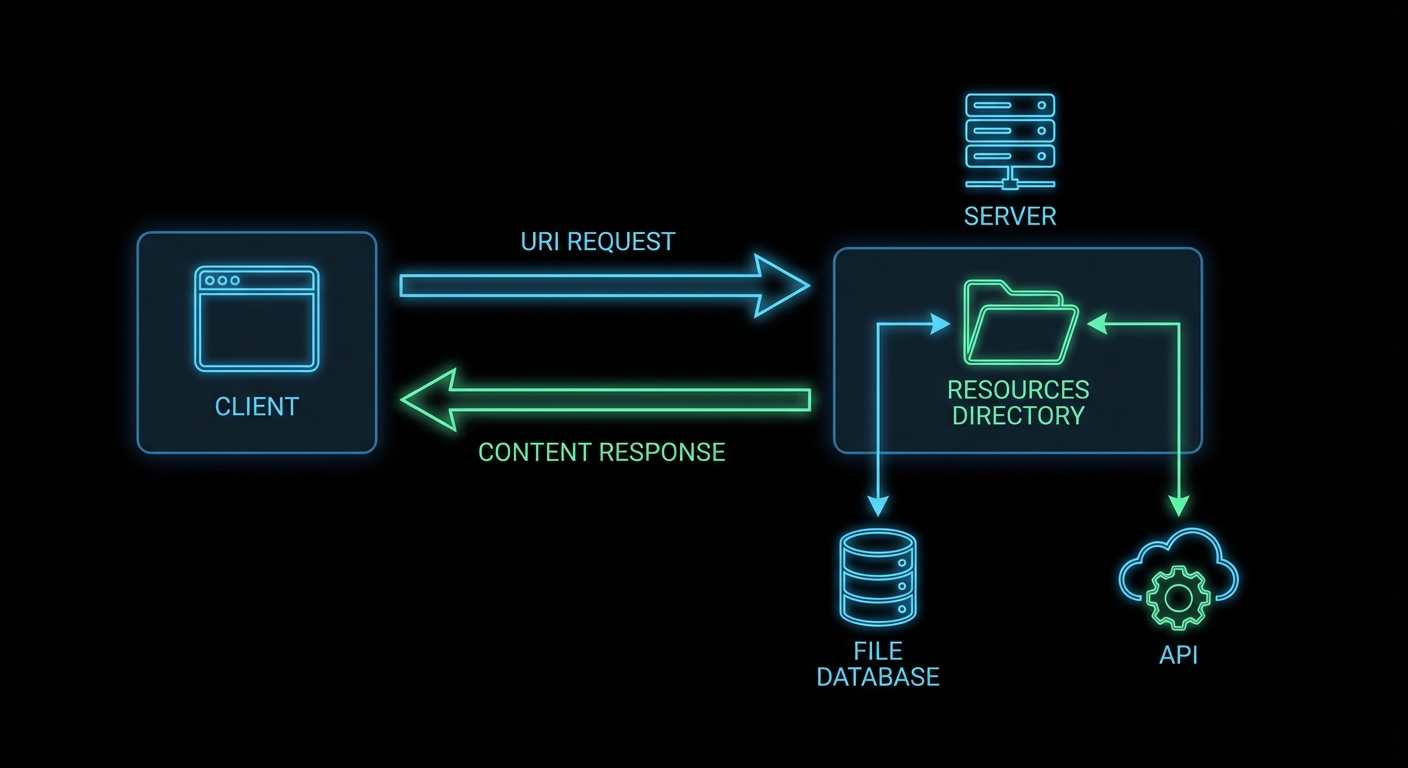
Every MCP resource has a URI – a unique identifier that the client uses to request it. The URI can follow any scheme: file://, db://, https://, custom-scheme://. The server defines what URIs exist and what they return. The client requests a URI and gets back content blocks (text or binary).
Resources come in two forms: direct resources (static items with known URIs that the server lists upfront) and resource templates (URI patterns with parameters, for dynamic resources where the set of possible URIs is not fixed).
import { McpServer } from '@modelcontextprotocol/sdk/server/mcp.js';
import { ResourceTemplate } from '@modelcontextprotocol/sdk/server/mcp.js';
import { z } from 'zod';
import fs from 'node:fs/promises';

const server = new McpServer({ name: 'file-server', version: '1.0.0' });

// Direct resource - static, known URI
// title and icons are optional metadata (title: New in 2025-06-18, icons: New in 2025-11-25)
server.resource(
  'config',
  'config://app/settings',
  {
    description: 'The application configuration',
    mimeType: 'application/json',
    title: 'App Settings',
    icons: [{ src: 'https://cdn.example.com/icons/settings.svg', mimeType: 'image/svg+xml' }],
  },
  async (uri) => {
    const config = await fs.readFile('./config.json', 'utf8');
    return { contents: [{ uri: uri.href, mimeType: 'application/json', text: config }] };
  }
);

// Resource template - dynamic, parameterised URI
server.resource(
  'user-profile',
  new ResourceTemplate('users://{userId}/profile', { list: undefined }),
  { description: 'User profile by ID' },
  async (uri, { userId }) => {
    const user = await db.getUser(userId);
    if (!user) throw new Error(`User ${userId} not found`);
    return {
      contents: [{
        uri: uri.href,
        mimeType: 'application/json',
        text: JSON.stringify(user, null, 2),
      }],
    };
  }
);
This pattern matters because it eliminates the need to write a separate tool for every piece of data your AI needs to read. Instead of creating get_config, get_user, and get_product tools, you expose each as a resource with a clean URI. The client can then browse and select what it needs without the model having to decide which tool to call.
“Resources represent any kind of data that an MCP server wants to make available to clients. This can include file contents, database records, API responses, live system data, screenshots, images, log files, and more.” – MCP Documentation, Resources
Resource Content Types
Resources return content blocks with either text or blob (binary) content. Text resources are the most common – JSON, Markdown, plain text, CSV, code. Binary resources use base64-encoded data.
// Text resource
return {
  contents: [{
    uri: uri.href,
    mimeType: 'text/markdown',
    text: '# Product Manual\n\nThis product does X...',
  }],
};

// Binary resource (e.g. an image or PDF)
const imageBuffer = await fs.readFile('./logo.png');
return {
  contents: [{
    uri: uri.href,
    mimeType: 'image/png',
    blob: imageBuffer.toString('base64'),
  }],
};

// Multiple content items (e.g. a resource that returns several files)
return {
  contents: [
    { uri: 'file:///src/main.js', mimeType: 'text/javascript', text: mainJsContent },
    { uri: 'file:///src/utils.js', mimeType: 'text/javascript', text: utilsJsContent },
  ],
};
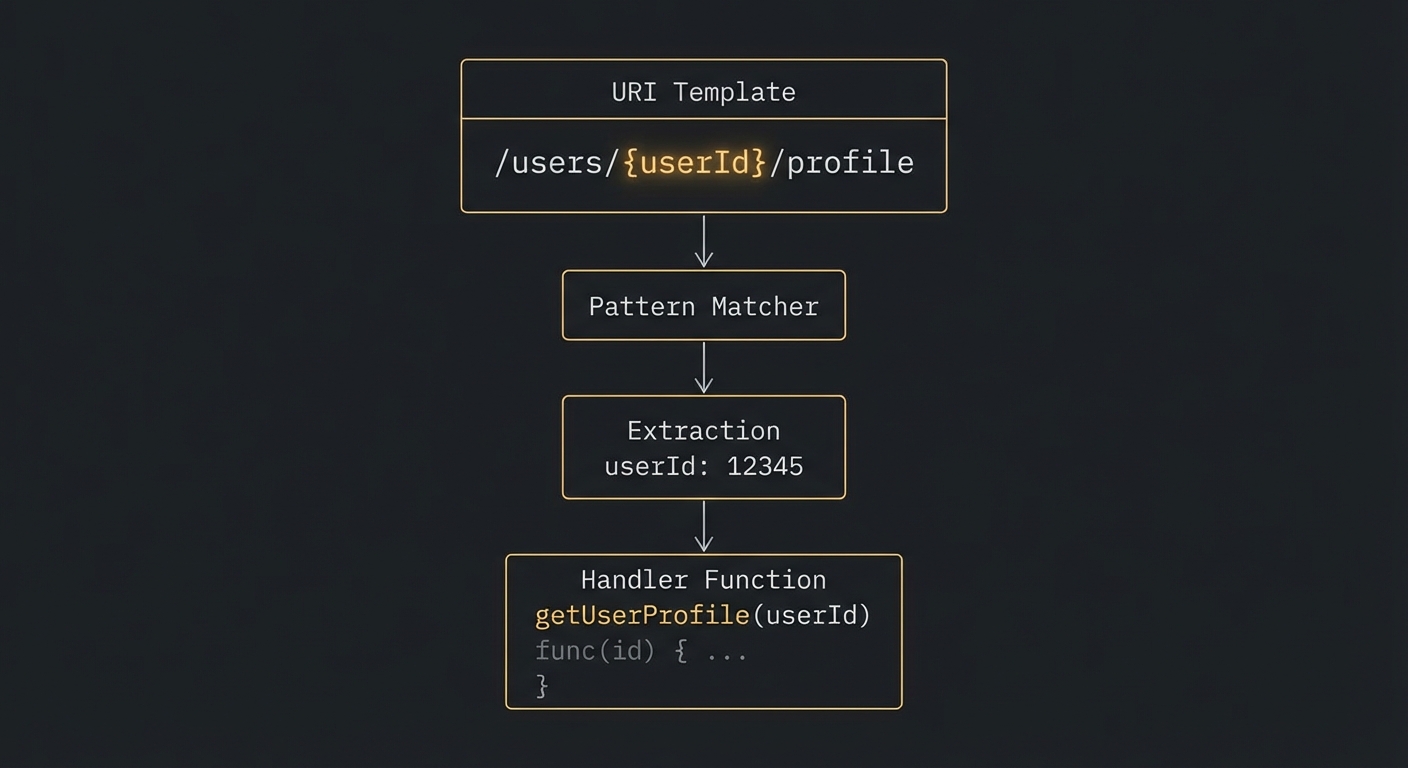
users://{userId}/profile resolve to dynamic content.So far, resources are fetched on demand – the client requests a URI and gets a snapshot. But what about data that changes continuously? The next section covers subscriptions, which let clients receive push notifications when a resource’s content updates.
Resource Subscriptions
If a resource changes over time, the server can support subscriptions. Clients subscribe to a URI and receive notifications when its content changes. This is useful for live data: a log file that grows, a database record that updates, a sensor reading that changes.
// Server with subscription support
const server = new McpServer({
  name: 'live-data-server',
  version: '1.0.0',
  capabilities: { resources: { subscribe: true } },
});

server.resource(
  'live-metrics',
  'metrics://system/cpu',
  { description: 'Live CPU usage percentage' },
  async (uri) => {
    const usage = await getCpuUsage();
    return {
      contents: [{ uri: uri.href, mimeType: 'text/plain', text: `${usage}%` }],
    };
  }
);

// When the data changes, notify subscribers:
setInterval(async () => {
  server.server.notification({
    method: 'notifications/resources/updated',
    params: { uri: 'metrics://system/cpu' },
  });
}, 5000); // every 5 seconds
In a production system, you would gate the notification interval based on actual data changes rather than a fixed timer. Broadcasting updates every 5 seconds when nothing has changed wastes bandwidth and triggers unnecessary re-fetches on the client side. Use event-driven notifications – emit only when the underlying data actually changes.
Now that we have covered how resources work when everything goes right, let’s look at what happens when they are misused. The following failure modes are the most common mistakes developers make when first implementing resources.
Failure Modes with Resources
Case 1: Returning Mutable Data from Resources
Resources are semantically read-only. If your resource handler has side effects (incrementing a counter, logging access, triggering a build), you are violating the contract. Clients may cache resource responses and re-use them without re-fetching. Side effects in resource handlers lead to missed triggers and hard-to-reproduce bugs.
// BAD: Side effect in a resource handler
server.resource('report', 'reports://quarterly', {}, async (uri) => {
  await markReportAsViewed(userId); // Side effect - will not fire on cached reads
  return { contents: [{ uri: uri.href, text: reportContent }] };
});

// GOOD: Side effects belong in tools
server.tool('mark_report_viewed', '...', { report_id: z.string() }, async ({ report_id }) => {
  await markReportAsViewed(report_id);
  return { content: [{ type: 'text', text: 'Marked as viewed.' }] };
});
The distinction between resources and tools is one of the most important design decisions in MCP server architecture. The next case covers the opposite mistake: using a resource where a tool would be more appropriate.
Case 2: Using Resources When Tools Are the Right Primitive
Resources are for pre-existing data the AI reads passively. If the data requires parameters that affect what is returned, the access has query semantics, or you need to aggregate data from multiple sources on the fly – that is a tool, not a resource.
// Ambiguous: is this a resource or a tool?
// If it takes user query parameters and runs a search algorithm -> Tool
// If it returns a fixed, addressable document -> Resource

// RESOURCE: Fixed, URI-addressable content
server.resource('user-manual', 'docs://user-manual', {}, handler);

// TOOL: Dynamic query with parameters
server.tool('search_docs', '...', { query: z.string() }, handler);
Resource Metadata: title and icons
title: New in 2025-06-18 | icons: New in 2025-11-25
Resources (and resource templates) now support a title field for human-readable display names and an icons array for visual identification in host UIs. The title is distinct from the programmatic name – use name as a stable identifier and title for user-facing labels that can contain spaces and special characters.
// In the resources/list response, each resource can include title and icons
{
  uri: 'config://app/settings',
  name: 'config',
  title: 'Application Settings',        // Human-readable label
  description: 'The current application configuration',
  mimeType: 'application/json',
  icons: [
    { src: 'https://cdn.example.com/icons/config.svg', mimeType: 'image/svg+xml' },
  ],
}
Content Annotations
New in 2025-06-18
All content types (text, image, audio, embedded resources, resource links) now support optional annotations that provide metadata about the intended audience, priority, and modification time. Hosts use these annotations to route content to the right place – for example, showing high-priority user-facing content in the chat while keeping low-priority assistant-only content in the model context without displaying it.
return {
  contents: [{
    uri: uri.href,
    mimeType: 'application/json',
    text: JSON.stringify(data),
    annotations: {
      audience: ['user', 'assistant'],   // who should see this
      priority: 0.8,                     // 0 (low) to 1 (high)
      lastModified: '2025-12-01T14:30:00Z',
    },
  }],
};

// assistant-only content (debug info the user does not need to see)
return {
  contents: [{
    uri: uri.href,
    mimeType: 'text/plain',
    text: debugTrace,
    annotations: {
      audience: ['assistant'],
      priority: 0.1,
    },
  }],
};
The audience array can contain "user", "assistant", or both. priority is a float from 0 to 1. lastModified is an ISO 8601 timestamp. All three are optional. These annotations apply to resource content, tool result content, and prompt message content – any content block in MCP can carry them.
What to Check Right Now
- Identify your read-only data sources – any data your AI needs to read but not modify is a resource candidate: config files, user profiles, product catalogues, documentation.
- Use resource templates for parameterised access – if you have N users with profiles, use
users://{userId}/profilerather than registering N individual resources. - Enable subscriptions for live data – if any of your resources update frequently, implement subscription support so clients can receive push notifications rather than polling.
- Test resource listing – call
resources/listfrom the Inspector and verify all your direct resources appear with correct URIs and descriptions.
nJoy 😉