
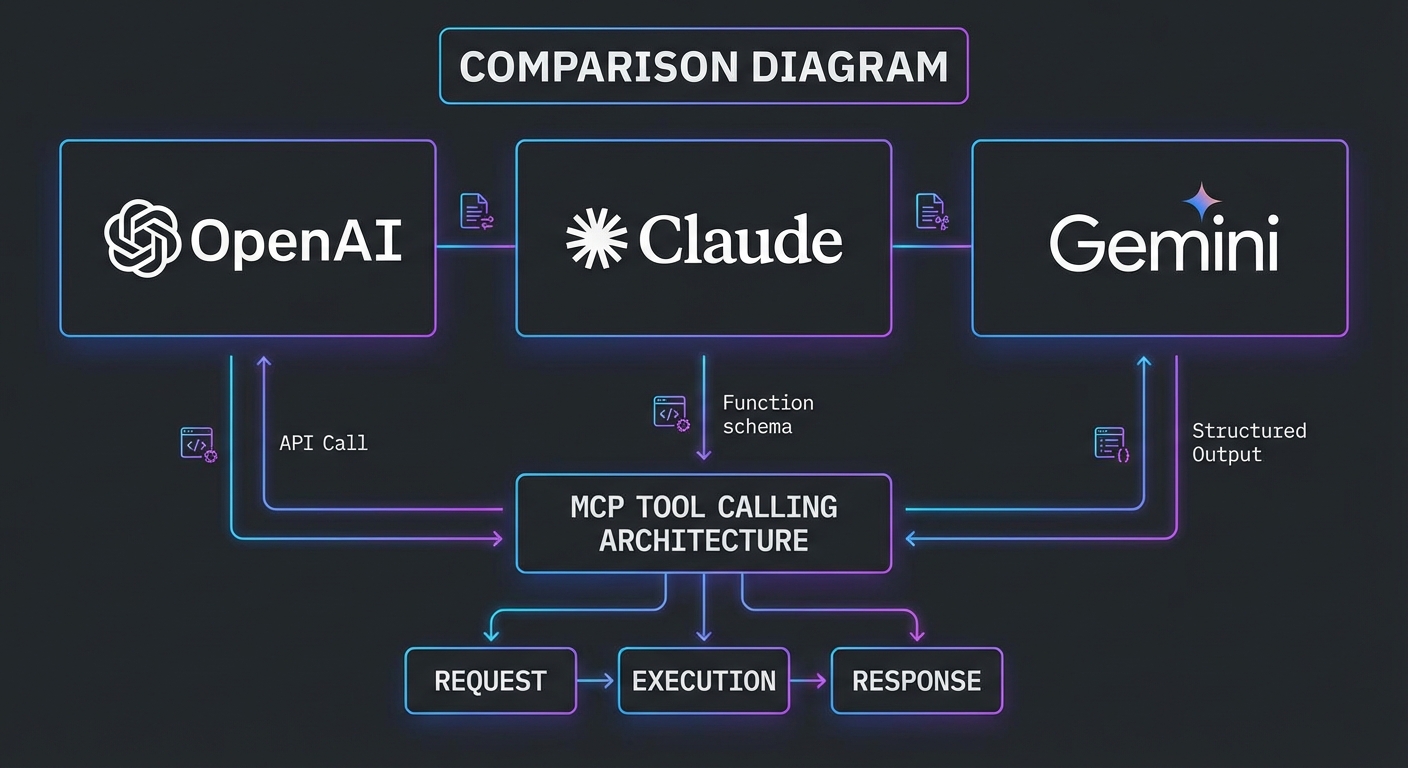
You have now built MCP integrations with all three major LLM providers. This lesson steps back and compares them head-to-head: the exact wire format differences, the tool schema quirks, the parallel calling behaviors, the error contracts, and the practical performance and cost characteristics. After this lesson you will know which provider to reach for first for a given task and how to justify that choice to a team.
The Tool Schema: What Each Provider Expects
MCP tools expose a JSON Schema via inputSchema. The conversion to each provider’s format differs slightly:
| Provider | Tool format field | Schema field name | Extras required |
|---|---|---|---|
| OpenAI | { type: 'function', function: { name, description, parameters } } |
parameters |
strict: true for deterministic calling |
| Claude | { name, description, input_schema } |
input_schema |
None |
| Gemini | { name, description, parameters } inside functionDeclarations |
parameters |
Must handle null parameters (no-arg tools) |
// Unified converter: MCP tool -> provider-specific format
export function convertMcpTool(tool, provider) {
  switch (provider) {
    case 'openai':
      return {
        type: 'function',
        function: {
          name: tool.name,
          description: tool.description,
          parameters: tool.inputSchema,
          strict: true,
        },
      };
    case 'claude':
      return {
        name: tool.name,
        description: tool.description,
        input_schema: tool.inputSchema,
      };
    case 'gemini':
      return {
        name: tool.name,
        description: tool.description,
        parameters: tool.inputSchema ?? { type: 'object', properties: {} },
      };
    default:
      throw new Error(`Unknown provider: ${provider}`);
  }
}
This converter function is the single most reusable piece of code in a multi-provider MCP application. Build it once, test it against all three providers, and every tool you add to your MCP server will automatically work across all of them without per-provider adjustments.
The Tool Result: How Each Provider Expects It Back
// OpenAI: tool result goes in a new message with role 'tool'
// messages.push({ role: 'tool', tool_call_id: call.id, content: resultText });

// Claude: tool results go in the user message as tool_result content blocks
// messages.push({ role: 'user', content: [{ type: 'tool_result', tool_use_id: block.id, content: resultText }] });

// Gemini: function responses go directly to chat.sendMessage() as an array
// await chat.sendMessage([{ functionResponse: { name: fc.name, response: { result: resultText } } }]);
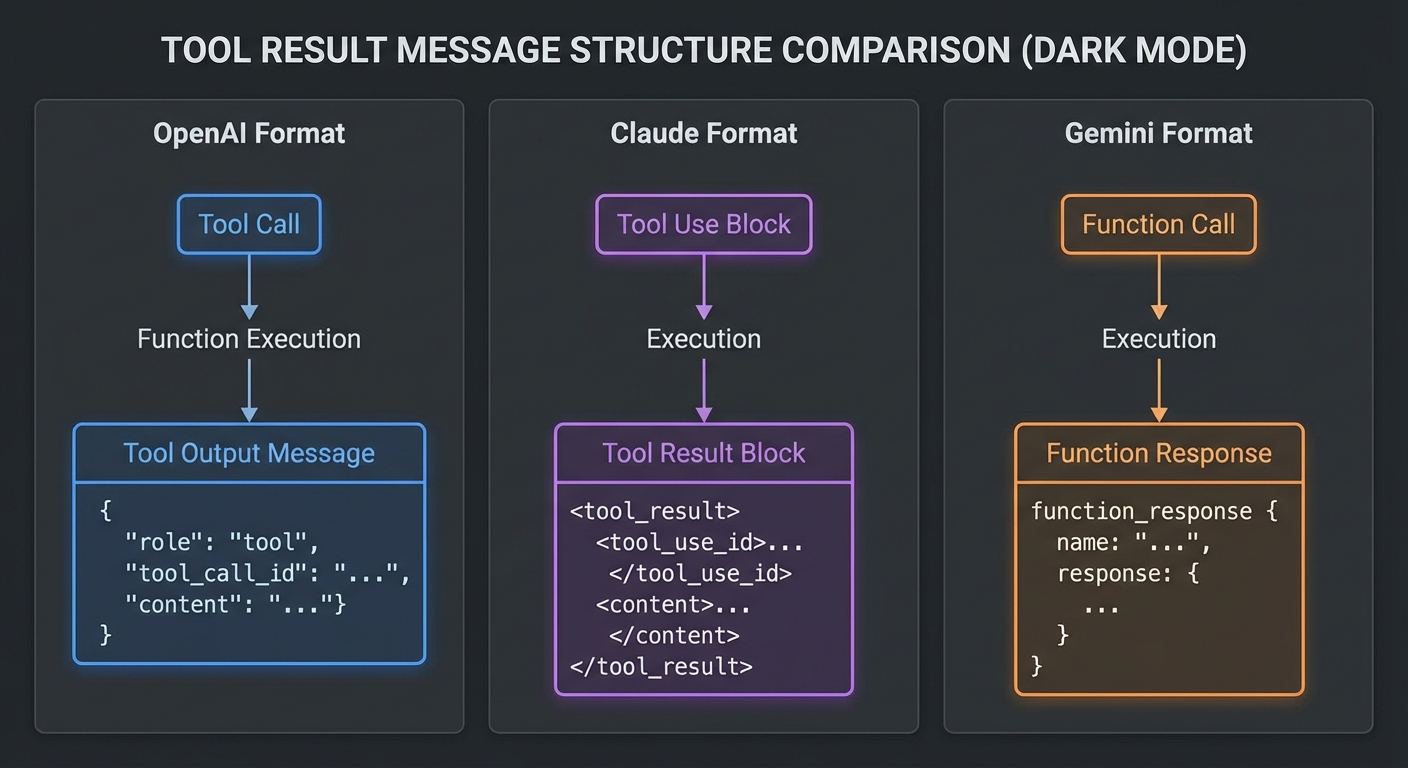
The tool result differences are where most cross-provider bugs hide. OpenAI uses a dedicated tool role, Claude nests results inside a user message, and Gemini sends them as functionResponse parts. If you mix up these formats, the model will either error out or silently ignore the tool results.
Parallel Tool Calling Behavior
| Provider | Parallel calls | How to detect | How to return results |
|---|---|---|---|
| OpenAI | Yes, opt-in via parallel_tool_calls: true |
message.tool_calls.length > 1 |
Multiple role=’tool’ messages, one per call |
| Claude | Limited (beta flag required) | Multiple tool_use blocks in content |
Multiple tool_result blocks in one user message |
| Gemini | Yes, default behavior | candidate.content.parts.filter(p => p.functionCall) |
Array of functionResponse parts in one message |
Parallel tool calling is more than a performance optimization. It changes how the model reasons about your tools. When a model can issue three independent lookups at once, it structures its approach differently than when it must chain calls sequentially. This means switching providers can subtly change your agent’s behavior even with identical prompts.
Stop Condition Comparison
// OpenAI: loop while finish_reason is 'tool_calls'
while (response.choices[0].finish_reason === 'tool_calls') { ... }

// Claude: loop while stop_reason is 'tool_use'
while (response.stop_reason === 'tool_use') { ... }

// Gemini: loop while any content part is a functionCall
while (candidate.content.parts.some(p => p.functionCall)) { ... }
Error Handling Patterns
| Error type | OpenAI | Claude | Gemini |
|---|---|---|---|
| Rate limit | 429, check retry-after |
429, check retry-after |
429 / RESOURCE_EXHAUSTED, 5s base delay |
| Server error | 500/503, retry | 529 overloaded, 500, retry | 500+, retry |
| Content blocked | finish_reason: 'content_filter' |
N/A (usually surfaces as an error) | finishReason: 'SAFETY' |
| Token limit hit | finish_reason: 'length' |
stop_reason: 'max_tokens' |
finishReason: 'MAX_TOKENS' |
A robust MCP client needs a unified error handler that normalizes these differences. Rather than scattering provider-specific error checks throughout your code, centralize them in your provider adapter so the rest of your application only sees a consistent set of error types: quota, server, content-blocked, and token-limit.
Performance and Cost Characteristics (March 2026)
| Model | Context | Input $/1M | Output $/1M | Best for |
|---|---|---|---|---|
| GPT-4o | 128K | $2.50 | $10.00 | Complex reasoning, code, structured output |
| GPT-4o mini | 128K | $0.15 | $0.60 | High-volume simple tool calling |
| Claude 3.7 Sonnet | 200K | $3.00 | $15.00 | Long context, extended thinking, coding |
| Claude 3.5 Haiku | 200K | $0.80 | $4.00 | Summarization within agent pipelines |
| Gemini 2.0 Flash | 1M | $0.075 | $0.30 | Multimodal, large context, high volume |
| Gemini 2.5 Pro | 1M | $1.25 | $10.00 | Complex reasoning over large corpora |
When to Use Which Provider
- Use OpenAI (GPT-4o) when you need strict JSON output via
zodResponseFormat, the Responses API’s stateful sessions, or the Agents SDK’s built-in orchestration and handoffs. - Use Claude (3.7 Sonnet) when your agent needs deep reasoning over 100K+ token inputs, extended thinking for multi-step planning, or when instruction-following precision is paramount.
- Use Gemini (2.0 Flash) when cost and throughput matter most, when you need multimodal inputs alongside tool calls, or when a 1M-token context window is required for whole-codebase or whole-document analysis.
The best MCP application is not the one built on the “best” model. It is the one that routes tasks to the cheapest model that meets the quality bar for that specific operation.
In practice, most production MCP systems start with a single provider, discover its limitations on specific task types, and gradually adopt a multi-provider strategy. You do not need all three providers on day one. Start with the one that best fits your primary use case, measure its weaknesses, and add a second provider only where the data justifies it.
What to Build Next
- Write a benchmark script that sends the same MCP tool-calling task to all three providers and measures latency, token count, and result quality.
- Build the provider abstraction layer from the next lesson and route automatically based on task type.
nJoy 😉