
OpenAI released the Responses API and the Agents SDK as a unified approach to building agentic workflows. These are not just new API endpoints – they represent OpenAI’s opinionated view of how production agents should be structured. The Responses API replaces the Chat Completions API for agentic use cases. The Agents SDK wraps it with built-in MCP support, tool orchestration, and a pipeline abstraction that handles the looping automatically. This lesson shows you both layers and where MCP plugs in.
The Responses API
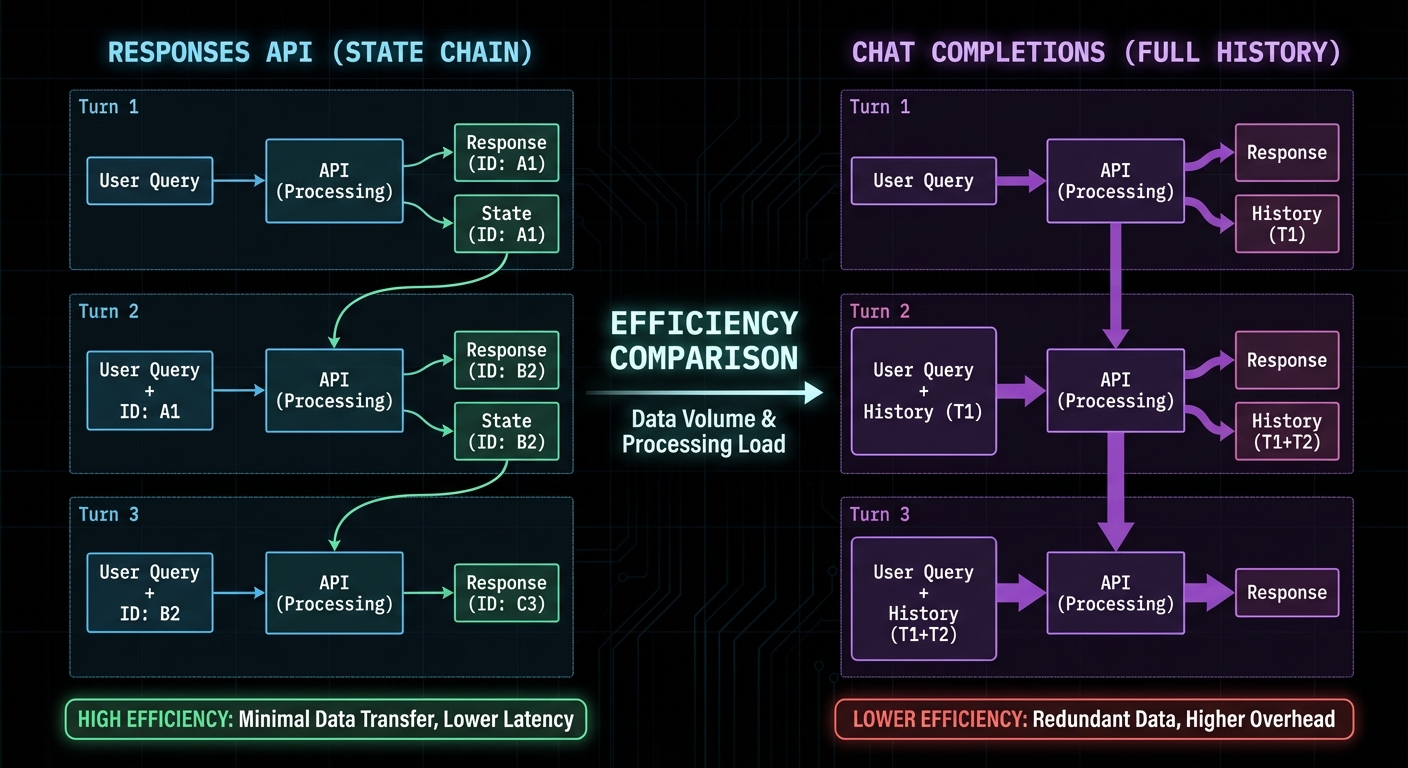
The Responses API (openai.responses.create()) is designed for stateful, multi-turn agentic sessions. Unlike Chat Completions which requires you to manage conversation history manually, the Responses API maintains state server-side via a response ID. You reference previous responses by ID, and the API handles context management including tool call history.
import OpenAI from 'openai';

const openai = new OpenAI({ apiKey: process.env.OPENAI_API_KEY });

// First turn - creates a new response
const response = await openai.responses.create({
  model: 'gpt-4o',
  input: 'Search for the best laptops under $1000',
  tools: openAITools,  // Same format as Chat Completions
});

const responseId = response.id;  // Save this for continuations

// Continue the conversation using the response ID (no need to re-send history)
const followUp = await openai.responses.create({
  model: 'gpt-4o',
  input: 'Now filter to only Dell and Lenovo models',
  previous_response_id: responseId,  // References prior context
  tools: openAITools,
});
“The Responses API is designed specifically for agentic workflows. It maintains conversation state server-side, supports native tool execution, and provides a unified interface for building multi-step AI tasks.” – OpenAI API Reference, Responses
The Agents SDK with MCP
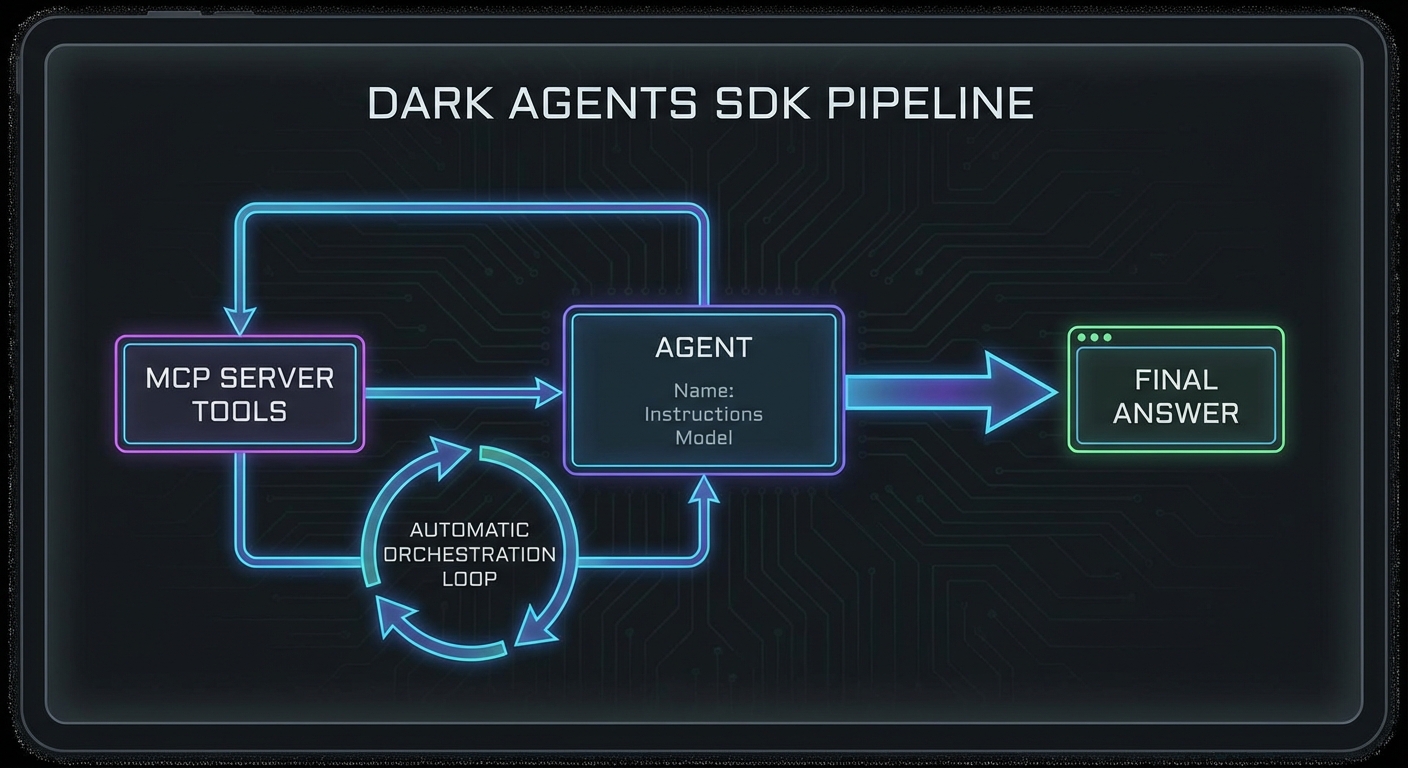
The OpenAI Agents SDK (@openai/agents) provides a higher-level abstraction with native MCP support. Instead of writing the tool calling loop yourself, the SDK handles it automatically. You define an agent with tools and an instruction, and the SDK orchestrates the full pipeline.
import { Agent, run, MCPServerStdio } from '@openai/agents';

// Connect to your MCP server via the SDK's native MCP support
const mcpServer = new MCPServerStdio({
  name: 'my-tools',
  fullCommand: 'node ./my-mcp-server.js',
});

await mcpServer.connect();

// Create an agent with the MCP server's tools
const agent = new Agent({
  name: 'Research Assistant',
  instructions: `You are a research assistant with access to product search and comparison tools.
    Always search for at least 3 options before recommending.
    Format your final recommendation as a clear list with prices.`,
  tools: await mcpServer.listTools(),
  model: 'gpt-4o',
});

// Run the agent - the SDK handles the tool calling loop
const result = await run(agent, 'Find the best wireless headphones under $200');
console.log('Final answer:', result.finalOutput);

// Clean up
await mcpServer.close();
Handoffs: Multi-Agent Patterns with the SDK
import { Agent, run, handoff } from '@openai/agents';

const searchAgent = new Agent({
  name: 'Search Specialist',
  instructions: 'You specialise in searching and retrieving product data.',
  tools: searchMcpTools,
  model: 'gpt-4o-mini',  // Cheaper model for search
});

const analysisAgent = new Agent({
  name: 'Analysis Specialist',
  instructions: 'You specialise in comparing and recommending products based on data.',
  tools: analysisMcpTools,
  model: 'gpt-4o',        // Smarter model for complex reasoning
  handoffs: [handoff(searchAgent, 'Use search specialist when you need more data')],
});

const result = await run(analysisAgent, 'Compare the top 5 gaming laptops');
console.log(result.finalOutput);
Failure Modes with the Responses API and Agents SDK
Case 1: Not Handling Tool Call Errors in the Responses API
// The Responses API may return partial results if a tool fails
// Always check response.status and handle incomplete states
const response = await openai.responses.create({ ... });

if (response.status === 'incomplete') {
  console.error('Response incomplete:', response.incomplete_details);
  // Handle: retry, use partial output, or escalate
}
Case 2: State Leakage Between Responses API Sessions
// previous_response_id links responses in a chain
// If you reuse an ID from a different user's session, state leaks
// Always scope response IDs to the authenticated user's session store

const userSession = sessions.get(userId);
const response = await openai.responses.create({
  previous_response_id: userSession.lastResponseId || undefined,
  ...
});
userSession.lastResponseId = response.id;
What to Check Right Now
- Try the Agents SDK first – if you are building a new agent, start with the Agents SDK. The automatic tool loop saves significant boilerplate.
- Use the Responses API for long sessions – for multi-turn conversations with many tool calls, the Responses API’s server-side state management avoids sending large context windows repeatedly.
- Test handoff behaviour – if using multi-agent handoffs, test the edge case where the receiving agent decides it does not need to hand off again and loops back incorrectly.
- Check the Agents SDK version – the SDK is actively developed. Pin the version in package.json and read the changelog when upgrading:
npm install @openai/agents.
nJoy 😉