
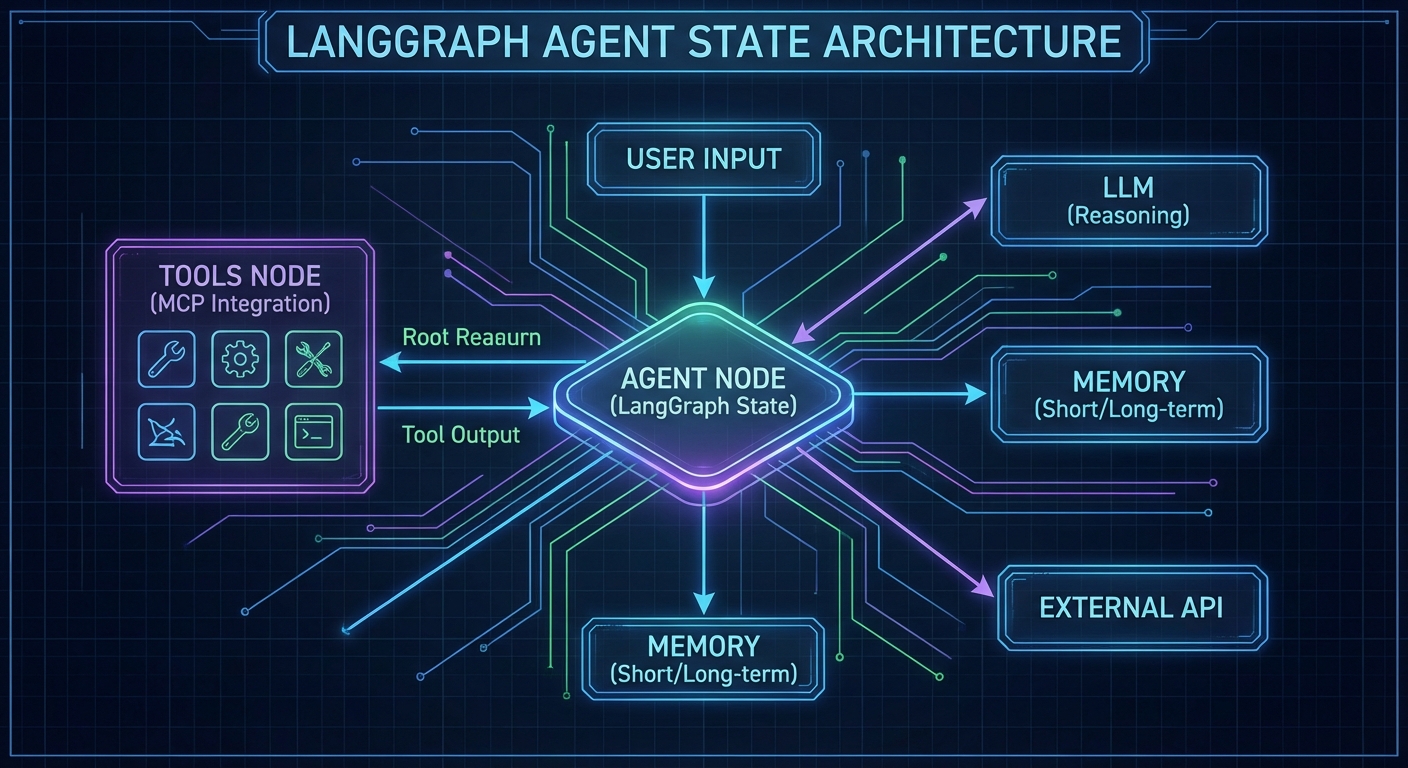
LangChain and LangGraph are among the most widely used agent orchestration frameworks. LangGraph in particular – a graph-based execution engine for stateful multi-step agents – integrates with MCP via the official @langchain/mcp-adapters package. This lesson shows how to wire MCP servers into LangGraph agents in plain JavaScript ESM, covering tool loading, multi-server configurations, graph construction, and the stateful execution patterns that make LangGraph suitable for long-horizon tasks.
Installing the Dependencies
npm install @langchain/langgraph @langchain/openai @langchain/mcp-adapters \
            @modelcontextprotocol/sdk langchain
These packages change frequently, and version mismatches between @langchain/langgraph and @langchain/mcp-adapters are a common source of cryptic runtime errors. Pin your versions in package.json and test after every upgrade.
Loading MCP Tools into LangGraph
The MultiServerMCPClient from @langchain/mcp-adapters manages connections to multiple MCP servers and returns LangChain-compatible tool objects:
import { MultiServerMCPClient } from '@langchain/mcp-adapters';
import { ChatOpenAI } from '@langchain/openai';
import { createReactAgent } from '@langchain/langgraph/prebuilt';

// Connect to multiple MCP servers
const mcpClient = new MultiServerMCPClient({
  servers: {
    products: {
      transport: 'stdio',
      command: 'node',
      args: ['./servers/product-server.js'],
    },
    analytics: {
      transport: 'stdio',
      command: 'node',
      args: ['./servers/analytics-server.js'],
    },
    // Remote server via HTTP
    emailService: {
      transport: 'streamable_http',
      url: 'https://email-mcp.internal/mcp',
    },
  },
});

// Get LangChain-compatible tools from all MCP servers
const tools = await mcpClient.getTools();
console.log('Loaded tools:', tools.map(t => t.name));

// Create a React agent with all MCP tools
const llm = new ChatOpenAI({ model: 'gpt-4o' });
const agent = createReactAgent({ llm, tools });

// Run the agent
const result = await agent.invoke({
  messages: [{ role: 'user', content: 'What are the top 5 products by revenue this week?' }],
});

console.log(result.messages.at(-1).content);
await mcpClient.close();
This is the core value of the MCP adapter: three different MCP servers (two local via stdio, one remote via HTTP) are unified into a single tool array with one line. Without the adapter, you would need to manage three separate MCP client connections and manually merge their tool lists before passing them to the LLM.
Stateful Agents with LangGraph Checkpointing
LangGraph’s MemorySaver persists agent state between invocations, enabling multi-turn conversations that remember previous tool calls and their results:
import { MemorySaver } from '@langchain/langgraph';
import { createReactAgent } from '@langchain/langgraph/prebuilt';

const checkpointer = new MemorySaver();

const agent = createReactAgent({
  llm,
  tools,
  checkpointSaver: checkpointer,
});

const config = { configurable: { thread_id: 'user-session-abc123' } };

// First turn
const r1 = await agent.invoke({
  messages: [{ role: 'user', content: 'Search for laptops under $1000' }],
}, config);
console.log(r1.messages.at(-1).content);

// Second turn - agent remembers the previous search
const r2 = await agent.invoke({
  messages: [{ role: 'user', content: 'Now check inventory for the first result' }],
}, config);
console.log(r2.messages.at(-1).content);
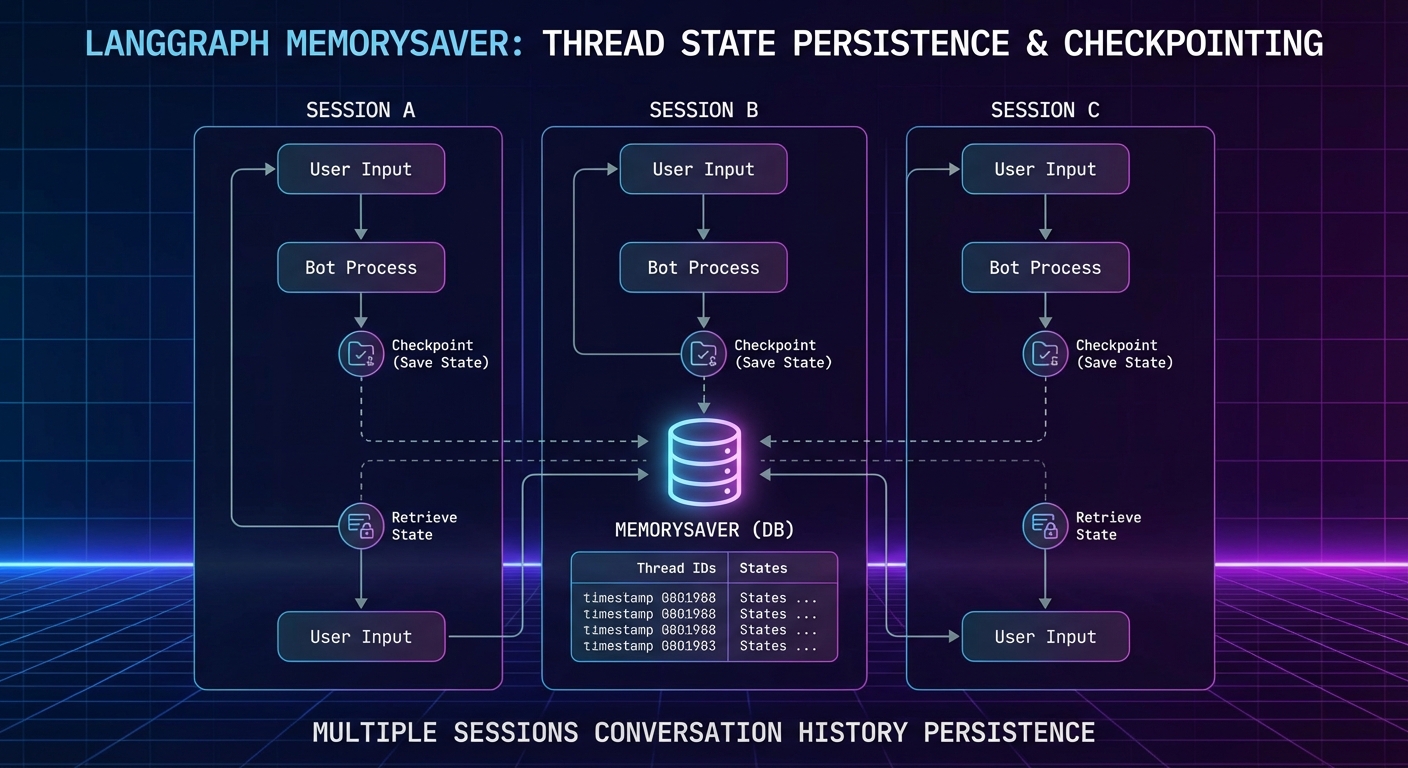
Checkpointing becomes essential when agents handle multi-step workflows like order processing or document review, where losing progress mid-session would force the user to start over. For production workloads, replace MemorySaver with a persistent backend like Redis or PostgreSQL so state survives server restarts.
Custom LangGraph with Conditional Routing
For more control over agent behavior, build a custom graph instead of using createReactAgent:
import { StateGraph, Annotation } from '@langchain/langgraph';
import { ToolNode } from '@langchain/langgraph/prebuilt';

// Define state schema
const AgentState = Annotation.Root({
  messages: Annotation({
    reducer: (x, y) => x.concat(y),
  }),
});

// Build the graph
const graph = new StateGraph(AgentState);

// Node: call the LLM
const callModel = async (state) => {
  const llmWithTools = llm.bindTools(tools);
  const response = await llmWithTools.invoke(state.messages);
  return { messages: [response] };
};

// Route: continue if model wants to use tools, end otherwise
const shouldContinue = (state) => {
  const lastMsg = state.messages.at(-1);
  return lastMsg.tool_calls?.length ? 'tools' : '__end__';
};

graph.addNode('agent', callModel);
graph.addNode('tools', new ToolNode(tools));
graph.addEdge('__start__', 'agent');
graph.addConditionalEdges('agent', shouldContinue);
graph.addEdge('tools', 'agent');

const app = graph.compile({ checkpointer: new MemorySaver() });

const result = await app.invoke(
  { messages: [{ role: 'user', content: 'Analyze Q1 sales and flag any anomalies' }] },
  { configurable: { thread_id: 'analysis-session-1' } }
);
The custom graph approach gives you fine-grained control that createReactAgent hides: you can add approval nodes, human-in-the-loop gates, or branching logic based on tool results. The tradeoff is more boilerplate, so start with the prebuilt agent and switch to a custom graph only when you need routing logic the prebuilt version cannot express.
Connecting to Claude and Gemini via LangGraph
// LangGraph works with any LangChain-compatible LLM
import { ChatAnthropic } from '@langchain/anthropic';
import { ChatGoogleGenerativeAI } from '@langchain/google-genai';

// Claude agent with MCP tools
const claudeAgent = createReactAgent({
  llm: new ChatAnthropic({ model: 'claude-3-7-sonnet-20250219' }),
  tools,
});

// Gemini agent with MCP tools
const geminiAgent = createReactAgent({
  llm: new ChatGoogleGenerativeAI({ model: 'gemini-2.0-flash' }),
  tools,
});
Swapping LLM providers is one of LangGraph’s practical advantages. If one provider has an outage or you want to compare tool-calling accuracy across models, you only change the llm parameter. The MCP tools, graph structure, and checkpointing all remain identical.
LangGraph vs Raw MCP Loops
| Aspect | Raw MCP Loop | LangGraph + MCP |
|---|---|---|
| Complexity | Low (simple while loop) | Higher (graph DSL, adapters) |
| State persistence | Manual | Built-in checkpointing |
| Multi-server tools | Manual merging | MultiServerMCPClient |
| Control flow | Hardcoded | Graph edges, conditional routing |
| Observability | Manual logging | LangSmith integration |
For simple single-server use cases, raw MCP loops are faster to write and debug. Use LangGraph when you need multi-server tool aggregation, multi-turn session state, or complex conditional routing.
Common Failures
- Not closing the MCPClient: Always call
await mcpClient.close()in afinallyblock. Unclosed connections leave orphaned subprocesses. - Thread ID collisions: Different users sharing a
thread_idwill mix conversation histories. Use a UUID per session. - Tool schema incompatibilities: LangChain’s tool schema format may not pass all MCP schema features through correctly. Test complex schemas with
tools.map(t => t.schema)before assuming everything works.
nJoy 😉