
Protocols are not magic. Under every elegant abstraction is a set of bytes moving between processes, governed by rules that someone wrote down. MCP is no different. The moment you understand exactly what happens on the wire when a client connects to an MCP server – the handshake, the capability negotiation, the request-response cycle, the message format – the whole protocol becomes transparent. And transparent systems are debuggable systems.
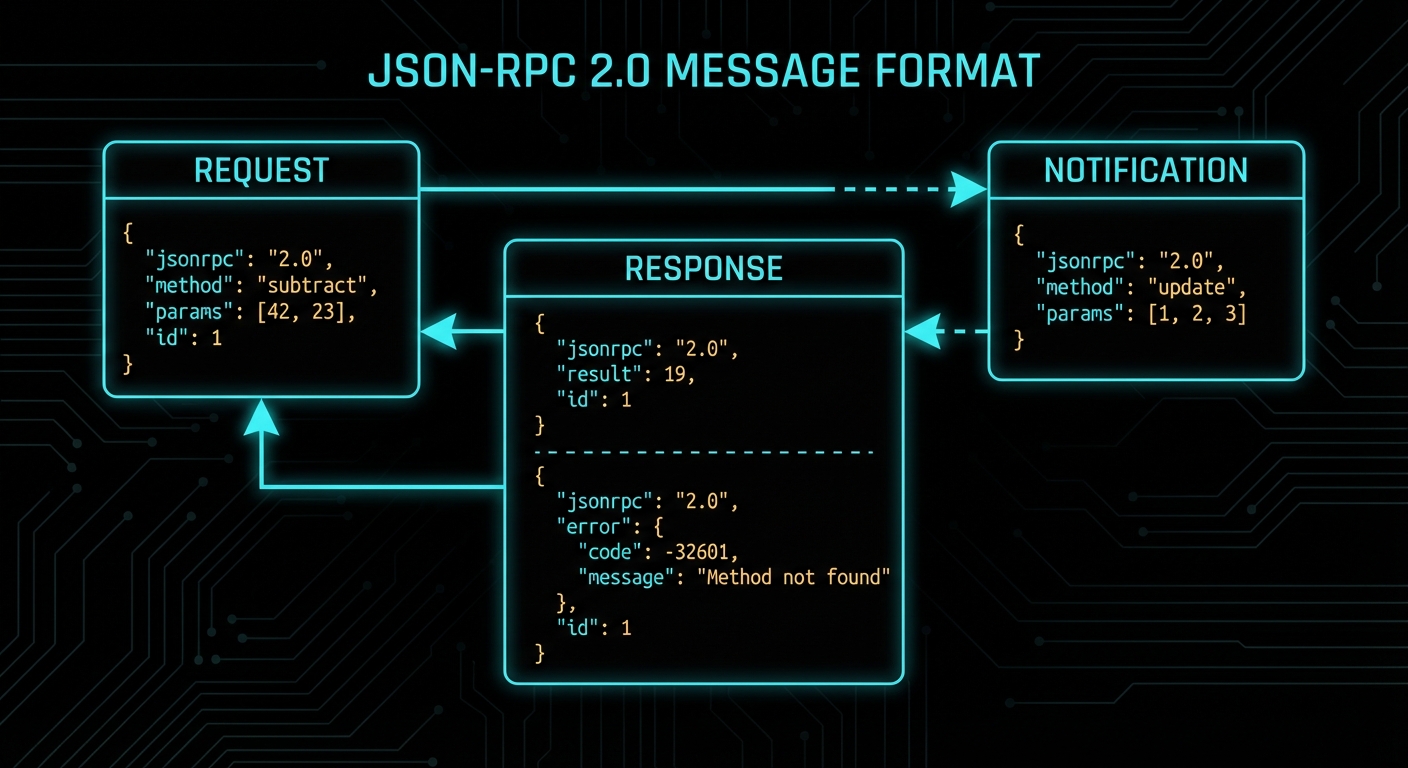
JSON-RPC 2.0: The Wire Format
MCP uses JSON-RPC 2.0 as its message format. JSON-RPC is a simple remote procedure call protocol encoded as JSON. Every MCP message is one of four types: a Request, a Response, an Error Response, or a Notification (a one-way message with no response expected).
A JSON-RPC request looks like this:
{
  "jsonrpc": "2.0",
  "id": 1,
  "method": "tools/call",
  "params": {
    "name": "greet",
    "arguments": { "name": "Alice" }
  }
}
A successful response:
{
  "jsonrpc": "2.0",
  "id": 1,
  "result": {
    "content": [
      { "type": "text", "text": "Hello, Alice! Welcome to MCP." }
    ]
  }
}
An error response:
{
  "jsonrpc": "2.0",
  "id": 1,
  "error": {
    "code": -32602,
    "message": "Invalid params",
    "data": { "detail": "Missing required argument: name" }
  }
}
A notification (no id, no response expected):
{
  "jsonrpc": "2.0",
  "method": "notifications/tools/list_changed"
}
The id field is how you match responses to requests in an async system. If you send ten requests and get ten responses back in any order, the id tells you which response belongs to which request. Notifications don’t have IDs because they are fire-and-forget.
This matters the moment you open a network trace or debug log. Every MCP problem you will ever diagnose comes down to reading these four message shapes and finding the mismatch – a missing id, an unexpected error code, or a notification that never arrived. Fluency in the wire format is the single most useful debugging skill in the protocol.
“The base protocol uses JSON-RPC 2.0 messages exchanged over a transport layer. Server and client capabilities are negotiated during an initialization phase.” – MCP Specification, Base Protocol
With the message format understood, the next question is ordering: when do these messages get sent, and in what sequence? The connection lifecycle defines exactly that – a strict three-phase flow that every MCP session follows from first contact to shutdown.
The Connection Lifecycle
Every MCP connection goes through a well-defined lifecycle. Understanding this lifecycle is essential for debugging connection problems and for building robust hosts and servers.
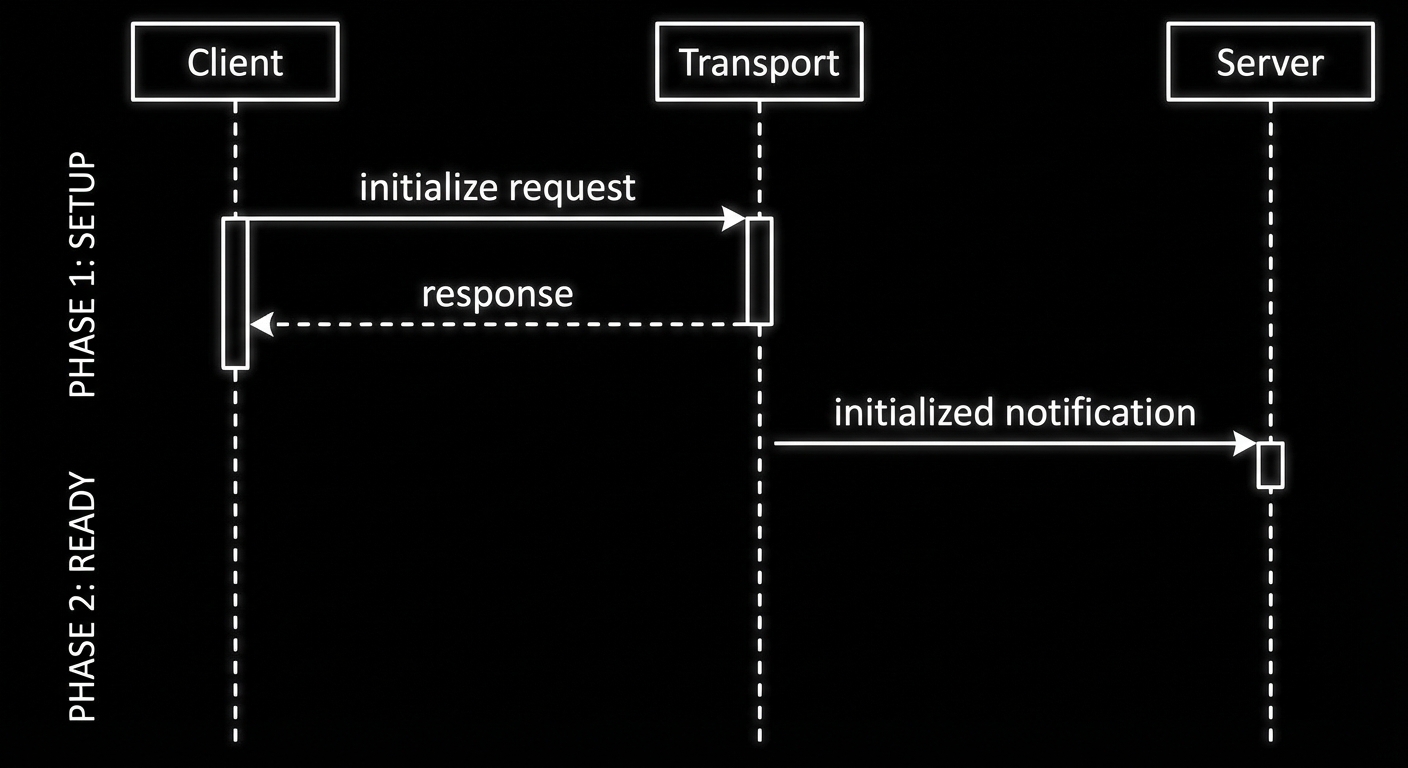
The lifecycle has three phases: initialisation, operation, and shutdown.
Phase 1: Initialisation
When a client connects to a server, the very first thing that happens is the initialisation handshake. This is not optional and not configurable – it is the protocol’s way of ensuring both sides agree on what they can do together before anything else happens.
The sequence:
- Client sends an
initializerequest, declaring its protocol version and capabilities. - Server responds with its protocol version and capabilities.
- Client sends an
initializednotification to confirm it received the response. - Both sides are now in the operating phase and can exchange any supported messages.
// Step 1: Client sends initialize request
{
  "jsonrpc": "2.0",
  "id": 1,
  "method": "initialize",
  "params": {
    "protocolVersion": "2024-11-05",
    "clientInfo": { "name": "my-host", "version": "1.0.0" },
    "capabilities": {
      "sampling": {}
    }
  }
}

// Step 2: Server responds
{
  "jsonrpc": "2.0",
  "id": 1,
  "result": {
    "protocolVersion": "2024-11-05",
    "serverInfo": { "name": "my-server", "version": "1.0.0", "description": "Product catalog and inventory management" },
    "capabilities": {
      "tools": {},
      "resources": { "subscribe": true },
      "logging": {}
    }
  }
}

// Step 3: Client confirms with a notification
{
  "jsonrpc": "2.0",
  "method": "notifications/initialized"
}
Phase 2: Operation
After the handshake, the connection is fully operational. Either side can send requests, responses, or notifications, subject to the capabilities they negotiated. The client can call tools/list, tools/call, resources/list, resources/read, prompts/list, prompts/get. The server can send sampling/createMessage requests (if the client declared sampling capability) or notifications about state changes.
Phase 3: Shutdown
Either side can close the connection. With stdio transport, this happens when the process exits. With HTTP/SSE transport, it happens when the connection is closed. The MCP SDK handles shutdown gracefully when you call server.close() or client.close().
The lifecycle ensures orderly communication, but the handshake also decides what each side is allowed to do. The next section unpacks capability negotiation – the mechanism that controls which features are available during the operation phase.
Capability Negotiation in Detail
Capability negotiation determines what each side is allowed to do in the operation phase. If the client does not declare sampling capability, the server cannot send sampling/createMessage requests – the client simply will not handle them. If the server does not declare resources capability, the client calling resources/list will receive a method-not-found error.
This is a safety mechanism. It prevents servers from sending requests that clients cannot handle, and prevents clients from calling methods the server has not implemented. You can inspect negotiated capabilities after connecting:
import { Client } from '@modelcontextprotocol/sdk/client/index.js';
import { StdioClientTransport } from '@modelcontextprotocol/sdk/client/stdio.js';

const client = new Client(
  { name: 'inspector', version: '1.0.0' },
  { capabilities: { sampling: {} } }
);

const transport = new StdioClientTransport({
  command: 'node',
  args: ['./my-server.js'],
});

await client.connect(transport);

// Read back what the server declared it supports
const serverCaps = client.getServerCapabilities();
console.log('Server capabilities:', JSON.stringify(serverCaps, null, 2));

// Read back what the server reported about itself
const serverInfo = client.getServerVersion();
console.log('Server info:', serverInfo);
In a production system, you would check capabilities immediately after connecting to decide what features to offer the user. If the server does not declare resources support, your host should grey out or hide the resource browser rather than letting the user trigger a method-not-found error.
New in 2025-11-25 – The Implementation interface (used for both serverInfo and clientInfo) now includes an optional description field. This provides a human-readable summary of what the server or client does, aligning with MCP registry and discovery formats. Include it when your server might appear in a registry or service mesh where operators need to identify it at a glance.
Common Protocol Failures
Case 1: Sending Requests Before Initialisation Completes
If you attempt to call a tool or list resources before the initialized notification has been exchanged, the server will reject the request with a protocol error. The MCP SDK handles this transparently when you use client.connect(transport) – the connect method waits for the full handshake before resolving. But if you implement a custom transport or bypass the SDK, this is the first thing that will bite you.
// WRONG: Calling tools before connect resolves
const transport = new StdioClientTransport({ command: 'node', args: ['server.js'] });
client.connect(transport); // Don't await this
const tools = await client.listTools(); // Races with initialisation - will fail

// CORRECT: Always await connect
await client.connect(transport);
const tools = await client.listTools(); // Safe: handshake is complete
Case 2: Mismatched Protocol Versions
MCP has versioned specifications. If client and server declare different protocol versions and neither can support the other, the connection fails at initialisation. The current stable version is 2024-11-05; the draft spec has incremental additions. When upgrading SDK versions, check the protocol version the new SDK defaults to and ensure your deployed servers are compatible.
// Always pin to a specific protocol version in production:
const client = new Client(
  { name: 'my-host', version: '1.0.0' },
  {
    capabilities: {},
    // The SDK picks the protocol version based on what server supports
    // Check SDK changelog when upgrading
  }
);
Case 3: Understanding Notification Semantics
Notifications do not have an id field and do not receive a response from the other side. However, sending a notification is still an I/O operation – bytes must be written to the transport. In the MCP SDK, Protocol.notification() is async and returns a Promise that resolves once the message has been flushed to the transport. Awaiting it is correct and recommended – it ensures the write completes before you proceed. Skipping await risks a race condition where the next message is sent before the notification has been flushed.
// CORRECT: await ensures the notification bytes are flushed to the transport
await client.sendNotification({ method: 'notifications/initialized' });

// ALSO CORRECT but risky in fast sequences: the write might not finish
// before your next message if the transport buffers
client.sendNotification({ method: 'notifications/initialized' });
The key distinction: awaiting a notification does not wait for a response from the server (there is none). It waits for the local transport to finish writing. This is the same as await stream.write() in Node.js – you are awaiting the I/O, not a reply.
“Servers MUST NOT send requests to clients before receiving the initialized notification from the client. Clients MUST NOT send requests other than pings before receiving the initialize response from the server.” – MCP Specification, Lifecycle
Each of these failure modes is easy to hit during development and hard to diagnose without seeing the raw messages. The common thread is timing and ordering – sending things too early, expecting responses to notifications, or assuming capabilities that were never negotiated. When something breaks, the JSON-RPC trace is always the first place to look.
What to Check Right Now
- Inspect live traffic with the MCP Inspector – run
npx @modelcontextprotocol/inspector node your-server.js. The inspector shows every JSON-RPC message, making the protocol visible in real time. - Enable SDK logging – set
DEBUG=mcp:*in your environment when developing. The SDK logs all protocol messages, which is invaluable for debugging lifecycle issues. - Validate your capability declarations – if a server feature is not working, check that the server declared the capability and the client did not need to declare a matching client capability first.
- Use JSON-RPC error codes correctly – MCP defines standard error codes (
-32700parse error,-32600invalid request,-32601method not found,-32602invalid params,-32603internal error). Application-level errors use codes in the range-32000to-32099.
nJoy 😉