
The MCP SDK’s StreamableHTTPServerTransport is framework-agnostic at the core, but wiring it up to Express, Hono, or any other HTTP framework requires adapters. Good adapters are thin – they translate between the framework’s request/response model and the transport’s expectations without adding logic of their own. This lesson shows you how to build those adapters correctly for Express and Hono, covers the common configuration patterns, and explains why each choice matters for production deployment.
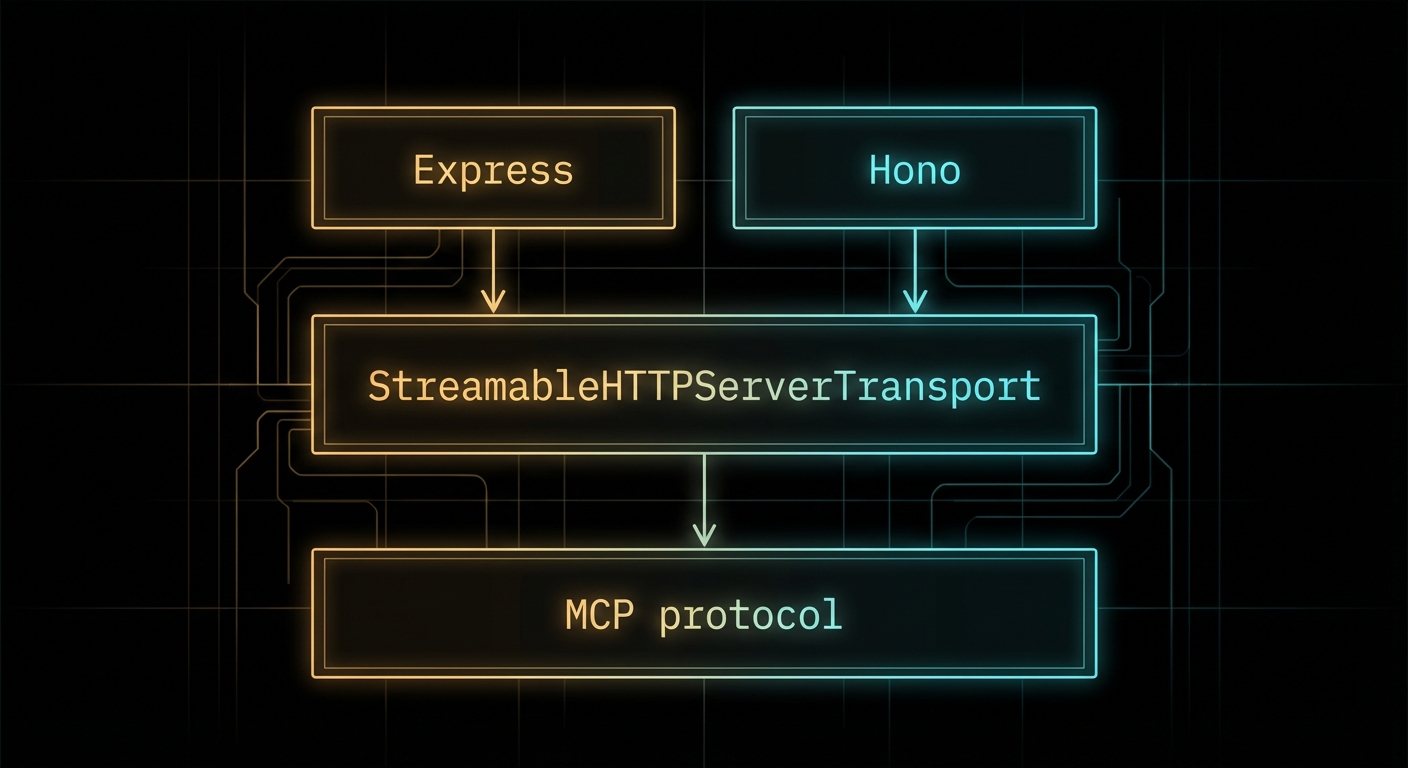
Express Adapter Pattern
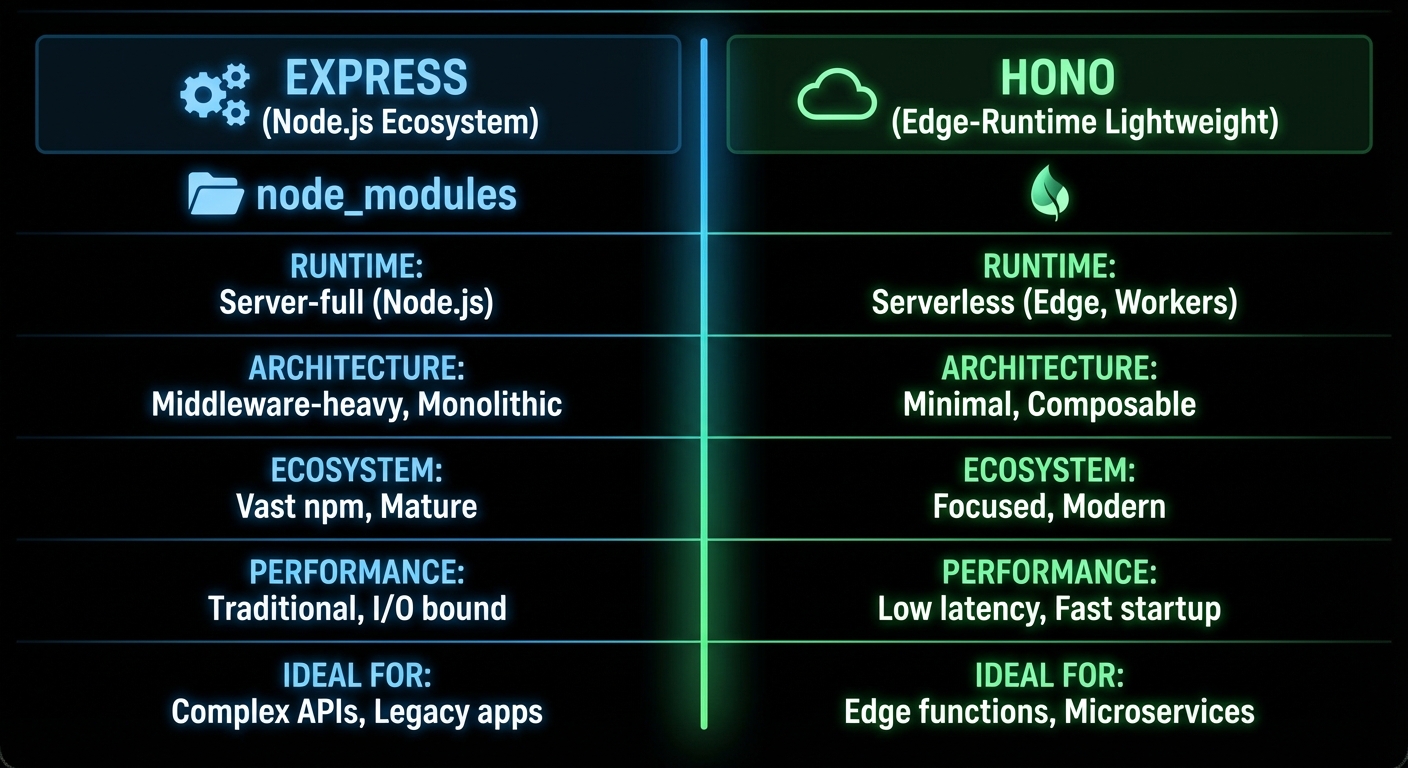
Express is the most widely used Node.js HTTP framework and the safest choice for teams that want maximum ecosystem compatibility. Here is the production-ready Express adapter pattern:
// mcp-server-express.js
import express from 'express';
import { McpServer } from '@modelcontextprotocol/sdk/server/mcp.js';
import { StreamableHTTPServerTransport } from '@modelcontextprotocol/sdk/server/streamableHttp.js';
import { z } from 'zod';
import { randomUUID } from 'node:crypto';

const app = express();
app.use(express.json({ limit: '4mb' })); // Increase limit for large tool inputs

// Session registry
const sessions = new Map();

function createMcpServer() {
  const server = new McpServer({ name: 'api-server', version: '1.0.0' });
  server.tool('ping', 'Check server health', {}, async () => ({
    content: [{ type: 'text', text: 'pong' }],
  }));
  return server;
}

// Shared handler for POST and GET
async function handleMcpRequest(req, res) {
  const sessionId = req.headers['mcp-session-id'];
  let transport;

  if (sessionId && sessions.has(sessionId)) {
    transport = sessions.get(sessionId);
  } else if (!sessionId && req.method === 'POST') {
    // New session on first POST
    transport = new StreamableHTTPServerTransport({
      sessionIdGenerator: () => randomUUID(),
      onsessioninitialized: (id) => {
        sessions.set(id, transport);
        // Clean up session when transport closes
        transport.onclose = () => sessions.delete(id);
      },
    });
    const mcpServer = createMcpServer();
    await mcpServer.connect(transport);
  } else {
    res.status(400).json({ error: 'Invalid or missing session' });
    return;
  }

  await transport.handleRequest(req, res, req.body);
}

app.post('/mcp', handleMcpRequest);
app.get('/mcp', handleMcpRequest);
app.delete('/mcp', (req, res) => {
  const sessionId = req.headers['mcp-session-id'];
  sessions.delete(sessionId);
  res.sendStatus(200);
});

// Health check
app.get('/health', (req, res) => res.json({ status: 'ok', sessions: sessions.size }));

const PORT = process.env.PORT || 3000;
app.listen(PORT, () => console.error(`MCP server on :${PORT}`));
“The Streamable HTTP transport can be integrated with any HTTP server framework. The key requirement is that the server must handle POST requests for client-to-server messages and GET requests for server-to-client SSE streams.” – MCP Documentation, Transports
Hono Adapter Pattern
Hono is a lightweight, ultra-fast web framework designed for edge runtimes (Cloudflare Workers, Deno Deploy, Bun) as well as Node.js. Its smaller footprint and native Web API compatibility make it attractive for MCP servers that need to run at the edge.
// mcp-server-hono.js
import { Hono } from 'hono';
import { serve } from '@hono/node-server';
import { McpServer } from '@modelcontextprotocol/sdk/server/mcp.js';
import { StreamableHTTPServerTransport } from '@modelcontextprotocol/sdk/server/streamableHttp.js';
import { randomUUID } from 'node:crypto';

const app = new Hono();
const sessions = new Map();

app.post('/mcp', async (c) => {
  const sessionId = c.req.header('mcp-session-id');
  const body = await c.req.json();

  let transport;
  if (sessionId && sessions.has(sessionId)) {
    transport = sessions.get(sessionId);
  } else {
    transport = new StreamableHTTPServerTransport({
      sessionIdGenerator: () => randomUUID(),
      onsessioninitialized: (id) => sessions.set(id, transport),
    });
    const mcpServer = createMcpServer();
    await mcpServer.connect(transport);
  }

  // Hono uses Web API Request/Response - convert for the transport
  // The SDK transport.handleRequest accepts both Node.js and Web API style
  return new Response(await transport.handlePostRequest(body, sessionId));
});

app.get('/mcp', async (c) => {
  const sessionId = c.req.header('mcp-session-id');
  const transport = sessions.get(sessionId);
  if (!transport) return c.json({ error: 'Session not found' }, 404);

  // Return SSE stream
  const stream = await transport.createSSEStream();
  return new Response(stream, {
    headers: {
      'Content-Type': 'text/event-stream',
      'Cache-Control': 'no-cache',
    },
  });
});

serve({ fetch: app.fetch, port: 3000 });
Middleware for MCP Endpoints
MCP endpoints benefit from the same middleware patterns as any HTTP API – request logging, rate limiting, correlation IDs, and error handling. Here is a middleware stack for a production MCP endpoint:
// Express middleware stack for MCP
import rateLimit from 'express-rate-limit';

// Rate limiting - protect against DoS
const mcpLimiter = rateLimit({
  windowMs: 60 * 1000,  // 1 minute
  max: 100,             // 100 requests per minute per IP
  message: { error: 'Too many requests' },
  skip: (req) => req.headers['mcp-session-id'] && sessions.has(req.headers['mcp-session-id']),
});

// Request logging
app.use('/mcp', (req, res, next) => {
  const start = Date.now();
  res.on('finish', () => {
    console.error(`[mcp] ${req.method} ${req.url} ${res.statusCode} ${Date.now() - start}ms`);
  });
  next();
});

// Apply rate limit before handler
app.post('/mcp', mcpLimiter, handleMcpRequest);
app.get('/mcp', handleMcpRequest);
Failure Modes with HTTP Adapters
Case 1: Forgetting express.json() Middleware
Without express.json(), Express will not parse the POST body. The transport will receive undefined as the body and produce confusing parse errors.
// WRONG: No body parser
const app = express();
app.post('/mcp', handleMcpRequest); // req.body is undefined

// CORRECT: Parse JSON bodies
const app = express();
app.use(express.json());
app.post('/mcp', handleMcpRequest); // req.body is the parsed JSON object
Case 2: Sharing a Single McpServer Instance Across All Sessions
If tool handlers have per-session state (user context, authentication tokens, active database transactions), sharing one McpServer instance across all sessions will mix state between users. Create a new McpServer per session, or design tools to be stateless.
// RISKY: Shared server instance if tools have per-session state
const sharedServer = createMcpServer(); // Fine only if all tools are stateless

// SAFE: New server per session (slightly more overhead but guarantees isolation)
onsessioninitialized: (id) => {
  const sessionServer = createMcpServer(); // Fresh instance per session
  sessionServer.connect(transport);
}
What to Check Right Now
- Choose Express for Node.js, Hono for edge – if you are deploying to a standard VPS or Docker container, Express is the safer choice. If you need Cloudflare Workers or Deno Deploy, use Hono.
- Add a health endpoint – every MCP HTTP server should have a
GET /healthendpoint that returns session count and server status. This is essential for load balancer health checks. - Apply rate limiting before your MCP handler – without rate limiting, a single client can exhaust your server with rapid requests. Use express-rate-limit or equivalent.
- Monitor session count – sessions that are never cleaned up will consume memory. Log the session count on the health endpoint and alert if it grows unboundedly.
nJoy 😉