
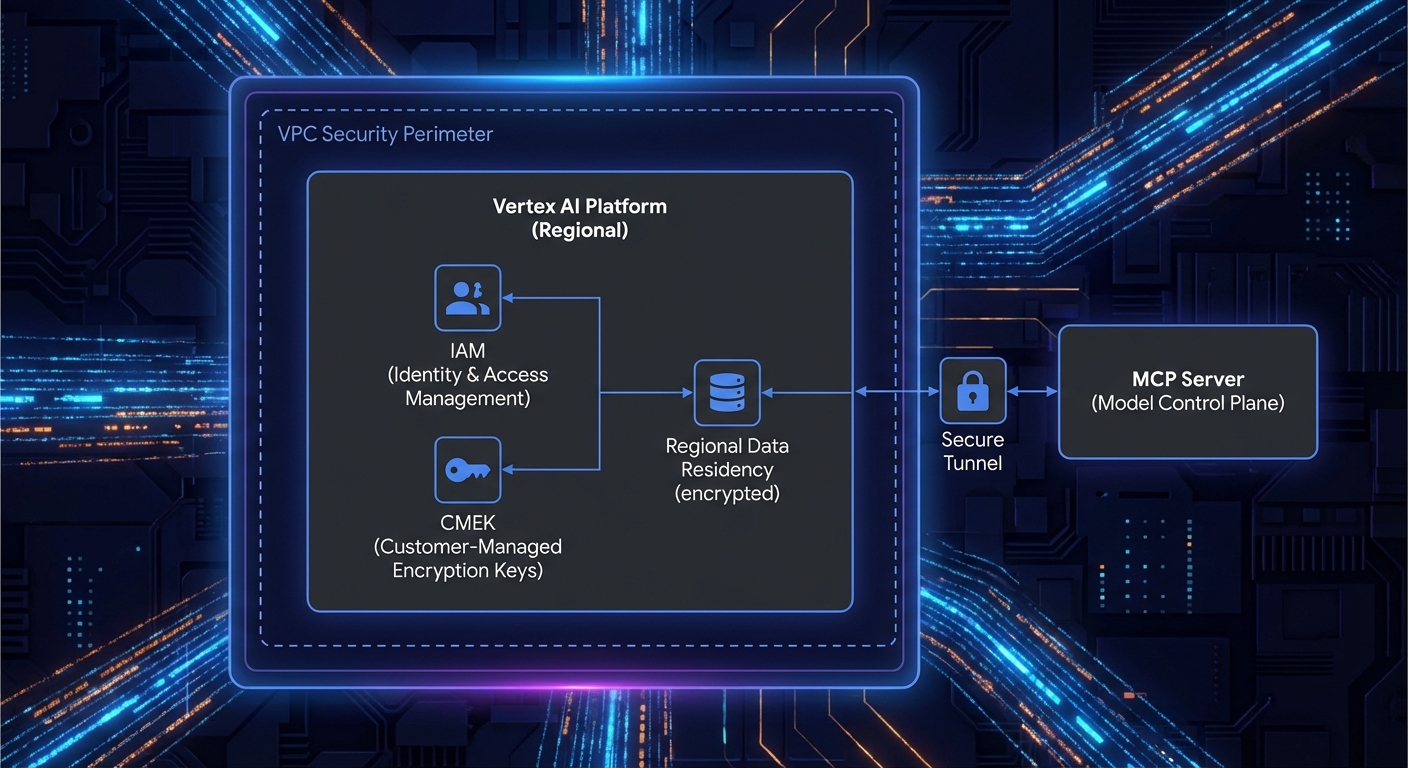
Running Gemini through the free Google AI Studio API is fine for prototypes, but enterprise deployments require what Vertex AI provides: VPC-SC network boundaries, CMEK encryption, IAM-based access control, regional data residency, no prompts used for model training, and SLA-backed uptime. If your MCP server handles customer data, PII, or proprietary IP, Vertex AI is the correct target environment. This lesson covers the transition from AI Studio to Vertex AI and the MCP-specific patterns that differ between the two.
AI Studio vs Vertex AI: The Key Differences
| Feature | AI Studio | Vertex AI |
|---|---|---|
| Auth | API key | GCP Service Account / ADC |
| Network isolation | Public internet | VPC-SC, Private Service Connect |
| Data used for training | May be used | Never used |
| Encryption | Google-managed | Google-managed or CMEK |
| Regional control | Limited | Full (europe-west1, us-east4, etc.) |
| SLA | No SLA | 99.9% SLA |
| Pricing model | Pay per token | Pay per token + provisioned throughput option |
For many teams, the “data used for training” row is the deciding factor. If your MCP tools process customer records, health data, or financial transactions, the guarantee that Vertex AI never trains on your prompts or responses is often a compliance requirement, not just a preference.
Setting Up Vertex AI in Node.js
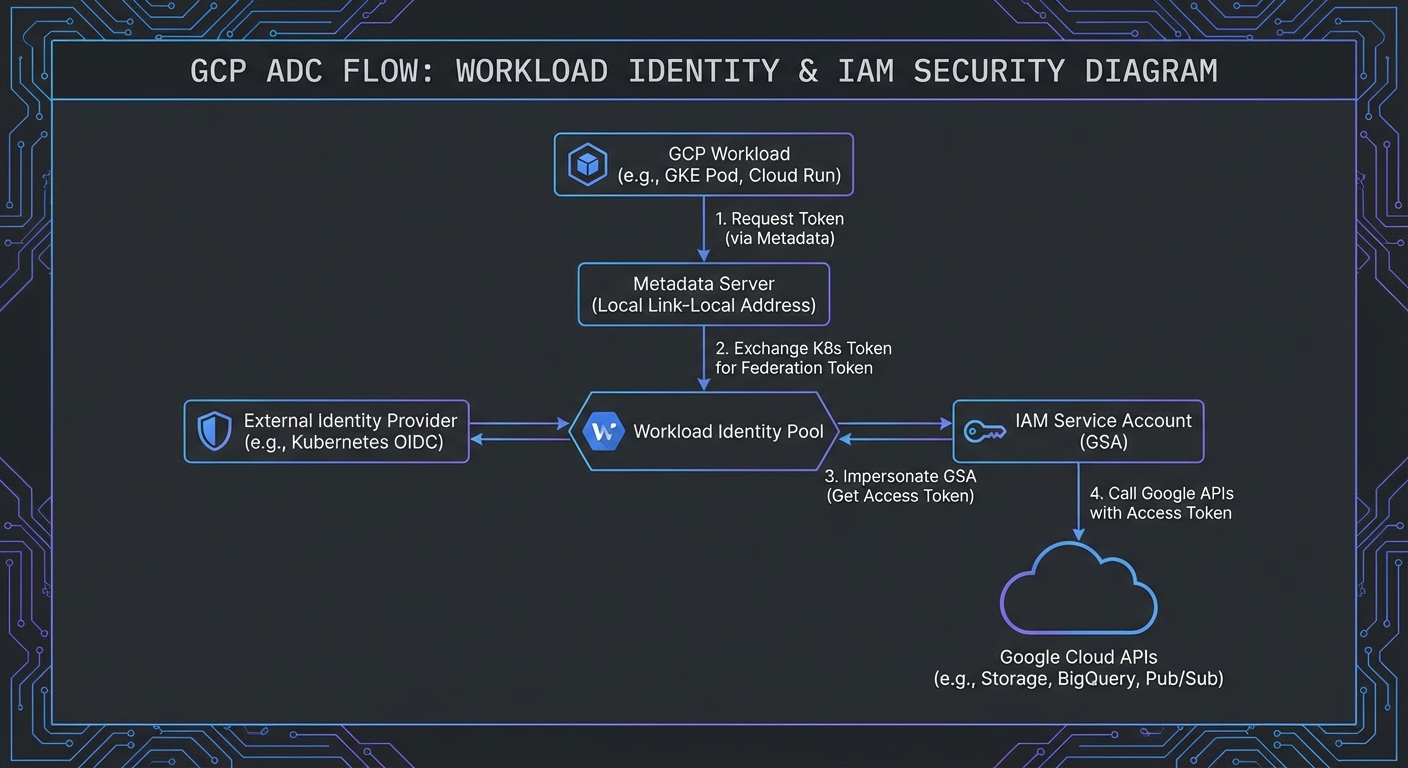
Vertex AI uses Application Default Credentials (ADC) instead of API keys. In development, authenticate with gcloud auth application-default login. In production, attach a service account to your Compute Engine instance or Cloud Run service.
npm install @google-cloud/vertexai @modelcontextprotocol/sdk
import { VertexAI } from '@google-cloud/vertexai';
import { Client } from '@modelcontextprotocol/sdk/client/index.js';
import { StdioClientTransport } from '@modelcontextprotocol/sdk/client/stdio.js';

const vertex = new VertexAI({
  project: process.env.GCP_PROJECT_ID,
  location: process.env.GCP_REGION ?? 'us-central1',
});

// Connect to MCP server
const transport = new StdioClientTransport({ command: 'node', args: ['./servers/data-server.js'] });
const mcp = new Client({ name: 'vertex-host', version: '1.0.0' });
await mcp.connect(transport);
const { tools: mcpTools } = await mcp.listTools();

// Convert MCP tools to Vertex AI FunctionDeclarations
const vertexTools = [{
  functionDeclarations: mcpTools.map(t => ({
    name: t.name,
    description: t.description,
    parameters: t.inputSchema,
  })),
}];

const model = vertex.preview.getGenerativeModel({
  model: 'gemini-2.0-flash-001',  // Vertex uses versioned model names
  tools: vertexTools,
});
The key difference from AI Studio is that you never handle API keys directly. ADC resolves credentials from the environment – a service account JSON file locally, or Workload Identity on GKE. This eliminates an entire class of secret-management bugs that plague API key-based deployments.
The Tool Calling Loop on Vertex AI
async function runVertexMcpLoop(userMessage) {
  const chat = model.startChat();
  let response = await chat.sendMessage(userMessage);
  let candidate = response.response.candidates[0];

  while (candidate.content.parts.some(p => p.functionCall)) {
    const calls = candidate.content.parts.filter(p => p.functionCall);
    const results = await Promise.all(
      calls.map(async part => {
        const fc = part.functionCall;
        const mcpResult = await mcp.callTool({ name: fc.name, arguments: fc.args });
        const text = mcpResult.content.filter(c => c.type === 'text').map(c => c.text).join('\n');
        return {
          functionResponse: {
            name: fc.name,
            response: { result: text },
          },
        };
      })
    );
    response = await chat.sendMessage(results);
    candidate = response.response.candidates[0];
  }

  return candidate.content.parts.filter(p => p.text).map(p => p.text).join('');
}
The tool calling loop is identical to the AI Studio version. The only differences are the SDK (@google-cloud/vertexai), the auth mechanism (ADC), and the model names (versioned rather than aliased).
This identical loop structure is a deliberate design choice by Google. Teams can prototype with AI Studio (free tier, API key) and then move to Vertex AI (production, IAM) by changing only the SDK import and initialization. Your MCP integration code, tool schemas, and business logic remain untouched.
Grounding with Google Search on Vertex AI
Vertex AI offers Grounding with Google Search – a built-in tool that adds real-time web search to Gemini responses. You can combine this with your custom MCP tools:
const modelWithGrounding = vertex.preview.getGenerativeModel({
  model: 'gemini-2.0-flash-001',
  tools: [
    { googleSearchRetrieval: {} },  // Enable Google Search grounding
    { functionDeclarations: mcpTools.map(t => ({  // And your MCP tools
      name: t.name, description: t.description, parameters: t.inputSchema,
    })) },
  ],
});
Grounding with Google Search is especially powerful for MCP agents that need both internal and external data. Your MCP tools handle proprietary databases and internal APIs, while Google Search fills in real-time public information – stock prices, weather, news, regulatory updates – without building additional tools for each source.
Deploying Your MCP Server Alongside Cloud Run
A common Vertex AI pattern: your MCP server runs as a container on Cloud Run (using Streamable HTTP transport), and your Node.js host service makes MCP calls to it over HTTPS. This pairs well with Vertex AI because both services can use the same VPC connector:
// Cloud Run MCP server URL (deployed with your service)
import { StreamableHTTPClientTransport } from '@modelcontextprotocol/sdk/client/streamable-http.js';

const transport = new StreamableHTTPClientTransport(
  new URL(process.env.MCP_SERVER_URL)  // e.g., https://my-mcp-server-xyz.run.app/mcp
);

const mcp = new Client({ name: 'vertex-cloud-host', version: '1.0.0' });
await mcp.connect(transport);
Provisioned Throughput for Predictable Latency
Vertex AI’s Provisioned Throughput option pre-allocates model capacity, eliminating the latency spikes that come from shared infrastructure. For MCP agents processing high-value business transactions (order processing, financial analysis, customer support), this is worth the cost:
// Configure provisioned throughput model endpoint
const model = vertex.preview.getGenerativeModel({
  model: 'projects/PROJECT_ID/locations/REGION/endpoints/ENDPOINT_ID',  // Provisioned endpoint
  tools: vertexTools,
});
“Vertex AI provides enterprise-grade security and privacy controls, ensuring your data is never used to train Google’s models and stays within your chosen regions.” – Google Cloud, Vertex AI Data Governance
Service Account Least-Privilege Setup
# Create a service account for your MCP host
gcloud iam service-accounts create mcp-vertex-host \
  --display-name="MCP Vertex AI Host"

# Grant only the roles required for Gemini API calls
gcloud projects add-iam-policy-binding PROJECT_ID \
  --member="serviceAccount:mcp-vertex-host@PROJECT_ID.iam.gserviceaccount.com" \
  --role="roles/aiplatform.user"

# For Cloud Run, set the service account at deploy time
gcloud run deploy my-mcp-host \
  --service-account=mcp-vertex-host@PROJECT_ID.iam.gserviceaccount.com \
  --region=europe-west1
In a real deployment, you will likely have two service accounts: one for the MCP host (needs aiplatform.user to call Gemini) and one for the MCP server on Cloud Run (needs access to your databases, APIs, and storage). Separating these accounts limits the blast radius if either service is compromised.
Failure Modes Specific to Vertex AI
- Quota limits per region: Vertex AI quotas are per-region, not global. If you hit limits in
us-central1, consider distributing across regions with a simple fallback. - ADC credential expiry: Service account tokens expire after 1 hour. The
@google-cloud/vertexaiSDK handles refresh automatically, but ensure the underlying credential source (Workload Identity, attached service account) is correctly configured. - VPC-SC policy blocking API calls: If your MCP server is behind a VPC Service Controls perimeter, ensure
aiplatform.googleapis.comis in the allowed services list. - Model names are versioned: Unlike AI Studio’s
gemini-2.0-flashalias, Vertex uses stable names likegemini-2.0-flash-001. Pin to a version in production to avoid unexpected breaking changes.
What to Build Next
- Deploy a Cloud Run MCP server with Streamable HTTP transport and connect it to a Vertex AI host. Verify the full flow from user request to tool execution to response.
- Set up a service account with least-privilege IAM and test that your MCP host can call Vertex AI and your Cloud Run MCP server without any extra roles.
nJoy 😉