
Google’s Gemini 2.0 Flash and 2.5 Pro bring a distinct approach to function calling that differs meaningfully from both OpenAI and Claude. Understanding those differences — particularly around parallel tool execution, the functionDeclarations schema, and how Gemini handles tool results — will save you hours of debugging when you first wire up an MCP server to the Gemini API.
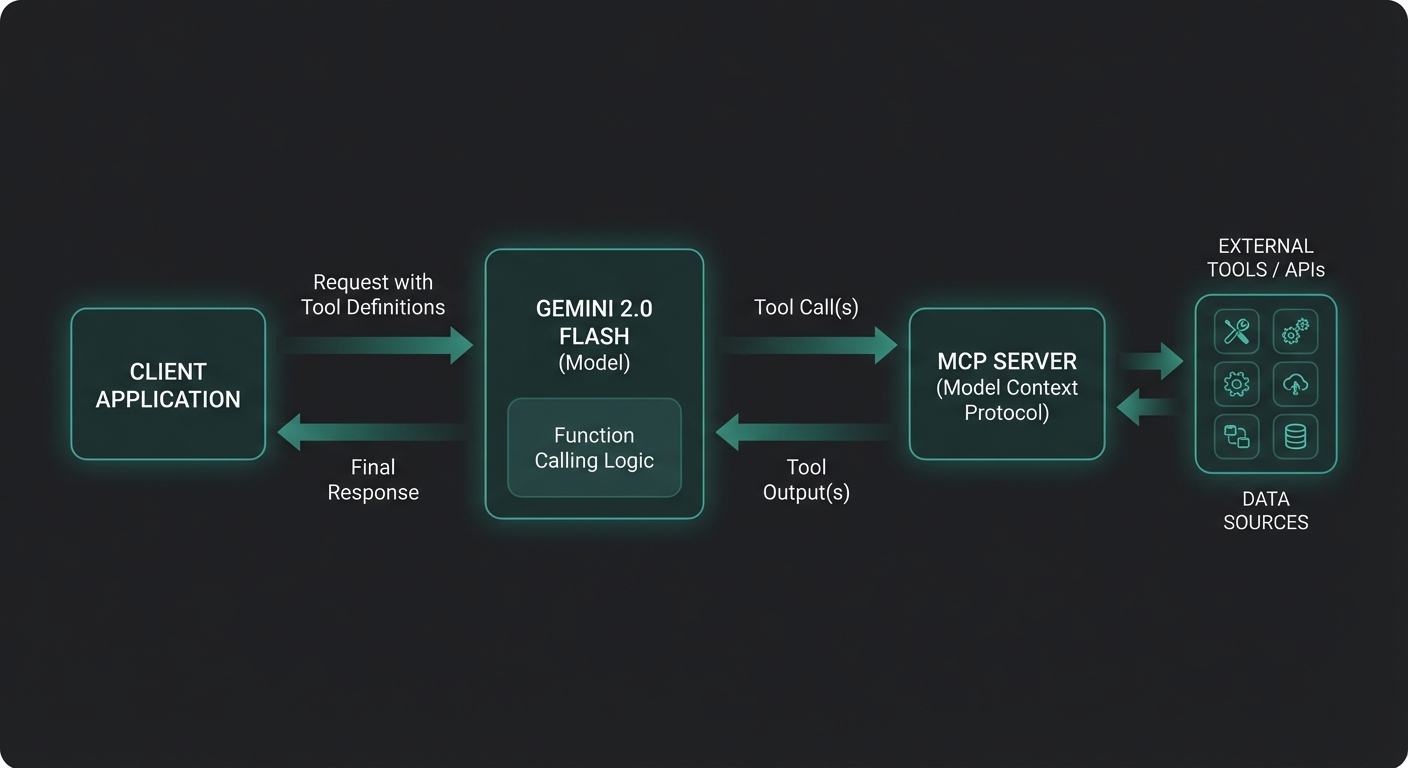
The Gemini Function Calling Model
Gemini’s tool-calling API is part of its @google/generative-ai package (or the newer @google/genai unified SDK). The key primitives are:
- FunctionDeclaration – describes a function with a name, description, and JSON Schema parameters
- FunctionCall – the model’s request to invoke a function (name + args as a plain object)
- FunctionResponse – your code’s reply to a function call (name + response object)
- Tool – a wrapper around an array of
FunctionDeclarationobjects
Gemini can issue multiple FunctionCall parts in a single response, meaning it supports parallel tool calling natively. This is a significant performance advantage when your agent can execute tools concurrently.
Installing the SDK
npm install @google/generative-ai @modelcontextprotocol/sdk zod
Use Node.js 22+ with "type": "module" in your package.json. Store your API key as GEMINI_API_KEY in a .env file and load it with node --env-file=.env.
Converting MCP Tools to Gemini FunctionDeclarations
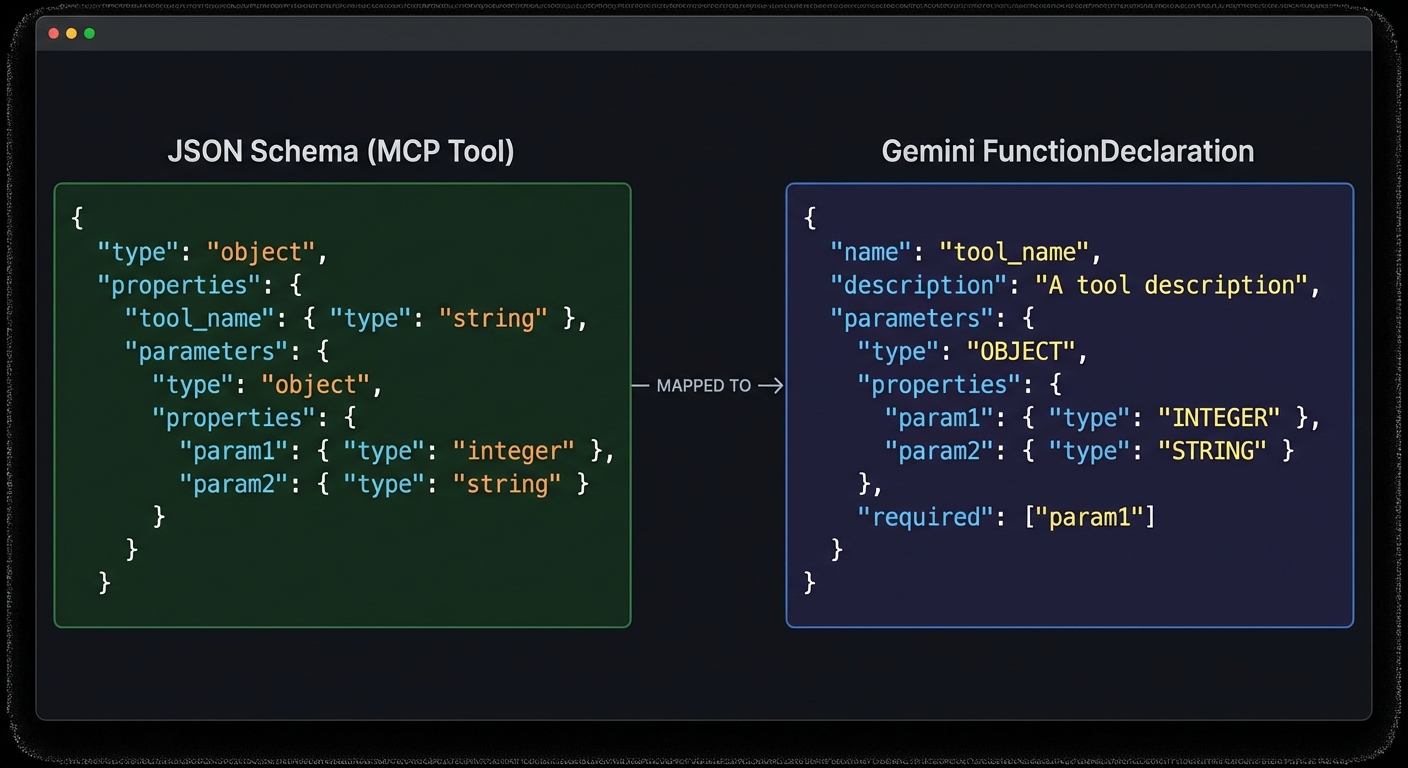
The MCP SDK returns tools as JSON Schema objects. Gemini’s FunctionDeclaration also uses JSON Schema for parameters, but the wrapper format differs. The conversion is straightforward:
import { GoogleGenerativeAI } from '@google/generative-ai';
import { Client } from '@modelcontextprotocol/sdk/client/index.js';
import { StdioClientTransport } from '@modelcontextprotocol/sdk/client/stdio.js';

const genai = new GoogleGenerativeAI(process.env.GEMINI_API_KEY);

// Connect to an MCP server
const transport = new StdioClientTransport({
  command: 'node',
  args: ['./servers/product-server.js'],
});

const mcp = new Client({ name: 'gemini-host', version: '1.0.0' });
await mcp.connect(transport);

// List MCP tools
const { tools: mcpTools } = await mcp.listTools();

// Convert to Gemini FunctionDeclarations
function mcpToolToGeminiDeclaration(tool) {
  return {
    name: tool.name,
    description: tool.description,
    parameters: tool.inputSchema,  // MCP already uses JSON Schema - pass through directly
  };
}

const geminiTools = [
  {
    functionDeclarations: mcpTools.map(mcpToolToGeminiDeclaration),
  },
];
This near-zero conversion cost is one of Gemini’s practical advantages over OpenAI. Because both MCP and Gemini use raw JSON Schema for parameters, you avoid the nested function wrapper that OpenAI requires. In a multi-provider setup, fewer transformations mean fewer bugs.
parameters field – no deep transformation needed.The Full Tool Calling Loop
async function runGeminiMcpLoop(userMessage) {
  const model = genai.getGenerativeModel({
    model: 'gemini-2.0-flash',
    tools: geminiTools,
  });

  const chat = model.startChat();
  const messages = [{ role: 'user', parts: [{ text: userMessage }] }];

  let response = await chat.sendMessage(userMessage);
  let candidate = response.response.candidates[0];

  while (candidate.finishReason === 'STOP' && hasFunctionCalls(candidate)) {
    const functionCalls = candidate.content.parts.filter(p => p.functionCall);

    // Execute all function calls in parallel (Gemini can issue multiple at once)
    const results = await Promise.all(
      functionCalls.map(async (part) => {
        const fc = part.functionCall;
        const mcpResult = await mcp.callTool({
          name: fc.name,
          arguments: fc.args,
        });
        const text = mcpResult.content
          .filter(c => c.type === 'text')
          .map(c => c.text)
          .join('\n');
        return {
          functionResponse: {
            name: fc.name,
            response: { result: text },
          },
        };
      })
    );

    // Send all function responses back in a single turn
    response = await chat.sendMessage(results);
    candidate = response.response.candidates[0];
  }

  return candidate.content.parts
    .filter(p => p.text)
    .map(p => p.text)
    .join('');
}

function hasFunctionCalls(candidate) {
  return candidate.content.parts.some(p => p.functionCall);
}
Note the key difference from OpenAI and Claude: Gemini uses a Chat session object (model.startChat()) with chat.sendMessage() instead of stateless messages arrays. The chat object maintains conversation history internally.
In production, this loop is the heartbeat of your agent. Every real-world Gemini MCP integration – from customer support bots to internal data dashboards – runs some version of this pattern. Getting it right here means the rest of your application can treat tool calling as a solved problem.
Gemini 2.5 Pro: Longer Context and Better Reasoning
Switch from gemini-2.0-flash to gemini-2.5-pro-preview-03-25 (or the latest stable alias) for tasks requiring deeper reasoning:
const model = genai.getGenerativeModel({
  model: 'gemini-2.5-pro-preview-03-25',  // 1M token context window
  tools: geminiTools,
  generationConfig: {
    temperature: 0.7,
    maxOutputTokens: 8192,
  },
});
Gemini 2.5 Pro’s 1-million-token context window makes it ideal for MCP agents that need to analyze large datasets, entire codebases, or long document collections through resource-fetching tools.
With the model tier covered, the next question is speed. Even the best model is slow if it makes tool calls sequentially when it could run them in parallel. This is where Gemini’s default parallel calling behavior becomes especially valuable.
Parallel Tool Execution: The Gemini Advantage
When Gemini issues multiple function calls in one response, it means it has determined those calls can be satisfied independently. This enables true parallel execution at your application layer:
// Gemini may respond with multiple FunctionCall parts simultaneously
// Example: searching multiple databases at once
// candidate.content.parts = [
//   { functionCall: { name: 'search_products', args: { query: 'laptop' } } },
//   { functionCall: { name: 'get_inventory', args: { category: 'electronics' } } },
//   { functionCall: { name: 'get_pricing', args: { tier: 'enterprise' } } },
// ]

// Your Promise.all() handles them concurrently - real parallelism
const results = await Promise.all(functionCalls.map(callMcpTool));
Compare this to OpenAI (which also supports parallel calls) and Claude (which sequences calls unless you explicitly enable parallel tool use in the beta). Gemini’s default is to use parallelism aggressively when it makes sense.
Handling Errors in Tool Responses
async function callMcpToolSafe(fc, mcpClient) {
  try {
    const result = await mcpClient.callTool({
      name: fc.name,
      arguments: fc.args,
    });
    if (result.isError) {
      return {
        functionResponse: {
          name: fc.name,
          response: { error: result.content[0]?.text ?? 'Tool returned an error' },
        },
      };
    }
    const text = result.content.filter(c => c.type === 'text').map(c => c.text).join('\n');
    return {
      functionResponse: {
        name: fc.name,
        response: { result: text },
      },
    };
  } catch (err) {
    return {
      functionResponse: {
        name: fc.name,
        response: { error: `Execution failed: ${err.message}` },
      },
    };
  }
}
Getting error handling right is critical because MCP tools are external processes that can fail for reasons completely outside your control: a database connection drops, an API rate-limits you, or the tool process crashes. Wrapping every call in a safe executor ensures your agent loop never hangs on a single broken tool.
“Function calling lets you connect Gemini models to external tools and APIs. Rather than processing all data internally, the model generates structured function calls that your application executes.” – Google AI for Developers, Function Calling Guide
With the core integration, model selection, parallel execution, and error handling covered, it is worth cataloging the specific ways things break in practice. These failure modes are drawn from real Gemini MCP deployments, not theoretical edge cases.
Common Failure Modes
- Null parameters schema: If a tool has no parameters, pass
parameters: { type: 'object', properties: {} }– omitting the field entirely causes a 400 error. - Nested arrays in schemas: Gemini is stricter about nested array schemas than OpenAI. Test each tool schema independently with a simple test call before integrating.
- Chat session state: The
Chatobject holds history in memory. For multi-user applications, create a newstartChat()per session – do not share a chat instance across users. - finishReason misread: Always check
candidate.finishReason. A value of'SAFETY'or'RECITATION'means the response was blocked – handle these as errors rather than silently continuing.
What to Build Next
- Swap
gemini-2.0-flashforgemini-2.5-proand pass a 500KB document as a user message – observe how the model leverages full-context reasoning alongside tool calls. - Add a
maximumTurnsguard to your tool loop to prevent infinite agent loops. - Log
response.response.usageMetadata.totalTokenCountto measure the cost of each agent run.
nJoy 😉