
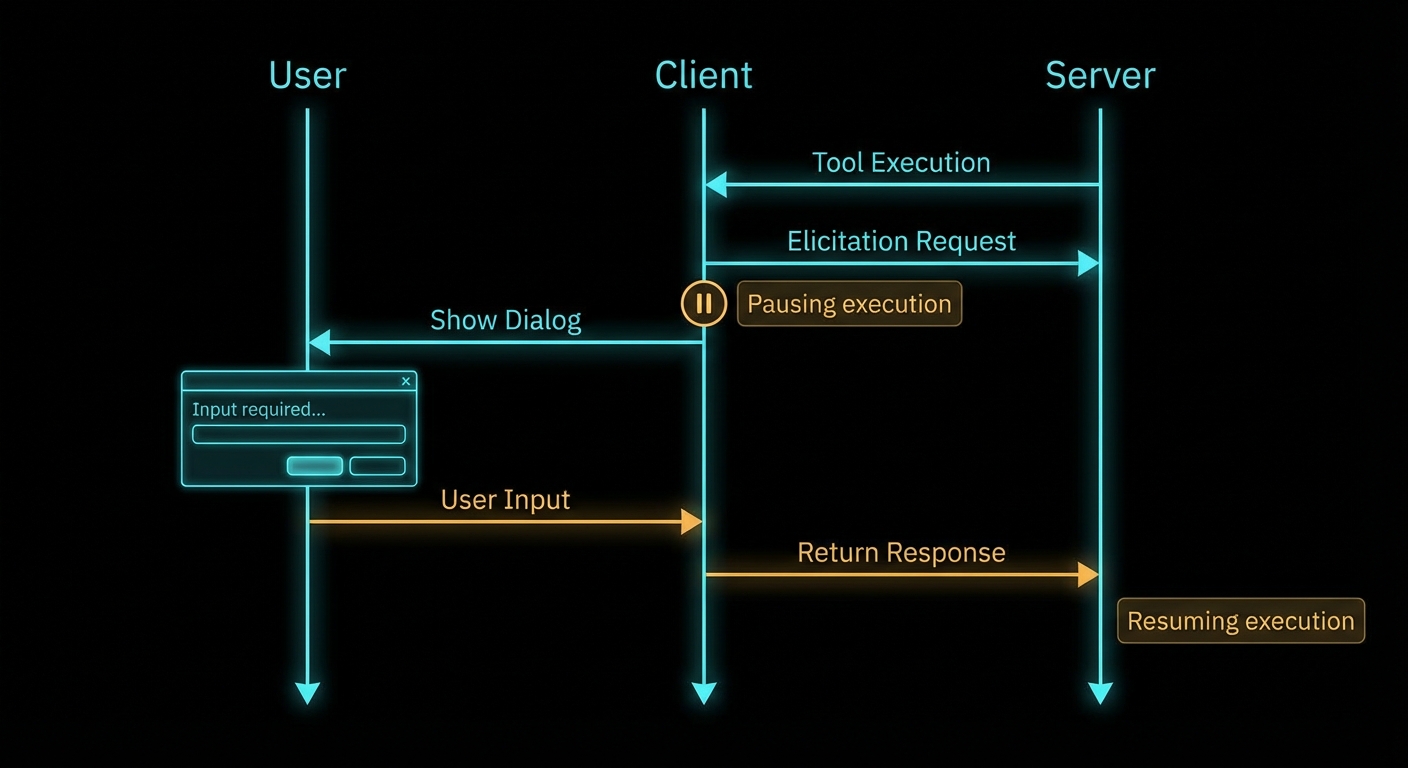
Some tools cannot complete without asking the user a question. “Which account should I debit?” “What is the date range for this report?” “Are you sure you want to delete all 200 records?” These are not questions an LLM should guess at. They require explicit, structured input from the human in the loop. Elicitation is MCP’s mechanism for this – it lets a server, while handling a request, ask the user for information through the client’s UI, wait for the answer, and then continue. It is a synchronous human-in-the-loop pattern baked into the protocol.
How Elicitation Works
When a server needs user input, it sends an elicitation/create request to the client. The request includes a message (explaining what information is needed) and a JSON schema describing the expected response format. The client presents this to the user in whatever UI is appropriate – a dialog box, a prompt, a form – and returns the user’s structured response. The server receives the answer and continues processing.
Elicitation is a client capability – the server can only use it if the client declared elicitation support during initialisation. If the client does not support elicitation, the server must handle the lack of user input gracefully (skip the step, use defaults, or return an error with a clear explanation).
// Client: declare elicitation support
const client = new Client(
  { name: 'my-host', version: '1.0.0' },
  {
    capabilities: {
      elicitation: {
        form: {},   // In-band structured data collection
        url: {},    // Out-of-band URL navigation (New in 2025-11-25)
      },
    },
  }
);

// Client: implement the elicitation handler
import { ElicitRequestSchema } from '@modelcontextprotocol/sdk/types.js';

client.setRequestHandler(ElicitRequestSchema, async (request) => {
  const { message, requestedSchema } = request.params;

  // Show UI to user - implementation is host-specific
  const userResponse = await showElicitationDialog(message, requestedSchema);

  if (userResponse === null) {
    // User dismissed/cancelled
    return { action: 'cancel' };
  }

  return {
    action: 'accept',
    content: userResponse,  // Must match requestedSchema
  };
});
Why this matters: the handler is the trust boundary between protocol messages and your UI. In a real project you would validate userResponse against requestedSchema before returning accept, and you would time out slow users so the server does not hang forever.
The client pieces only declare and route elicitation; the server still decides when to pause a tool and what shape of answer it needs. The next example shows a full tool handler that elicits structured confirmation before a side effect.
Server-Side Elicitation Usage
import { McpServer } from '@modelcontextprotocol/sdk/server/mcp.js';
import { z } from 'zod';

const server = new McpServer({ name: 'payment-server', version: '1.0.0' });

server.tool(
  'process_payment',
  'Processes a payment transaction with user confirmation',
  {
    amount: z.number().positive().describe('Amount in USD'),
    recipient: z.string().describe('Recipient name or email'),
  },
  async ({ amount, recipient }, { server: serverInstance }) => {
    // Elicit confirmation before processing
    const confirmation = await serverInstance.elicitInput({
      message: `You are about to send $${amount.toFixed(2)} to ${recipient}. Please confirm the payment account:`,
      requestedSchema: {
        type: 'object',
        properties: {
          account_id: {
            type: 'string',
            description: 'Your account ID to debit (format: ACC-XXXXXXXX)',
          },
          confirmed: {
            type: 'boolean',
            description: 'Confirm you want to proceed with this payment',
          },
        },
        required: ['account_id', 'confirmed'],
      },
    });

    if (confirmation.action === 'cancel') {
      return { content: [{ type: 'text', text: 'Payment cancelled by user.' }] };
    }

    if (!confirmation.content.confirmed) {
      return { content: [{ type: 'text', text: 'Payment declined - user did not confirm.' }] };
    }

    const result = await processPayment({
      amount,
      recipient,
      accountId: confirmation.content.account_id,
    });

    return { content: [{ type: 'text', text: `Payment ${result.transactionId} processed successfully.` }] };
  }
);
Why this pattern matters: money-moving and irreversible actions are where silent model guesses hurt the most. In a real project you would keep the elicitation copy short, show the same numbers the server will use, and log the outcome for audit without storing secrets in the model context.
“Elicitation allows servers to request additional information from users during tool execution. This enables interactive workflows where user input is needed to complete tasks, while maintaining a clear separation between the AI model and the human oversight layer.” – MCP Specification, Elicitation
Elicitation Schema Constraints
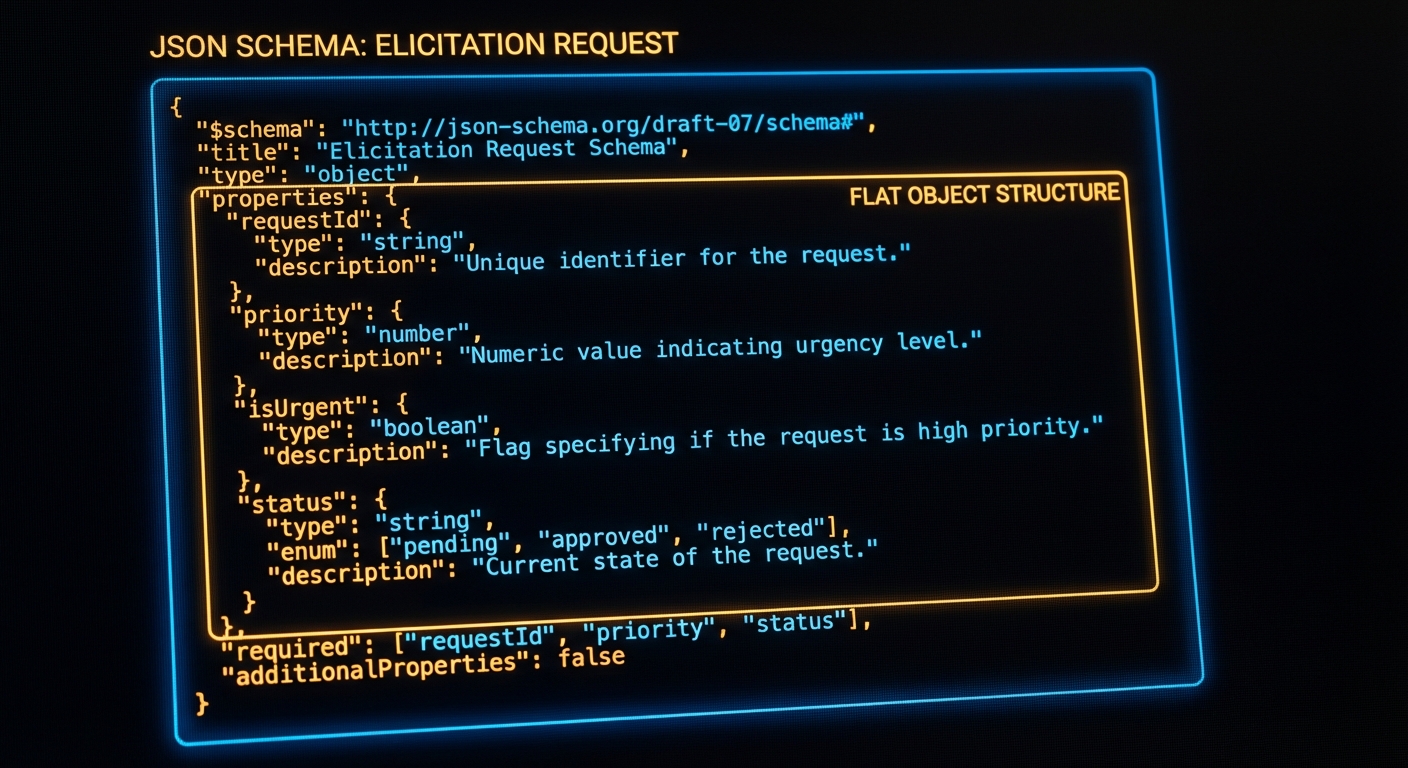
The schema for an elicitation request is deliberately restricted compared to full JSON Schema. This is intentional – the schema must be renderable by any client UI, which means it cannot be arbitrarily complex. The spec defines a “flat” schema: a single object with primitive properties (string, number, boolean, or enum). No nested objects, no arrays, no $ref references.
// VALID elicitation schema - flat, primitive properties only
{
  type: 'object',
  properties: {
    name: { type: 'string', description: 'Your full name' },
    age: { type: 'number', description: 'Your age in years' },
    agree_to_terms: { type: 'boolean', description: 'Do you agree to the terms?' },
    plan: { type: 'string', enum: ['basic', 'pro', 'enterprise'], description: 'Choose a plan' },
  },
  required: ['name', 'agree_to_terms'],
}

// INVALID: Nested objects not allowed in elicitation schemas
{
  type: 'object',
  properties: {
    address: {
      type: 'object',  // This will fail - nested objects not permitted
      properties: { street: { type: 'string' } },
    },
  },
}
If you need a richer form, split it into sequential elicitations or collect details before the tool runs. The flat schema trade-off keeps portable clients implementable; planning your UX around that limit avoids spec violations at runtime.
Failure Modes with Elicitation
Case 1: Not Handling cancel Action
Users can always cancel an elicitation. If your tool handler does not check for the cancel action, it will try to proceed with undefined data and crash or produce garbage output.
// BAD: No cancel check
const response = await serverInstance.elicitInput({ ... });
await processData(response.content.value); // Will throw if action was 'cancel'

// GOOD: Always check the action
const response = await serverInstance.elicitInput({ ... });
if (response.action !== 'accept') {
  return { content: [{ type: 'text', text: 'Action cancelled.' }] };
}
await processData(response.content.value);
Case 2: Using Elicitation When a Tool Parameter Would Suffice
Elicitation is for input the server cannot know at design time – confirmation of a specific action, a password, runtime context. If the information can be a tool argument, make it a tool argument. Elicitation adds a round-trip to the user and breaks the automated flow.
// WRONG: Using elicitation for something that should be an arg
server.tool('delete_record', '...', { id: z.string() }, async ({ id }, ctx) => {
  const confirm = await ctx.server.elicitInput({ message: 'Confirm deletion?', ... });
  // Should this really need an interactive prompt? Or is --confirm a better pattern?
});

// BETTER: Use tool annotations + let the host handle confirmation
server.tool(
  'delete_record',
  'Permanently deletes a record',
  { id: z.string(), confirm: z.boolean().describe('Set true to confirm permanent deletion') },
  { annotations: { destructiveHint: true } },
  async ({ id, confirm }) => {
    if (!confirm) return { isError: true, content: [{ type: 'text', text: 'Set confirm=true to proceed.' }] };
    await db.delete(id);
    return { content: [{ type: 'text', text: `Deleted ${id}` }] };
  }
);
URL Mode Elicitation
New in 2025-11-25
Form mode elicitation passes user data through the MCP client – the client renders the form, collects the response, and relays it back to the server. This is fine for non-sensitive data like preferences, date ranges, or confirmation flags. But some workflows need the user to enter credentials, sign a document, or complete an OAuth flow in a secure context where the MCP client should never see the raw data. URL mode solves this by directing the user to an external URL for the sensitive interaction.
When a server sends a URL mode elicitation, the client opens the target URL (in a browser or embedded webview), and the user interacts directly with the server’s web page. The sensitive data (password, API key, payment info) stays between the user and the server’s web endpoint. The MCP client only learns whether the user completed or cancelled the flow.
// Server: elicit via URL mode for credential entry
const result = await serverInstance.elicitInput({
  mode: 'url',
  message: 'Please sign in to your GitHub account to grant repository access.',
  url: 'https://auth.example.com/github/connect?session=abc123',
});

if (result.action === 'cancel') {
  return { content: [{ type: 'text', text: 'GitHub authentication cancelled.' }] };
}

// result.action === 'accept' means the user completed the flow
// The server's web endpoint already has the credential from the callback
const repos = await fetchGitHubRepos(sessionId);
return { content: [{ type: 'text', text: `Connected. Found ${repos.length} repositories.` }] };
The specification requires that servers MUST NOT use form mode for sensitive information. If your tool needs a password, API key, or payment detail, use URL mode. The client MUST display the target domain and get user consent before navigating. This is a trust boundary: the user decides whether to visit the URL, and the MCP client never touches the sensitive data.
Clients declare URL mode support in their capabilities: { elicitation: { form: {}, url: {} } }. A client that only supports form mode omits the url key. For backwards compatibility, an empty elicitation: {} object is treated as form-only. Servers MUST check the client’s declared capabilities before sending a URL mode request.
Titled and Multi-Select Enums
New in 2025-11-25
Earlier versions of elicitation only supported bare enums: enum: ['basic', 'pro', 'enterprise']. The 2025-11-25 spec adds titled enums (human-readable labels for each option) and multi-select enums (the user can pick more than one value). These make elicitation forms more usable without adding nested schema complexity.
// Titled enum: each option has a display label
const response = await serverInstance.elicitInput({
  message: 'Select your deployment region:',
  requestedSchema: {
    type: 'object',
    properties: {
      region: {
        type: 'string',
        enum: ['us-east-1', 'eu-west-1', 'ap-southeast-1'],
        enumNames: ['US East (Virginia)', 'EU West (Ireland)', 'Asia Pacific (Singapore)'],
        description: 'AWS region for deployment',
      },
    },
    required: ['region'],
  },
});

// Multi-select enum: user picks one or more values
const tagsResponse = await serverInstance.elicitInput({
  message: 'Tag this record (select all that apply):',
  requestedSchema: {
    type: 'object',
    properties: {
      tags: {
        type: 'array',
        items: {
          type: 'string',
          enum: ['urgent', 'billing', 'technical', 'feature-request'],
          enumNames: ['Urgent', 'Billing Issue', 'Technical Support', 'Feature Request'],
        },
        description: 'One or more tags for this support ticket',
      },
    },
    required: ['tags'],
  },
});
Titled enums prevent the user from seeing raw enum values like us-east-1 when the client renders the form – instead they see “US East (Virginia)”. Multi-select enums use an array wrapper around the enum type. Both features keep the schema flat and portable across client UIs.
Default Values in Elicitation Schemas
New in 2025-11-25
All primitive types in elicitation schemas now support a default value. The client pre-fills the form field with the default, reducing friction for the common case while still letting the user override when needed.
const response = await serverInstance.elicitInput({
  message: 'Configure the export:',
  requestedSchema: {
    type: 'object',
    properties: {
      format: {
        type: 'string',
        enum: ['csv', 'json', 'parquet'],
        default: 'csv',
        description: 'Export file format',
      },
      limit: {
        type: 'number',
        default: 1000,
        description: 'Maximum rows to export',
      },
      include_headers: {
        type: 'boolean',
        default: true,
        description: 'Include column headers in the output',
      },
    },
    required: ['format'],
  },
});
Defaults reduce the number of fields the user has to actively fill in. For high-frequency workflows (daily exports, recurring queries), a well-chosen default turns a multi-field form into a single-click confirmation.
What to Check Right Now
- Map your interactive flows – identify any workflow in your application that requires user input mid-execution. These are elicitation candidates.
- Keep schemas flat – validate your elicitation schemas against the spec constraints: flat object, primitive values only, no nested objects or arrays.
- Always handle cancel and decline – every elicitation can result in
cancel(user dismissed) ordecline(user responded negatively). Handle all three outcomes. - Check client support first – before calling elicitInput, check
client.getClientCapabilities()?.elicitation. If the client does not support it, fall back to tool-argument-based confirmation. - Use URL mode for sensitive data – passwords, API keys, and payment details MUST go through URL mode, never form mode. Check that the client declares
urlin its elicitation capabilities before sending a URL mode request. - Add defaults to common fields – pre-fill format, limit, and toggle fields so the user can confirm with one click in routine workflows.
nJoy 😉