
Claude’s tool use is the cleanest tool calling implementation in the major LLM providers. The API is symmetric: you send tools in the request, Claude returns tool_use blocks when it wants to call something, you run the tools, and you send back tool_result blocks. No function/tool naming confusion, no finish_reason gotchas – just a clear, typed message structure. This lesson builds the Claude + MCP integration from scratch, comparing it to the OpenAI pattern where they differ.
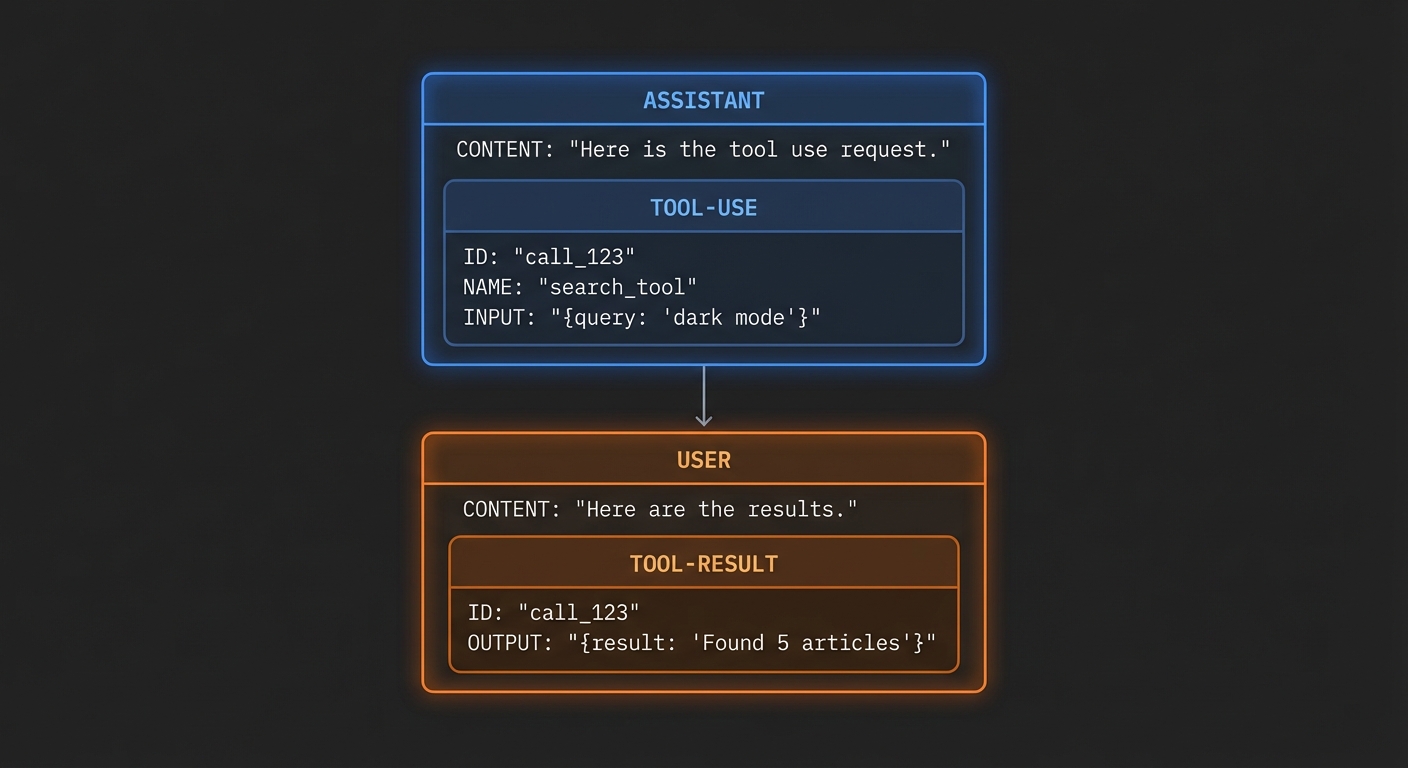
Claude Tool Use Format
Claude’s tool use has a fundamentally different message structure from OpenAI’s. The key difference: tool results go in a user message (not a separate role), nested inside a tool_result content block that references the tool use ID. This is more structured and less ambiguous than OpenAI’s approach.
// Claude tool calling message flow:

// 1. Request: tools defined, user message sent
// 2. Response: Claude returns tool_use block(s)
{
  role: 'assistant',
  content: [
    { type: 'text', text: 'Let me search for that.' },
    {
      type: 'tool_use',
      id: 'toolu_01XY',
      name: 'search_products',
      input: { query: 'wireless headphones', limit: 5 }
    }
  ]
}

// 3. You execute the tool through MCP
// 4. Send result back in a user message with tool_result block
{
  role: 'user',
  content: [{
    type: 'tool_result',
    tool_use_id: 'toolu_01XY',
    content: [{ type: 'text', text: 'Found 5 products: ...' }]
  }]
}
The Complete Claude + MCP Integration
import Anthropic from '@anthropic-ai/sdk';
import { Client } from '@modelcontextprotocol/sdk/client/index.js';
import { StdioClientTransport } from '@modelcontextprotocol/sdk/client/stdio.js';

const anthropic = new Anthropic({ apiKey: process.env.ANTHROPIC_API_KEY });

const mcpClient = new Client({ name: 'claude-host', version: '1.0.0' }, { capabilities: {} });
await mcpClient.connect(new StdioClientTransport({ command: 'node', args: ['server.js'] }));

const { tools: mcpTools } = await mcpClient.listTools();

// Convert MCP tools to Anthropic format
const claudeTools = mcpTools.map(t => ({
  name: t.name,
  description: t.description,
  input_schema: t.inputSchema,  // Note: input_schema, not parameters
}));

async function runWithClaude(userMessage) {
  const messages = [{ role: 'user', content: userMessage }];

  while (true) {
    const response = await anthropic.messages.create({
      model: 'claude-3-5-sonnet-20241022',
      max_tokens: 4096,
      tools: claudeTools,
      messages,
    });

    // Append Claude's response to messages
    messages.push({ role: 'assistant', content: response.content });

    // If Claude stopped due to tool use, execute tools
    if (response.stop_reason === 'tool_use') {
      const toolUseBlocks = response.content.filter(b => b.type === 'tool_use');
      const toolResults = await Promise.all(
        toolUseBlocks.map(async (toolUse) => {
          console.error(`[tool] Calling: ${toolUse.name}`, toolUse.input);
          const result = await mcpClient.callTool({
            name: toolUse.name,
            arguments: toolUse.input,
          });

          return {
            type: 'tool_result',
            tool_use_id: toolUse.id,
            content: result.content,  // MCP content blocks work directly here
          };
        })
      );

      // Tool results go in a user message
      messages.push({ role: 'user', content: toolResults });

    } else {
      // end_turn or other stop reason - extract final text
      const finalText = response.content
        .filter(b => b.type === 'text')
        .map(b => b.text)
        .join('');

      return finalText;
    }
  }
}

const result = await runWithClaude('Compare the best noise-cancelling headphones under $300');
console.log(result);
await mcpClient.close();
Claude 3.5 vs 3.7 Sonnet for Tool Use
Claude 3.5 Sonnet (20241022) is the current production choice for tool-heavy workloads: fast, reliable tool calls, good at following tool descriptions, and competitive pricing. Claude 3.7 Sonnet adds extended thinking (covered in Lesson 21) and improved reasoning for complex multi-step tool chains, at higher latency and cost.
// For fast, reliable tool calling:
model: 'claude-3-5-sonnet-20241022'

// For complex reasoning + tool use:
model: 'claude-3-7-sonnet-20250219'  // Includes extended thinking

// Haiku for high-volume, simple tool tasks:
model: 'claude-3-5-haiku-20241022'
“Claude is trained to use tools in the same way that humans do: by processing what it’s seen before and uses this context to craft appropriate tool calls or final responses. Tool use enables Claude to interact with external services and APIs in a structured way.” – Anthropic Documentation, Tool Use
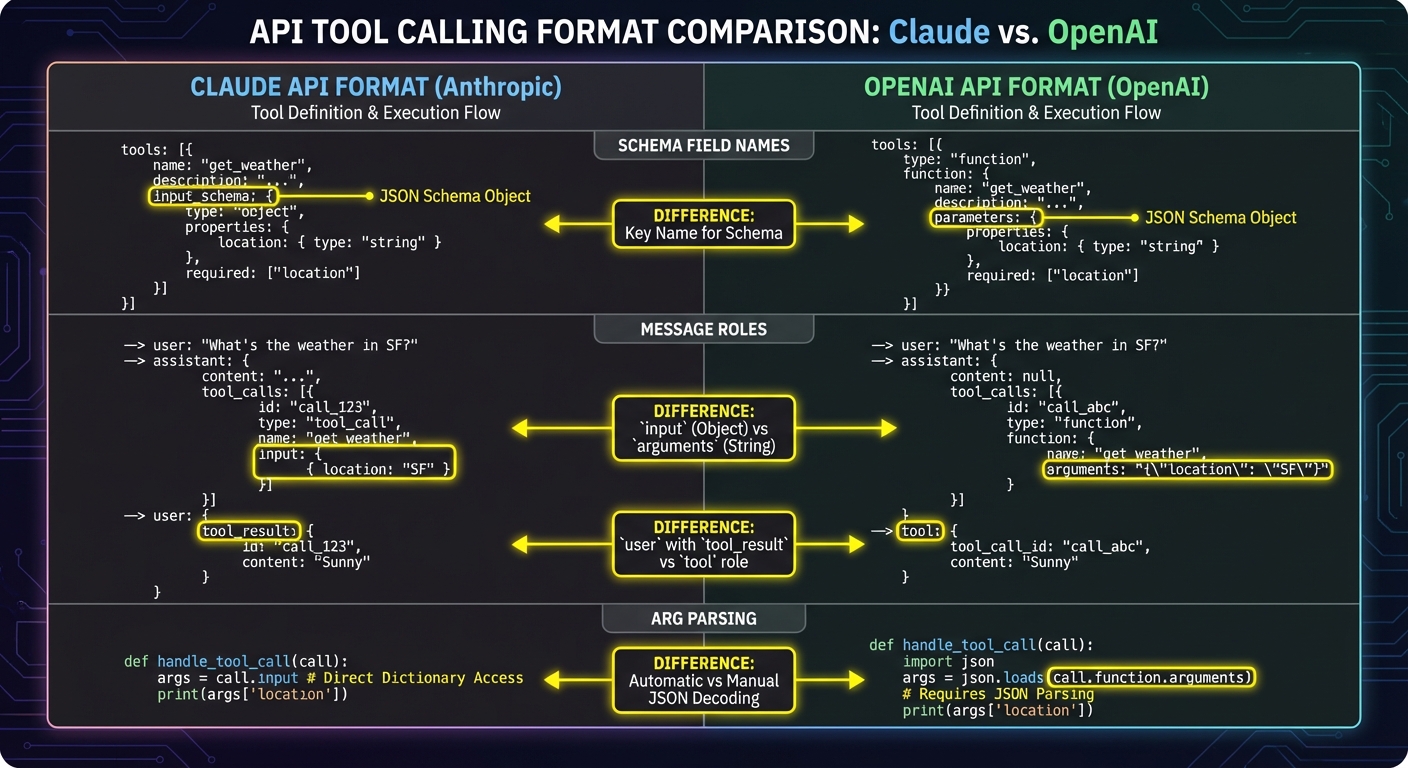
Key Differences from OpenAI
| Aspect | Claude (Anthropic) | GPT (OpenAI) |
|---|---|---|
| Tool result role | user |
tool |
| Schema field | input_schema |
parameters |
| Tool call detection | stop_reason === 'tool_use' |
finish_reason === 'tool_calls' |
| Multiple tools | All results in one user message | Each result is a separate tool message |
| Tool call args | toolUse.input (already parsed) |
JSON.parse(toolCall.function.arguments) |
Failure Modes with Claude Tool Use
Case 1: Putting Tool Results in an Assistant Message
// WRONG: Tool results in wrong role
messages.push({ role: 'assistant', content: toolResults }); // API error

// CORRECT: Tool results go in user role
messages.push({ role: 'user', content: toolResults });
Case 2: Forgetting that Claude’s input Is Already Parsed JSON
// WRONG: Trying to JSON.parse Claude's tool input
const args = JSON.parse(toolUse.input); // Error: toolUse.input is already an object

// CORRECT: Use directly - Claude's SDK already parses it
const args = toolUse.input; // Already an object like { query: "...", limit: 5 }
await mcpClient.callTool({ name: toolUse.name, arguments: args });
What to Check Right Now
- Test with a multi-tool Claude response – ask a question that forces 2-3 tool calls in one response. Verify all tool use blocks are collected and all results are bundled into one user message.
- Verify input_schema not parameters – this is the single most common copy-paste error when moving from OpenAI to Claude code. Search your code for
parametersin Claude tool definitions. - Handle vision content in tool results – Claude can process image content blocks in tool results. If your MCP tools return images (base64), pass them through as
{ type: 'image', source: ... }in the tool result content array. - Set a system prompt – Claude responds well to clear system prompts. Define the assistant’s persona, task scope, and output format at the system level.
nJoy 😉