
An MCP server that works in development can break in production in subtle ways: a tool’s Zod schema changes and clients that cached the old schema break; a new tool is added and existing clients need to discover it; a bug fix changes a tool’s output format and downstream agents that parse it stop working. This lesson covers the testing strategy, versioning approach, and CI/CD pipeline that makes MCP server deployments safe and repeatable.
Testing Strategy for MCP Servers
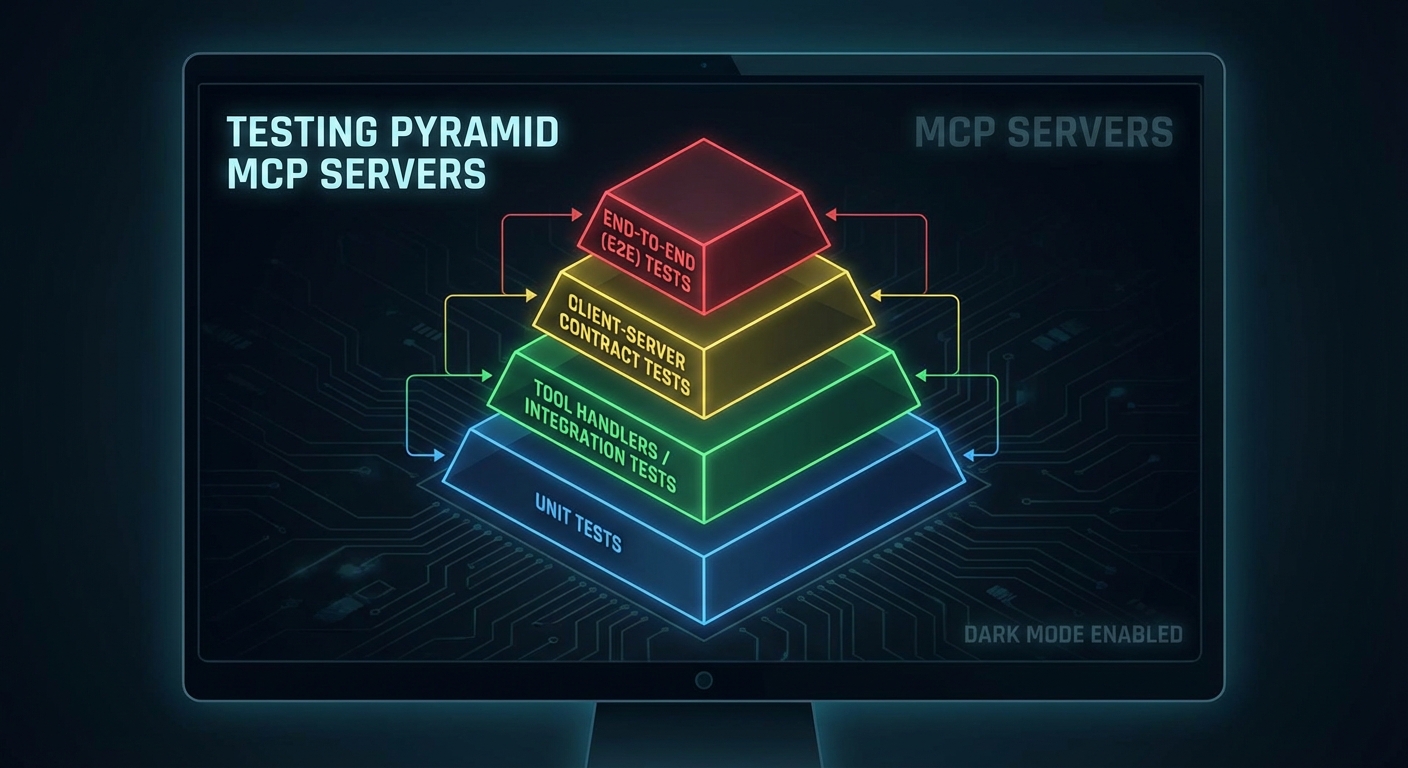
Unit Tests: Tool Handlers in Isolation
// test/tools/search-products.test.js
import { test, describe, mock } from 'node:test';
import assert from 'node:assert';
import { searchProductsHandler } from '../../tools/search-products.js';

describe('searchProductsHandler', () => {
  test('returns products matching query', async () => {
    const mockDb = {
      query: mock.fn(async () => ({ rows: [{ id: 1, name: 'Laptop X1', price: 999 }] })),
    };

    const result = await searchProductsHandler({ query: 'laptop', limit: 10 }, { db: mockDb });

    assert.ok(!result.isError);
    assert.ok(result.content[0].text.includes('Laptop X1'));
    assert.strictEqual(mockDb.query.mock.calls.length, 1);
  });

  test('returns error on empty query', async () => {
    const result = await searchProductsHandler({ query: '', limit: 10 }, {});
    assert.ok(result.isError);
  });
});
Unit testing tool handlers in isolation catches the majority of bugs before they ever reach a live server. By mocking the database and other dependencies, you can run hundreds of these tests in under a second. The real value shows up during refactoring: when you change a handler’s internals, these tests immediately confirm whether the output contract still holds.
Integration Tests: Full MCP Client-Server Round Trip
Unit tests verify logic, but they cannot catch problems in the MCP wire protocol, Zod schema serialization, or transport setup. Integration tests spin up the actual server as a subprocess and talk to it through a real MCP client, exercising the full request-response lifecycle.
// test/integration/mcp-server.test.js
import { test, describe, before, after } from 'node:test';
import assert from 'node:assert';
import { Client } from '@modelcontextprotocol/sdk/client/index.js';
import { StdioClientTransport } from '@modelcontextprotocol/sdk/client/stdio.js';

let client;
let transport;

before(async () => {
  transport = new StdioClientTransport({
    command: 'node',
    args: ['src/server.js'],
    env: { ...process.env, DATABASE_URL: process.env.TEST_DATABASE_URL },
  });
  client = new Client({ name: 'test-client', version: '1.0.0' });
  await client.connect(transport);
});

after(async () => {
  await client.close();
});

describe('MCP server integration', () => {
  test('lists expected tools', async () => {
    const { tools } = await client.listTools();
    const toolNames = tools.map(t => t.name);
    assert.ok(toolNames.includes('search_products'), 'search_products tool missing');
    assert.ok(toolNames.includes('get_product'), 'get_product tool missing');
  });

  test('search_products returns results', async () => {
    const result = await client.callTool({
      name: 'search_products',
      arguments: { query: 'laptop', limit: 5 },
    });
    assert.ok(!result.isError);
    const parsed = JSON.parse(result.content[0].text);
    assert.ok(Array.isArray(parsed));
  });

  test('get_product returns 404 error for unknown id', async () => {
    const result = await client.callTool({
      name: 'get_product',
      arguments: { id: 'nonexistent-99999' },
    });
    assert.ok(result.isError);
    assert.ok(result.content[0].text.includes('not found'));
  });
});
Protocol Versioning
Testing tells you whether the current build works. Versioning tells clients whether they are compatible with it. Since MCP clients often cache tool schemas, a server upgrade that changes a tool’s input shape can silently break agents that are still using the old schema. Exposing version metadata lets clients detect incompatibilities before they become runtime errors.
// server.js - declare server version in metadata
const server = new McpServer({
  name: 'product-server',
  version: process.env.npm_package_version ?? '1.0.0',
});

// Add a version resource so clients can check compatibility
// server.resource(name, uri, handler) - the URI is the second argument
server.resource(
  'server-version',           // resource name (identifier)
  'server://version',         // resource URI (what clients request)
  async (uri) => ({
    contents: [{
      uri: uri.href,
      mimeType: 'application/json',
      text: JSON.stringify({
        serverVersion: process.env.npm_package_version,
        mcpProtocolVersion: '2025-11-25',
        minimumClientVersion: '1.0.0',
        breaking_changes: [],
      }),
    }],
  })
);
GitHub Actions CI Pipeline
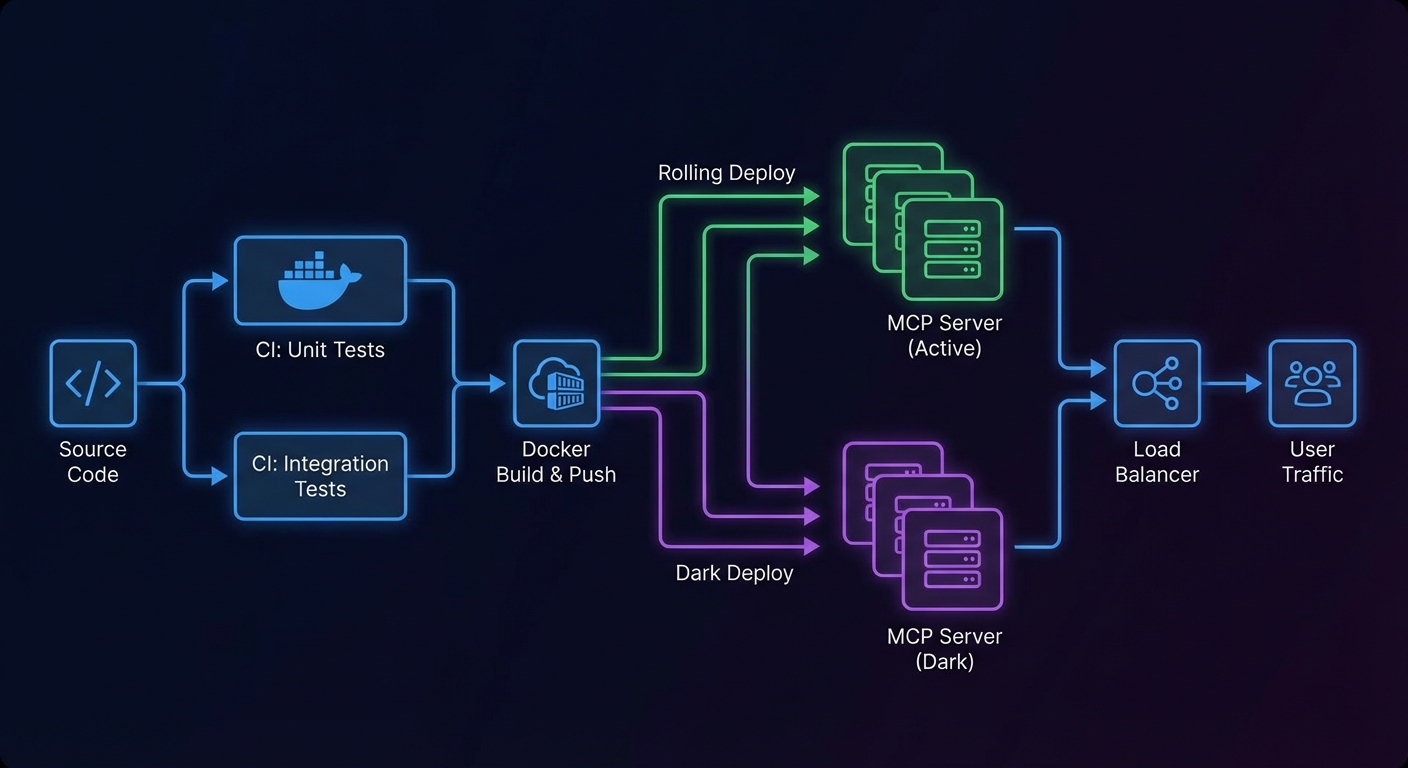
With tests and versioning in place, the CI pipeline ties everything together. The workflow below runs unit and integration tests against a real PostgreSQL service container, then builds a Docker image and deploys via rolling update. A failing test blocks the entire pipeline, so broken code never reaches production.
name: MCP Server CI/CD

on:
  push:
    branches: [main]
  pull_request:
    branches: [main]

jobs:
  test:
    runs-on: ubuntu-latest
    services:
      postgres:
        image: postgres:16
        env:
          POSTGRES_DB: mcp_test
          POSTGRES_USER: postgres
          POSTGRES_PASSWORD: testpass
        ports:
          - 5432:5432
    steps:
      - uses: actions/checkout@v4
      - uses: actions/setup-node@v4
        with:
          node-version: '22'
          cache: 'npm'
      - run: npm ci
      - run: npm test
        env:
          TEST_DATABASE_URL: postgresql://postgres:testpass@localhost:5432/mcp_test

  build-and-push:
    needs: test
    if: github.ref == 'refs/heads/main'
    runs-on: ubuntu-latest
    steps:
      - uses: actions/checkout@v4
      - uses: docker/setup-buildx-action@v3
      - uses: docker/login-action@v3
        with:
          registry: ghcr.io
          username: ${{ github.actor }}
          password: ${{ secrets.GITHUB_TOKEN }}
      - uses: docker/build-push-action@v5
        with:
          push: true
          tags: ghcr.io/${{ github.repository }}:${{ github.sha }},ghcr.io/${{ github.repository }}:latest
          cache-from: type=gha
          cache-to: type=gha,mode=max

  deploy:
    needs: build-and-push
    runs-on: ubuntu-latest
    steps:
      - name: Deploy to production
        run: |
          ssh deploy@production "
            docker pull ghcr.io/${{ github.repository }}:${{ github.sha }} &&
            docker service update --image ghcr.io/${{ github.repository }}:${{ github.sha }} mcp-product-server
          "
Zero-Downtime Deployment with Docker Swarm
The most dangerous moment in an MCP server’s lifecycle is deployment. Active SSE connections are stateful, so killing all instances simultaneously drops every connected client. A rolling update replaces one instance at a time and waits for health checks to pass before moving to the next. If a new build fails its health check, the --update-failure-action rollback flag automatically reverts to the previous image.
# Rolling update: replace instances one at a time, wait for health checks
docker service update \
  --image ghcr.io/myorg/mcp-product-server:v1.3.0 \
  --update-parallelism 1 \
  --update-delay 10s \
  --update-failure-action rollback \
  --health-cmd "wget -qO- http://localhost:3000/health || exit 1" \
  --health-interval 10s \
  --health-retries 3 \
  mcp-product-server
What to Build Next
- Write integration tests for your top 3 most-used tools using the client-server pattern above. Run them with
node --test. - Add the GitHub Actions pipeline from this lesson to your MCP server repo. Verify that a failing test blocks the build.
nJoy 😉