
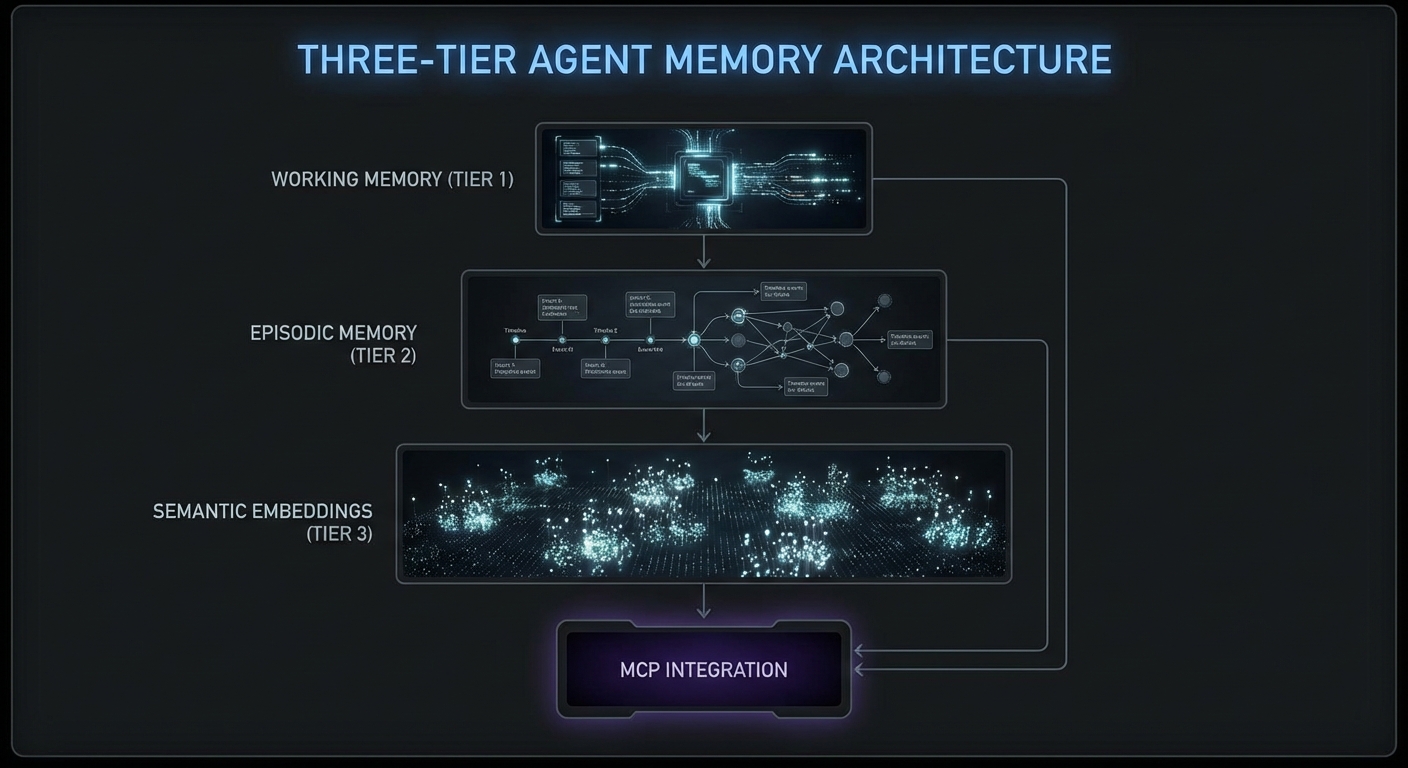
Long-running agents fail in predictable ways. They forget context after 50 turns. They repeat tool calls they already made. They lose track of what they learned three subtasks ago. The solution is an explicit memory architecture: conversation history with summarization, a short-term working memory for the current task, and a long-term episodic memory that persists across sessions. This lesson builds each layer in Node.js and shows how to connect them to MCP tool calls so the agent carries relevant context into every decision.
Layer 1: Conversation History with Rolling Summarization
import Anthropic from '@anthropic-ai/sdk';

class ConversationMemory {
  #messages = [];
  #summary = null;
  #maxMessages = 20;
  #anthropic;

  constructor(anthropic) {
    this.#anthropic = anthropic;
  }

  add(message) {
    this.#messages.push(message);
    if (this.#messages.length > this.#maxMessages) {
      this.#compactHistory();
    }
  }

  async #compactHistory() {
    const toCompress = this.#messages.splice(0, 10);
    const summaryReq = await this.#anthropic.messages.create({
      model: 'claude-3-5-haiku-20241022',
      max_tokens: 300,
      messages: [
        ...toCompress,
        { role: 'user', content: 'Summarize the above conversation in 3-5 bullet points, preserving all decisions made and tool call results.' },
      ],
    });
    const newSummary = summaryReq.content[0].text;
    this.#summary = this.#summary
      ? `Previous summary:\n${this.#summary}\n\nUpdated:\n${newSummary}`
      : newSummary;
  }

  toMessages() {
    if (!this.#summary) return this.#messages;
    return [
      { role: 'user', content: `[Conversation history summary]\n${this.#summary}` },
      { role: 'assistant', content: 'Understood, I have the context from our previous exchange.' },
      ...this.#messages,
    ];
  }
}
Rolling summarization is what keeps long-running agents viable. Without it, a 50-turn conversation will either exceed the context window and crash, or silently drop earlier messages, causing the agent to repeat searches it already performed. The tradeoff is that summaries lose nuance, so the #maxMessages threshold should be tuned based on your typical session length.
Layer 2: Working Memory – Task State Tracking
// Working memory tracks what the agent knows about the current task
class WorkingMemory {
  #state = new Map();

  set(key, value) {
    this.#state.set(key, { value, timestamp: Date.now() });
  }

  get(key) {
    return this.#state.get(key)?.value;
  }

  toContext() {
    if (this.#state.size === 0) return '';
    const lines = [...this.#state.entries()].map(
      ([k, v]) => `- ${k}: ${JSON.stringify(v.value)}`
    );
    return `[Working memory]\n${lines.join('\n')}\n`;
  }
}

// Use in tool call results to persist findings
const memory = new WorkingMemory();

// After searching products, remember what was found
const products = await mcp.callTool({ name: 'search_products', arguments: { query: 'laptop' } });
memory.set('searched_products', JSON.parse(products.content[0].text));

// When calling the next tool, include working memory in the system prompt
const systemPrompt = `You are a research assistant.
${memory.toContext()}
Use the above context to avoid repeating work you have already done.`;
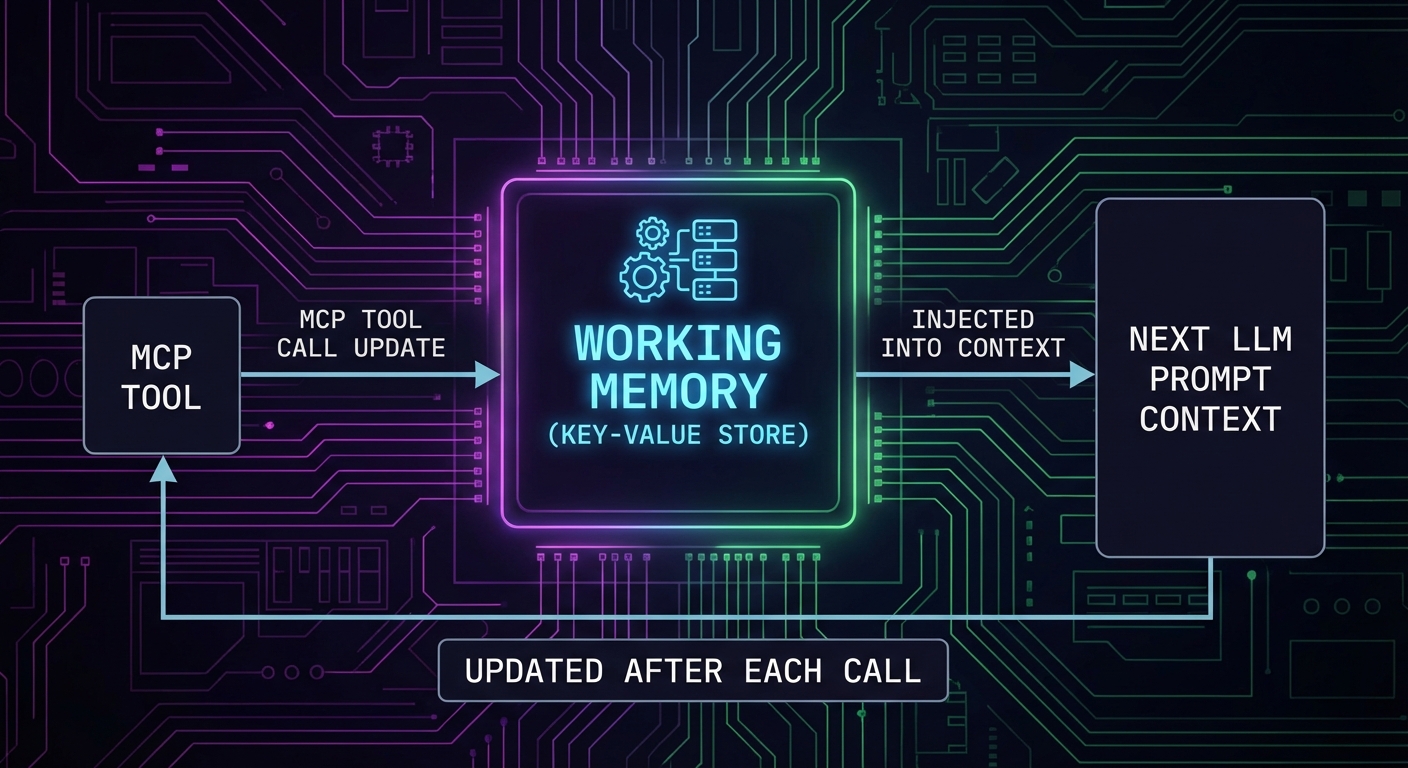
Working memory and conversation history solve the within-session problem, but agents that restart from zero every session waste time re-discovering information the user already provided. The next layer, episodic memory, addresses this by persisting key outcomes across sessions so the agent can recall what it learned last time.
Layer 3: Episodic Memory – Cross-Session Persistence
// Episodic memory stores session outcomes in a database
// Simple implementation using a JSON file; use Redis or PostgreSQL in production

import fs from 'node:fs';
import path from 'node:path';

class EpisodicMemory {
  #storePath;
  #episodes = [];

  constructor(userId, storePath = './memory-store') {
    this.#storePath = path.join(storePath, `${userId}.json`);
    this.#load();
  }

  #load() {
    try {
      this.#episodes = JSON.parse(fs.readFileSync(this.#storePath, 'utf8'));
    } catch {
      this.#episodes = [];
    }
  }

  async save(episode) {
    this.#episodes.push({
      id: crypto.randomUUID(),
      timestamp: new Date().toISOString(),
      ...episode,
    });
    // Keep last 50 episodes
    if (this.#episodes.length > 50) this.#episodes.shift();
    await fs.promises.writeFile(this.#storePath, JSON.stringify(this.#episodes, null, 2));
  }

  toContextString(maxEpisodes = 5) {
    if (this.#episodes.length === 0) return '';
    const recent = this.#episodes.slice(-maxEpisodes);
    const lines = recent.map(e => `[${e.timestamp}] ${e.task}: ${e.outcome}`);
    return `[Previous session memory]\n${lines.join('\n')}\n`;
  }
}

// After each task session
await episodicMemory.save({
  task: 'Product research for Q1 laptop category',
  outcome: 'Found 12 products, top pick: ThinkPad X1 Carbon',
  toolsUsed: ['search_products', 'get_pricing', 'check_availability'],
});
In real deployments, episodic memory is often backed by a vector database like Pinecone or pgvector, so the agent can semantically search past sessions rather than scanning a flat list. The JSON file approach shown here works for prototyping, but it will not scale past a few hundred episodes without indexing.
Tool Call Deduplication
// Prevent the agent from calling the same tool with the same args twice
class ToolCallCache {
  #cache = new Map();

  key(name, args) {
    return `${name}:${JSON.stringify(args)}`;
  }

  has(name, args) {
    return this.#cache.has(this.key(name, args));
  }

  get(name, args) {
    return this.#cache.get(this.key(name, args));
  }

  set(name, args, result) {
    this.#cache.set(this.key(name, args), result);
  }
}

const toolCache = new ToolCallCache();

// Wrap MCP callTool with cache
async function callToolCached(mcp, name, args) {
  if (toolCache.has(name, args)) {
    console.error(`[cache hit] ${name}`);
    return toolCache.get(name, args);
  }
  const result = await mcp.callTool({ name, arguments: args });
  toolCache.set(name, args, result);
  return result;
}
Tool call deduplication is especially valuable when the LLM “forgets” it already called a tool earlier in the conversation. Without caching, duplicate calls waste API quota on external services and can trigger rate limits. Be careful with cache staleness, though: if the underlying data changes between calls, a cached result may return outdated information.
Checkpoint and Resume Pattern
// Save agent state to disk so it can be resumed after interruption
class AgentCheckpoint {
  #path;

  constructor(sessionId) {
    this.#path = `./checkpoints/${sessionId}.json`;
  }

  async save(state) {
    await fs.promises.mkdir('./checkpoints', { recursive: true });
    await fs.promises.writeFile(this.#path, JSON.stringify(state, null, 2));
  }

  async load() {
    try {
      return JSON.parse(await fs.promises.readFile(this.#path, 'utf8'));
    } catch {
      return null;
    }
  }

  async clear() {
    await fs.promises.unlink(this.#path).catch(() => {});
  }
}

// Usage in agent loop
const checkpoint = new AgentCheckpoint(sessionId);
const savedState = await checkpoint.load();

const memory = savedState
  ? ConversationMemory.fromJSON(savedState.memory)
  : new ConversationMemory(anthropic);

// ... run agent loop ...
// After each turn, save checkpoint
await checkpoint.save({ memory: memory.toJSON(), workingMemory: workingMemory.toJSON() });
The checkpoint-and-resume pattern is critical for agents that run expensive, multi-step workflows. A network interruption or server restart halfway through a 20-turn analysis session should not mean starting over from scratch. In production, combine this with the working memory layer so that both the conversation state and the agent’s accumulated knowledge are saved together.
What to Build Next
- Add working memory to your most-used MCP agent: track what the agent has searched and found in the current session. Check if it reduces repeated tool calls.
- Implement the rolling summarization in
ConversationMemoryand test it with a 30-turn conversation. Verify the summary captures all key tool call results.
nJoy 😉