
In the previous article on context management, we built the machinery by hand: sliding windows, compaction, PostgreSQL-backed memory stores, A2A handoffs. That is genuinely useful knowledge. But at some point you look at the boilerplate and think: surely someone has already solved the plumbing. They have. It is called Letta, it is open source, and it implements every pattern we discussed as a first-class runtime. This article is about how to actually use it, with Node.js, in a way that is production-shaped rather than tutorial-shaped.

What Letta Is (and What It Is Not)
Letta is the production evolution of MemGPT, a research project from UC Berkeley that demonstrated you could give an LLM the ability to manage its own memory through tool calls, effectively creating unbounded context. The research paper was elegant; the original codebase was academic. Letta is the commercial rewrite: a stateful agent server with a proper REST API, a TypeScript/Node.js client, PostgreSQL-backed persistence, and a web-based Agent Development Environment (ADE) at app.letta.com.
The key architectural commitment Letta makes is that the server owns all state. You do not manage a message array in your application. You do not serialise session state to disk. You do not build a compaction loop. You send a new user message, the Letta server handles the rest: it injects the right memory blocks, runs the agent, manages the context window, persists everything to its internal PostgreSQL database, and returns the response. Your application is stateless; Letta’s server is stateful. This is Kleppmann’s stream processing model applied to agents: the server is the durable log, and your application is just a producer/consumer.
What Letta is not: a model provider, a prompt engineering framework, or a replacement for your orchestration logic when you need bespoke control. It is an agent runtime. You still choose the model (any OpenAI-compatible endpoint, Anthropic, Ollama, etc.). You still design the tools. You still decide the architecture. Letta manages context, memory, and persistence so you do not have to.
Running Letta: Docker in Two Minutes
The fastest path to a running Letta server is Docker. One command, PostgreSQL included:
docker run \
  -v ~/.letta/.persist/pgdata:/var/lib/postgresql/data \
  -p 8283:8283 \
  -e OPENAI_API_KEY="sk-..." \
  -e ANTHROPIC_API_KEY="sk-ant-..." \
  letta/letta:latest
The server starts on port 8283. Agent data persists to the mounted volume. The ADE at https://app.letta.com can connect to your local instance for visual inspection and debugging. Point it at http://localhost:8283 and you have a full development environment with memory block viewers, message history, and tool call traces.
For production, you will want to externalise the PostgreSQL instance (a managed RDS or Cloud SQL instance), set LETTA_PG_URI to point at it, and run Letta behind a reverse proxy with TLS. The Letta server itself is stateless between requests; it is the database that holds everything. That means you can run multiple Letta instances behind a load balancer pointing at the same PostgreSQL, which is the correct horizontal scaling pattern.
Install the Node.js client:
npm install @letta-ai/letta-clientConnect to your local or remote server:
import Letta from '@letta-ai/letta-client';

// Local development
const client = new Letta({ baseURL: 'http://localhost:8283' });

// Letta Cloud (managed, no self-hosting required)
const client = new Letta({ apiKey: process.env.LETTA_API_KEY });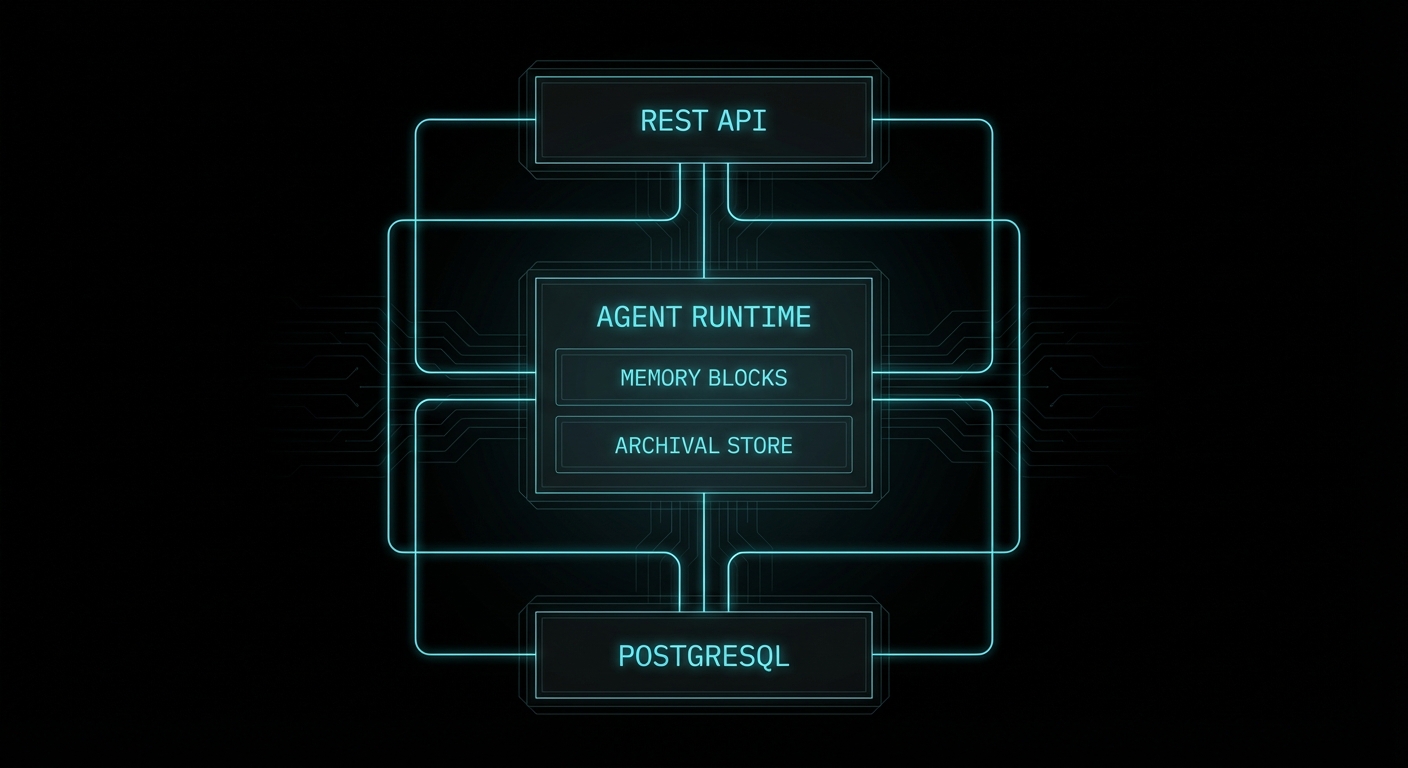
Memory Blocks: The Core Abstraction
If you read the context management article, you encountered the concept of “always-in-context pinned memory”: facts that never get evicted, always present at the top of the system prompt. Letta formalises this as memory blocks. A memory block is a named, bounded string that gets prepended to the agent’s system prompt on every single turn, in a structured XML-like format the model can read and modify.
This is what the model actually sees in its context window:
<memory_blocks>

<persona>
<description>Stores details about your persona, guiding how you behave.</description>
<metadata>chars_current=128 | chars_limit=5000</metadata>
<value>I am Sam, a persistent assistant that remembers across sessions.</value>
</persona>

<human>
<description>Key details about the person you're conversing with.</description>
<metadata>chars_current=84 | chars_limit=5000</metadata>
<value>Name: Alice. Role: senior backend engineer. Prefers concise answers. Uses Node.js.</value>
</human>

</memory_blocks>
Three things make this powerful. First, the model can see the character count and limit, so it manages the block like a finite buffer rather than writing without restraint. Second, the description field is the primary signal the model uses to decide how to use each block: write a bad description and the agent will misuse it. Third, blocks are editable by the agent via built-in tools: when the agent learns something worth preserving, it calls core_memory_replace or core_memory_append, and that change is persisted immediately to the database and visible on the next turn.
Here is a full agent creation with custom memory blocks in Node.js:
// create-agent.js
import Letta from '@letta-ai/letta-client';

const client = new Letta({ baseURL: 'http://localhost:8283' });

const agent = await client.agents.create({
  name: 'dev-assistant',
  model: 'anthropic/claude-3-7-sonnet-20250219',
  embedding: 'openai/text-embedding-3-small', // required for archival memory search
  memory_blocks: [
    {
      label: 'persona',
      value: 'I am a persistent dev assistant. I remember what you are working on, your preferences, and your past decisions. I am direct and do not pad answers.',
      limit: 5000,
    },
    {
      label: 'human',
      value: '', // starts empty; agent fills this in as it learns about the user
      limit: 5000,
    },
    {
      label: 'project',
      description: 'The current project the user is working on: name, stack, key decisions, and open questions. Update whenever the project context changes.',
      value: '',
      limit: 8000,
    },
    {
      label: 'mistakes',
      description: 'A log of mistakes or misunderstandings from past conversations. Consult this before making similar suggestions. Add to it when corrected.',
      value: '',
      limit: 3000,
    },
  ],
});

console.log('Agent created:', agent.id);
// Save this ID — it is the persistent identifier for this agent across all sessions
The project and mistakes blocks are custom: Letta does not know what they are for, but the model does, because you told it in the description field. This is where Hofstadter’s recursion shows up in the most practical way: you are configuring an agent’s memory by describing to the agent what memory is for, and the agent then self-organises accordingly.
Sending Messages: The Stateless Caller Pattern
This is the part that trips up developers coming from a hand-rolled context manager. With Letta, you do not maintain a message array. You do not pass the conversation history. You send only the new message. The server knows the history:
// chat.js
import Letta from '@letta-ai/letta-client';

const client = new Letta({ baseURL: 'http://localhost:8283' });

async function chat(agentId, userMessage) {
  const response = await client.agents.messages.create(agentId, {
    messages: [
      { role: 'user', content: userMessage },
    ],
  });

  // Extract the final text response from the run steps
  const textResponse = response.messages
    .filter(m => m.message_type === 'assistant_message')
    .map(m => m.content)
    .join('\n');

  return textResponse;
}

// First message: the agent starts learning about the user
const reply1 = await chat('agent-id-here', 'Hi, I\'m working on a Node.js API that serves a mobile app. Postgres for data, Redis for sessions.');
console.log(reply1);

// Second message, completely separate process invocation:
// The agent already knows everything from the first message.
const reply2 = await chat('agent-id-here', 'What database am I using again?');
console.log(reply2); // → "You're using Postgres for data and Redis for sessions."
The agent’s memory block for project was updated by the model itself during the first turn via its built-in memory tools. On the second turn, that block is injected back into context automatically. Your application code never touched any of it.
You can inspect what the agent currently knows at any point via the API:
// Peek at the agent's current memory state
const projectBlock = await client.agents.blocks.retrieve(agentId, 'project');
console.log('What the agent knows about your project:');
console.log(projectBlock.value);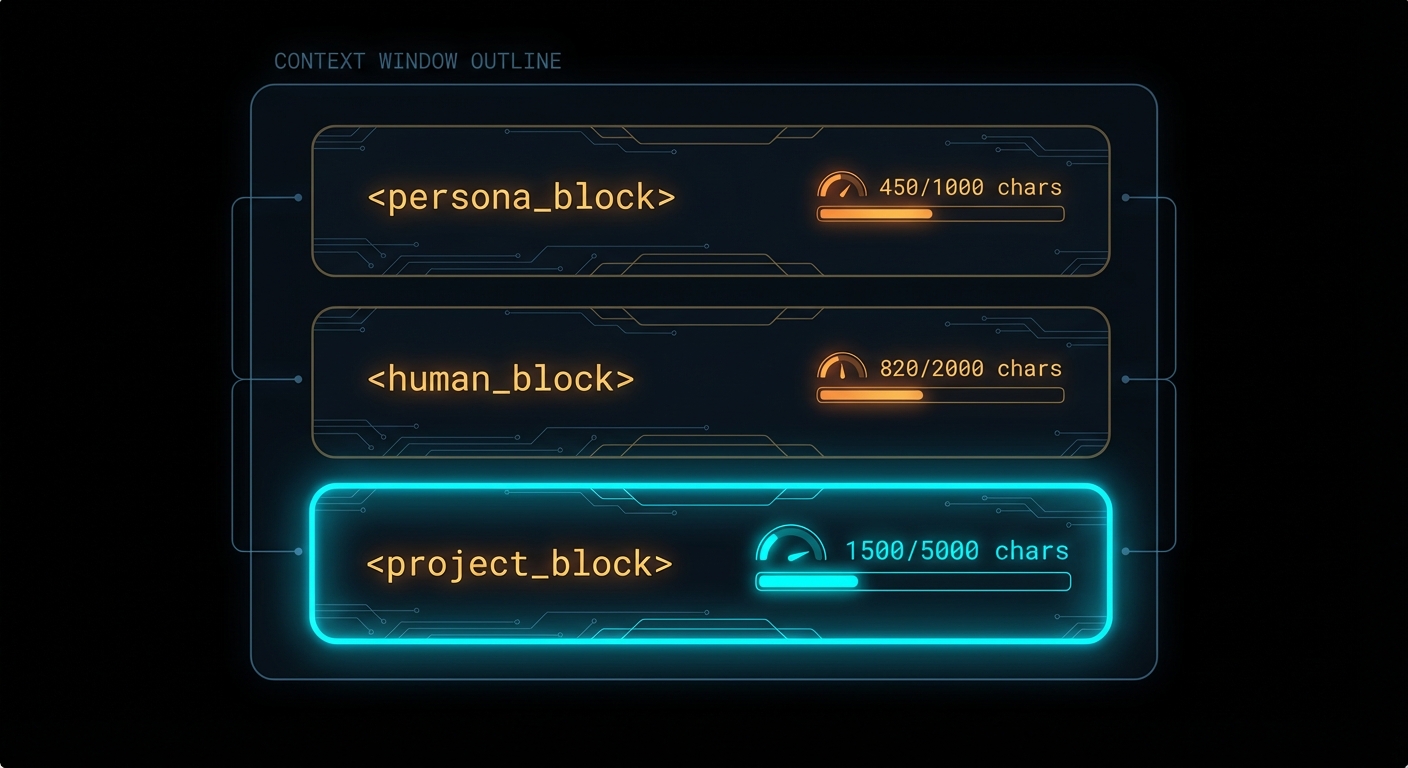
Archival Memory: The Infinite Store
Memory blocks are bounded (5,000 characters by default). For anything that does not fit, Letta provides archival memory: an external vector store backed by pgvector (in the self-hosted setup) or Letta Cloud’s managed index. The agent accesses it via two built-in tool calls that appear in its context as available tools: archival_memory_insert and archival_memory_search.
You do not have to configure these tools; they are always present. When the agent encounters a piece of information that is too large or too ephemeral for a core memory block, it decides to archive it. When it needs to recall something from the past, it issues a semantic search. All of this is embedded in the agent’s reasoning loop, not your application code.
You can also write to archival memory programmatically from your application, which is useful for seeding an agent with existing knowledge:
// seed-archival-memory.js
// Useful for bulk-loading documentation, past conversation summaries,
// or domain knowledge before the agent starts interacting with users

async function seedKnowledge(agentId, documents) {
  for (const doc of documents) {
    await client.agents.archivalMemory.create(agentId, {
      text: doc.content,
    });
    console.log(`Seeded: ${doc.title}`);
  }
}

// Example: seed with codebase context
await seedKnowledge(agentId, [
  { title: 'Auth module', content: 'The authentication module uses JWT with 24h expiry. Refresh tokens stored in Redis with 30-day TTL. See src/auth/...' },
  { title: 'DB schema', content: 'Main tables: users, sessions, events. users.id is UUID. events has a JSONB payload column...' },
  { title: 'Deployment', content: 'Production runs on Render. Two services: api (Node.js) and worker (Bull queue). Shared Postgres on Supabase...' },
]);

// Search archival memory (what the agent would do internally)
const results = await client.agents.archivalMemory.list(agentId, {
  query: 'authentication refresh token',
  limit: 5,
});
Multi-Agent Patterns with Shared Memory Blocks
This is where Letta’s design diverges most sharply from a DIY approach. In our context management article, the A2A section covered how to pass context between agents via structured handoff payloads. Letta adds a second mechanism that is often cleaner: shared memory blocks. A block attached to multiple agents is simultaneously visible to all of them. When any agent updates it, all agents see the change on their next turn.
The coordination pattern this enables: a supervisor agent writes its plan to a shared task_state block. All worker agents have that block in their context windows. The supervisor does not need to message each worker explicitly; the workers read the shared state and self-coordinate. This is closer to a shared blackboard than a message bus, and for many use cases it is significantly simpler:
// multi-agent-setup.js
import Letta from '@letta-ai/letta-client';

const client = new Letta({ baseURL: 'http://localhost:8283' });

// Create a shared state block
const taskStateBlock = await client.blocks.create({
  label: 'task_state',
  description: 'Current task status shared across all agents. Supervisor writes the plan and tracks progress. Workers read their assignments and update status when done.',
  value: JSON.stringify({ status: 'idle', tasks: [], results: [] }),
  limit: 10000,
});

// Create supervisor agent
const supervisor = await client.agents.create({
  name: 'supervisor',
  model: 'anthropic/claude-3-7-sonnet-20250219',
  memory_blocks: [
    { label: 'persona', value: 'I coordinate teams of specialist agents. I decompose tasks, assign them, and synthesise results.' },
  ],
  block_ids: [taskStateBlock.id], // attach shared block
});

// Create worker agents — all share the same task state block
const workers = await Promise.all(['code-analyst', 'security-reviewer', 'doc-writer'].map(name =>
  client.agents.create({
    name,
    model: 'anthropic/claude-3-5-haiku-20241022', // cheaper model for workers
    memory_blocks: [
      { label: 'persona', value: `I am a specialist ${name} agent. I read my assignments from task_state and write my results back.` },
    ],
    block_ids: [taskStateBlock.id],
    tags: ['worker'], // tags enable broadcast messaging
  })
));
For direct agent-to-agent messaging, Letta provides three built-in tools the model can call: send_message_to_agent_async (fire-and-forget, good for kicking off background work), send_message_to_agent_and_wait_for_reply (synchronous, good for gathering results), and send_message_to_agents_matching_all_tags (broadcast to a tagged group).
The supervisor-worker pattern with broadcast looks like this from the application perspective:
// Run the supervisor with a task; it handles delegation internally
const result = await client.agents.messages.create(supervisor.id, {
  messages: [{
    role: 'user',
    content: 'Review the PR at github.com/org/repo/pull/42. Get security, code quality, and docs perspectives.',
  }],
});

// The supervisor will internally:
// 1. Decompose the task into three sub-tasks
// 2. Call send_message_to_agents_matching_all_tags({ tags: ['worker'], message: '...' })
// 3. Each worker agent processes its sub-task
// 4. Results flow back to the supervisor
// 5. Supervisor synthesises and responds to the original message

// You can watch the shared block update in real time:
const state = await client.blocks.retrieve(taskStateBlock.id);
console.log(JSON.parse(state.value));
Conversations API: One Agent, Many Users
The multi-user pattern in Letta has two flavours. The simpler one: create one agent per user. Each agent has its own memory blocks and history. Clean isolation, straightforward. The more powerful one, added in early 2026: the Conversations API, which lets multiple users message a single agent through independent conversation threads without sharing message history.
This is the right pattern for a shared assistant that should have a consistent persona and knowledge base across all users, while keeping each user’s conversation private:
// conversations.js

// Create a single shared agent (one-time setup)
const sharedAssistant = await client.agents.create({
  name: 'company-assistant',
  model: 'anthropic/claude-3-7-sonnet-20250219',
  memory_blocks: [
    {
      label: 'persona',
      value: 'I am the Acme Corp internal assistant. I know our products, policies, and engineering practices.',
    },
    {
      label: 'policies',
      description: 'Company policies. Read-only. Do not modify.',
      value: 'Data retention: 90 days. Escalation path: ops → engineering → CTO. ...',
      read_only: true,
    },
  ],
});

// Each user gets their own conversation thread with this agent
async function getUserConversation(agentId, userId) {
  // List existing conversations for this user
  const conversations = await client.agents.conversations.list(agentId, {
    user_id: userId,
  });

  if (conversations.length > 0) {
    return conversations[0].id; // resume existing
  }

  // Create a new conversation thread for this user
  const conversation = await client.agents.conversations.create(agentId, {
    user_id: userId,
  });
  return conversation.id;
}

// Send a message within a user's private conversation thread
async function sendMessage(agentId, conversationId, userMessage) {
  return client.agents.messages.create(agentId, {
    conversation_id: conversationId,
    messages: [{ role: 'user', content: userMessage }],
  });
}

// Usage: two users, one agent, completely isolated message histories
const aliceConvId = await getUserConversation(sharedAssistant.id, 'user-alice');
const bobConvId   = await getUserConversation(sharedAssistant.id, 'user-bob');

await sendMessage(sharedAssistant.id, aliceConvId, 'What is our data retention policy?');
await sendMessage(sharedAssistant.id, bobConvId,   'How do I escalate a prod incident?');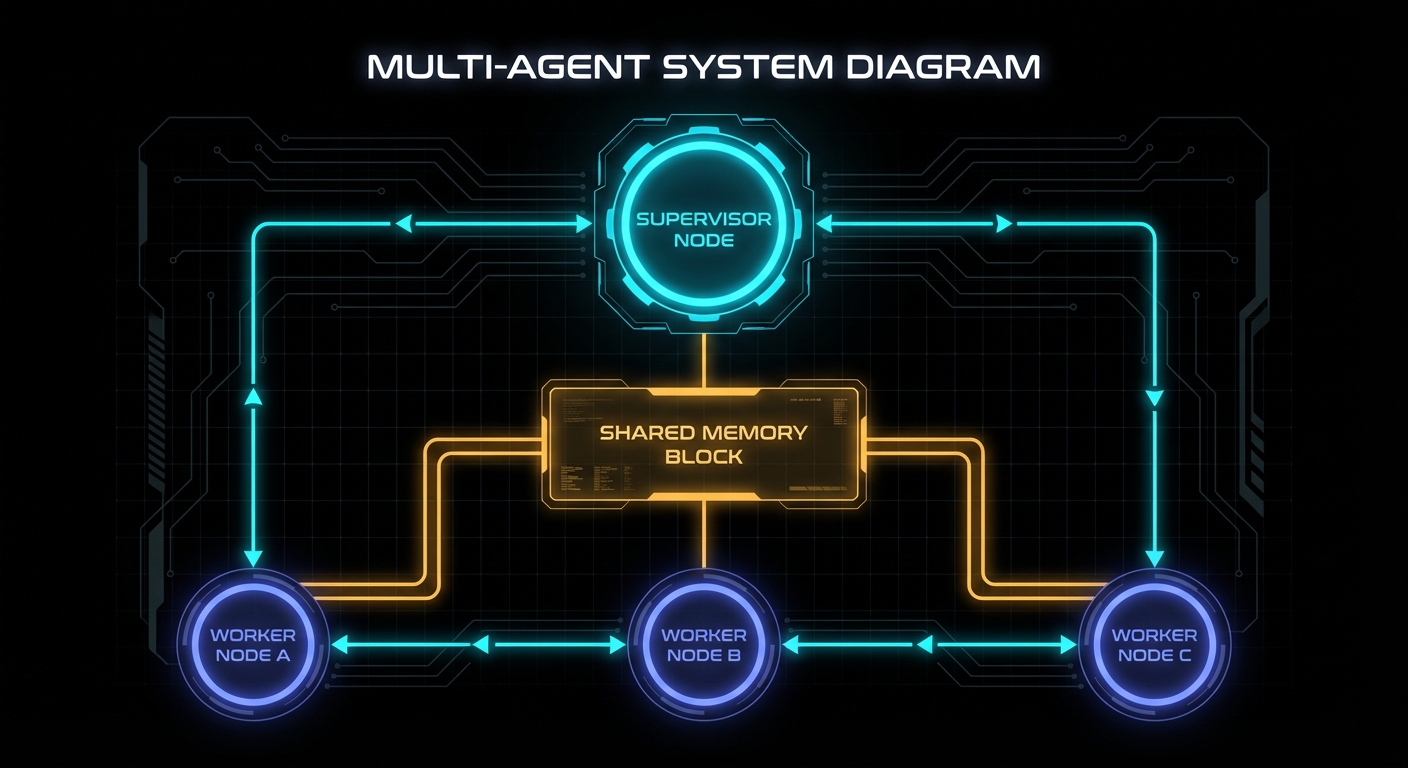
Connecting to What We Built Before
If you built the context manager from the previous article, you already understand what Letta is doing under the hood. The memory blocks are the workspace injection layer (SOUL.md, USER.md, etc.) made into a first-class API. The built-in memory tools are the memoryFlush hook, made automatic. The Conversations API is the session store with user-scoped RLS, managed for you. The archival memory tools are the PostgresMemoryStore with pgvector, managed for you.
The practical question is when to use Letta versus building your own. The answer is usually: use Letta when the standard patterns fit, build your own when they do not. Letta is excellent for: persistent user-facing assistants, multi-agent systems with shared state, anything where you need reliable memory across sessions without owning the infrastructure. Build your own when: you need sub-millisecond latency and cannot afford the Letta server round-trip, you need extreme control over what enters the context window, or you are building a very specialised agent loop that does not match any of Letta’s patterns.
You can also combine both: use Letta for its memory management while driving the agent loop from your own orchestration code. Create the agent via Letta’s API, send messages via the SDK, but handle tool routing, A2A handoffs, and business logic in your application layer:
// hybrid-orchestrator.js
// Use Letta for memory; own your tool routing

import Letta from '@letta-ai/letta-client';
import { handleA2AHandoff } from './a2a-context-bridge.js';
import { handleDomainTool } from './domain-tools.js';

const client = new Letta({ baseURL: 'http://localhost:8283' });

async function runTurn(agentId, userMessage, userId) {
  const response = await client.agents.messages.create(agentId, {
    messages: [{ role: 'user', content: userMessage }],
    // Inject user ID as context so the agent can reference who it's talking to
    stream_steps: false,
  });

  // Process any tool calls that need external routing
  for (const step of response.messages) {
    if (step.message_type === 'tool_call' && step.tool_name === 'delegate_to_agent') {
      // Route A2A handoffs through our own bridge
      const handoffResult = await handleA2AHandoff(step.tool_arguments, userId);

      // Inject the result back into the agent's context as a tool result
      await client.agents.messages.create(agentId, {
        messages: [{
          role: 'tool',
          content: JSON.stringify(handoffResult),
          tool_call_id: step.tool_call_id,
        }],
      });
    }

    if (step.message_type === 'tool_call' && step.tool_name.startsWith('domain_')) {
      const result = await handleDomainTool(step.tool_name, step.tool_arguments);
      await client.agents.messages.create(agentId, {
        messages: [{
          role: 'tool',
          content: JSON.stringify(result),
          tool_call_id: step.tool_call_id,
        }],
      });
    }
  }

  return response.messages
    .filter(m => m.message_type === 'assistant_message')
    .map(m => m.content)
    .join('\n');
}
Deploying Custom Tools
Letta supports three tool types. Server-side tools have code that runs inside the Letta server’s sandboxed environment: safe for untrusted logic, limited in what they can access. MCP tools connect to any Model Context Protocol server: your agent can use any tool exposed by an MCP-compatible service (file systems, databases, web browsers, code execution). Client-side tools return only the JSON schema to the model; your application handles execution and passes the result back.
For production integrations, client-side tools are usually the right choice: your application owns the execution environment, credentials, and error handling. Register the schema with Letta so the model knows the tool exists; intercept the tool call in your application code:
// register-tools.js

// Register a client-side tool (schema only — you handle execution)
const dbQueryTool = await client.tools.create({
  name: 'query_database',
  description: 'Execute a read-only SQL query against the application database. Use for looking up user data, orders, or product information.',
  tags: ['database', 'read-only'],
  source_type: 'json', // client-side: no code, just schema
  json_schema: {
    name: 'query_database',
    description: 'Execute a read-only SQL query',
    parameters: {
      type: 'object',
      properties: {
        query: {
          type: 'string',
          description: 'The SQL query to run. SELECT only. No mutations.',
        },
        limit: {
          type: 'number',
          description: 'Maximum rows to return (default 20, max 100).',
        },
      },
      required: ['query'],
    },
  },
});

// Attach the tool to an agent
await client.agents.tools.attach(agentId, dbQueryTool.id);
What to Watch Out For
- The agent creates its own memory; don’t fight it. The model decides what goes into memory blocks and when. If the agent is not remembering something you expect it to, improve the
descriptionfield on the relevant block. The description is the only instruction the model has for deciding when to write to that block. - Block limits are character counts, not token counts. A 5,000-character block costs roughly 1,250 tokens in your context window on every turn. If you have six blocks at 5,000 chars each, you have already spent 7,500 tokens before a single message is processed. Be deliberate about how many blocks you create and how large they are.
- Shared blocks have last-write-wins semantics. If two agents update the same shared block concurrently, the last write overwrites the earlier one. For coordination state that multiple agents write, use a structured JSON format inside the block and have agents do read-modify-write operations carefully. Or use a dedicated supervisor agent as the sole writer.
- One agent per user is not always the right model. For a large user base, thousands of agents each with their own archival memory index can become expensive to manage. The Conversations API lets one agent serve many users without multiplying infrastructure; evaluate whether your use case actually needs per-user agents or just per-user conversation isolation.
- Seed archival memory before go-live. An agent with an empty archival store has no domain knowledge beyond its system prompt. Invest time before launch in bulk-loading your codebase context, documentation, past decision logs, or relevant domain content. A well-seeded archival store transforms a generic assistant into something that genuinely knows your system.
- Use Claude 3.5 Haiku or GPT-4o mini for worker agents in multi-agent systems. The frontier models (Claude 3.7 Sonnet, GPT-4o) are necessary for the supervisor that does planning and synthesis; they are overkill for workers executing narrow, well-defined tasks. The cost difference is roughly 10x; the capability difference for simple tasks is negligible.
- Heartbeats are the agent’s “thinking” loop. When a tool call returns
request_heartbeat: true, Letta re-invokes the agent so it can reason about the result before responding. This is how multi-step reasoning works. Do not disable heartbeats on tasks that require chaining tool calls; you will get shallow, single-step responses.
nJoy 😉