
Google just dropped a 31-billion-parameter model that sits on the same leaderboard row as Claude Sonnet 4.5 and outranks models 20 times its size. That is not a typo. Gemma 4 31B, released under Apache 2.0 on 2 April 2026, is the densest punch-per-parameter open model the industry has ever seen, and you can run it on the MacBook you already own. If you have been paying $20-200 a month for API access to frontier models, this article is about to ruin your budget justification.

What Exactly Is Gemma 4 31B?
Gemma 4 is a family of open-weight models from Google DeepMind, built from the same research and technology that powers Gemini 3. The family ships in four sizes: E2B and E4B for phones and edge devices, a 26B Mixture-of-Experts (MoE) variant, and the 31B dense flagship. This article focuses on the 31B dense model, which is the largest, highest-quality member of the family.
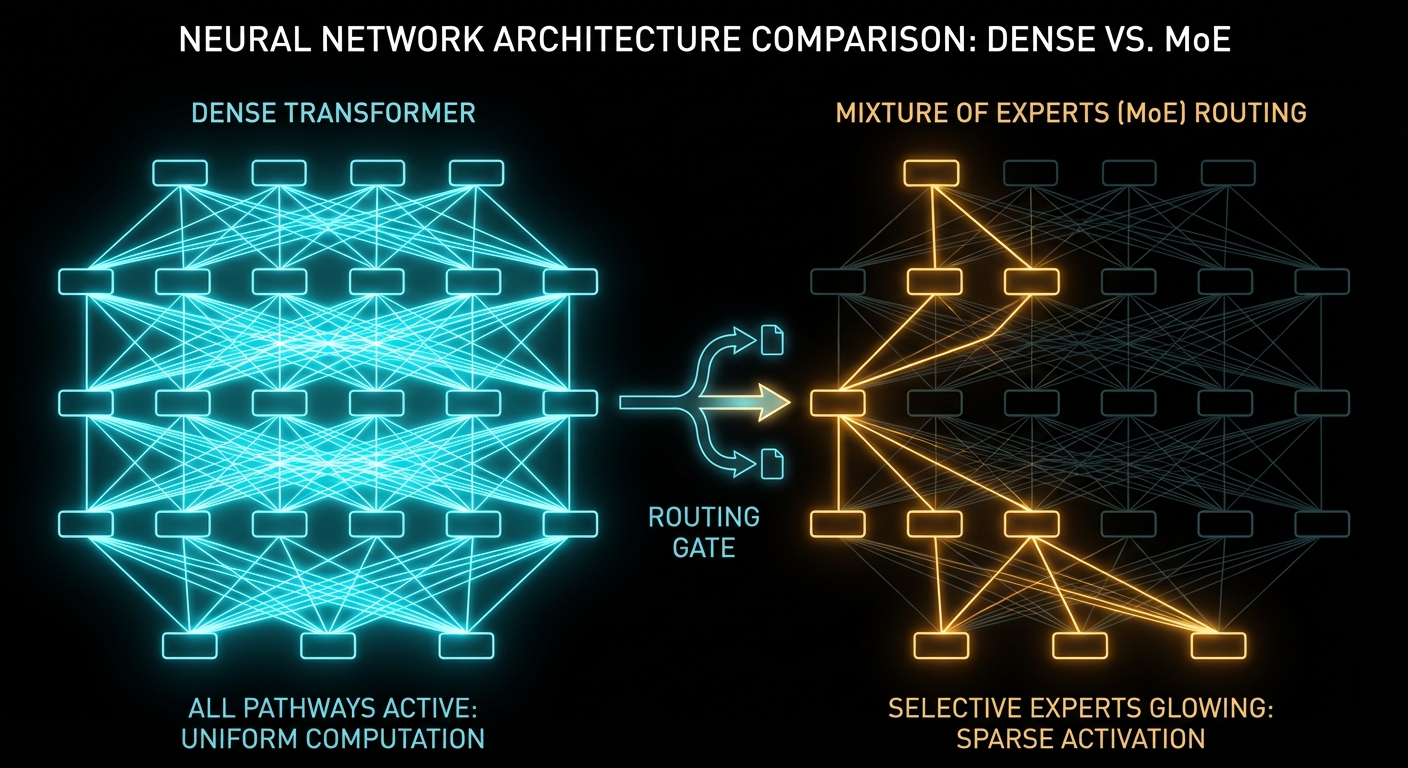
The 31B is a dense transformer, meaning all 30.7 billion parameters fire on every single token. There is no routing, no gating, no “some experts sleep whilst others work.” Every weight participates in every inference step. That architectural simplicity buys you two things: predictable behaviour and maximum quality per parameter.
Here are the core specifications, straight from the official model card:
| Property | Gemma 4 31B Dense |
|---|---|
| Total Parameters | 30.7B |
| Active Parameters | 30.7B (all of them, every token) |
| Layers | 60 |
| Context Window | 256K tokens |
| Sliding Window | 1,024 tokens |
| Vocabulary Size | 262K |
| Vision Encoder | ~550M parameters (27-layer ViT with 2D RoPE) |
| Audio | Not supported (E2B/E4B only) |
| Licence | Apache 2.0 |
| Input Modalities | Text + Images (variable resolution) |
The architecture uses a hybrid attention mechanism that interleaves local sliding-window attention with full global attention, ensuring the final layer is always global. Global layers use unified Keys and Values with Proportional RoPE (p-RoPE) to keep memory manageable at long context lengths. In plain English: the model can see its full 256K-token window without the memory cost exploding the way it would with naive full attention on every layer.
“Built from the same world-class research and technology as Gemini 3, Gemma 4 is the most capable model family you can run on your hardware.” – Google, Gemma 4 Launch Blog
Dense vs Sparse vs MoE: The Architecture That Matters
Understanding why Gemma 4 ships two different 20-30B models requires understanding three architectural paradigms that define how modern LLMs spend compute. This is the single most important concept for choosing which model to run locally, so let us get it right.
Dense Models: Every Neuron, Every Token
A dense transformer activates 100% of its parameters on every forward pass. If a model has 31 billion parameters, it performs 31 billion parameters’ worth of computation for every single token it generates. This is the classical architecture from “Attention Is All You Need” (Vaswani et al., 2017), and it remains the gold standard for raw quality. Dense models are simpler to train, more predictable in behaviour, and generally produce the highest-quality outputs at a given parameter count.
The downside is obvious: compute cost scales linearly with parameter count. Double the parameters, double the FLOPs per token. Gemma 4 31B is a dense model, and that is precisely why it tops the quality charts.
Mixture-of-Experts (MoE): Conditional Computation
MoE models replace certain feed-forward layers with multiple parallel “expert” sub-networks. A learned routing network examines each token and decides which experts handle it. Only a small subset of experts activate per token, so the total parameter count far exceeds the active parameter count.
Take Gemma 4’s 26B A4B variant as a concrete example:
| Property | 26B A4B MoE | 31B Dense |
|---|---|---|
| Total Parameters | 25.2B | 30.7B |
| Active Parameters per Token | 3.8B | 30.7B |
| Expert Count | 128 total, 8 active + 1 shared | N/A (dense) |
| Layers | 30 | 60 |
| Arena AI Score | 1,441 | 1,452 |
| Inference Speed | ~4B model speed | ~31B model speed |
The 26B MoE only activates 3.8 billion parameters per token. That means it computes at roughly the speed of a 4B dense model, despite having the “knowledge capacity” of a 25B model. The trade-off? Slightly lower peak quality and less predictable behaviour for fine-tuning, because the routing decisions add a stochastic element the dense model does not have.
Gemma 4’s MoE is architecturally unusual: each layer runs both a dense GeGLU FFN and a 128-expert MoE system in parallel, then sums the outputs. Most MoE architectures replace the FFN entirely. Gemma 4 keeps both, which partly explains why its MoE variant scores so close to the dense model despite activating far fewer parameters.
Sparse Models: The General Category
MoE is a specific type of sparse architecture, but “sparse” is the broader umbrella. Any model that selectively activates a subset of its parameters per token is sparse. The key insight, as described in Christopher Bishop’s Pattern Recognition and Machine Learning, is that not every feature in a learned representation is relevant to every input. Sparsity exploits this by routing computation only where it is needed.
Here is the practical cheat-sheet:
| Architecture | Compute per Token | Memory Footprint | Best For |
|---|---|---|---|
| Dense | All parameters | All parameters must fit | Maximum quality, fine-tuning, predictable outputs |
| MoE (Sparse) | Active subset only | All parameters must still fit | Fast inference, responsive chat, latency-critical agents |
| Quantised Dense | All parameters (reduced precision) | Reduced (e.g. 4-bit = ~4x smaller) | Running dense models on constrained hardware |
A critical nuance: MoE does not reduce memory requirements. All 25.2B parameters of the 26B MoE must be loaded into memory even though only 3.8B are active per token. The inactive experts are idle but still resident. MoE saves compute, not memory. This is why quantisation and MoE are complementary techniques, and why running the Q4-quantised 31B dense on a Mac with 24GB is actually a better deal than running the full-precision 26B MoE.
The Benchmarks: Arena Rankings and Hard Numbers
Benchmarks are a minefield of cherry-picked numbers and suspiciously round percentages. So let us look at two sources: the Arena AI human-preference leaderboard and the automated benchmark suite from Google’s own model card.
Arena AI: Human Preference Rankings
As of 31 March 2026, the Arena AI text leaderboard has 337 models ranked from 5.7 million human votes. Here is where Gemma 4 lands in the overall table:
| Model | Organisation | Licence | Arena Score |
|---|---|---|---|
| Claude Opus 4.6 Thinking | Anthropic | Proprietary | 1,504 +/- 6 |
| Claude Opus 4.6 | Anthropic | Proprietary | 1,499 +/- 5 |
| Gemini 3.1 Pro | Proprietary | 1,494 +/- 5 | |
| … | |||
| Claude Sonnet 4.5 Thinking | Anthropic | Proprietary | 1,452 +/- 3 |
| Gemma 4 31B | Apache 2.0 | 1,452 +/- 9 | |
| Qwen 3.5 397B A17B | Alibaba | Apache 2.0 | 1,449 +/- 6 |
| Gemini 2.5 Pro | Proprietary | 1,448 +/- 3 | |
| Gemma 4 26B A4B | Apache 2.0 | 1,441 +/- 9 |
Read that again. Gemma 4 31B scores 1,452, matching Claude Sonnet 4.5 Thinking and outranking Gemini 2.5 Pro and Qwen 3.5 397B. Among open-source models, it is ranked #3 in the world. This 31-billion-parameter model is competing with, and beating, models that are far larger. Google claims it “outperforms models up to 20 times larger,” and the Arena data backs that up.
Automated Benchmarks: The Full Picture
Here is a compact benchmark comparison from Google’s official model card:
| Benchmark | Gemma 4 31B | Gemma 4 26B MoE | Gemma 3 27B |
|---|---|---|---|
| MMLU Pro | 85.2% | 82.6% | 67.6% |
| AIME 2026 | 89.2% | 88.3% | 20.8% |
| LiveCodeBench v6 | 80.0% | 77.1% | 29.1% |
| GPQA Diamond | 84.3% | 82.3% | 42.4% |
| Codeforces ELO | 2,150 | 1,718 | 110 |
| MMMU Pro | 76.9% | 73.8% | 49.7% |
| MMMLU | 88.4% | 86.3% | 70.7% |
The AIME 2026 jump is staggering: from 20.8% to 89.2%. The Codeforces ELO went from 110 to 2,150. This is not a small step over Gemma 3, it is a generational leap.
Running Gemma 4 31B on a Mac: The Practical Guide
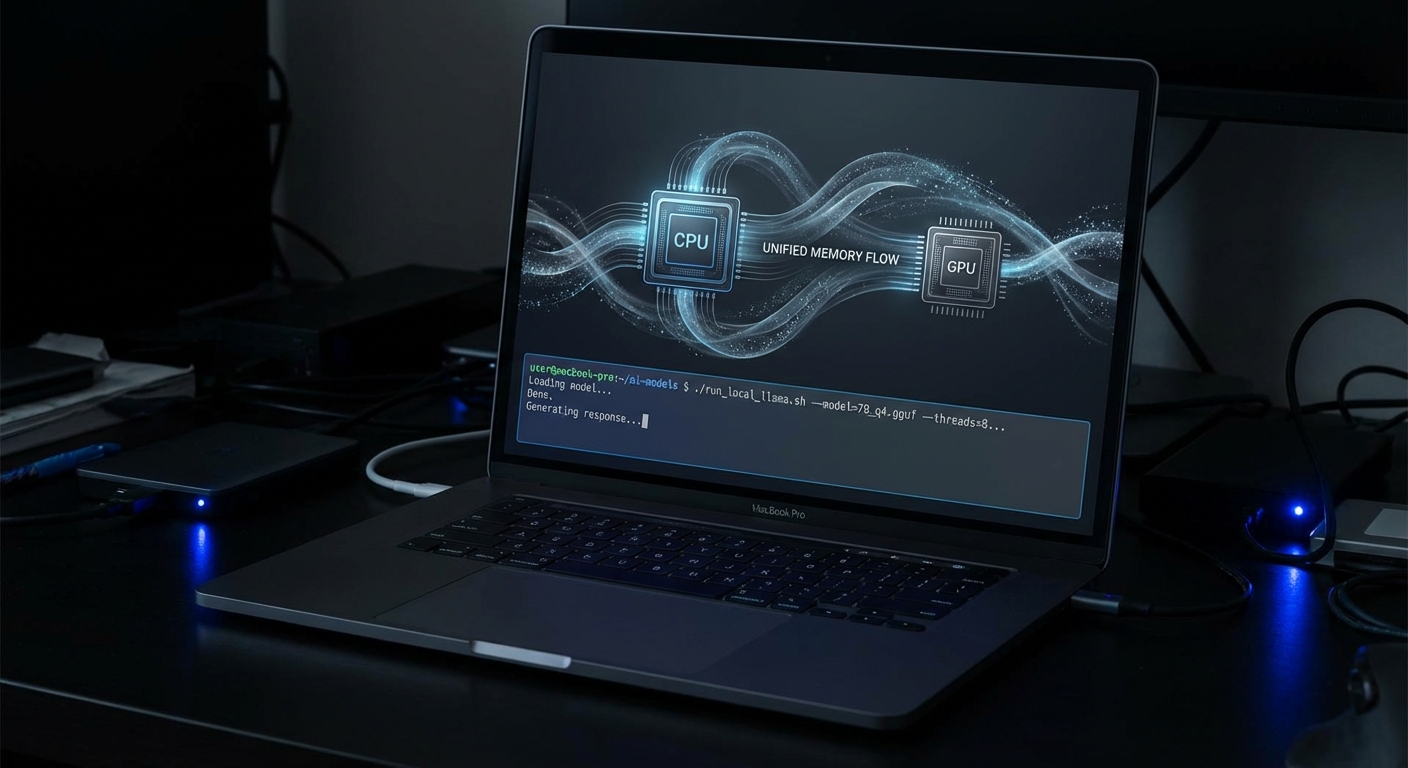
This is where it gets exciting for anyone with an Apple Silicon Mac. The unified memory architecture on M-series chips is a genuine superpower for local LLM inference, because the GPU and CPU share the same RAM pool. No separate VRAM cliff. If you have 24GB, 36GB, or more of unified memory, you are in business.
Memory Requirements
| Precision | Approx. Size | Minimum Memory | Mac Recommendation |
|---|---|---|---|
| BF16 | ~58 GB | 64 GB+ | M2/M3/M4 Max 64GB+ |
| FP8 | ~30 GB | 36 GB+ | M3/M4 Pro 36GB |
| Q4_K_M | ~20 GB | 24 GB+ | M2/M3/M4 Pro 24GB |
| Q3 | ~15 GB | 18 GB+ | Smaller Macs |
The sweet spot for most Mac users is Q4_K_M quantisation at about 20GB. This is the default distribution on Ollama, and it fits comfortably on a 24GB Mac with some headroom left for the operating system.
Step 1: Install Ollama
curl -fsSL https://ollama.com/install.sh | shOr download the macOS app directly from ollama.com.
Step 2: Pull and Run the Model
ollama run gemma4:31bThat is it. Two commands total. The download is around 20GB, and then you are chatting with a model that matches Claude Sonnet 4.5 on the Arena leaderboard.
Expected Performance on Apple Silicon
| Mac Configuration | Quantisation | Approx. Speed | Notes |
|---|---|---|---|
| M4 Max 128GB | Q4_K_M | 40-50 tok/s | Very fast local inference |
| M3/M4 Pro 36GB | Q4_K_M | 20-35 tok/s | Comfortable for extended use |
| M2/M3 Pro 24GB | Q4_K_M | 15-25 tok/s | Usable, context size matters |
| M1/M2 16GB | Q3 | 8-15 tok/s | Tight, consider 26B MoE or E4B |
For reference, human reading speed is roughly 4-5 tokens per second. Even the slower configurations are still readable in real time.
MLX: The Apple Silicon Optimiser
If you want to squeeze more performance out of your Mac, look into MLX, Apple’s machine learning framework optimised specifically for Apple Silicon. Community support for Gemma 4 landed almost immediately, and MLX-optimised models can outperform GGUF-based inference on the same hardware.
pip install mlx-lm
mlx_lm.generate --model Phipper/gemma-4-31b-it-mlx-4bit --prompt "Hello, world"
The trade-off: MLX requires more manual setup than Ollama. For most users, Ollama is the right starting point. For performance enthusiasts, MLX is where things get fun.
The Complete Gemma 4 Family: Four Models, Four Use Cases
The 31B dense flagship is the headline act, but Google shipped three other models in the same family, and understanding the full lineup matters because the right model for you depends on what you have in your pocket, on your desk, or in your rack. Here is the entire family at a glance:
| Model | Architecture | Effective Params | Context | Modalities | Q4 Memory |
|---|---|---|---|---|---|
| E2B | Dense (edge) | 2.3B | 128K | Text, Image, Audio | ~3.2 GB |
| E4B | Dense (edge) | 4.5B | 128K | Text, Image, Audio | ~5 GB |
| 26B A4B | MoE (128 experts) | 3.8B active | 256K | Text, Image | ~15.6 GB |
| 31B | Dense | 30.7B | 256K | Text, Image | ~17.4 GB |
Two things jump out immediately. First, the smaller models are the ones with audio support, not the flagship. The E2B and E4B each carry a dedicated ~300M-parameter audio encoder that the larger models lack. Second, the edge models use a technique called Per-Layer Embeddings (PLE), which gives each decoder layer its own small embedding table for every token. These tables are large but only used for lookups, which is why the “effective” parameter count is much smaller than the total on disk.
Gemma 4 E2B: The Phone Model
E2B has 5.1 billion total parameters but only 2.3 billion effective, and it fits in roughly 3.2 GB at Q4 quantisation. This is small enough to run on a three-year-old smartphone. Through the Google AI Edge Gallery app (available on both iOS and Android), you can download E2B at about 2.5 GB on disk and start chatting with it entirely offline.
The performance claim that shocked the community: E2B beats Gemma 3 27B on most benchmarks despite being roughly 12x smaller in effective parameters. One early tester running it on a basic i7 laptop with 32 GB RAM reported it was “not only faster, it gives significantly better answers” than Qwen 3.5 4B for finance analysis. On a phone, users are seeing roughly 30 tokens per second, which is genuinely conversational speed.
For a Mac with only 8 GB of unified memory, E2B at Q4 is the safe bet. It leaves plenty of headroom for macOS and whatever else you are running. Install it with:
ollama run gemma4:e2bGemma 4 E4B: The Best Small Model You Can Run Anywhere
E4B is the sweet spot for anyone who wants something meaningfully smarter than E2B without jumping to the heavyweight models. At 8 billion total parameters (4.5B effective) and ~5 GB at Q4, it fits comfortably on any Mac with 16 GB of memory and leaves room for a browser, an IDE, and Slack running simultaneously.
E4B is the model David Ondrej demonstrated running on his iPhone 16 Pro Max in the video, and it was clearly usable at conversational speeds. The Edge Gallery app lists it at 3.6 GB on disk. On a phone with a modern chip, expect 20-30 tokens per second. On a Mac with 16 GB, expect 40-60+ tokens per second since the model is small enough to stay entirely in the GPU memory partition.
Crucially, E4B supports native audio input alongside text, image, and video. That means on-device speech recognition, spoken language understanding, and audio analysis, all without sending a byte off your machine. The 31B flagship cannot do any of this.
ollama run gemma4:e4bGemma 4 26B A4B: The Speed Demon
The 26B MoE is the model for people who want high-end quality at dramatically lower latency. Despite having 25.2 billion total parameters, only 3.8 billion are active per token, which means it runs at roughly the speed of a 4B dense model whilst retaining the knowledge capacity of a 25B model.
Real-world benchmarks from Kartikey Chauhan’s testing on a 12 GB VRAM Nvidia card show 44.2 tokens per second for text at 128K context and 42.1 tok/s for vision at 64K context. Those are server-grade numbers from consumer hardware.
On a Mac with 16 GB of unified memory, the 26B A4B at Q4 (~15.6 GB) is technically possible but tight. You will be at the limit of available memory, and macOS itself needs headroom. A 24 GB Mac runs it comfortably. For 16 GB Macs, be conservative with context length and expect some performance degradation from memory pressure.
ollama run gemma4:26bQuality vs Size: What You Actually Lose at Each Step Down
The perennial question with model families is: how much quality do you sacrifice for each size reduction? With Gemma 4, Google published enough benchmark data to answer this precisely. Here is the full family compared side by side:
| Benchmark | 31B Dense | 26B MoE | E4B | E2B | Gemma 3 27B |
|---|---|---|---|---|---|
| MMLU Pro | 85.2% | 82.6% | 69.4% | 60.0% | 67.6% |
| AIME 2026 (Maths) | 89.2% | 88.3% | 42.5% | 37.5% | 20.8% |
| LiveCodeBench v6 | 80.0% | 77.1% | 52.0% | 44.0% | 29.1% |
| GPQA Diamond | 84.3% | 82.3% | 58.6% | 43.4% | 42.4% |
| MMMU Pro (Vision) | 76.9% | 73.8% | 52.6% | 44.2% | 49.7% |
| MMMLU (Multilingual) | 88.4% | 86.3% | 76.6% | 67.4% | 70.7% |
| Tau2 Agentic (avg over 3) | 76.9% | 68.2% | 42.2% | 24.5% | 16.2% |
| Codeforces ELO | 2,150 | 1,718 | 940 | 633 | 110 |
The pattern is clear: the 31B-to-26B step is almost free. You lose roughly 2-3 percentage points on most benchmarks but gain dramatically faster inference. This is the best trade-off in the entire lineup. The 26B MoE at 88.3% on AIME is essentially indistinguishable from the 31B’s 89.2% for any practical purpose.
The 26B-to-E4B step is where the cliff hits. You go from 88.3% to 42.5% on AIME, from 77.1% to 52.0% on LiveCodeBench, and from 85.5% to 57.5% on agentic tasks. This is where “frontier local model” becomes “capable assistant.” E4B is excellent for its size, but it is not in the same league as the two larger models for maths, competitive coding, or complex tool use.
The E4B-to-E2B step is gentler than expected. E2B typically loses 5-15 percentage points versus E4B, which is surprisingly modest given the 2x parameter difference. For basic Q&A, translation, summarisation, and conversational use, E2B is genuinely useful. It even beats Gemma 3 27B on multilingual tasks (67.4% vs 70.7% is close, but E2B’s AIME score of 37.5% vs Gemma 3’s 20.8% is a clear win).
Perhaps the most striking trend in the table: E2B scores 24.5% on Tau2 agentic tasks versus Gemma 3 27B’s 16.2%. A model you can run on a phone outperforms last year’s full-size model at tool use by a clear margin. Meanwhile, the 31B’s 76.9% average across all three Tau2 domains is nearly 5x what Gemma 3 managed. That is not an incremental improvement; it is proof that architectural progress matters more than raw scale.
Running Every Gemma 4 Model: A Hardware Decision Tree
Here is the practical guide to matching your hardware to the right model. Start from whatever you own and work your way to the best model it can handle:
| Your Hardware | Best Gemma 4 Model | Quantisation | Expected Speed | Quality Tier |
|---|---|---|---|---|
| iPhone / Android (3+ years old) | E2B | INT4 | ~30 tok/s | Good assistant, basic coding |
| iPhone / Android (recent) | E4B | INT4 | 20-30 tok/s | Strong assistant, decent coding |
| Mac M1/M2 8GB | E2B or E4B | Q4 | 50-80 tok/s | Good assistant with audio |
| Mac M1/M2/M3 16GB | E4B (safe) or 26B A4B (tight) | Q4 | 40-60 / 15-25 tok/s | Strong / Near-frontier |
| Mac M2/M3/M4 Pro 24GB | 26B A4B or 31B | Q4 | 25-40 / 15-25 tok/s | Near-frontier / Frontier |
| Mac M3/M4 Pro 36GB | 31B | Q4 or Q8 | 20-35 tok/s | Frontier |
| Mac M3/M4 Max 64GB+ | 31B | BF16 | 40-50 tok/s | Frontier, full precision |
| Nvidia GPU 12GB VRAM | 26B A4B | Q5 | ~44 tok/s | Near-frontier |
The 12 GB Nvidia GPU result deserves special mention. Kartikey Chauhan’s detailed benchmarking of the 26B A4B on a 12 GB card using llama.cpp showed 44.2 tokens per second for text and 42.1 tok/s for vision, both at 128K context. He reported that the model is “an excellent default” for daily interactive use, with stable generation and no constant OOM babysitting once the right memory profile is set. The key was using fit-based GPU placement rather than forcing everything into VRAM.
For the edge models on phones, the Google AI Edge Gallery app is genuinely the easiest path. Download it, pick E2B or E4B, wait for the 2.5-3.6 GB download, and start chatting. Everything runs offline, nothing leaves your device, and the models support function calling for agentic tasks directly on the phone.
The 16 GB Mac Dilemma
The most common question in the community: “I have a MacBook with 16 GB, can I run the good stuff?” The honest answer is nuanced:
- E4B at Q4 (~5 GB): Runs beautifully. Fast, responsive, with plenty of headroom. This is the comfortable choice.
- 26B A4B at Q4 (~15.6 GB): Technically fits but leaves almost no room for macOS and apps. Expect memory pressure, swap usage, and slower generation as context grows. Usable for short conversations; painful for long ones.
- 31B at Q4 (~17.4 GB): Does not fit. You will hit swap immediately, and inference will crawl.
If you have a 16 GB Mac and want the best possible quality, the 26B A4B is your ceiling, but keep context short and close other apps. If you want a smooth, reliable experience, E4B is the pragmatic winner. It scores 52% on LiveCodeBench (enough for practical coding help), 58.6% on GPQA Diamond (solid science reasoning), and it can process audio natively, which neither of the larger models can.
How Good Are These Models for Coding?
If you are a developer considering local models as a coding assistant, the benchmark numbers matter less than a straight answer: can this thing actually help me write code? Here is the honest breakdown for each model, using LiveCodeBench v6 (real coding tasks, not just function completion) and Codeforces ELO (competitive problem solving) as the primary yardsticks:
| Model | LiveCodeBench v6 | Codeforces ELO | Comparable To | Practical Coding Level |
|---|---|---|---|---|
| E2B | 44.0% | 633 | GPT-3.5-class | Handles boilerplate, simple functions, basic refactors. Struggles with multi-file logic or complex algorithms. |
| E4B | 52.0% | 940 | GPT-4o-mini / Claude 3.5 Haiku | Writes working functions, understands context, handles standard patterns. The level that powers most “free tier” coding assistants. |
| 26B A4B | 77.1% | 1,718 | GPT-4o / Claude 3.5 Sonnet | Strong coder. Handles multi-step problems, debugging, architectural reasoning, and non-trivial algorithms reliably. |
| 31B | 80.0% | 2,150 | Claude Sonnet 4.5 | Frontier-class. Solves most competitive programming problems and writes production-quality code with real architectural awareness. |
The Codeforces 1,718 ELO for the 26B MoE puts it at roughly “Candidate Master” level, meaning it can solve the majority of interview-style programming problems and a solid chunk of competitive challenges. The 31B at 2,150 ELO is in “Master” territory. For context, Gemma 3 27B scored 110 ELO on the same benchmark. That is not a typo.
The practical takeaway: if you have the memory for the 26B A4B or 31B, you have a genuinely capable local coding assistant that rivals the paid API models most developers use today. If you are limited to E4B, you still get a useful companion for everyday development, roughly on par with the models that power free-tier tools like GitHub Copilot’s lighter backend. E2B is better suited for quick scripting help, code explanation, and boilerplate generation than for serious algorithmic work.
A Suggested Workflow for Constrained Hardware
If your Mac cannot comfortably run the 26B or 31B, a practical approach is to run E4B as your always-on local model for inline help, autocomplete, and quick questions, then fall back to a cloud API (Claude, GPT-4o, or Gemma 4 31B via Google AI Studio, which offers a free tier) for the 20% of problems where E4B is not enough. You get speed and privacy for the easy stuff, and quality for the hard stuff.
CPU-Only Servers: Running Gemma 4 Without a GPU
Not everyone runs inference on a laptop or a gaming PC. If you have access to a rack server, a cloud VM, or any x86 machine with a lot of RAM but no GPU, Gemma 4 still works. The entire family runs on CPU-only hardware via llama.cpp, Ollama, or vLLM.
The key constraint on CPU-only inference is memory bandwidth, not compute. LLM token generation is fundamentally a memory-bound operation: the model reads weights from RAM for every token. A typical DDR4 server delivers 40-80 GB/s of memory bandwidth, versus 200-400 GB/s on Apple Silicon or 900+ GB/s on an Nvidia A100. Those extra CPU cores help with prompt ingestion (prefill) but barely move the needle on generation speed.
Here is what to expect on a typical high-core-count x86 server with DDR4 (e.g., a dual-socket Xeon or EPYC with 256-384 GB RAM):
| Model | Precision | RAM Used | Est. Generation Speed | Best Use Case |
|---|---|---|---|---|
| E2B | BF16 | ~10 GB | 15-30 tok/s | High-throughput batch processing, multi-worker serving |
| E4B | BF16 | ~16 GB | 10-20 tok/s | Quality-per-watt sweet spot for CPU serving |
| 26B A4B | BF16 | ~50 GB | 8-15 tok/s | Near-frontier quality, MoE helps since less data moves per token |
| 31B | BF16 | ~58 GB | 3-8 tok/s | Maximum quality when latency is not critical |
With 384 GB of RAM, you can run the 31B at full BF16 precision with no quantisation loss at all. Most consumer setups cannot do this. The trade-off is generation speed: expect 3-8 tokens per second for the 31B on DDR4, which is below human reading speed (~4-5 tok/s) but still usable for batch jobs, API backends, or any workflow where you do not need instant responses.
The 26B MoE is the star on CPU-only servers. Because only 3.8B parameters are active per token, it moves far less data through the memory bus than the 31B dense model, which means the memory-bandwidth bottleneck hurts less. Expect 8-15 tok/s at full precision, which is genuinely conversational speed, with quality only 2-3% behind the flagship.
For serving multiple concurrent users, consider running several E4B instances across those 56 cores rather than one large model. Each instance uses ~16 GB at BF16, so you could run 10+ parallel workers within 384 GB of RAM, giving you high aggregate throughput for an internal team.
Multimodal Capabilities: What It Can and Cannot See
Gemma 4 31B is multimodal for vision, accepting both text and images as input with text output. It includes a ~550M-parameter vision encoder and supports variable aspect ratios and resolutions.
- Object detection and description – identify and describe objects in images
- Document and PDF parsing – extract structure and text
- OCR – including multilingual OCR
- Chart comprehension – read graphs and visual data
- Screen and UI understanding – parse app screenshots and interfaces
- Video understanding – analyse sequences of frames
On MMMU Pro, Gemma 4 31B scores 76.9%, up from Gemma 3’s 49.7%. That is a serious jump in multimodal quality.
What it cannot do: the 31B model does not support audio input. Audio is only available on E2B and E4B. So if you need speech recognition or spoken language understanding, the small models are actually more capable in that modality than the flagship.
140+ Language Support
Gemma 4 is trained on over 140 languages, with out-of-the-box support for 35+ languages. Community testing suggests it is especially strong on multilingual tasks, and the official MMMLU score of 88.4% backs that up.
“Natively trained on over 140 languages, Gemma 4 helps developers build inclusive, high-performance applications for a global audience.” – Google AI for Developers, Gemma 4 Model Overview
This multilingual strength is one of Gemma 4’s real differentiators. If you build products for non-English audiences, this is not a side feature, it is the feature.
Choosing the Right Model: A Practical Decision Guide
With four models in the family, the question is no longer “should I run Gemma 4?” but “which Gemma 4?” Here is the decision matrix:
- You have 24 GB+ and want the absolute best quality: Run the 31B dense. It is the quality ceiling of the family.
- You have 24 GB+ but care about speed: Run the 26B A4B MoE. You lose 2-3% on benchmarks but gain roughly 2-4x faster inference. For most real tasks, you will not notice the quality difference.
- You have a 16 GB Mac: The E4B is your best realistic option. The 26B A4B technically fits at Q4 but will struggle with memory pressure. E4B leaves comfortable headroom and still scores above Gemma 3 27B on key benchmarks.
- You have an 8 GB Mac or a phone: Run E2B. At ~3.2 GB it fits anywhere, and it still beats Gemma 3 27B on maths and coding benchmarks despite being 12x smaller.
- You need audio processing: Only E2B and E4B support native audio input. The 31B and 26B cannot hear anything.
- You want to run AI entirely offline on your phone: Install the Google AI Edge Gallery app and pick E2B (2.5 GB) or E4B (3.6 GB). Everything runs locally, no data leaves your device.
- You need the longest possible context: Only the 31B and 26B support 256K tokens. The edge models cap at 128K.
- You want the absolute fastest time-to-first-token: E2B is the speed king, though E4B is close behind.
What to Check Right Now
- Check your Mac’s unified memory (Apple menu, About This Mac). Match it to the hardware decision tree above to find your optimal model.
- Install Ollama and try the model that fits your hardware:
ollama run gemma4:e2b– any Mac, any phone (3.2 GB)ollama run gemma4:e4b– 8 GB+ Macs (5 GB)ollama run gemma4:26b– 16 GB+ Macs, tight fit (15.6 GB)ollama run gemma4:31b– 24 GB+ Macs (17.4 GB)
- Try the Edge Gallery on your phone. Download the Google AI Edge Gallery (iOS and Android), grab E2B or E4B, and chat completely offline.
- Compare against your paid model. Try your real prompts, not toy benchmarks. The 31B matches Claude Sonnet 4.5 on Arena; the E2B beats Gemma 3 27B on maths. Test them yourself.
- Test the 26B MoE if you have the RAM. It is the best speed-to-quality ratio in the family: 44 tok/s on a 12 GB Nvidia card, and only 2-3% behind the 31B on benchmarks.
- Watch for better quantisations and QAT releases. Unsloth, MLX Community, and other groups are actively improving the quantised variants. Quality improvements are still landing.
- Take the Apache 2.0 licence seriously. Commercial use, modification, redistribution, and fine-tuning are all on the table for every model in the family.

Video Attribution
This article was inspired by David Ondrej’s video covering the Gemma 4 release. The analysis, benchmarks, architecture deep-dive, and Mac deployment guide are original research drawing from Google DeepMind’s official documentation, the Arena AI leaderboard, community testing, and the Hugging Face model card.
nJoy 😉