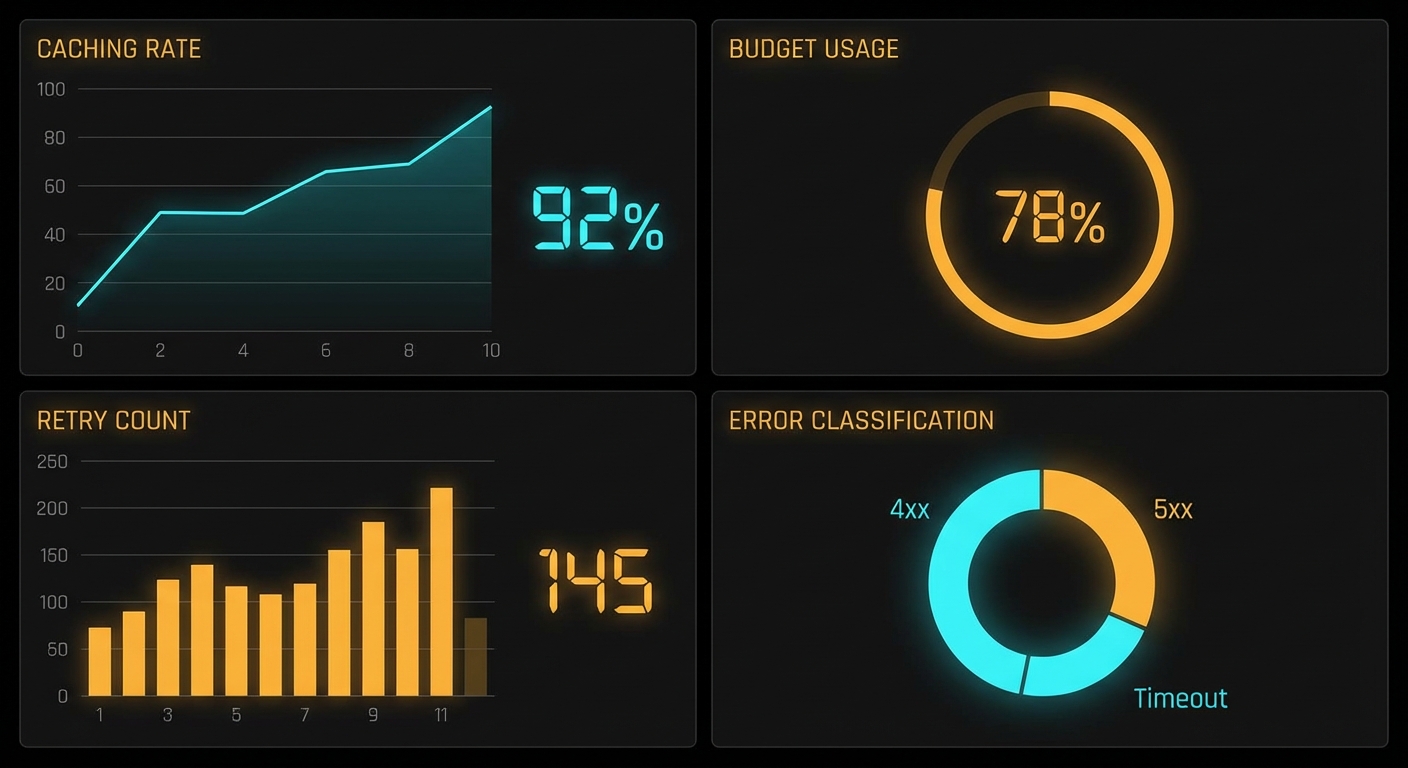
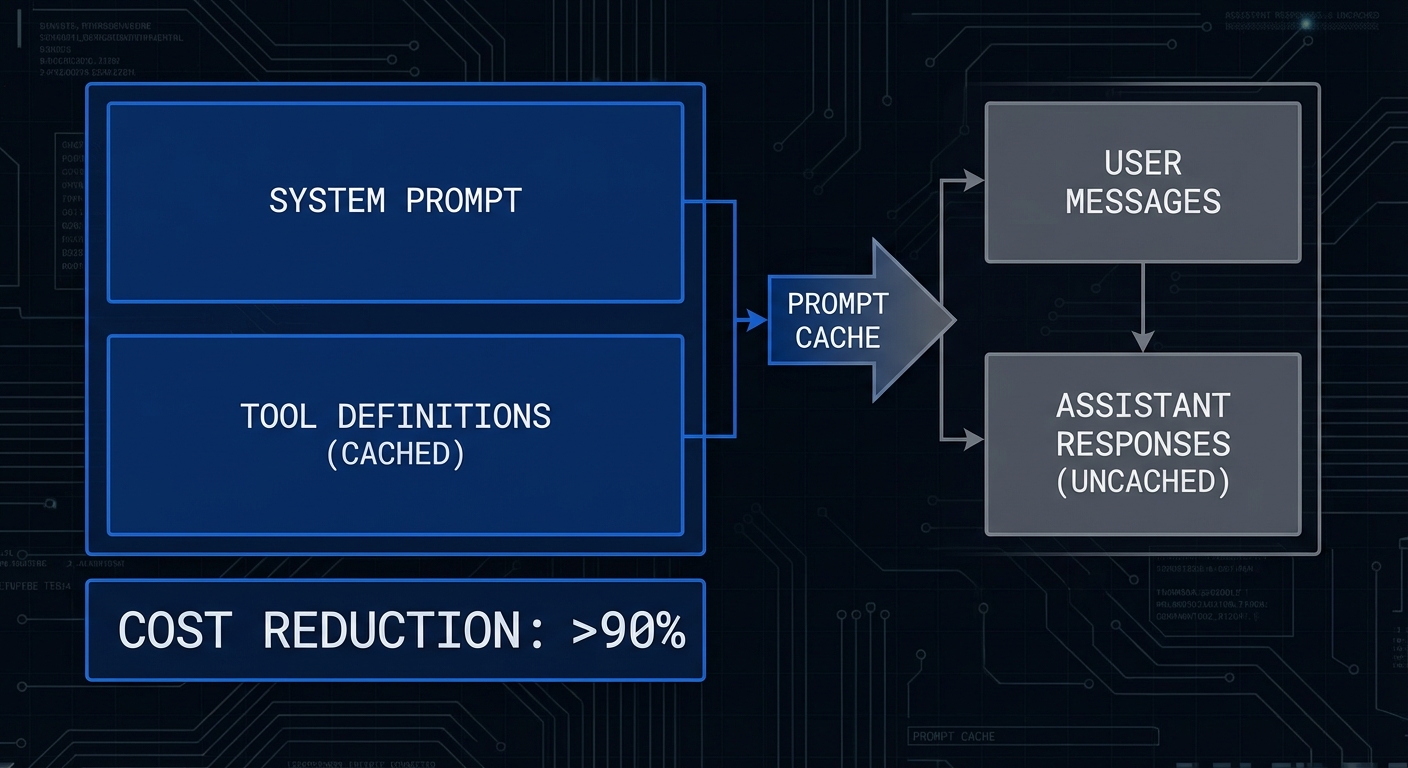
%3Cp%3EThree%20months%20of%20production%20experience%20with%20Claude%20%2B%20MCP%20teaches%20you%20things%20that%20no%20documentation%20covers.%20The%20retry%20patterns%20that%20actually%20work.%20The%20system%20prompts%20that%20reduce%20hallucinated%20tool%20calls.%20The%20caching%20strategies%20that%20cut%20your%20bill%20in%20half.%20The%20error%20classes%20you%20will%20encounter%20and%20the%20ones%20that%20silently%20corrupt%20output.%20This%20lesson%20consolidates%20those%20hard-won%20patterns%20into%20a%20reference%20you%20can%20apply%20directly.%3C/p%3E%0A%0A%3Cfigure%20style%3D%22margin%3A2em%200%3Btext-align%3Acenter%3B%22%3E%0A%20%20%3Cimg%20src%3D%22https%3A//sudoall.com/wp-content/uploads/2026/03/mcp-claude-prod-hero.jpeg%22%20alt%3D%22Production%20Claude%20MCP%20patterns%20overview%20diagram%20showing%20caching%20retry%20budget%20observability%20blocks%20dark%22%20style%3D%22max-width%3A100%25%3Bborder-radius%3A8px%3B%22%20/%3E%0A%20%20%3Cfigcaption%20style%3D%22color%3A%23888%3Bfont-size%3A0.9em%3Bmargin-top%3A0.5em%3B%22%3EProduction%20Claude%20%2B%20MCP%3A%20the%20patterns%20that%20separate%20reliable%20systems%20from%20ones%20that%20fail%20at%202am.%3C/figcaption%3E%0A%3C/figure%3E%0A%0A%3Ch2%3EPrompt%20Caching%20for%20Cost%20Reduction%3C/h2%3E%0A%0A%3Cp%3EAnthropic%27s%20prompt%20caching%20feature%20caches%20portions%20of%20the%20input%20prompt%20that%20do%20not%20change%20between%20requests.%20For%20MCP%20applications%2C%20the%20tool%20definitions%20and%20system%20prompt%20are%20perfect%20candidates%20-%20they%20are%20typically%20the%20same%20for%20every%20user%20in%20a%20session.%20Caching%20them%20can%20reduce%20costs%20by%2050-90%25%20on%20repeated%20calls.%3C/p%3E%0A%0A%3Cpre%3E%3Ccode%3E//%20Enable%20prompt%20caching%20for%20stable%20content%0Aconst%20response%20%3D%20await%20anthropic.messages.create%28%7B%0A%20%20model%3A%20%27claude-3-5-sonnet-20241022%27%2C%0A%20%20max_tokens%3A%204096%2C%0A%20%20system%3A%20%5B%0A%20%20%20%20%7B%0A%20%20%20%20%20%20type%3A%20%27text%27%2C%0A%20%20%20%20%20%20text%3A%20%60You%20are%20a%20helpful%20assistant%20with%20access%20to%20our%20product%20database%20and%20order%20management%20system.%0AAlways%20verify%20product%20availability%20before%20confirming%20orders.%0AFormat%20all%20prices%20in%20USD.%60%2C%0A%20%20%20%20%20%20cache_control%3A%20%7B%20type%3A%20%27ephemeral%27%20%7D%2C%20%20//%20Cache%20this%20system%20prompt%0A%20%20%20%20%7D%2C%0A%20%20%5D%2C%0A%20%20tools%3A%20claudeTools.map%28t%20%3D%3E%20%28%7B%0A%20%20%20%20…t%2C%0A%20%20%20%20//%20Cache%20tool%20definitions%20-%20they%20rarely%20change%0A%20%20%20%20…%28claudeTools.indexOf%28t%29%20%3D%3D%3D%20claudeTools.length%20-%201%0A%20%20%20%20%20%20%3F%20%7B%20cache_control%3A%20%7B%20type%3A%20%27ephemeral%27%20%7D%20%7D%20%20//%20Cache%20after%20last%20tool%20definition%0A%20%20%20%20%20%20%3A%20%7B%7D%29%2C%0A%20%20%7D%29%29%2C%0A%20%20messages%2C%0A%7D%29%3B%0A%0A//%20Check%20cache%20performance%20in%20usage%20stats%0Aconst%20usage%20%3D%20response.usage%3B%0Aconsole.error%28%60Cache%3A%20%24%7Busage.cache_read_input_tokens%7D%20hit%2C%20%24%7Busage.cache_creation_input_tokens%7D%20created%60%29%3B%0A%3C/code%3E%3C/pre%3E%0A%0A%3Cblockquote%20style%3D%22border-left%3A4px%20solid%20%2300bcd4%3Bmargin%3A1.5em%200%3Bpadding%3A0.5em%201.5em%3Bcolor%3A%23aaa%3Bfont-style%3Aitalic%3B%22%3E%0A%22Prompt%20caching%20enables%20you%20to%20cache%20portions%20of%20your%20prompt.%20Cached%20data%20is%20stored%20server-side%20for%20a%20rolling%205-minute%20period%2C%20after%20which%20it%20expires.%20Cache%20hits%20save%2090%25%20of%20input%20token%20costs%20for%20the%20cached%20portion.%22%20-%20%3Ca%20href%3D%22https%3A//docs.anthropic.com/en/docs/build-with-claude/prompt-caching%22%20target%3D%22_blank%22%20rel%3D%22noopener%22%3EAnthropic%20Documentation%2C%20Prompt%20Caching%3C/a%3E%0A%3C/blockquote%3E%0A%0A%3Ch2%3ESystem%20Prompt%20Patterns%20That%20Work%3C/h2%3E%0A%0A%3Cp%3EClaude%20responds%20better%20to%20system%20prompts%20that%20describe%20the%20persona%2C%20define%20tool%20usage%20rules%2C%20specify%20output%20format%2C%20and%20set%20boundaries%20-%20in%20that%20order.%20Vague%20system%20prompts%20produce%20vague%20tool%20use.%3C/p%3E%0A%0A%3Cpre%3E%3Ccode%3Econst%20PRODUCTION_SYSTEM_PROMPT%20%3D%20%60You%20are%20a%20precise%20product%20research%20assistant%20for%20TechStore.%0A%0ATOOL%20USAGE%20RULES%3A%0A1.%20Always%20call%20search_products%20before%20making%20any%20recommendations%0A2.%20For%20price%20comparisons%2C%20call%20get_product_price%20for%20each%20product%20separately%0A3.%20If%20a%20product%20has%20less%20than%203%20reviews%2C%20note%20%22limited%20reviews%22%20in%20your%20response%0A4.%20Never%20recommend%20products%20that%20are%20out%20of%20stock%20%28use%20check_availability%20first%29%0A5.%20If%20tools%20return%20errors%2C%20explain%20what%20you%20could%20not%20verify%20rather%20than%20guessing%0A%0AOUTPUT%20FORMAT%3A%0A-%20Lead%20with%20the%20recommendation%2C%20then%20supporting%20evidence%0A-%20Include%20price%2C%20rating%2C%20and%20availability%20for%20each%20recommended%20product%0A-%20Use%20bullet%20points%20for%20product%20comparisons%0A-%20End%20with%20%22Note%3A%20Stock%20and%20prices%20verified%20at%20%5Bcurrent%20timestamp%5D%22%0A%0ABOUNDARIES%3A%0A-%20You%20can%20only%20recommend%20products%20from%20our%20catalogue%0A-%20Do%20not%20speculate%20about%20products%20not%20in%20the%20search%20results%0A-%20If%20the%20user%20asks%20for%20something%20outside%20our%20catalogue%2C%20say%20so%20clearly%60%3B%0A%3C/code%3E%3C/pre%3E%0A%0A%3Cfigure%20style%3D%22margin%3A2em%200%3Btext-align%3Acenter%3B%22%3E%0A%20%20%3Cimg%20src%3D%22https%3A//sudoall.com/wp-content/uploads/2026/03/mcp-claude-prod-caching.jpeg%22%20alt%3D%22Anthropic%20prompt%20caching%20diagram%20showing%20system%20prompt%20and%20tool%20definitions%20cached%20versus%20messages%20uncached%20cost%20reduction%22%20style%3D%22max-width%3A100%25%3Bborder-radius%3A8px%3B%22%20/%3E%0A%20%20%3Cfigcaption%20style%3D%22color%3A%23888%3Bfont-size%3A0.9em%3Bmargin-top%3A0.5em%3B%22%3EPrompt%20caching%3A%20static%20content%20%28system%20prompt%2C%20tool%20definitions%29%20cached%20at%2090%25%20discount%3B%20dynamic%20messages%20are%20not%20cached.%3C/figcaption%3E%0A%3C/figure%3E%0A%0A%3Ch2%3EProduction%20Error%20Taxonomy%3C/h2%3E%0A%0A%3Cpre%3E%3Ccode%3E//%20Claude%20API%20errors%20and%20how%20to%20handle%20them%0A%0A//%20429%20-%20Rate%20limit%3A%20retry%20with%20exponential%20backoff%0A//%20529%20-%20Overloaded%3A%20retry%20with%20longer%20backoff%20%28Anthropic%20load%29%0A//%20400%20-%20Bad%20request%3A%20check%20tool%20schema%2C%20messages%20format%2C%20max_tokens%0A//%20401%20-%20Auth%20error%3A%20check%20ANTHROPIC_API_KEY%0A//%20413%20-%20Request%20too%20large%3A%20trim%20context%20or%20summarize%20conversation%20history%0A%0A//%20Non-error%20patterns%20to%20watch%3A%0A//%20stop_reason%20%3D%3D%3D%20%27max_tokens%27%20-%20response%20was%20cut%20off%2C%20increase%20max_tokens%0A//%20stop_reason%20%3D%3D%3D%20%27end_turn%27%20but%20no%20text%20-%20model%20may%20be%20stuck%2C%20check%20context%0A%0Aasync%20function%20callClaudeWithRetry%28params%2C%20maxRetries%20%3D%203%29%20%7B%0A%20%20for%20%28let%20attempt%20%3D%201%3B%20attempt%20%3C%3D%20maxRetries%3B%20attempt%2B%2B%29%20%7B%0A%20%20%20%20try%20%7B%0A%20%20%20%20%20%20return%20await%20anthropic.messages.create%28params%29%3B%0A%20%20%20%20%7D%20catch%20%28err%29%20%7B%0A%20%20%20%20%20%20const%20shouldRetry%20%3D%20err.status%20%3D%3D%3D%20429%20%7C%7C%20err.status%20%3D%3D%3D%20529%20%7C%7C%20err.status%20%3E%3D%20500%3B%0A%20%20%20%20%20%20if%20%28%21shouldRetry%20%7C%7C%20attempt%20%3D%3D%3D%20maxRetries%29%20throw%20err%3B%0A%0A%20%20%20%20%20%20const%20delay%20%3D%20Math.min%281000%20%2A%20Math.pow%282%2C%20attempt%29%2C%2030000%29%3B%0A%20%20%20%20%20%20const%20retryAfter%20%3D%20err.headers%3F.%5B%27retry-after%27%5D%0A%20%20%20%20%20%20%20%20%3F%20parseInt%28err.headers%5B%27retry-after%27%5D%29%20%2A%201000%0A%20%20%20%20%20%20%20%20%3A%20delay%3B%0A%0A%20%20%20%20%20%20console.error%28%60%5Bclaude%5D%20Attempt%20%24%7Battempt%7D%20failed%20%28%24%7Berr.status%7D%29%2C%20retrying%20in%20%24%7BretryAfter%7Dms%60%29%3B%0A%20%20%20%20%20%20await%20new%20Promise%28r%20%3D%3E%20setTimeout%28r%2C%20retryAfter%29%29%3B%0A%20%20%20%20%7D%0A%20%20%7D%0A%7D%0A%3C/code%3E%3C/pre%3E%0A%0A%3Ch2%3EContext%20Management%20for%20Long%20Conversations%3C/h2%3E%0A%0A%3Cpre%3E%3Ccode%3E//%20Summarise%20old%20conversation%20history%20when%20approaching%20context%20limits%0A//%20Claude%203.5%20Sonnet%20context%3A%20200K%20tokens%20%28allows%20very%20long%20conversations%29%0A//%20But%20cost%20grows%20linearly%20with%20context%20-%20summarize%20for%20efficiency%0A%0Aasync%20function%20summariseHistory%28messages%2C%20anthropicClient%29%20%7B%0A%20%20const%20summaryRequest%20%3D%20await%20anthropicClient.messages.create%28%7B%0A%20%20%20%20model%3A%20%27claude-3-5-haiku-20241022%27%2C%20%20//%20Use%20cheaper%20model%20for%20summarisation%0A%20%20%20%20max_tokens%3A%20500%2C%0A%20%20%20%20messages%3A%20%5B%0A%20%20%20%20%20%20…messages%2C%0A%20%20%20%20%20%20%7B%20role%3A%20%27user%27%2C%20content%3A%20%27Summarise%20our%20conversation%20so%20far%20in%203%20bullet%20points%2C%20preserving%20all%20key%20facts%20found%20via%20tool%20calls.%27%20%7D%2C%0A%20%20%20%20%5D%2C%0A%20%20%7D%29%3B%0A%20%20return%20summaryRequest.content%5B0%5D.text%3B%0A%7D%0A%0A//%20In%20your%20main%20conversation%20loop%2C%20check%20token%20usage%3A%0Aif%20%28response.usage.input_tokens%20%3E%2050000%29%20%7B%0A%20%20const%20summary%20%3D%20await%20summariseHistory%28messages%2C%20anthropic%29%3B%0A%20%20messages%20%3D%20%5B%7B%20role%3A%20%27user%27%2C%20content%3A%20%60Previous%20conversation%20summary%3A%5Cn%24%7Bsummary%7D%60%20%7D%5D%3B%0A%7D%0A%3C/code%3E%3C/pre%3E%0A%0A%3Ch2%3EFailure%20Mode%3A%20model%20Outputting%20Tool%20Calls%20That%20Do%20Not%20Exist%3C/h2%3E%0A%0A%3Cpre%3E%3Ccode%3E//%20Claude%20occasionally%20hallucinates%20tool%20names%2C%20especially%20if%20tool%20descriptions%20are%20vague%0A//%20Guard%20against%20this%20at%20the%20execution%20layer%0Aconst%20toolNames%20%3D%20new%20Set%28mcpTools.map%28t%20%3D%3E%20t.name%29%29%3B%0A%0Afor%20%28const%20toolUse%20of%20toolUseBlocks%29%20%7B%0A%20%20if%20%28%21toolNames.has%28toolUse.name%29%29%20%7B%0A%20%20%20%20console.error%28%60%5Bwarn%5D%20Claude%20called%20non-existent%20tool%3A%20%24%7BtoolUse.name%7D%60%29%3B%0A%20%20%20%20toolResults.push%28%7B%0A%20%20%20%20%20%20type%3A%20%27tool_result%27%2C%0A%20%20%20%20%20%20tool_use_id%3A%20toolUse.id%2C%0A%20%20%20%20%20%20content%3A%20%5B%7B%20type%3A%20%27text%27%2C%20text%3A%20%60Tool%20%27%24%7BtoolUse.name%7D%27%20does%20not%20exist.%20Available%20tools%3A%20%24%7B%5B…toolNames%5D.join%28%27%2C%20%27%29%7D%60%20%7D%5D%2C%0A%20%20%20%20%20%20is_error%3A%20true%2C%0A%20%20%20%20%7D%29%3B%0A%20%20%20%20continue%3B%0A%20%20%7D%0A%20%20//%20…%20execute%20valid%20tool%0A%7D%0A%3C/code%3E%3C/pre%3E%0A%0A%3Ch2%3EWhat%20to%20Check%20Right%20Now%3C/h2%3E%0A%3Cul%3E%0A%20%20%3Cli%3E%3Cstrong%3EEnable%20prompt%20caching%3C/strong%3E%20-%20add%20%3Ccode%3Ecache_control%3A%20%7B%20type%3A%20%27ephemeral%27%20%7D%3C/code%3E%20to%20your%20system%20prompt%20and%20the%20last%20tool%20definition.%20Check%20the%20%3Ccode%3Eusage.cache_read_input_tokens%3C/code%3E%20to%20measure%20savings.%3C/li%3E%0A%20%20%3Cli%3E%3Cstrong%3EAdd%20a%20tool%20existence%20check%3C/strong%3E%20-%20validate%20every%20tool%20name%20Claude%20returns%20before%20attempting%20to%20execute%20it%20via%20MCP.%20Hallucinated%20tool%20calls%20happen%20in%20production.%3C/li%3E%0A%20%20%3Cli%3E%3Cstrong%3EMonitor%20stop%20reasons%3C/strong%3E%20-%20log%20every%20%3Ccode%3Estop_reason%3C/code%3E.%20A%20high%20rate%20of%20%3Ccode%3Emax_tokens%3C/code%3E%20stops%20means%20you%20need%20to%20increase%20%3Ccode%3Emax_tokens%3C/code%3E%20or%20summarize%20context%20sooner.%3C/li%3E%0A%20%20%3Cli%3E%3Cstrong%3EMeasure%20prompt%20cache%20hit%20rates%3C/strong%3E%20-%20aim%20for%20%3E70%25%20cache%20hit%20rate%20in%20sustained%20conversations.%20Low%20hit%20rates%20mean%20your%20%22static%22%20content%20is%20actually%20varying%20between%20calls.%3C/li%3E%0A%3C/ul%3E%0A%0A%3Cp%3EnJoy%20%3B-%29%3C/p%3E
Category: MCP Protocol
Claude Code and Agent Skills: MCP in the Era of Autonomous Coding
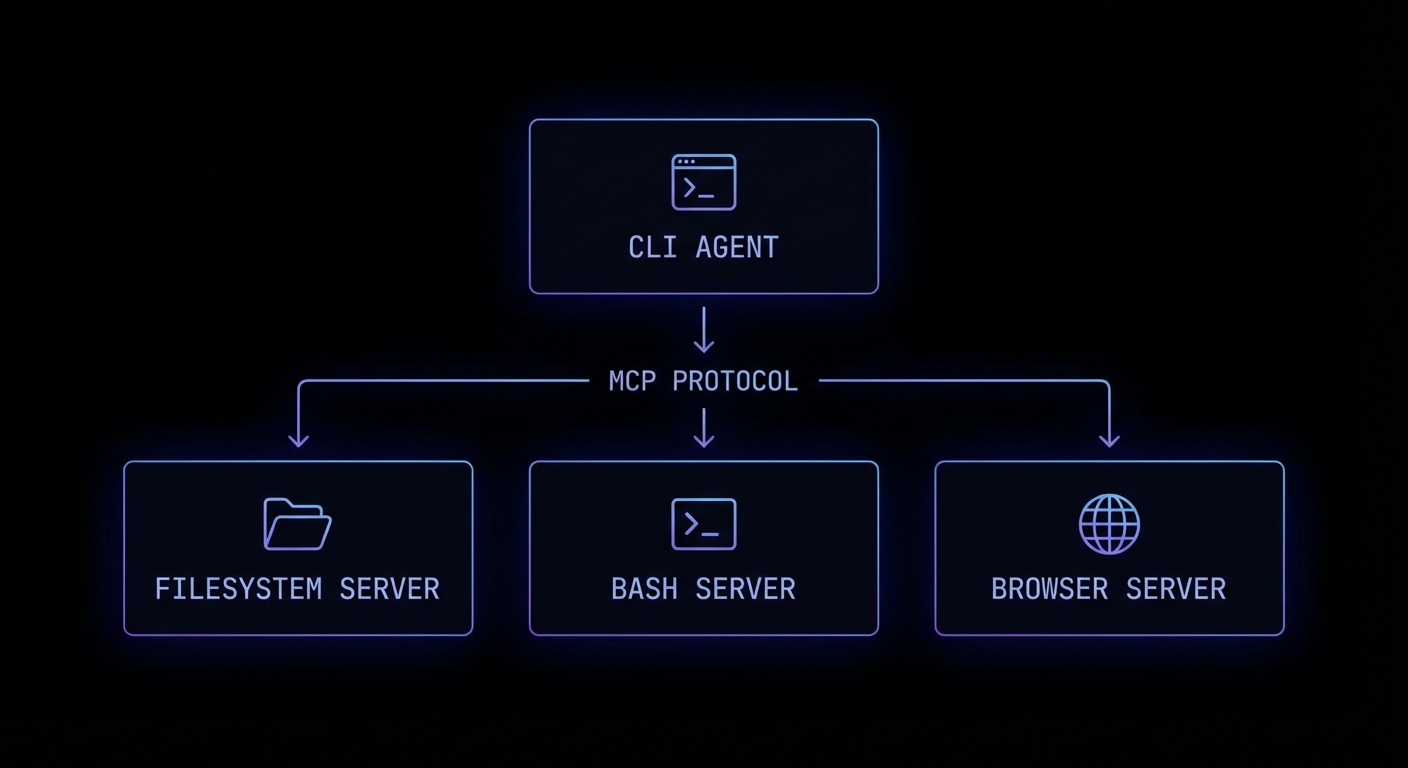
Claude Code is Anthropic’s autonomous coding agent – and it is built on MCP. When Claude Code reads files, runs tests, executes commands, and browses documentation, it does all of this through MCP servers. The architecture is not a coincidence: it is Anthropic demonstrating exactly how a production-grade autonomous agent should integrate with external systems. Understanding how Claude Code uses MCP is one of the fastest ways to understand how you should build your own agents.

Claude Code’s MCP Architecture
Claude Code (the CLI tool, claude) operates as an MCP host. When it starts, it connects to a set of built-in MCP servers that provide its core capabilities: computer-use (screen reading/clicking), bash (shell command execution), and files (filesystem read/write). You can extend Claude Code with your own custom MCP servers, making it immediately capable of working with your specific project tools.
# ~/.claude/config.json - Extend Claude Code with your MCP servers
{
"mcpServers": {
"my-project-tools": {
"command": "node",
"args": ["./tools/mcp-server.js"],
"env": {
"DATABASE_URL": "postgresql://localhost/mydb"
}
},
"github-tools": {
"command": "npx",
"args": ["-y", "@anthropic-ai/mcp-github"]
}
}
}
Once configured, Claude Code can use your custom server’s tools as naturally as it uses its built-in bash or filesystem tools. Your create_github_issue tool becomes as usable as Bash(git commit).
Building Agent Skills for Claude Code
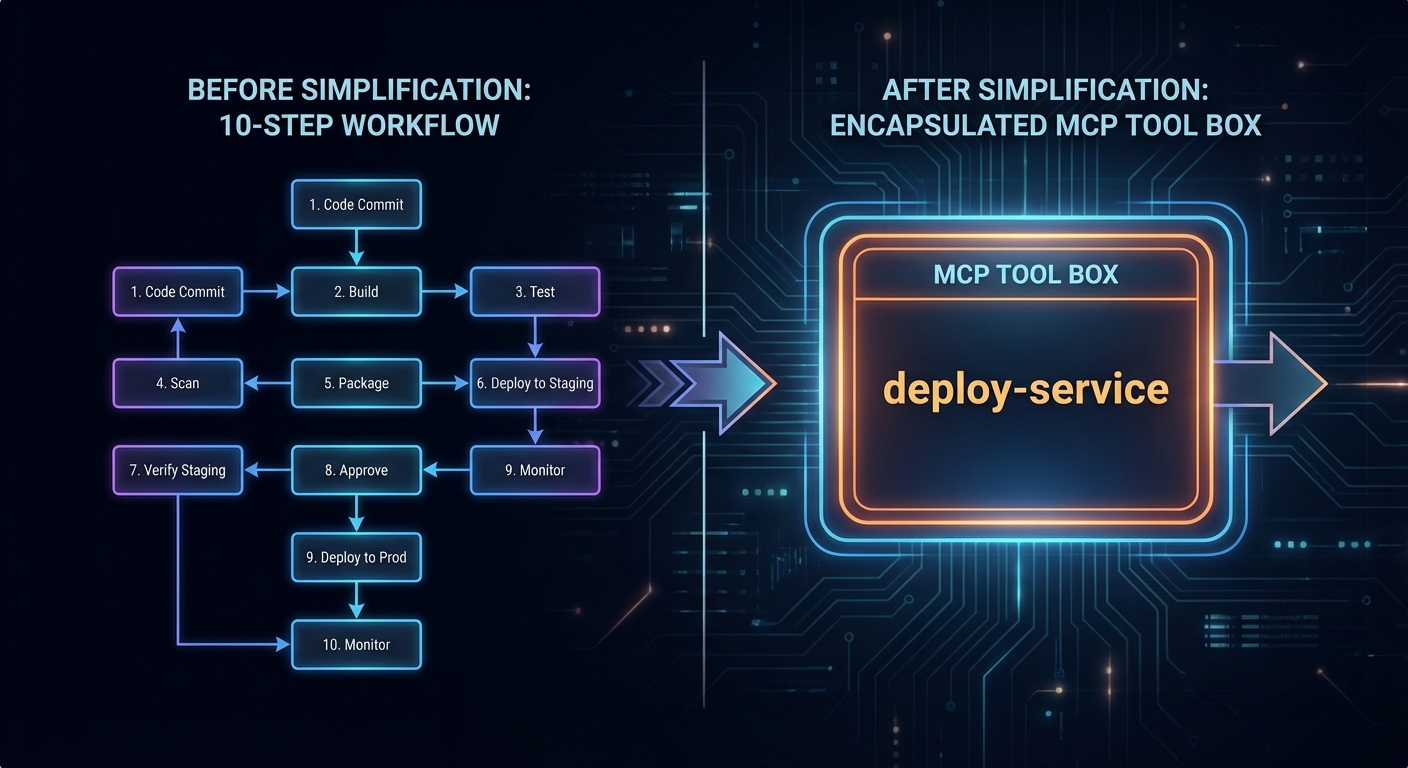
The most powerful Claude Code extension pattern is the “agent skill” – a specialised MCP server that encapsulates a complex workflow as a single callable tool. Instead of Claude figuring out the 20-step process to deploy a microservice, you encode those steps in a deploy_service tool that handles all the complexity.
// deploy-skill-server.js
import { McpServer } from '@modelcontextprotocol/sdk/server/mcp.js';
import { StdioServerTransport } from '@modelcontextprotocol/sdk/server/stdio.js';
import { z } from 'zod';
import { execFile } from 'node:child_process';
import { promisify } from 'node:util';
const exec = promisify(execFile);
const server = new McpServer({ name: 'deploy-skills', version: '1.0.0' });
server.tool(
'deploy_service',
`Deploy a microservice to Kubernetes. Handles build, push, and rollout.
Returns the deployment status and the new pod count.`,
{
service_name: z.string().describe('Name of the service to deploy'),
image_tag: z.string().describe('Docker image tag to deploy'),
namespace: z.string().default('production').describe('Kubernetes namespace'),
replicas: z.number().int().min(1).max(10).default(2),
},
async ({ service_name, image_tag, namespace, replicas }) => {
const steps = [];
// Step 1: Build
const { stdout: buildOut } = await exec('docker', [
'build', '-t', `${service_name}:${image_tag}`, './services/' + service_name
]);
steps.push('Build: OK');
// Step 2: Push
await exec('docker', ['push', `myregistry/${service_name}:${image_tag}`]);
steps.push('Push: OK');
// Step 3: Deploy
const manifest = generateK8sManifest(service_name, image_tag, namespace, replicas);
await exec('kubectl', ['apply', '-f', '-'], { input: manifest });
steps.push(`Deploy: OK (${replicas} replicas)`);
// Step 4: Wait for rollout
await exec('kubectl', ['rollout', 'status', `deployment/${service_name}`, '-n', namespace]);
steps.push('Rollout: Complete');
return {
content: [{ type: 'text', text: steps.join('\n') + `\n\nService ${service_name} deployed successfully.` }],
};
}
);
const transport = new StdioServerTransport();
await server.connect(transport);

Permission Modes in Claude Code
Claude Code has a permission system that controls what actions it can take without asking for confirmation. MCP tools are subject to the same permission model. You can configure Claude Code to auto-approve specific tools, require confirmation for destructive operations, or run in fully supervised mode.
# .claude/settings.json (project-level)
{
"permissions": {
"allow": [
"Bash(git *)", # Allow all git commands
"mcp:my-project-tools:read_*", # Allow read-only tools from my server
"Read(**)" # Allow reading any file
],
"deny": [
"mcp:my-project-tools:deploy_*", # Always ask before deploying
"Bash(rm -rf *)" # Never auto-approve recursive deletes
]
}
}
“Claude Code is designed to be an autonomous coding agent that can understand and work on complex codebases. It uses a set of built-in tools and can be extended with custom MCP servers to access domain-specific capabilities.” – Anthropic Documentation, Claude Code
Failure Modes with Claude Code MCP Extensions
Case 1: Tools That Are Too Granular
// BAD: Too granular - Claude has to call many tools in sequence and may make mistakes
server.tool('set_k8s_namespace', '...', { ns: z.string() }, handler);
server.tool('set_k8s_image', '...', { image: z.string() }, handler);
server.tool('apply_k8s_manifest', '...', { manifest: z.string() }, handler);
server.tool('watch_k8s_rollout', '...', { deployment: z.string() }, handler);
// BETTER: One atomic skill tool that handles the whole workflow
server.tool('deploy_service', 'Deploy a service to k8s...', { service: z.string(), ... }, handler);
Case 2: Forgetting to Handle Long-Running Operations
// Build + deploy can take minutes
// Don't timeout. Stream progress via notifications or use progress indicators
// Claude Code will wait, but it needs feedback to know the tool is running
server.tool('build_and_deploy', '...', { ... }, async ({ service }) => {
// Send progress
process.stderr.write(`[build] Starting build for ${service}...\n`);
await buildService(service); // May take 2-10 minutes
process.stderr.write(`[deploy] Deploying ${service}...\n`);
await deployService(service);
return { content: [{ type: 'text', text: 'Done.' }] };
});
What to Check Right Now
- Install Claude Code –
npm install -g @anthropic-ai/claude-code. Then runclaudein a project directory to see it in action. - Add your MCP server to Claude Code config – add it to
~/.claude/config.jsonor.claude/config.json(project-level). Then runclaudeand ask it to use your tool. - Design tools as atomic workflows – each tool should complete one meaningful unit of work end-to-end. Avoid exposing low-level implementation details as separate tools.
- Review the permission system – set appropriate
allowanddenyrules for your project. Deny destructive tools by default and require explicit confirmation.
nJoy π
Extended Thinking Mode with MCP Tools in Claude 3.7
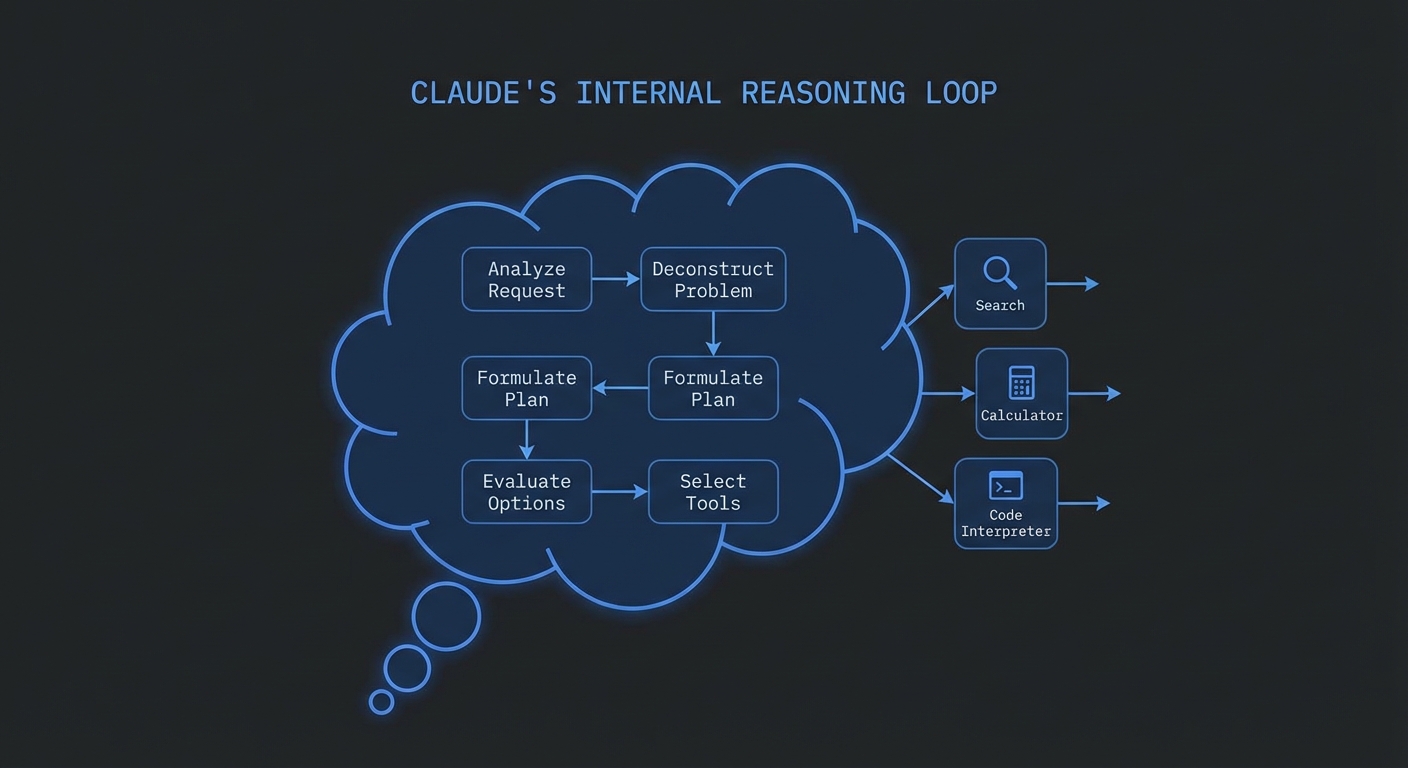
Claude 3.7 Sonnet introduced extended thinking – a mode where the model spends additional compute on internal reasoning before producing its response. When combined with MCP tools, extended thinking transforms how the model approaches complex multi-step tasks: instead of immediately deciding to call a tool, Claude reasons through what it knows, what it needs, which tools would help, and what order to call them in. The result is dramatically fewer redundant tool calls and significantly better decisions on ambiguous tasks.

Enabling Extended Thinking
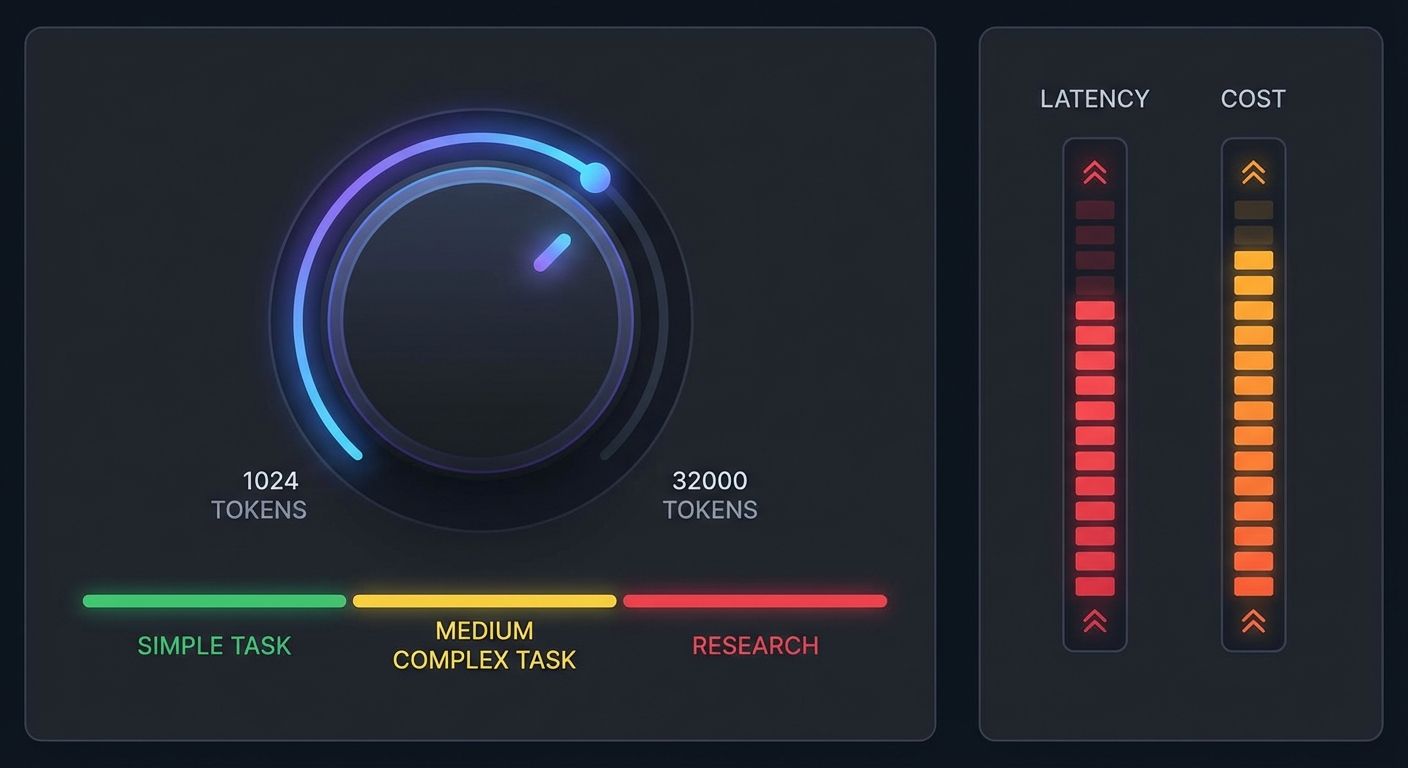
Extended thinking is enabled by adding the thinking block to the API request. You control the “budget” – the maximum number of tokens Claude can use for internal reasoning. A higher budget allows deeper reasoning but adds latency and cost.
import Anthropic from '@anthropic-ai/sdk';
import { Client } from '@modelcontextprotocol/sdk/client/index.js';
import { StdioClientTransport } from '@modelcontextprotocol/sdk/client/stdio.js';
const anthropic = new Anthropic({ apiKey: process.env.ANTHROPIC_API_KEY });
const mcpClient = new Client({ name: 'thinking-host', version: '1.0.0' }, { capabilities: {} });
await mcpClient.connect(new StdioClientTransport({ command: 'node', args: ['server.js'] }));
const { tools: mcpTools } = await mcpClient.listTools();
const claudeTools = mcpTools.map(t => ({ name: t.name, description: t.description, input_schema: t.inputSchema }));
async function runWithExtendedThinking(userMessage, thinkingBudget = 8000) {
const messages = [{ role: 'user', content: userMessage }];
while (true) {
const response = await anthropic.messages.create({
model: 'claude-3-7-sonnet-20250219',
max_tokens: 16000, // Must be > thinking budget
thinking: {
type: 'enabled',
budget_tokens: thinkingBudget, // Min: 1024, no hard max
},
tools: claudeTools,
messages,
});
// Response may contain thinking blocks - they appear before text/tool_use
const thinkingBlocks = response.content.filter(b => b.type === 'thinking');
const textBlocks = response.content.filter(b => b.type === 'text');
const toolUseBlocks = response.content.filter(b => b.type === 'tool_use');
if (process.env.SHOW_THINKING) {
for (const tb of thinkingBlocks) {
console.error('\n[thinking]', tb.thinking.slice(0, 500) + '...');
}
}
messages.push({ role: 'assistant', content: response.content });
if (response.stop_reason === 'tool_use') {
const toolResults = await Promise.all(
toolUseBlocks.map(async (toolUse) => {
const result = await mcpClient.callTool({
name: toolUse.name,
arguments: toolUse.input,
});
return { type: 'tool_result', tool_use_id: toolUse.id, content: result.content };
})
);
messages.push({ role: 'user', content: toolResults });
} else {
return textBlocks.map(b => b.text).join('');
}
}
}
// Complex task: extended thinking shines here
const result = await runWithExtendedThinking(
`I need to buy a laptop for machine learning research.
My budget is $2000. I prefer AMD GPUs but would consider NVIDIA.
It must have at least 32GB RAM expandable to 64GB,
and I work across Windows and Linux so driver support matters.
Research and recommend the top 3 options.`,
12000 // Higher budget for complex task
);
console.log(result);
await mcpClient.close();

When to Use Extended Thinking with MCP
Extended thinking is not free – it adds significant latency (often 10-30 seconds for high budgets) and substantial token cost. Use it selectively:
- Use it for: complex research requiring 5+ tool calls, tasks requiring careful tradeoff analysis, situations where tool call order significantly affects outcome quality
- Skip it for: simple lookups, single-tool tasks, time-sensitive queries, high-volume low-latency applications
// Adaptive thinking budget based on task complexity
function getThinkingBudget(task) {
const wordCount = task.split(/\s+/).length;
const hasComparisons = /compare|vs|versus|between|best|recommend/.test(task.toLowerCase());
const hasMultipleRequirements = task.split(/and|also|additionally|plus/).length > 2;
if (hasComparisons && hasMultipleRequirements) return 10000;
if (hasComparisons || hasMultipleRequirements) return 5000;
if (wordCount > 50) return 3000;
return 0; // No thinking for simple tasks
}
const budget = getThinkingBudget(userInput);
if (budget > 0) {
return runWithExtendedThinking(userInput, budget);
} else {
return runWithClaude(userInput); // Standard tool calling
}
“Extended thinking causes Claude to reason more thoroughly about tasks before responding, which can substantially improve performance on complex tasks. Thinking tokens are not cached and must be included in the context window when continuing a conversation.” – Anthropic Documentation, Extended Thinking
Failure Modes with Extended Thinking
Case 1: Setting max_tokens Less Than Thinking Budget
// WRONG: max_tokens must exceed budget_tokens
const response = await anthropic.messages.create({
max_tokens: 4096,
thinking: { type: 'enabled', budget_tokens: 8000 }, // 8000 > 4096 - API error!
});
// CORRECT: max_tokens must be greater than budget_tokens
const response = await anthropic.messages.create({
max_tokens: 16000,
thinking: { type: 'enabled', budget_tokens: 8000 }, // Valid: 16000 > 8000
});
Case 2: Not Passing Thinking Blocks Back in Continuation
// When continuing a conversation with extended thinking enabled,
// thinking blocks from previous turns MUST be included in the messages array.
// The SDK handles this automatically if you push the full response.content.
messages.push({ role: 'assistant', content: response.content }); // Include ALL blocks including thinking
What to Check Right Now
- Test with SHOW_THINKING=1 – run your agent with thinking visible. Reading the thinking output reveals what the model understood about the task and why it chose each tool.
- Measure latency impact – log response time with and without extended thinking on the same tasks. Quantify the tradeoff for your use case before deploying at scale.
- Start with budget 4000-8000 – this range gives substantially improved reasoning for most tasks without the extreme latency of budgets above 15,000.
- Use claude-3-5-sonnet for anything where speed > accuracy – 3.5 Sonnet without thinking is typically faster and cheaper for tasks where the tradeoff makes sense.
nJoy π
Claude 3.5/3.7 and MCP: Native Tool Calling
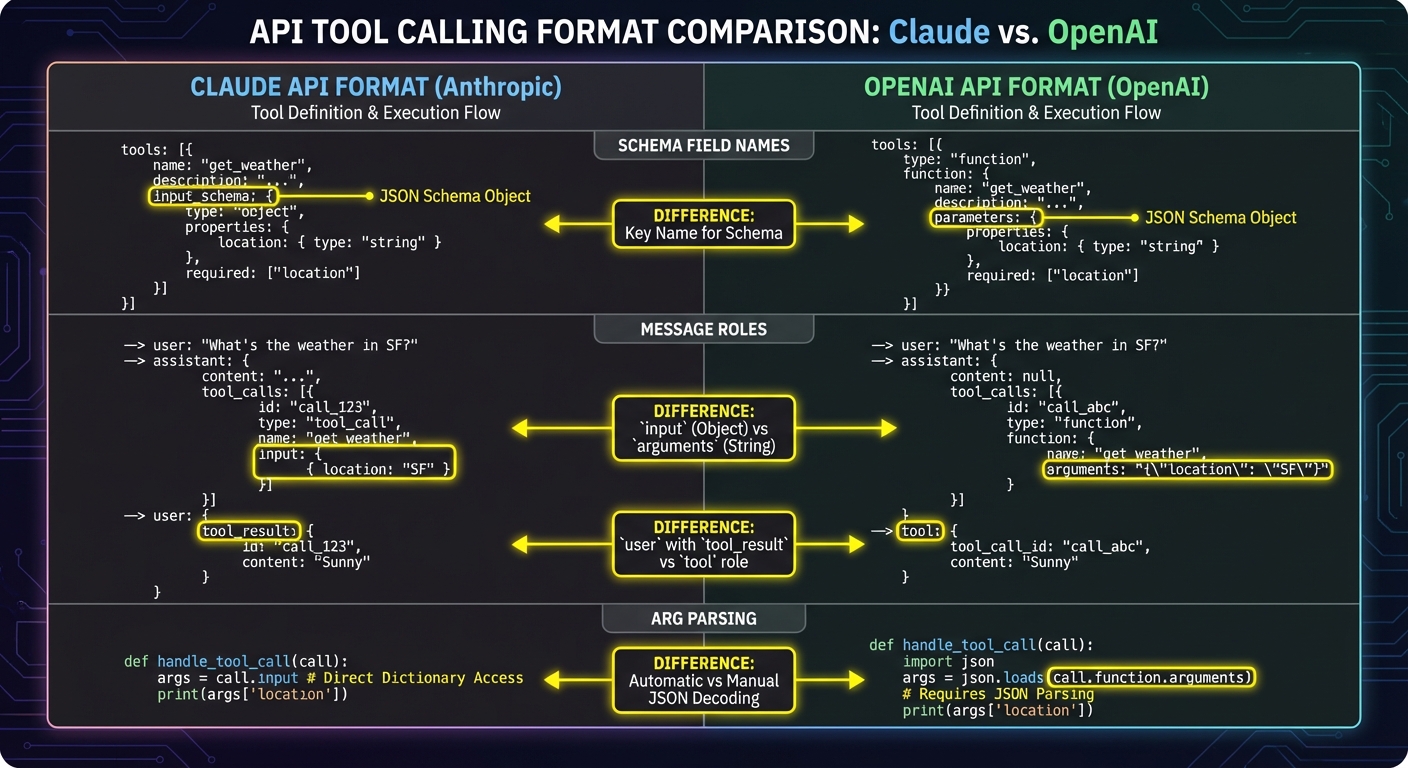
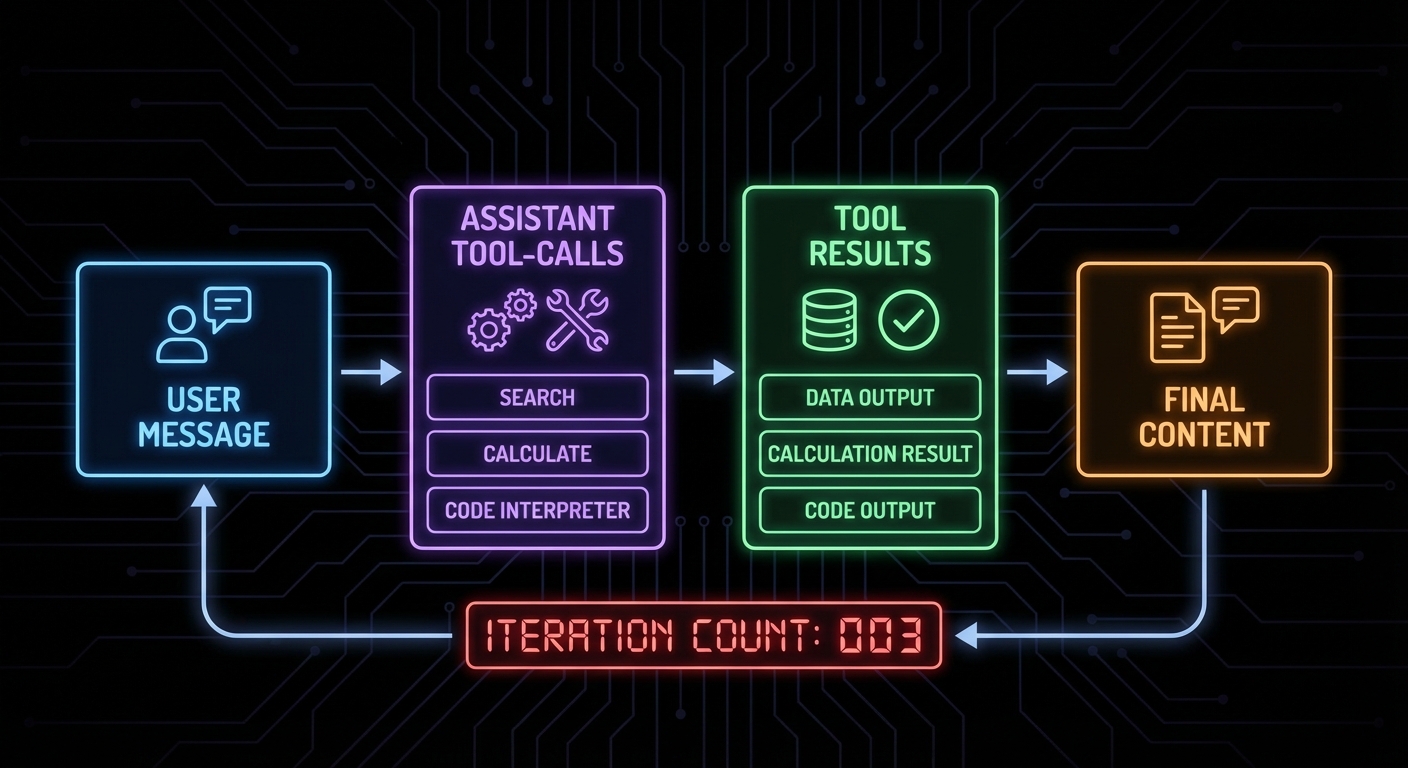
Claude’s tool use is the cleanest tool calling implementation in the major LLM providers. The API is symmetric: you send tools in the request, Claude returns tool_use blocks when it wants to call something, you run the tools, and you send back tool_result blocks. No function/tool naming confusion, no finish_reason gotchas – just a clear, typed message structure. This lesson builds the Claude + MCP integration from scratch, comparing it to the OpenAI pattern where they differ.

Claude Tool Use Format
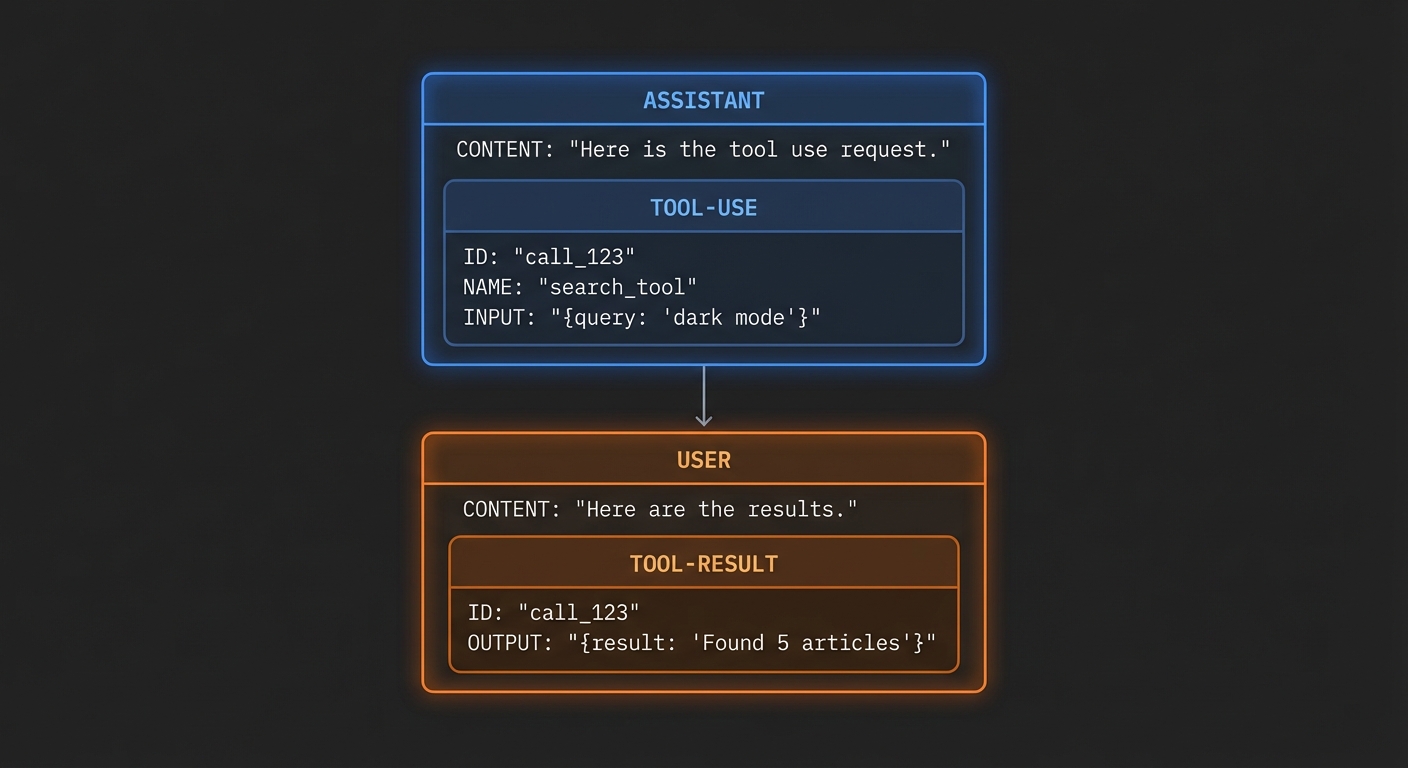
Claude’s tool use has a fundamentally different message structure from OpenAI’s. The key difference: tool results go in a user message (not a separate role), nested inside a tool_result content block that references the tool use ID. This is more structured and less ambiguous than OpenAI’s approach.
// Claude tool calling message flow:
// 1. Request: tools defined, user message sent
// 2. Response: Claude returns tool_use block(s)
{
role: 'assistant',
content: [
{ type: 'text', text: 'Let me search for that.' },
{
type: 'tool_use',
id: 'toolu_01XY',
name: 'search_products',
input: { query: 'wireless headphones', limit: 5 }
}
]
}
// 3. You execute the tool through MCP
// 4. Send result back in a user message with tool_result block
{
role: 'user',
content: [{
type: 'tool_result',
tool_use_id: 'toolu_01XY',
content: [{ type: 'text', text: 'Found 5 products: ...' }]
}]
}
The Complete Claude + MCP Integration
import Anthropic from '@anthropic-ai/sdk';
import { Client } from '@modelcontextprotocol/sdk/client/index.js';
import { StdioClientTransport } from '@modelcontextprotocol/sdk/client/stdio.js';
const anthropic = new Anthropic({ apiKey: process.env.ANTHROPIC_API_KEY });
const mcpClient = new Client({ name: 'claude-host', version: '1.0.0' }, { capabilities: {} });
await mcpClient.connect(new StdioClientTransport({ command: 'node', args: ['server.js'] }));
const { tools: mcpTools } = await mcpClient.listTools();
// Convert MCP tools to Anthropic format
const claudeTools = mcpTools.map(t => ({
name: t.name,
description: t.description,
input_schema: t.inputSchema, // Note: input_schema, not parameters
}));
async function runWithClaude(userMessage) {
const messages = [{ role: 'user', content: userMessage }];
while (true) {
const response = await anthropic.messages.create({
model: 'claude-3-5-sonnet-20241022',
max_tokens: 4096,
tools: claudeTools,
messages,
});
// Append Claude's response to messages
messages.push({ role: 'assistant', content: response.content });
// If Claude stopped due to tool use, execute tools
if (response.stop_reason === 'tool_use') {
const toolUseBlocks = response.content.filter(b => b.type === 'tool_use');
const toolResults = await Promise.all(
toolUseBlocks.map(async (toolUse) => {
console.error(`[tool] Calling: ${toolUse.name}`, toolUse.input);
const result = await mcpClient.callTool({
name: toolUse.name,
arguments: toolUse.input,
});
return {
type: 'tool_result',
tool_use_id: toolUse.id,
content: result.content, // MCP content blocks work directly here
};
})
);
// Tool results go in a user message
messages.push({ role: 'user', content: toolResults });
} else {
// end_turn or other stop reason - extract final text
const finalText = response.content
.filter(b => b.type === 'text')
.map(b => b.text)
.join('');
return finalText;
}
}
}
const result = await runWithClaude('Compare the best noise-cancelling headphones under $300');
console.log(result);
await mcpClient.close();

Claude 3.5 vs 3.7 Sonnet for Tool Use
Claude 3.5 Sonnet (20241022) is the current production choice for tool-heavy workloads: fast, reliable tool calls, good at following tool descriptions, and competitive pricing. Claude 3.7 Sonnet adds extended thinking (covered in Lesson 21) and improved reasoning for complex multi-step tool chains, at higher latency and cost.
// For fast, reliable tool calling:
model: 'claude-3-5-sonnet-20241022'
// For complex reasoning + tool use:
model: 'claude-3-7-sonnet-20250219' // Includes extended thinking
// Haiku for high-volume, simple tool tasks:
model: 'claude-3-5-haiku-20241022'
“Claude is trained to use tools in the same way that humans do: by processing what it’s seen before and uses this context to craft appropriate tool calls or final responses. Tool use enables Claude to interact with external services and APIs in a structured way.” – Anthropic Documentation, Tool Use
Key Differences from OpenAI
| Aspect | Claude (Anthropic) | GPT (OpenAI) |
|---|---|---|
| Tool result role | user |
tool |
| Schema field | input_schema |
parameters |
| Tool call detection | stop_reason === 'tool_use' |
finish_reason === 'tool_calls' |
| Multiple tools | All results in one user message | Each result is a separate tool message |
| Tool call args | toolUse.input (already parsed) |
JSON.parse(toolCall.function.arguments) |
Failure Modes with Claude Tool Use
Case 1: Putting Tool Results in an Assistant Message
// WRONG: Tool results in wrong role
messages.push({ role: 'assistant', content: toolResults }); // API error
// CORRECT: Tool results go in user role
messages.push({ role: 'user', content: toolResults });
Case 2: Forgetting that Claude’s input Is Already Parsed JSON
// WRONG: Trying to JSON.parse Claude's tool input
const args = JSON.parse(toolUse.input); // Error: toolUse.input is already an object
// CORRECT: Use directly - Claude's SDK already parses it
const args = toolUse.input; // Already an object like { query: "...", limit: 5 }
await mcpClient.callTool({ name: toolUse.name, arguments: args });
What to Check Right Now
- Test with a multi-tool Claude response – ask a question that forces 2-3 tool calls in one response. Verify all tool use blocks are collected and all results are bundled into one user message.
- Verify input_schema not parameters – this is the single most common copy-paste error when moving from OpenAI to Claude code. Search your code for
parametersin Claude tool definitions. - Handle vision content in tool results – Claude can process image content blocks in tool results. If your MCP tools return images (base64), pass them through as
{ type: 'image', source: ... }in the tool result content array. - Set a system prompt – Claude responds well to clear system prompts. Define the assistant’s persona, task scope, and output format at the system level.
nJoy π
Building a Production OpenAI-Powered MCP Client
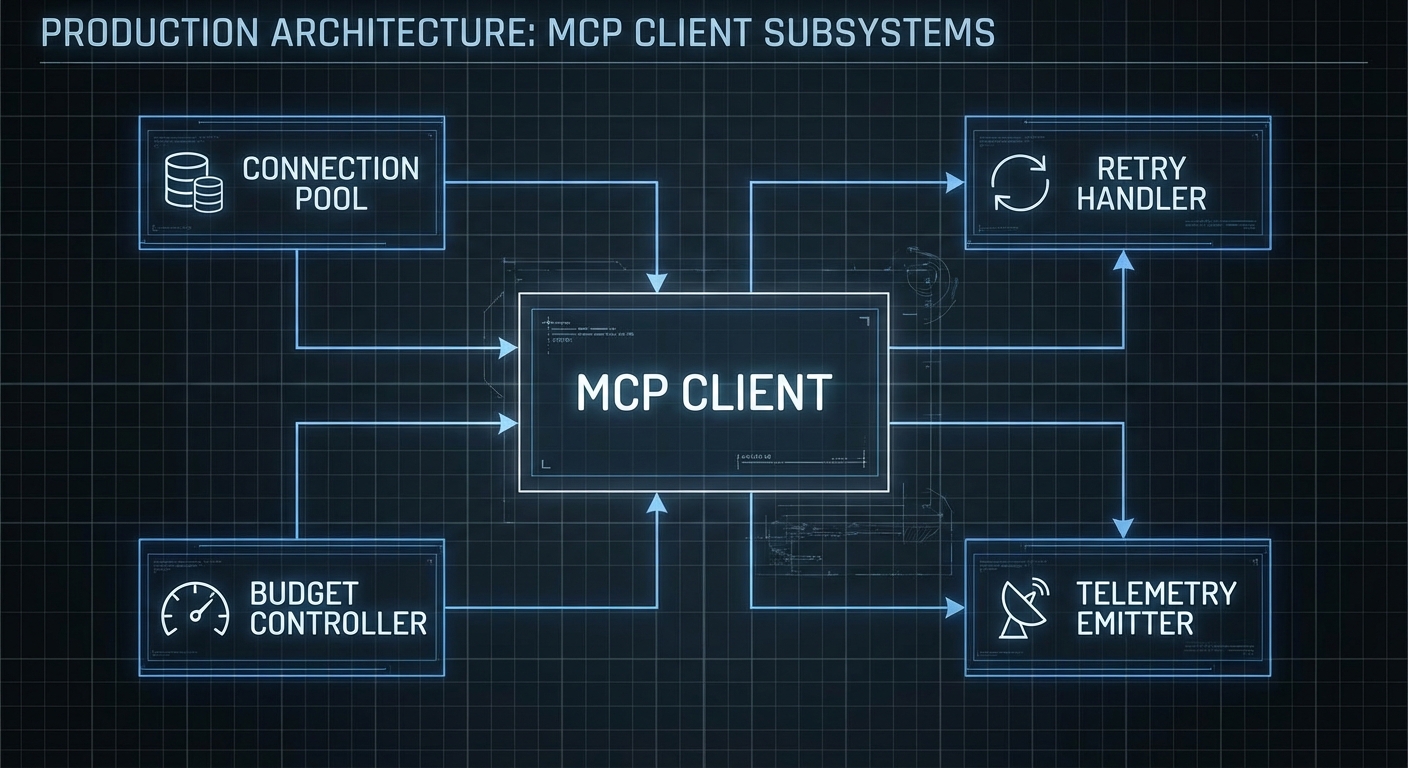
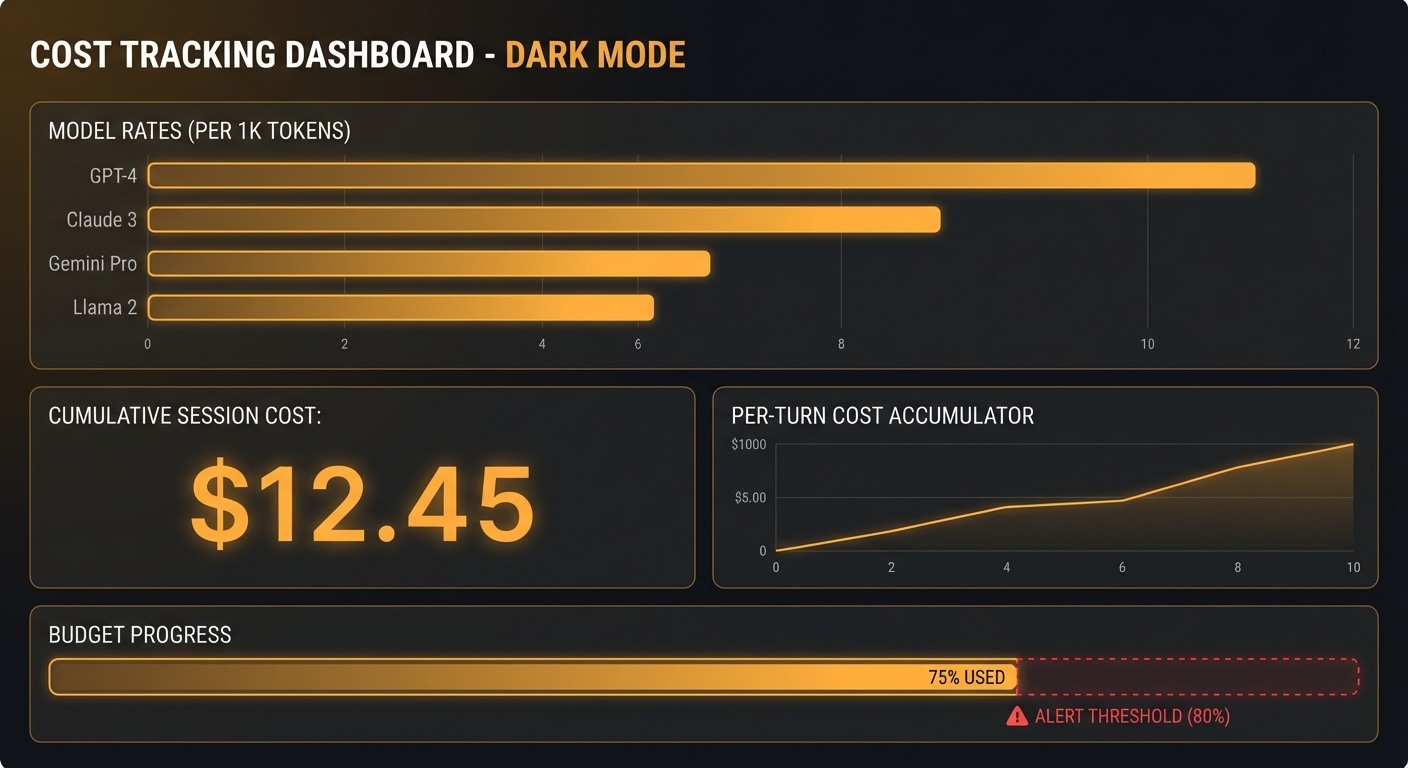
The gap between “demo that calls a tool” and “production client that handles 10,000 daily users” is everything we have not talked about yet: connection pooling, retry logic, cost control, token budget management, error classification, telemetry, and graceful degradation. This lesson builds a production-grade OpenAI MCP client library from scratch – the kind you would actually deploy in a company. Every pattern here comes from real production failure modes.

The Production Client Library
// mcp-openai-client.js - Production-grade MCP + OpenAI client
import OpenAI from 'openai';
import { Client } from '@modelcontextprotocol/sdk/client/index.js';
import { StdioClientTransport } from '@modelcontextprotocol/sdk/client/stdio.js';
const DEFAULT_CONFIG = {
model: 'gpt-4o',
maxTokens: 4096,
maxIterations: 15,
temperature: 0.1,
retries: 3,
retryDelay: 1000, // ms
budgetUSD: 0.50, // Max cost per conversation
timeoutMs: 120_000, // 2 minute timeout per conversation
};
// Token cost estimates (USD per 1M tokens, approximate)
const MODEL_COSTS = {
'gpt-4o': { input: 2.50, output: 10.00 },
'gpt-4o-mini': { input: 0.15, output: 0.60 },
'o3': { input: 15.00, output: 60.00 },
'o3-mini': { input: 1.10, output: 4.40 },
};
export class McpOpenAIClient {
constructor(mcpServerConfig, options = {}) {
this.config = { ...DEFAULT_CONFIG, ...options };
this.openai = new OpenAI({ apiKey: options.apiKey || process.env.OPENAI_API_KEY });
this.mcpServerConfig = mcpServerConfig;
this.mcpClient = null;
this.tools = [];
this.totalCostUSD = 0;
}
async connect() {
this.mcpClient = new Client(
{ name: 'production-host', version: '1.0.0' },
{ capabilities: {} }
);
const transport = new StdioClientTransport(this.mcpServerConfig);
await this.mcpClient.connect(transport);
const { tools } = await this.mcpClient.listTools();
this.tools = tools.map(t => ({
type: 'function',
function: { name: t.name, description: t.description, parameters: t.inputSchema },
}));
console.error(`[mcp] Connected - ${this.tools.length} tools available`);
}
async disconnect() {
await this.mcpClient?.close();
}
estimateCostUSD(inputTokens, outputTokens, model) {
const costs = MODEL_COSTS[model] || MODEL_COSTS['gpt-4o'];
return (inputTokens / 1_000_000) * costs.input + (outputTokens / 1_000_000) * costs.output;
}
async executeWithRetry(fn, maxRetries = this.config.retries) {
let lastError;
for (let attempt = 1; attempt <= maxRetries; attempt++) {
try {
return await fn();
} catch (err) {
lastError = err;
const isRetryable = err.status === 429 || err.status === 500 || err.status === 503;
if (!isRetryable || attempt === maxRetries) throw err;
const delay = this.config.retryDelay * Math.pow(2, attempt - 1); // Exponential backoff
console.error(`[openai] Attempt ${attempt} failed: ${err.message}. Retrying in ${delay}ms`);
await new Promise(r => setTimeout(r, delay));
}
}
throw lastError;
}
async run(userMessage, systemPrompt = null) {
const startTime = Date.now();
const messages = [];
if (systemPrompt) messages.push({ role: 'system', content: systemPrompt });
messages.push({ role: 'user', content: userMessage });
let iteration = 0;
let totalInputTokens = 0;
let totalOutputTokens = 0;
while (true) {
if (++iteration > this.config.maxIterations) {
throw new Error(`Exceeded max iterations (${this.config.maxIterations})`);
}
if (Date.now() - startTime > this.config.timeoutMs) {
throw new Error(`Conversation timeout after ${this.config.timeoutMs}ms`);
}
if (this.totalCostUSD > this.config.budgetUSD) {
throw new Error(`Budget exceeded: $${this.totalCostUSD.toFixed(4)} > $${this.config.budgetUSD}`);
}
const response = await this.executeWithRetry(() =>
this.openai.chat.completions.create({
model: this.config.model,
messages,
tools: this.tools.length > 0 ? this.tools : undefined,
max_tokens: this.config.maxTokens,
temperature: this.config.temperature,
})
);
const usage = response.usage;
totalInputTokens += usage?.prompt_tokens || 0;
totalOutputTokens += usage?.completion_tokens || 0;
const turnCost = this.estimateCostUSD(
usage?.prompt_tokens || 0,
usage?.completion_tokens || 0,
this.config.model
);
this.totalCostUSD += turnCost;
const choice = response.choices[0];
const message = choice.message;
messages.push(message);
if (choice.finish_reason !== 'tool_calls') {
const elapsedMs = Date.now() - startTime;
console.error(`[stats] iterations=${iteration} tokens=${totalInputTokens}+${totalOutputTokens} cost=$${this.totalCostUSD.toFixed(4)} elapsed=${elapsedMs}ms`);
return {
content: message.content,
iterations: iteration,
totalCostUSD: this.totalCostUSD,
tokens: { input: totalInputTokens, output: totalOutputTokens },
elapsedMs,
};
}
// Execute tool calls
const toolResults = await Promise.all(
message.tool_calls.map(async (tc) => {
let args;
try {
args = JSON.parse(tc.function.arguments);
} catch {
return { role: 'tool', tool_call_id: tc.id, content: 'Error: Invalid tool arguments JSON' };
}
try {
const result = await this.mcpClient.callTool({ name: tc.function.name, arguments: args });
const text = result.content.filter(c => c.type === 'text').map(c => c.text).join('\n');
const errorFlag = result.isError ? '[TOOL ERROR] ' : '';
return { role: 'tool', tool_call_id: tc.id, content: errorFlag + text };
} catch (err) {
console.error(`[tool] ${tc.function.name} error: ${err.message}`);
return { role: 'tool', tool_call_id: tc.id, content: `Tool execution failed: ${err.message}` };
}
})
);
messages.push(...toolResults);
}
}
}

Usage Pattern
import { McpOpenAIClient } from './mcp-openai-client.js';
const client = new McpOpenAIClient(
{ command: 'node', args: ['server.js'] },
{
model: 'gpt-4o-mini',
budgetUSD: 0.10,
maxIterations: 8,
timeoutMs: 60_000,
}
);
await client.connect();
const result = await client.run(
'Find me a good Python book for beginners under $40',
'You are a helpful book recommendation assistant.'
);
console.log('Answer:', result.content);
console.log('Cost:', `$${result.totalCostUSD.toFixed(4)}`);
console.log('Iterations:', result.iterations);
await client.disconnect();
“For production deployments, implement exponential backoff for rate limit errors (429). The OpenAI API will return Retry-After headers for rate limits – respect these values.” – OpenAI Documentation, Error Codes
Failure Modes in Production
Case 1: No Budget Control
// A single misbehaving agent with no budget cap can cost hundreds of dollars
// Always set a budgetUSD limit per conversation
// Always set a maxIterations limit per conversation
// Log and alert when conversations exceed 80% of budget
Case 2: Catching All Errors and Retrying Blindly
// Some errors should NOT be retried - e.g. 400 Bad Request (invalid schema)
// 429 = retry (rate limit)
// 500/503 = retry (server error)
// 400 = do NOT retry (your code is wrong)
// 401/403 = do NOT retry (authentication issue)
What to Check Right Now
- Set per-conversation budgets – $0.10 is a reasonable starting point for most workflows. Adjust based on your model and expected tool call count.
- Implement exponential backoff – the pattern shown above (doubling delay on each retry) is the industry standard. Start at 1000ms, cap at 60000ms.
- Log every tool call – production debugging without tool call logs is nearly impossible. Log tool name, arguments, result length, and execution time for every call.
- Monitor iteration counts – if average iterations are above 8, your tool descriptions or system prompt may be unclear. Investigate and improve before scaling.
nJoy π
OpenAI Responses API and Agents SDK with MCP
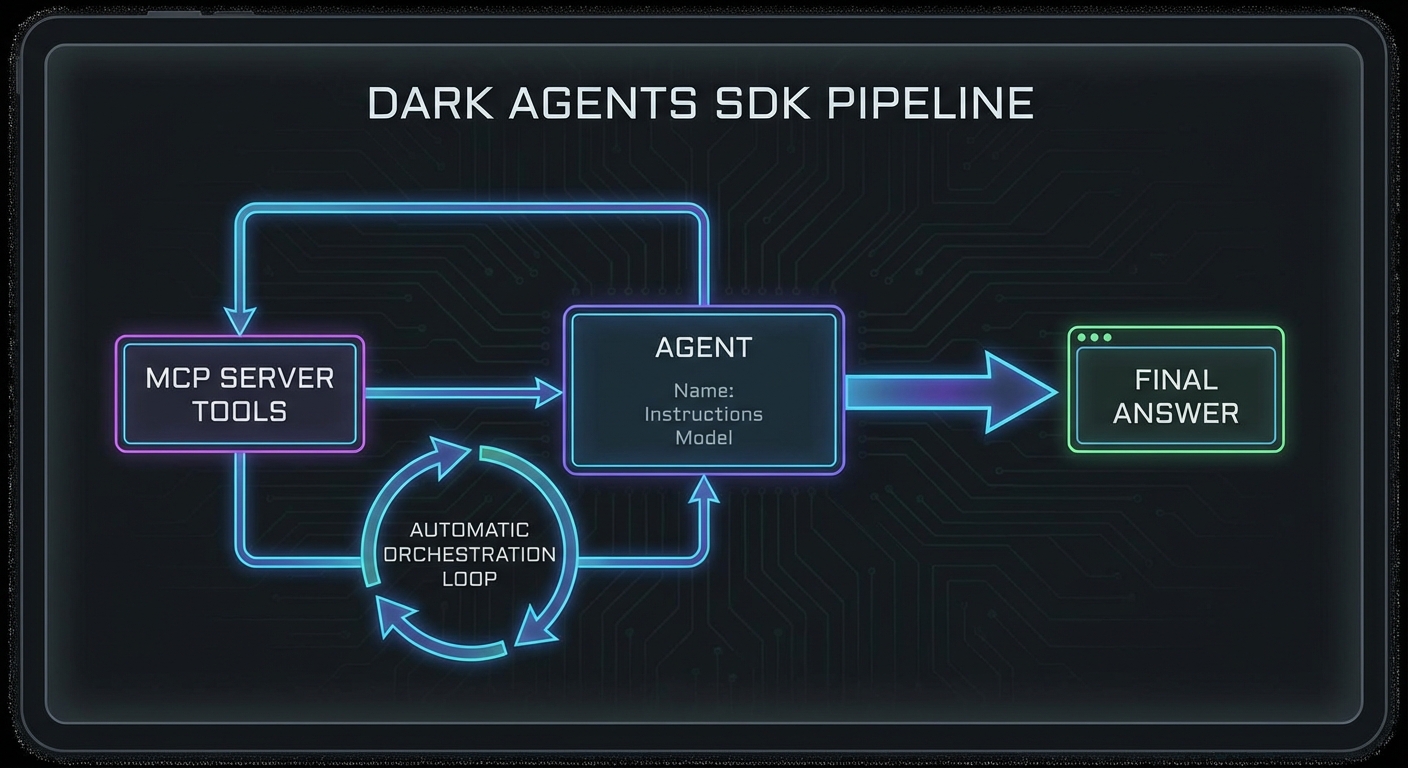
OpenAI released the Responses API and the Agents SDK as a unified approach to building agentic workflows. These are not just new API endpoints – they represent OpenAI’s opinionated view of how production agents should be structured. The Responses API replaces the Chat Completions API for agentic use cases. The Agents SDK wraps it with built-in MCP support, tool orchestration, and a pipeline abstraction that handles the looping automatically. This lesson shows you both layers and where MCP plugs in.

The Responses API
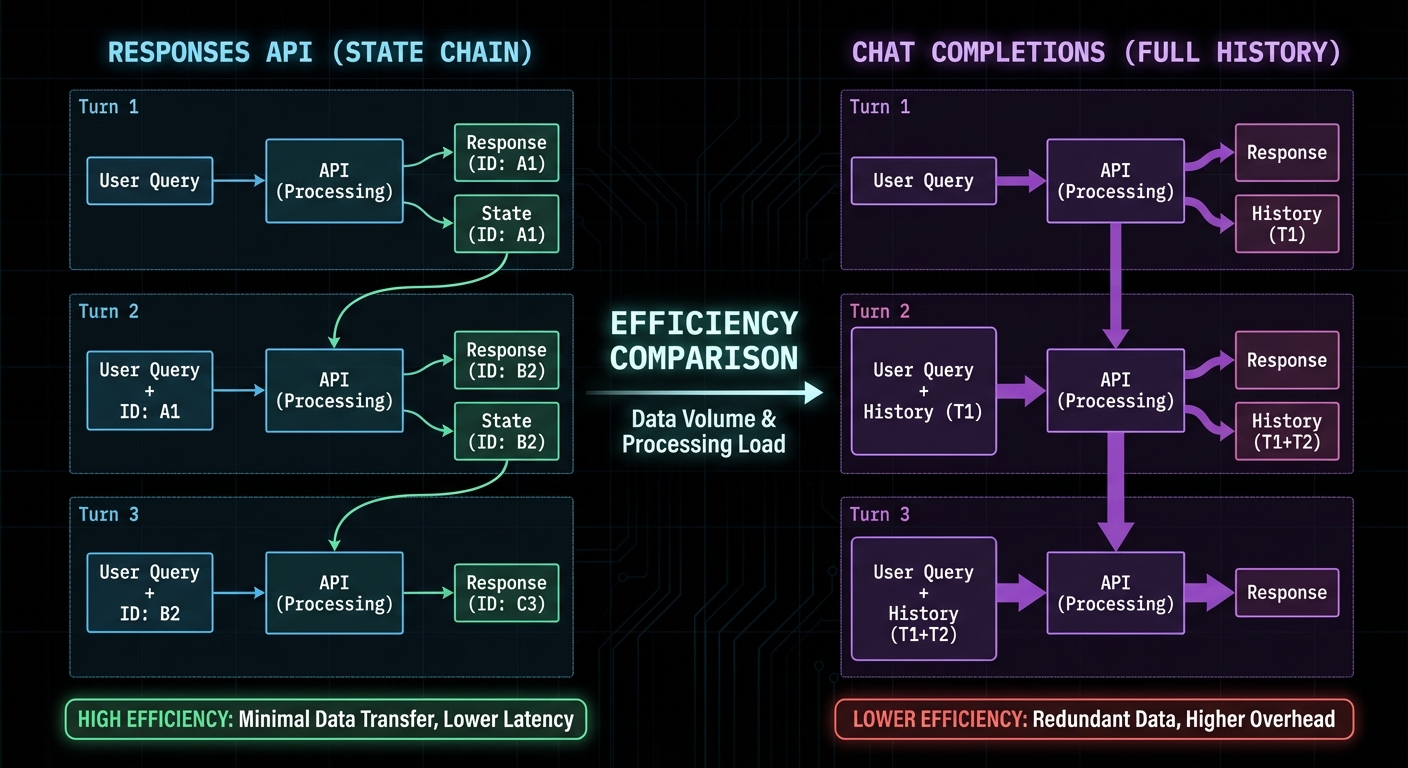
The Responses API (openai.responses.create()) is designed for stateful, multi-turn agentic sessions. Unlike Chat Completions which requires you to manage conversation history manually, the Responses API maintains state server-side via a response ID. You reference previous responses by ID, and the API handles context management including tool call history.
import OpenAI from 'openai';
const openai = new OpenAI({ apiKey: process.env.OPENAI_API_KEY });
// First turn - creates a new response
const response = await openai.responses.create({
model: 'gpt-4o',
input: 'Search for the best laptops under $1000',
tools: openAITools, // Same format as Chat Completions
});
const responseId = response.id; // Save this for continuations
// Continue the conversation using the response ID (no need to re-send history)
const followUp = await openai.responses.create({
model: 'gpt-4o',
input: 'Now filter to only Dell and Lenovo models',
previous_response_id: responseId, // References prior context
tools: openAITools,
});
“The Responses API is designed specifically for agentic workflows. It maintains conversation state server-side, supports native tool execution, and provides a unified interface for building multi-step AI tasks.” – OpenAI API Reference, Responses
The Agents SDK with MCP
The OpenAI Agents SDK (@openai/agents) provides a higher-level abstraction with native MCP support. Instead of writing the tool calling loop yourself, the SDK handles it automatically. You define an agent with tools and an instruction, and the SDK orchestrates the full pipeline.
import { Agent, run, MCPServerStdio } from '@openai/agents';
// Connect to your MCP server via the SDK's native MCP support
const mcpServer = new MCPServerStdio({
name: 'my-tools',
fullCommand: 'node ./my-mcp-server.js',
});
await mcpServer.connect();
// Create an agent with the MCP server's tools
const agent = new Agent({
name: 'Research Assistant',
instructions: `You are a research assistant with access to product search and comparison tools.
Always search for at least 3 options before recommending.
Format your final recommendation as a clear list with prices.`,
tools: await mcpServer.listTools(),
model: 'gpt-4o',
});
// Run the agent - the SDK handles the tool calling loop
const result = await run(agent, 'Find the best wireless headphones under $200');
console.log('Final answer:', result.finalOutput);
// Clean up
await mcpServer.close();

Handoffs: Multi-Agent Patterns with the SDK
import { Agent, run, handoff } from '@openai/agents';
const searchAgent = new Agent({
name: 'Search Specialist',
instructions: 'You specialise in searching and retrieving product data.',
tools: searchMcpTools,
model: 'gpt-4o-mini', // Cheaper model for search
});
const analysisAgent = new Agent({
name: 'Analysis Specialist',
instructions: 'You specialise in comparing and recommending products based on data.',
tools: analysisMcpTools,
model: 'gpt-4o', // Smarter model for complex reasoning
handoffs: [handoff(searchAgent, 'Use search specialist when you need more data')],
});
const result = await run(analysisAgent, 'Compare the top 5 gaming laptops');
console.log(result.finalOutput);
Failure Modes with the Responses API and Agents SDK
Case 1: Not Handling Tool Call Errors in the Responses API
// The Responses API may return partial results if a tool fails
// Always check response.status and handle incomplete states
const response = await openai.responses.create({ ... });
if (response.status === 'incomplete') {
console.error('Response incomplete:', response.incomplete_details);
// Handle: retry, use partial output, or escalate
}
Case 2: State Leakage Between Responses API Sessions
// previous_response_id links responses in a chain
// If you reuse an ID from a different user's session, state leaks
// Always scope response IDs to the authenticated user's session store
const userSession = sessions.get(userId);
const response = await openai.responses.create({
previous_response_id: userSession.lastResponseId || undefined,
...
});
userSession.lastResponseId = response.id;
What to Check Right Now
- Try the Agents SDK first – if you are building a new agent, start with the Agents SDK. The automatic tool loop saves significant boilerplate.
- Use the Responses API for long sessions – for multi-turn conversations with many tool calls, the Responses API’s server-side state management avoids sending large context windows repeatedly.
- Test handoff behaviour – if using multi-agent handoffs, test the edge case where the receiving agent decides it does not need to hand off again and loops back incorrectly.
- Check the Agents SDK version – the SDK is actively developed. Pin the version in package.json and read the changelog when upgrading:
npm install @openai/agents.
nJoy π
OpenAI Streaming Completions and Structured Outputs with MCP Tools
Tool calling with a single round-trip response is the entry point. But production MCP applications need streaming – the ability to show intermediate results to users as the model thinks – and structured outputs, which guarantee that the model’s final answer conforms to a schema you define. This lesson adds both to your OpenAI + MCP integration, covering the streaming tool call parsing mechanics and the structured output patterns that prevent hallucinated schemas in production.

Streaming with Tool Calls
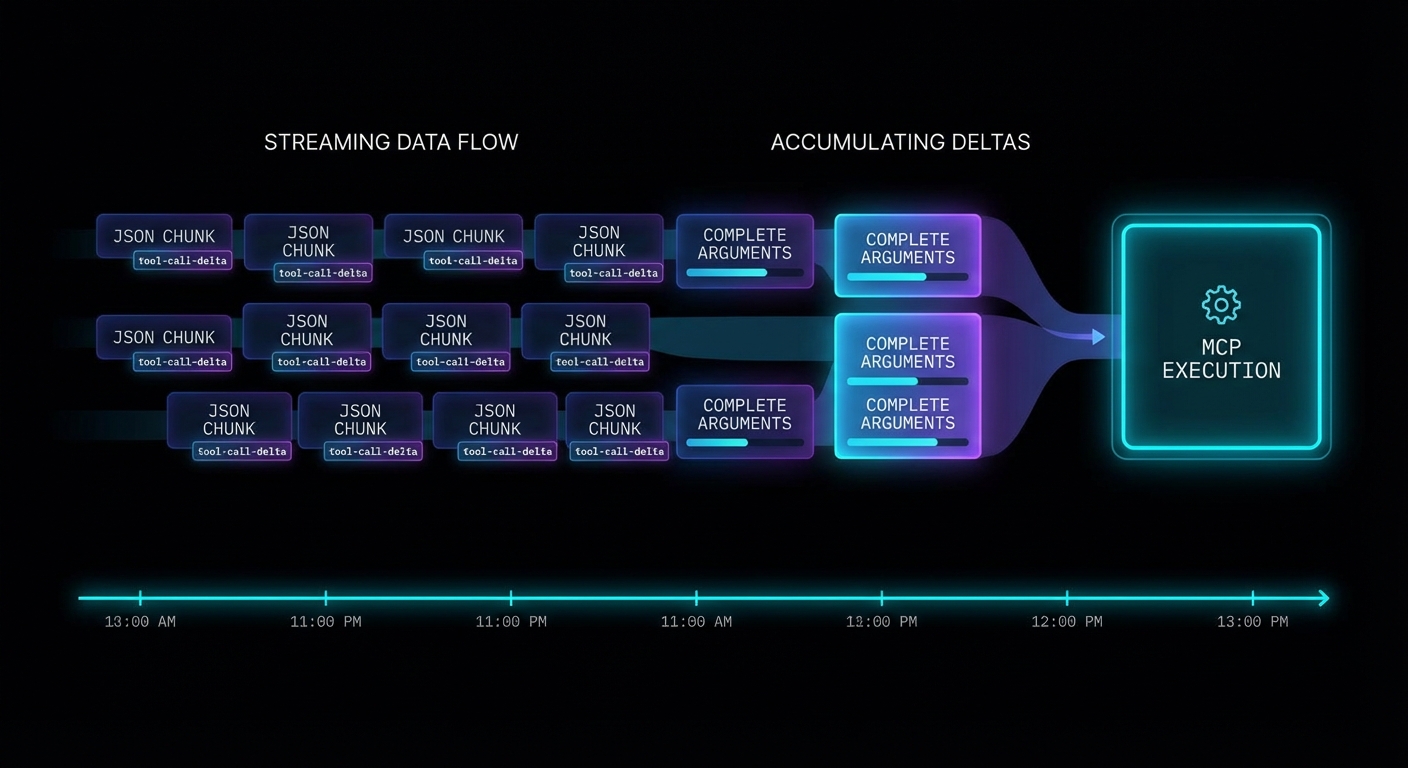
When you stream a completion that includes tool calls, the tool call arguments arrive incrementally as delta chunks. You must accumulate them before you can parse and execute the tool. The pattern is: buffer all deltas, detect when a tool call is complete, then execute through MCP.
import OpenAI from 'openai';
import { Client } from '@modelcontextprotocol/sdk/client/index.js';
import { StdioClientTransport } from '@modelcontextprotocol/sdk/client/stdio.js';
const openai = new OpenAI({ apiKey: process.env.OPENAI_API_KEY });
const mcpClient = new Client({ name: 'streaming-host', version: '1.0.0' }, { capabilities: {} });
await mcpClient.connect(new StdioClientTransport({ command: 'node', args: ['server.js'] }));
const { tools: mcpTools } = await mcpClient.listTools();
const openAITools = mcpTools.map(t => ({
type: 'function',
function: { name: t.name, description: t.description, parameters: t.inputSchema },
}));
async function runStreamingWithTools(userMessage) {
const messages = [{ role: 'user', content: userMessage }];
while (true) {
// Stream the completion
const stream = await openai.chat.completions.create({
model: 'gpt-4o',
messages,
tools: openAITools,
stream: true,
});
// Accumulate the full response
let assistantMessage = { role: 'assistant', content: '', tool_calls: [] };
const toolCallMap = {}; // index -> accumulated tool call
for await (const chunk of stream) {
const delta = chunk.choices[0]?.delta;
if (!delta) continue;
// Stream text content to UI
if (delta.content) {
assistantMessage.content += delta.content;
process.stdout.write(delta.content); // Real-time output
}
// Accumulate tool call deltas
if (delta.tool_calls) {
for (const tcDelta of delta.tool_calls) {
const idx = tcDelta.index;
if (!toolCallMap[idx]) {
toolCallMap[idx] = { id: '', type: 'function', function: { name: '', arguments: '' } };
}
const tc = toolCallMap[idx];
if (tcDelta.id) tc.id += tcDelta.id;
if (tcDelta.function?.name) tc.function.name += tcDelta.function.name;
if (tcDelta.function?.arguments) tc.function.arguments += tcDelta.function.arguments;
}
}
}
assistantMessage.tool_calls = Object.values(toolCallMap);
messages.push(assistantMessage);
// No tool calls = we have the final answer
if (assistantMessage.tool_calls.length === 0) {
return assistantMessage.content;
}
// Execute all accumulated tool calls through MCP
const toolResults = await Promise.all(
assistantMessage.tool_calls.map(async (tc) => {
const args = JSON.parse(tc.function.arguments);
console.error(`\n[tool] Calling: ${tc.function.name}`);
const result = await mcpClient.callTool({ name: tc.function.name, arguments: args });
const text = result.content.filter(c => c.type === 'text').map(c => c.text).join('\n');
return { role: 'tool', tool_call_id: tc.id, content: text };
})
);
messages.push(...toolResults);
}
}
const answer = await runStreamingWithTools('What are the best products under $50?');
console.log('\n\nFinal:', answer);

Structured Outputs with MCP Tool Results
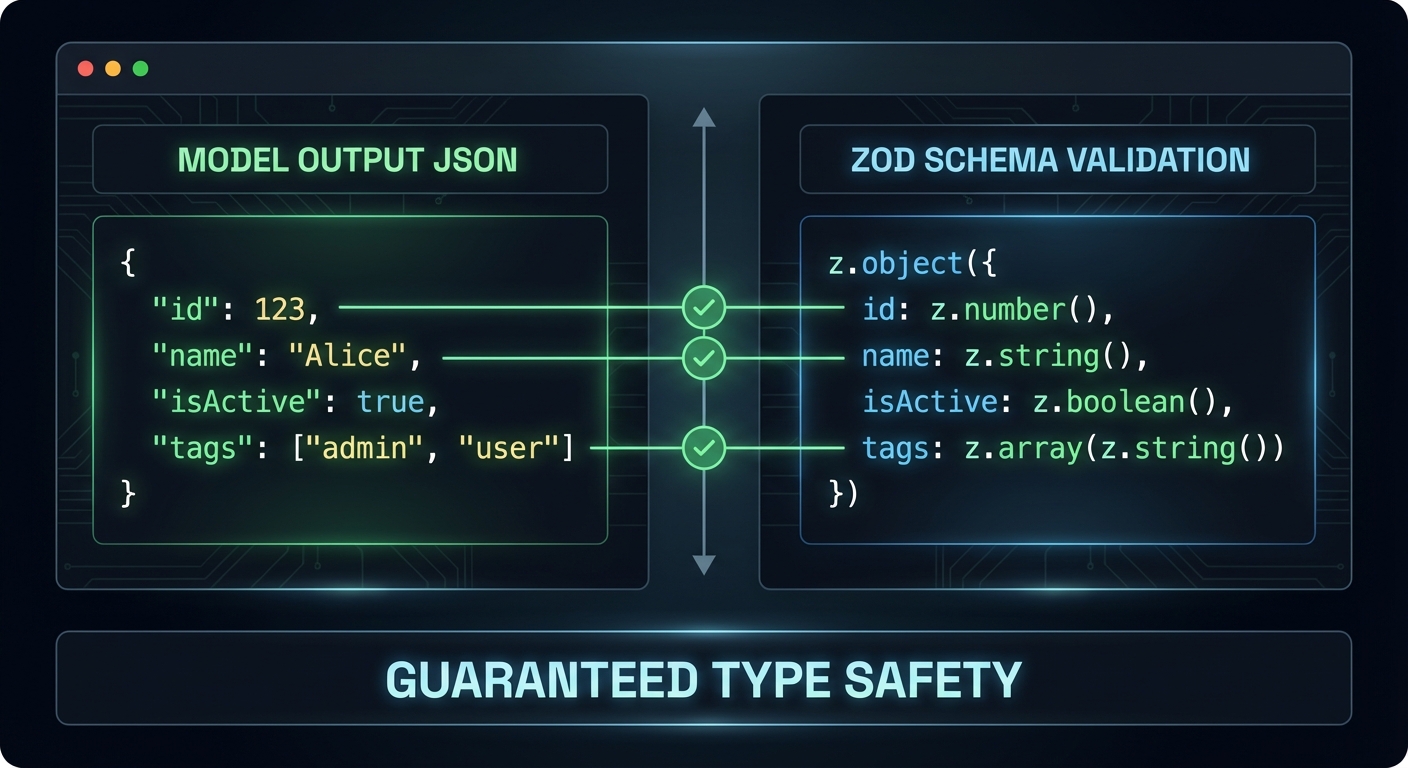
OpenAI’s structured outputs feature forces the model to return JSON that exactly matches a schema you specify. This is different from JSON mode (which just returns valid JSON) – structured outputs guarantee that every required field is present and every value is the correct type. You can use structured outputs for the final answer even when intermediate steps use tool calls.
import { z } from 'zod';
import { zodResponseFormat } from 'openai/helpers/zod.js';
// Define the schema for the final answer
const ProductRecommendationSchema = z.object({
recommendations: z.array(z.object({
product_name: z.string(),
price: z.number(),
reason: z.string(),
confidence: z.enum(['high', 'medium', 'low']),
})),
total_products_checked: z.number(),
search_strategy: z.string(),
});
// Use structured output for the final response
const finalResponse = await openai.beta.chat.completions.parse({
model: 'gpt-4o',
messages: [
...conversationHistory,
{ role: 'user', content: 'Based on the search results, provide your top 3 recommendations.' },
],
response_format: zodResponseFormat(ProductRecommendationSchema, 'product_recommendations'),
});
const recommendations = finalResponse.choices[0].message.parsed;
// recommendations is now typed as ProductRecommendation - guaranteed to match schema
console.log(recommendations.recommendations[0].product_name);
“Structured Outputs is a feature that ensures the model will always generate responses that adhere to your supplied JSON Schema, so you don’t need to worry about the model omitting a required key, or hallucinating an invalid enum value.” – OpenAI Documentation, Structured Outputs
Failure Modes with Streaming Tool Calls
Case 1: Parsing Arguments Before All Deltas Arrive
// WRONG: Parsing tool call arguments during streaming
for await (const chunk of stream) {
const delta = chunk.choices[0]?.delta;
if (delta.tool_calls?.[0]?.function?.arguments) {
const args = JSON.parse(delta.tool_calls[0].function.arguments); // WRONG - may be partial JSON
await mcpClient.callTool({ ... });
}
}
// CORRECT: Accumulate all deltas first, then parse
// (As shown in the complete streaming loop above)
Case 2: Missing tool_call_id in Tool Result Messages
// WRONG: tool_call_id missing or mismatched
messages.push({ role: 'tool', content: result }); // Missing tool_call_id
// CORRECT: Each tool result must include the exact tool_call_id
messages.push({ role: 'tool', tool_call_id: tc.id, content: result });
What to Check Right Now
- Test streaming with a multi-tool query – ask a question that forces two tool calls in sequence. Verify the streaming output is coherent and the final answer is correct.
- Add a progress indicator – during streaming, show a spinner or partial text. Users should see something happening, not a blank screen for 10 seconds.
- Use structured outputs for all final answers – wherever your application needs to parse the model’s response programmatically, use structured outputs. It eliminates an entire class of parsing bugs.
- Handle stream errors – wrap the
for await (const chunk of stream)loop in a try-catch. Network errors during streaming are common and need graceful handling.
nJoy π
OpenAI and MCP: Tool Calling with GPT-4o and o3
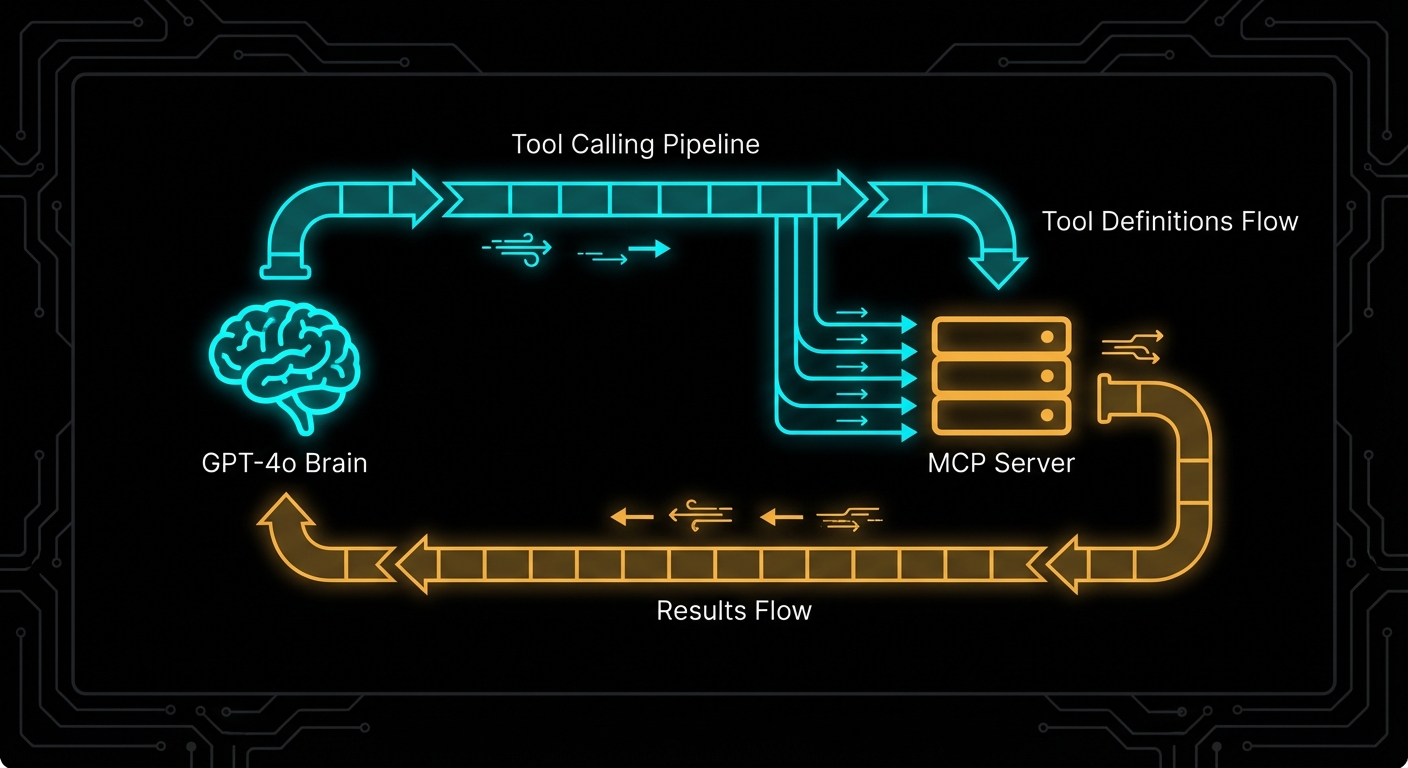
OpenAI’s tool calling is where MCP integration becomes immediately tangible. You have an MCP server with tools registered on it. You have a GPT-4o or o3 model that needs to use those tools. The integration is three steps: list tools from MCP, convert them to OpenAI’s function format, run the completion loop. This lesson builds that integration from scratch, explains every conversion step, and covers the failure modes that will break your agent in the middle of a production run.

The OpenAI Tool Calling Model
OpenAI’s tool calling (formerly function calling) works by providing the model with a list of functions it can invoke. When the model decides to use a tool, the API returns a response with tool_calls instead of content. Your application executes the tool, then appends the result to the conversation and calls the API again. This loop continues until the model returns content with no pending tool calls.
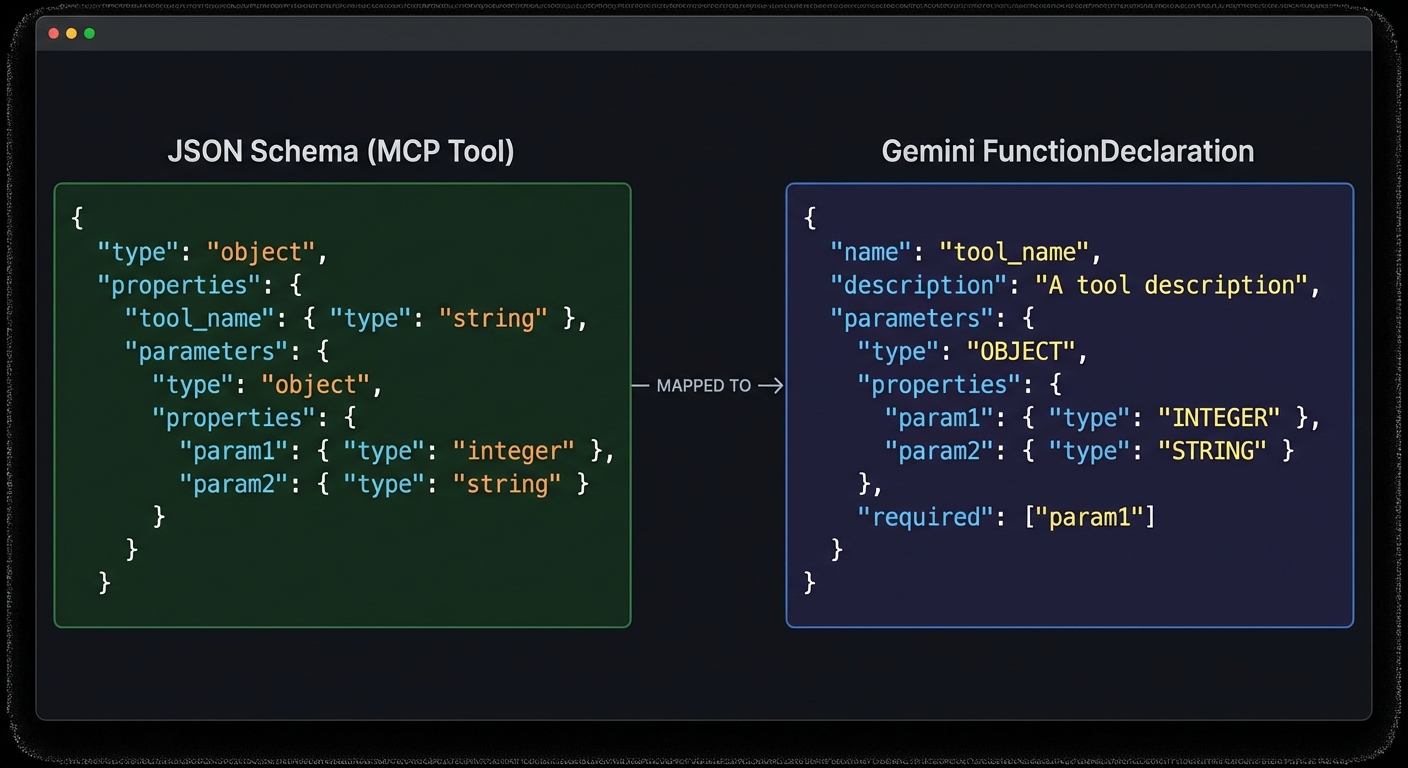
MCP tools map cleanly onto OpenAI’s function schema. The conversion is mechanical: take the MCP tool’s name, description, and JSON Schema, and wrap them in OpenAI’s format.
// MCP tool schema (what the MCP server provides)
// {
// name: "search_products",
// description: "Search the product catalogue",
// inputSchema: {
// type: "object",
// properties: {
// query: { type: "string", description: "Search terms" },
// limit: { type: "number", description: "Max results" }
// },
// required: ["query"]
// }
// }
// OpenAI tool format (what openai.chat.completions.create() expects)
function mcpToolToOpenAITool(mcpTool) {
return {
type: 'function',
function: {
name: mcpTool.name,
description: mcpTool.description,
parameters: mcpTool.inputSchema, // Direct pass-through - formats are compatible
},
};
}
“Tool calls allow models to call user-defined tools. Tools are specified in the request by the user, and the model can call them during message generation.” – OpenAI Documentation, Function Calling
The Complete Integration: MCP Client + OpenAI Loop
// mcp-openai-host.js
import OpenAI from 'openai';
import { Client } from '@modelcontextprotocol/sdk/client/index.js';
import { StdioClientTransport } from '@modelcontextprotocol/sdk/client/stdio.js';
const openai = new OpenAI({ apiKey: process.env.OPENAI_API_KEY });
// Step 1: Connect to MCP server
const mcpClient = new Client(
{ name: 'openai-host', version: '1.0.0' },
{ capabilities: {} }
);
const transport = new StdioClientTransport({
command: 'node',
args: ['./my-mcp-server.js'],
env: process.env,
});
await mcpClient.connect(transport);
// Step 2: Discover tools and convert to OpenAI format
const { tools: mcpTools } = await mcpClient.listTools();
const openAITools = mcpTools.map(tool => ({
type: 'function',
function: {
name: tool.name,
description: tool.description,
parameters: tool.inputSchema,
},
}));
console.log(`Loaded ${openAITools.length} tools from MCP server`);
// Step 3: Build the tool-calling loop
async function runWithTools(userMessage) {
const messages = [{ role: 'user', content: userMessage }];
while (true) {
const response = await openai.chat.completions.create({
model: 'gpt-4o',
messages,
tools: openAITools,
tool_choice: 'auto', // Let the model decide
});
const choice = response.choices[0];
const message = choice.message;
// Append the assistant message to conversation
messages.push(message);
// If no tool calls, we have the final answer
if (choice.finish_reason !== 'tool_calls') {
return message.content;
}
// Execute each tool call through MCP
const toolResults = await Promise.all(
message.tool_calls.map(async (toolCall) => {
const args = JSON.parse(toolCall.function.arguments);
console.log(`Calling tool: ${toolCall.function.name}`, args);
const result = await mcpClient.callTool({
name: toolCall.function.name,
arguments: args,
});
// Format result for OpenAI
const resultText = result.content
.filter(c => c.type === 'text')
.map(c => c.text)
.join('\n');
return {
role: 'tool',
tool_call_id: toolCall.id,
content: resultText,
};
})
);
// Append all tool results to conversation
messages.push(...toolResults);
// Loop back to get the model's response to the tool results
}
}
// Run it
const answer = await runWithTools('Find the top 5 electronics products under $100');
console.log('\nFinal answer:', answer);
await mcpClient.close();

Using GPT-4o vs o3 with MCP Tools
Different OpenAI models have different tool calling behaviours. GPT-4o is the most reliable for agentic tool use: it calls tools precisely, handles multi-tool scenarios well, and respects tool descriptions. The o3 and o3-mini reasoning models think before calling tools, which improves accuracy on complex multi-step tasks but adds latency and cost.
// For fast, reliable tool calling:
model: 'gpt-4o'
// For complex reasoning tasks where accuracy matters more than speed:
model: 'o3-mini'
// o3 supports a different parameter for "thinking budget":
const response = await openai.chat.completions.create({
model: 'o3',
messages,
tools: openAITools,
reasoning_effort: 'medium', // 'low', 'medium', 'high'
});
Failure Modes with OpenAI + MCP
Case 1: Not Handling Multiple Simultaneous Tool Calls
GPT-4o can call multiple tools in a single response. If you only handle the first tool call, you will get protocol errors when the model expects all tool call results before it continues.
// WRONG: Only handles first tool call
const toolCall = message.tool_calls[0];
const result = await mcpClient.callTool({ name: toolCall.function.name, arguments: ... });
// CORRECT: Handle all tool calls, run them in parallel
const toolResults = await Promise.all(
message.tool_calls.map(async (toolCall) => { ... })
);
messages.push(...toolResults);
Case 2: Infinite Tool Call Loops
If a tool always returns data that prompts another tool call, the loop never terminates. Set a maximum iteration count.
const MAX_ITERATIONS = 10;
let iterations = 0;
while (true) {
if (++iterations > MAX_ITERATIONS) {
throw new Error(`Tool calling loop exceeded ${MAX_ITERATIONS} iterations`);
}
// ... rest of loop
}
Case 3: Passing MCP Tool Input Schema Directly Without Validation
OpenAI requires tool parameter schemas to be valid JSON Schema. MCP’s inputSchema is JSON Schema, so it should work – but some edge cases (like Zod’s default values, which add non-standard keys) can cause OpenAI API errors. Strip unknown keys before passing to OpenAI.
// Safe schema extraction
function safeInputSchema(mcpTool) {
const schema = mcpTool.inputSchema;
// OpenAI does not accept 'default' at the schema root level
// Strip it to avoid API validation errors
const { default: _, ...safeSchema } = schema;
return safeSchema;
}
What to Check Right Now
- Test tool conversion – print your OpenAI tools array and verify each tool has the correct name, description, and parameter schema.
- Run with gpt-4o-mini first – use the cheaper model during development to iterate faster and avoid burning GPT-4o quota on debugging.
- Log tool calls and results – add logging every time a tool is called and its result received. This makes agentic debugging dramatically easier.
- Cap iteration count – always set a maximum loop iteration and handle the case where the model runs out of allowed turns.
nJoy π
MCP Transport Security: TLS, CORS, and Host Header Validation
Security is not a feature you add after the transport works. It is the transport design. An MCP server exposed over HTTP without TLS, without CORS validation, and without Host header checking is not a development shortcut – it is a vulnerability waiting to be exploited. This lesson covers the three most important transport-level security controls for MCP HTTP servers: TLS termination, CORS policy, and Host header validation. Get these right before your server ever sees production traffic.

TLS: Why Plaintext MCP Is Unacceptable
Any MCP server that carries sensitive data (API keys, user data, database queries, file contents) must use TLS. Over plaintext HTTP, anyone between the client and server can read and modify the JSON-RPC stream. Tool arguments, resource contents, and sampling responses are all exposed. For local development, this is tolerable. For any remote server – even internal company servers – TLS is mandatory.
The simplest production approach: terminate TLS at nginx or a load balancer, and run your Node.js MCP server on HTTP internally. This keeps TLS certificate management at the infrastructure layer.
# nginx.conf for TLS-terminated MCP server
server {
listen 443 ssl;
server_name mcp.mycompany.com;
ssl_certificate /etc/ssl/certs/mycompany.crt;
ssl_certificate_key /etc/ssl/private/mycompany.key;
ssl_protocols TLSv1.2 TLSv1.3;
ssl_ciphers ECDHE-ECDSA-AES128-GCM-SHA256:ECDHE-RSA-AES128-GCM-SHA256;
location /mcp {
proxy_pass http://localhost:3000;
proxy_http_version 1.1;
proxy_set_header Upgrade $http_upgrade;
proxy_set_header Connection 'upgrade';
proxy_set_header Host $host;
proxy_set_header X-Real-IP $remote_addr;
proxy_buffering off; # Critical for SSE
proxy_read_timeout 3600s; # Long timeout for SSE connections
proxy_cache off;
}
}
“For remote MCP servers, all communication MUST use TLS to protect against eavesdropping and tampering. Servers MUST validate client authentication before processing any requests.” – MCP Specification, Transport Security
CORS: Controlling Browser Access
If your MCP server will be accessed from browser-based hosts (web applications that call the MCP endpoint directly from JavaScript), you must configure CORS. Without CORS headers, the browser will block cross-origin requests. With overly permissive CORS (Access-Control-Allow-Origin: *), any website can make requests to your server on behalf of your users.
// Correct CORS configuration for MCP HTTP servers
import cors from 'cors';
const ALLOWED_ORIGINS = [
'https://myapp.example.com',
'https://staging.myapp.example.com',
// For development only:
'http://localhost:5173',
];
app.use('/mcp', cors({
origin: (origin, callback) => {
// Allow requests with no origin (server-to-server, curl)
if (!origin) return callback(null, true);
if (ALLOWED_ORIGINS.includes(origin)) return callback(null, true);
callback(new Error(`CORS: Origin ${origin} not allowed`));
},
methods: ['GET', 'POST', 'DELETE', 'OPTIONS'],
allowedHeaders: ['Content-Type', 'mcp-session-id', 'Authorization'],
credentials: true, // If you use cookie-based auth
}));

Host Header Validation: DNS Rebinding Protection
DNS rebinding attacks allow malicious websites to make requests to your localhost MCP server even through browser CORS restrictions. The attack works by pointing a DNS entry to 127.0.0.1 and then making requests with a spoofed Host header. Validating the Host header prevents this class of attack for local servers.
// Host header validation middleware
function validateHost(allowedHosts) {
return (req, res, next) => {
const host = req.headers.host;
if (!host) return res.status(400).send('Missing Host header');
const hostname = host.split(':')[0]; // Strip port
if (!allowedHosts.includes(hostname)) {
console.error(`[security] Rejected request with Host: ${host}`);
return res.status(403).send('Forbidden: Invalid Host header');
}
next();
};
}
// For a local development server, allow only localhost
app.use('/mcp', validateHost(['localhost', '127.0.0.1']));
// For a production server, allow your actual domain
// app.use('/mcp', validateHost(['mcp.mycompany.com']));
Putting It All Together: Security Middleware Stack
// Complete security middleware stack for production MCP server
import helmet from 'helmet';
import rateLimit from 'express-rate-limit';
app.use(helmet({
contentSecurityPolicy: {
directives: {
defaultSrc: ["'self'"],
},
},
}));
// Host validation
app.use('/mcp', validateHost([process.env.MCP_ALLOWED_HOST || 'localhost']));
// CORS
app.use('/mcp', cors({ origin: ALLOWED_ORIGINS, methods: ['GET', 'POST', 'DELETE'] }));
// Rate limiting
app.use('/mcp', rateLimit({
windowMs: 60 * 1000,
max: 100,
standardHeaders: true,
legacyHeaders: false,
}));
// Request size limit
app.use('/mcp', express.json({ limit: '2mb' }));
// Then your MCP handler
app.post('/mcp', handleMcpRequest);
app.get('/mcp', handleMcpRequest);
Failure Modes in Transport Security
Case 1: Using Wildcard CORS in Production
// NEVER in production - allows any origin to call your MCP server
app.use(cors({ origin: '*' }));
// ALWAYS use an explicit allowlist in production
app.use(cors({ origin: ALLOWED_ORIGINS }));
Case 2: Running an HTTP MCP Server on a Public Port Without Auth
// WRONG: Public port, no auth, no TLS
app.listen(3000); // Accessible to the internet on port 3000 - anyone can call your tools
// CORRECT: Bind to localhost and terminate TLS at nginx
app.listen(3000, '127.0.0.1'); // Only accessible locally; nginx handles TLS externally
What to Check Right Now
- Scan your server with nmap –
nmap -sV localhost -p 3000. Verify it binds only to 127.0.0.1 in production builds. - Test CORS with curl -H “Origin:” –
curl -X OPTIONS http://localhost:3000/mcp -H "Origin: https://evil.com". The server should return a 403 or no CORS headers. - Check Host header handling –
curl http://localhost:3000/mcp -H "Host: evil.com". Your server should reject requests with non-allowlisted Host headers. - Enable TLS on every non-local deployment – use Let’s Encrypt with
certbot --nginxfor automatic certificate management. There is no excuse for plaintext in 2026.
nJoy π
HTTP Adapters for MCP: Express, Hono, and the Node Middleware Pattern
The MCP SDK’s StreamableHTTPServerTransport is framework-agnostic at the core, but wiring it up to Express, Hono, or any other HTTP framework requires adapters. Good adapters are thin – they translate between the framework’s request/response model and the transport’s expectations without adding logic of their own. This lesson shows you how to build those adapters correctly for Express and Hono, covers the common configuration patterns, and explains why each choice matters for production deployment.

Express Adapter Pattern
Express is the most widely used Node.js HTTP framework and the safest choice for teams that want maximum ecosystem compatibility. Here is the production-ready Express adapter pattern:
// mcp-server-express.js
import express from 'express';
import { McpServer } from '@modelcontextprotocol/sdk/server/mcp.js';
import { StreamableHTTPServerTransport } from '@modelcontextprotocol/sdk/server/streamableHttp.js';
import { z } from 'zod';
import { randomUUID } from 'node:crypto';
const app = express();
app.use(express.json({ limit: '4mb' })); // Increase limit for large tool inputs
// Session registry
const sessions = new Map();
function createMcpServer() {
const server = new McpServer({ name: 'api-server', version: '1.0.0' });
server.tool('ping', 'Check server health', {}, async () => ({
content: [{ type: 'text', text: 'pong' }],
}));
return server;
}
// Shared handler for POST and GET
async function handleMcpRequest(req, res) {
const sessionId = req.headers['mcp-session-id'];
let transport;
if (sessionId && sessions.has(sessionId)) {
transport = sessions.get(sessionId);
} else if (!sessionId && req.method === 'POST') {
// New session on first POST
transport = new StreamableHTTPServerTransport({
sessionIdGenerator: () => randomUUID(),
onsessioninitialized: (id) => {
sessions.set(id, transport);
// Clean up session when transport closes
transport.onclose = () => sessions.delete(id);
},
});
const mcpServer = createMcpServer();
await mcpServer.connect(transport);
} else {
res.status(400).json({ error: 'Invalid or missing session' });
return;
}
await transport.handleRequest(req, res, req.body);
}
app.post('/mcp', handleMcpRequest);
app.get('/mcp', handleMcpRequest);
app.delete('/mcp', (req, res) => {
const sessionId = req.headers['mcp-session-id'];
sessions.delete(sessionId);
res.sendStatus(200);
});
// Health check
app.get('/health', (req, res) => res.json({ status: 'ok', sessions: sessions.size }));
const PORT = process.env.PORT || 3000;
app.listen(PORT, () => console.error(`MCP server on :${PORT}`));
“The Streamable HTTP transport can be integrated with any HTTP server framework. The key requirement is that the server must handle POST requests for client-to-server messages and GET requests for server-to-client SSE streams.” – MCP Documentation, Transports
Hono Adapter Pattern
Hono is a lightweight, ultra-fast web framework designed for edge runtimes (Cloudflare Workers, Deno Deploy, Bun) as well as Node.js. Its smaller footprint and native Web API compatibility make it attractive for MCP servers that need to run at the edge.
// mcp-server-hono.js
import { Hono } from 'hono';
import { serve } from '@hono/node-server';
import { McpServer } from '@modelcontextprotocol/sdk/server/mcp.js';
import { StreamableHTTPServerTransport } from '@modelcontextprotocol/sdk/server/streamableHttp.js';
import { randomUUID } from 'node:crypto';
const app = new Hono();
const sessions = new Map();
app.post('/mcp', async (c) => {
const sessionId = c.req.header('mcp-session-id');
const body = await c.req.json();
let transport;
if (sessionId && sessions.has(sessionId)) {
transport = sessions.get(sessionId);
} else {
transport = new StreamableHTTPServerTransport({
sessionIdGenerator: () => randomUUID(),
onsessioninitialized: (id) => sessions.set(id, transport),
});
const mcpServer = createMcpServer();
await mcpServer.connect(transport);
}
// Hono uses Web API Request/Response - convert for the transport
// The SDK transport.handleRequest accepts both Node.js and Web API style
return new Response(await transport.handlePostRequest(body, sessionId));
});
app.get('/mcp', async (c) => {
const sessionId = c.req.header('mcp-session-id');
const transport = sessions.get(sessionId);
if (!transport) return c.json({ error: 'Session not found' }, 404);
// Return SSE stream
const stream = await transport.createSSEStream();
return new Response(stream, {
headers: {
'Content-Type': 'text/event-stream',
'Cache-Control': 'no-cache',
},
});
});
serve({ fetch: app.fetch, port: 3000 });

Middleware for MCP Endpoints
MCP endpoints benefit from the same middleware patterns as any HTTP API – request logging, rate limiting, correlation IDs, and error handling. Here is a middleware stack for a production MCP endpoint:
// Express middleware stack for MCP
import rateLimit from 'express-rate-limit';
// Rate limiting - protect against DoS
const mcpLimiter = rateLimit({
windowMs: 60 * 1000, // 1 minute
max: 100, // 100 requests per minute per IP
message: { error: 'Too many requests' },
skip: (req) => req.headers['mcp-session-id'] && sessions.has(req.headers['mcp-session-id']),
});
// Request logging
app.use('/mcp', (req, res, next) => {
const start = Date.now();
res.on('finish', () => {
console.error(`[mcp] ${req.method} ${req.url} ${res.statusCode} ${Date.now() - start}ms`);
});
next();
});
// Apply rate limit before handler
app.post('/mcp', mcpLimiter, handleMcpRequest);
app.get('/mcp', handleMcpRequest);
Failure Modes with HTTP Adapters
Case 1: Forgetting express.json() Middleware
Without express.json(), Express will not parse the POST body. The transport will receive undefined as the body and produce confusing parse errors.
// WRONG: No body parser
const app = express();
app.post('/mcp', handleMcpRequest); // req.body is undefined
// CORRECT: Parse JSON bodies
const app = express();
app.use(express.json());
app.post('/mcp', handleMcpRequest); // req.body is the parsed JSON object
Case 2: Sharing a Single McpServer Instance Across All Sessions
If tool handlers have per-session state (user context, authentication tokens, active database transactions), sharing one McpServer instance across all sessions will mix state between users. Create a new McpServer per session, or design tools to be stateless.
// RISKY: Shared server instance if tools have per-session state
const sharedServer = createMcpServer(); // Fine only if all tools are stateless
// SAFE: New server per session (slightly more overhead but guarantees isolation)
onsessioninitialized: (id) => {
const sessionServer = createMcpServer(); // Fresh instance per session
sessionServer.connect(transport);
}
What to Check Right Now
- Choose Express for Node.js, Hono for edge – if you are deploying to a standard VPS or Docker container, Express is the safer choice. If you need Cloudflare Workers or Deno Deploy, use Hono.
- Add a health endpoint – every MCP HTTP server should have a
GET /healthendpoint that returns session count and server status. This is essential for load balancer health checks. - Apply rate limiting before your MCP handler – without rate limiting, a single client can exhaust your server with rapid requests. Use express-rate-limit or equivalent.
- Monitor session count – sessions that are never cleaned up will consume memory. Log the session count on the health endpoint and alert if it grows unboundedly.
nJoy π