Artificial Intelligence attempts to replicate human cognition in machines. Both biological and artificial neurons share fundamental principles: receiving multiple inputs, having activation thresholds, and strengthening connections through repeated use. However, implementation differs dramatically between organic brain computing and silicon-based AI processing.
The human brain contains 86 billion neurons connected by trillions of synapses, operating massively parallel while consuming only 20 watts. Training large AI models requires megawatts. Biological neurons communicate through electrochemical signals with complex temporal dynamics. Artificial neurons use simplified mathematical functions on numerical inputs.
Current AI lacks consciousness and genuine understanding. These systems recognise patterns and generate statistically likely outputs, but do not truly comprehend meaning. Large language models write poetry and solve problems without subjective experience or awareness. This distinction defines both AI capabilities and limitations.
Artificial General Intelligence matching human cognitive abilities across domains remains distant and uncertain. While narrow AI excels at specific tasks, replicating human flexibility and creativity presents challenges we barely understand. The brain-AI comparison inspires while humbling us about how much remains to learn.
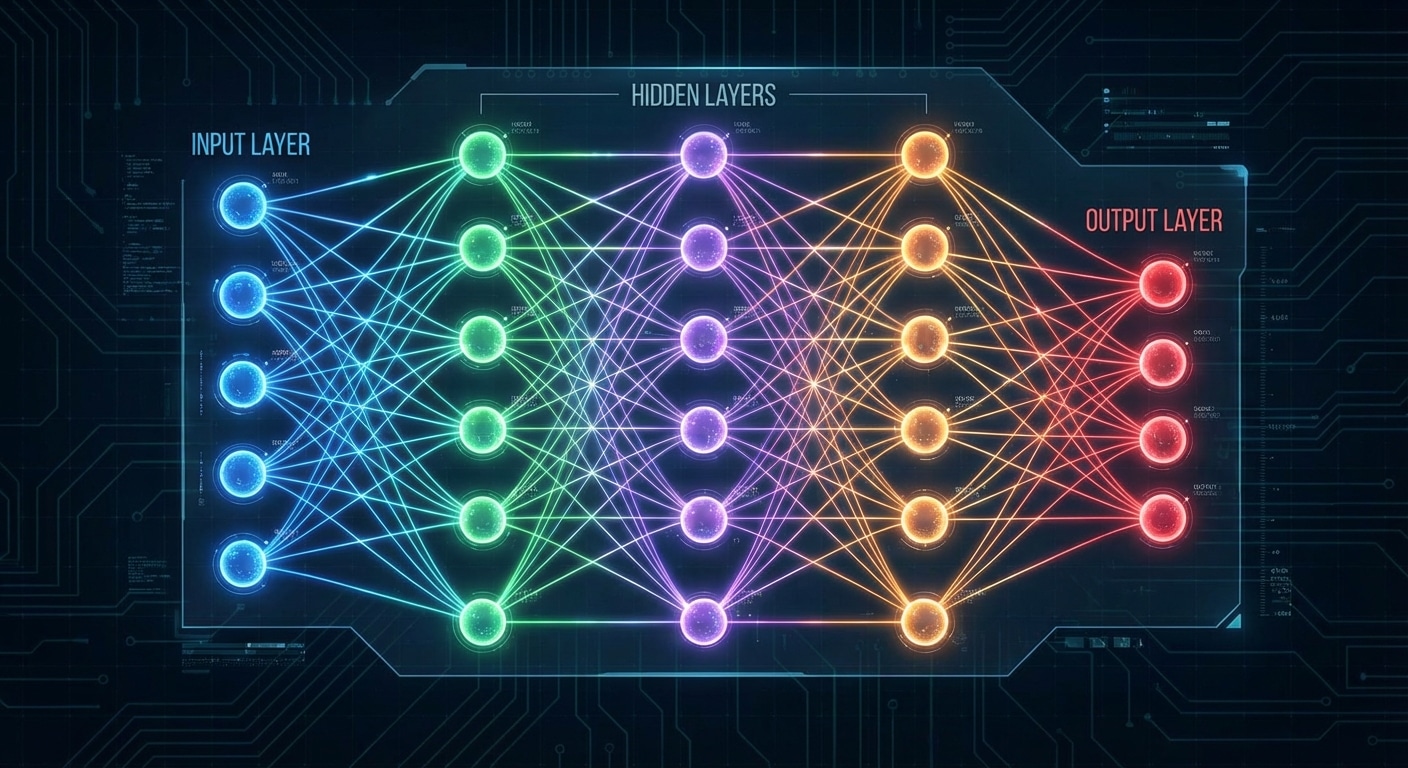
A neural network is a computational model inspired by the biological structure of the human brain. At its core, it consists of interconnected nodes called neurons, organised into distinct layers that process information hierarchically. These artificial neurons receive inputs, apply mathematical transformations, and produce outputs that feed into subsequent layers, creating a powerful system capable of learning complex patterns.
The architecture consists of three fundamental layer types. The input layer receives raw data such as images or text. Hidden layers transform inputs through weighted sums and activation functions, gradually learning meaningful representations. The output layer produces the final result – a classification, prediction, or generated content.
Each connection between neurons carries a weight determining influence. During training, weights are adjusted using backpropagation to minimise prediction errors. The computation follows: output equals activation function applied to sum of inputs times weights plus bias. This simple operation repeated millions of times enables learning incredibly complex patterns.
Understanding this architecture is crucial for AI development. The depth and width of networks determine learning capacity. Proper initialisation, regularization, and optimisation ensure successful training whether building image classifiers, language models, or recommendation systems.
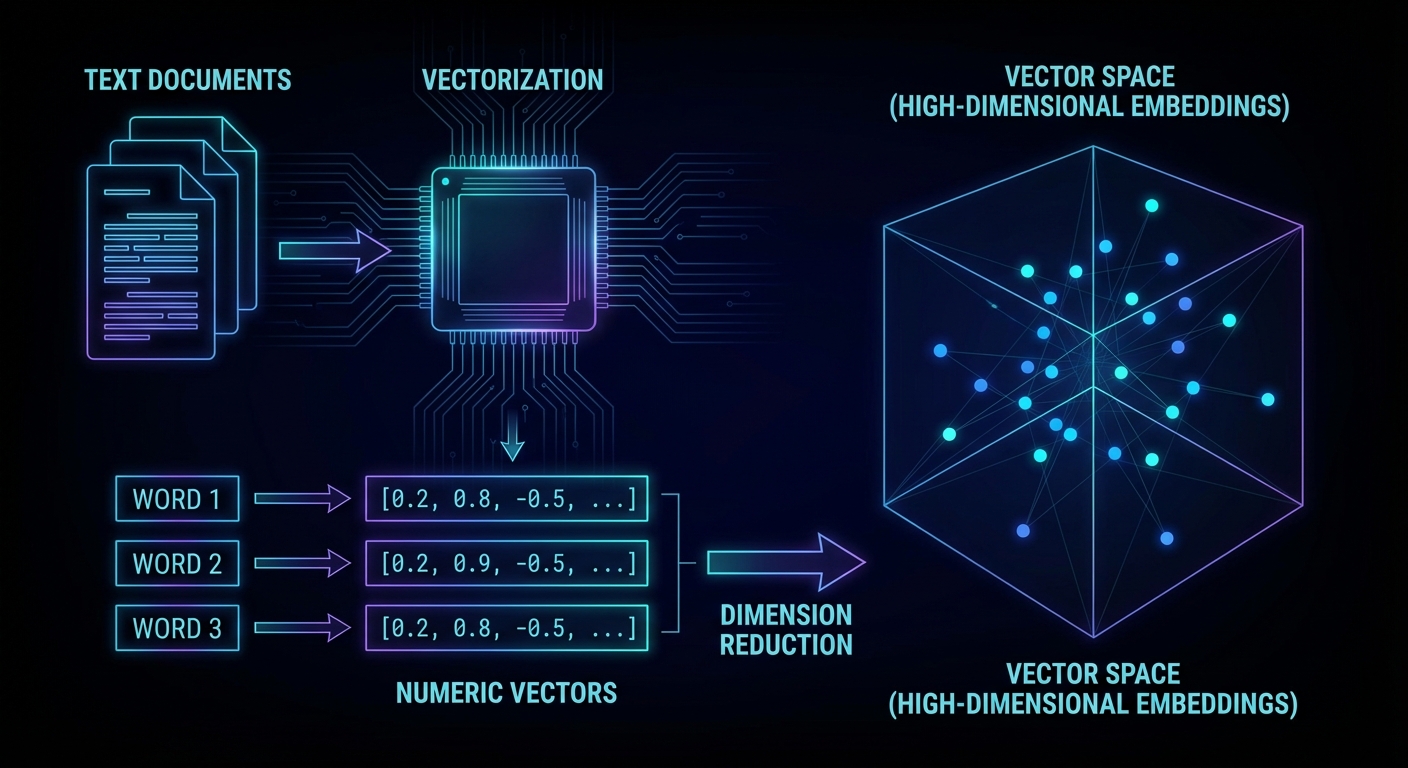
A vector database stores data as high-dimensional numeric arrays, embeddings, instead of rows and columns. When you search, you don’t match keywords; you find items that are semantically close in that space. Two sentences can share zero words and still be nearest neighbours if they mean the same thing. That’s why vector databases are the backbone of RAG (Retrieval-Augmented Generation): you embed a user’s question, retrieve the most relevant document chunks from the database, and hand those chunks to the LLM as context. The LLM answers from evidence rather than from weights alone, grounded, citable, and up to date with your own data.
How embeddings work
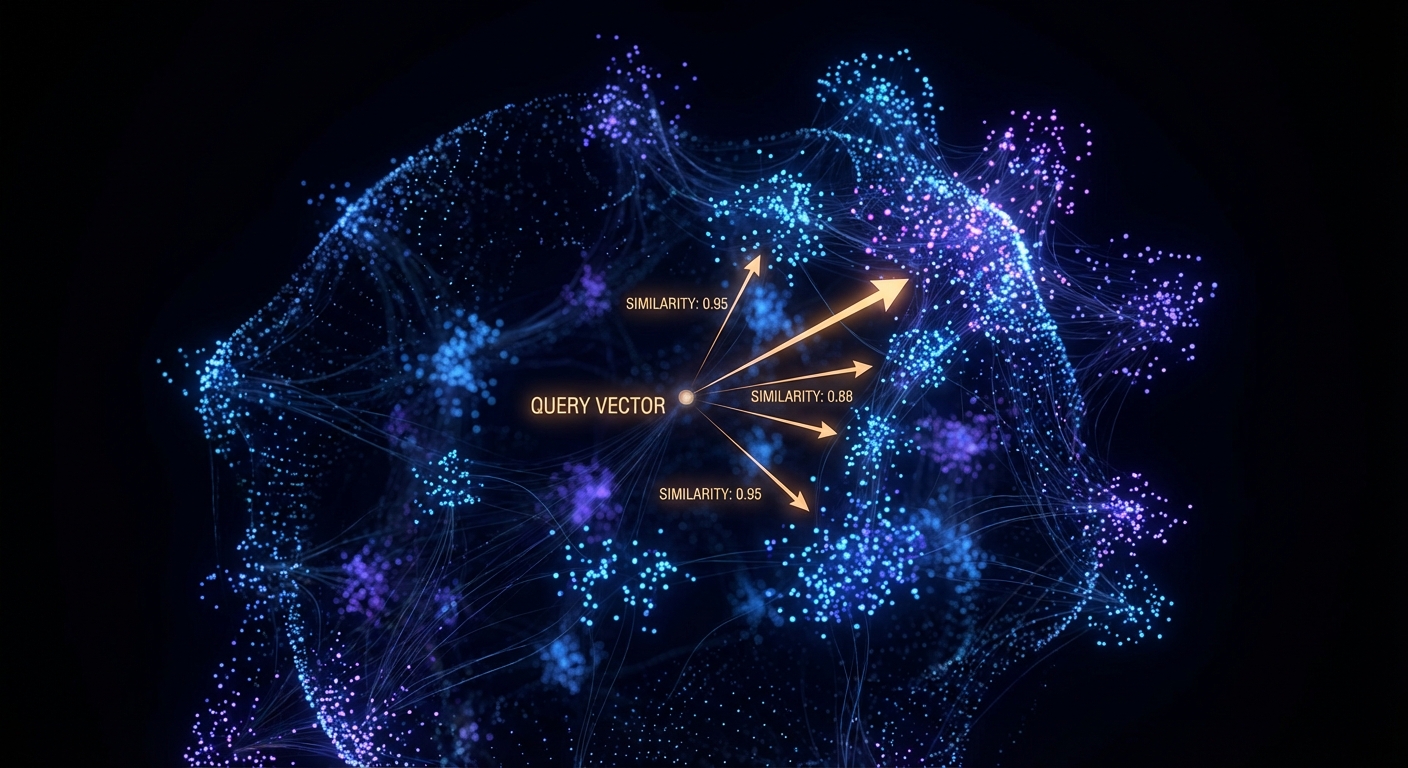
An embedding model (like OpenAI’s text-embedding-3-small) reads a piece of text and outputs a list of floats, typically 1,536 of them. Each float encodes some aspect of meaning learned during training. The distance between two vectors (cosine similarity is standard) measures semantic closeness: 1.0 means identical in meaning, 0 means unrelated, negative means opposite. The magic is that this geometry is compositional: “Paris” minus “France” plus “Italy” lands near “Rome”. You don’t program these relationships, they emerge from training on billions of documents.
Queries and documents live in the same space. Nearest-neighbour search retrieves the most semantically relevant matches.
The full pipeline
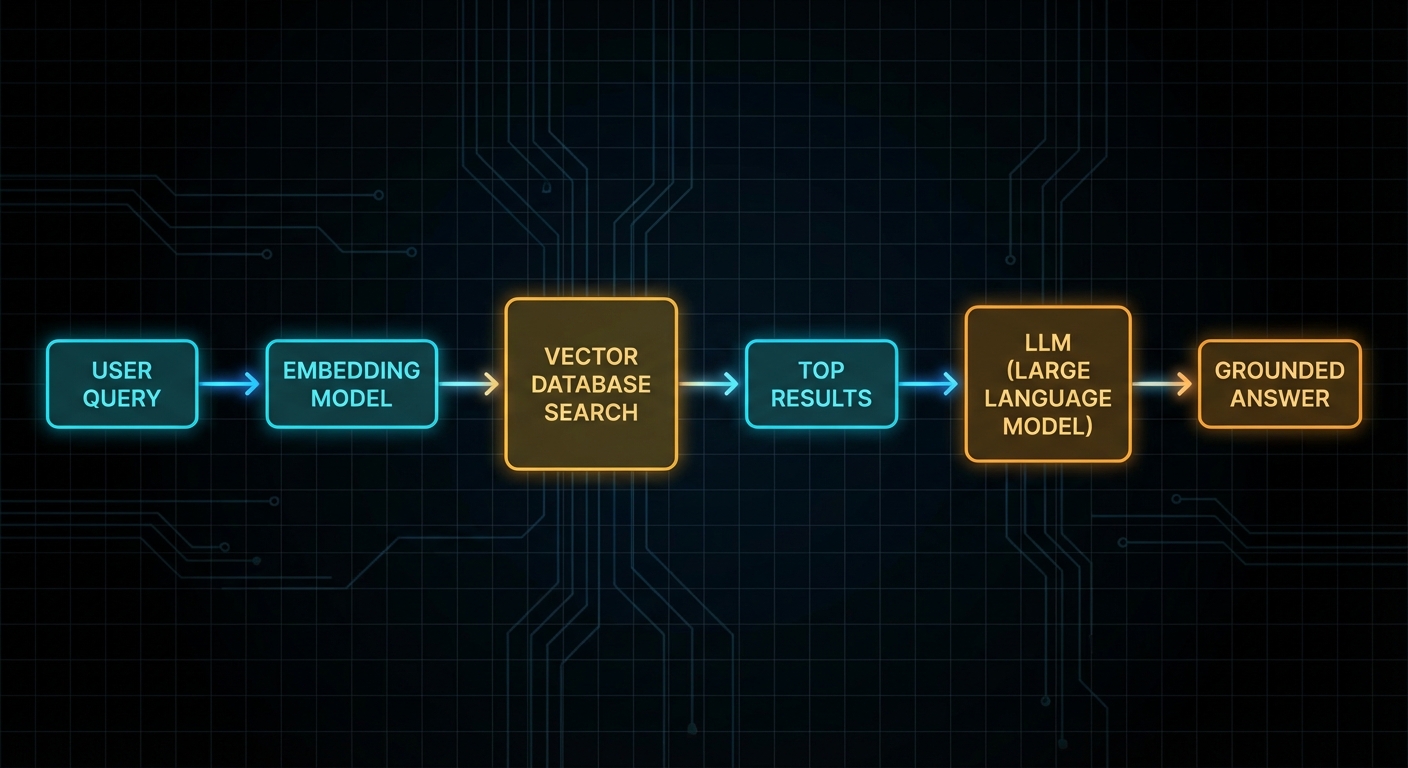
The pipeline has two phases: ingestion (offline, runs once or on update) and retrieval (online, runs per query). During ingestion you chunk your documents, embed each chunk, and upsert into Pinecone. During retrieval you embed the query, call Pinecone’s query endpoint, and get back the top-K most similar chunks. Those chunks become the context you inject into the LLM prompt.
The full RAG flow: embed the query → search Pinecone → retrieve chunks → inject into LLM → get a grounded answer.
Step 1: Setup
npm install @pinecone-database/pinecone openai
Create a free Pinecone index at pinecone.io. Set dimension to 1536 (matches text-embedding-3-small) and metric to cosine. Store both keys in .env:
// client.js
import { Pinecone } from '@pinecone-database/pinecone';
import OpenAI from 'openai';

export const pinecone = new Pinecone({ apiKey: process.env.PINECONE_API_KEY });
export const openai   = new OpenAI({ apiKey: process.env.OPENAI_API_KEY });
export const index    = pinecone.index('documents');
Step 2: Chunk your documents
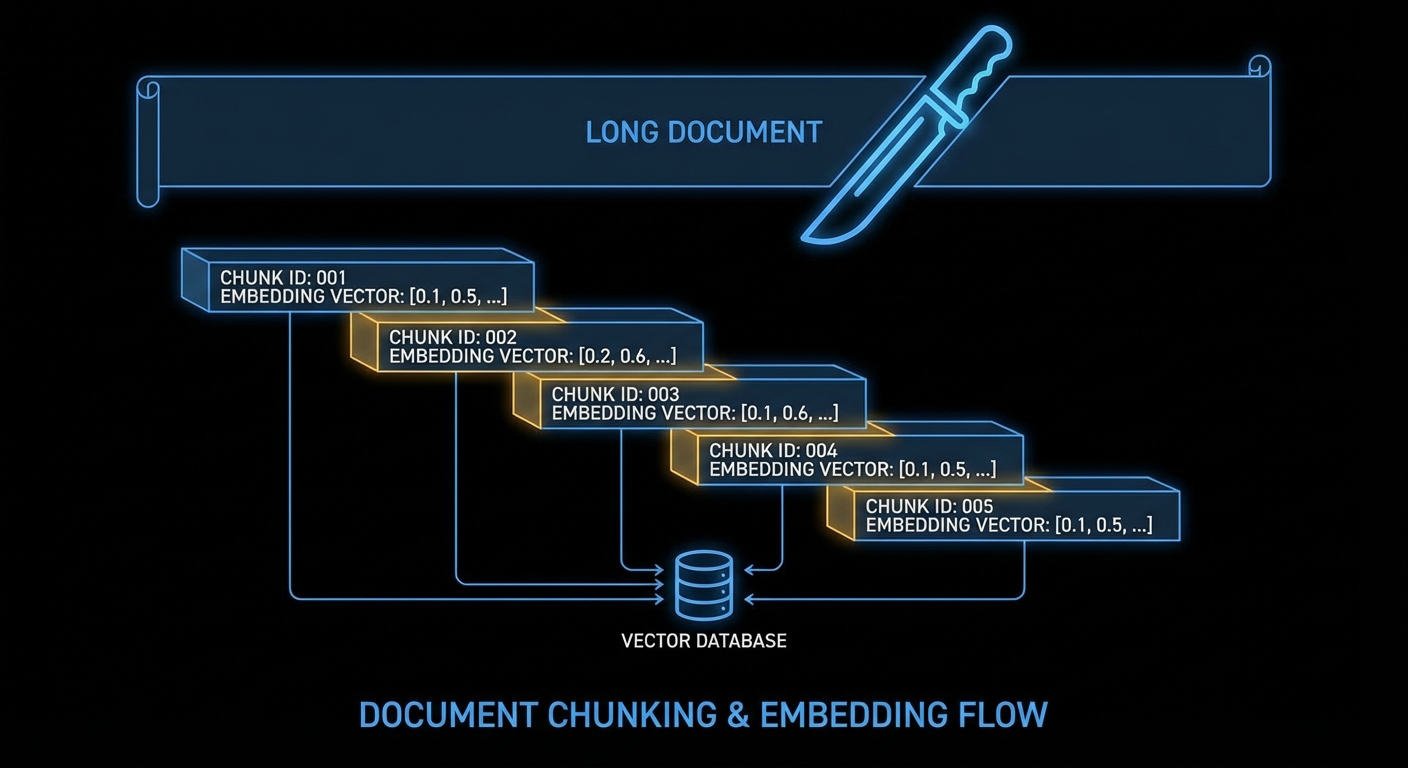
Embedding models have token limits (8,191 for text-embedding-3-small). More importantly, a chunk that’s too large drowns the signal, a paragraph about your answer might be buried inside a 5,000-word chunk. Aim for 200–500 words per chunk with a small overlap so context doesn’t get cut at chunk boundaries.
Overlapping chunks prevent context loss at boundaries. Each chunk gets an ID and is embedded independently.
// chunker.js

/**
 * Split text into overlapping chunks.
 * @param {string} text        - Full document text
 * @param {number} chunkSize   - Target chars per chunk (default 1200 ≈ 300 words)
 * @param {number} overlap     - Overlap chars between chunks (default 200)
 * @returns {string[]}
 */
export function chunkText(text, chunkSize = 1200, overlap = 200) {
  const chunks = [];
  let start = 0;

  while (start < text.length) {
    const end = Math.min(start + chunkSize, text.length);
    chunks.push(text.slice(start, end).trim());
    if (end === text.length) break;
    start += chunkSize - overlap; // step back by overlap amount
  }

  return chunks.filter(c => c.length > 50); // drop tiny trailing chunks
}
Step 3: Embed in batches and upsert
OpenAI’s embeddings endpoint accepts up to 2,048 inputs per call. Batching is faster and cheaper than one call per chunk. After embedding, upsert to Pinecone with a stable ID and metadata. The metadata is what comes back in query results, store everything you’ll need to display or cite the source.
// ingest.js
import { openai, index } from './client.js';
import { chunkText }     from './chunker.js';

const EMBED_MODEL  = 'text-embedding-3-small';
const BATCH_SIZE   = 100; // chunks per OpenAI call

/**
 * Embed an array of strings in batches.
 */
async function embedBatch(texts) {
  const res = await openai.embeddings.create({
    model: EMBED_MODEL,
    input: texts,
  });
  return res.data.map(d => d.embedding); // array of float[]
}

/**
 * Ingest a document into Pinecone.
 * @param {string} docId    - Stable identifier for this document
 * @param {string} text     - Full document text
 * @param {object} meta     - Extra metadata (title, url, date, etc.)
 */
export async function ingestDocument(docId, text, meta = {}) {
  const chunks  = chunkText(text);
  const vectors = [];

  // Embed in batches of BATCH_SIZE
  for (let i = 0; i < chunks.length; i += BATCH_SIZE) {
    const batch      = chunks.slice(i, i + BATCH_SIZE);
    const embeddings = await embedBatch(batch);

    embeddings.forEach((embedding, j) => {
      const chunkIndex = i + j;
      vectors.push({
        id: `${docId}__chunk_${chunkIndex}`,
        values: embedding,
        metadata: {
          ...meta,
          docId,
          chunkIndex,
          text: chunks[chunkIndex], // store chunk text for retrieval
        },
      });
    });
  }

  // Upsert to Pinecone (max 100 vectors per call)
  for (let i = 0; i < vectors.length; i += 100) {
    await index.upsert(vectors.slice(i, i + 100));
  }

  console.log(`Ingested ${vectors.length} chunks for doc: ${docId}`);
}

// --- Usage example ---
await ingestDocument(
  'nodejs-docs-v20',
  await fs.readFile('nodejs-docs.txt', 'utf8'),
  { title: 'Node.js v20 Docs', url: 'https://nodejs.org/docs/v20/' }
);
Step 4: Query and retrieve
At query time: embed the user's question, search Pinecone for the top-K nearest chunks, and return them. Pinecone also supports metadata filtering so you can narrow results to a specific document, date range, or tag, without re-embedding.
// retrieve.js
import { openai, index } from './client.js';

const EMBED_MODEL = 'text-embedding-3-small';

/**
 * Retrieve the top-K most relevant chunks for a query.
 * @param {string} query    - User's natural language question
 * @param {number} topK     - Number of results (default 5)
 * @param {object} filter   - Optional Pinecone metadata filter
 * @returns {Array<{text, score, meta}>}
 */
export async function retrieve(query, topK = 5, filter = {}) {
  // 1. Embed the query
  const res = await openai.embeddings.create({
    model: EMBED_MODEL,
    input: query,
  });
  const queryVector = res.data[0].embedding;

  // 2. Search Pinecone
  const results = await index.query({
    vector:          queryVector,
    topK,
    includeMetadata: true,
    filter:          Object.keys(filter).length ? filter : undefined,
  });

  // 3. Return clean objects
  return results.matches.map(m => ({
    text:  m.metadata.text,
    score: m.score,         // cosine similarity 0–1
    meta:  m.metadata,
  }));
}

// --- With metadata filter (only search a specific doc) ---
const chunks = await retrieve(
  'How do I use async iterators?',
  5,
  { docId: { $eq: 'nodejs-docs-v20' } }
);
Step 5: Wire it into a RAG answer
Now put it all together: retrieve relevant chunks, build a prompt, call the LLM. The key is to pass the chunks as explicit context and instruct the model to answer only from them, this is what gives you grounded, citable responses instead of hallucinations.
// rag.js
import { openai }  from './client.js';
import { retrieve } from './retrieve.js';

/**
 * Answer a question using RAG over your Pinecone index.
 * @param {string} question
 * @param {object} filter    - Optional metadata filter
 * @returns {string}         - LLM answer
 */
export async function ragAnswer(question, filter = {}) {
  // 1. Retrieve relevant chunks
  const chunks = await retrieve(question, 5, filter);

  if (chunks.length === 0) {
    return "I couldn't find relevant information in the knowledge base.";
  }

  // 2. Build context block
  const context = chunks
    .map((c, i) => `[${i + 1}] (score: ${c.score.toFixed(3)})n${c.text}`)
    .join('nn---nn');

  // 3. Build prompt
  const systemPrompt = `You are a helpful assistant. Answer the user's question
using ONLY the context provided below. If the answer is not in the context,
say so. Cite the chunk number [1], [2], etc. where relevant.

CONTEXT:
${context}`;

  // 4. Call the LLM
  const completion = await openai.chat.completions.create({
    model:    'gpt-4o-mini',
    messages: [
      { role: 'system',  content: systemPrompt },
      { role: 'user',    content: question },
    ],
    temperature: 0.2, // low temperature = more faithful to context
  });

  return completion.choices[0].message.content;
}

// --- Example ---
const answer = await ragAnswer(
  'What changed in the streams API in Node.js v20?',
  { docId: { $eq: 'nodejs-docs-v20' } }
);
console.log(answer);
Practical tips
Delete old chunks when you update a document, use a consistent naming scheme like docId__chunk_N so you can delete all chunks for a doc before re-ingesting: index.deleteMany({ docId: { $eq: docId } }) (requires a paid Pinecone plan for filter-based delete; alternatively delete by ID prefix).
Score thresholds, don't blindly pass all top-K to the LLM. Filter out chunks with score below ~0.75; they're probably noise. Low scores mean your query is outside what the index knows.
Namespace isolation, use Pinecone namespaces to keep multi-tenant data separate: index.namespace('tenant-abc').upsert(...). Free plans have no namespace limit.
Hybrid search, Pinecone's sparse-dense hybrid mode lets you combine BM25 keyword matching with vector similarity. Useful when exact terms matter (product codes, names) alongside semantic meaning.
Cost, embedding 1M tokens with text-embedding-3-small costs $0.02. A typical 1,000-page knowledge base (~500K words) costs under $2 to embed. Re-embedding only changed documents keeps costs minimal.